Killer Instinct
Here are some parts from the steam-577940.log that I'm guessing might be relevant (too big to paste full log):
Killer Instinct
Issue transferred from https://github.com/ValveSoftware/Proton/issues/2222.
@massatt212 posted on 2019-01-16T13:56:22:
Game Runs very well could be Whitelisted but their is no Online Gameplay
steam-577940.log
Is it possible to fix the Online Feature in this game ?
@nded03 commented on 2019-01-16T14:00:07
You say the only problem you have is lack of online? Last time I tried this game there were severe rendering issues at the character select screen in addition to connectivity issues.
the game is rendering bad at character load screen on Linux VIA DXVK on windows VIA DXVK no rendering issues so maybe its a wine or Driver problem
Killer Instinct: game hangs and crashes after a fight ends
Issue transferred from https://github.com/ValveSoftware/Proton/issues/3214.
@vinifmor posted on 2019-11-12T01:29:18:
Compatibility Report
- Killer Instinct
- 577940
System Information
- GPU: Nvidia GTX 970 4GB
- Driver/LLVM version: nvidia 440.26
- Kernel version: 5.3.8.MANJARO
- Proton version: 4.11.-8
I confirm:
- [X] that I haven't found an existing compatibility report for this game.
- [X] that I have checked whether there are updates for my system available.
Symptoms
This game has 3 issues, but only one stops people from playing it:
- the game is not able to sync to the servers when the game begins ( but you are able to bypass it )
- the characters have missing graphics in the select screen and pre-battle screen ( but they are properly loaded during battle )
- after a fight ends, the game hangs and crashes
I have noticed this behavior since Proton 4.2 ( I don't remember if it happens in previous versions ).
Proton Log:
<Log spew omitted, please see [#3214](/issue/ValveSoftware/Proton/3214)>
System Information
- GPU: RTX 2060
- Driver: NVIDIA 455.38
- Kernel version: 5.4.0-53-generic
- Link to full system information report as Gist
- Proton version: Proton 5.13-2 RC3
I confirm:
- [x] that I have checked whether there are updates for my system available.
Symptoms
As others have mentioned this application contains the following issues:
- Unable to sync with game servers during launch:
- ~Character models have missing textures during Selection and VS screens~ UPDATE: This issue is now resolved using Proton 5.0-1:
- ~Application crashes at the end of each match~ UPDATE: This issue is now resolved using Proton 5.13-2 RC3.
Reproduction
- Select the title within your
Libraryusing the Steam client and press thePlaybutton - Navigate to
Single Player>Fight>CPU vs. CPUand select 2 characters and 1 stage. - Wait for the match to finish
I can confirm that crash doesn't happen in 3.7.8 but happens starting with 3.16. We definitely got a regression here. Graphics issues were fixed in wine 4.2 while official Proton is at 4.11 atm. There's no graphics issues at all in GloriousEggroll 4.21 build but it inherited post 3.16 regression - game closes after every battle which makes it pretty much unplayable.
And it's definitely a Proton regression, game works fine in wine 4.20+ with every mode fully playable except Shadow Lords which have some GnuTLS/bcrypt issues and can't connect to servers.
Hello @shadowflash, please add PROTON_LOG=1 %command% to the game's launch options, reproduce the regression, and drag and drop the generated $HOME/steam-$APPID.log into the comment box.
@kisak-valve here
steam-577940-3.16.log
Also if you need a log of game running in 3.7.8 with normal exit from menu without any crash:
steam-577940.log
I've just tested with Proton 5.0. The textures are now loaded correctly, but the crash after a fight is still happening. Server sync and online multiplayer are not working as well. The game is running fine on Lutris using the WineSteam runner (wine version: lutris-5.0). Log: steam-577940
P.S: I deleted the old prefix and did a clean install before running the game.
I've just tested with Proton 5.0. The textures are now loaded correctly, but the crash after a fight is still happening. Server sync and online multiplayer are not working as well. The game is running fine on Lutris using the WineSteam runner (wine version: lutris-5.0). Log: steam-577940
P.S: I deleted the old prefix and did a clean install before running the game.
Does Online work on Lutris as well?
Lutris as well?
It does. I've just tested with the wine build lutris-5.4.
the game doesnt work on Proton with AMD Hardware on ubuntu 19.10 or Ubuntu 20.40
but it works on my GTX 1050 ti but not RX 560
Hello @massatt212, on the AMD system, please add PROTON_LOG=1 %command% to the game's launch options and drag and drop the generated $HOME/steam-$APPID.log into the comment box. Also, please copy your system information from Steam (Steam -> Help -> System Information) and put it in a gist, then include a link to the gist in this issue report.
Looks like a video driver issue of some sort:
libGL error: MESA-LOADER: failed to retrieve device information
libGL error: MESA-LOADER: failed to open amdgpu (search paths /usr/lib/x86_64-linux-gnu/dri:\$${ORIGIN}/dri:/usr/lib/dri)
libGL error: failed to load driver: amdgpu
err:vulkan:wine_vk_instance_load_physical_devices Failed to enumerate physical devices, res=-3
err:vulkan:wine_vkCreateInstance Failed to load physical devices, res=-3
i tried every ppa
kisak ppa Oibaf
Padoka Stable PPA
and AMDVLK failed also to launch but Nvidia drivers has no problems
you think their anything i can do to play now ?
steam-577940.log
it works with Ubuntu 18.04 and not Ubuntu 19 or 20
https://gist.github.com/massatt212/2d6059fb77bbf5c8858e40639d63c2b8
Hello @massatt212, blind guess, but did you ppa-purge between tests of different mesa builds?
In general, mixing multiple mesa PPAs is not recommended and completely untested. If they were all applied at once, then odds are you were testing mesa from oibaf's ppa with an unknown blend of other components. Also, I don't know if there are additional complications from how you installed AMDVLK.
The fresh system info at least indicates that mesa from my PPA was in use when it was working.
i purge the mesa driver and remove the ppa both 19 and 20 only the nvidia gpu works
i belive Killer instinct prob need some 32bit stuff to work idk
im going to reinstall ubuntu 20.04 ill test again
https://gist.github.com/massatt212/4959ddc913a997eaf7348420c75b3df3
steam-577940.log
Fresh install no boot, black screen then crash
I seem to have the same issue (on Arch Linux) even though this used to work. After I have started the game, the game window opens after a few seconds (staying black) and then closes again and the game stops.
Gist is here: https://gist.github.com/Shugyousha/0d2c5422e5ca9b859cdb9d1d1203aec0
Log is here:
steam-577940.log
My log also contains these:
libGL error: MESA-LOADER: failed to retrieve device information
libGL error: MESA-LOADER: failed to open amdgpu (search paths /usr/lib/dri)
libGL error: failed to load driver: amdgpu
...
3042.456:00b8:00bc:err:vulkan:wine_vk_instance_load_physical_devices Failed to enumerate physical devices, res=-3
3042.456:00b8:00bc:err:vulkan:wine_vkCreateInstance Failed to load physical devices, res=-3
3042.456:00b8:00bc:trace:seh:raise_exception code=20474343 flags=0 addr=0x7b00fc3e ip=7b00fc3e tid=00bc
Even though glxgears, vulkaninfo (and other games) work fine.
I tried andvlk and mesa, idk what they did in ubuntu 20 and the new version of Linux but it doesn't work after version 18
The regression where the game would crash after a battle has been fixed with Proton 5.13-2.
The regression where the game would crash after a battle has been fixed with Proton 5.13-2.
@alasky17 Agreed, the only remaining issue is the failure to connect to game servers during launch
UPDATE: found out that the first time I played and finished the game I was in Steam offline mode, which is also the workaround to avoid game crashing after a match on Proton < 5.13.
I confirm that the game always crashes on start for me using latest Proton-5.13 and also with Proton-5.21-GE-1, with a lot of err:virtual:try_map_free_area wine_anon_mmap() error Operation not permitted, range 0x10000-0x11000, unix_prot 0x3 messages in the log.
See steam-577940.log, where Operazione non permessa is the italian for Operation not permitted, which should imply an errno EPERM value returned by the mmap function.
Steam System information
ORIGINAL MESSAGE:
Weird, I purchased the game yesterday and had no issues, apart needing to temporarily switch back to Proton-5.0 to run the first time setup. I "think" I then switched back to Proton-5.13-2 (I'm on Proton next + SLR-Soldier client_beta beta branches) and was even able to finish the training mode and the story mode 3 times with different characters with no problem.
Today, when I tried to launch the game, I noticed that it was set to run using Proton-5.0 (instead of the expected 5.13-2) and, upon switching to Proton-5.13-2, I get a crash on start: steam-577940.log.
Switching to Proton-5.0 makes the game run, but then it always crashes on the victory screen after a match, as others have noted.
Proton-5.13-2 is able to launch Ultra Street Fighter IV (45760) with no issues on the same system, so I doubt it is a container/new runtime launch issue...
I've investigated a bit further in my issue with Proton-5.13 and this game.
By temporarily using sysctl vm.mmap_min_addr=0, I got rid of all preloader and try_map_free_area errors, but the crash remains, so I guess that was a false clue.
I reverted the change and added +relay to the WINEDEBUG variable and got this:
[...]
3949.636:0104:0108:Call ntdll.RtlNtStatusToDosError(00000000) ret=7b053f1f
3949.636:0104:0108:Ret  ntdll.RtlNtStatusToDosError() retval=00000000 ret=7b053f1f
3949.636:0104:0108:Ret  user32.GetDC() retval=00090041 ret=7f87117355eb
3949.636:0104:0108:Call gdi32.__wine_get_wgl_driver(00090041,00000015) ret=7f87117355fb
3949.636:0104:0108:Call ntdll.RtlRunOnceExecuteOnce(7f8710ecb608,7f8710e4f240,00000000,00000000) ret=7b06a1e2
[...]
3949.652:0104:0108:trace:seh:dispatch_exception code=c0000005 flags=0 addr=0000000000000000 ip=0 tid=0108
3949.652:0104:0108:trace:seh:dispatch_exception  info[0]=0000000000000008
3949.652:0104:0108:trace:seh:dispatch_exception  info[1]=0000000000000000
3949.652:0104:0108:trace:seh:dispatch_exception  rax=000000000000008d rbx=000000000031dc10 rcx=000000000031bbf5 rdx=0000000000000002
3949.652:0104:0108:trace:seh:dispatch_exception  rsi=000000000031dc10 rdi=000000007d66c6b0 rbp=000000007d66c6b0 rsp=0000000000319b88
3949.652:0104:0108:trace:seh:dispatch_exception   r8=0000000000000002  r9=000000000000009a r10=000000000031dbd0 r11=000000001777ebf0
3949.652:0104:0108:trace:seh:dispatch_exception  r12=000000000031dc10 r13=0000000000000151 r14=000000000031dd78 r15=000000007d63fc60
The ellipsised parts are traces from other threads. Here's the complete log (xz format, not gz): steam-577940.log.xz.NOT.gz.
From what I see, the ntdll.RtlRunOnceExecuteOnce function gets called with the param and context arguments set to 0 (NULL). By looking at the wine implementation of said function, I could not see unguarded accesses to potentially NULL pointers param and context. I'd guess then that the c0000005 page fault happens inside the function passed in as second parameter (function pointer) to ntdll.RtlRunOnceExecuteOnce.
I have however no idea where to go from here, assuming I even did a correct analysis in the first place...
Turns out that DRI drivers were not correctly loaded inside the container (see ValveSoftware/steam-runtime#318 for details and a workaround, until a new version of SLR with the fix is published) and that caused the error in the previous post.
Now I can start the game with no errors with Proton-5.13 or 5.21-GE-1 and all seems working, apart multiplayer.
Just played a game with current Proton experimental and online play seems to work now!
I tested the Shadow Lords and Shadow Lab modes.
Wine is displaying an error dialog when you exit the game (after playing at least one fight). It happens on Proton 6.3 and Proton 7. This is not a big deal, but for Big Picture mode you have to use a mouse or keyboard to kill the game.
Logs:
steam-577940-proton7.tar.gz
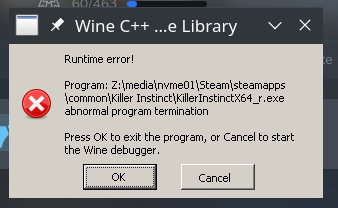
Specs:
- GPU: GTX 970
- Driver: 510.54
- Kernel: 5.15 (futex2 patched)
- OS: Manjaro
- KDE / X11
Yah I get the same problem, it would be really nice if you guys can fix that.
Replying to https://github.com/ValveSoftware/Proton/issues/348#issuecomment-1046238927
2023 and this error message appears still.
It seems Proton 8.0-1 has fixed the annoying exit dialog. The only issue I've noticed is that now (with Proton 8.0-1) when the game tries to sync with the server it displays a "cannot sync DLC content" (retry ?). Don't know if this behavior wasn't happening before (Proton 7.0-6), because Wine was/wans't mocking something up.
Log file:
steam-577940.tar.gz
Specs
- O.S: Arch
- Kernel: 6.24
- GPU: RX 6700 XT (Mesa 23.0.2)
A recent game update keeps it syncing with the servers forever, and you are not able to access the main menu (happens with Proton 8.0-2 and latest experimental -> 2023-05-17).
Log file:
steam-577940.tar.gz
Specs
O.S: Arch
Kernel: 6.1.27
GPU: RX 6700 XT (Mesa 23.0.3)
I've found out this last update makes the game sync for 1 minute and 30 seconds before you are able to access the main menu. Don't know if this is a game or Proton issue.
I've found out this last update makes the game sync for 1 minute and 30 seconds before you are able to access the main menu. Don't know if this is a game or Proton issue.
That's probably due to the latest quality of life improvements.
Killer Instinct seems to be able to crash Steam on Deck on top of not being able to connect to its servers on Proton 7.0
Demonstrative video: https://youtu.be/Lz3tBwwePQc
For anyone that has found their way here with the same issue - I've had luck with ProtonUp-Qt and installing Proton Tkg 16518040454 (proton_tkg_experimental.bleeding.edge.10.0.223348.20250725)
Was able to pit CPU vs CPU, play exhibition, and lobbly mode without crashing at the end of a match.
The game only works with Proton 9.0-4 for me without crashing after a match. Anything else causes the game to crash back to the desktop after a match.
@nvaert1986 the game shouldn't crash on proton bleeding edge https://github.com/ValveSoftware/Proton/wiki/Proton-Versions#proton-bleeding-edge
I've been testing Proton 11.0 (beta-1) with some games, and I've noticed some of them are freezing (need manual process kill). Killer Instinct is one of them. Scenarios that have triggered the issue (clean prefix):
- Try to run the benchmark (freeze before reaching it)
- After leaving the benchmark
- When trying to start a match against the CPU
Proton logs: steam-577940.tar.gz
Specs:
- OS: Arch
- Kernel: 6.18.17
- GPU: RX 6700 XT (Mesa 25.3.5)
- CPU: Ryzen 7 5700G (8c/16t)
- DE: Plasma 6.6.2 (wayland) and gamescope session (3.16.23)
any FSYNC changes in Proton 11.0 (beta) ? If I disable FSYNC, the game works fine...
If the ntsync kernel module is enabled, it also fixes the issue (still disabled by default on vanilla Arch)
@ranplayer Thank you - we'll look into this! Yes, fsync is a hack on top of wine so it needs to be rebased every year, and this year there were particularly big changes since it was rebased on top of ntsync (which is upstream in wine).
Proton versions
proton 11.0x2 2026-04proton 9.0-4x1 2025-10proton 7.0x1 2024-01proton 8.0-2x1 2023-05proton 7.0-6x1 2023-04proton 8.0-1x1 2023-04proton 6.3x1 2022-02proton experimentalx1 2021-09proton 5.13x3 2020-12proton 5.13-2x4 2020-11proton 5.0x3 2020-11proton 5.21-ge-1x1 2020-11proton 5.0-1x1 2019-12proton 4.2x1 2019-11
Launch options
WINEDEBUGx1 2020-11PROTON_LOG=1x2 2020-05
Upstream links
- ValveSoftware/Proton/issues/3214x1 2019-11
- ValveSoftware/Proton/issues/2222x1 2019-01
4 Killer Instinct issues:
on startup KI shows, "Unable to Resync DLC Content".
on character select screen and the "VS" loading screen the models are missing polygons and textures. Actual play models are fine.
https://postimg.cc/image/vcnziynjl/
when attempting multiplayer, KI shows, " Multiplayer Service Log in Error. Unable to log in to multiplayer service. Please try again."
on exit there is a crash, but winedebugger won't start after "cancel" button is clicked.
software 64-bit: llvm-git, mesa-git, kernel-git, proton-release (1535035861)
software 32-bit: old git (will attempt to recompile later)
Hardware: AMD Fiji