Fallout: New Vegas
Do you have achievements unlockable?
Game not working properly for me. After running, it minimizing to dock panel, after that i click on game icon, game window popup and minimizing immediately to panel again but music keeps playing.
Here is my log file: steam-22490
My system specs
And one more thing: after disabling Steam Overlay, game window starts to appear properly when you click on it in dock panel, but i can't see anything because screen is black
Update: With latest Proton 3.7-4 game is not minimizing to dock panel anymore but in battles i experiencing huge fps drops.
Game has little dots appearing/disappearing on screen.
Other than that , works very good. Install and go.
Works for me, too.
It works fine except for the dots that appear and disappear
Works OOTB on ultra settings
There is a "water reflections" bug (near water Goodsprings source ) and "lens flares" bug with enabled HDR+(AA/AF).
Disabling "water reflections" and AA/AF in launcher configuration window fixes this for me. Everithing else seems to be fine.
Apart from the above mentioned white dots and lens flare bug I also have had the game crash a couple of time upon exit, forcing me to kill the FalloutNV.exe process from console. Other than that, the game seems to work fine.
[Edit]
Disabling HDR seems to fix above mentioned problems, at least for me during my testing so far.
Playing with bloom enabled seems to cause some glitches where upon looking around, the lighting changes and the HUD disappears and reappears. This happens in the town of Primm at least.
Disabling screen effects altogether seems to fix this issue as well.
Doesn't start at all for me :( I just get a black screen pop up and then disappear.
@HughPH
Did you installed Python 2.7?
@HughPH might make sense to post version info and a logfile.
@Leopard1907 in the winecontext or in Linux? (I didn't see anything above about Python)
@Holzhaus good thinking. Where can I find the logs? System Info
@HughPH
Linux.
Proton 3.7 needs Python 2.7 while Proton 3.7.4 beta works with Python 3 also.
Also you need 396.51 at least on Nvidia , Mesa 18.1 and LLVM7
https://github.com/ValveSoftware/Proton/blob/proton_3.7/PREREQS.md
Works for me except if I start in 4K, in which case I get the HUD over a black screen during gameplay.
@Leopard1907 I already had Python 2.7 and Nvidia 396.54. The behaviour is the same with LLVM7 and Mesa 18.2 installed (although issues in other games are resolved.)
You don't need Mesa if you are on Nvidia but updating it won't hurt.
That game works really well for me , i'm on Mint 18.3. In fact my brother is playing it for 2 hours right now.
Maybe you can try Proton 3.7.4 beta update as a last resort. You can change it from Settings- Steam Play section. After that restart your client and Steam will update Proton via as an update to some Protonized game.
After that completed , try again.
No difference :(
@HughPH you need to enable logging in the user_settings.py. The logfiles can then be found in your home folder ~/steam-APPID.log.
No mouse control in game for me with Ubuntu 18.04 & Flatpak Steam. Alt tabbing also will make game go into an unresponsive state on resume.
Thanks @Holzhaus, I'll try it
Still not running. Steam has updated in the last couple of hours and now seems to default to the Proton beta.
Here is my steam-22380.log
Fallout: New Vegas (22380) and Background Downloads
Issue transferred from https://github.com/ValveSoftware/Proton/issues/807.
@SteveHeist posted on 2018-08-28T05:21:37:
This could potentially be a universal issue for all Proton games (or even all Steam games), but when installing any game in Steam while running Fallout: New Vegas, the game goes haywire momentarily, dropping all frames and audio for about a second.
Gist: https://gist.github.com/SteveHeist/1f51e113d17ac6bb8224c70a926d6508
Log (in a Google Doc because it's massive): https://drive.google.com/open?id=1Hpn8U-KuJjS6yUXJWmcGTDDK_ueFuCY2
Other than this, Fallout: New Vegas could very easily be whitelisted.
Fallout New Vegas crashes when Radio New Vegas is turned on (22380)
Issue transferred from https://github.com/ValveSoftware/Proton/issues/1056.
@jgacas posted on 2018-08-31T06:03:53:
Every time I turn on Radio New Vegas, and speaker finishes talking about latest news, games crashes. At that moment music, that was announced by the speaker, should start playing, but instead games exits to the desktop. Issue is easily reproducible because it happens every time.
My system info: https://gist.github.com/jgacas/64704de0370633b265b2970b97ec7d35
Log file:
steam-22380.log
@daasuharo commented on 2018-08-31T06:05:51
Make sure to add appid to title (22380)
@jgacas commented on 2018-08-31T06:35:03
Figured out that's the problem by examining the log file, 32 bit MP3 decoding library was missing. Problem can be fixed by issuing
sudo apt install libmpg123-0:i386
New Vegas seems to have a problem starting at native resolution. If I start at native (1080p), after the launcher there's a black flicker followed by the game minimising to the dash. If I click on the dash icon the whole screen goes black. It can be tabbed away from and can be killed from the desktop environment or a pop on the black screen.
Seems to run fine at 1600x900 though.
Ubuntu 18.04.1
This game can't be whitelisted for now.
HDR and antialias causes game grashes.
I tried to disable hdr/bloom, but i still had the issue where the HUD disappears if you look at certain directions.
I've tried the Lutris installer for fallout new vegas and this is working flawlessly, so i think you can look at the lutris scripts.
These are the same issues of fallout3, but in fo3 i solved disabling hdr/bloom, in this game the workaround doesnt work.
system info > https://gist.github.com/Kryuko/724a9320ff3d7f6a09445b5052ca85cf
Hello @Kryuko, please copy your system information from steam (Steam -> Help -> System Information) and put it in a gist, then include a link to the gist in this issue report.
Hello @Kryuko, please copy your system information from steam (
Steam->Help->System Information) and put it in a gist, then include a link to the gist in this issue report.
Done, thank you
@kisak-valve I think you can look at the Lutris installer for fallout new vegas. Their installer do some patches to the game. I copied the patched lutris files to the steam folder and the game now works flawlessly with Proton.
The strange thing is that disabling HDR and antialias solve every issue in Fallout3, but (for me) the workaround doesn't work in new vegas.
Anyway, if we want to add this game to the whitelist, we need that every graphic-setting works and doesn't cause a game crash IMHO.
[Whitelist] Fallout: New Vegas (22380)
Issue transferred from https://github.com/ValveSoftware/Proton/issues/1879.
@DennisBednarz posted on 2018-11-01T21:49:41:
Compatibility Report
- Name of the game with compatibility issues: Fallout: New Vegas
- Steam AppID of the game: 22380
System Information
- GPU: AMD Radeon AMD Radeon R7 M265
- Driver/LLVM version: 4.5, Mesa 18.3.0-devel
- Kernel version: 4.19.0
- Link to full system information report as [Gist]: https://gist.github.com/DennisBednarz/cd19d28dc24d2c378eaed42fb5bb7089
- Proton version: 3.16~4 Beta
I confirm:
- [X ] that I haven't found an existing compatibility report for this game.
- [X ] that I have checked whether there are updates for my system available.
Symptoms
There are two problems. The first one is the more serious one. Using a bluetooth mouse (or at least the Microsoft Arc Touch mouse) is impossible in this game because as soon as you move the mouse at all, the game goes down to single-digit FPS if it doesn't freeze altogether. As soon as the mouse stops moving and giving input, it's back to "normal" which is still not good (something I'll describe in a second). I have not tested this game with other bluetooth or wired mice.
The second issue is that the game has constant micro-freezes. The FPS also seems to be unaffected no matter if I set the settings to absolute maximum or the lowest settings possible. This is odd as neither max out at 60 FPS. This freeze/micro-stuttering doesn't seem to happen while standing still, only when there's input passed to the game, hence why I'm reporting two issues at the same time as they seem to be related.
Fallout: New Vegas (Radio Music Doesn't Play
Issue transferred from https://github.com/ValveSoftware/Proton/issues/2028.
@osilkin98 posted on 2018-11-24T20:33:46:
Compatibility Report
- Name of the game with compatibility issues: Fallout: New Vegas
- Steam AppID of the game: 22380
System Information
- GPU: GTX 960
- Driver/LLVM version: 396.54
- Kernel version: 4.15.0-39-generic
- Link to full system information report as Gist:
- Proton version: 3.7-8
I confirm:
- [x] that I haven't found an existing compatibility report for this game.
- [x] that I have checked whether there are updates for my system available.
Symptoms
The game runs pretty smoothly for the most port, the only issue is that songs won't play if you try listening to the radio. For instance, you can listen to Radio New Vegas, and Mr. New Vegas' voice will come on every so often, but the songs won't. I'm not sure if it's a codec issue or what, it's just kind of unnerving.
Reproduction
Just run the game with the settings above and it should replicate the error
The caravan card game also seems to be bugged
went to start a fresh game, chose my name then doc asked me to look at this thing. I have a feeling something's missing.

This game didn't work out of the box.
System:
Fedora 29
GPU Nvidia 1070
Nvidia driver 415.25
Screen: 3440×1440
Proton 3.16-6
When using Alt-tab you can't enter the game again, but have to kill the process.
The opening screen with the doctor works, but immediately when going out of the doctor's door to enter Goodspring, the game crashes. I wasn't able to get past this point, until I used the Lutris installer and patched the game manually with it. Now it works.
fallout new vegas on steamos
Issue transferred from https://github.com/ValveSoftware/SteamOS/issues/681.
@vladislavyuzbekov posted on 2019-06-20T14:57:11:
Your system information
- Steam client version: 1560817063
- SteamOS version: 2.0: 1:2.190
- Opted into Steam client beta?: [Yes/No] yes
- Opted into SteamOS beta?: [Yes/No] yes
- Have you checked for updates in Settings > System?: [Yes/No] yes
Please describe your issue in as much detail as possible:
Describe what you expected should happen and what did happen.
- It is impossible to open additional settings in the settings window.
- The cursor does not work in the game after the first mouse click.
On other operating systems, such as ubuntu, everything works well. I think the problems are due to the peculiarities of the Steam session.
Steps for reproducing this issue:
problem with the game settings window
- run the game
- click "settings" in the launch window
- try to click "advanced"
problem with cursor
- run the game
- click "play"
- click the mouse anywhere and the cursor will freeze in the main menu
As of Proton 4.11, the game won't start (when clicking "Play" in the launcher) if I enable D9VK with PROTON_USE_D9VK=1 %command% and set it to windowed in the game options, instead of fullscreen.
Game doesn't launch with Proton 5.0-1. Doesn't seem to get past the legal screen.
Specs: https://gist.github.com/archaeme/6f598c50c802614d03cfd88e0d25a909
steam-22380.log
The game crush after launch with proton 5
stdout log
GameAction [AppID 22490, ActionID 1] : LaunchApp changed task to SynchronizingCloud with ""
GameAction [AppID 22490, ActionID 1] : LaunchApp changed task to SiteLicenseSeatCheckout with ""
GameAction [AppID 22490, ActionID 1] : LaunchApp changed task to CreatingProcess with ""
GameAction [AppID 22490, ActionID 1] : LaunchApp waiting for user response to CreatingProcess ""
GameAction [AppID 22490, ActionID 1] : LaunchApp continues with user response "CreatingProcess"
Game update: AppID 22490 "", ProcID 9634, IP 0.0.0.0:0
Starting app 22490
>>> Adding process 9634 for game ID 22490
GameAction [AppID 22490, ActionID 1] : LaunchApp changed task to WaitingGameWindow with ""
Installing breakpad exception handler for appid(steam)/version(1580500660)
ERROR: ld.so: object '/home/vladislav/.local/share/Steam/ubuntu12_32/gameoverlayrenderer.so' from LD_PRELOAD cannot be preloaded (wrong ELF class: ELFCLASS32): ignored.
ERROR: ld.so: object '/home/vladislav/.local/share/Steam/ubuntu12_32/gameoverlayrenderer.so' from LD_PRELOAD cannot be preloaded (wrong ELF class: ELFCLASS32): ignored.
ERROR: ld.so: object '/home/vladislav/.local/share/Steam/ubuntu12_32/gameoverlayrenderer.so' from LD_PRELOAD cannot be preloaded (wrong ELF class: ELFCLASS32): ignored.
GameAction [AppID 22490, ActionID 1] : LaunchApp changed task to Completed with ""
>>> Adding process 9636 for game ID 22490
>>> Adding process 9637 for game ID 22490
ERROR: ld.so: object '/home/vladislav/.local/share/Steam/ubuntu12_32/gameoverlayrenderer.so' from LD_PRELOAD cannot be preloaded (wrong ELF class: ELFCLASS32): ignored.
>>> Adding process 9638 for game ID 22490
ERROR: ld.so: object '/home/vladislav/.local/share/Steam/ubuntu12_64/gameoverlayrenderer.so' from LD_PRELOAD cannot be preloaded (wrong ELF class: ELFCLASS64): ignored.
ERROR: ld.so: object '/home/vladislav/.local/share/Steam/ubuntu12_64/gameoverlayrenderer.so' from LD_PRELOAD cannot be preloaded (wrong ELF class: ELFCLASS64): ignored.
ERROR: ld.so: object '/home/vladislav/.local/share/Steam/ubuntu12_32/gameoverlayrenderer.so' from LD_PRELOAD cannot be preloaded (wrong ELF class: ELFCLASS32): ignored.
>>> Adding process 9646 for game ID 22490
esync: up and running.
>>> Adding process 9648 for game ID 22490
ERROR: ld.so: object '/home/vladislav/.local/share/Steam/ubuntu12_32/gameoverlayrenderer.so' from LD_PRELOAD cannot be preloaded (wrong ELF class: ELFCLASS32): ignored.
>>> Adding process 9651 for game ID 22490
ERROR: ld.so: object '/home/vladislav/.local/share/Steam/ubuntu12_32/gameoverlayrenderer.so' from LD_PRELOAD cannot be preloaded (wrong ELF class: ELFCLASS32): ignored.
ERROR: ld.so: object '/home/vladislav/.local/share/Steam/ubuntu12_32/gameoverlayrenderer.so' from LD_PRELOAD cannot be preloaded (wrong ELF class: ELFCLASS32): ignored.
>>> Adding process 9653 for game ID 22490
ERROR: ld.so: object '/home/vladislav/.local/share/Steam/ubuntu12_32/gameoverlayrenderer.so' from LD_PRELOAD cannot be preloaded (wrong ELF class: ELFCLASS32): ignored.
>>> Adding process 9656 for game ID 22490
Installing breakpad exception handler for appid(steam)/version(1580500660)
>>> Adding process 9663 for game ID 22490
ERROR: ld.so: object '/home/vladislav/.local/share/Steam/ubuntu12_32/gameoverlayrenderer.so' from LD_PRELOAD cannot be preloaded (wrong ELF class: ELFCLASS32): ignored.
>>> Adding process 9672 for game ID 22490
ERROR: ld.so: object '/home/vladislav/.local/share/Steam/ubuntu12_32/gameoverlayrenderer.so' from LD_PRELOAD cannot be preloaded (wrong ELF class: ELFCLASS32): ignored.
>>> Adding process 9678 for game ID 22490
Game update: AppID 22490 "", ProcID 9646, IP 0.0.0.0:0
RecordSteamInterfaceCreation (PID 9646): SteamUtils009 / Utils
Setting breakpad minidump AppID = 22490
RecordSteamInterfaceCreation (PID 9646): SteamUser019 / User
Steam_SetMinidumpSteamID:  Caching Steam ID:  76561198302634439 [API loaded no]
RecordSteamInterfaceCreation (PID 9646): SteamUser019 / User
RecordSteamInterfaceCreation (PID 9646): SteamFriends015 / Friends
RecordSteamInterfaceCreation (PID 9646): SteamUtils009 / Utils
RecordSteamInterfaceCreation (PID 9646): SteamMatchMaking009 / Matchmaking
RecordSteamInterfaceCreation (PID 9646): SteamMatchMakingServers002 / MatchmakingServers
RecordSteamInterfaceCreation (PID 9646): STEAMUSERSTATS_INTERFACE_VERSION011 / UserStats
RecordSteamInterfaceCreation (PID 9646): STEAMAPPS_INTERFACE_VERSION008 / Apps
RecordSteamInterfaceCreation (PID 9646): SteamNetworking005 / Networking
RecordSteamInterfaceCreation (PID 9646): STEAMREMOTESTORAGE_INTERFACE_VERSION014 / RemoteStorage
RecordSteamInterfaceCreation (PID 9646): STEAMSCREENSHOTS_INTERFACE_VERSION003 / Screenshots
RecordSteamInterfaceCreation (PID 9646): STEAMHTTP_INTERFACE_VERSION002 / HTTP
RecordSteamInterfaceCreation (PID 9646): SteamController006 / Controller
RecordSteamInterfaceCreation (PID 9646): STEAMUGC_INTERFACE_VERSION010 / UGC
RecordSteamInterfaceCreation (PID 9646): STEAMAPPLIST_INTERFACE_VERSION001 / AppList
RecordSteamInterfaceCreation (PID 9646): STEAMMUSIC_INTERFACE_VERSION001 / Music
RecordSteamInterfaceCreation (PID 9646): STEAMMUSICREMOTE_INTERFACE_VERSION001 / MusicRemote
RecordSteamInterfaceCreation (PID 9646): STEAMHTMLSURFACE_INTERFACE_VERSION_004 / HTMLSurface
RecordSteamInterfaceCreation (PID 9646): STEAMINVENTORY_INTERFACE_V002 / Inventory
RecordSteamInterfaceCreation (PID 9646): STEAMVIDEO_INTERFACE_V002 / Video
RecordSteamInterfaceCreation (PID 9646): STEAMPARENTALSETTINGS_INTERFACE_VERSION001 / ParentalSettings
ERROR: ld.so: object '/home/vladislav/.local/share/Steam/ubuntu12_64/gameoverlayrenderer.so' from LD_PRELOAD cannot be preloaded (wrong ELF class: ELFCLASS64): ignored.
>>> Adding process 9694 for game ID 22490
ERROR: ld.so: object '/home/vladislav/.local/share/Steam/ubuntu12_64/gameoverlayrenderer.so' from LD_PRELOAD cannot be preloaded (wrong ELF class: ELFCLASS64): ignored.
>>> Adding process 9696 for game ID 22490
Game update: AppID 22490 "", ProcID 9696, IP 0.0.0.0:0
RecordSteamInterfaceCreation (PID 9696): SteamUtils005 / Utils
RecordSteamInterfaceCreation (PID 9696): SteamUser016 / User
RecordSteamInterfaceCreation (PID 9696): STEAMAPPTICKET_INTERFACE_VERSION001 /
Game update: AppID 22490 "", ProcID 9696, IP 0.0.0.0:0
RecordSteamInterfaceCreation (PID 9696): SteamUser013 / User
RecordSteamInterfaceCreation (PID 9696): SteamFriends005 / Friends
RecordSteamInterfaceCreation (PID 9696): SteamUtils005 / Utils
RecordSteamInterfaceCreation (PID 9696): SteamMatchMaking008 / Matchmaking
RecordSteamInterfaceCreation (PID 9696): SteamMatchMakingServers002 / MatchmakingServers
RecordSteamInterfaceCreation (PID 9696): STEAMUSERSTATS_INTERFACE_VERSION007 / UserStats
RecordSteamInterfaceCreation (PID 9696): STEAMAPPS_INTERFACE_VERSION003 / Apps
RecordSteamInterfaceCreation (PID 9696): SteamNetworking003 / Networking
RecordSteamInterfaceCreation (PID 9696): STEAMREMOTESTORAGE_INTERFACE_VERSION002 / RemoteStorage
RecordSteamInterfaceCreation (PID 9696): SteamUtils005 / Utils
ERROR: ld.so: object '/home/vladislav/.local/share/Steam/ubuntu12_64/gameoverlayrenderer.so' from LD_PRELOAD cannot be preloaded (wrong ELF class: ELFCLASS64): ignored.
>>> Adding process 9702 for game ID 22490
Game update: AppID 22490 "", ProcID 9702, IP 0.0.0.0:0
RecordSteamInterfaceCreation (PID 9702): SteamUtils005 / Utils
RecordSteamInterfaceCreation (PID 9702): SteamUser016 / User
RecordSteamInterfaceCreation (PID 9702): STEAMAPPTICKET_INTERFACE_VERSION001 /
Game update: AppID 22490 "", ProcID 9702, IP 0.0.0.0:0
RecordSteamInterfaceCreation (PID 9702): SteamUser013 / User
RecordSteamInterfaceCreation (PID 9702): SteamFriends005 / Friends
RecordSteamInterfaceCreation (PID 9702): SteamUtils005 / Utils
RecordSteamInterfaceCreation (PID 9702): SteamMatchMaking008 / Matchmaking
RecordSteamInterfaceCreation (PID 9702): SteamMatchMakingServers002 / MatchmakingServers
RecordSteamInterfaceCreation (PID 9702): STEAMUSERSTATS_INTERFACE_VERSION007 / UserStats
RecordSteamInterfaceCreation (PID 9702): STEAMAPPS_INTERFACE_VERSION003 / Apps
RecordSteamInterfaceCreation (PID 9702): SteamNetworking003 / Networking
RecordSteamInterfaceCreation (PID 9702): STEAMREMOTESTORAGE_INTERFACE_VERSION002 / RemoteStorage
Unable to read VR Path Registry from C:\users\steamuser\Local Settings\Application Data\openvr\openvrpaths.vrpath
Fossilize INFO: Overriding serialization path: "/mnt/sdb1/SteamLibrary/steamapps/shadercache/22490/fozpipelinesv4/steamapprun_pipeline_cache".
Installing breakpad exception handler for appid(gameoverlayui)/version(20200131012205)
Installing breakpad exception handler for appid(gameoverlayui)/version(1.0)
Installing breakpad exception handler for appid(gameoverlayui)/version(1.0)
[0208/074806.944298:INFO:crash_reporting.cc(270)] Crash reporting enabled for process: renderer
Installing breakpad exception handler for appid(gameoverlayui)/version(1.0)
[0208/074807.135759:ERROR:frame_sink_video_capturer_impl.cc(197)] Invalid resolutions constraints: 0x0 must not be greater than 0x0; and also within media::limits.
wine: Unhandled page fault on read access to 15F29DE1 at address 15F29DE1 (thread 004b), starting debugger...
ERROR: ld.so: object '/home/vladislav/.local/share/Steam/ubuntu12_64/gameoverlayrenderer.so' from LD_PRELOAD cannot be preloaded (wrong ELF class: ELFCLASS64): ignored.
>>> Adding process 9751 for game ID 22490
pid 9649 != 9648, skipping destruction (fork without exec?)
Game removed: AppID 22490 "", ProcID 9702
Game 22490 created interface STEAMAPPS_INTERFACE_VERSION003 / Apps
Game 22490 created interface STEAMAPPTICKET_INTERFACE_VERSION001 /
Game 22490 created interface STEAMREMOTESTORAGE_INTERFACE_VERSION002 / RemoteStorage
Game 22490 created interface STEAMUSERSTATS_INTERFACE_VERSION007 / UserStats
Game 22490 created interface SteamFriends005 / Friends
Game 22490 created interface SteamMatchMaking008 / Matchmaking
Game 22490 created interface SteamMatchMakingServers002 / MatchmakingServers
Game 22490 created interface SteamNetworking003 / Networking
Game 22490 created interface SteamUser013 / User
Game 22490 created interface SteamUser016 / User
Game 22490 created interface SteamUtils005 / Utils
Game 22490 method call count for IClientUser::GetAppOwnershipTicketExtendedData : 1
Game 22490 method call count for IClientUser::BLoggedOn : 1
Game 22490 method call count for IClientUser::GetSteamID : 1
Game 22490 method call count for IClientUtils::GetAppID : 15
Game 22490 method call count for IClientUtils::RecordSteamInterfaceCreation : 12
Game 22490 method call count for IClientUserStats::RequestCurrentStats : 1
Uploaded AppInterfaceStats to Steam
Exiting app 22490
No cached sticky mapping in ActivateActionSet.
Hello @archaeme, "Fix frequent crash introduced in Proton 5.0-1 related to video and audio playback." in Proton 5.0-2 should have helped with the regression, please retest.
@kisak-valve Seems like Proton 5.0-2 fixes the loading screen crash for me.
Thanks! Everything works!
Compatibility Report
- Name of the game with compatibility issues: Fallout: New Vegas
- Steam AppID of the game: https://steamdb.info/app/22380/
System Information
- GPU: GTX 760
- Driver/LLVM version: NVIDIA 440.59
- Kernel version: 5.5.4
- https://github.com/shoober420/linux-scripts/blob/main/home/shoober420/sysinfonvidia
- Proton version: 5.0-2
LOG:
steam-22380.log
Symptoms
Crash at launch about no sound device being detected.

proton 5.0-2, game crashes after alt-tab.
I tried to run it with proton 4.11-2 in fullscreen mode, but when alt-tabbing, the game window vanishes nowhere to be found, however the game keeps running in the background.
Proton 5.0-2 crashes the game the instant I alt-tab.
Hello @soredake, @ptkato, does adding PROTON_USE_WINED3D=1 %command% to the game's launch options avoid the alt-tab crash?
No difference, but I was mistaken on the proton 5.0-2 crash, it doesn't crash, it just vanishes like in the previous versions.
Okay, enabling wine's virtual desktop fixed the vanishing problem, maybe it could fix the crash too?
To enable it launch the system's winecfg, in the game's wineprefix:
WINEPREFIX=$HOME/.local/share/Steam/steamapps/compatdata/22380/pfx winecfg
Okay, enabling wine's virtual desktop fixed the vanishing problem, maybe it could fix the crash too?
To enable it launch the system's winecfg, in the game's wineprefix:
WINEPREFIX=$HOME/.local/share/Steam/steamapps/compatdata/22380/pfx winecfg
@ptkato @soredake
This right here works (almost) perfectly fine.
These are steps I used for being able to alt-tab in/out of the game:
- run
WINEPREFIX=$HOME/.local/share/Steam/steamapps/compatdata/22380/pfx winecfg( :heart: @ptkato ) - in tab
Graphicsset:- [x] Automatically capture mouse in full-screen (not sure if this is necessary tough)
- [x] Emulate a virtual desktop
- Desktop size: change to the resolution you set for Fallout New Vegas in Options
- in your
FalloutPrefs.ini( usually located in$HOME/.local/share/Steam/steamapps/compatdata/22380/pfx/drive_c/users/steamuser/My Documents/My Games/FalloutNV/)- make sure full screen is on:
bFull Screen=1
- make sure full screen is on:
- run the game as usual
Caveat:
I had issues with directly alt-tabbing and the mouse cursor, which got stuck in wine desktop. Tried clicking on other apps - nothing. The cursor always stayed in the wine desktop/Fallout NV ( thus me experimenting with capture mouse in full-screen).
Workaround:
Use a keyboard shortcut for minimizing the window.
Using KDE, I set a global keyboard shortcut for minimizing windows in:
Global Shortcuts->KWin->Minimize Window(I set mine to Meta+PgDown )
I didn't test with other desktop environments so YMMV.
However: it worked perfectly fine with ENB enabled. So if you want to play in window mode with ENB and cannot because of the Failed to initialize renderer error: this might actually be a viable workaround for you.
The game freezes after pressing exit button.
System Information
-GPU: GTX 1060
-Driver/LLVM version: nvidia 415.27
-Kernel version: 4.19
-Link to full system information report as Gist: https://gist.github.com/Vladislavuz/80ced5788bff17617ff96eb3b7a5536a
-Proton version: 5.0-7
steam-22490.log
Fallout: New Vegas (22380)
Issue transferred from https://github.com/ValveSoftware/Proton/issues/3965.
@cncz42 posted on 2020-06-10T18:24:29:
Compatibility Report
- Name of the game with compatibility issues: Fallout: New Vegas
- Steam AppID of the game: 22380
System Information
- GPU: RTX 2080ti
- Driver/LLVM version: nvidia 440.82
- Kernel version:5.4.43-1
- Link to full system information report as Gist: https://gist.github.com/cncz42/262fc6c4732969ec9cc90bbacdd0ffdd
- Proton version: 5.0-8
I confirm:
- [ *] that I haven't found an existing compatibility report for this game.
- [ *] that I have checked whether there are updates for my system available.
Symptoms
The in game radio music is completely silent, all other audio including ambient music, npc voices, radio voices, and jukebox voices are perfectly fine.
Reproduction
Start game, play through intro from new game, get "pip-boy 3000" select "mojave music radio" in the menu
@kisak-valve tagging you so this gets attention, hope that's okay :)
Finally pinpointed the issue with the radio music not playing. To get a bit on tangent why music from radios in the world but not your PipBoy will actually play, all music comes with two differently encoded versions. The one from the radio props etc. are mono .ogg files while the versions that gets played through the PipBoy are actually stereo .mp3 files.
To cut to the issue, radio will work with earlier Proton versions (4.11 et al.) because those builds did not ship with gstreamer and it would fallback to your system one (?). Starting with Proton 5.0 the wrapper now comes with gstreamer precompiled but only includes gst-plugins-base and gst-plugins-good while gstreamer needs gst-plugins-ugly to be able to use lib32-libmpg123 for decoding the .mp3 audio files.
So tl:dr we need gst-plugins-ugly in the Linux distributed Proton builds to achieve full compatibility for Fallout: New Vegas. As far as I can tell, game will then run pretty comparable (or even more stable in my experience) than on Windows.
I am having an issue where the music only plays for a few seconds before moving on to the next track. For the radio this means hearing a verse or two of Big Iron before Blue Moon starts and for the ambient BGM this means hearing the first few bars before the track starts again. This is especially noticeable in Goodsprings where I only really get the "click click click" sound over and and over again, and in Doc Mitchell's house where the same violin notes are played repeatedly and the track never winds down.
I can confirm radio playing in 5.13, but only for 30 seconds until it starts over again.
https://streamable.com/so0pdi
Hiya,
I tested the radio in Proton 4.2-9 and it plays completely normally as far as I can tell. Tested the mr new vegas radio and mojave music radio and dialogue worked perfectly in Mr New Vegas radio and so did songs in both
Seems to be an issue where the radio playback has broken with a proton update post 4.2-9. I tested again with 5.13-2 and it appears to play for a bit then cut out randomly.
I've just tried New Vegas with Proton Experimental and I am still seeing the issue of the radio jumping to the next song before the previous one finishes playing.
I just started replaying New Vegas and, same story here with the radio. I was pulling my hair out for a while there (since these behaviors have been common on Windows since the game released and usually never solved in those cases)! I didn't think to check the Github issues for a VERY recent regression ;)
Looks like I'll have to wait for the fix, too. Playing this game with mods seems to be way too unstable on anything older than 5.
Anything older than 4.11 and NVSE gets stuck in an infinite loop and never runs the game. 4.21 gets an error when launching the game and can't manage it.
4.11 has crackling audio with the radio, and seems to be totally incompatible with Nevada Skies--it gets the infamous ground sky texture bug, that usually happens when people don't install mods properly, no matter what, unless I run a different version of proton besides that one.
I'm seeing the same issues with radio/music mentioned above.
EDIT: By disabling winegstreamer using winecfg on the game's prefix i can get the ambience music and radio playing without cutting short, however doing this introduces incredibly heavy amounts of distortion and stuttering, on top of that the game is much more prone to crashing.
If i were to assume, it would be related to the comment about gstreamer above?
It sounds like this problem should already be solved in the newest builds of GloriousEggroll (proton-ge-custom), because they DO seem to come with all of the gstreamer plugins, in case anyone else doesn't want to wait.
I was already running 5.21-GE-1 this whole time, but I didn't realize until today that I actually don't(!) have gstreamer's ugly plugins installed on my system, be they lib32 or not. I don't think that should usually matter, except it does for me because I'm also using steam-native (deliberately and I know what I'm doing). So I'm installing them now, and we'll see if I get full radio compatibility. And if it still doesn't work, I'll see what happens in steam runtime for good measure.
EDIT: I got impatient waiting for stuff to compile, and somehow it's still not solved in steam runtime with GE. So let's see how native runtime does.
EDIT 2: I have full radio--no stutters, no crackles, and no song skips. I just listened to an entire song on Radio New Vegas! I just had to make sure the ugly gstreamer plugins and libmpg123 (on Arch Linux as of this writing--gst-plugins-ugly, lib32-gst-plugins-ugly, mpg123, and lib32-mpg123) were installed on my system, use the GloriousEggroll 5.21-GE-1 proton build, and native runtime.
(When I tested steam runtime, I hadn't finished installing the ugly plugins yet. So for all I know, it's possible that steam runtime also works once those are installed, though I thought the entire point of steam runtime was so that you DON'T have to install extra libraries yourself.)
Tried @Jimi-James's tips and no luck here. steam-native with the dependencies installed, in a clean prefix with GE 5.21. No dice, radio skips for me. Wonder what library you have that I don't?
That's interesting. Here's what I have as far as gstreamer:
$ pacman -Qqs gst
gst-editing-services
gst-libav
gst-plugin-gtk
gst-plugins-bad
gst-plugins-bad-libs
gst-plugins-base
gst-plugins-base-libs
gst-plugins-good
gst-plugins-ugly
gstreamer
gstreamer-vaapi
lib32-gst-plugins-bad
lib32-gst-plugins-base
lib32-gst-plugins-base-libs
lib32-gst-plugins-good
lib32-gst-plugins-ugly
lib32-gstreamer
performous
phonon-qt5-gstreamer
lib32-gst-plugins-bad had not finished installing yet (was still compiling dependencies) when I confirmed it working, so that shouldn't be needed.
What other libraries might be relevant? As far as I remember, I haven't installed much else that's relevant other than every single dependency of the steam-native-runtime package:
bash  steam  alsa-lib  alsa-plugins  atk  cairo  curl
dbus-glib  fontconfig  freetype2  freeglut  gdk-pixbuf2
glew1.10  glib2  glu  gtk2  lib32-alsa-lib
lib32-alsa-plugins  lib32-atk  lib32-cairo  lib32-curl
lib32-dbus-glib  lib32-fontconfig  lib32-freetype2
lib32-freeglut  lib32-gdk-pixbuf2  lib32-glew1.10
lib32-glib2  lib32-glu  lib32-gtk2  lib32-libcaca
lib32-libcanberra  lib32-libcups  lib32-libcurl-compat
lib32-libcurl-gnutls  lib32-dbus  lib32-libdrm
lib32-libgcrypt15  lib32-libice  lib32-libidn11
lib32-libjpeg6  lib32-libnm-glib  lib32-libpng12
lib32-libpulse  lib32-librtmp0  lib32-libsm  lib32-libtheora
lib32-libtiff4  lib32-libudev0-shim  lib32-libusb
lib32-libva  lib32-libvdpau  lib32-libvorbis  lib32-libvpx1.3
lib32-libwrap  lib32-libxcomposite  lib32-libxcursor
lib32-libxft  lib32-libxi  lib32-libxinerama  lib32-libxmu
lib32-libxrandr  lib32-libxrender  lib32-libxtst
lib32-libxxf86vm  lib32-nspr  lib32-openal  lib32-openssl-1.0
lib32-pango  lib32-sdl  lib32-sdl2  lib32-sdl2_image
lib32-sdl2_mixer  lib32-sdl2_ttf  lib32-sdl_image
lib32-sdl_mixer  lib32-sdl_ttf  libcaca  libcanberra  libcups
libcurl-compat  libcurl-gnutls  dbus  libdrm  libgcrypt15
libice  libidn11  libjpeg6  libnm-glib  libpng12  libpulse
librsvg  librtmp0  libsm  libtheora  libtiff4  libudev0-shim
libusb  libva  libvdpau  libvorbis  libvpx1.3  libwrap
libxcomposite  libxcursor  libxft  libxi  libxinerama  libxmu
libxrandr  libxrender  libxtst  libxxf86vm  nspr  openal
openssl-1.0  pango  sdl  sdl2  sdl2_image  sdl2_mixer
sdl2_ttf  sdl_image  sdl_mixer  sdl_ttf  vulkan-icd-loader
vulkan-driver  lib32-vulkan-driver  lib32-vulkan-icd-loader
lib32-libappindicator-gtk2  lib32-libindicator-gtk2
lib32-libdbusmenu-glib  lib32-libdbusmenu-gtk2
Shot in the dark--a couple libraries that I've had to install manually to get other games working are vulkan-mesa-layers-git, libffi6, and lib32-libffi6 (Arch is on libffi version 7, which has its own filename with a 7, but at least a few months ago World of Horror only worked if I also had 6, which has its own filename with a 6, still installed).
There are also some libraries I installed into the proton prefix with winetricks in order to do certain mod-related activities--could they be relevant?: vcrun2010, vcrun2017, vcrun2019, dotnet48, corefonts
It's also possible that the Extended New Vegas Radio Generator mod has done something to my game that happened to make it more compatible, though AFAIK it does not edit those vanilla music files at all.
On the subject of mods, maybe even NVSE or one of its plugins did something, like NVAC, the Mod Limit Fix, NVTF, OneTweak, JIP, or JohnnyGuitar.
Despite having the same libraries as @Jimi-James (as far as i'm aware) and running 5.21-GE-1 i still get the same problem.
I should note that by increasing the sound cache in the configuration inis for the game sometimes i get to hear a properly looped song, but only in the initial area where i load a save from, as soon as there needs to be some kind of music change by moving around, the problem comes back, although this discrepancy could be caused by something else altogether, it's also strange to me that the main menu theme plays out just fine as far as i can tell.
In case it helps, here are all of the non-default game INI settings I have set:
[General]
bUseThreadedAI=1
iNumHWThreads=16
bPreemptivelyUnloadCells=1

[BackgroundLoad]
bSelectivePurgeUnusedOnFastTravel=1

[Water]
bAutoWaterSilhouetteReflections=1
bForceHighDetailReflections=0

[Controls]
fForegroundMouseAccelBase=0
fForegroundMouseAccelTop=0
fForegroundMouseBase=0
fForegroundMouseMult=0

[Audio]
iAudioCacheSize=8192
iMaxSizeForCachedSound=1024
bMultiThreadAudio=1

[Display]
bFull Screen=0
They were all recommended by Viva New Vegas, except for bMultiThreadAudio=1, which I set while trying to solve this problem and forgot to ever set back. Maybe that's also required to fix this?
Tried those INI tweaks, no luck on my end. I'm interested in @teggun1's comment that suggested the increased cache had the radio working sometimes. What do you have yours set to?
@Tea23 I have it set to these:
[Audio]
bEnableAudio=1
bEnableAudioCache=1
bMultiThreadAudio=0
bEnableEnviroEffectsOnPC=0
; cache sizes in kilobytes
iAudioCacheSize=4096
iMaxSizeForCachedSound=512
But to be honest it could be something else entirely, it's very sporadic, and whenever i hear it i think i've finally fixed the problem but then after a small time of playing it comes back and i can hear the improper loops again.
I've also installed protontricks 22380 quartz not sure if that has made any differences
Another tip: I've found that even after "solving" this issue, if I load a save that already has Radio New Vegas / Mojave Music Radio playing, then the current song WILL cut out early, even if the exact same playing of the same song played out in full before I reloaded back to that save.
If I want to hear full songs, I have to do one of the following:
-Load a save that isn't playing a vanilla station, and then select a vanilla station after loading.
-Wait for that first song to skip early, and then none of the subsequent songs ever skip early again.
Also, in case it hasn't been mentioned yet: radios added by mods (Conelrad, Existence 2.0, Wave Radio) have been working perfectly from the very beginning--no skips ever. For me this now-solved issue only affects vanilla stations. If you go to a terminal and file inspect the audio files, comparing a mod radio's MP3s to vanilla, you will find they don't 100% match up in format and bitrate--though they almost do, and they both fall under what should be compatible with the game. If all else fails, maybe re-encode the vanilla files to match the mods?
I did as @Jimi-James suggested and i re-encoded all the MP3 files to mono (just to test and because it's quick) with ffmpeg and it all seems to be working fine, switching areas with different ambience and different radio songs and no skipping so far, so i guess it's a problem with the exact format the vanilla game music is in, though not sure why.
I guess that's one way to fix it i suppose.
I did as @Jimi-James suggested and i re-encoded all the MP3 files to mono (just to test and because it's quick) with ffmpeg and it all seems to be working fine, switching areas with different ambience and different radio songs and no skipping so far, so i guess it's a problem with the exact format the vanilla game music is in, though not sure why.
I guess that's one way to fix it i suppose.
That's exciting! Mind sharing the command you used for the re-encoding?
They say they changed them to mono, so I'm guessing just the first basic command at https://trac.ffmpeg.org/wiki/AudioChannelManipulation
That's interesting, though, because the mod files are not mono--they're stereo. When I suggested making the vanilla files match the mod files, I was thinking more in terms of sample rate and bit rate and MPEG layers, not mono.
Alright! So I encoded everything down to 192kbps but kept it in stereo and it worked; I heard the whole of In The Shadow of the Valley without any skips.
Here's the steps I followed in case anyone wants to try and replicate:
cd /mnt/games/Steam/steamapps/common/Fallout\ New\ Vegas/Data/Sounds/radionv
mkdir out backup
for i in *.mp3; do ffmpeg -i "$i" -codec:a libmp3lame -b:a 192k out/"$i"; done
mv *.mp3 backup
mv out/* .
Obviously change the paths as applicable. I also recommend backing up the re-encoded files in case a Steam update overwrites them!
Here is file run on an original file and a re-encoded one for comparison:
bkup/MUS_Why_Dont_You_Do_Right.mp3: Audio file with ID3 version 2.3.0, contains:MPEG ADTS, layer III, v1, 256 kbps, 44.1 kHz, StereoMUS_Why_Dont_You_Do_Right.mp3: Audio file with ID3 version 2.4.0, contains:MPEG ADTS, layer III, v1, 192 kbps, 44.1 kHz, Stereo
Now, all of this has been tested using 5.21-GE so how useful it is for upstream Proton development I'm not sure, but it is clearly indicative of a library issue somewhere if a 256k MP3 doesn't want to play.
I'm playing in earnest now and am definitely finding that the background music is repeating. But none of it is in 256kbps, so I dunno what's up with that...
So the only difference I was able to find between the BGM and the radio music is that the sample rate is 48kHz instead of 44.1kHz. I changed the sample rate of the Doc Mitchell theme but still found it repeating.
To be clear, the repeat is only a few bars in. There's a few strums on a banjo(?) after some woodwind hissing. This is the section that repeats over and over. It's maddening.
So we can have the radio working by reducing the bitrate, but matching the bitrate and sample rate of the background music with these parameters does not work. Something's weird there.
Observed in 5.13, Experimental, 5.21-GE, and 6.0-GE.
Edit: Also finding the above issue with upstream wine-staging 6.0, so we have an upstream regression.
The music in this mod, which adds extra radio tracks, is also affected. The MP3 files in the mod are 128kbps @ 44.1kHz.
No matter what I do i always get the Application load error 5:0000065434. Tried disabling esync, fsync, NVSE, 4gb ram patch, moving to different partition
If i try to put steam.exe (either random exe or windows version steam.exe) into game dir or rename steam_api.dll the game just exits immediately after launching without any error message.
Fallout: New Vegas RU however seems to be launching fine
Seems to be a problem related to NV: RU version, non-RU version doesn't launch at all natively, steam gives error code 53.
made a steam support ticket about it.
I've got a hacky patch if anyone is interested in compiling their own version of Proton to use it.
I intend to get this upstream, but I'll need to do a bit more research before I do. Basically the issue here is, gstreamer takes a little bit longer to get the duration information on the mp3 audio stream than Wine waits, so Wine tries to estimate the length based on the file size and data type. My patch just asks for the duration a few times before giving up, and the delay seems to be enough to get the true duration.
0001-winegstreamer-Delay-the-stream-duration-value-check.txt
Currently playing the game with the default audio files and seems to be playing fine.
I'm experiencing weird mouse slow down and stutter after using steam overlay on top of the game. It only seems to happen if I open it a lot of times throughout the play session. The game then requires to be restarted to work properly again.
Proton 6.3-4
When running the "Proton Experimental" have issues with:
- Mouse sensitivity / acceleration - Appears fixed with GloriousEggroll
- New game cut scene artifacts
- Radio songs cut off too early, radio messages looped - Tea23's FFMPEG hack seemed to work
Has anyone else noticed issues with the opening cut scene? Specifically, the screen freezes in 15 different sections (5x3) where the bottom right will freeze and the sections cascade up left and freeze. The sections unfreeze after ever few seconds but the effect is repeated. I was able to watch the cut scene on YouTube and skip it in game for now.
Could this cut scene issue be related to codecs as well?
Hey. So I made a little script to automatically re encode all the mp3 files in the fallout directory based on @Tea23 ffmpeg hack. It just starts at the root folder and recursively checks all the folders and re-encodes the mp3s. I did this after i noticed the tranquility lane music repeating and i realised this problem occurs not only on the radio.
Heres a link. Hope someone finds it helpful
https://github.com/StarPlatin4m/fallout-music-reencoder
I have not tested it, but the radio cutoff bug seems to be fixed with wine 6.14: https://bugs.winehq.org/show_bug.cgi?id=51126
Too bad we gotta wait for a good solution in case of MO2 usage. Cause for that to work you need Wine and Proton 5.0. Seems to also be a regression of some sort.
Maybe one of you has an idea how I might get the Heap Replacer and OneTweak working there.
With the heap replacer lib installed, my game opens and immediatly closes. With OneTweak it says Gamebryo render failed to ininitalise.
Does anyone know when proton might be updated to include this?
Fallout New Vegas (22380)
Issue transferred from https://github.com/ValveSoftware/Proton/issues/5152.
@Budgieplucker posted on 2021-09-12T03:44:11:
Compatibility Report
-
Name of the game with compatibility issues: Fallout New Vegas
steam-22380.log -
Steam AppID of the game: 22380
System Information
- GPU:
- Driver/LLVM version:
- nvidia 470.63.01
- Kernel version:
- 5.14.2-zen1-2-zen
- Link to full system information report as Gist:
- https://gist.github.com/Budgieplucker/629053c50301a17a4990afcc6058d649
- Proton version: All versions
I confirm:
- [ yes ] that I haven't found an existing compatibility report for this game.
- [ yes ] that I have checked whether there are updates for my system available.
Symptoms
Launching the game via the steam client, just opens the game launcher. The launcher itself, does not allow you to launch the game, only showing an install button, which when clicked, states that the game does not appear to be installed and to check the CD-ROM.
Reproduction
Launch the game through the steam client and press the "install" button.
The game seems to work just fine for me.
I did notice off and on issues with the radio cutoff bug. I will try switching to the latest wine version.
Message if you want a full report, but it seems there are other reports saying the same thing, so I figured I wouldn't bother.
Mods also seem to work OK, although the scripting extender loader will not install it's default steam header properly and you have to use a separate exe patcher to launch properly from Steam. The other use of the exe patcher is unnecessary too considering that Proton auto-applies the same patch (Large Address Aware bit on) to all games.
Surround sound does not work on Proton. Things I tried:
Basics:
- Install FNV through Steam
- Install no mods or anything like that
- Run using Proton
No surround sound, only stereo.
Attempts to get surround sound working:
- Run Protontricks > Winecfg > "Libraries" tab > add openal32 and set to "Builtin", then run game through Lutris using "Disable Lutris runtime" option in game's System options. Still only stereo.
- Run Protontricks > Install DLLs > dsound, xact, xact_x64, then run game through Steam or Lutris as above. Still only stereo.
- Run game with custom command, "WINEDLLOVERRIDES="xaudio2_7=n,b" %command%". Still only stereo.
Any help would be greatly appreciated.
Surround sound does not work on Proton. Things I tried:
Yea, I'm having the same issue.
I've also tried installing a couple of mods: DSOAL, Dll files
OGG libraries.
Protontricks: openal enabled
The audio is completely messed up as well, not just in stereo but full of glitches and strange sounds.
@bb-nope If you can then post a proton log. Launch game with PROTON_LOG=1 %command% and then a log should appear in your users home folder.
Here's my log. I also tried recording the strange audio glitches using OBS, but it didn't pick them up quite right and the audio completely cuts in and out on the video. Basically, what happens is: in the main menu, the music and sounds play from the left speaker only with the right speaker glitching in and out. When one navigates through the menu, any time the "click" sound occurs, the audio jumps up in the right speaker too, only to cut out again after a second or so.
At the beginning of the video, you can see my audio setup in Linux Mint 20.2.
Also, my PC's config: https://termbin.com/rfoq
I had OBS misconfigured and now got it to work. Updated video:
https://youtu.be/aZDFRs1bkpM
@mrmatteastwood I see in your log proton is trying to load the 64bit version of gstreamer and then fails a bunch of stuff afterwards. Should be loading the 32bit version so might be what's causing the issue.
(wine:302823): GStreamer-WARNING **: 07:37:47.058: Failed to load plugin '/home/thebrightside/zzLocal/Appdata/Steam/steamapps/common/Proton - Experimental/files/lib64/gstreamer-1.0/libgstmpg123.so': /home/thebrightside/zzLocal/Appdata/Steam/steamapps/common/Proton - Experimental/files/lib64/gstreamer-1.0/libgstmpg123.so: wrong ELF class: ELFCLASS64

(wine:302823): GStreamer-WARNING **: 07:37:47.058: Failed to load plugin '/home/thebrightside/zzLocal/Appdata/Steam/steamapps/common/Proton - Experimental/files/lib64/gstreamer-1.0/libgstaudioresample.so': /home/thebrightside/zzLocal/Appdata/Steam/steamapps/common/Proton - Experimental/files/lib64/gstreamer-1.0/libgstaudioresample.so: wrong ELF class: ELFCLASS64

etc
Edit: Verified that i see the same errors here. Tried 7.0-3RC, 7.0-2 & 6.3-8
my game loads fine to menu, however whenever i load into my game its getting about 5 or 6 laggy frames, then freezing with the audio still running fine. tried several proton versions and steam linux runtime to no avail.
@papaollie Can you launch the game with PROTON_LOG=1 %command% and then a log should appear in your users home folder. Then post the log here.
Also a system report would be good. In steam go to Help -> System Information -> wait at least 15 seconds for all info to be gathered (text will appear before it's done) -> and copy it into a github gist or text file and share it here.
@Blisto91
https://gist.github.com/papaollie/23d734e93c245cbf3f03082bb625810b
theres the steam system info
sorry for bugging but i dont see it in the default home on dolphin which is /home/user. im fairly new to linux gaming wise so i am not used to troubleshooting proton stuff, what is the name of the log by default?
No worry.
It's steam-$GAMEID.log with game id being the steam id of the game so this one should be called steam-22380.log
You can also specify a directory you want the log to appear in with PROTON_LOG_DIR
e.g.
PROTON_LOG=1 PROTON_LOG_DIR="/home/papaollie/" %command%
Hello @papaollie, your AMD video card is part of the Southern Island (SI) generation video cards. The radeon kernel module gets used by default with this generation, which is incompatible with Vulkan. As a result, the game is trying to render on your Haswell generation Intel chipset.
The video drivers for Haswell do not provide a spec-compliant implementation, and rendering artifacts or crashes are expected.
Please give https://github.com/ValveSoftware/Proton/wiki/For-AMD-users-having-issues-with-non-OpenGL-games a read.
Yes kisak is probably right.
That AMD generation had only experimental support for vulkan on linux which isn't enabled by default. But afaik it should work okay when enabled as per the link above.
Edit: To clarify, the reason vulkan is needed is because proton uses some software that translates directx to vulkan. It is also possible to translate to OpenGL, but that is usually less performant and also sometimes less stable/ more buggy for non older games.
A reason for those early GPUs being able to support vulkan (on Linux at least in practice) is cuz they were made to support amds mantle, which later evolved into vulkan.
@kisak-valve sorry for noob question, but im at the point in the article where i need to set the amdgpu kernel driver before the radeon one, and i am clueless from the article.
@mrmatteastwood I see in your log proton is trying to load the 64bit version of gstreamer and then fails a bunch of stuff afterwards. Should be loading the 32bit version so might be what's causing the issue.
(wine:302823): GStreamer-WARNING **: 07:37:47.058: Failed to load plugin '/home/thebrightside/zzLocal/Appdata/Steam/steamapps/common/Proton - Experimental/files/lib64/gstreamer-1.0/libgstmpg123.so': /home/thebrightside/zzLocal/Appdata/Steam/steamapps/common/Proton - Experimental/files/lib64/gstreamer-1.0/libgstmpg123.so: wrong ELF class: ELFCLASS64

(wine:302823): GStreamer-WARNING **: 07:37:47.058: Failed to load plugin '/home/thebrightside/zzLocal/Appdata/Steam/steamapps/common/Proton - Experimental/files/lib64/gstreamer-1.0/libgstaudioresample.so': /home/thebrightside/zzLocal/Appdata/Steam/steamapps/common/Proton - Experimental/files/lib64/gstreamer-1.0/libgstaudioresample.so: wrong ELF class: ELFCLASS64

etc
Edit: Verified that i see the same errors here. Tried 7.0-3RC, 7.0-2 & 6.3-8
Hey, thanks for replying so quickly. I tried looking this up but couldn't find a way to make Proton load the right version of gstreamer. Is there anything I can do to fix this, or is it something you guys are handling for a future version of Proton? If it's a change I can make on my PC, can you point me in the right direction?
I don't know if there is anything specifically we can do, have never look into it. When i see it i usually just point it out and then sometimes after some proton updates it seems to have been fixed for some of the games i pointed it out for (or at least the one or two i checked in on later). Dunno if the proton devs notices and does something or if it's just some general updates that fixes it.
But theres also a chance that i'm misremembering 😁
Ah, I understand. Well, let's hope it'll be addressed soon :-)
Hello @papaollie, your AMD video card is part of the Southern Island (SI) generation video cards. The
radeonkernel module gets used by default with this generation, which is incompatible with Vulkan. As a result, the game is trying to render on your Haswell generation Intel chipset.The video drivers for Haswell do not provide a spec-compliant implementation, and rendering artifacts or crashes are expected.
Please give https://github.com/ValveSoftware/Proton/wiki/For-AMD-users-having-issues-with-non-OpenGL-games a read.
finally got around to sitting down & figuring out this article, and it fixed it! thanks a lot man
Yeah, basically i had the misfortune of getting the RU/CIS Quakecon pack, which just happens to "override" EU New Vegas because it includes it because bethesda i guess, i had to ask them to essentially erase the whole purchase of quakecon pack (not before backing up all the game data) to be able to play the EU version of New Vegas, because as far as I understand if EU version sees that you also have RU/CIS version it will refuse to start or something. Thanks, bethesda.
Game has little dots appearing/disappearing on screen.
Other than that , works very good. Install and go.
Still an issue in Proton 9. With HDR enabled in the game's launcher, a "flashlight" effect bleeds through the scenery. Disabling HDR fixes this at quite a loss of visual fidelity.
For some reason Fallout: New Vegas (22490) launches OK, while Fallout: New Vegas (22380) fails with
Application load error 5:0000065434error
im getting the same issue. new vegas is unplayable on proton. valve, please fix.
Valve, being anti-consumer as always, isnt even allowing me to purchase 22490, so i just cant play new vegas i guess. this is almost as bad as what ubisoft is doing.
update: reverting to proton 6.3-8 allows the game to launch.
Anyone know why when using the crash logger mod, and then crashing the log doesn't contain any dll information? Apparently it does for some people running fnv through proton.
fnvnodllscrashlogger.tar.gz
Also my mouse sensitivity in the menus get reset when I change window focus. I can fix it by using a virtual desktop through wine, but I'd be nice to not have too. If anyone has another fix please let me know.
I have audio issues trying to play this game on Kubuntu 24.10 with Proton Experimental and Proton 9 trying to run this. The "surround" sound is all over the place, volume wise.
I have audio issues trying to play this game on Kubuntu 24.10 with Proton Experimental and Proton 9 trying to run this. The "surround" sound is all over the place, volume wise.
I found that, if you have a 7.1 system, setting it to 5.1 in your Linux settings, the surround sound works properly. 7.1 isn't happening with this game through Proton, unfortunately (though it's fine on Windows). Same with some other games like Prince of Persia 2008, incidentally.
I have audio issues trying to play this game on Kubuntu 24.10 with Proton Experimental and Proton 9 trying to run this. The "surround" sound is all over the place, volume wise.
I found that, if you have a 7.1 system, setting it to 5.1 in your Linux settings, the surround sound works properly. 7.1 isn't happening with this game through Proton, unfortunately (though it's fine on Windows). Same with some other games like Prince of Persia 2008, incidentally.
Where do you do that? I cant find it in my settings.
Fallout New Vegas in-game HDR effect seems broken in Experimental
Issue transferred from https://github.com/ValveSoftware/Proton/issues/8462.
@pr0statitis posted on 2025-02-18T07:53:16:
Compatibility Report
- Name of the game with compatibility issues: Fallout: New Vegas
- Steam AppID of the game: 22380
System Information
- GPU: NVIDIA GeForce RTX 4080 SUPER
- Video driver version: 550.120
- Kernel version: 6.8.0-53-generic
- Link to full system information report: Gist
- Proton version: Experimental
I confirm:
- [x] that I haven't found an existing compatibility report for this game.
- [x] that I have checked whether there are updates for my system available.
Symptoms
Fallout New Vegas seems to have issues with the HDR effect (no sun glare and aggressive switching between brightness levels - eye adaptation) when running it via Proton Experimental or 9.0-4. Proton 8.0-5 does not have this issue.
Here are videos showcasing the described problem:
[Working] 8.0-5
[Broken] Experimental
The problem happens with or without mods (I have completely nuked my installation and re-downloaded the game to make sure)
Strangely, the same issue does not appear on my Steam Deck, regardless of the Proton version used. Maybe it's a problem with my PC's GPU or driver in conjunction with Proton?
Reproduction
- Launch Fallout New Vegas with Proton Experimental
- Look at the sky (it's more noticeable during sunsets and sunrises - the videos show early morning footage)
Replying to https://github.com/ValveSoftware/Proton/issues/356#issuecomment-2568593884
Found out the issue with this; plugging my headset into the front panel instead of the back fixed the issue. The only thing I can speculate is that the motherboard was reporting the back as a Surround jack instead of a Headphone jack which Linux was not gracefully handling somewhere in the ALSA Pulse abstraction stack. This was working on Windows, it just didnt gracefully handle the false positive in this case.
I took a look at this and everything points towards this just being a decision by the game. It just seems to use a different approach that behaves slightly different when it detects a Nvidia GPU.
I can't find any DXVK bugs in there, it should look the same on Windows on Nvidia GPUs.
I took another look and figured it out. I opened a DXVK-NVAPI PR that fixes it.
The DXVK issue linked above and the DXVK-NVAPI PR linked below explains the issue in case anyone is curious.
i can tab out, but not back in. proton ge 10-10
plz fix
i can tab out, but not back in. proton ge 10-10 plz fix
For Proton-GE bugs you'd need to see https://github.com/GloriousEggroll/proton-ge-custom/issues
Fallout New Vegas Missing Radio Music, Ambient SFX
Issue transferred from https://github.com/ValveSoftware/Proton/issues/9161.
@DAnaselo posted on 2025-10-30T14:23:33:
Compatibility Report
- Name of the game with compatibility issues: Fallout New Vegas
- Steam AppID of the game: 22380
System Information
- GPU: GTX 1660 Super
- Video driver version: nvidia 580.95.05
- Kernel version: 6.17.5-arch1-1
- Proton version: Proton Experimental (2025-10-24)
I confirm:
- [x] that I haven't found an existing compatibility report for this game.
- [x] that I have checked whether there are updates for my system available.
Im Sorry if The Log Is Weird As i am running the game modded through Mod Organizer 2, i hope its useful (i've ran the game unmodified with umu and the gog version but using proton experimental as the runner and the problem persisted fyi)
steam-14221653456107601920.log
Symptoms
Music From The Radio ,Some Ambient Sound Effect's Are not Audible anymore, Intro Game Screen Chime Is Also Missing. they used play to before the last update to proton experimental
Music From The Radio ,Some Ambient Sound Effect's Are not Audible anymore, Intro Game Screen Chime Is Also Missing. they used play to before the last update to proton experimental
I can confirm this happens on both Linux Mint and Bazzite.
It must have been introduces in one of the more recent versions of Proton. GE-Proton10-20 (and the respective original Proton) still worked.
GE-Proton 10-25 Seems To Have Fixed This Issue.
Funny Enough They Don't Seem To Have Mentioned This Fix On Their Release Notes
https://github.com/GloriousEggroll/proton-ge-custom/releases/tag/GE-Proton10-25
Just thought I'd comment in case someone runs into the same.
My radio songs were located in /Data/Sound/songs/radionv/ when they should have been in /Data/sound/songs/radionv/. There were errors in falloutnv_error.log indicating as much. I'm not sure what caused this, though I am modding (Viva New Vegas, Mod Organizer 2).
Perhaps something related to Windows being case insensitive, while Linux is case sensitive?
After moving the folder to the correct location the radio works as expected on the latest Proton Experimental (2025-12-09).
Fallout New Vegas GPU Detection Issue
Issue transferred from https://github.com/ValveSoftware/Proton/issues/9441.
@DAnaselo posted on 2026-01-27T22:03:21:
Using Proton 10.0.4
When i Boot Fallout New Vegas it automatically detects my gpu as an amd 6700xt, my gpu is an nvidia gtx 1660 super
sorry if this is a nitpick / useless bug as it's irrelevant in this old game, not like im gonna be using physx or dlss or something
Hello @DAnaselo, this is intentional to avoid rendering issues. https://github.com/doitsujin/dxvk/commit/c3125fe454c3f29bca150decbb07565687c86c28
@DAnaselo This is on purpose. DXVK hides Nvidia GPUs in Fallout New Vegas because there's a mod for the game 'New Vegas Reloaded' which behaves in a way that's more friendly to DXVK when it detects an AMD GPU.
oh got it. thanks
I am seeing this issue in recent versions of Proton, where audio seems to play multiple times. Trying to determine if it's a modding issue (Viva New Vegas with moderate deviations), putting it here in case others have run into it. Clip attached; you can hear the door open/close sounds begin multiple times leading to a more "crunchy" sound.
I see the same issue in Protons 9, 10, Experimental, and GE 10-34.
~~https://github.com/user-attachments/assets/1b48c3ef-b758-4725-8197-3e137a00323a~~
Edit: Confirmed to be happening in Windows too, so not relevant any longer.
Hello @AlexeySFdot, friendly note that your feedback is for a different variant of this game. Please add your comment to #8876 (since it's Steam app id 22490).
Howdy folks!
Very recently I have started getting frequent white flashing objects/circles when playing the game on the newest Experimental release.
Here is a video I recorded that showcases the issue. Additionally, here is a still frame from the footage I recorded.
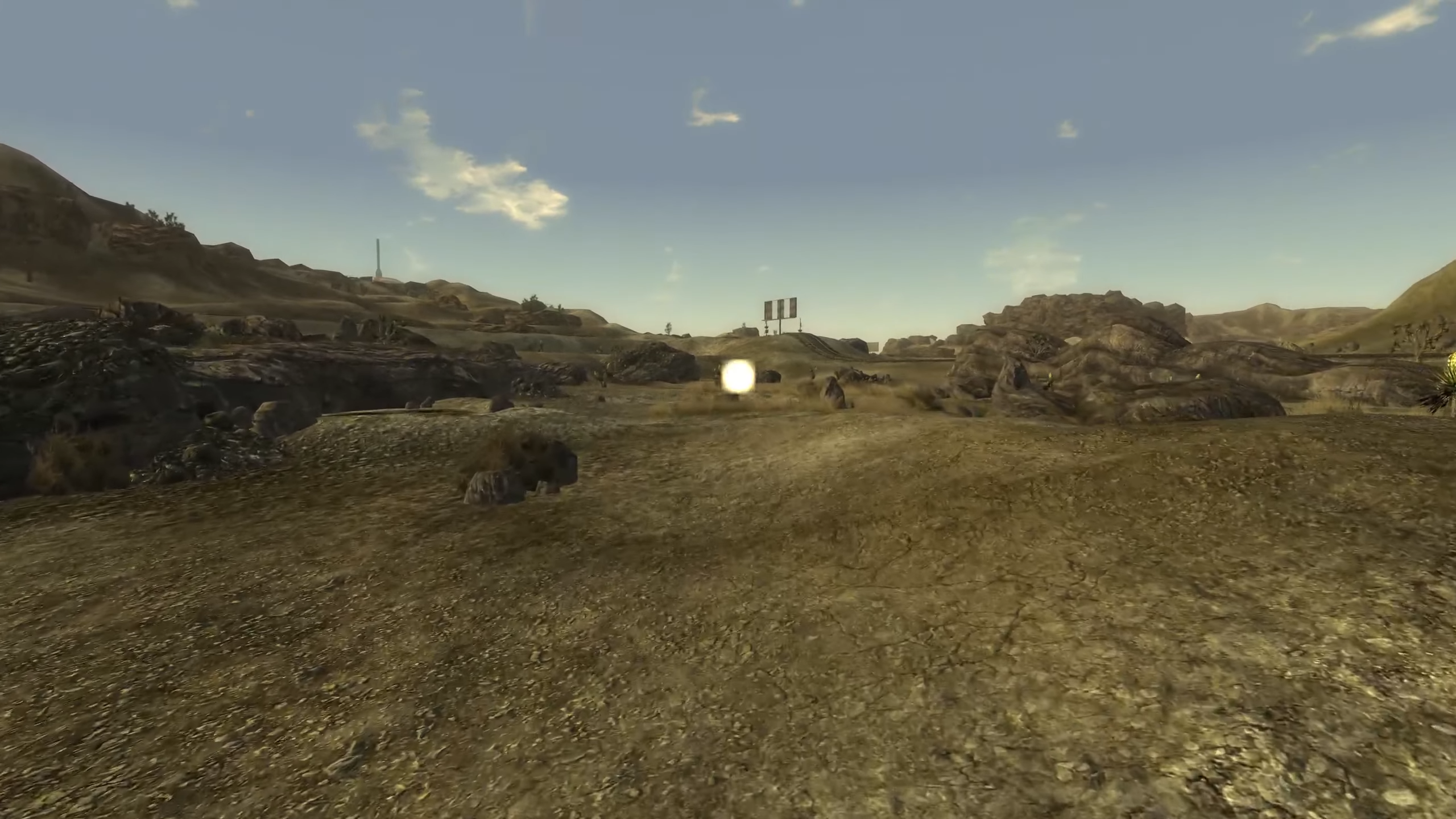
According to this old Reddit post from 2019 and this GitHub report for DXVK the issue used to happen before and it now seems back.
Using Proton 11.0 (Beta) (which I believe uses Beta 5) does not seem to cause the same issue.
Hello @pr0statitis, please add PROTON_LOG=1 %command% to the game's launch options and attach the generated $HOME/steam-$APPID.log to this issue report as a file. (Proton logs compress well if needed.) Also, please copy the contents of Steam Runtime Diagnostics from Steam (Steam -> Help -> Steam Runtime Diagnostics) and put it in a gist, then include a link to the gist in this issue report.
Sure thing!
Here they are:
steam-22380.log
gist
I'm also having the same problem as @pr0statitis. Didn't have this problem a month ago, so it's a regression.
@WeanWind with what gpu, driver version, and proton version? Does it happen at the start of the game? Because I've been going around town, killing geckos and have yet to see any flashes with experimental, this with the game settings set as high as it allows
Proton versions
proton 11.0x1 2026-06proton 10.0x1 2026-01proton experimentalx9 2025-12ge-proton10-25x1 2025-11ge-proton10-20x1 2025-11proton 8.0-5x1 2025-02proton 6.3-8x1 2024-05proton 5.0x2 2021-08proton 6.3-4x1 2021-05proton 4.2-9x1 2020-11proton 4.11-2x2 2020-09proton 5.0-2x5 2020-02proton 5.0-1x2 2020-02proton 4.11x1 2019-08proton 3.16-6x1 2018-12
Launch options
PROTON_LOG=1x4 2026-06PROTON_LOG_DIRx1 2022-06PROTON_LOG_DIR="/home/papaollie/"x1 2022-06WINEDLLOVERRIDES="xaudio2_7=n,b"x1 2022-06WINEPREFIX=$HOME/.local/share/Steam/steamapps/compatdata/22380/pfxx2 2020-05PROTON_USE_WINED3D=1x1 2020-02PROTON_USE_D9VK=1x1 2019-08
Launch lines
PROTON_LOG=1 PROTON_LOG_DIR="/home/papaollie/" %command%x1 2022-06WINEDLLOVERRIDES="xaudio2_7=n,b" %command%x1 2022-06PROTON_USE_WINED3D=1 %command%x1 2020-02PROTON_USE_D9VK=1 %command%x1 2019-08
Upstream links
- doitsujin/dxvk/issues/2319x1 2026-06
- ValveSoftware/Proton/issues/9441x1 2026-01
- ValveSoftware/Proton/issues/9161x1 2025-10
- ValveSoftware/Proton/issues/8462x1 2025-02
- ValveSoftware/Proton/issues/5152x1 2021-09
- show_bug.cgi?id=51126x1 2021-07
- ValveSoftware/Proton/issues/3965x1 2020-06
- ValveSoftware/SteamOS/issues/681x1 2019-06
- ValveSoftware/Proton/issues/2028x1 2018-11
- ValveSoftware/Proton/issues/1879x1 2018-11
- ValveSoftware/Proton/issues/1056x1 2018-08
- ValveSoftware/Proton/issues/807x1 2018-08
DLLs
steam_api.dllx1 2021-03
Debian Testing 64-bit, Linux 4.17.0-1
Machine 1: Intel Core i5-6500 / NVIDIA Geforce GTX 960
Machine 2: Intel Core i5-2520M / Intel HD Graphics 3000
Only issue appears to be alt-tabbing. Game is playable just fine until you alt-tab.