Borderlands 3
The game runs fine for me, benchmark passes with no glitches in both DX11 and DX12 modes.
I do have an issue with in-game videos though and I got the "Watch Monitor" game-breaking bug that was also reported on Windows. It seems to be related to Media Feature Pack, I tried using <Workaround removed by moderator> in the prefix but it doesn't help at all.
https://forums.gearboxsoftware.com/t/watch-monitor-bug/3119409/30
Nvidia 435, Proton 5.0.4
SHIFT isn't connected either.
I do have an issue with in-game videos though and I got the "Watch Monitor" game-breaking bug that was also reported on Windows.

I have the same issue.
<Workaround removed by moderator>
You should see the logo videos when the game starts and after loading your game it will be unstuck.
EDIT : Sorry :/
Hello @poke86, the workaround you linked is legally problematic and has been removed.
The previous comment tells us the game uses Media Foundation, and the game would benefit from support for the framework maturing.
Got an issue too, game don't even launch nor creates config files
steam_profile
Can't post the log file, 1.3GB heavy.
So after running the game a lot of times it'll crash when opening the inventory/stores etc.
This is aside from videos not working due to Media Foundation as it seems.
Steam Sys Info
steam-397540.log.zip (43MB extracted)
Edit: Resetting the prefix helps to run the game for an hour and a bit until it reaches the inv/store crash. I'm 'trying' to play it with a few friends in coop, so I could skip the 'look at screen' bug. :smile:
I would like to add my experiences here as well, and mine are almost identical to the original poster of this bug. The one that is most aggravating to me is the Network bug preventing me from playing with friends.
I did manage to get the game to launch, but each time I launch it, it says that it has "crashed" multiple times and that it needs to reset the settings to launch again. If I click No, it will not launch at all.
Apart from the graphical issues, there is also a connection issue -- I can't get into multiplayer at all. I try to change to Public, it won't allow me. I log in to Shift using my browser and I even linked my steam account to gearbox, but it will not recognize that I am online (and of course I am not invisible or anything on Steam, I am online).
Got an issue too, game don't even launch nor creates config files
steam_profileCan't post the log file, 1.3GB heavy.
Had the same problem on my daughter's computer. Seems to be caused by an illegal instruction problem on some AMD Ryzen CPUs. Look at: https://github.com/ValveSoftware/Proton/issues/2927
Adding the clearcpuid=514 workaround to grub fixed it for us.
Worked out with help from Newbyte over on the Gaming on Linux Telegram chat.
Edit to add, this is the log for a client connect failure on LAN mode in case it helps anybody: https://gist.github.com/KayEss/04d502d09803392044e9493852039664 The log is for a connection attempt to another machine on the same LAN which has a game in progress
The connection issue works like that. I am online on Steam, logged in to SHiFT through the browser, I try the upper-right menu changing to "Public", it gives this message:

I also go to options, Network and Social, and try to change the Group Privacy to "Open to Public":

But as soon as I leave the menu, the connection error appears again:

steam-397540.log from these attempts is attached.
steam-397540.log
I have the same problem with multiplayer. I've made the SHiFT account and linked with steam. My friends see me with matchmaking tools. Invitations won't work with the error message "Connection Failed: Could not connect to host". It also seems to affect LAN. Although they see me connected and can launch a petition to join, they will never enter and I can not see them.
With no simple work around solution for my 'watch monitor' bug, I will now watch Proton.
Hello @Hnaguski, @poke86, your comments were removed because that workaround is legally problematic. It's not okay to encourage other players to use it, either directly or indirectly.
@kisak-valve Seems like folks are posting legally problematic work-arounds out of ignorance. I don't see how to educate the community about legal ramifications if all references to the work-arounds are scrubbed, though; seems like a reference scrub means mods like you are doomed to play an endless game of work-around whack-a-mole. Any way to avoid that?
Alright I was aware about the legal issues with what I mentioned but wasn't aware of what was okay and what wasn't, since other people in this thread mentioned it, but not as in depth as I was.
The network issues are a thing, even though I managed to connect, which seemed to happen out of luck. The first times launching the game yesterday it also didn't connect to SHiFT. First thing popping up for that is the Cross-Play thingie.
Further testing on various Proton versions brought me to the point of having the game run with videos under the freshly released tkg-5.4.r0. Videos will not work out of the box there, even though wine 5.4 has Media Foundation patches now.
As it seems, there's a shader or locale issue as well when the game's running for 60-90 minutes. This is running in DX11 mode and happens when either opening the inventory or any random box ingame. I found these lines in the crash logs of the game:
[2020.03.15-03.59.45:761][  0]LogStandaloneRenderer: SlateD3DShaders::CompileShader() - D3DCompilerFunc Result: DXGI_ERROR_88760B59 [88760B59]
[2020.03.15-03.59.45:764][  0]LogStandaloneRenderer: GammaCorrectionCommon.hlsl:6:11: error: syntax error, unexpected NEW_IDENTIFIER
 Result: DXGI_ERROR_88760B59 [88760B59]
Full Log: CrashReportClient-backup-2020.03.15-06.33.37.log
According to a thread in the Steam forums it might have to do something with non-UTF8 characters in the game's packages.
Proton versions leading to the same error are: 5.0-4 / 5.0-GE-1 / 5.2-GE-2 / TKG-5.4.r0
I guess I should add my report here, because the game won't launch at all for me.
System Information
- GPU: GTX 1070
- Driver version: nvidia 440.64
- Kernel version: 5.3.0-40-generic
- Link to full system information report
- Proton version: 5.0-4
Symptoms
I just click the green "Play" button in Steam, it changes to a blue Cancel button for a second, then a blue Stop button for ~45 seconds, then it changes back to the green Play button. Literally nothing else happens; no black screen, no sounds, no menu, no dialogs.
Things I've tried:
- Verify game files
- Uninstalled Borderlands 3 and re-downloaded
- Verified re-downloaded files
- Proton 5.0-4 and 4.11-13
- rebooting Ubuntu
- installing all system updates (there aren't any)
- with and without various MF workarounds
- blowing away the Proton prefix and letting it recreate
- switching graphics drivers (tried proprietary
nvidia-driver-435and open sourcenvidia-driver-440
The raw Proton log file from PROTON_LOG=1 is 1.4GB(!) but I've uploaded a gzipped version here: steam-397540.log.gz
I'm relatively sure that my graphics drivers and Vulkan are installed correctly, because I can play Shadow of the Tomb Raider (native) just fine and it says I'm using Vulkan, and I can play DOOM via Proton in Vulkan mode as well.
Hoping somebody has some clue, since apparently most people can at least play the game at all!
Hello @grahammitchell, looks like your system is affected by #2927, you can try a workaround by adding clearcpuid=514 to grub, which was reported to help at https://github.com/ValveSoftware/Proton/issues/3635#issuecomment-599036236.
The problem with multiplayer seems to be missing ALPN support in schannel.
The attached patch hacks around that.
0001-schannel-ALPN-hack.patch.gz
Note that this hack is a potential security risk.
Hello @fabianbieler, can you send that patch to upstream wine's mailing list for evaluation? Ideally we'd like to see fixes like that land upstream, then a merge request to backport it to Proton.
That patch won't be accepted upstream, as it's a potential security rist. I should have mentioned that, sorry.
I will try to write a proper patch. That may take another week or two, however.
Thanks, @kisak-valve, that did the trick! Don't know how I missed that. I haven't tried online multiplayer but now everything works except the benchmark.
Much appreciated.
Networking/SHiFT logon works in Proton 4.11-13. Note that I had to delete the prefix used by my 5.0/5.2GE attempts before the game would launch with 4.11.
Can confirm that Networking works with 4.11-13 but does not with 5.0-4. Also all the fixes for videos not playing on 5.0-4 stopped working on 4.11-13 however.
but now everything works except the benchmark
I thought the benchmark wasn't working, but it turns out that it just takes a really long time to load, and the sounds start quite some time before the video fades in. Have you just tried waiting longer?
@KayEss, you are correct! Turns out I just didn't wait long enough for the benchmark to begin. Thanks!
Also all the fixes for videos not playing on 5.0-4 stopped working on 4.11-13 however.
I re-applied the fixes in my 4.11-13 prefix and the videos started working again.
re-applied the fixes in my 4.11-13 prefix and the videos started working again.
I'm still using same prefix however, and fixes were just [redacted] and [redacted]cab. Not sure if I need to re-apply them again since it's the same prefix. The symptoms are different - instead of loading videos there's generic load screen and instead of "voice in your head" video there's white hole (used to be black) so I'm guessing 4.11-13 needs something extra.
No, it works (with internet) in Proton 4.11-13 including the voice in head part after doing the workaround. So, nothing extra is required.

Not saying people should do the workaround. But knowing this is useful to correctly diagnose the problem. A wine-provided replacement for Microsoft Foundation Classes should make the movies playable without going into a legal grey area.
I haven't tested this, but it seems plausible that the problem with the 5.0 series is our upgrade to win10 prefixes. You could try changing the prefix back to win7 using the PROTON_DUMP_DEBUG_COMMANDS switch and then /tmp/proton_$USER/run winecfg. This might (or might not) get it playable with Proton 5.0.
seems that my prefix is already using win7, but still no network connection. Tried it switching to win10 - no luck. Switched back to win7 - still same.
Don't want to change stuff around too often tho as to not to trip denuvo.
it seems that [redacted] fixes need to be re-applied when switching proton versions.
Using 4.11-13 version of Proton, I was able to connect with SHiFT services. But when I tried to play with a friend of mine, I was unable to enter in his game and he was unable to enter mine. Is someone experiencing similar problems?
It makes a lot of sense that networking would work with a Windows7 prefix since schannel only support ALPN on Windows 8.1 and newer.
Using 4.11-13 version of Proton, I was able to connect with SHiFT services. But when I tried to play with a friend of mine, I was unable to enter in his game and he was unable to enter mine. Is someone experiencing similar problems?
I tried playing with a friend but connection timed out. But when I tried matchmaking I was put in a game with other players, it's very strange.
4.11-13, fixes for movies applied, movies work. network works.
Playing with friends right now seems to be stable for now.
update: game is VERY laggy at times
lag was present in windows too, i guess it's just my internet being shitty
update: game is VERY laggy at times
Is it? Played for 12h so far, in all that time a couple times had a noticeable framedrop for 2-3 seconds, then back to normal.
Running 4.11-13 with videos/network running, I've reached a point where the game crashes a couple of seconds after going ingame after the main menu.
After running 4.11-13 I got this in the Proton logs:
247018.646:00bb:00bc:trace:loaddll:load_so_dll Loaded L"C:\\Engine\\Binaries\\ThirdParty\\Windows\\DirectX\\x64\\d3dcompiler_47.dll" at 0x7f62e1600000: builtin
247018.647:00bb:00bc:err:d3dcompiler:compile_shader HLSL shader parsing failed.
247018.647:00bb:00bc:warn:debugstr:OutputDebugStringA "[2020.03.16-02.47.03:244][  0]LogStandaloneRenderer: SlateD3DShaders::CompileShader() - D3DCompilerFunc Result: DXGI_ERROR_88760B59 [88760B59]\r\n"
steam-397540-4.11-13.log.gz
Which is also reflected in the games logs:
[2020.03.16-02.42.32:260][  0]LogStandaloneRenderer: SlateD3DShaders::CompileShader() - D3DCompilerFunc Result: DXGI_ERROR_88760B59 [88760B59]
[2020.03.16-02.42.32:261][  0]LogStandaloneRenderer: GammaCorrectionCommon.hlsl:6:11: error: syntax error, unexpected NEW_IDENTIFIER
 Result: DXGI_ERROR_88760B59 [88760B59]
CrashReportClient-backup-2020.03.16-03.46.58-4.11-13.log
Adding d3dcompiler_47.dll into the mix with protontricks makes the logged error go away in both logs, but the behavior is still the same.
Here's a Proton log with d3dcompiler_47.dll applied:
steam-397540-4.11-13+d3dcompiler_47.log.gz
I guess I'm missing something here... :smile:
Is it? Played for 12h so far, in all that time a couple times had a noticeable framedrop for 2-3 seconds, then back to normal.
yeah, it was just my internet being laggy at the moment. thanks, coronavirus
Okay so I backed up the 4.11 prefix and started from scratch with 5.0-4. As mentioned in previous posts setting the prefix to Windows 7 resolves the connectivity issue. Applying the thingie also makes the videos play. The game ran fine for roughly 7 hours. The same d3dcompiler error shows up in the logs.
steam-397540-5.0-4.log.gz
The CrashReportClient log is the same as before.
As the game is restarted, the time until it crashes get's shorter every time until it goes down after a few seconds after loading a game. Same behavior as with 4.11.
EDIT: After verifying the game's files and redownloading a 4GB chunk everything seems to be working fine.
With Proton 4.11 Shift works, but with two machines on the same LAN joining each other's games doesn't work. We can see each other and invite each other, but the join always gives a timeout error. This is the same for LAN, invite only, friends only or global. Setting to public and trying matchmaking also always fails to find partners, even when there are two of us trying on the same LAN (one in the game the other trying to get in).
For some reason the shift connection is unreliable On many launches it simply won't connect at all and all of the shift parts return network errors straight away.
I couldn't get online/shift to work using v4.11.
What worked for me was setting it manually to Windows 7 with 'protontricks -c "winecfg" 397540'. That way I can use v5.0-4 with Shift working. I can list players online and check the roster, but haven't tried out co-op multiplaying just yet.
I hope this works for others as well.
Made it works with 4.11 and 5.4-GE, can see people online but can't add them to a party, even in lan (to be fair, the lan is in a OpenVPN lan)
Switching from Windows 10 to Windows 7 worked for me with Proton 5.0-4.
Maybe Proton 5.0 should revert defaulting to Win10? At least until the schannel support is more complete...
On my system, after installing <Removed by moderator> workaround the game began stuck at starting.
I tried different Proton 5.0-4, 4.11-13, 5.4-GE-1 but result always the same.
I see that some users here successfully could play in Borderland 3 with this workaround. Even my friend who uses the same distributive as me also launched the game successfully with this workaround.
We are tried to copy his WINEPREFIX on my machine but the game stuck again.
The difference between our machines only on CPU and GPU.
My config:
- GPU: Radeon 7
- CPU: Ryzen 3950X
His config:
- GPU: Vega 56
- CPU: Ryzen 2700X
Can anyone look in my Proton logs to say why the game stuck on my machine?
steam-397540-proton-5.0-4.log
steam-397540-proton-4.11-13.log
steam-397540-proton-4.11-13-2.log
Hello @NTMan, you can not get help with that workaround here because it's legally problematic, however, you're most likely seeing the same as https://github.com/ValveSoftware/Proton/issues/3635#issuecomment-599036236 https://github.com/ValveSoftware/Proton/issues/3635#issuecomment-599259798 because Proton is affected by #2927 on your CPU. You can try working around that issue by adding clearcpuid=514 to grub.
Hello @NTMan, you can not get help with that workaround here because it's legally problematic, however, you're most likely seeing the same as [#3635 (comment)](https://github.com/ValveSoftware/Proton/issues/3635#issuecomment-599036236) [#3635 (comment)](https://github.com/ValveSoftware/Proton/issues/3635#issuecomment-599259798) because Proton is affected by #2927 on your CPU. You can try working around that issue by adding
clearcpuid=514to grub.
I saw this advice, and of course, we also tried to add clearcpuid=514 to grub, but unfortunately, it couldn't solve the problem with stuck too.
$ dmesg | grep clearcpuid
[    0.000000] Command line: BOOT_IMAGE=(hd1,gpt2)/boot/vmlinuz-5.6.0-0.rc5.git2.1.fc33.x86_64 root=UUID=b3e2e027-c39d-4266-871f-22d313ac419b ro resume=UUID=f47f69e1-61f8-4024-960a-b3981d3b1d02 rhgb log_buf_len=16M sysrq_always_enabled=1 nmi_watchdog=1 amdgpu.lockup_timeout=-1 slub_debug=FZPU,kmalloc-* clearcpuid=514
[    0.000000] Kernel command line: BOOT_IMAGE=(hd1,gpt2)/boot/vmlinuz-5.6.0-0.rc5.git2.1.fc33.x86_64 root=UUID=b3e2e027-c39d-4266-871f-22d313ac419b ro resume=UUID=f47f69e1-61f8-4024-960a-b3981d3b1d02 rhgb log_buf_len=16M sysrq_always_enabled=1 nmi_watchdog=1 amdgpu.lockup_timeout=-1 slub_debug=FZPU,kmalloc-* clearcpuid=514
We are tried to copy his WINEPREFIX on my machine but the game stuck again.
The difference between our machines only on CPU and GPU.
On my system, the first start of the game took several minutes on a black screen... You may need to be patient for 10-15 minutes, especially when the (legally problematic) workaround isn't working, it won't show the logos and Claptrap animation while it's loading. I think this is due to shader compilation. You may ssh into the machine and run top to see CPU activity. If a single process is stuck at 100% CPU, it may be in an endless loop. But if you see varying activity of 90% to 100%, the game may be active compiling shaders.
Also, completely disabling Proton logging may speed the process up: Some games spool a vast amount of wine fixme logs while compiling shaders, and this slows down the process a lot.
Of course, this is only when "game stuck" means "black screen", and not just returning to the desktop or still being in launching state in Steam.
Continued with 3 long sessions. Game crashes and corrupts files randomly, meaning big chunks are being downloaded when verifying files after each crash.
steam-397540-5.0-4+d3dcompiler_47-2.log.gz (60.3MB)
CrashReportClient-backup-2020.03.18-05.58.06-5.0-4+d3dcompiler_47.dll.log
The Proton log contains a bunch of fixme right before the CrashReportClient.exe is launched:
114431.692:0036:0038:trace:seh:RtlRestoreContext returning to 7b0665b6 stack 1f5f200
114442.735:0036:0038:fixme:dbghelp:x86_64_fetch_minidump_module RunTime_Function outside IMAGE_DIRECTORY_ENTRY_EXCEPTION unimplemented yet!
114442.736:0036:0038:fixme:dbghelp:x86_64_fetch_minidump_module RunTime_Function outside IMAGE_DIRECTORY_ENTRY_EXCEPTION unimplemented yet!
114443.323:0036:0038:fixme:dbghelp:x86_64_fetch_minidump_module RunTime_Function outside IMAGE_DIRECTORY_ENTRY_EXCEPTION unimplemented yet!
114443.337:0036:0038:fixme:dbghelp:x86_64_fetch_minidump_module RunTime_Function outside IMAGE_DIRECTORY_ENTRY_EXCEPTION unimplemented yet!
114443.354:0036:0038:fixme:dbghelp:x86_64_fetch_minidump_module RunTime_Function outside IMAGE_DIRECTORY_ENTRY_EXCEPTION unimplemented yet!
ERROR: ld.so: object '/home/pow/.local/share/Steam/ubuntu12_32/gameoverlayrenderer.so' from LD_PRELOAD cannot be preloaded (wrong ELF class: ELFCLASS32): ignored.
114456.145:0166:0167:trace:loaddll:load_native_dll Loaded L"C:\\windows\\system32\\kernelbase.dll" at 0x7b000000: PE builtin
114456.145:0166:0167:trace:loaddll:load_so_dll Loaded L"C:\\windows\\system32\\kernel32.dll" at 0x7b410000: builtin
114456.321:0166:0167:trace:loaddll:load_native_dll Loaded L"Z:\\home\\pow\\Games\\Steam\\steamapps\\common\\Borderlands 3\\Engine\\Binaries\\Win64\\CrashReportClient.exe" at 0x140000000: native
114456.322:0036:0045:trace:seh:RtlUnwindEx code=1 flags=2 end_frame=0x1353fd70 target_ip=0x159da2ae4 rip=000000007bcc5412
The same lines are found in my other logs posted before. The time gap between the fixmes and CRClient starting is also roughly the time the game get's 'stuck' before closing down.
I'm not sure what causes it, as I was just playing along. Somewhere after 6-7 hours it happens randomly. Seems like nobody else plays for that long in a single session... 33 hours playtime since Friday... I should reconsider my life decisions... :laughing:
But jokes aside aside, that's my best guess. :smile:
Just in case, here's a fresh sysinfo from the Steam Client: https://gist.github.com/7HEPOW/0125ce709d167eb5ea3a0bbbd27d0f4c
My problem with "random" crashes is down to the GPU overheating >100 centigrades. The workaround is to manually set the fan speed to max on my Vega 56 gfx card, for some reason automatic fan control isn't working. Not an issue exclusive to Steam/Proton/B3, but its the first game I've played that taxes the GPU this much.
Continued with 3 long sessions. Game crashes and corrupts files randomly, meaning big chunks are being downloaded when verifying files after each crash.
Works just fine here, I played around the same amount of time in long sessions, it's super stable if we don't count occasional multi-second freezes due to texture streaming. If game content gets corrupted, this may be more likely due to faulty hardware. Please check your drive cable connections, maybe even replace SATA cables, also run memtest86. If you're using an EFI system, you can just download the EFI binary of memtest86, drop it into your ESP partition, boot into EFI shell and run it from there. You should consider at least two loops of test runs.
According to your sysinfo, your CPU may be overclocked, maybe just a little bit too high. Please retest (the game and memtest86) without doing so. Maybe RAM is also overclocked? Or the system bus? SATA is especially sensitive to overclocking, don't do that. Which file system are you using? Try running an fsck. But check your hardware stability first before checking the file system, otherwise you may see non-existent errors.
You may also want to try the schedutil CPU governor instead of the performance governor (if you're using gamemode, that's easy to configure), this should keep thermals down without performance compromise.
My system is somewhat similar, tho much older platform (Sandybridge with i7-3770K slightly overclocked to 4 GHz turbo) and less GPU power (GTX 1660 Ti AMP, clock-boosted by manufacturer).
PS: How to do all the test steps is beyond the scope of this issue, please check your friendly search engine or contact me PM.
Almost fully working including shift connectivity using 4.11, 5.0.4, 5.4-GE-1 with redacted workarounds + OS set to Windows 7. 4.11 had the occasional crash, none on 5.0.4 or 5.4 so far.
Haven't been able to party with either matchmaking or friends, matchmaking loops indefinitely and joining or having a friend attempt to join me leads to timeouts. Can't see anything obvious in the log and it seems to be successfully establishing connections between me and random people during matchmaking.
steam-397540.log (Unfortunately had to cut most of it out, filesize jumps 30-40MB every time matchmaking is started)

@kakra: Schöne Grüße aus Cux, but unfortunately it's not a hardware issue.
3.4/4.0GHz are the regular clock speeds for the 6700. All BIOS settings are basically stock, so no overclocking there on any ports. Only the fan speeds are reduced on low end temps to keep it quiet.
I replaced my cables in December, so I simply swapped 2 of them to recheck. Manjaro's running from a NVME and the game from HDD. Total hard disk space in Steam's sys info is wrong. Should say ~9.6TB instead. :laughing: S.M.A.R.T says everything's fine. fsck says all good. I ran memtest twice as adviced: All fine. Also not running gamemode on this one.
The game spreads nicely to all logical cores at around 50% taking something from 3.5-5GB of RAM. It uses 4-6GB of VRAM with 50-60% GPU utilization. Game is locked at 60FPS in the settings. All temperatures hover around 50-55°C for CPU/HDD and around 60° for the GPU.
Out of curiosity, I ran the game for 2 hours. Validated files. All OK. Ran the game again and it crashed after 20 minutes. Validated files. 800MB download. :stuck_out_tongue_closed_eyes:
The only constant is:
fixme:dbghelp:x86_64_fetch_minidump_module RunTime_Function outside IMAGE_DIRECTORY_ENTRY_EXCEPTION unimplemented yet!
@7HEPOW Ah, ein Linux-Fan aus der Nähe, schöne Grüße zurück aus Bhv! Zur direkten Kontaktaufnahme findest du meine Mail bestimmt in einem meiner Repos. :-)
So it seems the system is stable and in good shape. It shouldn't really damage files. You could run find -type f | xargs md5sum on the content directory before the incident, then check again after such a crash and before validating files with Steam. I'd be interested if it really damages game content, or if it just damaged something else. 800 MB sounds about the amount of typical shader state caches, maybe that broke down? There have been reports in DXVK that the shader cache files were damaged (and I experienced such an issue myself, but this didn't introduce re-downloading files in Steam). Comparing the md5sums should show what is damaged or is not.
BTW: Looking at your log - is it possible that your wine prefix is damaged? It shouldn't show all those ongoing traces and exceptions. I've successfully managed to get the game running with Tkg Proton 5.4, running just one [redacted] workaround (afair), and then setting winecfg to Win7. It is really important to run the workarounds with Proton, so one workaround needs some path adjustments or it will simply use system wine and potentially damage your prefix.
I've started from scratch. So clean 5.0-4 prefix, rechecked paths for the dancing claptrap to use Proton, ran md5sum in the game's path, played for maybe 2 hours, crashed, reran md5sum and diff says:
56c56
< 11ee85a376f2eecb18a4c3a7c19f91ce  ./OakGame/Content/Paks/pakchunk0-WindowsNoEditor_5_P.pak
---
> 25693ebb8b389521a8f1cb5eed32cf91  ./OakGame/Content/Paks/pakchunk0-WindowsNoEditor_5_P.pak
The file is 422MB on disk and the client downloaded a chunk 424MB.
The d3dcompiler_47.dll is also not required, as it ships with the game...
Here's a fresh logfile: steam-397540-5.0-4.0319.1.log.gz
The traces seem to be default. Maybe they're deactivated in Tkg's release. I got nothing more than DXVK_HUD=compiler PROTON_LOG=1 in the command line.
I'll take a nap and give the GE and/or Tkg branches a go later. I need to clean up a little anyway. :smile:
For now our friend RunTime_Function outside IMAGE_DIRECTORY_ENTRY_EXCEPTION unimplemented yet! is the only thing showing up shortly pre-crashing.
EDIT: GTA V also did this in the past. Just didn't spent too much time with it yet, to see if it's still the case.
EDIT II: 5.4-GE-1 goes down with the same error.
Almost fully working including shift connectivity using 4.11, 5.0.4, 5.4-GE-1 with redacted workarounds + OS set to Windows 7. 4.11 had the occasional crash, none on 5.0.4 or 5.4 so far.
Haven't been able to party with either matchmaking or friends, matchmaking loops indefinitely and joining or having a friend attempt to join me leads to timeouts. Can't see anything obvious in the log and it seems to be successfully establishing connections between me and random people during matchmaking.
steam-397540.log (Unfortunately had to cut most of it out, filesize jumps 30-40MB every time matchmaking is started)
I'm having the exact same issue. I think its weird that 'room or node' is empty?
My logs are filled with 'P2P call declined'.. the logs are truncated a bit though, so you can never see all the information :/
output.txt
Using TKG Proton 5.4 in Win7 mode, I can join and host games just fine but after a few minutes, the game just freezes and has to be killed. I didn't try Proton GE yet as I don't want to mess around with my working prefix. Anyone knows if there's a Proton version yet that doesn't require the [redacted] workaround?
I'm using Proton 5.0-5 and Proton 4.11-13? And I can get on SHiFT but I cannot join a game, or have others join my game.
Haven't been able to party with either matchmaking or friends, matchmaking loops indefinitely and joining or having a friend attempt to join me leads to timeouts.
This is my experience as well.
Ubuntu 18.04, 1070, Intel i7.
I got Borderlands 3 Coop working, after deactivating my virtual Network adapter (use it for VFIO setup)
Proton 4.11
I got Borderlands 3 Coop working, after deactivating my virtual Network adapter (use it for VFIO setup)
Proton 4.11
@Fl0xy, Do you mean that you only have 1 ethernet adapter (eth0) and localhost (lo) as available network interfaces when you run the game? As in I should avoid VPNs, network interface aliases, and maybe shut down docker?
@Fl0xy yep, I just deleted the virbr0 network that VirtManager created and now I can join a coop game where I would previously get a network timeout.
Using Proton 5.0-5, although I did have to switch to 4.11-13 temporarily to have it log me into Shift.
@Fl0xy, Do you mean that you only have 1 ethernet adapter (eth0) and localhost (lo) as available network interfaces when you run the game?
Yes
As in I should avoid VPNs, network interface aliases, and maybe shut down docker?
probably
Borderlands 3 (397540) not launching despite Ryzen workaround
Issue transferred from https://github.com/ValveSoftware/Proton/issues/3687.
@Astror posted on 2020-03-25T21:46:33:
Compatibility Report
- Name of the game with compatibility issues: Borderlands 3
- Steam AppID of the game: 397540
System Information
- GPU: GTX 1070
- Driver/LLVM version: 440 and 435 (tested both)
- Kernel version: 5.0.3-42-generic
- Link to full system information report as Gist: System specs
- Proton version: 4.11-13 and 5.0-5 (tested both)
I confirm:
- [x] that I haven't found an existing compatibility report for this game.
- [x] that I have checked whether there are updates for my system available.
Symptoms
Game started fine on i7-2600 but does not work on Ryzen 5 3600 anymore:
After pressing play, the preparing to launch window appears, followed by the Borderlands 3 banner but instead of the loading screen launching as the third window, the game crashes.
Reproduction
Same behavior on every start.
Steps that I've tried
- Added
clearcpuid=514to kernel boot parameters according to this workaround for Ryzen 3XXX cpus. Verified thatdmesgno longer shows a problem with Borderlands 3 - Downgraded driver from 440 to 435, which the game launched with on old cpu
- Tried 4.11-13 and 5.0-5 Proton versions (former worked previously)
- Used a workaround for .mp4 files not playing (this also worked previously)
Hello @Astror, your system information is telling us that your nVidia driver install is broken, which is consistent with the Proton log. If you recently changed nVidia driver versions, you may need to reboot. nVidia's running kernel module version, the 32 bit userspace version, and 64 bit userspace version need to match for their driver to work properly.
@Fl0xy yep, I just deleted the
virbr0network that VirtManager created and now I can join a coop game where I would previously get a network timeout.Using Proton 5.0-5, although I did have to switch to 4.11-13 temporarily to have it log me into Shift.
Similar to this, I had to delete the docker0 and br-{guid} networks and matchmaking started working, my VPN running has no effect on it either way. Would rather not have to do this since I work using docker + play games on the same machine, have taken a look for ways to force wine/proton to use a specific network but not found any.
Hello @Astror, your system information is telling us that your nVidia driver install is broken, which is consistent with the Proton log. If you recently changed nVidia driver versions, you may need to reboot. nVidia's running kernel module version, the 32 bit userspace version, and 64 bit userspace version need to match for their driver to work properly.
Thank you for the quick answer and for moving my issue to the right place. So after restart (I indeed reverted back to 435 again and didn't restart), the problem still exists. So where exactly do you see that 32 and 64 bit userspace versions do not match and how do I correct this? I previously installed drivers with sudo apt purge 'nvidia.*' followed by sudo apt-get install nvidia-driver-435. Should I proceed differently there?
You can try something like apt policy nvidia-dkms-435 libnvidia-gl-435 libnvidia-gl-435:i386 to check if the major bits are installed and their version matches.
You can also use glxinfo -B from mesa-utils to check which OpenGL driver is active. In your case, nVidia is good, llvmpipe is bad.
The first command lists an installed version that is equal to the candidate version for every entry, so this looks fine to me:
  Installed: 435.21-0ubuntu2
  Candidate: 435.21-0ubuntu2
  Version table:
 *** 435.21-0ubuntu2 500
        500 http://de.archive.ubuntu.com/ubuntu eoan/restricted amd64 Packages
        500 http://ppa.launchpad.net/graphics-drivers/ppa/ubuntu eoan/main amd64 Packages
        100 /var/lib/dpkg/status
libnvidia-gl-435:
  Installed: 435.21-0ubuntu2
  Candidate: 435.21-0ubuntu2
  Version table:
 *** 435.21-0ubuntu2 500
        500 http://de.archive.ubuntu.com/ubuntu eoan/restricted amd64 Packages
        500 http://ppa.launchpad.net/graphics-drivers/ppa/ubuntu eoan/main amd64 Packages
        100 /var/lib/dpkg/status
libnvidia-gl-435:i386:
  Installed: 435.21-0ubuntu2
  Candidate: 435.21-0ubuntu2
  Version table:
 *** 435.21-0ubuntu2 500
        500 http://de.archive.ubuntu.com/ubuntu eoan/restricted i386 Packages
        500 http://ppa.launchpad.net/graphics-drivers/ppa/ubuntu eoan/main i386 Packages
        100 /var/lib/dpkg/status
The output of the second also looks good:
display: :1  screen: 0
direct rendering: Yes
Memory info (GL_NVX_gpu_memory_info):
    Dedicated video memory: 8192 MB
    Total available memory: 8192 MB
    Currently available dedicated video memory: 6650 MB
OpenGL vendor string: NVIDIA Corporation
OpenGL renderer string: GeForce GTX 1070/PCIe/SSE2
OpenGL core profile version string: 4.6.0 NVIDIA 435.21
OpenGL core profile shading language version string: 4.60 NVIDIA
OpenGL core profile context flags: (none)
OpenGL core profile profile mask: core profile

OpenGL version string: 4.6.0 NVIDIA 435.21
OpenGL shading language version string: 4.60 NVIDIA
OpenGL context flags: (none)
OpenGL profile mask: (none)

OpenGL ES profile version string: OpenGL ES 3.2 NVIDIA 435.21
OpenGL ES profile shading language version string: OpenGL ES GLSL ES 3.20
However, steam-397540.log does seem slightly different to me. Is this still a driver issue?
I agree, at a glance you've cleared the blocking driver issue. Unfortunately I'm not seeing an obvious hint on what to look into next.
Okay, but thank you for trying!
I tried to run Borderlands 3 via Lutris with the Steam for Windows runner and Wine 5.0, which had the same behavior/issue and produced this log: BL-wine-log.txt (this used to work before, also). While it is technically another software and also not my preferred way of launching the game, this log may be helpful in figuring out where the problem stems from.
@Fl0xy yep, I just deleted the
virbr0network that VirtManager created and now I can join a coop game where I would previously get a network timeout.
Using Proton 5.0-5, although I did have to switch to 4.11-13 temporarily to have it log me into Shift.Similar to this, I had to delete the docker0 and br-{guid} networks and matchmaking started working, my VPN running has no effect on it either way. Would rather not have to do this since I work using docker + play games on the same machine, have taken a look for ways to force wine/proton to use a specific network but not found any.
I have multiple VPN adapters running (tun adapters for OpenVPN), multiplayer works in Proton 5.4 versions but the game freezes after a few minutes. So maybe there's something in upstream wine that copes better with network interfaces and that just needs to be backported?
I'm also running a bridge adapter to connect local running containers into a shared birdge, my host system itself is also connected to that bridge, so my physical ensXpX adapter has no IP assigned. Otherwise one would need a switch with hairpinning enabled (and that's rare).
1: lo: <LOOPBACK,UP,LOWER_UP> mtu 65536 qdisc noqueue state UNKNOWN group default qlen 1000
    link/loopback 00:00:00:00:00:00 brd 00:00:00:00:00:00
    inet 127.0.0.1/8 scope host lo
       valid_lft forever preferred_lft forever
    inet6 ::1/128 scope host
       valid_lft forever preferred_lft forever
2: enp5s0: <BROADCAST,MULTICAST,UP,LOWER_UP> mtu 1500 qdisc fq_codel state UP group default qlen 1000
    link/ether 00:25:22:XX:XX:XX brd ff:ff:ff:ff:ff:ff
3: vpn-AAA: <POINTOPOINT,MULTICAST,NOARP,UP,LOWER_UP> mtu 1500 qdisc fq_codel state UP group default qlen 100
    link/none
    inet 192.168.XX.XX/24 brd 192.168.XX.255 scope global vpn-AAA
       valid_lft forever preferred_lft forever
    inet6 fe80::x:x:x:x/64 scope link stable-privacy
       valid_lft forever preferred_lft forever
4: vpn-BBB: <POINTOPOINT,MULTICAST,NOARP,UP,LOWER_UP> mtu 1500 qdisc fq_codel state UP group default qlen 100
    link/none
    inet 192.168.XX.XX/24 brd 192.168.XX.255 scope global vpn-BBB
       valid_lft forever preferred_lft forever
    inet6 fe80::x:x:x:x/64 scope link stable-privacy
       valid_lft forever preferred_lft forever
5: vmbridge@enp5s0: <BROADCAST,MULTICAST,UP,LOWER_UP> mtu 1500 qdisc noqueue state UP group default qlen 1000
    link/ether 4e:fe:14:XX:XX:XX brd ff:ff:ff:ff:ff:ff
    inet 192.168.XX.XX/24 brd 192.168.XX.255 scope global dynamic vmbridge
       valid_lft 2716sec preferred_lft 2716sec
    inet6 2a02:8109:x:x::x/128 scope global dynamic noprefixroute
       valid_lft 601663sec preferred_lft 601663sec
    inet6 2a02:x:x:x:x:x:x:x/64 scope global dynamic mngtmpaddr noprefixroute
       valid_lft 5399sec preferred_lft 2699sec
    inet6 fe80::x:x:x:x/64 scope link
       valid_lft forever preferred_lft forever
(currently, there's no container running which joins the bridge, so veth interfaces are missing)
Stopping docker and removing the docker0 interface also fixed multiplayer for me.
Using proton 4.11-3 with the media foundation fixes.
I had a similar problem the virtualization bridge interface (virbr0) was up I had to disable it:
if virtualization interfaces are enabled make sure they are disabled and off (may require reboot).
I’m running Fedora31, I had to:
sudo dnf/yum groupinstall virtualization
then I could run:
sudo virsh net-autostart --disable default
This will disable virbr0 from starting
reboot
Then I could play online
(also using proton 4.11-3 and media foundation fixes)
The network issues appear to prevent the game from downloading the latest hotfix, just an FYI.
Note: anyone troubleshooting or tweaking this game is in for a fun time, because Denuvo limits you to a certain number of launches per hour - with what appears to be an incremental backoff on the cooldown time as well.
Compatibility Report
- Name of the game with compatibility issues: Borderlands 3
- Steam AppID of the game: 397540
System Information
- CPU: Intel i7-4790
- GPU: GTX 970
- Driver/LLVM version: nvidia 415.27
- Kernel version: 4.19
- Link to full system information report as Gist: https://gist.github.com/joerg/1f6df1e26f21b9779f818b4f8b4d29bd#file-system_information_report-txt
- Proton version: 5.0-5
I confirm:
- [ ] that I haven't found an existing compatibility report for this game.
- [X] that I have checked whether there are updates for my system available.
https://gist.github.com/joerg/1f6df1e26f21b9779f818b4f8b4d29bd#file-steam-397540-log
Symptoms
I am running SteamOS and other games like DOOM run perfectly fine.
When starting Borderlands 3 the splash screen (the one with the 4 Characters) appears, but after a few seconds the game just crashes. I tried different fixes I found online including other Proton versions, Glorious EggRoll and the "questionable legality" media foundation libraries.
Any suggestions are highly welcome and if there are any further logs I can provide I am more than willing provide them.
Reproduction
Install SteamOS and try to run Borderlands 3.
The latest Proton-GE-Custom should fix the Media Foundation issues, without resorting to the legal gray area that is copying parts of Windows into your prefix. Except for the Marcus narrated intro to a new game, which is still broken, since the fix isn't really perfect yet, it's a preview release of the effort.
Thanks for the update of GE. I just tried the prerelease with a clean wine prefix but sadly no change. The game crashes after the splash screen and is sometimes asking me if I want to reset my settings because it crashed previously.
If I enable logging it gets worse because the game crash reporter crashes. :-D Heres what I got with the GE prerelease:
Hi,
I was able to get it working by uninstalling everything ati related. :roll_eyes:
When running Doom Eternal I got errors about Vulcan being out of memory and googling that error I found that this is a bug that happens when ati libs exist on PCs with an NVidia card. I have no idea why they were installed, but after simply purging them it now runs with the GE pre release.
I still got a lot of graphics glitches and I have to restart the game every hour or so because of them, but I guess they will be solved sooner or later.
I can confirm some additional graphical glitches (DX11):

It seems that every once in a while some verticles of random model gets pulled waay away from the model, i feel like it happens because/during lag spikes (i.e. when game is loading textures) and it looks like a problem with vertex shader - corruption is consistent for same type of model everywhere on map and it's random model every time, it happens consistently after some time playing the game.
game has some vertex-based effect for holograms where object would appear "noisy" by shifting some random verticles away from the model, maybe that conflicts with DXVK in some way. Happens to practically all models - spinning loading icon, player model, static objects like stairs or boxes (doesn't affect collision), some gun model, building models, animated models like grass.
@hjri In my particular case, I observed far fewer - if any - graphical issues with AMDVLK versus RADV. Most notably, the balloon texture z-fighting (or whatever is going on there). As for the other issues you mentioned, I have not observed these with any ICD on Linux - nor on Windows for that matter.
What device and driver version are you using?
AMD RX 5700 XT, i think i have RADV, I didn't get too deep into it yet, came from nvidia just recently. GPU id : 0 (AMD RADV NAVI10 (LLVM 9.0.1))
It doesn't always happen, sometimes it happens to something unnoticable i might not even see it. Doesn't happen to other (deep rock galactic, gzdoom, final fantasy xiv, garry's mod)
Tested with new Proton: 1586834466 5.6-GE-1-6-ga6d50e7 (@GloriousEggroll thank you, it is working on resident evil 2 with no need to use non-legal fix with libraries) and clean prefix, game does not launch. (blank screen after launch).
steam-397540.log
As with some others here, deleting my bridged network adapter fixed my inability to play online. My two bridged adapters were the result of lxc (Linux containers) being installed and also a manual bridged adapter being set up in /etc/network/interfaces. I uninstalled lxc and commented out my manual bridge. The game worked online after a reboot.
@7HEPOW as of Proton 5.0-7 still crashes more often later in the game, using the inventory on Nvidia hardware as well
Seems like Team Green is on the crashy side. Tried various GE releases, but it keeps happening, aside from some videos playing now due to the MF patches in GE.
Borderlands 3 should work fine now with https://github.com/doitsujin/dxvk/commit/0a486bd9757837993ec871157d27fa63d23a5291
Can someone confirm?
EDIT: With RADV
what is the patch for? fix crash? where is the patch applied? in 5.09 or not?
Read the issue it links to? It fixes a flickering artifact on moving cloth and balloons in several of the maps in the game. But it has no effect on the game crashing.
I didn't even notice there was a flickering artifact. I already finished the game. but it was crashing all the time.
Can you explain how to reproduce this crash? Is this a GPU hang?
I got Borderlands 3 Coop working, after deactivating my virtual Network adapter (use it for VFIO setup)
Proton 4.11
I was having the same issue, timeout joining games. I had virtualbox installed, so there were vmnet1 ... vmnet8 interfaces listed. I had to kill the background running processes to get rid of them (killall vmnet-*) and I could play with my friends again!
I wonder people claim to start the game in DX12. After I first install the game I can see DX12 in the API, but when I selected DX11, DX12 is no longer available.
@hakzsam the game just freeze when you open the inventory or sometimes after picked up a new item then open the inventory. Other times, it just freeze after enemies appear while it seems like is trying to stream in some data. It is random.
The game starts in DX11 the first time, and automatically selects DX12 for the next launch if it detects your system is "Windows 10". This will in all likelihood prevent it from launching again until you respond to the launch time crash dialog by ordering it to reset settings to defaults.
@kode54 where is the Proton option to set Windows 10?
I don't think there is an option. Maybe protontricks setting the prefix version, but it always defaults to Windows 10 now.
This default may make some problems with online connections (not only for this game) due to some incomplete SSL support in Wine or some incomplete/mismatching dependency between Proton and Steam Runtime - I am not sure. But sometimes it helps to set it back to Win7 except the game explicitly requires Win10.
Crash randomly and frequently.
try proton_no_esync=1 seems to improve the crash issue
I also independently determined on my own personal (EGS-based) attempts to run Borderlands 3, using a custom wine build, using the legendary game launcher, that Borderlands 3 doesn't really like either esync or fsync. This may be due to the esync or fsync patches needing to be rebased against newer wine, or may be because Borderlands 3 just doesn't like esync or fsync.
It still manages to perform near Windows Direct3D 12 levels of performance running under wine with the Direct3D 11 renderer. Well, sort of near. More than playable, except for the stutters, which are entirely down to the shader compiler in use. ACO makes it better.
Game Peport: No CRASH after 3 long days of gameplay! More than 10 hours in each session!
I do not try any online play or online features.
OS: Ubuntu Budgie 20.04 LTS
KERNEL: 5.4.52-xanmod1
CPU: Intel Core i7-6700K @ 4.00GHz
GPU: NVIDIA GeForce GTX 1060 6GB
GPU DRIVER: NVIDIA 450.57
RAM: 32 GB
SSM: 512GB
With my setup i can play long as i want without game crash! I play all day long without a single crash! I will share with you, and you can try this.
In MB BIOS settings: all possible settings are for enhanced stability!
Steam client: Beta Update
Game graphics API options: i use DX11
Proton: Proton-5.9-GE-3-ST ( https://github.com/GloriousEggroll/proton-ge-custom/releases/tag/5.9-GE-3-ST )
Linux Kernel: 5.4.52-xanmod1 LTS with FSYNC support ( xanmod.org )
Some programs installed:
sudo apt install gamemode preload zram-config
Game launch options: gamemoderun %command% -NoLauncher -NoStartupMovies -notexturestreaming
PP: Without any tweaks, game crash for like 1 hour gameplay or even stay AFK.
I think, generally Game launch options and FSYNC Fix game crashes. The last 3 options and DX11 are super important i think.
The -notexturestreaming Fix micro freezes after 30min/1 hour gameplay. That is happen with original Proton too. I think this exactly cause game crashes most of times!
The -NoLauncher Fix that if game crash, opening window, that offer default all game options before start game. Now you can start game without this prompt. Game just start.
The -NoStartupMovies just skip all intro cut-scenes and load game faster.
try proton_no_esync=1 seems to improve the crash issue
Just proton_no_esync=1 as starting parameters on steam or do I need to fit a %command% too?
It needs to be PROTON_NO_ESYNC=1 %command% - the upcase/downcase is important.
The
-notexturestreamingFix micro freezes after 30min/1 hour gameplay. That is happen with original Proton too. I think this exactly cause game crashes most of times!
This texture streaming is one of the most annoying problems at each map start, this was absolutely no problem with previous versions of Borderlands, and also many other games but in BL3 it hogs the game performance so much, I don't even think that shaders are the problem. And it's probably this what interacts with esync/fsync so badly. Thanks for the tip, I'll try -notexturestreaming.
For me the game hasn't crashed a single time so far but after some time of playing it eventually freezes - when playing single player. In multiplayer it freezes like after 5 minutes. @deathxxx123 Did you try multiplayer also?
The
-notexturestreamingFix micro freezes after 30min/1 hour gameplay. That is happen with original Proton too. I think this exactly cause game crashes most of times!This texture streaming is one of the most annoying problems at each map start, this was absolutely no problem with previous versions of Borderlands, and also many other games but in BL3 it hogs the game performance so much, I don't even think that shaders are the problem. And it's probably this what interacts with esync/fsync so badly. Thanks for the tip, I'll try
-notexturestreaming.For me the game hasn't crashed a single time so far but after some time of playing it eventually freezes - when playing single player. In multiplayer it freezes like after 5 minutes. @deathxxx123 Did you try multiplayer also?
I do not try multi. Cannot connect to any service. But game have great performance problems when i set to LOW, MED, HIGH or any, exept default.
Now another report:
With Proton 4.11-13 i have greatly performance boost (+60% or more)over proton Proton-5.9-GE-3-ST. Also no crashes and ONLINE coop and Shift Keys working!
Execute all commands one by one, or make .sh with all of them and execute. You'r game will be ready to run!
This is for Ubuntu Focal Fosa 20.04, Steam Beta, Proton 4.11-13 and Borderlands 3 (ID=397540) and nvidia 450.57 driver:
<Workaround removed by moderator>
For different Distros, all paths can be different. Just replace to you'r paths.
Hello @deathxxx123, the workaround you posted is legally problematic and has been removed.
@deathxxx123 Do you run the game in DX12 mode which is not available in Proton 4.11? Try switching to DX11, it should work with high performance and 5.9-GE-3-ST - no hacks needed...
@deathxxx123 Do you run the game in DX12 mode which is not available in Proton 4.11? Try switching to DX11, it should work with high performance and 5.9-GE-3-ST - no hacks needed...
Yes i use DX11 API. Crashes are with DX11 and DX12 API. With 5.9-GE-3-ST is working, but performance is super slow, compared to Proton 4.11-13. I try all things, but i have limited tryes, because Denuvo protection.
I wonder why you see such a performance boost... I don't see it here. It may help to switch 5.9-GE-3-ST to Win7 mode, tho... Also, I think the MF implementation of Wine is currently not very optimized, sound of videos is stuttering a lot. This may affect gameplay, too, as it includes videos played with the MF libs.
Or maybe it's because I'm using this wrapper:
#!/bin/bash
# /usr/local/bin/gmproton

case "$1" in
        */proton)
                STEAM_PPID=${PPID}
                (
                        for second in $(seq 1 30); do
                                echo "Waiting for wineserver child of ${STEAM_PPID}... (${second}s)" >>/tmp/gamemode.log
                                sleep 1
                                wspid=$(pgrep -P${STEAM_PPID} wineserver)
                                [ "${wspid}" -gt 0 ] && { schedutil -I ${wspid}; exit; }
                        done
                ) &
                GAMEMODEAUTO="/usr/\$LIB/libgamemodeauto.so"
                export LD_PRELOAD="${GAMEMODEAUTO}${LD_PRELOAD:+:$LD_PRELOAD}"
                ;;
esac

# Prevent fsync / sync for non-blocking writes
EATMYDATA="/usr/\$LIB/libeatmydata.so"
export LD_PRELOAD="${EATMYDATA}${LD_PRELOAD:+:$LD_PRELOAD}"

exec "$@"
It turns filesystem fsync/sync off for Proton games, auto-loads gamemode and puts wineserver under SCHED_ISO (which needs proper kernel support). Then change launch options gmproton %command%.
I manage now maybe perfect settings and Proton for the game. Runs super smooth even when 60FPS recording, with some improved graphics options. Image looks perfect without any glitches.
I run it from Ubuntu Budgie 20.04 with Proton 5.0[next] + Media Foundation and Coop fixes.
I found when i remove from steam launch options the -notexturestreaming, the game loads much faster and boost's for like 15% more FPS. When first play, you can experience the micro freezes, until all shaders will load during all play. After that every new start will run smooth. I make recording that shows very smooth running with super dynamic fights with bosses:
<Link removed by moderator> (may still processing to FullHD)
Update: Coop is working great even with full party from other country. No slow down, even i don't notice that i have full party. Gameplay was long, like 3-4 hours.
@deathxxx123, the link you posted was removed because it contains a guide telling others to use a legally problematic workaround.
Whereas the latest Proton-GE stable release includes a Media Foundation implementation which is not legally problematic, and has been verified to run some of the game's videos. In-game videos should work, the intro sequence may not work right but should be skippable.
Proton GE is not from Valve. If the intro sequence don't work properly why is not legally problematic? The Media Foundation scripts github is only correct fix. This is Proton github and only for Proton issues.
Of course don't use notexturestreaming. Not just start game loading slow, but every single saved game loading is slow.
@howdev the reason the Media Foundation scripts are legally problematic is because they pulled files directly from a windows installation which were then stored on a github repository. These files are not publicly available online from any Microsoft package without owning windows, which equates to pirating on a small scale. The patches in my builds use open source gstreamer and ffmpeg implementations within wine, which are all publicly available online to the end-user, including source code, and I have personally received the 'ok' from multiple proton moderators and developers regarding this. While the open source implementation is not perfect, it is more than enough to allow users to play the game, specifically in regards to in-game videos which are necessary to pass some game areas (such as after the first boss).
EDIT: Didn't realize it was GloriousEggroll himself replying above, sorry. Yeah, that post renders most of my subsequent reply redundant.
The non-Valve Proton builds include non-problematic Media Foundation implementation, written from reverse engineering and careful testing against various games. They utilize GStreamer to decode the video and/or audio streams.
Until such time as Guy1524's patch is ever accepted completely, you'll either have to use Glorious Eggroll's Proton, or you'll have to make use of legally questionable methods which this issue tracker will not allow you to link to or describe.
There is hope. The patch is gradually being accepted, as I see thousands of lines being excised from the current patch version as those changes become incorporated into either wine trunk or the staging patch set.
How to remove or disable this one:
Borderlands 3 -notexturestreaming option added to protonfixes ....
From Proton-GE? Can i disable this from steam launch options?
With this option, game load much slower. With SSD or SSM disks, stutter problem is no mather.
Maybe can disable with -notexturestreaming=0 ?
Borderlands 3 game not Launch:
fatal error Unhandeled exeption: 0x80000100
I redownload and reinstall, but cannot start it. I use Proton 5.9-GE-4-ST. Game is lastest version. Maybe this is reason that, cannot start anymore.
With Proton 5.9-GE-4-ST-4 log:
Proton: 1595722547 5.9-GE-4-ST-4-g8400b8a
SteamGameId: 397540
Command: ['/home/user1/.steam/debian-installation/steamapps/common/Borderlands 3/OakGame/Binaries/Win64/Borderlands3.exe', '-NoLauncher -notexturestreaming']
But i do not use -NoLauncher -notexturestreaming commands, but game stil use them... How to disable this?
EDIT: I see, that is Proton-GE problem, because dev implement these commands for the BL3.
With -NoLauncher command, the game cannot auto-generate the graphics settings and cannot start(with fresh install and start for first time) just because of that, but will start if game was started before and generate GameUserSettings.ini
With Proton 5.0 [next], game start and now my GameUserSettings.ini is generated and it is not empty file now.
Please GloriousEggroll, remove these launch options, that cannot be disabled and game cannot start for 1-st time with empty GameUserSettings.ini
Now with Proton 5.0 [next] log:
Proton: 1595604148 proton-5.0-10-rc3
SteamGameId: 397540
Command: ['/home/user1/.steam/debian-installation/steamapps/common/Borderlands 3/OakGame/Binaries/Win64/Borderlands3.exe']
Hm, i found the fix for BL3 for 1-st time start:
To remove -NoLauncher and -notexturestreaming launch options in this Proton version, i need to delete the 397540.py file, from /Proton-5.9-GE-4-ST/protonfixes/gamefixes/
Then start game again with Proton-5.9-GE-4-ST, and game finally will start!
EDIT:
Now i test this:
I remove this launch options, but still cannot start the game with Proton-5.9-GE-4-ST, but start with Proton 5.0 [next]
Now i got Denuvo lock, because of trying game with different Protons, to determine where is the problem. Thanks Denuvo!
Still lock and cannot play.

@deathxxx123 you're still hitting denuvo. Please don't spam the bug tracker.
I've removed the launch options in the recent proton-ge release as of a few hours ago.
I'm sorry if i'm just spam, but now BL3 just does not start anymore with any Proton, but other games do.
There was like 500mb in update for Vulkan shaders, before start BL3.
Is there anyone who can run BL3 now?
I try:
Proton-5.9-GE-4-ST
Proton-5.9-GE-5-ST
Proton-5.0-10-rc4
I try with -NoLauncher and with noting. Same log's.
Proton's log's are just this short:
Proton: 1595878477 proton-5.0-10-rc4
SteamGameId: 397540
Command: ['/home/death/.steam/debian-installation/steamapps/common/Borderlands 3/OakGame/Binaries/Win64/Borderlands3.exe', '-NoLauncher']
Options: {'forcelgadd'}
======================
ERROR: ld.so: object '/home/death/.steam/debian-installation/ubuntu12_32/gameoverlayrenderer.so' from LD_PRELOAD cannot be preloaded (wrong ELF class: ELFCLASS32): ignored.
Just fixed this with rebooting system. Looks like some process was still running, but steam not detect it.
But game does not start with Proton-5.9-GE-5-ST (i even turn all settings to lowest to be sure with normal Proton)
and gives me this:

But start with Proton-5.0-10-rc4
EDIT:
Proton GE and normal Proton log's looks different. Are normal Proton uses Win 10? Because i see in GE, that is Win 7 in log.
Maybe because of that game won't start. Anyway i use DX11 in game options.
EDIT again:
With Proton-5.9-GE-5-ST, game won't start without -NoStartupMovies
Maybe just cannot display these movies and gives error when game is try to play them.
When i set -NoStartupMovies in steam launch, game starts!
Does this Proton-GE have Media Foundation working?
works fine here for both dx11 and dx12. Tested on a new prefix for the steam version of the game. If you're on arch make sure you're not using steam-runtime-native (this is a bad idea in general.)


Hm, i never see that 2-nd window. I'm using Ubuntu 20.04.
Maybe Ubuntu is not that good like Arch.
I have GamerOS in second HDD, based on Arch. I will try this game there and will see if there are difference.
Will need to archive 100gb and install to new OS. If all works like you, i will consider to migrate to Arch-based distros.
2nd window is dx12 only. I have not tested ubuntu, I run Fedora, but many users use Arch or Manjaro.
I have tested the game with GamerOS(it's very fresh, i have only 1 game installed in it and like 3-4 hours of gameplay), whitch is very minimal OS with Steam and all nesesary files to run it. But on normal HDD.
I can confirm that, the game does not start without -NoStartupMovies launch option.
Also can confirm that, in both OS: Ubuntu/GamerOS with the -notexturestreaming option, game run much slower, like 50% decrease performance, and also i see stutter in benchmark, with and without the -notexturestreaming
Also the -notexturestreaming cause the game load levels much slower. So i don't see any benefit to use -notexturestreaming option.
So, overall after 2 times benchmark with -notexturestreaming and without it:
88 FPS average without -notexturestreaming
41 FPS average with the -notexturestreaming set up
And ofcource i use -NoStartupMovies too, to make game run. And all tests are made with 5.9-GE-5-ST
EDIT: I'm little afraid with -NoStartupMovies option, because that can make the "Watch monitor" mission impossible. That is one from first missions from starting the game. Because that option may disable all movies in game.
GloriousEggroll, do you see start up movies like 2K logo and AMD when start the game?
If the startup movies dont work on proton-ge then you're likely missing
some kind of dependency or running steam with native libraries instead of
the steam runtime, because proton-ge ships with all of the required
gstreamer libraries. and works here using the steam runtime.
On Tue, Jul 28, 2020 at 1:52 PM Death [email protected] wrote:
I have tested the game with GamerOS, whitch is very minimal OS with Steam
and all nesesary files to run it. But on normal HDD.
I can confirm that, the game does not start without -NoStartupMovies
launch option.
Also can confirm that, in both OS: Ubuntu/GamerOS with the
-notexturestreaming option, game run much slower, like 50% decrease
performance, and also i see stutter in benchmark, with and without the
-notexturestreaming
Also the -notexturestreaming cause the game load levels much slower. So i
don't see any benefit to use -notexturestreaming option.So, overall after 2 times benchmark with -notexturestreaming and without
it:
88 FPS average without -notexturestreaming
41 FPS average with the -notexturestreaming set—
You are receiving this because you were mentioned.
Reply to this email directly, view it on GitHub
https://github.com/ValveSoftware/Proton/issues/3635#issuecomment-665243563,
or unsubscribe
https://github.com/notifications/unsubscribe-auth/ACWD2HIPTACCBNQH35QOT5DR54T6LANCNFSM4LHE7ANQ
.
If the startup movies dont work on proton-ge then you're likely missing some kind of dependency or running steam with native libraries instead of the steam runtime, because proton-ge ships with all of the required gstreamer libraries. and works here using the steam runtime.
…
I use just steam runtime, that ships with steam. In GamerOS also startup movies does not show, but crash. For that i'm forced to use -NoStartupMovies option.
I think only time i saw the startup movies, was when i install <Workaround removed by moderator> script.
How to check what dependency i'm missing with Proton-GE?
I wil try with Kubuntu 20.04. Since the Kubuntu have KDE, should have more dependencies by default.
EDIT: Maybe i need install all deps for building Proton-GE?
You may need to completely delete your compatdata prefix folder when switching Proton runtimes. Also make sure the game itself isn't using the wrong version, by checking its properties from the Library.
You may need to completely delete your compatdata prefix folder when switching Proton runtimes. Also make sure the game itself isn't using the wrong version, by checking its properties from the Library.
This is a really good point!
I got again "denuvo lock", or maybe something else, because that "something went wrong" is described in forums "you need update you'r Epic Launcher", but there are no Epic, but Steam launcher. Also that error is described: denuvo cannot re-validate the game. So this is not lock really. It's problem with re-validate game.
EDIT: I read that, Denuvo have limit validations per day. Actually 5 validations. For another 5, need to wait 24 hours. lol .... Very limiting validations for a non-cheap game.
EDIT:
That is itresting: https://borderlands.com/en-US/news/2020-03-05-borderlands-3-steam-faq/
Can I play Borderlands 3 on Steam in Offline Mode?
Yes! Just as with the Epic Games Store version, Borderlands 3 on Steam supports offline play, though you will need a one-time internet connection to verify ownership, as well as download any patches and hotfixes.
That should to be pinned to Proton testers!
One report for fixing online multiplayer:
Just if you have borderlands 2 or Pre:sequel, use them to connect to Shift, then go back to Borderlands 3, and you will be connected, and online multiplayer will work!
I personally used native linux port of Borderlands Pre-sequel.
Make STEAM LINKED there https://shift.gearboxsoftware.com/home Then start BL2 or Pre:sequel and be sure you got linked, quit game, then run Borderlands 3. All online features are working.
Tested with Very fresh Kubuntu 20.04
Nvidia 440.100 default driver
Without -NoStartupMovies, the game will not start.
So, with Ubuntu Budgie 20.04, Kubuntu 20.04, GamerOS, the game still need -NoStartupMovies to run.
All test's are with Proton-5.9-GE-5-ST and noting modified. Game settings to LOW.
EDIT: Also tested on fresh PopOS 20.04 Nvidia edition and Proton-5.9-GE-5-ST (PopOS gives great stuttering in gameplay and in videos)
Still cannot start game without -NoStartupMovies option.
Report for: Proton-5.9-GE-5-ST
The problem was in mine side, or to be correct on Steam side(effect).
I finally locate the problem that don't start startup movies and all MF videos in game.
I make game to run without any launch options with Ubuntu Budgie 20.04.
I see also with DX12 mode, OPTIMIZING SHADERS screen in-game.
The game run very good and it seems to don't have any problems with game progress. All videos are played and "Watch monitor" mission are working perfect.
The problem was, because i just copy all game-files to destination OS. And that files have some configuration files inside, that is mess up with the game. So this time i used "Backup and restore games" from Steam menu.
-
I back up the BL3
-
Uninstall BL3 from Steam menu
-
I delete all files left in Borderlands 3 steam folder(there was a few some small files left) i also check pfx folder and it was empty
-
I restore BL3 from the archive.
-
I start the BL3 with Proton-5.9-GE-5-ST without any options.
EDIT: And to be clear, i used same Ubuntu Budgie 20.04, whitch was used to test before. It's not a fresh install.
This is solution for this error:
Unhandled Exception: 0x80000100
Things to be improved:
Laggy and choppy sound with startup movies(maybe needed different format movies)
In-game cuts-cenes sounds are in Chinese language, when i use English. All other are good.
Ubuntu 18.04
Proton 5.0-9
Driver: X.Org AMD Radeon RX 5700 XT (NAVI10, DRM 3.35.0, 5.4.0-42-generic, LLVM 10.0.0)
Driver Version: 4.6 (Compatibility Profile) Mesa 20.1.4 - kisak-mesa PPA
Full system information output
I am unable to do any multiplayer activities.
I can see my Steam and Shift friends through the Social-menu in-game.
I resolved this issue earlier by removing virtual network adapter, created by Docker in my case. After several crashes I re-installed the game resulting to this to not work anymore.
When attempting to connect to another player, I get timed out. When others try to connect to my party, they get timed out as well.
I also have tried running the game with older Proton.
I am running the game with folowing launch-options:
PROTON_NO_ESYNC=1 WINEPREFIX="<path_to_my_prefix>" WINEARCH=win64 wine wineboot -NoStartupMovies -notexturestreaming
I am unsure on how to debug this at all, so any hints are appreciated :)
Otherwise the game performance is OK, but could be improved. Tough my performance issues might be due to my unusual setup.
Ubuntu 18.04
Proton 5.0-9Driver: X.Org AMD Radeon RX 5700 XT (NAVI10, DRM 3.35.0, 5.4.0-42-generic, LLVM 10.0.0)
Driver Version: 4.6 (Compatibility Profile) Mesa 20.1.4 - kisak-mesa PPA
Full system information outputI am unable to do any multiplayer activities.
I can see my Steam and Shift friends through the Social-menu in-game.
I resolved this issue earlier by removing virtual network adapter, created by Docker in my case. After several crashes I re-installed the game resulting to this to not work anymore.
When attempting to connect to another player, I get timed out. When others try to connect to my party, they get timed out as well.I also have tried running the game with older Proton.
I am running the game with folowing launch-options:
PROTON_NO_ESYNC=1 WINEPREFIX="<path_to_my_prefix>" WINEARCH=win64 wine wineboot -NoStartupMovies -notexturestreamingI am unsure on how to debug this at all, so any hints are appreciated :)
Otherwise the game performance is OK, but could be improved. Tough my performance issues might be due to my unusual setup.
Try that i do:
Back up the BL3 from Steam menu
Uninstall BL3 from Steam menu
Delete all files left in Borderlands 3 steam folder and also check pfx folder
Restore BL3 from the archive.
Start the BL3
The game does run better than before, but the multiplayer issue I solved by deleting network adapters, which I was not using.
The game does run better than before, but the multiplayer issue I solved by deleting network adapters, which I was not using.
I just run Steam with namespace isolation (unshare + slirp4netns) and launch BL3. It's a hassle to drop my VPN connection everytime I want to multiplay with BL3, so hiding/isolating Steam and sub-processes in a namespace did the trick.
Ubuntu 18.04 / Kernel 4.15
Proton-5.9-GE-5-ST, Proton-5.11-GE-3-MF
nvidia-430, nvidia-440, nvidia-450
Game starts and works with acceptable performance, but crashes after ~15 minutes. Otherwise perfectly playable.
Turns out NLWP constantly increases, about 10 per second are spawned, leading to eventual exhaustion and crash when limits in user-1000 slice are reached:
cgroup: fork rejected by pids controller in ...
Various startup options (PROTON_NO_ESYNC, notexturestreaming) and setting adjustments do not make a difference.
Will continue testing with 5.4 kernel once drm lockout expires.
I'm seeing the behaviour that @bgse mentioned as well. It's currently impossible to complete the Slaughterstar 3000 mission because of this - for whatever reason the intensity of combat and/or environment really exacerbates this problem. At the point which the game crashed, my system thread count was ~31950 and dropped to only 2200 after closing killing the parent process for the game. That's in the ballpark of 29000 processes spawned by the application. Where it's happening, I'm not sure. I'm tempted to run the game with RADV again to see if this is graphics-stack related or if it's something else.
Environment:
Gentoo
Proton-5.9-GE-5-ST
AMD Radeon VII with AMDGPU in-tree on 5.7.12 with Zen patches.
AMD 2990WX
Proton-5.11-GE-3-MF
arch; 5.8.3-arch1-1 kernel
AMD Ryzen 5 2600X
NVIDIA GTX 1080 (with nvidia driver)
Not sure where to get logs exactly, I can see this in the steam console:
akGame\Binaries\Win64\Borderlands3.exe: ../../../../proton/wine/dlls/ntdll/unix/virtual.c:1310: create_view: Assertion `!((UINT_PTR)base & page_mask)' failed.
Game just randomly crashes every 1-2 hours, works flawlessly besides that.
Game just randomly crashes every 1-2 hours, works flawlessly besides that.
@makupi probably the same thread leak i just mentioned
@makupi probably the same thread leak i just mentioned
Sounds about right, just checking system thread count and it's continuously climbing up, currently sitting at 19k threads. I'll try to monitor when it crashes, will edit here. Crashed at 30k, went down to 680.
I'll try to monitor when it crashes, will edit here.
Not sure how useful the thread count will be as it will more or less equal the thread limit for your user slice/cgroup. I think the real question is where it's forking at.
Update: this issue occurs with DX12 as well, eliminating portions of DXVK from the question (vkd3d is used here instead, not that either would be spawning threads). I'd hazard a guess that this is some issue with the way WINE itself works. When I closed the game, stuttering had become intolerable and the game was using 120GB of virtual memory and only 14GB or real memory - likely due to overhead from the 12000 or so threads it had spawned up until that point.
Addendum: I think it's also worth noting that I do not recall this having been an issue when the game initially released on Steam. So it's possible that in between the versions of WINE shipped with whatever Proton version I initially used and the 5.9 introduced a new bug or regression.
Update 2: Did some log analysis and real-time log viewing. I should clarify RE DXVK that it is still present. There's a very large amount of SEH log traffic, but no smoking gun. The only clear evidence of so many threads spawning is DXVK being initialized and logging every second. This is likely due to DXVK being loaded in the new thread, and not necessarily any indication that DXVK is at fault here. Adding more channels to the log might be helpful, but could quickly become unmanageable.
I share the issue with the game locking up after 30-60 min.
What works for me is to turn off the Steam vulkan shader cache, or just delete the shadercache directory to allow Steam to re-create it whilst playing the game. After that, the game works flawlessly until the next patch/update/hotfix is released and I need to repeat the workaround. When I do this the game doesn't crash at all even after several hours of playing.
Also, any attempts I made to play the game using the 5.8.x branch of the kernel result in a completely lockup after 5-10 min forcing a hard reboot. I don't have the problem using 5.7.x branch (I'm currently using 5.7.18). Though that might perhaps be caused by some incompatibility between the kernel and the BIOS/CPU/GPU used.
I'll test the shader cache bit, though I fear it may lead to some initial stuttering with Mesa. I'm not immediately sure why ahead-of-time shader caching would cause this issue, but it's an interesting suggestion and its implementation (for BL3, at least) seems to have coincided with the problem appearing.
Update: I have tested this, and unfortunately it has no impact on the thread leak issue. The game began spawning at most 20 threads per second right after the gearbox logo.
Perhaps it has any effect on the rate of spawning new threads? I'm just speculating, since I can the game without any major issues compared to having it crash randomly 30-60 min into the game when I have the Steam vulkan shaders turned off. I have swap turned off completely as I have 32 gb of ram.
Edit: It may be worth mentioning I'm using Proton 5.0.9-next in Steam
No discernible effect on spawn rate. What version of WINE is packaged with Proton 5.0.9-next?
No discernible effect on spawn rate. What version of WINE is packaged with Proton 5.0.9-next?
Proton 5.0-y is based off Wine 5.0, with selected patches cherry-picked and back-ported from current wine 5.x. So it's not exactly Wine 5.0 but it is also not Wine 5.15 but something in between. I'm guessing that Valve is currently preparing for Proton 6.0 based off Wine 6.0 which will land at end of the year: I've seen some rebase efforts somewhere in the git logs.
@veganvelociraptor
I have swap turned off completely as I have 32 gb of ram.
That may have the opposite effect of what you're thinking it does: https://chrisdown.name/2018/01/02/in-defence-of-swap.html
You actually want to have at least a little amount of swap. I also have 32 GB of RAM, and I paired it with 60 GB of swap (for reasons of coincidence, it's not actually that useful). The system always accumulates around 1-2 GB of data in swap after some time. And this would really be dead RAM otherwise: It never touches it again, that's up to 2 GB more RAM for caching and improved performance. If you're concerned about memory guarantees for your games, you'd better look for cgroup v2 and memory.low settings.
I ran BL3 with the Valve distribution of Proton 5.0-9 (distributed via Steam), as opposed to the typical GE patchset I tend to use. While running the game for more than long enough to see the thread leak, I did not observe a continually rising thread count. This is helpful because it at least tells us that this behavior was introduced somewhere between Proton 5.0 and 5.9, quite possibly in the additional patches present in GE.
While Proton is comprised of many components, the one with the largest surface area and (IMO) potential for this sort of bug is WINE itself.
I would build some newer versions of vanilla proton and test those, but this isn't a pressing enough issue for me to set up vagrant-libvirt tonight on Gentoo (which inexplicably does not have a use flag for the libvirt vagrant backend, correct me if I'm wrong). Also, regression testing may be difficult as one may run out of Denuvo tickets for 12 hours or so.
Update: This issue is not present in Proton-GE-5.4-3, the last release of GE prior to implementing the fix (which happened in GE-5.5-1).
TL;DR for folks getting annoyed with this: once you use the GE distribution to get past any mandatory video bit (because of the fix which shall not be named), switch to the official distribution and the issue will not occur.
A potential problem with using Valve's Proton distribution is that you may not get hotfixes due to the well known networking issues. I can't check this now, as I've upset Denuvo by starting the game too much and can't do so until this evening. Hotfixes (and multiplayer, theoretically) should work with Valve Proton 5.0-9.
After the Krieg DLC update, the thread spamming problem with Proton-GE-5.9-ST got fixed.
Not observing evident increasing of threads.
Fake news :face_with_head_bandage:
After the Krieg DLC update, the thread spamming problem with Proton-GE-5.9-ST got fixed.
Not observing evident increasing of threads.
Interesting. Will test.
Does anyone notice there is a huge performance drop in some areas. The pandora sand area drops 10fps without any enemies.
After the Krieg DLC update, the thread spamming problem with Proton-GE-5.9-ST got fixed.
Not observing evident increasing of threads.
I can't get B3 to start at all after the new DLC update, I get a error mesage with a list of 4 unhandled exceptions.
I can't get B3 to start at all after the new DLC update, I get a error mesage with a list of 4 unhandled exceptions.
Hmmm, I didn't do any tweak on BL3 except I switched between the official Proton-5.0-9 and Proton-GE-5.9-ST. And I'm currently using Proton-GE-5.9-5 with PROTON_NO_ESYNC and DirectX11, it works (almost) perfectly now in single player.
Maybe it's about hardware and OS.
Here is mine: (click me)
- ArchLinux
- Linux-5.8.8.arch1-1
- xorg-1.20.9
- NVIDIA GTX 1070 with nvidia-450.66 driver
- Intel i7-6700k
dont switch proton while it is already working especially to third party Proton. Every time you switch, Proton reconfigures, you don't know what problem it will cause to break the game.
@howdev If you're on AMD, I noticed that AMDVLK is now less performant than MESA. If you're on AMDVLK you may want to try the MESA ICD.
Um, RADV is the MESA driver.
My bad, AMDVLK
@Mr-indescribable I observed the thread leak with 5.9-GE-5-ST running the game with DX12. Given my testing, I do not think DX version will have any impact on the outcome, either.
@RomanHargrave
Whoa, that sounds intriguing, I should backup my WINEPREFIX immediately.
BTW, I have no experience in game development, if anyone can tell me what should I do to find out the thing that fixes this problem, I'll be happy to do the test.
BTW, I have no experience in game development, if anyone can tell me what should I do to find out the thing that fixes this problem, I'll be happy to do the test.
@Mr-indescribable
I'm not 100% sure where the issue could be, but if I had to guess it's Media Foundation or a regression in a component like DXVK or WINElib. Because this is a very large game built on a very complicated engine with a whole lot going on at runtime, figuring out what's causing it is - while still probable - a time consuming exercise.
Comparing a snapshot of a prefix could be interesting, though I'm not sure how much it could tell us. I would recommend creating a backup of the prefix in case the problem returns, and then creating a file with hashes of the prefix by running find ~/.local/share/Steam/steamapps/compatdata/397540/ -type f -print0 | xargs -0 sha256sum | perl -ne 'chomp; /([a-f0-9]+) .*compatdata\/397540\/(.+$)/ && print "$1 $2\n"'. If you post that file here (or anywhere), we can compare hashes. These hashes may differ between versions of the components in Proton, so be sure to specify exactly what version you are using.
@RomanHargrave
Exactly, it's the Media Foundation which is causing this problem.
Your reply just reminds me that I did try some illegal solution of the Media Foundation (that well known script) and I just forgot it, sorry about that. :crying_cat_face:
I reproduced the threading spamming problem by creating a new prefix, and solved it by copying Media Foundation related libraries from the old prefix into the new one.
The proton version of mine is Proton-5.9-GE-5-ST, the precompiled one downloaded from the release page.
@Mr-indescribable that's interesting.
Since ~5.7, GE has included a patch that provides media foundation support, but it looks like it's using a cleanroom implementation as opposed to the proprietary version you're using (and which many people have had limited success with). Is video playback working for you?
@RomanHargrave
It works, but with some issues, a part of videos with no sound (such as the one played when you create a new character), and a part of them just played as a black screen (such as videos about the plan in the mission "The Plan" in handsome jackpot DLC).
After the Krieg DLC update, the thread spamming problem with Proton-GE-5.9-ST got fixed.
Not observing evident increasing of threads.I can't get B3 to start at all after the new DLC update, I get a error mesage with a list of 4 unhandled exceptions.
I finally found a fix to the game suddenly not starting for me any longer, by installing d3dcompiler_47.dll. No idea what it does or why it works, I was desperate and read that it fixed a completely different error message for a previous poster and tried out the same thing.
Bl3 with all updates and DLC's at moment are working all absolutely perfect with Proton 5.0 next with some fixes. No stuttering, no glitches, CoOp is working, no problem at all!
with some fixes
@deathxxx123 are you referring to media foundation?
with some fixes
@deathxxx123 are you referring to media foundation?
I cannot say.
Can someone please summarise the current state of running Borderlands 3 with Proton?
Many of you reading this will probably be thinking "just read the thread like we all had to!" but the way the comments auto-collapse and the varying information makes this pretty awkward.
I've managed to get the game to launch once and played the campaign briefly. Unfortunately the game doesn't start after that initial launch. I have tried different proton versions and deleting the WindowsNoEditor folder but I can't get the game to launch again.
Hoping to try and play this with a friend who is using the Epic Store version on Windows.
Its times like this I question my life choices that lead to using Linux on the desktop...
Thanks in advance :)
Part of the getting it to launch again after first launch: Make sure you go into graphics settings and switch it from "DirectX 12" to "DirectX 11". It starts the first time in 11 mode, and then automatically detects that it's on "Windows 10" and switches to 12 mode, but this only takes effect after restarting, and Proton's vkd3d doesn't really work with this game.
Crashing a few times on startup can lead it to offer to erase your settings, which may let you fix this. Or it could also end up triggering the Denuvo ban, which will lock you out of the game for 24 hours.
Can someone please summarise the current state of running Borderlands 3 with Proton?
Many of you reading this will probably be thinking "just read the thread like we all had to!" but the way the comments auto-collapse and the varying information makes this pretty awkward.
I've managed to get the game to launch once and played the campaign briefly. Unfortunately the game doesn't start after that initial launch. I have tried different proton versions and deleting the
WindowsNoEditorfolder but I can't get the game to launch again.Hoping to try and play this with a friend who is using the Epic Store version on Windows.
Its times like this I question my life choices that lead to using Linux on the desktop...
Thanks in advance :)
It run very great with lastest proton and some tweaks. The game is big, and if you have SSD or SSM, this will greatly reduce loading times and shaders preloading.
And because this game have Denuvo protection, if you try 3 times with different proton, you will get 24 hours lock, before you can try another 3 times. For that, use only one version of proton. You can modify it many times you want without lock, only need to be a one version.
Use DX11 API, it's better.
I play alot BL3, and don't have any problems.
Ubuntu 20.04, GTX 1060 6GB, 32GB RAM and samsung SSM.
Can someone please summarise the current state of running Borderlands 3 with Proton?
Nowadays with latest proton it works flawlessly in my case. Playing on DX11. But one issue annoying me for a long time - micro stutters. It turns out that this cause because of small shader cache size in case of NVIDIA, you can find full thread and solution (workaround TBH) here.
No stutters for me. The Proton preloads all shaders, before start the game.
No stutters for me. The Proton preloads all shaders, before start the game.
This should help or fix entirely stutters issue but some people (i would say many people) suffer even more because of this feature https://github.com/ValveSoftware/steam-for-linux/issues/7306
Thanks to everyone who replied previously.
Using Proton 5.13-1 the game reliably launches (it doesn't reset to DX12) every time.
I was able to play some co-op with a friend, however I encountered the "Watch Monitor bug" when starting a new campaign. After trying various things to fix this, nothing worked!
In the end, I joined my friends campaign a few missions ahead of the bug mentioned above and things have been 100% perfect.
Does anyone know if I am going to run into more issues with video playback throughout the campaign or is the worst behind me!?
Thanks in advance
EDIT:
After some more research I realised that "VidScreen_ShivsOffice.mp4" is probably the video the game was trying to play. Taking a look at how many VidScreen files are in the game:
[foo@BAR ~]$ find "$HOME/.local/share/Steam/steamapps/common/Borderlands 3/OakGame/Content/Movies/" -mindepth 1 -iname "vidscreen*" | wc -l
21
Looks like I'm definitely going to hit this issue again!
I should mention that I have tried both <Workaround removed by moderator> scripts which still haven't fixed the issue.
<Workaround removed by moderator>
Hi,
I've search the thread for similar report, but i couldn't find anything, sorry if it's a repost.
I'm using Proton-5.9-GE-8-ST and Pop!_OS 20.10 and everything is running fine, apart from the coop part.
I can see my friend on the friend list in-game but he timeout during the connection and we are using forced to use Hamachi or ZeroTier to connect together.
The issue is that i cannot use matchmaking at all.
I've tried to use Proton 4.11 to "enable" multiplayer, but nothing changed and i could already see the friend list.
I've also tried to use winecfg to use Windows 7, still nothing changed.
Has anyone encountered the same issue before. Could anyone have any clue ?
Hello @neofright, the workaround you mentioned is legally problematic and has been removed.
@MassonY could you extract this 397540.py file to Proton-5.9-GE-8-ST/protonfixes/gamefixes/ then launch the game and see if multiplayer works?
Has anyone encountered the same issue before. Could anyone have any clue ?
This is a common problem. The networking seems to get confused by any extra networking interfaces that might exist -- for example, docker or kvm bridges. I use the following for mine and my daughter's computers to remove them before playing and multi-player works fine:
ifconfig | grep -E "^br-[0-9a-f]*|^docker0|^flannel\\.1|^veth[0-9a-f]*|virbr0" --only-matching | xargs --max-args=1 --no-run-if-empty sudo ip link del ; ifconfig
Depending on what services you're running you may need to tweak the regex to pick up the interfaces. Restarting docker and restarting the kvm networking fixes the networking connections after play.
@MassonY could you extract this 397540.py file to Proton-5.9-GE-8-ST/protonfixes/gamefixes/ then launch the game and see if multiplayer works?
I've tried your fix but it didn't solve my multiplayer issue.
But I saw that you published 5.21-GE so i upgraded and i got extra FPS, good work !
This is a common problem. The networking seems to get confused by any extra networking interfaces that might exist -- for example, docker or kvm bridges. I use the following for mine and my daughter's computers to remove them before playing and multi-player works fine:
ifconfig | grep -E "^br-[0-9a-f]*|^docker0|^flannel\\.1|^veth[0-9a-f]*|virbr0" --only-matching | xargs --max-args=1 --no-run-if-empty sudo ip link del ; ifconfigDepending on what services you're running you may need to tweak the regex to pick up the interfaces. Restarting docker and restarting the kvm networking fixes the networking connections after play.
Thank you very much it worked ! My friend can connect without any problems !
I didn't found anyone on matchmaking tho, but the feature is quite bad to be honest.
I have kvm, hamachi, zerotier and docker network interfaces. With all of them out, the game knows it has to use the ethernet one i guess.
Thank both of you so much for your help !
I suspect that the game is using adapter type filtering, or uses heuristics based on ordering of adapters, and Wine just doesn't properly replicate it. Some games support selecting the right adapter, and some of them choose the wrong by default. I'm using only MACVLAN adapters here, plus two OpenVPN adapters. And it works for me.
System Information
- GPU: AMD Radeon RX 5700 XT
- Driver/LLVM version: 4.6 (Compatibility Profile) Mesa 20.2.2
- Kernel version: 5.8.18-1-MANJARO
- system info:
- Proton version: Proton-5.21-GE1
I installed drivers according to instructions listed at Intelligent Gaming's Youtube video.
I confirm:
- [ ] that I haven't found an existing compatibility report for this game.
- [x] that I have checked whether there are updates for my system available.
I ran the game with following launch options:
PROTON_NO_ESYNC=1 PROTON_LOG=1 gamemoderun %command% -NoStartupMovies
Symptoms
The game launches just fine to the menu. When starting the game on a character who is on board the Sanctuary, I can load the game. When fast-traveling to another location, the game first freezes and finally crashes without any error message. The same happens on a character which is located outside Sanctuary.
I can:
- load the game to Sanctuary
- run in-game performance test
I have tried:
- running without launch options
- switching to DX11 (with DX12 even the in-game performance test didn't start)
- setting the game to full screen
Would anyone have any hints on what to try next? Am I missing something?
@ArktinenSieni Hello, this github is for Proton from Valve, not for 3rd party Proton like GE. 3rd Party proton has their own modifications, different source code.
report your Proton GE bugs here https://github.com/GloriousEggroll/proton-ge-custom
Or
Please try Valve Proton 4.x and 5.x and report back here.
Runs perfectly, excluding the things related to Media Foundation items. I get stuck at "watch monitor" and I do not see the visions sent by sirens.
I found a workaround to use Multiplayer without deleting network interfaces (docker/vpn/etc). Before this fix I could see friends online but if I tried to join them my connection would time out.
Firejail is a security sandboxing program. You can use it to restrict the network interfaces that Steam/Borderlands will see.
The package is available via apt on 20.04
sudo apt install firejail
Then run steam using firejail and set an explicit network interface. I had to set dns as well but that might be specific to my environment.
The --noprofile argument runs firejail without using the bundled in steam security profile
❯ firejail --net=eno1 --dns=8.8.8.8 --noprofile steam
Parent pid 944657, child pid 944658

Interface        MAC                IP               Mask             Status
lo                                  127.0.0.1        255.0.0.0        UP
eth0-944657      f2:59:9b:3f:70:ff  192.168.1.128    255.255.255.0    UP
Default gateway 192.168.1.1
DNS server 8.8.8.8

Child process initialized in 1065.30 ms
Running Steam on ubuntu 20.04 64-bit
From there, you can start borderlands and multiplayer should work. I have only tried Co-Op with friends, but I'm assuming that it should fix matchmaking as well.
Borderlands 3 endless black screen
Issue transferred from https://github.com/ValveSoftware/Proton/issues/4530.
@MEJacoby529 posted on 2021-01-04T15:01:08:
Compatibility Report
- Name of the game with compatibility issues: Borderlands 3
- Steam AppID of the game: 397540
System Information
- GPU: nVidia Quadro M1000M
- Driver/LLVM version: nvidia v: 455.45.01
- Kernel version: 5.10.2-2
- Link to full system information report as Gist:
- Proton version: Tried Experimental, & also Proton 5.21-GE-1
I confirm:
- [There are reports, but not of this issue specifically, that I can see. ] that I haven't found an existing compatibility report for this game.
- [Y ] that I have checked whether there are updates for my system available.
Symptoms
The game launches from Steam into a black screen and hangs there, forever. Once or twice I heard the intro logos, but there's nothing else, and eventually I have to exit out.
Reproduction:
Not sure how one would do this....
I think I've uploaded the right error file, but not sure. New to this! Just trying to post a correct report.
@MEJacoby529 commented on 2021-01-04T15:12:26:
Here's the log file, I think.
Hello @MEJacoby529, there's a chance you're seeing an issue similar to https://github.com/ValveSoftware/steam-runtime/issues/312. Maybe give https://github.com/ValveSoftware/steam-runtime/issues/312#issuecomment-739441559 a try as a workaround?
The game launches from Steam into a black screen and hangs there, forever.
When I first started the game, it took over 45 minutes to get past this screen: It seems to compile shaders in the background, CPU usage is quite high. On Windows, you'd see Claptrap moving from left to right in a loop, that's a video that wine-mfplat will not show and play just a black screen.
Maybe try letting it sit there for 0.5 to 1 hour, it will eventually start. Successive starts of the game will be much faster (like maybe 1-2 minutes on the seemingly "black" screen).
The game launches from Steam into a black screen and hangs there, forever.
When I first started the game, it took over 45 minutes to get past this screen: It seems to compile shaders in the background, CPU usage is quite high. On Windows, you'd see Claptrap moving from left to right in a loop, that's a video that wine-mfplat will not show and play just a black screen.
Maybe try letting it sit there for 0.5 to 1 hour, it will eventually start. Successive starts of the game will be much faster (like maybe 1-2 minutes on the seemingly "black" screen).
Ahh, that's so interesting that it ended up working after you waited. I'll be sure to try that!
With Proton Experimental, we can see a test screen video instead of a black window, so you would see it doing at least something (it has an animation so you'd know it didn't freeze).
But I want to add another issue: With texture streaming enabled, the game has absolutely abysmal performance while it's still streaming textures from the HDD (8 fps vs. 60 fps). Path of Exile has a similar issue. Other games seem to be unaffected by this, e.g. BL2 and Cyberpunk work just great with texture streaming enabled (and better quality textures pop in faster than on Windows, at least for BL2). I'm guessing this may be related to what rendering engine is used (DX11 vs. DX9 vs. Vulkan, or maybe Unreal Engine vs. other engines, it doesn't seen to depend on whether DXVK, wined3d or vkd3d is used, so it's probably some code path in Wine itself which is blocking instead of async).
Well, yes, BL2 does use an older version of the Unreal engine, while BL3 uses UE4. UE4 is remarkable for having absolutely abysmal texture streaming performance under both Linux (dxvk) and macOS (native Metal version of UE4).
Note that it may also be the shader compilation. If you think it's bad under DXVK, you should see the native macOS version that's available in the Epic Games Store. First run on a machine with an AMD Polaris card, under Big Sur, and the game sits on the Claptrap cycling screen for a while, but then lags into the title screen, where it will then appear to lock up "logging in" to your account. It will then lag there for 5-10 minutes, while Metal compiler processes chug away in the background. It usually takes this long the first time it runs only. However, the first time you visit a given map, it also lags similarly for several minutes upon getting into the world, and things stream in slowly.
No, I'd just say that Unreal Engine 4 is just a nasty successor to UE3, and not really much of an "upgrade", unless you consider pretty screen shots to be important above all else.
Hey @kisak-valve ,
The AMD RADV / Mesa drivers labels can be removed from this ticket. d3d11.invariantPosition has been enabled in DXVK for this title and is already present in the current Proton release (see https://gitlab.freedesktop.org/mesa/mesa/-/issues/2608 and https://github.com/doitsujin/dxvk/commit/0a486bd9757837993ec871157d27fa63d23a5291). This resolves all known flickering issue on AMD hardware using MESA. We've additionally tested Mesa on Polaris, Vega, and Navi and where unable to reproduce any failures that were previously attributed to Mesa / RADV.
As of Proton with vkd3d 2.3 or higher, the game shows very good performance in DX12 mode. But apparently, it crashes every now and then with a texture memory allocation error:

Proton Experimental 6.3 2021-05-08
NIVIDA 455.50.14 Vulkan beta
GTX 1660 Ti 6 GB
32 GB RAM
@kode54 Well, UE4 isn't running natively, and I've not seen a native Linux title with UE4 and texture streaming, so we cannot say that UE4 has abysmal texture streaming performance under Linux. If it's fine in Windows, it's probably something in wine that needs to be optimized.
@kakra It has abysmal performance on macOS as well on first launch, but that's possibly due to the shader compilation going on, not due to texture streaming. (Referring to the native macOS build available on EGS, not any Wine wrapping.)
@kode54 My best uneducated guess would be that UE4 uses async IO to load the textures, async IO has to go through wineserver, and wineserver is single-threaded, thus acting as a single-threaded bottleneck and global lock for everything that goes through it. Since there are a lot of other APIs calls that go through wineserver, it makes texture loading more or less a synchronous operation. This shouldn't be a problem for native usage of the UE4 engine.
With fossilize and shader pre-caching, shader compilation has become mostly a non-issue (or at least a really minor one) from my point of testing, especially with latest vkd3d-proton versions (if the game uses DX12). Does MacOS or this game in special do any permanent shader caching? Running the Steam version should do it using the fossilize background worker. I wonder if EGS has such a shader cache built in.
A quick google search reveals that EGS has a global shader cache shared by all games, and people have problems with it. Maybe it simply doesn't exist for you? Or maybe it's broken? But discussing EGS issues here is probably off-topic.
My main concern is the abysmal texture streaming performance in this game. Without reading the complete list of UE4 games, I most likely have played one or another UE4 title, and BL3 is the one that shows this abysmal performance - others don't, or the effect is much more subtle. BL3 seems to do things differently. Path of Exile (before the Vulkan engine) has similar issues while loading textures, but it's more likely due to shader loading there, and it's also not UE4.
Using DX12 instead of DX11 in BL3 seems to make things a little better (textures are loaded faster, or at least it finishes earlier and stuttering does not last as long). Maybe I should lower the texture quality and see how it behaves then. May also fix the error I posted above.
Update: Yes, works much better when setting texture streaming to low, and material quality to medium.
Probably related to MF implementation: Some missions do not continue due to videos not playing in the engine, e.g. after opening the vault under Meridian and returning to the chip, I had to quit the game to the main menu and reload to continue: This screen projection on the bridge showed nothing (no video, no audio) but all NPC kept looking at it for minutes before I decided to quit the game.
Borderlands 3 Unable to access Main Menu
Issue transferred from https://github.com/ValveSoftware/Proton/issues/4845.
@lorddickfist posted on 2021-05-22T19:25:02:
Compatibility Report
- Name of the game with compatibility issues:Borderlands 3
- Steam AppID of the game:397540
System Information
- GPU: Radeon 6800
- Driver/LLVM version: mesa 21.1
- Kernel version: 5.12.4
- Link to full system information report as Gist:
- Proton version: Experimental, and 6.3-4 tried
I confirm:
- [x ] that I haven't found an existing compatibility report for this game.
- [ x] that I have checked whether there are updates for my system available.
Symptoms
Cannot get game to go to title screen gets stuck at black screen if you skip movies and stuck at no signal if there's
Reproduction
Use proton 6.3-4 or experimental and launch the game

Hello @lorddickfist, can you test if setting the game's launch options to WINEDLLOVERRIDES="mfplay.dll=d" %command% works around the issue?
Hello @lorddickfist, can you test if setting the game's launch options to
WINEDLLOVERRIDES="mfplay.dll=d" %command%works around the issue?
Added the launch commands tv no signal is gone but then it hangs on a black screen instead
new log:
steam-397540.log
You may have to wait patiently while the "TV no signal" or black screen is shown: Usually, it plays a video of a walking Claptrap while it compiles shaders. This process can take up to 20 minutes on the first launch.
You may have to wait patiently while the "TV no signal" or black screen is shown: Usually, it plays a video of a walking Claptrap while it compiles shaders. This process can take up to 20 minutes on the first launch.
Yeah I had to wait half an hour however I am having in an issue with the game progressing when showing the propaganda videos currently stuck at sanctuary video where they make fun of lilith
I am having in an issue with the game progressing when showing the propaganda videos
Yeah, all videos in MP4 format from the videos game directory don't work. If at least some video playback timer would progress for the content that cannot be decoded, you would probably be able to progress. The only way around is using that special MF hack that's not allowed to link here. Luckily, once you passed that mission, there won't be another non-working video for a long time that blocks mission progression, and when it happens, you can successfully bypass that by exiting to the main menu and reloading. Most videos aren't even funny, there's not really something to miss, but there are a few videos where it breaks some immersion if you skip them (because it contains some story and lore, and not just "make fun of the siren again"), but well: They are there in the videos folder to watch them.
I wonder if it's possible to convert the videos to just another format, keeping the mp4 extension. Because people report similar problems on Windows when they installed third-party media codec packs. And it is said the problem is that BL3 just asks Windows to play the file without specifying a preferred player/decoder. WEBM format may work, it can be decoded by Proton. I've seen multiple games with WEBM format videos playing them just fine ingame.
I tried to convert the Loading.mp4 (walking robot) to webm but it results in a black screen (and I didn't wait for it to eventually finish). The game already has two webm format videos but I'm not sure if these are even used, or if that is just an artifact of the development where they tried webm, failed, then used mp4.
Replying to https://github.com/ValveSoftware/Proton/issues/3635#issuecomment-846690416
I got it to work by removing the dll override suggested by kisak-valve so I am finally good to go
The game doesn't detect my Steam Controller with Proton 5.13-6, 6.3-5 and Experimental, but with Proton 6.12-GE-1 the controller is detected properly.
System Information
- CPU: Intel i9-9900K
- GPU: NVIDIA RTX 2070
- Driver Version: 470.74
- Kernel Version: 5.4.0-84
- OS: Linux Mint 20.2 x86_64
Summary
I have very frequent access violation exceptions, occurring on DLC and non-DLC maps alike. The game is playable and running smoothly for a time (ranging from 5 to 20 minutes) and then freezes, eventually throwing an ACCESS_VIOLATION and exiting.
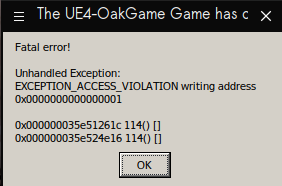
Log
So. Does the game works using official Proton or not?
A long time ago there was a free weekend, I tried it, but there was a problem with the cinematics.
So. Does the game works using official Proton or not?
A long time ago there was a free weekend, I tried it, but there was a problem with the cinematics.
The problem with the cinematics still persist because the media foundation situation. I finished the main story using proton-GE and since there are no more cinematics I'm doing the end game content with proton experimental.
Unfortunately, I think there may be some in-game use of cinematics as textures for things, but nothing that requires waiting for a video to play through before it will proceed. Probably just monitors or whatever showing looping videos? I'd have to dig into the resources.
@kode54 There are at least two occasions in the game where it won't progress if the video doesn't properly play to the end... One is right before the first boss fight... The other happens later in the story on-board the spaceship. I've not encountered another issue, and latest Proton seems to play at least some videos: The intro logos DO play now but I've not encountered a TV inside the game yet that played one of those silly contents.
@CSahajdacny AFAIK, proton-GE fixes the media foundation issues entirely. I've now tried experimental, 6.3-6 and GE; all of them are persisting with these access violations. I know that the causes of these exceptions are usually pretty nebulous, if someone could even point me in the right direction in terms of debugging something like this, I'd be mighty appreciative.
OK.... another FREE WEEKEND, so I tried this game again...
Using Mangohud I noticed that in DX12 this game eats a lot of system ram. All of the ram available..
And the first video "so, you what to hear an story" has the audio in english when I have the game set in spanish.
Original MARCUS_INTRO.mp4 file has eight audio tracks (spanish is track number 5)
It is obvious that the transcoded_video.foz has mistakes in the audio part of the transcoding.
It's amazing that ProtonGE makes this game work almost flawlessly but no multiplayer, while in Proton performance is not as good but multiplayer works. Crashes frequently on 6.3-8 too.
I purchased the game, thinking that is working properly by now, but no; the audio of the transcoded video is still in the wrong language.
steam-397540.log
I know I'm in time for to get a refund, but I want an official explanation from Proton devs
And the first video "so, you what to hear an story" has the audio in english when I have the game set in spanish. Original MARCUS_INTRO.mp4 file has eight audio tracks (spanish is track number 5)
Maybe the problem is that the first playback fossilized the English audio, and now the converted file only offers the English track to the game - and the game just silently accepts that. Read: while the game still asks for Spanish, the audio renderer cannot find the track and just plays back the (already fossilized) English track. What happens if you delete the fossilized data, and then start the game: will it maybe ask fossilize for the Spanish track, and then, after the cloud synced the file back, it would play the Spanish track?
What is the fossilized data?
the file named transcoded_video.foz ?
Deleting transcoded_video.foz , this is what I see:

No luck!
If I delete all the shader cache, Steam keeps downloading everything again, including the "huge for whatever reason" transcoded_video.foz file with the cinematics audio in english....
This is nonsense. I can play any Borderlands 3 mp4 file on Linux, Proton should use what I already have on my system, instead of downloading useless huge files.
I'm still waiting for an official Proton Devs statement before refunding the game.
could it be that original video is multi-channel and game just selects the proper audio for it but transcoding just takes first one?
Looking at the code, the transcoder is made with multiple audio streams in mind... There's actually a comment about that in the code. To me, it seems more likely that the fossilize cache just doesn't offer multiple audio streams because it only ever saw the English stream.
I confirm MARCUS_INTRO.mp4 has 8 audio streams. Spanish audio is track number 5.
As I said, Proton should use what I already have in my system instead of downloading something that doesn't work properly.
It should be possible to legally override this and use local codecs instead of relying on remote transcoder for to play a local file.
Or at least, allow the user to transcode everything locally.
It should be possible to legally override this and use local codecs instead of relying on remote transcoder for to play a local file.
Or at least, allow the user to transcode everything locally.
Why it is done the way it is is already extensively discussed here: https://github.com/ValveSoftware/Proton/issues/1464
I have read it , but that doesn't change the empirical truth that this media converter system is not effcient and the evidence is my problem with Borderlands 3....
Videos should play Out of the Box and with the right audio track.
Another game with media issues came to my mind today: Resident Evil 2 RPD DEMO...
I tested it, and even after two years, the notebook ingame video doesn't work.
I am not burning in rage because I still have time for a game refund.
Just imagine the scandal if an SteamDeck user have this same problem.
It is obvious that official Proton is very far away of being ready...
If the language selection fails in the games properties, write %command% -culture=es in the launch options of the general tab at the bottom. This will ignore the selected language and launch it in Spanish.
At least it works for me. It's set to German in the language tab, but launches in Spanish and Marcus sounds weird to me in the intro video even though I'm Spanish. :rofl:
EDIT:
All available languages supported by -culture can be found here:
https://www.pcgamingwiki.com/wiki/Borderlands_3#Localizations
@7HEPOW That was the first thing I did...
But still no luck... MARCUS intro still has English audio, instead of Spanish...
And... REfunded.
Frequent crashing 1-10 mins of play using Intel Iris Xe, perfectly playable if it didnt crash.
steam-397540.log
Hello @ruineka, DxvkSubmissionQueue: Failed to sync fence: VK_ERROR_DEVICE_LOST and MESA-INTEL: error: ../src/intel/vulkan/anv_device.c:3713: GPU hung on one of our command buffers (VK_ERROR_DEVICE_LOST) in your log hints that you're seeing a video driver issue, or simply that the game has some shaders that are prematurely tripping the video driver's gpu hang detector. Either way, it might be worthwhile to also report your experience to your video driver vendor.
Hello @ruineka,
DxvkSubmissionQueue: Failed to sync fence: VK_ERROR_DEVICE_LOSTandMESA-INTEL: error: ../src/intel/vulkan/anv_device.c:3713: GPU hung on one of our command buffers (VK_ERROR_DEVICE_LOST)in your log hints that you're seeing a video driver issue, or simply that the game has some shaders that are prematurely tripping the video driver's gpu hang detector. Either way, it might be worthwhile to also report your experience to your video driver vendor.
I overlooked this in the logs, thanks I'll open a ticket over at Mesa. I suspected it was something shader related.
I got this game on Humble Monthly, so I decided to try again.... And the Marcus intro video bug persist.
No matter which game localization I set using -culture=xx, the audio of Marcus intro is still in English (the rest of the game has the audio according to the -culture settings)...
It is obvious that this transcoding system is bugged.
For example, this is the log with the game localization set in german
steam-397540.log
.
With Latest Proton-Exp-Bleeding Edge, just stopping working... a black screen after "borderlands splash image" ...
with/without clean prefix
Proton Tested:
experimental-bleeding-edge-6.3-8991-20220209-pbb8dca-w5de775-d8054ae-v9029d1
Log:
steam-397540.log
Try to put this WINEDLLOVERRIDES="mfplay=d" %command%
After some time, the game will load, but without cinematics and will look like this...
Is an old capture, but you will have an idea..

It seems the bleeding edge version try to use a missing GStreamer plugin.
There may be an issue/conflict if you previously used a third-party Proton version, or applied the MF hack. You should retry with a clean prefix in that case. Current Proton Experimental should play the videos just fine (although some users report they are played in the wrong language). At least it works for me with Proton Experimental, both the shader compiling video (walking robot) and the logo videos, even in-game videos. I didn't test the introduction video because I never started a new play-through yet.
There may be an issue/conflict if you previously used a third-party Proton version, or applied the MF hack. You should retry with a clean prefix in that case.
@kakra, @iWeaker4you said He used Proton Experimental-BleedingEdge with a clean prefix
I confirm the same error using Bleeding Edge: steam-397540.log
I didn't test the introduction video because I never started a new play-through yet.
Well, do it. Change the language to Spanish (or French, German or Italian) and start a new play-through and see what happen with Marcus intro. After that, don't choose a character, just close the game with alt-F4 and the previous save game will be untouched.
I didn't switch language as German is my native language. When I tried a new game, the Marcus intro audio is English, so it's actually not working as you say.
In-game audio is still correctly localized, even the top overlay videos that sometimes play. Looking at the movies folder, this is actually easily resolved: Those movies have no audio track at all so it will probably be played by the game from a separate audio track.
I didn't use BleedingEdge, just normal Proton Experimental.
Are there other games to try which have multi-language audio tracks in videos? Maybe this is specific to BL3? Because looking at the video converter code it looks like it properly handles multiple audio tracks.
This game constantly downloads 8.6GB every time steam is restarted. It eats up a tremendous amount of your internet data usage if not watched closely.
This game constantly downloads 8.6GB every time steam is restarted. It eats up a tremendous amount of your internet data usage if not watched closely.
This problem happens, when you install the game in another directory than the default. My solution is to create a symlink folder from the "common" folder to another path or hard drive where to install the game
This game constantly downloads 8.6GB every time steam is restarted. It eats up a tremendous amount of your internet data usage if not watched closely.
This problem happens, when you install the game in another directory than the default. My solution is to create a symlink folder from the "common" folder to another path or hard drive where to install the game
🤔 On my OneXPlayer the game is at the default directory on the only available SSD and it does this still.
I think there are bugs in the Shader Pre-Caching downloader currently which downloads redundant data, or doesn't properly detect which version of the shader cache is already downloaded. For me, this behavior has currently stopped and most games only download a few MBs (but each time Steam starts). Clearing the download cache and shaders may fix this, or at least bring it down to a more usable situation. It affects multiple games, BL3 is one of the worst - I can confirm at least that.
Well.. Proton 7.0-1 is here and I tested Borderlands 3 again...
And again Marcus intro audio is English only, but is not a Proton issue by itself, because if I check the file transcoded_video.foz file with the program MediaInfo, like in the picture, the fossilized file has only one audio Stream....

.....instead of the eight audio streams of the original Marcus MP4 file

So, that specific issue is an issue of the remote transcoder and not a Proton issue.
Now, according to the Proton 7.0 release info:
Added support for local decoding of H264 videos.
So, I tried the game with Proton 7.0 without the transcoded_video.foz file for to check if that is true...
But no, no video is shown, only the TV adjust signal.
The Proton log complain about some missing Gstreamer plugins.
steam-397540.log
wine:27277): GStreamer-WARNING **: 13:02:32.613: Failed to load plugin '/home/carlos/.local/share/Steam/steamapps/common/Proton 7.0/dist/lib64/gstreamer-1.0/libgstlibav.so': libavfilter.so.7: no se puede abrir el fichero del objeto compartido: No existe el fichero o el directorio
After A LOT of further testings I discovered that these files are missing from Proton 7.0/dist/lib64/ folder:
libavfilter.so.7
libavformat.so.58
libavcodec.so.58
libavutil.so.56
libswscale.so.5
libswresample.so.3
libavresample.so.4
With those files in the mentioned folder, Marcus Intro now works perfect!
I wonder why those Gstreamer files are missing from Proton 7
After A LOT of further testings I discovered that these files are missing from
Proton 7.0/dist/lib64/folder: libavfilter.so.7 libavformat.so.58 libavcodec.so.58 libavutil.so.56 libswscale.so.5 libswresample.so.3 libavresample.so.4With those files in the mentioned folder, Marcus Intro now works perfect!
Followed your steps and also had to add these into the aforementioned folder:
View list
libpostproc.so.55
libbs2b.so.0
liblilv-0.so.0
librubberband.so.2
libmysofa.so.1
libflite_cmu_us_awb.so.1
libflite_cmu_us_kal.so.1
libflite_cmu_us_kal16.so.1
libflite_cmu_us_rms.so.1
libflite_cmu_us_slt.so.1
libflite.so.1
libass.so.9
libvidstab.so.1.1
libzmq.so.5
libgme.so.0
libopenmpt.so.0
libchromaprint.so.1
libbluray.so.2
libssh-gcrypt.so.4
libvpx.so.6
libwebpmux.so.3
librsvg-2.so.2
libzvbi.so.0
libsnappy.so.1
libaom.so.0
libcodec2.so.0.9
libgsm.so.1
libmp3lame.so.0
libopenjp2.so.7
libshine.so.3
libtwolame.so.0
libwavpack.so.1
libx264.so.155
libx265.so.179
libxvidcore.so.4
libsoxr.so.0
libserd-0.so.0
libsord-0.so.0
libsratom-0.so.0
libfftw3.so.3
libflite_usenglish.so.1
libflite_cmulex.so.1
libsodium.so.23
libpgm-5.2.so.0
libnorm.so.1
libgssapi_krb5.so.2
libnuma.so.1
libkrb5.so.3
libk5crypto.so.3
libkrb5support.so.0
libkeyutils.so.1
After this - gstreamer plugin warnings disappeared and all videos started working at long last!
This has also fixed similar issues with video that I've been having in Psychonauts 2! Thank you for the lead.
[need help]: borderlands 3 killed by systemd-oomd because of huge memory usage
Issue transferred from https://github.com/ValveSoftware/Proton/issues/5854.
@lumingzh posted on 2022-05-22T22:25:59:
borderlands 3 runs with DirectX 12 API on a 16GB RAM laptop, but after some time like 20 minutes the memory usage will rise up to the whole RAM and killed by systemd-oomd.
Is there any way to limit or reduce the memory usage of borderlands 3 or fix this issue?
Is this relates to DirectX 12 or unreal Engine? Or it is borderlands' own bug?
Thank you.
Replying to https://github.com/ValveSoftware/Proton/issues/3635#issuecomment-1134003364
Looks like lower graphic settings can delay the out of memory kill.
Stop systemd-oomd.socket can delay OOM kill much longer on high graphic settings, but still will be killed by kernel OOM killer after all.
However, there is no system freeze when memory usage is very high, weird.
Is the issue only on my side or is there a problem with mouse movement suddenly acting weird (roughly after 45 minutes of gameplay each time). This is not a problem of settings, vsync, mouse acceleration, mouse smoothing, mouse polling rate, or any other relevant 'solution' that comes on Google for mouse issue on this game.
The game still keeps its good performance, if I run straight forward it is absolutely normal, but when I move the camera with the mouse, then it is like the mouse input is acquired periodically instead of continuously. Imagine a grid of 50x100 squares in the screen, and the mouse 'cursor' snaps on the intersection of each line (or each square's corner), instead of freely and smoothly moving everywhere.
Only restarting the game fixes the issue. I tried a mouse with 125Hz polling rate, and another one with 1000Hz and 500Hz, I tried switching mouse when issue occurs, changing USB port, absolutely nothing seems to workaround the issue. It is kinda annoying because when it happens I need to finish what I'm doing, with the mouse bug active, then restart/load the game.
I don't play this with mouse but rather a controller. But I may see similar behavior with other games that I use a mouse for, e.g. Elite Dangerous: The longer I play, the more often the mouse starts to jump. This only affects some parts of the game: The mouse cursor on menus is not affected but using the mouse, e.g. for the FSS scanner (where the mouse works like in an FPS game, turning the camera with it), the mouse starts jumping at random occasions, making it difficult to precisely navigate on the scanner. It looks like input events are not delivered to the game for a brief moment, probably even skipped, and when they do again, some sort of mouse acceleration kicks in and jumps the mouse position a great distance. Setting relative or absolute mouse mode in the game makes no difference (except that one mode may be even worse).
I'm not sure if this is something wine could do about, it may be an issue in the kernel or some blocking in user-space, as I'm also seeing messages like this in Xorg.log:
[403223.695] (EE) client bug: timer event8 debounce short: scheduled expiry is in the past (-27ms), your system is too slow
[403223.695] (EE) WARNING: log rate limit exceeded (5 msgs per 3600000ms). Discarding future messages.
[403305.700] (EE) event13 - Logitech K360: client bug: event processing lagging behind by 28ms, your system is too slow
[458754.532] (EE) client bug: timer event8 debounce short: scheduled expiry is in the past (-24ms), your system is too slow
As this is an i7-12700K, I doubt my "system is too slow". Rather, some timers seem to be off, or threads are being delayed. This also becomes visible in the game performance by seeing the frame time graph showing more and more spikes. The latter may be a problem of Elite Dangerous itself but it may show the effects of the same underlying problem.
I wonder if BL3 shows similar messages in Xorg.log, or if the weird mouse acting also applies to the menus when you have a real mouse cursor to navigate.
borderlands 3 runs with DirectX 12 API on a 16GB RAM laptop, but after some time like 20 minutes the memory usage will rise up to the whole RAM and killed by systemd-oomd.
As far as I know, systemd-oomd triggers on memory latency when memory usage is above a certain threshold, especially when swap is above a certain threshold (90% by default). Do you use a very small swap partition (1 GB is certainly too small, for your system I'd recommend about 4 GB). If you don't use swap at all: Linux memory management is not well suited for working without swap, you should add a swap partition then.
For my system (32 GB of memory, oomd enabled), swap usually hovers around 2-3 GB which seems dead memory and is unlikely to be swapped in again. The game works fine for me with oomd enabled.
If the problem still persists, you might want to lower the texture quality. Also, some kernels adjust vfs cache pressure in sysctl, this may have a negative impact on your experience. Adjusting that value may improve things (lower values prefer the cache and thus increase swap/memory pressure, the default value is "100"). If you're running from SSD, there's probably no point in lowering the value.
Replying to https://github.com/ValveSoftware/Proton/issues/3635#issuecomment-1173523606
I'm using Fedora silverblue, the default swap method is zram at 8GB size, so there is no physical swap partition.
But I don't think 16GB memory is enough, because the game will be killed by kernel if I disable systemd-oomd.
As this is an i7-12700K, I doubt my "system is too slow".
Indeed, these messages are common in my experience, don't worry about them I think. I have similar messages for my keyboard.
For my issue I have some progress, not posting details right now ,but I think I shouldn't have posted here, but on the Steam For Linux issues tracker probably. Will post more details when I will fully troubleshoot the issue and properly narrowed it down to Steam (or its overlay) and/or the method I start my game with.
I'm using Fedora silverblue, the default swap method is zram at 8GB size, so there is no physical swap partition.
But I don't think 16GB memory is enough, because the game will be killed by kernel if I disable systemd-oomd.
Maybe try reducing zram size to 2 or 4 GB, or completely avoid it and add a physical swap partition - maybe just "in the name of science". I had problems with too big compressed swap (but I'm using zswap instead of zram).
I'm using Fedora silverblue, the default swap method is zram at 8GB size, so there is no physical swap partition.
But I don't think 16GB memory is enough, because the game will be killed by kernel if I disable systemd-oomd.Maybe try reducing zram size to 2 or 4 GB, or completely avoid it and at a phyiscal swap partition - maybe just "in the name of science". I had problems with too big compressed swap (but I'm using zswap instead of zram).
I increased zram size to my whole memory, and works normally now.
Replying to https://github.com/ValveSoftware/Proton/issues/3635#issuecomment-1046015424
Is there any easy way to do this? I have no idea where all those files are
Replying to [#3635 (comment)](https://github.com/ValveSoftware/Proton/issues/3635#issuecomment-1046015424)
Is there any easy way to do this? I have no idea where all those files are
Yesterday I tested the game it using a clean Proton 7.0-4 and the problem seems to be fixed.
Proton 7.0-6 (Next),
Ryzen 5 4600H
RX 5500M
Slackware64-current, Sway, Steam running through flatpak
Issue observed:
Mouse buttons does not work, plus mouse movement in multi-monitor setups is going out of the display borders where game is.
Is there any fix for that?
plus mouse movement in multi-monitor setups is going out of the display borders where game is.
I can prevent that by setting the game to fullscreen instead of borderless window. But games should also be able to properly capture the mouse, so that may actually be a bug, either in the game or in Proton. For this particular game, I use fullscreen mode and the mouse is properly captured.
I can prevent that by setting the game to fullscreen instead of borderless window.
This solution does not work for me unfortunately, instead of grabbing mouse - after moving it out of main monitor it goes full dark.
The game processes Vulkan shaders every time I start the game. Other games are not doing that. The game is installed in the default directory. My launch parameters are:
DXVK_FILTER_DEVICE_NAME="1650" gamemoderun %command% -nostartupmovies -nosplash
System Information
- GPU: RX 7900 XTX
- Driver/LLVM version: 4.6 (Compatibility Profile) Mesa 22.3.5
- Kernel version: 6.2.6-76060206-generic
- Link to full system information report as Gist: https://gist.github.com/alvaromunoz/ae7c9dec0f5a87de1da27831443451ed
- Proton version: 8.0-1
Symptoms
Game continually freezes from a couple seconds to almost a minute. It seems it's loading assets on the fly? I'm running the game from an NTSC partition on an M.2 SSD (980 pro). This happens more often if hosting a game session.
from an NTSC partition
Presumably you mean NTFS? This is not a great idea. NTFS is pretty slow even on Windows and is a terrible match for how Linux machines want a file system to work. You should move the game over to a standard Linux file formatted disk and see what difference that makes.
from an NTSC partition
Presumably you mean NTFS? This is not a great idea. NTFS is pretty slow even on Windows and is a terrible match for how Linux machines want a file system to work. You should move the game over to a standard Linux file formatted disk and see what difference that makes.
Damn... my brain was on auto pilot at the time, mixing NTFS with NTSC (the TV standard). Sorry about that hahaha. And well, you know, PCMCIA (people can't memorize complicated industry acronyms)
Anyway, thanks for the tip, the game now works without issues! So long NTSC NTFS! I'll move all my games that run on Linux to my ext4 partition.
I wanted to report that Borderlands 3 sufferers from performance degradation, idk if this is is sytem specifc, but using Proton 9.0.4, experimental, or GE the game will work fine for about 30-45 minutes then suffer from unplayable stutter causing my framerate to go from 120, to 45-50 and drops when there if camera movement.
Im not sure what is causing this problem
Hello @GingerBobRoss, check if you're seeing https://github.com/ValveSoftware/steam-for-linux/issues/11446.
Hello @GingerBobRoss, check if you're seeing ValveSoftware/steam-for-linux#11446.
I will try that command to see if it helps the issue. It happens really quick during gameplay, so I will report back within the hour
@kisak-valve That indeed seems to have fixed the issue.
Borderlands 3 no longer lags with that command in place
This game started crashing when reaching main menu, when setting it to DX11 via config file it once reached in-game but then crashed on the very first frame it loaded in. What's weird is that it worked for about 3 minutes at first and then never ever worked again. Tried Proton 10, 9, Experimental and Hotfix.
steam-397540.log
System information: https://gist.github.com/kattjevfel/e2a5987afbe0ed26b18b0b936c15211c
After further testing, I've found that it works on Proton 7 and 8, but breaks on anything 9+. Even though it used to work with proton 9 four months ago.
Log from the game running with Proton 8:
steam-397540-8.0.log
@kattjevfel did you change anything about your setup in those months? like, for example, your monitors?
Nope, exact same setup.
On Mon, 24 Nov 2025, 19:23 Simon Hurtado, @.***> wrote:
simifor left a comment (ValveSoftware/Proton#3635)
https://github.com/ValveSoftware/Proton/issues/3635#issuecomment-3572142309@kattjevfel https://github.com/kattjevfel did you change anything about
your setup in those months? like, for example, your monitors?—
Reply to this email directly, view it on GitHub
https://github.com/ValveSoftware/Proton/issues/3635#issuecomment-3572142309,
or unsubscribe
https://github.com/notifications/unsubscribe-auth/ABPQDCB4PZF7XB3S2BCKCLT36NEJXAVCNFSM4LHE7AN2U5DIOJSWCZC7NNSXTN2JONZXKZKDN5WW2ZLOOQ5TGNJXGIYTIMRTGA4Q
.
You are receiving this because you were mentioned.Message ID:
@.***>
I just tested playing this with gamescope+steam big picture, and it works flawlessly... So there's something with KDE I guess.
@kattjevfel your log has this
3523.590:00d0:00d4:err:system:NtUserChangeDisplaySettings Changing L"\\\\.\\DISPLAY2" display settings returned -2.
3523.590:00d0:00d4:err:explorer:initialize_display_settings Failed to initialize registry display settings for L"\\\\.\\DISPLAY2".
which is why I asked about ssetup changes. Do you have multiple monitors? If so, I'm curious what you'd get from trying one at a time
I do have two monitors, but they're the same monitors in the same ports and same configuration. I disabled the secondary one but the crash persists.
Log with only one monitor, which does not have that error: steam-397540.log
@kattjevfel so that error was a red herring. I was checking plasma wayland 6.5.3, what are you using?
@simifor Same here
Operating System: Arch Linux
KDE Plasma Version: 6.5.3
KDE Frameworks Version: 6.20.0
Qt Version: 6.10.1
Kernel Version: 6.17.9-zen1-1-zen (64-bit)
Graphics Platform: Wayland
@kattjevfel interesting, I wonder if you change whatever display mode you have set (windowed/borderless/fullscreen) to another one, does it work without gamescope?
I tried switching between fullscreen/borderless without any success. What I did find out is that it always works on my TV, both on 4K and 1440p.
It works on neither of my desktop monitors at 1440p (their native resolution). If I run one of the monitors at 4K, it does however work, and I can even lower the resolution in-game back to 1440p (but is a very annoying workaround, only works with HDMI).
I also tried different refresh rates and lowering the resolutions below 1440p but nothing worked either. So my best solution is still to just use Proton 8 or play the game on my TV...
Proton versions
proton 9.0x1 2025-05proton 7.0-6x1 2023-01proton 7.0-4x1 2022-11proton 7.0x2 2022-02proton 7.0-1x1 2022-02proton experimentalx6 2022-02proton 5.13-6x1 2021-07proton 6.12x1 2021-07proton 6.3-4x1 2021-05proton 5.21x2 2021-01proton 5.9-ge-8x3 2020-11proton 4.11x7 2020-11proton 5.13-1x1 2020-11proton 5.0x11 2020-09proton 5.9-ge-5x6 2020-09
Launch options
DXVK_FILTER_DEVICE_NAME="1650"x1 2023-04WINEDLLOVERRIDES="mfplay=d"x1 2022-02WINEDLLOVERRIDES="mfplay.dll=d"x2 2021-05PROTON_NO_ESYNC=1x4 2020-11PROTON_LOG=1x1 2020-11WINEPREFIXx3 2020-09PROTON_NO_ESYNCx2 2020-09WINEARCH=win64x2 2020-08WINEPREFIX="<path_to_my_prefix>"x2 2020-08PROTON_LOG=1`x2 2020-03DXVK_HUD=compilerx1 2020-03PROTON_DUMP_DEBUG_COMMANDSx1 2020-03
Launch lines
DXVK_FILTER_DEVICE_NAME="1650" gamemoderun %command% -nostartupmovies -nosplashx1 2023-04WINEDLLOVERRIDES="mfplay=d" %command%x1 2022-02%command% -culture=esx1 2021-12WINEDLLOVERRIDES="mfplay.dll=d" %command%x2 2021-05PROTON_NO_ESYNC=1 PROTON_LOG=1 gamemoderun %command% -NoStartupMoviesx1 2020-11PROTON_NO_ESYNC=1 %command%x1 2020-07gamemoderun %command% -NoLauncher -NoStartupMovies -notexturestreamingx1 2020-07
Upstream links
- ValveSoftware/steam-for-linux/issues/11446x2 2025-05
- ValveSoftware/Proton/issues/5854x1 2022-05
- ValveSoftware/Proton/issues/1464x2 2021-12
- ValveSoftware/Proton/issues/4845x1 2021-05
- ValveSoftware/steam-runtime/issues/312x1 2021-01
- ValveSoftware/Proton/issues/4530x1 2021-01
- ValveSoftware/steam-for-linux/issues/7306x1 2020-10
- ValveSoftware/Proton/issues/2927x2 2020-03
- ValveSoftware/Proton/issues/3687x1 2020-03
DLLs
mfplay.dllx2 2021-05d3dcompiler_47.dllx4 2020-092bd3dcompiler_47.dllx1 2020-03kernel32.dllx1 2020-03kernelbase.dllx1 2020-03
Error codes
0x80000100x1 2020-07
Compatibility Report
System Information
I confirm:
steam-397540-DX12.log
steam-397540.log
Symptoms
Reproduction