Age of Empires III: Definitive Edition
Hello @ThaChillera, these look like some lines of interest from the log:
err:ole:CoGetClassObject class {94297043-bd82-4dfd-b0de-8177739c6d20} not registered
err:ole:CoGetClassObject no class object {94297043-bd82-4dfd-b0de-8177739c6d20} could be created for context 0x1
Followed immediately by an access violation.
As a side note, Proton logs tend to compress well. Please consider using an archive if it is larger than Github is happy with.
It tested it on proton 5.0.9, i was able to play some art of war scenarios without much trouble.
-
there is definitively an issue on splash screen about mp3

if i click on "Tentative d'execution" , it does start. -
I get an issue that may be unrelated to proton (a bug) on one of the scenario by getting all texture disappear in screen (all the 3d getting black, but the ui stay normal), i can not reproduce it later. I will try to create a log and post it here if i'm able to reproduce it. Reloading the game does fix this issue.
I am not able to play this using 5.13-X (works fine using 5.0-X).
It will launch its starter - which complains that my GPU would not support DirectX11 (although vulkan is installed and the GPU definitely does support it).
After that, it proceeds to launch the game, where only a black screen awaits and after a while Ubuntu detects the game froze and asks to kill the process.
Updating from NVIDIA drivers 450 to 455 didn't help.
My system specs:
Computer Information:
Manufacturer: Unknown
Model: Unknown
Form Factor: Laptop
No Touch Input DetectedProcessor Information:
CPU Vendor: GenuineIntel
CPU Brand: Intel(R) Core(TM) i7-6700HQ CPU @ 2.60GHz
CPU Family: 0x6
CPU Model: 0x5e
CPU Stepping: 0x3
CPU Type: 0x0
Speed: 3500 Mhz
8 logical processors
4 physical processors
HyperThreading: Supported
FCMOV: Supported
SSE2: Supported
SSE3: Supported
SSSE3: Supported
SSE4a: Unsupported
SSE41: Supported
SSE42: Supported
AES: Supported
AVX: Supported
AVX2: Unsupported
AVX512F: Unsupported
AVX512PF: Unsupported
AVX512ER: Unsupported
AVX512CD: Unsupported
AVX512VNNI: Unsupported
SHA: Unsupported
CMPXCHG16B: Supported
LAHF/SAHF: Supported
PrefetchW: UnsupportedOperating System Version:
Ubuntu 20.04.1 LTS (64 bit)
Kernel Name: Linux
Kernel Version: 5.4.0-58-generic
X Server Vendor: The X.Org Foundation
X Server Release: 12008000
X Window Manager: GNOME Shell
Steam Runtime Version: steam-runtime_0.20201203.1Video Card:
Driver: NVIDIA Corporation GeForce GTX 1060/PCIe/SSE2
Driver Version: 4.6.0 NVIDIA 455.38
OpenGL Version: 4.6
Desktop Color Depth: 24 bits per pixel
Monitor Refresh Rate: 120 Hz
VendorID: 0x10de
DeviceID: 0x1c20
Revision Not Detected
Number of Monitors: 1
Number of Logical Video Cards: 2
Primary Display Resolution: 1920 x 1080
Desktop Resolution: 1920 x 1080
Primary Display Size: 13.54" x 7.64" (15.51" diag)
34.4cm x 19.4cm (39.4cm diag)
Primary Bus: PCI Express 16x
Primary VRAM: 6144 MB
Supported MSAA Modes: 2x 4x 8x 16xSound card:
Audio device: USB MixerMemory:
RAM: 15888 MbVR Hardware:
VR Headset: None detectedMiscellaneous:
UI Language: English
LANG: en_US.UTF-8
Total Hard Disk Space Available: 516306 Mb
Largest Free Hard Disk Block: 243561 Mb
I also attached the proton log
steam-933110.log
As additional info:
Using PROTON_USE_WINED3D11=1 with 5.13-4 does work and makes the game launch just fine.
Also attached the log for that, just in case.
steam-933110.log
There are, however, visible artifacts in the intro videos (which aren't present without PROTON_USE_WINED3D11=1 in 5.0-10). Didn't really test it thoroughly for other bugs, as I'd rather use 5.0-10 without wined3d11.
I have a feeling this could be related to a somewhat similar bug I had here:
https://github.com/ValveSoftware/Proton/issues/4298
In that case, using wined3d11 also fixed a problem (while introducing others).
Hello @TheSHEEEP, info: Device name: : Intel(R) HD Graphics 530 (SKL GT2) in your log hints that the game is trying to use the Intel Vulkan driver, even though it looks like you're using an Optimus laptop that's been configured to run everything on the nVidia GPU. I suspect you have encountered https://github.com/ValveSoftware/steam-runtime/issues/312.
@kisak-valve That is very interesting.
I'm actually not running an Optimus laptop at all and my laptop has a dedicated GPU, and only that GPU. Also see my system specs for that:
Video Card:
Driver: NVIDIA Corporation GeForce GTX 1060/PCIe/SSE2
Driver Version: 4.6.0 NVIDIA 455.38
I actually bought that laptop specifically to avoid all the usual Optimus troubles on Linux.
It's this one:
https://www.msi.com/Laptop/GE62vr-6rF-Apache-Pro/Specification
So it actually looks like the problem might be later versions of Proton not recognizing the GPU correctly under some circumstances (when vulkan is used)?
Edit: I swear I actually don't use actually that often.
Trees, units, animals all look black since 5.13-6. It was fine before that.
Hello @sangoku116, please add PROTON_LOG=1 %command% to the game's launch options, reproduce the regression, and attach the generated $HOME/steam-$APPID.log to this issue report as a file. (Proton logs compress well if needed.) Also, please copy your system information from Steam (Steam -> Help -> System Information) and put it in a gist, then include a link to the gist in this issue report.
Hello @sangoku116, please add
PROTON_LOG=1 %command%to the game's launch options, reproduce the regression, and attach the generated $HOME/steam-$APPID.log to this issue report as a file. (Proton logs compress well if needed.) Also, please copy your system information from Steam (Steam->Help->System Information) and put it in a gist, then include a link to the gist in this issue report.
I updated mesa-git and all looks fine now. Thank you for the quick reply though.
Everything is working fine on both hardware Nvidia or AMD. For me and my friends. Its fine with latest proton versions as well as Proton GE versions. Except a 1 caveat which is xbox live integration for joining a clan , however it is not required for anything else. We can open another issue for that as its not just AOE specific and also effects MCC, sea of thieves and others. Again it is not required to play any of the above !
this issue can be closed @kisak-valve
I don't think this can be closed, because the same problem happens to me on other games - just a black screen and nothing else in newer Proton versions, whereas 5.0-X versions work just fine.
I really do think something along these lines is the problem:
So it actually looks like the problem might be later versions of Proton not recognizing the GPU correctly under some circumstances (when vulkan is used)?
However, maybe it would be better to rename this topic or make a new one for what is clearly a bug affecting multiple games (not all, somehow).
XBOX Live Sign In does not work nor do the US challenges, they reset every time the game is closed and opened.
How to not reset US challenges in centos 8 ? I really need that american
African maps do not load

Since the African DLC launched, I am unable to play online or via LAN
I can confirm what dhollinger said.
In my house, we have 2 machines running Arch Linux, and one running Windows 10. Since the last update, the two Arch machines running AOE3 through Proton cannot see or join any games, either online or via LAN (the "Browse Games" list is just empty). Direct invitations from the Windows player do appear in game, but attempting to actually join a game that way fails with the message "Host Rejected".
This issue occurs regardless of what version of Proton is used.
Related post on the Age of Empires official forum, that appears to contain a possible cause for the issues: https://forums.ageofempires.com/t/due-to-the-borked-map-file-encryption-for-african-maps-linux-proton-users-are-unable-to-use-them-play-multiplayer/140245
DLCs previously bought used to be playable and show in game, but now they are no longer available in-game. It says to buy the DLC, but it has been bought and installed. Multiplayer still does not work.
Do we have any update on this or should I just move on to AoE2 or 4?
Do we have any update on this or should I just move on to AoE2 or 4?
Only AOE2 works properly as of now. AOE3 is still broken and so is 4.
Do we have any update on this or should I just move on to AoE2 or 4?
Only AOE2 works properly as of now. AOE3 is still broken and so is 4.
AOE4 finally has a workaround that makes the textures visible, but it requires some extra files and either Proton-GE or Proton Experimental IIRC
Looks like the issues related to AOEIII-DE may have to do with an issue in BattleServer.exe:
Crash Log: 2021-11-11_11:56:36_appid-933110_crash.log
Proton Log:
steam-933110.log
As has been mentioned elsewhere, it does appear as though the map files from the newest DLC have been obfuscated. The C Source and XML files report as simply binary data files when checked with the file command while the core map files return as the correct file type.
@kisak-valve is there anything we can do to try and pinpoint what, if anything, in Proton is missing that allows the game to know how to read these files so that users can play multiplayer again?

Hello @dhollinger, friendly note that I'm a moderator for Valve's issue trackers on Github and not a Proton dev myself. We'll need to hear from a Proton dev if they need additional information to look into that issue.
Age of Empires III: Definitive Edition (933110)
Issue transferred from https://github.com/ValveSoftware/Proton/issues/5342.
@tridoxx posted on 2021-11-24T01:41:05:
Compatibility Report
- Name of the game with compatibility issues: age of empires 3 definitive edition
- Steam AppID of the game: 933110
System Information
- GPU: AMD ATI 30:00.0 Cezanne integrated
- Driver/LLVM version: latest mesa driver
- Kernel version: 5.13.0-7620-generic
- Link to full system information report as Gist:
- Proton version: proton experimental
I confirm:
- [x ] that I haven't found an existing compatibility report for this game.
- [ x] that I have checked whether there are updates for my system available.
Symptoms
the multiplayer does not work after the encryption of the new African maps, the error is produced by the proton
Reproduction
enter to find a multiplayer game the rooms do not load
this is the error that show proton
crypt:get_gnutls_cipher AES mode 1 with key length 64 not supported wine linux
@kisak-valve commented on 2021-11-24T02:19:16:
Previously mentioned on #3712.
Tracking note: This compatibility report was originally opened against the beta variant of this game (1211010), but past the initial post, the entirety of the feedback has been for the main release variant of this game. In hindsight, we shouldn't have done this and tracked feedback for the main game separately, but at this point it'd be more counterproductive to fragment discussion for the main game release (933110) over multiple issue reports, so I'm switching this compatibility report to align with the most feedback.
Tracking note: This compatibility report was originally opened against the beta variant of this game (1211010), but past the initial post, the entirety of the feedback has been for the main release variant of this game. In hindsight, we shouldn't have done this and tracked feedback for the main game separately, but at this point it'd be more counterproductive to fragment discussion for the main game release (933110) over multiple issue reports, so I'm switching this compatibility report to align with the most feedback.
hello, ready understood that there was already a problem report, although what I add to the report is about the problem, handling wine and proton is based on it, apparently the encryption or decryption with aes is not working in wine ,"proton"
crypt: get_gnutls_cipher AES Mode 1 with key length 64 not compatible wine linux or will the report be sent to wine directly?
I am encountering the "progress not saved" bug under Proton 6.3 and Experimental. This is resolved when Proton 5.13 is used. The bug has been previously reported and user Epiqure provided the temporary solution of downgrading to the 5.x branch of the software six months back.
The distro does not seem to be relevant as it is seen on everything from Pop to Ubuntu to Arch to Fedora.
Hello @s-i-e-v-e, please add PROTON_LOG=1 %command% to the game's launch options, reproduce the regression, and attach the generated $HOME/steam-$APPID.log to this issue report as a file. (Proton logs compress well if needed.) Also, please copy your system information from Steam (Steam -> Help -> System Information) and put it in a gist, then include a link to the gist in this issue report.
@kisak-valve
Steps:
- Delete 933110 folders from
compatdataanduserdata - Start game
- Change Home City from Germans to British
- Add new deck and add random cards to it
- Go back to main menu and exit game
- Start game again
- None of the changes are saved
I've also got the "progress not saved" under both Proton 6.3 and Experimental. Downgrading to Proton 5.13 solves the issue, but then I can't join multiplayer games.
Steps to reproduce:
- Start game;
- Change Home City to any other civilization;
- Go to "Deck Builder" and create a new deck with random cards, save it;
- Go back to home screen, Home City returns to previous one;
- If you search for the created deck, it isn't there.
@arafek
I can't join multiplayer games.
Have you tried the ucrtbase.dll replacement trick that works with the other Age games?
- Create a temp folder somewhere and
cdinto it. wget "https://aka.ms/vs/16/release/vc_redist.x64.exe"cabextract vc_redist.x64.execabextract a10- Copy the
ucrtbase.dllfile from that folder into~/.local/share/Steam/steamapps/compatdata/933110/pfx/drive_c/windows/system32
I just tried it, I still get the "Host rejected" error when trying to join or host a casual multiplayer game.
@arafek the problem is with uncrypt african maps, wine don't support that decrypted, i report the bug on winehq
@tridoxx I couldn't find the winehq bug you filed for some reason - could you link it here?
@alasky17 https://bugs.winehq.org/show_bug.cgi?id=52158 look.
ey everybody multyplayer problem with decrypt maps is fixed using, Proton 6.21 GE plz try and check if work for you, i am playing on this moment, bay bay bugwindows.
@tridoxx it's important to note that players should manually select the map they want to use if they play multiplayer. I had to re-setup a game with my wife last night because it selected an African DLC map and still couldn't decrypt it.
@dhollinger very strange, i will try to test african map, but steam don't show on logs, the error abut decrpyt

you same test on mexico maps?
@tridoxx I don't have the African or Mexican DLC. I'll buy it and re-test. Maybe it was just a fluke
@kisak-valve I am not the person you asked the info from, but I suffer from the same regression.
steam-933110.log
https://gist.github.com/AliceDTRH/9029b50bd5a0d68e77a13da06556e3ef
The game now works again with wine 7.1 or proton-ge 7.1
Age of Empires III: Definitive Edition fix
Issue transferred from https://github.com/ValveSoftware/Proton/issues/6420.
@AdolfRoxler posted on 2022-12-30T08:59:18:
Compatibility Report
- Name of the game with compatibility issues: Age of Empires III: Definitive Edition
- Steam AppID of the game: 933110
System Information
- GPU: RTX 3070M, Radeon 5800H APU
- Driver/LLVM version: nvidia 525.60.11-1 | mesa 22.3.1-1
- Kernel version: 6.1.1
- Proton version: any
I confirm:
- [ YES] that I have checked whether there are updates for my system available.
Symptoms
The multiplayer will not work on newer proton versions. Last reported working version was 7.0-4 but I can't compile it because openvr.dll is missing.
The only proton version that worked for me is unfortunately GloriousEggroll's fork, specifically Proton-6.21-GE-2.
Now, as everyone knows because this is a Definitive Edition issue, multiplayer will still not work. Although this time, with the GE fork, now the listing appears (I guess the africa encryption is messed up on newer versions since the latest GE fork seems to have the same issue, alongside the newer proton versions.)
In order to fix the desync error or whatever, you have to install the correct vcredistx64 (presumably it's the 2015-19 one) onto the game's C:\ drive in the pfx. However, thanks to the guys developing cabextract, you can directly extract the cabinet files from the redistributable, specifically, the cabinet file a10 that contains the necessary dll's for multiplayer play.
Now, the steam deck doesn't have cabextract installed, so you'd have to disable write protection on / and populate the arch linux keyring to install the aforementioned software to make age of empires work on multiplayer.
It should work on proton 7.0-5, as i was able to play on it a few days prior. But since the update to 7.0-6, it seems that multiplayer no longer works. I would like to test if it was my PC updating or proton updating which broke multiplayer, but I don't know where to find a viable proton 7.0-5 build. Downgrading my PC is just not viable by the amount of packages updated.
Hello @Zetabite, please add PROTON_LOG=1 %command% to the game's launch options, reproduce the regression, and attach the generated $HOME/steam-$APPID.log to this issue report as a file. (Proton logs compress well if needed.) Also, please copy your system information from Steam (Steam -> Help -> System Information) and put it in a gist, then include a link to the gist in this issue report.
@Zetabite We are hoping that the networking regression is fixed with Experimental Bleeding-Edge. Could you confirm and let us know if there are any AOE III multiplayer things that were previously working on 7.0-5 that are still not working? To switch to bleeding-edge, you will need to force the game to use Proton Experimental (which you can do on a per-game basis by right-clicking on the game and going to "compatibility tool"), and also switch Experimental to the bleeding-edge beta branch.
@alasky17 i tried it and can confirm that the issue has been indeed fixed. what i noted that i had my first ever game desync, but it has only happened once and then not again. i havent played a lot yet with the new proton, so i will let you know if it changes. but atm it seems its fixed, hooray :D
@alasky17 In my case the startup splash screen for the game flickers and then the game crashes. Please find the compatibility report below.
Compatibility Report
- Name of the game with compatibility issues: Age of Empires III: Definitive Edition
- Steam AppID of the game: 933110
System Information
- GPU: RX 6850M XT
- Driver/LLVM version: Mesa 23.0.0
- Kernel version: 6.2.8
- Link to full system information report as Gist: here
- Proton version: 7.0-6
I confirm:
- [ ] that I haven't found an existing compatibility report for this game.
- [X] that I have checked whether there are updates for my system available.
Symptoms
The startup splash screen displays normally, then flickers and the game crashes with the error report dialog:
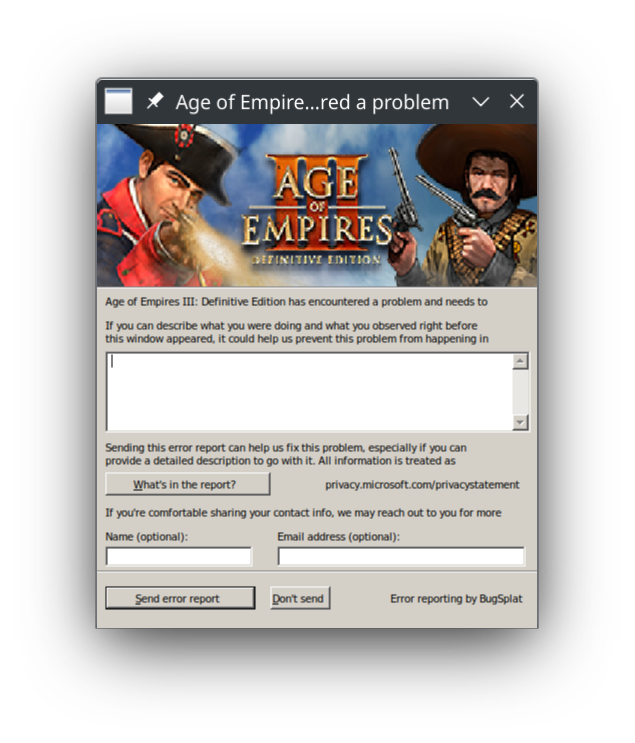
Reproduction
Start the game with Proton 7.0-6 to reproduce the crash above. Under Proton 5.0-10, the game starts up with audio and a white screen and the MP3 codec error message is displayed.
Replying to https://github.com/ValveSoftware/Proton/issues/3712#issuecomment-1484787888
so strange for me is working the last year after proton update, i use proton experimental pop_os 22.04 kernel 6.2.6, ryzen 55600g, rtx3060ti maybe drivers problem?.
Replying to [#3712 (comment)](https://github.com/ValveSoftware/Proton/issues/3712#issuecomment-1484787888)
so strange for me is working the last year after proton update, i use proton experimental pop_os 22.04 kernel 6.2.6, ryzen 55600g, rtx3060ti maybe drivers problem?.
@tridoxx @alasky17 @kisak-valve Proton Experimental doesn't cause the game to crash anymore, instead the game is immediately minimized. When I restore the game window, it is not shown, but my mouse cursor disappears and animations for other windows and my desktop environment lag. Since I can still reproduce the original crash on Proton-7.0-6 and Proton-8.0-1, I doubt anything has changed on the Mesa side between 23.0.1 and 23.0.2.
on proton-GE 7-55 it crashes when you launch the game, it works with proton 7.0 tho but i would assume the multiplayer won't work
update : it works with proton-GE 8-01
on proton-GE 7-55 it crashes when you launch the game, it works with proton 7.0 tho but i would assume the multiplayer won't work update : it works with proton-GE 8-01
@josef256 For me it shows the same behaviour with GE-Proton8-1 as with Proton Experimental.
If anybody has complaints from friends, while playing AoEIII:DE, that they are experiencing a lot of lag spikes, then see Arkanosis' comment here. His solution for AoEII:DE seems to also have fixed my issue on AoEIII:DE. Note that on my end, the game appeared to have no lag, but all my friends were complaining heavily.
Proton versions
proton experimentalx6 2023-05proton 7.0x2 2023-05ge-proton8-1x1 2023-05proton 7.0-6x2 2023-04proton 8.0-1x1 2023-04proton 5.0-10x1 2023-03proton 7.0-5x1 2023-02proton 6.21-ge-2x1 2022-12proton 6.21x1 2021-12proton 5.13x2 2021-12proton 6.3x2 2021-12proton 5.0x1 2020-10
Launch options
PROTON_LOG=1x4 2023-02PROTON_USE_WINED3D11=1x1 2020-12
Upstream links
- ValveSoftware/Proton/issues/3189x1 2023-10
- ValveSoftware/Proton/issues/6420x1 2022-12
- show_bug.cgi?id=52158x1 2021-12
- ValveSoftware/Proton/issues/5342x1 2021-11
- ValveSoftware/steam-runtime/issues/312x1 2020-12
- ValveSoftware/Proton/issues/4298x1 2020-12
DLLs
openvr.dllx1 2022-12ucrtbase.dllx1 2021-12
Compatibility Report
System Information
I confirm:
Proton log, uploaded to dropbox since its 56 MiB, larger than github allows
Symptoms
Cannot get past the loading screen
Reproduction