Resident Evil 3
@kisak-valve It only happens to Proton 5.0-5, if I try it with Proton5.4-GE1 and Proton5.4-GE3, it works out of the box.
@laichiaheng do you get past the intial setup, when it loads the actual game? Because that's when it still crashes for me with Proton5.4-GE3. Is this MF-related? This is so weird considering the demo ran w/o any issues.
Edit: it really was the issue
@laichiaheng do you get past the intial setup, when it loads the actual game? Because that's when it still crashes for me with Proton5.4-GE3. Is this MF-related? This is so weird considering the demo ran w/o any issues.
Edit: it really was the issue
The game launched without problem for me when the mfplat workaround was not enabled.
Maybe you should remove the prefix folder and try it again?
Same here. The game crashes with Proton 5.0-5, but works with 5.4-GE-1 even without mfplat crutch.
steam-952060-proton-5.0-5.log
steam-952060-proton-5.4-ge-1.log
System info
@laichiaheng yes the game launched, but when it starts as in loading the first cutscene it crashed w/o the mfplat, because it is a real action movie rather than in-engine.
Edit:
Works on latest Proton-GE with the Media Foundation work thanks to Guy1524
If it still doesn't try deleting the prefix, and/or adding PROTON_USE_SECCOMP=1 %command% in launch options/
@GloriousEggroll
steam-952060-Proton-5.4-GE-3.log
When I try to enter the S.T.A.R.S. member room, it crashes.
It's the GE proton.
@doitsujin Is it a DXVK issue?
Same here. The game crashes with Proton 5.0-5, but works with 5.4-GE-1 even without mfplat crutch.
steam-952060-proton-5.0-5.log
steam-952060-proton-5.4-ge-1.log
System info
@laichiaheng yes the game launched, but when it starts as in loading the first cutscene it crashed w/o the mfplat, because it is a real action movie rather than in-engine.
Do you guys also have the issue?
@laichiaheng My game crashes as well when I try to enter the stars office.
@laichiaheng
for me it also always crashes at the S.T.A.R.S office. no matter whether Proton Tkg or GE, DX11 or DX12, fsync/esync on/off. and now i can't test any further because of denuvo.
@doitsujin Is it a DXVK issue?
Doesn't look like it, no (see reports about the same thing happening with dx12, and also have a look at the stack trace).
I dunno if this has been happening to anybody else, but GE proton fixes the initial setup crash, but now, instead it always crashes after the CAPCOM logo at the save indicator message with and without the movie patch
Also, the game crashed for me at the STARS office (with GE1 proton and the movie patch)
I use GE3, except for the stars office, no crashs. The Stars Office is a cutscene, so there must be something missing.
I use GE3 because the game doesn't start on default versions of Proton no matter with or without the mfplat patch. However even with GE3 the game crashes upon entering STARS office. The first 1~2 seconds of a cutscene play, then it crashes.
I use GE3 because the game doesn't start on default versions of Proton no matter with or without the mfplat patch. However even with GE3 the game crashes upon entering STARS office. The first 1~2 seconds of a cutscene play, then it crashes.
I didn't see any cut scene at SRARS office at all.
Same, it basically crashes right after pushing the door. Cutscene is only 2 second and transitions to ingame.
Has anyone tried this thing: https://www.reddit.com/r/linux_gaming/comments/fhixs0/media_foundation_mfplat_in_wine_without_microsoft/
He doesn't need the mfplat from Microsoft to play the game which needs it.
I have a temporal workaround.
- Turn off subtitle. (if not, it will crash immediately)
- Enter the office.
- Skip the cut scene in the first few seconds.
@laichiaheng turning off subtitles doesn't fix it for me, crashes regardless.
@laichiaheng turning off subtitles doesn't fix it for me, crashes regardless.
I forgot to mention, I didn't walk into the door, I pressed the A button to triger the cut scene, then skipped it immediately.
Yes, even if I do that. The game freezes immediatly when I press A.
Yes, even if I do that. The game freezes immediatly when I press A.
How about standing in front of the door for a little longer before you press A to open the door?
Yeah doesn't matter. Funny thing is, if I remove mfplat the game crashes after the cutscene blowing up the wall, when you walk through it.
Managed to get past STARS office by skipping the cutscene. There's another crash though, at the hospital, right after you read the E-Mail, the game crashes.
Managed to get past STARS office by skipping the cutscene. There's another crash though, at the hospital, right after you read the E-Mail, the game crashes.
Which E-Mail? I'm in the hospital now.
Is it possible to pass that E-Mail?
Managed to get past STARS office by skipping the cutscene. There's another crash though, at the hospital, right after you read the E-Mail, the game crashes.
Which E-Mail? I'm in the hospital now.
Is it possible to pass that E-Mail?
The E-Mail on the computer right after you find the doctor. It is required to read the E-Mail, and apparently a cutscene is supposed to start after that, but it crashes before it even starts.
The only reason for those crashes that I can think of at the moment is that those are manually placed Denuvo checks or something.
Both cutscenes involve an in-game computer screen displaying video. Perhaps that's a helpful hint.
Generally the backtrace always looks like this when mine crashes.
Backtrace: =>0 0x00007fa69d2cd408 __libc_rpc_getport@GLIBC_PRIVATE+0x362d8() in libc.so.6 (0x000000006b73f9c0) 1 0x00007fa69a6a0738 MSVCRT_memcpy+0x57() in msvcrt (0x000000006b73f9c0) 0x00007fa69d2cd408 __libc_rpc_getport@GLIBC_PRIVATE+0x362d8 in libc.so.6: ldsl▶\0x000000000000006f(%rsi),%edi
I have no idea how you skipped this cutscene, the moment I press A the game is dead.
Edit: Looks like I can't test any further now, thanks a lot denuvo.
How do you guys manage to load your saves, I can't run the game after the initial setup
Alright I got passed it and I have no idea if it was just switching to Proton-5.4-GE-1 or switching API to DirectX12 as well. I played also around with setting graphics to the lowest and turning off subtitles.
I just tested with https://github.com/GloriousEggroll/proton-ge-custom/releases/tag/5.5-GE-1 and it did not crash at the stars office :)
I just tested with https://github.com/GloriousEggroll/proton-ge-custom/releases/tag/5.5-GE-1 and it did not crash at the stars office :)
The cutscene after reading the E-Mail in the hospital works now, even though there is nothing displayed at the monitor. There is a problem though, after the cutscene, no matter skip you it or not, all menus get disabled and you can't pickup items anymore, pause menu is not accessible as well.
EDIT: found a way around. after the cutscene, go to the save room and save. After that, restart the game and load the save.
@Fothsid yep, had the same issue and workaround.
One thing though, maybe it happened because I didn't apply mfplat patch to the new version of Proton by GloriousEggroll. I had to apply it later because the game froze in the ending when it tried to play a video. After applying the patch, the game played the ending properly.
I just tested with https://github.com/GloriousEggroll/proton-ge-custom/releases/tag/5.5-GE-1 and it did not crash at the stars office :)
The cutscene after reading the E-Mail in the hospital works now, even though there is nothing displayed at the monitor. There is a problem though, after the cutscene, no matter skip you it or not, all menus get disabled and you can't pickup items anymore, pause menu is not accessible as well.
EDIT: found a way around. after the cutscene, go to the save room and save. After that, restart the game and load the save.
I can pass the E-Mail scene with 5.4-GE3 by the same method before.
By the way, turning off the subtitle is meaningless.
@Fothsid Nah, I'm on my second playthrough and it occurs on both troubling cutscenes.
The game crashes right after blowing up the wall in the lockers room in the police station, with Proton-5.5-GE-1.
steam-524220.log
@julienbenjamin have you applied the mfplat fix? Because w/o it it crashes for me as well
@julienbenjamin have you applied the mfplat fix? Because w/o it it crashes for me as well
Yes, I following the advice found on protondb:
<Workaround removed by moderator>
I noticed I could go a little further to the door of the STARS office with Proton-5.4-GE-3 but now it crashes when I try to open the door.
you shouldn't post this here, because the repo contains a dll with license issue. But if this didn't help you, maybe switch to an older version of GE. I actually have to do this as well for different parts of the game, like the credits only roll on GE3 with the patch. The cutscene after the wallbreak works only on GE1 etc.
@julienbenjamin have you applied the mfplat fix? Because w/o it it crashes for me as well
Yes, I following the advice found on protondb:
<Workaround removed by moderator>I noticed I could go a little further to the door of the STARS office with Proton-5.4-GE-3 but now it crashes when I try to open the door.
I need to generate the prefix with 5.4-GE-3 and apply the workaround, then switch to 5.5-GE-1
Hello @julienbenjamin, the workaround you posted is legally problematic and has been removed.
Yes, I following the advice found on protondb:
I wrote that report on ProtonDB.
I just tested some things.
On 5.5-GE-1 with mfplat patch, the cutscene in the hospital works properly for me (tested from an old save), however, after I started the game anew, the cutscene in the S.T.A.R.S. office still crashed the game for some obscure reason.
I should probably remove the report, though I'm not sure how to do that.
UPDATE: I recreated the prefix for the game, tried go get through without the mfplat patch, the game crashed after the explosion. HOWEVER, I applied the mfplat patch again, AND THE GAME DIDN'T CRASH IN S.T.A.R.S. OFFICE. I have no idea what just happened. Also, it's worth mentioning that the game disabled menus as it did after the cutscene in the hospital, but there's a save point right after that.
Hello @julienbenjamin, the workaround you posted is legally problematic and has been removed.
Sorry for the inconvenience, I totally forgot about the licensing issues.
Yes, I following the advice found on protondb:
I wrote that report on ProtonDB.
I just tested some things.
On 5.5-GE-1 with mfplat patch, the cutscene in the hospital works properly for me (tested from an old save), however, after I started the game anew, the cutscene in the S.T.A.R.S. office still crashed the game for some obscure reason.
I should probably remove the report, though I'm not sure how to do that.UPDATE: I recreated the prefix for the game, tried go get through without the mfplat patch, the game crashed after the explosion. HOWEVER, I applied the mfplat patch again, AND THE GAME DIDN'T CRASH IN S.T.A.R.S. OFFICE. I have no idea what just happened. Also, it's worth mentioning that the game disabled menus as it did after the cutscene in the hospital, but there's a save point right after that.
If you manage to figure out how you managed to work around the issue, I am interested.
If I get this right, you created the prefix with Proton-5.4-GE-3, applied the mfplat workaround and then ran the game at some with Proton-5.5-GE-1?
Btw you shouldn't switch the proton version too often, because this results in a denuvo ban for at least a few hours.
If I get this right, you created the prefix with Proton-5.4-GE-3, applied the mfplat workaround and then ran the game at some with Proton-5.5-GE-1?
Not really. I had a prefix that was created before with Proton-5.4-GE-3, and with which I completed the game, then I started the new game and it crashed on STARS office cutscene. After that I created the prefix with Proton-5.5-GE-1 (deleted the old one beforehand), the game crashed after wall explosion, then I applied the mfplat patch and tried again - it didn't crash on STARS office cutscene.
121589.501:002b:0050:trace:loaddll:load_so_dll Loaded L"C:\windows\system32\winegstreamer.dll" at 0x7f3f639a0000: builtin
121590.599:002b:0050:fixme:mfplat:mf_decoder_GetAttributes 0x1174340, 0x67f8f6b0. stub!
121590.599:002b:0050:fixme:mfplat:mf_decoder_GetAttributes 0x1174340, 0x67f8f660. stub!
121590.599:002b:0050:fixme:mfplat:mf_decoder_GetOutputCurrentType 0x1174340, 0, 0x67f8f670. stub!
121590.599:002b:0050:fixme:mfplat:mf_decoder_GetOutputCurrentType 0x1174340, 0, 0x67f8f688. stub!
(These functions are actually in winegstreamer.dll and not mfplat!)
This is from a log from a session where the game didn't crash on the cutscene. (The video on the computer screen was just a black box by the way)
These stubs are worrying me a bit. Considering that the library returns E_NOTIMPL as a result for these stubs, maybe the game freaks out because of it, doesn't play the video and disables the menus?
According to MSDN, while IMFTransform::GetAttributes can return E_NOTIMPL, IMFTransform::GetOutputCurrentType shouldn't do that. So, I guess there should be an implementation of IMFTransform::GetOutputCurrentType at least?
@Fothsid possible that the video disables elements ingame and they don't load properly again afterwards.
121589.501:002b:0050:trace:loaddll:load_so_dll Loaded L"C:\windows\system32\winegstreamer.dll" at 0x7f3f639a0000: builtin
121590.599:002b:0050:fixme:mfplat:mf_decoder_GetAttributes 0x1174340, 0x67f8f6b0. stub!
121590.599:002b:0050:fixme:mfplat:mf_decoder_GetAttributes 0x1174340, 0x67f8f660. stub!
121590.599:002b:0050:fixme:mfplat:mf_decoder_GetOutputCurrentType 0x1174340, 0, 0x67f8f670. stub!
121590.599:002b:0050:fixme:mfplat:mf_decoder_GetOutputCurrentType 0x1174340, 0, 0x67f8f688. stub!(These functions are actually in winegstreamer.dll and not mfplat!)
Funny thing is, I get a segfault from winegstreamer with Proton-5.5-GE1-1 after exploding the wall in the showers/lockers room in the police station. My first impression was that there might be a regression from wine used by Proton-5.4-GE-3.
The crash after the wallbreak happens on 5.4-GE3 and 5.4-GE1 as well w/o the mfplat patch, I have tested this before.
I just completed the game for the second time. The thing is, I didn't encounter any crashes in the cutscene in the hospital, BUT, despite mfplat patch applied, the game froze on the ending FMV.
This is what I have in the end of the log.
132084.720:002b:0087:err:mfplat:watch_source_bus qtdemux1: This file is invalid and cannot be played.
132084.720:002b:0087:err:mfplat:watch_source_bus ../../proton/gst-plugins-good/gst/isomp4/qtdemux.c(764): gst_qtdemux_pull_atom (): /GstBin:bin2/GstQTDemux:qtdemux1:
atom has bogus size 807842421
132084.720:002b:0088:err:mfplat:watch_source_bus qtdemux1: Internal data stream error.
132084.720:002b:0088:err:mfplat:watch_source_bus ../../proton/gst-plugins-good/gst/isomp4/qtdemux.c(6605): gst_qtdemux_loop (): /GstBin:bin2/GstQTDemux:qtdemux1:
streaming stopped, reason error (-5)
132084.720:002b:0087:err:mfplat:watch_source_bus qtdemux1: This file contains no playable streams.
132084.720:002b:0087:err:mfplat:watch_source_bus ../../proton/gst-plugins-good/gst/isomp4/qtdemux.c(718): gst_qtdemux_post_no_playable_stream_error (): /GstBin:bin2/GstQTDemux:qtdemux1:
no known streams found
132152.014:0018:001c:trace:loaddll:free_modref Unloaded module L"C:\windows\system32\drivers\winehid.sys" : builtin
132152.015:0018:001c:trace:loaddll:free_modref Unloaded module L"C:\windows\system32\hidclass.sys" : builtin
132152.016:0018:001c:trace:loaddll:free_modref Unloaded module L"C:\windows\system32\drivers\winebus.sys" : builtin
pid 19652 != 19651, skipping destruction (fork without exec?)
Correct me if I'm wrong, but I don't think GE's proton ships the necessary codecs for WMV playback.
On a side note, I'd like to get this game working w/ builtin media foundation, but I don't use Proton when developing. Is there a list of patches/workarounds I need to get this working on wine master with windows steam?
Correct me if I'm wrong, but I don't think GE's proton ships the necessary codecs for WMV playback.
The game doesn't run at all on Steam's default Proton. With GE's proton, the game at least starts, but the videos freeze the game. With <Workaround removed by moderator>, the game plays videos, but sometimes doesn't? There are also issues with crashes in two cutscenes where the video is being played on top of a in-game monitor. I'm honestly confused at this point.
I wish I could help, but the results just seem random now.
Hello @Fothsid, the workaround you mentioned is legally problematic and has been removed.
Apparently this needs to be made clear again, we can't use that workaround and feedback connected to it won't help improve wine or proton in the long run. It's not a patch or a fix.
I'm trying to avoid being heavy handed here, and discussion of Media Foundation in general can continue, but the discussion of that workaround needs to stop now.
Do not ask for support troubleshooting illegal workarounds.
@kisak-valve
Well, I'm sorry. I know that it is legally problematic, but I haven't thought that the slightest mention of the workaround is prohibited.
@Guy1524 @kisak-valve
Using proton-5.0-6-rc2 with PROTON_USE_SECCOMP=1 shown here https://github.com/ValveSoftware/Proton/commit/d33fa5b6d6c304d6343dd28ee13f2351c2c9b6e5 allows the game to launch with proton. Also I seem to getting better fps on proton-5.0-6-rc2
Hope this helps.
The intro cutscene does not work and the game freezes and screen turns blank.
here is the log with proton-5.0-6-rc2
steam-952060.log
@Guy1524 @kisak-valve
Using proton-5.0-6-rc2 withPROTON_USE_SECCOMP=1shown here d33fa5b allows the game to launch with proton. Also I seem to getting better fps on proton-5.0-6-rc2Hope this helps.
The intro cutscene does not work and the game freezes and screen turns blank.
here is the log with proton-5.0-6-rc2
steam-952060.log
Does it contain the Media Foundation implementation from 5.5-GE-1?
@laichiaheng no it does not, but interesting enough I have a save later in the game and it does play some of the cutscenes.
The crash after the wallbreak happens on 5.4-GE3 and 5.4-GE1 as well w/o the mfplat patch, I have tested this before.
The game turns black screen at the last scene with 5.5-GE-1
If I delete the whole ~/.steam/steam/steamapps/compatdata/952060, and regenerate the prefix folder by 5.5-GE-1, then do a special method which everyone has already known, the last cutscene plays fine.
RE3 still crashes for me with proton 5.0-6 beta or with 5.5-GE-1 with the following message from the kernel:
[Thu Apr  9 16:25:36 2020] umip: re3.exe[19353] ip:14c62e906 sp:52f980: SGDT instruction cannot be used by applications.
[Thu Apr  9 16:25:36 2020] umip: re3.exe[19353] ip:14c62e906 sp:52f980: For now, expensive software emulation returns the result.
[Thu Apr  9 16:25:37 2020] umip: re3.exe[19353] ip:1494adbeb sp:52e2e8: SGDT instruction cannot be used by applications.
[Thu Apr  9 16:25:37 2020] umip: re3.exe[19353] ip:1494adbeb sp:52e2e8: For now, expensive software emulation returns the result.
[Thu Apr  9 16:25:37 2020] umip: re3.exe[19353] ip:15c1d0066 sp:52e268: SGDT instruction cannot be used by applications.
RE3 still crashes for me with proton 5.0-6 beta or with 5.5-GE-1 with the following message from the kernel:
[Thu Apr  9 16:25:36 2020] umip: re3.exe[19353] ip:14c62e906 sp:52f980: SGDT instruction cannot be used by applications.
[Thu Apr  9 16:25:36 2020] umip: re3.exe[19353] ip:14c62e906 sp:52f980: For now, expensive software emulation returns the result.
[Thu Apr  9 16:25:37 2020] umip: re3.exe[19353] ip:1494adbeb sp:52e2e8: SGDT instruction cannot be used by applications.
[Thu Apr  9 16:25:37 2020] umip: re3.exe[19353] ip:1494adbeb sp:52e2e8: For now, expensive software emulation returns the result.
[Thu Apr  9 16:25:37 2020] umip: re3.exe[19353] ip:15c1d0066 sp:52e268: SGDT instruction cannot be used by applications.
Are you using a Ryzen 3xxx? If yes, do not hesitate to report this game to #2927.
RE3 still crashes for me with proton 5.0-6 beta or with 5.5-GE-1 with the following message from the kernel:
[Thu Apr  9 16:25:36 2020] umip: re3.exe[19353] ip:14c62e906 sp:52f980: SGDT instruction cannot be used by applications.
[Thu Apr  9 16:25:36 2020] umip: re3.exe[19353] ip:14c62e906 sp:52f980: For now, expensive software emulation returns the result.
[Thu Apr  9 16:25:37 2020] umip: re3.exe[19353] ip:1494adbeb sp:52e2e8: SGDT instruction cannot be used by applications.
[Thu Apr  9 16:25:37 2020] umip: re3.exe[19353] ip:1494adbeb sp:52e2e8: For now, expensive software emulation returns the result.
[Thu Apr  9 16:25:37 2020] umip: re3.exe[19353] ip:15c1d0066 sp:52e268: SGDT instruction cannot be used by applications.
Are you using a Ryzen 3xxx? If yes, do not hesitate to report this game to #2927.
I'm using 3700X and can run the game
Managed to finish the game once. The STARS office did crash a lot of times and the HOSPITAL but for some reason it played the cutscene once but without the video playing on computer monitors in game. I tried with 5.0-6 RC but it did the same but I think the cutscene audio lags might have been imroved.
Edit: Second playthrough but can't finish because stuck at hospital crash!
It must be something to do with the video playback in those areas???
Yeah, my system looks very similar to @laichiaheng - Archlinux, 3600X, RX 580, mesa 20.0.4 and it was still crashing.
But just a moment ago I was able to pass STARS office, no idea what changed - I even had these messages in the kernel log again, but this time it didn't crash. The only thing what's changed - I lowered the graphics settings to the lowest, but it didn't help previous 4-5 times :/ I have no idea. And yes, after the office cutscene in game menus stopped working.
[95217.995457] umip_printk: 147 callbacks suppressed
[95217.995460] umip: re3.exe[58014] ip:15c1d0066 sp:3ccff8a8: SGDT instruction cannot be used by applications.
[95217.995461] umip: re3.exe[58014] ip:15c1d0066 sp:3ccff8a8: For now, expensive software emulation returns the result.
[95218.001284] umip: re3.exe[58014] ip:15b538f10 sp:3ccff8d8: SGDT instruction cannot be used by applications.
[95218.001285] umip: re3.exe[58014] ip:15b538f10 sp:3ccff8d8: For now, expensive software emulation returns the result.
[95218.001763] umip: re3.exe[58014] ip:15b538f10 sp:3ccff8d8: SGDT instruction cannot be used by applications.
Looks if you keep trying to progress on the crashing you might be lucky and
pass it. Very very strange.
On Fri, 10 Apr 2020, 03:01 Marat Bakeev, [email protected] wrote:
Yeah, my system looks very similar to @laichiaheng
https://github.com/laichiaheng - Archlinux, 3600X, RX 580, mesa 20.0.4
and it was still crashing.But just a moment ago I was able to pass STARS office, no idea what
changed - I even had these messages in the kernel log again, but this time
it didn't crash. The only thing what's changed - I lowered the graphics
settings to the lowest, but it didn't help previous 4-5 times :/ I have no
idea. And yes, after the office cutscene in game menus stopped working.[95217.995457] umip_printk: 147 callbacks suppressed
[95217.995460] umip: re3.exe[58014] ip:15c1d0066 sp:3ccff8a8: SGDT instruction cannot be used by applications.
[95217.995461] umip: re3.exe[58014] ip:15c1d0066 sp:3ccff8a8: For now, expensive software emulation returns the result.
[95218.001284] umip: re3.exe[58014] ip:15b538f10 sp:3ccff8d8: SGDT instruction cannot be used by applications.
[95218.001285] umip: re3.exe[58014] ip:15b538f10 sp:3ccff8d8: For now, expensive software emulation returns the result.
[95218.001763] umip: re3.exe[58014] ip:15b538f10 sp:3ccff8d8: SGDT instruction cannot be used by applications.—
You are receiving this because you commented.
Reply to this email directly, view it on GitHub
https://github.com/ValveSoftware/Proton/issues/3719#issuecomment-611839098,
or unsubscribe
https://github.com/notifications/unsubscribe-auth/ABHOYDE3QK2MZQIZ2G2L4FTRLZ4WBANCNFSM4L3GK3VQ
.
Yeah, my system looks very similar to @laichiaheng - Archlinux, 3600X, RX 580, mesa 20.0.4 and it was still crashing.
But just a moment ago I was able to pass STARS office, no idea what changed - I even had these messages in the kernel log again, but this time it didn't crash. The only thing what's changed - I lowered the graphics settings to the lowest, but it didn't help previous 4-5 times :/ I have no idea. And yes, after the office cutscene in game menus stopped working.
[95217.995457] umip_printk: 147 callbacks suppressed
[95217.995460] umip: re3.exe[58014] ip:15c1d0066 sp:3ccff8a8: SGDT instruction cannot be used by applications.
[95217.995461] umip: re3.exe[58014] ip:15c1d0066 sp:3ccff8a8: For now, expensive software emulation returns the result.
[95218.001284] umip: re3.exe[58014] ip:15b538f10 sp:3ccff8d8: SGDT instruction cannot be used by applications.
[95218.001285] umip: re3.exe[58014] ip:15b538f10 sp:3ccff8d8: For now, expensive software emulation returns the result.
[95218.001763] umip: re3.exe[58014] ip:15b538f10 sp:3ccff8d8: SGDT instruction cannot be used by applications.
What kernel are you using now?
@mtb-xt For now, expensive software emulation returns the result.
This means the kernel emulated the instruction.
What kernel are you using now?
5.6.2-arch1-2
Resident Evil 2 finally can run without the illegal workaround with Proton-5.6-GE-2, I believe that this game can run as well as RE2, I'm re-downloading the game to test it out.
I was wrong, RE3 still doesn't work with Proton-5.6-GE-2 in the police station bathroom.
@GloriousEggroll Proton-5.6-GE-2 also crashes immediately when I enter the STARS office which doesn't happen to Proton-5.5-GE-1.
Oh man...what a shame. What could the problem be?
On Wed, 15 Apr 2020, 08:43 小亨, [email protected] wrote:
I was wrong, RE3 still doesn't work with Proton-5.6-GE-2 in the police
station bathroom.—
You are receiving this because you commented.
Reply to this email directly, view it on GitHub
https://github.com/ValveSoftware/Proton/issues/3719#issuecomment-613873409,
or unsubscribe
https://github.com/notifications/unsubscribe-auth/ABHOYDAQIGUN6PK63PGHHJ3RMVQQNANCNFSM4L3GK3VQ
.
@GloriousEggroll @mixalis1987
Here is the log when I enter the office WITH the protondb method:
steam-952060.log
Here is the log after explosion in bathroom WITHOUT the protondb method:
steam-952060.log
Both are using Proton-5.6-GE-2, the 1st issue didn't happen in Proton-5.5-GE-1.
In your first log I search for (a video error I can't mention here) because I suspect that that is the problem at the offfice and the hospital and I found this at the end of the first log.
36356.326:002a:0058:fixme:******:**_decoder_GetAttributes 0x11179e0, 0x6bc8f6b0. stub! 36356.326:002a:0058:fixme:******:**_decoder_GetAttributes 0x11179e0, 0x6bc8f660. stub! 36356.326:002a:0058:fixme:******:**_decoder_GetOutputCurrentType 0x11179e0, 0, 0x6bc8f670. stub! 36356.326:002a:0058:fixme:******:**_decoder_GetOutputCurrentType 0x11179e0, 0, 0x6bc8f688. stub!
I replaced the name of the Microsoft method with stars. The second log doesn't have this error. Also the videos at the start of the game that use Microsoft method do not have this error, but this.
36270.466:002a:002b:trace:loaddll:load_native_dll Loaded L"Z:\\home\\laichiaheng\\.local\\share\\Steam\\steamapps\\common\\RE3\\******.dll" at 0x7ff385d0000: native
36270.462:002a:002b:trace:loaddll:free_modref Unloaded module L"Z:\\home\\laichiaheng\\.local\\share\\Steam\\steamapps\\common\\RE3\\******.dll" : builtin
36270.462:002a:002b:trace:loaddll:load_native_dll Loaded L"Z:\\home\\laichiaheng\\.local\\share\\Steam\\steamapps\\common\\RE3\\******.dll" at 0x71200000: PE builtin This bit looks ok to me and thats why I think the first video at the start of the game work but not the ones on the games computer monitors.
I think it's something to do with that because the errors always happen at an area that has a computer that needs to play a video and if we are lucky for it not to crash the computer never will play a video just show a black box on the monitor.
Of course don't take my word for it, it's mostly a theory.
@laichiaheng can you run that scene in both Proton-5.6-GE-2 and Proton-5.5-GE-1 and enable +mf,+mfplat in the debug logs?
@GloriousEggroll I have a save file right before you enter the stars office, here are the logs with +mf and +mfplat enabled.
With proton-5.0-6 with PROTON_USE_SECCOMP=1 enabled it does not crash.
With both proton GE versions the crash in the bathroom right after the explosion.
Not even able to enter the Stars office.
with Proton-5.5-GE-1
with Proton-5.6-GE-2
steam-952060.log
@gort818 Do you see any video play on the computer monitor in the stars office not just a black box on it when the game doesn't crash on 5.0-6? And does it stop crashing completely on 5.0-6 or some times like before? Did you try it multiple times to see that it definitely stops crashing on that version?
@GloriousEggroll I have a save file right before you enter the stars office, here are the logs with +mf and +mfplat enabled.
With proton-5.0-6 with PROTON_USE_SECCOMP=1 enabled it does not crash.
With both proton GE versions the crash in the bathroom right after the explosion.
Not even able to enter the Stars office.with Proton-5.5-GE-1
with Proton-5.6-GE-2
steam-952060.log
5.0.6 works the best now without any workaround, but still can't click on anything in the office.
@laichiaheng But no video on the computer monitors?
@laichiaheng But no video on the computer monitors?
No, none of them can do this now, but Proton-5.6-GE-2 is the only one can play video cut scenes.
@laichiaheng Well good that the crashing is gone, need to test that when I install the game again.
We will get there..one step at a time. :)
when you say the 5.6-GE-2 version plays video cut scenes you do mean the mf scenes and not actual in game cutscenes right?
@laichiaheng Well good that the crashing is gone, need to test that when I install the game again.
We will get there..one step at a time. :)when you say the 5.6-GE-2 version plays video cut scenes you do mean the mf scenes and not actual in game cutscenes right?
Yes.
@laichiaheng can you run that scene in both Proton-5.6-GE-2 and Proton-5.5-GE-1 and enable +mf,+mfplat in the debug logs?
How to enable that in debug logs?
@laichiaheng go to your proton directory, and edit the user settings file.
@laichiaheng Delete the game prefix and install ( that thing I can't mention on here ) that might fix it for the video to work again on the other proton versions. I found they stoppped working for me 1-2 times and that always sorted it out.
@laichiaheng go to your proton directory, and edit the user settings file.
Thanks, I'll report it tomorrow after work, I need to go to bed now.
I need to do it later, I accidentally closed the window when the game was starting, and it showed me this: Currently your game purchase cannot be re-validated successfully, please wait 24 hours and try again.
@laichiaheng Yea that messaged happened for me twice. It detected that we changed proton versions/settings too often and put a temp ban for security.
@laichiaheng can you run that scene in both Proton-5.6-GE-2 and Proton-5.5-GE-1 and enable +mf,+mfplat in the debug logs?
@GloriousEggroll
New logs are here.
The bathroom without the method which is mentioned on ProtonDB:
5.6-GE-2-bathroom.log
The S.T.A.R.S. office with the ProtonDB method:
5.5-GE-1-office.log
5.6-GE-2-office.log
I've been experimenting with different Proton-GE versions and found out that the game works fine ONLY with Proton-5.4-GE-* (I've tried GE-1 and GE-3, both work). Not older, not newer!
For example, with 5.6-GE, after the cutscene where Carlos is looking at the computer at Dr. Bard's office, there's no video on its display, and the player loses the ability to interact objects after the said scene, so it's impossible to get the vaccine.
I've been experimenting with different Proton-GE versions and found out that the game works fine ONLY with Proton-5.4-GE-* (I've tried GE-1 and GE-3, both work). Not older, not newer!
For example, with 5.6-GE, after the cutscene where Carlos is looking at the computer at Dr. Bard's office, there's no video on its display, and the player loses the ability to interact objects after the said scene, so it's impossible to get the vaccine.
5.4 is the only one works, but you need to skip the cut scene immediately, or the game crashes.
5.4 is the only one works, but you need to skip the cut scene immediately, or the game crashes.
What cutscene? I didn't skip anything during my first playthrough, and the game didn't crash. It crashed, actually (and still crashes sometimes), but only at trying to load a save or the next level.
5.4 is the only one works, but you need to skip the cut scene immediately, or the game crashes.
What cutscene? I didn't skip anything during my first playthrough, and the game didn't crash. It crashed, actually (and still crashes sometimes), but only at trying to load a save or the next level.
At the S.T.A.R.S. office, the game crashes in few seconds after Carlos enters the room.
I think most of people noticed this issue like me since 5.4, because 5.5 wasn't released at that time.
I've just watched both cutscenes at the S.T.A.R.S. office, everything was fine.
I've just watched both cutscenes at the S.T.A.R.S. office, everything was fine.
OK. Let me try that again with a new prefix.
Did you enable PROTON_USE_SECCOMP for the game?
It still crashes every time. How do you have no problem with it?
What CPU are you using?
I can't even start the game with 5.0.6 now:
steam-952060.log
The Denuvo happens again, it sucks.
Did you enable
PROTON_USE_SECCOMPfor the game?It still crashes every time. How do you have no problem with it?
What CPU are you using?
No, just <Workaround removed by moderator> and mfplat.dll. Ryzen 7 3700X and GTX 1060.
Did you enable
PROTON_USE_SECCOMPfor the game?
It still crashes every time. How do you have no problem with it?
What CPU are you using?No, just ***, *** and ***.dll. Ryzen 7 3700X and GTX 1060.
Do not say the words.
Hello @SergeyLatyshev, the workaround you mentioned is legally problematic and has been removed.
Did you enable
PROTON_USE_SECCOMPfor the game?
It still crashes every time. How do you have no problem with it?
What CPU are you using?No, just
<Workaround removed by moderator>and mfplat.dll. Ryzen 7 3700X and GTX 1060.
What kernel and /GPU driver versions are you using?
What kernel and /GPU driver versions are you using?
5.6.5-1-MANJARO and 440.82 (updated today, had older versions before that.)
What kernel and /GPU driver versions are you using?
5.6.5-1-MANJARO and 440.82 (updated today, had older versions before that.)
Is it a AMD GPU problem? You have a Nvidia GPU, you don't have this issue.
Is it a AMD GPU problem?
I have no idea. I don't have an AMD card to check if it is.
Is it a AMD GPU problem? You have a Nvidia GPU, you don't have this issue.
I have an Nvidia GPU and I get the crash. (GTX 1050 Ti, NVIDIA 440.59)
Is it a AMD GPU problem? You have a Nvidia GPU, you don't have this issue.
I have an Nvidia GPU and I get the crash. (GTX 1050 Ti, NVIDIA 440.59)
Me too. (GTX 1080 Ti, 440.82)
Any news?
Is it able to enable HDR in this game, or trick this game to enable it?
Can any one say how to skip the cutscenes quickly or maybe provide saves after STARS office and hospital crashes. apparenlty the scenes are WMV and I dont see proton playing WMV any time soon. :)
This game works perfectly fine with the latest GE custom build without any tweaks.
No matter in the bathroom or office.
https://github.com/GloriousEggroll/proton-ge-custom/releases/download/5.8-GE-2-MF/Proton-5.8-GE-2-MF.tar.gz
@laichiaheng the game is fully playble now ? With proton GE ?
@tjssoldier Yes Just tested it and game no longer crashes and videos play normal. But before you use it remove the games prefix folder first "952060" or it wont work.
@tjssoldier @mixalis1987 For me it crashed at the credits (thus not completing the game). The RPD and hospital scenes do not crash though.
If someone else can confirm that the game crash at the end like @galizur reported, maybe is a good ideia report this to @GloriousEggroll. I don't have the game, but i am thinking of buying.
@galizur I haven't tested it at the credits yet to see if it happens to me and I don't have a save at the end anymore. But I recall that when I played the game with other proton builds when the game was first released, it crashed for me too on the credits when I had the old game method installed.
What I did to make it work again was to delete the game prefix and get steam to set it up again, even though I didn't change anything for the game to remove MF.
So if you haven't already tried it, delete the prefix and try again, even if you think you don't need to.
@mixalis1987 I always delete my prefix when changing a proton version. I also make sure there are no leftover files from previous workarounds. I will try deleting the game and downloading it again, in case there is something leftover. I will also try different launch flags and report again.
I haven't tried 5.8, but with 5.4 it often crashed at the credits, but not always. I don't think it's something with MF, because the game tends to crash at loading sometimes (a new area, or a save point).
@SergeyLatyshev for me it is the first crash besides the two known problematic locations. Never had any issue with the game.
Did you try to get to the end credits again to see if it crashes?
@SergeyLatyshev I had the crash at the start also with older previous proton builds. At first I had the crash at the end, so I tried again and got the crash again, then I tested the start of the game just to see and I got a crash then also. Thats when I deleted prefix and tried again and the start worked and the credits again.
This could very well be random though.
Note: I also got crashes on loading with no MF. With new GE version it works out fot the box.
So, fresh pfx, deleted all the non-key files and verified installation (meaning I kept the textures and executable) and the game still crashes. I wasn't completely correct before, it doesn't crash at the credits, but at your time/score. Tried it about 5 times in a row, since I have an autosave just before the ending.
@galizur You see the video at the end when they are on helicopter leaving the city? I have a save at the hospital so when I have time I will play to end and see if I get the crash.
@mixalis1987 I see everything, including the actual credits (all the people that worked on the game), and it crashes just before showing my time, saves and score.
@galizur Ok, i'll try it out also. Sounds like we might let @GloriousEggroll know.
@tjssoldier @mixalis1987 For me it crashed at the credits (thus not completing the game). The RPD and hospital scenes do not crash though.
Confirmed, after the ending music, it crashed.
So, fresh pfx, deleted all the non-key files and verified installation (meaning I kept the textures and executable) and the game still crashes. I wasn't completely correct before, it doesn't crash at the credits, but at your time/score. Tried it about 5 times in a row, since I have an autosave just before the ending.
Same issue here, with a fresh pfx, no mfplat workaround or anything, the game crashes when trying to load a save in the hospital (before the computer sequence, since I could not go past it), with Proton-5.8-GE-2-MF.
Is there something we are missing here, @GloriousEggroll?
@jul-ben That loading spot is definitely working with GE version, tested it twice. Let's see if others can duplicate it.
@jul-ben That loading spot is definitely working with GE version, tested it twice. Let's see if others can duplicate it.
What GPU/drivers do you use? In my case, Nvidia Geforce 2070 Super/440.82.
5.8-GE-2-MF works fine out of the box (fresh pfx). All the game works well, no problems in STARS office or Hospital.
The game crash at the very end of the credits, at the post-credits scene (like Marvel movies).
It seems this video is encoded in a yet unsupported format .
It's a shame not be able to finish the game (and open the store and buy the rocket launcher) for a failing 5 seconds video.
62069.837:00c4:017c:trace:loaddll:load_so_dll Loaded L"C:\\windows\\system32\\winegstreamer.dll" at 0x7f57ce790000: builtin
62077.283:00c4:01cc:fixme:mfplat:transform_to_media_type Unrecognized format WMV3
62077.283:00c4:01cc:fixme:mfplat:transform_to_media_type Unrecognized format WMV3
62077.286:00c4:017c:fixme:mfplat:caps_from_mf_media_type Unrecognized subtype {33564d57-0000-0010-8000-00aa00389b71}
@albfernandez Did you see your score? If I remember correctly, you first see your score and then the last "hidden" cut-scene.
@albfernandez Did you see your score? If I remember correctly, you first see your score and then the last "hidden" cut-scene.
No, I've no score.
I've just checked other players videos in youtube and the order is: helicopter scene, credits, post-credits scene, score.
It fails in the post-credits scene.
I've just checked other players videos in youtube and the order is: helicopter scene, credits, post-credits scene, score.
My mistake then. Seems odd though, since I had managed to fully complete the game once (on 5.5-GE-1 if I remember correctly).
Why does CAPCOM make the cut scene of this game so complicated?
Anyone else still having cutscene issues even with 5.8-GE2? I'm still getting a crash when I start a new game, and it attempts to play the FMV. On a later save, I'm getting the Carlos bathroom scene crash.
I definitely deleted all my old prefixes and redownloaded the game. Something I'm missing?
Anyone else still having cutscene issues even with 5.8-GE2? I'm still getting a crash when I start a new game, and it attempts to play the FMV. On a later save, I'm getting the Carlos bathroom scene crash.
I definitely deleted all my old prefixes and redownloaded the game. Something I'm missing?
Try to remove steamapps/compatdata/952060/pfx/
After doing that, I was able to play the full game with 5-8-GE2-MF without any issue (I skipped all cutscenes because it was my third run of the game, but no crashes until the end of the credits)
Anyone else still having cutscene issues even with 5.8-GE2? I'm still getting a crash when I start a new game, and it attempts to play the FMV. On a later save, I'm getting the Carlos bathroom scene crash.
I definitely deleted all my old prefixes and redownloaded the game. Something I'm missing?Try to remove
steamapps/compatdata/952060/pfx/After doing that, I was able to play the full game with 5-8-GE2-MF without any issue (I skipped all cutscenes because it was my third run of the game, but no crashes until the end of the credits)
Didn't do anything for me unfortunately. My logs, for reference are below. Can't spot anything I can recognise to fix, but I'm fairly new at this to be fair.
steam-952060.log
Did you tell steam to use the GE version?
Yep, forcing 5.8-GE2.
The "unspeakable" workaround has been the only way to play the game for me, in tandem with 5.5-GE1. But I can't pass the known police station and hospital crash areas with that, so I'm now trying to get 5.8 to work.
And yes, all remnants of the workaround have been removed, I've full on deleted and reinstalled the game since then.
There's a few reports on ProtonDB of people in my boat, i.e. no cutscenes will play with 5.8. Not enough detail in those reports to know what's wrong however.
Hello @Leaguesman, looks like the third party build pulls in an additional dependency which is missing. [...]/dist/lib64/wine/winegstreamer.dll.so": libffi.so.6: cannot open shared object file: No such file or directory
Well now I feel stupid, I definitely should have spotted that. Installed the missing dependencies, and now am having no more issues. Really appreciate the help, thanks.
Just a heads up, I actually noted this in the release notes:
WIP (work in progress) and known issues:
-Deep Rock Galactic requires libffi. Most distros ship this, with libffi.so.6, however some rolling distros such as Arch have upgraded to libffi.so.7.1.0, causing breakage. On arch this can be fixed by installing the libffi6 package from the AUR.
While the note is for Deep Rock Galactic, it's likely required for other titles that use Media Foundation.
This game is now (hopefully!) fully playable with Proton-5.9-GE-2-MF or a custom proton-tkg build with Guy1524's patches applied.
@vitorhnn I tried it earlier on (fresh pfx as always, no other modifications, except for aco compiler) and it still crashes after the credits. I'm waiting to see if anyone else has had any success. Oh, and since I am on Arch, I have installed libffi.so.6, although I am not sure if I need to take any other steps.
@galizur GE just released a hotfix for that build because he missed part 2 of a patch. It should be working now.
OK, can confirm that the game ends properly, rank, unlockables, etc right now. Will report back after another full play through to see if there are any regressions elsewhere.
OK, RPD works and the cutscene plays correctly, as well as the video from the ingame monitor. I'm going to assume that the hospital also works, but if I find anything else I will report back.
@Leaguesman could you try removing libffi6 and then try this build:
https://drive.google.com/file/d/13sAeSkcXDG5_NrUHtjMdfSF0JjDuQh98/view?usp=sharing
I'm trying to fix the libffi dependency
@Leaguesman could you try removing libffi6 and then try this build:
https://drive.google.com/file/d/13sAeSkcXDG5_NrUHtjMdfSF0JjDuQh98/view?usp=sharingI'm trying to fix the libffi dependency
Sure I can do that, I'm getting an access denied error when opening your GDrive link however.
fixed, sorry! I also went ahead and installed manjaro on my potato laptop as it uses the same version, should be able to test it on there
could you clarify what spot (preferably the earliest in the game) is causing the crash?
Also, it seems you may be still running the game from the old version? the path appears to be a backup path:
Proton-5.9-GE-2-MF-bak/dist/lib64/wine/winegstreamer.dll.so": libffi.so.6:
---------------------------^^^^
OK, well I don't have a save at the bathroom/police office anymore to test, but a new game (which was producing the same errors) ran fine with your test build even after removing libffi6. Logs attached in case I missed something non-obvious.
could you clarify what spot (preferably the earliest in the game) is causing the crash?
Also, it seems you may be still running the game from the old version? the path appears to be a backup path:
Proton-5.9-GE-2-MF-bak/dist/lib64/wine/winegstreamer.dll.so": libffi.so.6:
---------------------------^^^^
Damn you're quick, thought I'd delete that before anyone spotted my boneheaded error :).
Hi, does anyone knows why the free cam and reshade mods won't work with Proton ?
Crashing to desktop when starting game with Proton 6.3-5 and experimental. Loads upto main menu, allows changing options but crashes when trying to load the game.
GPU: AMD Vega 10 XL/XT [Radeon RX Vega 56/64] (rev c3)
Mesa Git head, kernel 5.13
Proton log upto crash
steam-952060.log
The game crashes immediately when I start a new game.
GPU: RX6750XT
DRIVER: Mesa Gallium driver 22.2.3 for AMD Radeon RX 6750 XT (navi22, LLVM 14.0.6, DRM 3.48, 6.0.9-zen1-1-zen)
Kernel: 6.0.9-zen1-1-zen
Distro: Arch
steam-952060.log
Does it mean that Resident Evil 4 will not be playable on Linux?
How to enable ray tracing on AMD RX6750XT in Resident Evil 3?
Issue transferred from https://github.com/ValveSoftware/Proton/issues/6334.
@laichiaheng posted on 2022-11-23T12:03:23:
I tried to enable ray tracing on RX6750XT in Resident Evil 3, but I can't enable it.
RE2 and RE3 fail to start new games now, why??
After I remove the game directory and reinstall the game, it works.
System Information
- GPU: RX6750XT
- Driver/LLVM version: Mesa Gallium driver 22.2.3
- Kernel version: 6.0.9-zen1-1-zen
- Link to full system information report as Gist:
- Proton version: Experimental
I confirm:
- [x] that I haven't found an existing compatibility report for this game.
- [x] that I have checked whether there are updates for my system available.
steam-952060.log
Symptoms
Unable to launch the game with mangohud.
Reproduction
Add mangohud in the parameter.
There seems to be some kind of regression with this title, with Proton 7.0-5 and Experimental the game would randomly close(or just display incorrect physics/objects in game glitches out and closes with no error). The issue with this is that it's very very random, it can instantly lead up to that hang/crash or it could take playing for some time.
Hello @kodatarule, what's the newest Proton version that you know does not exhibit that behavior? Please add PROTON_LOG=1 %command% to the game's launch options, reproduce the issue, and attach the generated $HOME/steam-$APPID.log to this issue report as a file. (Proton logs compress well if needed.) Also, please copy your system information from Steam (Steam -> Help -> System Information) and put it in a gist, then include a link to the gist in this issue report.
Sure thing, I will play around and test out until I reproduce the crash, so far I haven't exhibited this behavior with GE 7.41(as it allows the use of Ray Tracing in this title). Will update ASAP.
EDIT: I am unable to reproduce the crash/hang so far and there isn't any point to upload a proton log consisting of 1 hour of playing time, I will see if I can find some repeating pattern or specific locations that exhibit the crash and make an upload of the log when the crash/hang is triggered.
In the meantime I will leave a gist report.
https://gist.github.com/kodatarule/cfc6367ed7adc68ff2904fc8cff57f86
EDIT2: Just as I was describing the issue, the game hit the fan with the shaders made everything unresponsive(just to clarify that it isn't VRAM issue, I can see with nvidia-smi monitoring that the total VRAM usage with game+apps+de at around the crash/weird shaders hang was at 6.8GB out of 8GB/1.2gb free) .
Attaching proton log.
steam-952060.log
GPU VRAM usage at the time of the crash:
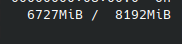
If it helps out, game is played at the regular ray tracing profile from presets, only thing changed is AMD FSR is disabled so that it runs at native resolution and fidelityFX CAS is enabled(no other setting has been changed).
EDIT3: Since my last report I have swapped out the GPU for an RTX 3090(same setup) the game still did hang with the same settings(attaching a log).
steam-952060.log
Just wanted to say that even though in this log I am using Proton-GE this same hang/crash is observed in Proton Experimental and Proton 7.0-5
I'm having trouble with constant random freezing of this title on my Steam Deck. At random points it will freeze, go to a black screen, come back (but frozen with audio still playing), and then it restarts my system. Currently running it with ProtonGE-53, but have also tried the latest Proton for the Deck.
I'm having this issue with all RE Engine titles as well.
Only reporting:
Currently, playing Resident Evil 3 Remake on PC using Proton Experimental [bleeding-edge] or GE-Proton7-50 onwards causes the game to crash immediately after starting a campaign.
Switching to the GE-Proton7-49 I got it running, so far without any problems.
Hello @JoseZancanaro, please add PROTON_LOG=1 %command% to the game's launch options, reproduce the crash with Proton Experimental, and attach the generated $HOME/steam-$APPID.log to this issue report as a file. (Proton logs compress well if needed.) Also, please copy your system information from Steam (Steam -> Help -> System Information) and put it in a gist, then include a link to the gist in this issue report.
Hello @kisak-valve, here what you requested:
Steam Launch Options
PROTON_LOG=1 LD_PRELOAD="$LD_PRELOAD:/usr/\$LIB/libgamemode.so.0" gamemoderun mangohud %command%
System information from Steam
https://gist.github.com/JoseZancanaro/acd1ba75b079a3374895e4449907fbde
First, I was already trying to find a solution by myself, and had generated the following log:
(1) steam-952060.log
I noticed the following warning line:
gamemodeauto: dlopen failed - libgamemode.so: cannot open shared object file: No such file or directory
And I managed to solve it from the third comment of this link reddit_gamemode
Later I reproduced the crash again, and got the following log:
(2) steam-952060.log
I tested with Proton Experimental [bleeding-edge] and GE-Proton7-49 (50, 51,54 and 55).
With GE-Proton7-49, I was able to play about 30 min without any problem.
@JoseZancanaro this looks like a mangohud problem to me:
../MangoHud/subprojects/imgui-1.81/imgui.cpp:7056: void ImGui::ErrorCheckNewFrameSanityChecks(): Assertion `g.IO.Fonts->Fonts[0]->IsLoaded() && "Font Atlas not built. Did you call io.Fonts->GetTexDataAsRGBA32() / GetTexDataAsAlpha8()?"' failed.
@mbriar
Indeed, i removed mangohud from steam launch options, and seems work well to the beginning of the game. Later i will try play more.
Many thanks for the help!
@JoseZancanaro I should have fixed that issue with MangoHud. Please try with the latest master. If it does not work can you please open an issue.
@gort818 Of course, I'll try to help as much as I can.
I use the AUR (more specifically YAY) to keep the mangohud and lib32-mangohud packages up to date.
I use MangoHud with GOverlay, and I can still use MangoHud normally, if I set it to 'Global Enable' by GOverlay.
So it seems to be a little problem with using mangohud through the steam launch options, here in Resident Evil 3 Remake?
If it helps then, later i will open an issue there in the MangoHud repository.
Game simply crashes randomly on arch linux using mesa 23.1.1
info:
- steam from arch repos
- drivers from arch repos
- gpu: rx 6600 xfx at stock
- steam overlay on and off dont change anything
- kde plasma wayland
- proton experimental, proton-ge, all crash
Proton-GE logs:
Proton Experimental logs:
Resident evil 3 remake is not running
Issue transferred from https://github.com/ValveSoftware/Proton/issues/8665.
@hagom posted on 2025-05-07T18:14:16:
Compatibility Report
- Name of the game with compatibility issues: Resident evil 3 remake
- Steam AppID of the game: 952060
System Information
- GPU: AMD Radeon RX 7600
- Video driver version: Mesa 25.0.4-1
- Kernel version: 6.12.25
- Link to full system information report as Gist:
- Proton version:
I confirm:
- [X] that I haven't found an existing compatibility report for this game.
- [X] that I have checked whether there are updates for my system available.
Symptoms
The game used to run without a single problem and after an update the game starts, shows a window and stays in black. The proton log says "wine client error:128: write: Invalid argument". This also happens with:
Crysis 2 remastered
Crysis 3 remastered
Hitman World of assasination
Devil May Cry 5
Resident evil 2 remake
Reproduction
This happens with latest versions of the games listed above. Just start the game and problem shows up
https://gist.github.com/hagom/72485c221101cb14f3385e5dc4c3db39
Hello @hagom, can you check if Vulkan is broken in general on your system from https://bugs.debian.org/cgi-bin/bugreport.cgi?bug=1104326?
It works with other games like battletoads and re 5 and 6
Proton versions
proton experimentalx5 2023-06ge-proton7-49x2 2023-04ge-proton7-50x1 2023-04proton 7.0-5x2 2023-01proton 6.3-5x1 2021-07proton 5.9-ge-2x3 2020-06proton 5.8-ge-2x2 2020-05proton 5.4x2 2020-04proton 5.5-ge-1x10 2020-04proton 5.6-ge-2x10 2020-04proton 5.0-6x7 2020-04proton 5.4-ge-3x6 2020-04proton 5.5x1 2020-04proton 5.4-ge-1x3 2020-04proton 5.0-5x3 2020-04
Launch options
PROTON_LOG=1x3 2023-04PROTON_USE_SECCOMPx4 2020-04PROTON_USE_SECCOMP=1x3 2020-04PROTON_USE_SECCOMP=1`x2 2020-04
Launch lines
PROTON_LOG=1 LD_PRELOAD="$LD_PRELOAD:/usr/\$LIB/libgamemode.so.0" gamemoderun mangohud %command%x1 2023-04PROTON_USE_SECCOMP=1 %command%x1 2020-04
Upstream links
- ValveSoftware/Proton/issues/8665x1 2025-05
- ValveSoftware/Proton/issues/6334x1 2022-11
DLLs
winegstreamer.dllx6 2020-06mfplat.dllx2 2020-04
Compatibility Report
System Information
I confirm:
steam-952060.zip
Symptoms
It crashes.
Reproduction
Run the game, and it happens every time.