Satisfactory
I can confirm this issue. Looking at wireshark it appears to be having issues with Epic Online Service's STUN service (possibly):

My NAT was set to "Moderate" in-game.
My steam log, nothing too useful in there I am afraid. Is there a way I can more effectively diagnose network settings, or get wine / proton to use a specific network interface to help diagnose this a bit better?
Relevant logs from game:
LogConsoleResponse: Display: Failed to find resolution value strings in scalability ini. Falling back to default.
LogPakFile: Registered encryption key '00000000000000000000000000000000': 0 pak files mounted, 0 remain pending
LogPakFile: Display: Found Pak file ../../../FactoryGame/Content/Paks/FactoryGame-WindowsNoEditor.pak attempting to mount.
LogPakFile: Display: Mounting pak file ../../../FactoryGame/Content/Paks/FactoryGame-WindowsNoEditor.pak.
LogPlatformFile: Not using cached read wrapper
LogTaskGraph: Started task graph with 4 named threads and 82 total threads with 3 sets of task threads.
LogD3D11RHI: Loaded GFSDK_Aftermath_Lib.x64.dll
LogICUInternationalization: ICU TimeZone Detection - Raw Offset: +10:00, Platform Override: ''
LogPluginManager: Mounting plugin ReplicationGraph
LogPluginManager: Mounting plugin Wwise
LogPluginManager: Mounting plugin MatineeToLevelSequence
LogPluginManager: Mounting plugin ApexDestruction
LogPluginManager: Mounting plugin BlueprintStats
LogPluginManager: Mounting plugin OnlineFramework
LogPluginManager: Mounting plugin OnlineSubsystem
LogPluginManager: Mounting plugin OnlineSubsystemUtils
LogPluginManager: Mounting plugin Composure
LogPluginManager: Mounting plugin LensDistortion
LogPluginManager: Mounting plugin BlueprintMaterialTextureNodes
LogPluginManager: Mounting plugin MediaIOFramework
LogPluginManager: Mounting plugin OpenColorIO
LogPluginManager: Mounting plugin WindowsDeviceProfileSelector
LogPluginManager: Mounting plugin SteamController
LogPluginManager: Mounting plugin RawInput
LogPluginManager: Mounting plugin MfMedia
LogPluginManager: Mounting plugin OnlineSubsystemSteam
LogPluginManager: Mounting plugin OnlineSubsystemEOS
LogPluginManager: Mounting plugin SignificanceManager
LogPluginManager: Mounting plugin PythonScriptPlugin
LogPluginManager: Mounting plugin EditorScriptingUtilities
LogPluginManager: Mounting plugin EditorTests
LogPluginManager: Mounting plugin FbxAutomationTestBuilder
LogPluginManager: Mounting plugin FunctionalTestingEditor
LogPluginManager: Mounting plugin RuntimeTests
LogPluginManager: Mounting plugin ScreenshotTools
LogPluginManager: Mounting plugin CSSEditorToolsExtension
LogPluginManager: Mounting plugin Paper2D
LogPluginManager: Mounting plugin AISupport
LogPluginManager: Mounting plugin LightPropagationVolume
LogPluginManager: Mounting plugin AnimationSharing
LogPluginManager: Mounting plugin AssetManagerEditor
LogPluginManager: Mounting plugin CryptoKeys
LogPluginManager: Mounting plugin FacialAnimation
LogPluginManager: Mounting plugin DatasmithContent
LogPluginManager: Mounting plugin VariantManagerContent
LogPluginManager: Mounting plugin AlembicImporter
LogPluginManager: Mounting plugin GeometryCache
LogPluginManager: Mounting plugin AppleImageUtils
LogPluginManager: Mounting plugin AppleVision
LogPluginManager: Mounting plugin BackChannel
LogPluginManager: Mounting plugin CharacterAI
LogPluginManager: Mounting plugin ImgMedia
LogPluginManager: Mounting plugin LinearTimecode
LogPluginManager: Mounting plugin MediaCompositing
LogPluginManager: Mounting plugin WmfMedia
LogPluginManager: Mounting plugin TcpMessaging
LogPluginManager: Mounting plugin UdpMessaging
LogPluginManager: Mounting plugin ActorSequence
LogPluginManager: Mounting plugin NetcodeUnitTest
LogPluginManager: Mounting plugin OnlineSubsystemNull
LogPluginManager: Mounting plugin LauncherChunkInstaller
LogPluginManager: Mounting plugin AudioCapture
LogPluginManager: Mounting plugin CableComponent
LogPluginManager: Mounting plugin CustomMeshComponent
LogPluginManager: Mounting plugin EditableMesh
LogPluginManager: Mounting plugin ExampleDeviceProfileSelector
LogPluginManager: Mounting plugin PhysXVehicles
LogPluginManager: Mounting plugin ProceduralMeshComponent
LogPluginManager: Mounting plugin RuntimePhysXCooking
LogPluginManager: Mounting plugin WebMMoviePlayer
LogPluginManager: Mounting plugin WebMMedia
LogPluginManager: Mounting plugin WindowsMoviePlayer
LogInit: Using libcurl 7.55.1-DEV
LogInit:  - built for x86_64-pc-win32
LogInit:  - supports SSL with OpenSSL/1.1.1
LogInit:  - supports HTTP deflate (compression) using libz 1.2.8
LogInit:  - other features:
LogInit:      CURL_VERSION_SSL
LogInit:      CURL_VERSION_LIBZ
LogInit:      CURL_VERSION_IPV6
LogInit:      CURL_VERSION_ASYNCHDNS
LogInit:      CURL_VERSION_LARGEFILE
LogInit:      CURL_VERSION_IDN
LogInit:  CurlRequestOptions (configurable via config and command line):
LogInit:  - bVerifyPeer = true  - Libcurl will verify peer certificate
LogInit:  - bUseHttpProxy = false  - Libcurl will NOT use HTTP proxy
LogInit:  - bDontReuseConnections = false  - Libcurl will reuse connections
LogInit:  - MaxHostConnections = 16  - Libcurl will limit the number of connections to a host
LogInit:  - LocalHostAddr = Default
LogInit:  - BufferSize = 65536
LogInit: WinSock: version 1.1 (2.2), MaxSocks=128, MaxUdp=1024
LogOnline: Warning: OSS: Setting up user cache directory: C:/users/steamuser/My Documents/CacheDirectory
LogOnline: Display: STEAM: Loading Steam SDK 1.39
LogOnline: STEAM: Steam User is subscribed 1
LogOnline: STEAM: [AppId: 526870] Client API initialized 1
LogOnline: STEAM: [AppId: 526870] Game Server API initialized 1
LogOnline: STEAM: Missing P2PCleanupTimeout key in OnlineSubsystemSteam of DefaultEngine.ini, using default
LogInit: Build: ++FactoryGame+rel-main-0.3.5-CL-124233
LogInit: Engine Version: 4.22.3-124233+++FactoryGame+rel-main-0.3.5
LogInit: Compatible Engine Version: 4.22.0-5660361+++FactoryGame+rel-main-0.3.5
LogInit: Net CL: 5660361
LogInit: OS: Windows 7 (Service Pack 1), CPU: AMD Ryzen Threadripper 2950X 16-Core Processor , GPU: NVIDIA-0
LogInit: Compiled (64-bit): Jun  4 2020 11:58:19
LogInit: Compiled with Visual C++: 19.16.27038.00
LogInit: Build Configuration: Shipping
LogInit: Branch Name: ++FactoryGame+rel-main-0.3.5
LogInit: Command Line:  -NO_EOS_OVERLAY -NOSPLASH LOG=GAME.LOG.TXT
LogInit: Base Directory: Z:/home/tmcbride/.local/share/Steam/steamapps/common/Satisfactory/FactoryGame/Binaries/Win64/
LogInit: Installed Engine Build: 1
LogInit: Launcher File: Z:/home/tmcbride/.local/share/Steam/steamapps/common/Satisfactory/launcher_id
LogInit: Launcher ID: steam
LogInit: Presizing for max 2097152 objects, including 1 objects not considered by GC, pre-allocating 0 bytes for permanent pool.
LogStreaming: Display: Async Loading initialized: Event Driven Loader: true, Async Loading Thread: true, Async Post Load: true
LogInit: Object subsystem initialized
...
...
[2020.06.11-02.18.43:078][758]LogWorld: Bringing World /Game/FactoryGame/Map/MenuScenes/MenuScene_02.MenuScene_02 up for play (max tick rate 0) at 2020.06.11-12.18.43
[2020.06.11-02.18.43:081][758]LogWorld: Bringing up level for play took: 0.004116
[2020.06.11-02.18.43:082][758]LogGame: Warning: Player start 'PlayerStart_2' has no tag.
[2020.06.11-02.18.43:083][758]LogGameMode: Display: Match State Changed from EnteringMap to WaitingToStart
[2020.06.11-02.18.43:083][758]LogGameState: Match State Changed from EnteringMap to WaitingToStart
[2020.06.11-02.18.43:083][758]LogGameMode: Display: Match State Changed from WaitingToStart to InProgress
[2020.06.11-02.18.43:140][758]LogConfig: Error: Unidentified category type
[2020.06.11-02.18.43:165][758]LogGameState: Match State Changed from WaitingToStart to InProgress
[2020.06.11-02.18.43:166][758]LogLoad: Took 1.881538 seconds to LoadMap(/Game/FactoryGame/Map/MenuScenes/MenuScene_02)
[2020.06.11-02.18.43:184][758]LogUObjectHash: Compacting FUObjectHashTables data took  11.60ms
[2020.06.11-02.18.43:217][758]LogSlate: FSceneViewport::OnFocusLost() reason 2
[2020.06.11-02.18.44:314][760]LogOnlineIdentity: OSS: Presence update notification
[2020.06.11-02.18.44:314][760]LogOnlineIdentity: OSS: The presence udpate was for an unmapeed user...
[2020.06.11-02.18.44:597][777]LogOnlineIdentity: OSS: Presence update notification
[2020.06.11-02.18.44:597][777]LogOnlineIdentity: OSS: The presence udpate was for an unmapeed user...
[2020.06.11-02.18.52:148][226]LogSlate: FSceneViewport::OnFocusLost() reason 0
[2020.06.11-02.18.53:789][321]LogSlate: FSceneViewport::OnFocusLost() reason 2
[2020.06.11-02.18.59:193][637]LogOnlineIdentity: OSS: Presence update notification
[2020.06.11-02.18.59:193][637]LogOnlineIdentity: OSS: The presence udpate was for an unmapeed user...
[2020.06.11-02.19.00:231][693]LogGame: Warning: QuerySessionByID with ID: dorkfusionad2525bb691937#BCF.
[2020.06.11-02.19.00:231][693]LogOnlineSession: OSS: EOS-OSS: FindSessions
[2020.06.11-02.19.03:535][887]LogGame: Warning: QuerySessionByID with ID: found a session
[2020.06.11-02.19.05:077][974]LogGame: Warning: Comparing Game Versions: They were the same: Others Version: ++FactoryGame+rel-main-0.3.5-CL-124233, this version: ++FactoryGame+rel-main-0.3.5-CL-124233
[2020.06.11-02.19.05:376][989]LogGameMode: Display: Match State Changed from InProgress to LeavingMap
[2020.06.11-02.19.05:376][989]LogGameState: Match State Changed from InProgress to LeavingMap
[2020.06.11-02.19.05:376][989]LogNet: Browse: EOS.0002aee5c4d448d28d8b18e3a0b15272faf4fc2759bb4792a19e9d37428a7429//Game/FactoryGame/Map/MenuScenes/MenuScene_02
[2020.06.11-02.19.05:377][989]PacketHandlerLog: Loaded PacketHandler component: Engine.EngineHandlerComponentFactory (StatelessConnectHandlerComponent)
[2020.06.11-02.19.05:683][  6]LogOnlineIdentity: OSS: Presence update notification
[2020.06.11-02.19.05:683][  6]LogOnlineIdentity: OSS: The presence udpate was for an unmapeed user...
[2020.06.11-02.19.20:666][865]LogOnlineIdentity: OSS: Presence update notification
[2020.06.11-02.19.20:666][865]LogOnlineIdentity: OSS: The presence udpate was for an unmapeed user...
[2020.06.11-02.19.23:620][ 42]LogSocketSubsystemEOS: EOSSDK::OnRemoteConnectionClosedCb 0x00000000005EE170
[2020.06.11-02.19.23:620][ 42]LogSocketSubsystemEOS: Connection closed from 0002aee5c4d448d28d8b18e3a0b15272, with reason EOS_CCR_ClosedByPeer
[2020.06.11-02.19.35:690][747]LogOnlineIdentity: OSS: Presence update notification
[2020.06.11-02.19.35:690][747]LogOnlineIdentity: OSS: The presence udpate was for an unmapeed user...
[2020.06.11-02.19.42:741][167]LogSocketSubsystemEOS: EOSSDK::OnRemoteConnectionClosedCb 0x00000000005EE170
[2020.06.11-02.19.42:741][167]LogSocketSubsystemEOS: Connection closed from 0002aee5c4d448d28d8b18e3a0b15272, with reason EOS_CCR_ClosedByPeer
[2020.06.11-02.19.50:717][627]LogOnlineIdentity: OSS: Presence update notification
[2020.06.11-02.19.50:717][627]LogOnlineIdentity: OSS: The presence udpate was for an unmapeed user...
[2020.06.11-02.20.01:952][275]LogSocketSubsystemEOS: EOSSDK::OnRemoteConnectionClosedCb 0x00000000005EE170
[2020.06.11-02.20.01:952][275]LogSocketSubsystemEOS: Connection closed from 0002aee5c4d448d28d8b18e3a0b15272, with reason EOS_CCR_ClosedByPeer
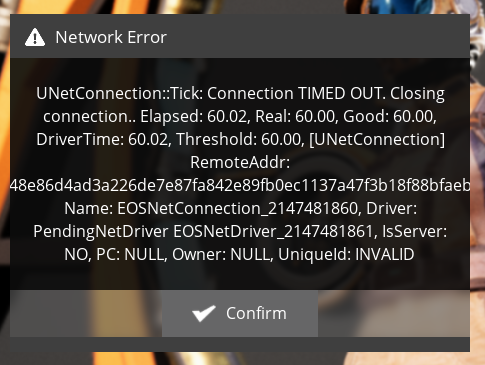
[2020.06.11-02.20.05:409][475]LogNet: Warning: UNetConnection::Tick: Connection TIMED OUT. Closing connection.. Elapsed: 60.03, Real: 60.00, Good: 60.00, DriverTime: 60.03, Threshold: 60.00, [UNetConnection] RemoteAddr: EOS.0002aee5c4d448d28d8b18e3a0b15272faf4fc2759bb4792a19e9d37428a7429:7777, Name: EOSNetConnection_0, Driver: PendingNetDriver EOSNetDriver_1, IsServer: NO, PC: NULL, Owner: NULL, UniqueId: INVALID
[2020.06.11-02.20.05:410][475]LogNet: Warning: Network Failure: PendingNetDriver[ConnectionTimeout]: UNetConnection::Tick: Connection TIMED OUT. Closing connection.. Elapsed: 60.03, Real: 60.00, Good: 60.00, DriverTime: 60.03, Threshold: 60.00, [UNetConnection] RemoteAddr: EOS.0002aee5c4d448d28d8b18e3a0b15272faf4fc2759bb4792a19e9d37428a7429:7777, Name: EOSNetConnection_0, Driver: PendingNetDriver EOSNetDriver_1, IsServer: NO, PC: NULL, Owner: NULL, UniqueId: INVALID
[2020.06.11-02.20.05:410][475]LogGame: Error: Network Error Recived: Type: 1121122136, MSG: UNetConnection::Tick: Connection TIMED OUT. Closing connection.. Elapsed: 60.03, Real: 60.00, Good: 60.00, DriverTime: 60.03, Threshold: 60.00, [UNetConnection] RemoteAddr: EOS.0002aee5c4d448d28d8b18e3a0b15272faf4fc2759bb4792a19e9d37428a7429:7777, Name: EOSNetConnection_0, Driver: PendingNetDriver EOSNetDriver_1, IsServer: NO, PC: NULL, Owner: NULL, UniqueId: INVALID
[2020.06.11-02.20.05:410][475]LogNet: NetworkFailure: ConnectionTimeout, Error: 'UNetConnection::Tick: Connection TIMED OUT. Closing connection.. Elapsed: 60.03, Real: 60.00, Good: 60.00, DriverTime: 60.03, Threshold: 60.00, [UNetConnection] RemoteAddr: EOS.0002aee5c4d448d28d8b18e3a0b15272faf4fc2759bb4792a19e9d37428a7429:7777, Name: EOSNetConnection_0, Driver: PendingNetDriver EOSNetDriver_1, IsServer: NO, PC: NULL, Owner: NULL, UniqueId: INVALID'
[2020.06.11-02.20.05:410][475]LogGameMode: Display: Match State Changed from LeavingMap to Aborted
[2020.06.11-02.20.05:410][475]LogGameState: Match State Changed from LeavingMap to Aborted
[2020.06.11-02.20.05:410][475]LogOnline: Error: OSS: EOS-OSS: EOS_PresenceModification_SetData() failed with result code (EOS_Presence_DataLengthInvalid)
[2020.06.11-02.20.05:410][475]LogNet: UNetConnection::Close: [UNetConnection] RemoteAddr: EOS.0002aee5c4d448d28d8b18e3a0b15272faf4fc2759bb4792a19e9d37428a7429:7777, Name: EOSNetConnection_0, Driver: PendingNetDriver EOSNetDriver_1, IsServer: NO, PC: NULL, Owner: NULL, UniqueId: INVALID, Channels: 2, Time: 2020.06.11-02.20.05
[2020.06.11-02.20.05:411][475]LogNet: UChannel::Close: Sending CloseBunch. ChIndex == 0. Name: [UChannel] ChIndex: 0, Closing: 0 [UNetConnection] RemoteAddr: EOS.0002aee5c4d448d28d8b18e3a0b15272faf4fc2759bb4792a19e9d37428a7429:7777, Name: EOSNetConnection_0, Driver: PendingNetDriver EOSNetDriver_1, IsServer: NO, PC: NULL, Owner: NULL, UniqueId: INVALID
[2020.06.11-02.20.05:425][476]LogGameMode: Display: Match State Changed from Aborted to LeavingMap
[2020.06.11-02.20.05:425][476]LogGameState: Match State Changed from Aborted to LeavingMap
[2020.06.11-02.20.05:426][476]LogNet: Browse: /Game/FactoryGame/Map/MenuScenes/MenuScene_02?closed
[2020.06.11-02.20.05:426][476]LogNet: DestroyNamedNetDriver EOSNetDriver_1 [PendingNetDriver]
[2020.06.11-02.20.05:426][476]LogSocketSubsystemEOS: EOSSDK::OnRemoteConnectionClosedCb 0x00000000005EDCD0
[2020.06.11-02.20.05:426][476]LogSocketSubsystemEOS: Connection closed from 0002aee5c4d448d28d8b18e3a0b15272, with reason EOS_CCR_ClosedByLocalUser
[2020.06.11-02.20.05:426][476]LogExit: PendingNetDriver EOSNetDriver_1 shut down
[2020.06.11-02.20.05:426][476]LogNet: Connection failed; returning to Entry
[2020.06.11-02.20.05:437][476]LogLoad: LoadMap: /Game/FactoryGame/Map/MenuScenes/MenuScene_02?closed
[2020.06.11-02.20.05:456][476]LogNet: UChannel::CleanUp: ChIndex == 0. Closing connection. [UChannel] ChIndex: 0, Closing: 0 [UNetConnection] RemoteAddr: EOS.0002aee5c4d448d28d8b18e3a0b15272faf4fc2759bb4792a19e9d37428a7429:7777, Name: EOSNetConnection_0, Driver: PendingNetDriver EOSNetDriver_1, IsServer: NO, PC: NULL, Owner: NULL, UniqueId: INVALID
[2020.06.11-02.20.05:460][476]LogNet: UNetConnection::PendingConnectionLost. [UNetConnection] RemoteAddr: EOS.0002aee5c4d448d28d8b18e3a0b15272faf4fc2759bb4792a19e9d37428a7429:7777, Name: None, Driver: PendingNetDriver None, IsServer: YES, PC: NULL, Owner: NULL, UniqueId: INVALID bPendingDestroy=0
[2020.06.11-02.20.05:480][476]LogUObjectHash: Compacting FUObjectHashTables data took  10.99ms
[2020.06.11-02.20.05:487][476]LogStreaming: Display: Flushing async loaders.
[2020.06.11-02.20.05:562][476]LogAIModule: Creating AISystem for world MenuScene_02
[2020.06.11-02.20.05:646][476]LogLoad: Game class is 'BP_GameModeMenu_C'
[2020.06.11-02.20.05:653][476]LogWorld: Bringing World /Game/FactoryGame/Map/MenuScenes/MenuScene_02.MenuScene_02 up for play (max tick rate 0) at 2020.06.11-12.20.05
[2020.06.11-02.20.05:654][476]LogWorld: Bringing up level for play took: 0.002260
...
...
[2020.06.11-02.20.22:313][122]LogExit: Exiting.
[2020.06.11-02.20.22:325][122]Log file closed, 06/11/20 12:20:22
Tested with Proton 5.0-9 and 4.11-13. Tested the Epic Games version through Proton as well, which used to work in multiplayer. Same issue across the board on two different Ubuntu 18.04.4 boxes. Whatever they did upto the Steam release broke multiplayer under Proton.
When you were testing the steam version, did you also do the steam connection to EOS instead of the steam to epic account linking?
I wonder if the steam to epic account link would work better in case there is something being lost in translation between steam proton and the epic online service communication framework.
But this would be difficult to test because I would need to open a ticket with the satisfactory in manually adjust my account.
When you were testing the steam version, did you also do the steam connection to EOS instead of the steam to epic account linking?
I chose the option on the right, linking both accounts so I can see both Epic and Steam friends online in-game.
Can confirm, the exact same error in wireshark with STUN and epic
I get the same error message, but only if the target server/session is running inside Proton as well. If I connect from my Proton client to a Satisfactory session running on windows, it works.
I get the same error message, but only if the target server/session is running inside Proton as well. If I connect from my Proton client to a Satisfactory session running on windows, it works.
Could you do a network trace of a working join and compare it with one that failed?
@JackTemaki in the case in which it works vs doesnt, does the account change? Like does the host that work not have an account linked to epic and the host that doesnt work have its account linked to epic?
I am also experiencing this, my (linux) account is not linked to an epic account, but the host (windows) account is
I've tried with and without being logged into an Epic account (on the steam version of the game) and neither seem to work. Will post network trace comparison shortly.
Game log files, joining the same session on Windows (VM) successfully vs Proton unsuccessfully. These files can be produced by turning up network logging verbosity by appending the following lines to Saved/Config/WindowsNoEditor/Game.ini:
[Core.Log]
LogOnline=All
LogOnlineGame=All
You can specify the location of your log file by adding LOG=[your-log-file-name].txt to your launch options, and it will create it relative to Saved/Logs.
@JackTemaki in the case in which it works vs doesnt, does the account change? Like does the host that work not have an account linked to epic and the host that doesnt work have its account linked to epic?
No, in both cases we did not link to an (explicit, only the interal dummy) epic account, on neither the server nor the client side.
I had the same problem. It seems to be somehow related to the fact that there are multiple network interfaces. When I remove all network interfaces except the one used for connecting to the internet, multiplayer works.
@steffen-kiess Can you provide more details on how to perform this workaround?
There seems to be no request under the proton with CreatePermission
Windows:

Proton:

I had the same problem. It seems to be somehow related to the fact that there are multiple network interfaces. When I remove all network interfaces except the one used for connecting to the internet, multiplayer works.
Thanks for this observation, I'll try this out.
When I remove all network interfaces except the one used for connecting to the internet, multiplayer works
This is not desirable considering that many here would use some form or another of VM (virtualbox, VMWare, etc). So removing network interfaces is a major pain in the you know where.
What would be desirable is an environment var to force an interface to be used only.
Would it be possible to run a command prior to FactoryGame.exe that sets the primary interface as shown in this forum post? https://forum.winehq.org/viewtopic.php?p=1363#p1363
Edit: Never mind, that's using the linux route command!
My friend and I have been troubleshooting this on and off for two days. Try this command in linux:
sudo virsh net-destroy default
He did that, and i was able to connect to his game instantly.
He did that, and i was able to connect to his game instantly.
I have docker installed and a virsh interface for my Windows VM, I am guessing I'd need to remove all of these to test.
To be honest with you I have no idea
He did that, and i was able to connect to his game instantly.
I have docker installed and a virsh interface for my Windows VM, I am guessing I'd need to remove all of these to test.
To be honest with you I have no idea. We just started another session and I was able to connect again.
I am going to test shutting all of my interfaces and connecting to a game. likely wont be able to get to it for a couple hours however.
I am going to test shutting all of my interfaces and connecting to a game. likely wont be able to get to it for a couple hours however.
Using the method I recommended, it worked perfectly as soon as we ran the command. It appears the code is forcing use of a virtual network interface as the default. If you destroy it, all is well. The command my friend used is in my initial post
I am going to test shutting all of my interfaces and connecting to a game. likely wont be able to get to it for a couple hours however.
Using the method I recommended, it worked perfectly as soon as we ran the command. It appears the code is forcing use of a virtual network interface as the default. If you destroy it, all is well. The command my friend used is in my initial post
The virtual network interfaces (Hamachi in this particular case) were also the issue for us, after removing them everything worked fine.
For VMware, as root;
vmware-networks --stop.
You can later re-enable with vmware-networks --start
This is still not a proper solution - there still needs to be a way for wine/proton to force bind to a network interface.
Disabling network interfaces is lipstick on a pig.
@steffen-kiess Can you provide more details on how to perform this workaround?
You can list the interfaces with ip a and then use e.g. ip link set dev virbr0 down to disable the interface virbr0. (You can use ip link set dev virbr0 up to enable it again.) You probably should disable every interface which is listed as UP and has an IPv4 address except lo and the interface you need for network access.
I need my other interfaces, unfortunately. No wine trickery possible to get around this?
I need my other interfaces, unfortunately. No wine trickery possible to get around this?
You can use namespaces to launch Steam with a single network interface. Change IP_SUBNET if you already have the same and USER_NAME_TO_RUN_STEAM. Check net.ipv4.ip_forward, if you don't need to change it.
Script example:
#!/bin/bash
USER_NAME_TO_RUN_STEAM="YourUser"
IP_SUBNET="10.10.10"
sudo ip netns add steam_ns
sudo ip netns exec steam_ns ip addr add 127.0.0.1/8 dev lo
sudo ip netns exec steam_ns ip link set lo up
sudo ip link add steam_ns0 type veth peer name steam_ns1
sudo ip link set steam_ns0 up
sudo ip link set steam_ns1 netns steam_ns up
sudo ip addr add $IP_SUBNET.1/24 dev steam_ns0
sudo ip netns exec steam_ns ip addr add $IP_SUBNET.2/24 dev steam_ns1
sudo ip netns exec steam_ns ip route add default via $IP_SUBNET.1 dev steam_ns1
sudo iptables -A INPUT ! -i steam_ns0 -s $IP_SUBNET.0/24 -j DROP
sudo iptables -t nat -A POSTROUTING -s $IP_SUBNET.0/24 -o en+ -j MASQUERADE
sudo sysctl -q net.ipv4.ip_forward=1
sudo mkdir -p /etc/netns/steam_ns
echo "nameserver 8.8.8.8" | sudo tee /etc/netns/steam_ns/resolv.conf
sudo ip netns exec steam_ns su - $USER_NAME_TO_RUN_STEAM -c "DISPLAY=:0 steam"
sudo ip netns pids steam_ns | xargs -rd'\n' sudo kill
sudo rm -rf /etc/netns/steam_ns
sudo sysctl -q net.ipv4.ip_forward=0
sudo iptables -D INPUT ! -i steam_ns0 -s $IP_SUBNET.0/24 -j DROP
sudo iptables -t nat -D POSTROUTING -s $IP_SUBNET.0/24 -o en+ -j MASQUERADE
sudo ip link del steam_ns0
sudo ip netns delete steam_ns
Reporting back that shutting all other interfaces than your internet and loopback will allow you to play Satisfactory multiplayer without issues.
For now I have a workaround. huzzah!
Thank you all for the help.
You can use namespaces to launch Steam with a single network interface. Change IP_SUBNET if you already have the same and USER_NAME_TO_RUN_STEAM. Check net.ipv4.ip_forward, if you don't need to change it.
You absolute champion, thanks!
Thanks, removing the virt-manager network interface via 'sudo virsh net-destroy default' did the trick for me!
This finally did the trick. I had to ifconfig down my other interfaces (docker0, wifi) and then I was able to join other games without problems.
(Though I still needed to have ports 50000-65000 forwarded to host)
Neither this suggestion (link to my own gist here), nor this one worked for me (see below copy/paste).
My system's details
$ ip addr
$ ip addr
[2020-07-11 13:38:43] 0 x10an14@x10-desktop:~
-> $ ip addr
1: lo: <LOOPBACK,UP,LOWER_UP> mtu 65536 qdisc noqueue state UNKNOWN group default qlen 1000
    link/loopback 00:00:00:00:00:00 brd 00:00:00:00:00:00
    inet 127.0.0.1/8 scope host lo
       valid_lft forever preferred_lft forever
    inet6 ::1/128 scope host
       valid_lft forever preferred_lft forever
2: enp42s0: <BROADCAST,MULTICAST,UP,LOWER_UP> mtu 1500 qdisc mq state UP group default qlen 1000
    link/ether 70:85:c2:83:67:04 brd ff:ff:ff:ff:ff:ff
    inet 192.168.14.4/24 brd 192.168.14.255 scope global dynamic enp42s0
       valid_lft 85296sec preferred_lft 85296sec
    inet6 fe80::7285:c2ff:fe83:6704/64 scope link
       valid_lft forever preferred_lft forever
3: enp45s0: <NO-CARRIER,BROADCAST,MULTICAST,UP> mtu 1500 qdisc mq state DOWN group default qlen 1000
    link/ether 70:85:c2:83:67:02 brd ff:ff:ff:ff:ff:ff
4: wlp39s0: <BROADCAST,MULTICAST> mtu 1500 qdisc noop state DOWN group default qlen 1000
    link/ether 94:b8:6d:2e:c9:a8 brd ff:ff:ff:ff:ff:ff
5: br-223757ae9ac0: <NO-CARRIER,BROADCAST,MULTICAST,UP> mtu 1500 qdisc noqueue state DOWN group default
    link/ether 02:42:1f:24:62:22 brd ff:ff:ff:ff:ff:ff
    inet 172.18.0.1/16 brd 172.18.255.255 scope global br-223757ae9ac0
       valid_lft forever preferred_lft forever
6: docker0: <NO-CARRIER,BROADCAST,MULTICAST,UP> mtu 1500 qdisc noqueue state DOWN group default
    link/ether 02:42:87:e1:1a:64 brd ff:ff:ff:ff:ff:ff
    inet 172.17.0.1/16 brd 172.17.255.255 scope global docker0
       valid_lft forever preferred_lft forever
[2020-07-11 13:41:47] 0 x10an14@x10-desktop:~
-> $
I'm on;
$ lsb_release -a
$ uname -a
$ lsb_release -a
$ uname -a
[2020-07-11 13:41:47] 0 x10an14@x10-desktop:~
-> $ lsb_release -a
No LSB modules are available.
Distributor ID:	Debian
Description:	Debian GNU/Linux 10 (buster)
Release:	10
Codename:	buster
[2020-07-11 13:42:26] 0 x10an14@x10-desktop:~
-> $ uname -a
Linux x10-desktop 4.19.0-9-amd64 #1 SMP Debian 4.19.118-2+deb10u1 (2020-06-07) x86_64 GNU/Linux
[2020-07-11 13:42:32] 0 x10an14@x10-desktop:~
-> $
(Hopefully relevant) Excerpted error messages from `FactoryGame-*.log`
[448]LogNet: Browse: EOS.00020fe2d4014e23a343a18773216d32e330c946493e4476ba5dfb4d82dfbfce//Game/FactoryGame/Map/MenuScenes/MenuScene_02
[448]PacketHandlerLog: Loaded PacketHandler component: Engine.EngineHandlerComponentFactory (StatelessConnectHandlerComponent)
[ 36]LogSocketSubsystemEOS: EOSSDK::OnRemoteConnectionClosedCb 0x00000000005FE3E0
[ 36]LogSocketSubsystemEOS: Connection closed from 00020fe2d4014e23a343a18773216d32, with reason EOS_CCR_ClosedByPeer
[636]LogSocketSubsystemEOS: EOSSDK::OnRemoteConnectionClosedCb 0x00000000005FE3E0
[636]LogSocketSubsystemEOS: Connection closed from 00020fe2d4014e23a343a18773216d32, with reason EOS_CCR_ClosedByPeer
[235]LogSocketSubsystemEOS: EOSSDK::OnRemoteConnectionClosedCb 0x00000000005FE3E0
[235]LogSocketSubsystemEOS: Connection closed from 00020fe2d4014e23a343a18773216d32, with reason EOS_CCR_ClosedByPeer
[317]LogSlate: FSceneViewport::OnFocusLost() reason 0
[669]LogNet: Warning: UNetConnection::Tick: Connection TIMED OUT. Closing connection.. Elapsed: 60.05, Real: 60.02, Good: 60.02, DriverTime: 60.05, Threshold: 60.00, [UNetConnection] RemoteAddr: EOS.00020fe2d4014e23a343a18773216d32e330c946493e4476ba5dfb4d82dfbfce:7777, Name: EOSNetConnection_0, Driver: PendingNetDriver EOSNetDriver_0, IsServer: NO, PC: NULL, Owner: NULL, UniqueId: INVALID
[669]LogNet: Warning: Network Failure: PendingNetDriver[ConnectionTimeout]: UNetConnection::Tick: Connection TIMED OUT. Closing connection.. Elapsed: 60.05, Real: 60.02, Good: 60.02, DriverTime: 60.05, Threshold: 60.00, [UNetConnection] RemoteAddr: EOS.00020fe2d4014e23a343a18773216d32e330c946493e4476ba5dfb4d82dfbfce:7777, Name: EOSNetConnection_0, Driver: PendingNetDriver EOSNetDriver_0, IsServer: NO, PC: NULL, Owner: NULL, UniqueId: INVALID
[669]LogGame: Error: Network Error Recived: Type: 1121126232, MSG: UNetConnection::Tick: Connection TIMED OUT. Closing connection.. Elapsed: 60.05, Real: 60.02, Good: 60.02, DriverTime: 60.05, Threshold: 60.00, [UNetConnection] RemoteAddr: EOS.00020fe2d4014e23a343a18773216d32e330c946493e4476ba5dfb4d82dfbfce:7777, Name: EOSNetConnection_0, Driver: PendingNetDriver EOSNetDriver_0, IsServer: NO, PC: NULL, Owner: NULL, UniqueId: INVALID
[669]LogNet: NetworkFailure: ConnectionTimeout, Error: 'UNetConnection::Tick: Connection TIMED OUT. Closing connection.. Elapsed: 60.05, Real: 60.02, Good: 60.02, DriverTime: 60.05, Threshold: 60.00, [UNetConnection] RemoteAddr: EOS.00020fe2d4014e23a343a18773216d32e330c946493e4476ba5dfb4d82dfbfce:7777, Name: EOSNetConnection_0, Driver: PendingNetDriver EOSNetDriver_0, IsServer: NO, PC: NULL, Owner: NULL, UniqueId: INVALID'
Request
Does any kind, samaritan soul have any suggestion on how to debug this further?
It's the "Timeout"/"Connection not found" error I get in-game when trying to connect to friends (on Windows), or they try to connect to me.
EDIT: Added headings, and an older error log of the same error.
EDIT2: Clean-up after Valve's edit - whose edit made the post more digestible =).
This did work, however that required both taking down my VMs and my VPN. Those interfaces were completely gone not shutdown, which may have played a part. (When I did this, I only had lo, enp10s0, enp15s0, enp0s31f6, and wlp9s0.
This other solution which I far preferred doesn't really translate over to firewalld sadly, even with the iptables input mode.
My system details
$ ip a
1: lo: <LOOPBACK,UP,LOWER_UP> mtu 65536 qdisc noqueue state UNKNOWN group default qlen 1000
    link/loopback 00:00:00:00:00:00 brd 00:00:00:00:00:00
    inet 127.0.0.1/8 scope host lo
       valid_lft forever preferred_lft forever
    inet6 ::1/128 scope host
       valid_lft forever preferred_lft forever
2: enp10s0: <BROADCAST,MULTICAST,UP,LOWER_UP> mtu 1500 qdisc mq state UP group default qlen 1000
    link/ether [BLOCKED] brd ff:ff:ff:ff:ff:ff
    inet [BLOCKED] brd [BLOCKED] scope global dynamic noprefixroute enp10s0
       valid_lft 2538413sec preferred_lft 2538413sec
    inet6 [BLOCKED] scope link noprefixroute
       valid_lft forever preferred_lft forever
3: enp15s0: <NO-CARRIER,BROADCAST,MULTICAST,UP> mtu 1500 qdisc mq state DOWN group default qlen 1000
    link/ether [BLOCKED] brd ff:ff:ff:ff:ff:ff
4: enp0s31f6: <NO-CARRIER,BROADCAST,MULTICAST,UP> mtu 1500 qdisc fq_codel state DOWN group default qlen 1000
    link/ether [BLOCKED] brd ff:ff:ff:ff:ff:ff
5: wlp9s0: <NO-CARRIER,BROADCAST,MULTICAST,UP> mtu 1500 qdisc noqueue state DOWN group default qlen 1000
    link/ether [BLOCKED] brd ff:ff:ff:ff:ff:ff permaddr [BLOCKED]
6: tun0: <POINTOPOINT,MULTICAST,NOARP,UP,LOWER_UP> mtu 1380 qdisc fq_codel state UNKNOWN group default qlen 500
    link/none
    inet [BLOCKED] scope global tun0
       valid_lft forever preferred_lft forever
    inet6 [BLOCKED] scope global
       valid_lft forever preferred_lft forever
    inet6 [BLOCKED] scope link stable-privacy
       valid_lft forever preferred_lft forever
7: vmnet1: <BROADCAST,MULTICAST,UP,LOWER_UP> mtu 1500 qdisc fq_codel state UNKNOWN group default qlen 1000
    link/ether 00:50:56:c0:00:01 brd ff:ff:ff:ff:ff:ff
    inet 172.16.206.1/24 brd 172.16.206.255 scope global vmnet1
       valid_lft forever preferred_lft forever
    inet6 fe80::250:56ff:fec0:1/64 scope link
       valid_lft forever preferred_lft forever
8: vmnet8: <BROADCAST,MULTICAST,UP,LOWER_UP> mtu 1500 qdisc fq_codel state UNKNOWN group default qlen 1000
    link/ether 00:50:56:c0:00:08 brd ff:ff:ff:ff:ff:ff
    inet 192.168.237.1/24 brd 192.168.237.255 scope global vmnet8
       valid_lft forever preferred_lft forever
    inet6 fe80::250:56ff:fec0:8/64 scope link
       valid_lft forever preferred_lft forever
$ lsb_release -a
LSB Version:	:core-4.1-amd64:core-4.1-noarch
Distributor ID:	Fedora
Description:	Fedora release 32 (Thirty Two)
Release:	32
Codename:	ThirtyTwo
$ uname -a
Linux neodymium 5.7.8-200.fc32.x86_64 #1 SMP Thu Jul 9 14:34:51 UTC 2020 x86_64 x86_64 x86_64 GNU/Linux
With Proton 5.0-9 it's crashing on startup?
wine: Unhandled page fault on execute access to 0000000000000000 at address 0000000000000000 (thread 0208), starting debugger...
steam-526870_proton_5_0_9.log
The good news is Proton 4.11-13 seems to work okay.
steam-526870_proton_4_11_13.log
Not sure if this is the correct place for this to go or if it should be a separate compatibility report issue? I've not been able to find any similar reports online...
- GPU: Vega 64
- Driver/LLVM version: Mesa 20.1.4, LLVM 10.0.0 (kisak-mesa)
- Kernel version: 5.4.0-42-generic x86_64
- Proton version: 5.0-9
- steam_system_info.txt
Hello @dbrookes96, it looks like there's some old vulkan icd files in /etc/vulkan/icd.d/. Please verify that no packages own them and move/remove them, then retest the game with Proton 5.0.
daniel@OctoLinux:/etc/vulkan/icd.d$ dpkg -S *
mesa-vulkan-drivers:i386: /usr/share/vulkan/icd.d/intel_icd.i686.json
libgl1-mesa-dri:i386: /etc/vulkan/icd.d/intel_icd.i686.json
libgl1-mesa-dri:amd64: /etc/vulkan/icd.d/intel_icd.x86_64.json
mesa-vulkan-drivers:amd64: /usr/share/vulkan/icd.d/intel_icd.x86_64.json
libgl1-mesa-dri:i386: /etc/vulkan/icd.d/radeon_icd.i686.json
mesa-vulkan-drivers:i386: /usr/share/vulkan/icd.d/radeon_icd.i686.json
libgl1-mesa-dri:amd64: /etc/vulkan/icd.d/radeon_icd.x86_64.json
mesa-vulkan-drivers:amd64: /usr/share/vulkan/icd.d/radeon_icd.x86_64.json
daniel@OctoLinux:/etc/vulkan/icd.d$ ls -lH
total 16
-rw-r--r-- 1 root root 161 Sep  5  2017 intel_icd.i686.json
-rw-r--r-- 1 root root 163 Sep  5  2017 intel_icd.x86_64.json
-rw-r--r-- 1 root root 161 Nov 29  2016 radeon_icd.i686.json
-rw-r--r-- 1 root root 163 Nov 29  2016 radeon_icd.x86_64.json
daniel@OctoLinux:/usr/share/vulkan/icd.d$ ls -lH
total 16
-rw-r--r-- 1 root root 161 Jul 23 06:51 intel_icd.i686.json
-rw-r--r-- 1 root root 163 Jul 23 06:51 intel_icd.x86_64.json
-rw-r--r-- 1 root root 162 Jul 23 06:51 radeon_icd.i686.json
-rw-r--r-- 1 root root 164 Jul 23 06:51 radeon_icd.x86_64.json
I removed the files in /etc/vulkan/icd.d and reinstalled the packages mesa-vulkan-drivers and libgl1-mesa-dri (both i386 and amd64). After doing so those files in /etc/vulkan/icd.d weren't put back.
Proton 5.0-9 now works great, thanks Kisak!
I also had this problem where I had 4/4 connecting to host and then everything would time out after 30-60 seconds or so.
Following the discussion above:
original "ip a"
1: lo:  mtu 65536 qdisc noqueue state UNKNOWN group default qlen 1000
    link/loopback 00:00:00:00:00:00 brd 00:00:00:00:00:00
    inet 127.0.0.1/8 scope host lo
       valid_lft forever preferred_lft forever
    inet6 ::1/128 scope host
       valid_lft forever preferred_lft forever
2: eno1:  mtu 1500 qdisc fq_codel state DOWN group default qlen 1000
    link/ether xxxxxxxxxxxx brd ff:ff:ff:ff:ff:ff
3: wlx001325ac0fed:  mtu 1500 qdisc mq state UP group default qlen 1000
    link/ether xxxxxxxxxxxxxxx brd ff:ff:ff:ff:ff:ff
    inet 192.168.1.44/24 brd 192.168.1.255 scope global noprefixroute wlx001325ac0fed
       valid_lft forever preferred_lft forever
    inet6 xxxxxxxxxxxxxxx/64 scope link noprefixroute
       valid_lft forever preferred_lft forever
4: docker0:  mtu 1500 qdisc noqueue state DOWN group default
    link/ether xxxxxxxxxxxxxxx ff:ff:ff:ff:ff:ff
    inet xxxxxxxxxxxxxxxxx scope global docker0
       valid_lft forever preferred_lft forever
This was what I was dealing with originally
then i did
sudo ip link delete docker0
which removed the above lines (4: docker0 and everything below it)
and then everything worked perfectly!
Since I absolutely require my Docker and Libvirt interfaces, net namespaces were the only way to get Satisfactory running in a way that my friend (also using Proton) could connect to, but the above script didn't work for me (Steam couldn't log in on launch).
I ended up using https://gist.github.com/dpino/6c0dca1742093346461e11aa8f608a99, though using sudo -E (to preserve environment variables) was necessary so that dbus (and thus PulseAudio) would be accessible for the game to have sound.
sudo -E  ~/bin/ns-inet.sh enp7s0

ns1> sudo -E -u j steam
The script worked without modifications on my Gentoo system. My friend runs Artix and had to change L85 from routing via VPEER_ADDR to routing via VETH_ADDR - this was discussed in a comment in that gist, https://gist.github.com/dpino/6c0dca1742093346461e11aa8f608a99#gistcomment-2001534. YMMV.
Satisfactory Proton 5.13-1 regression (game not starting), 5.0-9 and 5.9-GE-8-ST are fine.
Issue transferred from https://github.com/ValveSoftware/Proton/issues/4281.
@Optimus22Prime posted on 2020-10-16T23:33:44:
Compatibility Report
- Name of the game with compatibility issues: Satisfactory
- Steam AppID of the game: 526870
System Information
- GPU: GTX 970
- Driver/LLVM version: nvidia 450.66
- Kernel version: 5.4.57
- Link to full system information report as Gist: https://gist.github.com/Optimus22Prime/cdb96640af9ca811b6afd5f4874e3176
- Proton version: 5.13-1
I confirm:
- [x] that I haven't found an existing compatibility report for this game.
- [x] that I have checked whether there are updates for my system available.
Symptoms
Satisfactory game won't starting with Proton 5.13-1. It's working fine with Proton 5.0-9 and 5.9-GE-8-ST.
Reproduction
rm -rf ~/.steam/steam/steamapps/compatdata/526870
Delete Satisfactory (If Satisfactory was installed before)
Install Satisfactory
Select Proton 5.13-1 in game parameters
Run
Game will show Satisfactory splash, then crash without any warnings or errors on screen
Game working fine with Proton 5.0-9 and 5.9-GE-8-ST
Hello @Optimus22Prime, looks like there's some kind of alsa issue in your log:
ALSA lib pcm_dmix.c:1108:(snd_pcm_dmix_open) unable to open slave
INFO: OpenAudioDevice failed: ALSA: Couldn't open audio device: Устройство или ресурс занято
INFO: Assertion failed: 0 && "Failed to open audio device!"
Thats strange, because I'm using pulseaudio, winecfg running from protontricks show me that I use pulseaudio and sound test from winecfg are working. Also when I changing Proton version back to previous all working fine too (with pulseaudio ofc)
That's a log after successful start with Proton 5.9-GE-8-ST, I just selected it back without removing ~/.steam/steam/steamapps/compatdata/526870
@Optimus22Prime There is a potential dxvk regression that we are investigating, and your log looks similar to a failure log related to that regression. Could you try putting an older version of dxvk into your Proton 5.13/dist folder and checking if you still get the launch failure? The easiest way to do this is to just copy the contents of Proton 5.0/dist/lib/wine/dxvk/* and Proton 5.0/dist/lib64/wine/dxvk/* into the corresponding dxvk folders in Proton 5.13/dist. Let me know if you need more detailed instructions :)
After you are done testing, just delete the entire Proton 5.13/dist folder to reset everything.
@alasky17 I did as you said to do, game not starting anyway. There is a log
steam-526870.log
@Optimus22Prime I just realized my request was a bit silly. Could you try just disabling dxvk entirely? PROTON_USE_WINED3D=1 %command% in the launch options or via usersettings.py. Not likely to give a different result, but since I can't reproduce what you are seeing to troubleshoot more easily, I think its worth a shot :)
@alasky17 Did it, no go, log attached. I see Satisfactory splash, then black screen, then it's crash to desktop without any wine error message window. Btw I'm experienced linux and wine user, so you can give some complex orders to troubleshoot issue if you wish
steam-526870.log
.
@Optimus22Prime That's very good to know.. Hard to tell without context :) My co-worker will definitely be better suited to that kind of troubleshooting when they get back next week. I'll direct them to this thread :+1: Thank you for putting up with my troubleshooting so far! It would have been so convenient if it was the same failure haha. At least you have 5.0 in the meantime :)
Edit: Well, you could always try to do a bisect in the meantime if you feel like it ;) If the failure also happens on plain wine-5.13 that would be super convenient. Also would be telling if the game works there even if you don't have time to run the full bisect.
Edit2: Forgot to mention - the reason I'm asking this is because I can't repro the problem. So be aware it could be a race condition :D
@alasky17 lol, stock 5.0 have some small glitch with starting cartoon not playing at capsule screen during planetfall, its not game breaking anyway. Latest GE Proton btw works like a charm :)
Well will try some bisecting, I can do this. And I'm not going anywhere, so I can wait for your co-worker returning. Hmm, about race condition, It's interesting suggestion, because a have NUMA workstation, presume I will try to bind the game to only one node...
@alasky17 Well, playing with numactl give me nothing, so I will begin to compile plain wine-5.13 and wine-staging-5.13 then, will see whats happens
@alasky17 Well, game started fine with latest wine-staging-5.19 (sorry, there is no 5.13 in gentoo portage tree, too old, lol), but I can build 5.13 from overlay, and if it not running the game I can find some next one that run and do some bisecting then.
@alasky17 so, plain wine-vanilla-5.13, wine-staging-5.13, wine-staging-5.13+dxvk-1.7.2 all fine, game are starting with them as usual. So, looks like its a time to compile proton locally by myself?
@alasky17 @kisak-valve Finally after some meditation over Proton log I'm figured out what happens and can fix issue. I was not enabling BPF JIT Compiler as default in my custom linux kernel. Dunno why, but enabling BPF JIT Compiler as default are matter for prebuilded Proton 5.13-1 to work, and not so matter for previous and my own local builds. After rebuilding kernel with option "BPF JIT Compiler enabled as default" game starting fine with Proton 5.13-1 out of the box. Sorry for spam, you can remove Regression label now.
@Optimus22Prime nice work! No worries about the spam, this is super good to know. I'm not sure where that requirement is coming from but it is definitely something we should investigate :+1:
@pherralis Thanks for the suggestion to simply taking the connections down for the short term!
I need my other interfaces, unfortunately. No wine trickery possible to get around this?
You can use namespaces to launch Steam with a single network interface. Change IP_SUBNET if you already have the same and USER_NAME_TO_RUN_STEAM. Check net.ipv4.ip_forward, if you don't need to change it.
Script example:#!/bin/bash
USER_NAME_TO_RUN_STEAM="YourUser"
IP_SUBNET="10.10.10"sudo ip netns add steam_ns
sudo ip netns exec steam_ns ip addr add 127.0.0.1/8 dev lo
sudo ip netns exec steam_ns ip link set lo up
sudo ip link add steam_ns0 type veth peer name steam_ns1
sudo ip link set steam_ns0 up
sudo ip link set steam_ns1 netns steam_ns up
sudo ip addr add $IP_SUBNET.1/24 dev steam_ns0
sudo ip netns exec steam_ns ip addr add $IP_SUBNET.2/24 dev steam_ns1
sudo ip netns exec steam_ns ip route add default via $IP_SUBNET.1 dev steam_ns1
sudo iptables -A INPUT ! -i steam_ns0 -s $IP_SUBNET.0/24 -j DROP
sudo iptables -t nat -A POSTROUTING -s $IP_SUBNET.0/24 -o en+ -j MASQUERADE
sudo sysctl -q net.ipv4.ip_forward=1
sudo mkdir -p /etc/netns/steam_ns
echo "nameserver 8.8.8.8" | sudo tee /etc/netns/steam_ns/resolv.confsudo ip netns exec steam_ns su - $USER_NAME_TO_RUN_STEAM -c "DISPLAY=:0 steam"
sudo ip netns pids steam_ns | xargs -rd'\n' sudo kill
sudo rm -rf /etc/netns/steam_ns
sudo sysctl -q net.ipv4.ip_forward=0
sudo iptables -D INPUT ! -i steam_ns0 -s $IP_SUBNET.0/24 -j DROP
sudo iptables -t nat -D POSTROUTING -s $IP_SUBNET.0/24 -o en+ -j MASQUERADE
sudo ip link del steam_ns0
sudo ip netns delete steam_ns
This script looks promising. Unfortunately Steam doesn't reach the internet at all when I use it. What do you mean with "Check net.ipv4.ip_forward, if you don't need to change it."? How do I know and what would I need to change it to?
Another issue:
Am unable to complete the initial login on game start, Attempting to use an existing epic account., it simply loops with the message "Working... Check Browser". Nothing in any browser ever opens.
Relevant log excerpt.
[2020.12.30-06.58.37:842][ 13]LogOnlineIdentity: STEAM: Got Steam Login Token with length 126
[2020.12.30-06.58.37:842][ 13]LogOnlineIdentity: OSS: Got Steam Login Token result: True
[2020.12.30-06.58.37:842][ 13]LogOnlineIdentity: OSS: Calling EOS_Connect_Login
[2020.12.30-06.58.37:892][ 18]LogOnline: Warning: OSS: EOSSDK-LogEOSEcom: Purchase flow is disabled due to overlay setup failure (EOS_NotConfigured).
[2020.12.30-06.58.38:118][ 44]LogOnline: Warning: OSS: EOSSDK-LogEOS: Error response received from backend. ServiceName=[EOSAuth], OperationName=[TokenGrant], Url=[<Redacted>], HttpStatus=[404], ErrorCode=[errors.com.epicgames.eos.auth.user_not_found], NumericErrorCode=[110016], ErrorMessage=[EOS User Identity not found. identityProviderId: steam accountId: <Redacted>], CorrId=[<Redacted>]
[2020.12.30-06.58.38:135][ 46]LogOnlineIdentity: OSS: Got reply from EOS_Connect_Login
[2020.12.30-06.58.38:135][ 46]LogOnlineIdentity: OSS: EEosAccountConnectionResult::NoConnecedId
[2020.12.30-06.58.38:135][ 46]LogOnlineIdentity: OSS: Update account connection GUI with event
[2020.12.30-06.58.38:135][ 46]LogOnline: OSS: BroadcastAccountConnectionStepResult: EEosAccountConnectionResult::NoConnecedId
[2020.12.30-06.58.42:072][490]LogSlate: FSceneViewport::OnFocusLost() reason 0
[2020.12.30-06.58.43:605][662]LogOnlineIdentity: Error: OSS: EOS-OSS: GetProductUserId() failed. Non EOS User queried, had no local maping or ID stored in presence, or presence was unavailable. USER: (STEAM)Diana [<Redacted>]
[2020.12.30-06.58.44:560][769]LogOnlineIdentity: OSS:  Logging In with Account Portal
[2020.12.30-06.54.34:707][120]LogOnline: Warning: OSS: EOSSDK-LogEOS: Error response received from backend. ServiceName=[OAuth], OperationName=[TokenGrant], Url=[<Redacted>], HttpStatus=[400], ErrorCode=[errors.com.epicgames.account.oauth.authorization_pending], NumericErrorCode=[1012], ErrorMessage=[The authorization server request is still pending as the end user has yet to visit and enter the verification code.], CorrId=[<Redacted>]
Hello @DianaNites, what Proton version are you using with the game? Also, please copy your system information from Steam (Steam -> Help -> System Information) with the extended diagnostics information and put it in a gist, then include a link to the gist in this issue report. In particular, I'm like to check if the xdg-portals section is healthy, which is needed for opening links in a system-installed browser with Proton 5.13 and newer.
@kisak-valve The latest proton at the moment, through steam, 5.13. I also tried Experimental, 5.21-GE-1, and 5.0, without success.
I'm on Arch Linux, and installing xdg-desktop-portal resolves the issue, thanks! Seems Arch is simply missing a dependency on it. Are runtime dependencies like that documented anywhere?
The 1.0.0.67 and 1.0.0.68 Steam package for Ubuntu has improvements to check for xdg-desktop-portal, but doesn't make it a hard requirement for users and the adjustment is in the package's changelog. However, this counts as a distro-specific change and you should ask Arch's package maintainer(s) for Steam how they'd like to handle it.
Since the Update 4 on the Experimental branch of Satisfactory, I am experiencing performance regressions every time either the game or Mesa receives an update.
I can usually play the game on maximum settings at stable 60 FPS, but when this regression occurs the FPS drop down to 28 in the main menu. Reducing the video settings does not yield expected FPS gains.
I tried deleting the prefix and deleting the shader-cache which sometimes works.
Tested Proton versions: 6.3-2, 6.5-GE-1
Launch options: ENABLE_VKBASALT=1 gamemoderun mangohud %command%
Enabled VkBasalt features: SMAA, FakeHDR, AdaptiveSharpen, Vignette
Tested without any launch options, same results.
OS: ArchLinux
MB: X570 from MSI
CPU: Ryzen 7 5800X
GPU: RX 6900XT RedDevil (Stock Mesa, SAM is enabled)
RAM: 16GB-3600 (FCLK==MEMCLK==UCLK)
I'm going to test if MAYBE smart access memory causes this, since it is known to cause performance regressions in rare cases.
EDIT: Disabled ReBAR support, 60 FPS, re-enabled it, still 60 FPS. Seems to be unrelated, but can't say for sure.
EDIT2: Seems like I found the actual cause. My GPU has a weird issue where VA-API does not work properly, unless I suspend and then wake up my system.
Before suspending, the game runs at 60 FPS, after suspending it drops to 28.
Also see: https://gitlab.freedesktop.org/mesa/mesa/-/issues/4391#note_836133
Attempting to use an existing epic account [without xdg-desktop-portal installed], it simply loops with the message "Working... Check Browser"
In SteamLinuxRuntime_soldier version 0.20210406.0 and up (currently in the beta branch of Steam Linux Runtime - Soldier but not in the default branch), if we can't contact xdg-desktop-portal for a http or https URL, we fall back to sending the URL to Steam instead. This should fix that particular issue for people who don't have xdg-desktop-portal.
Installing xdg-desktop-portal is still recommended.
for those googling and finding this thread, installing xdg-desktop-portal worked for me on Arch Linux. Before, the game was saying "Check browser" but nothing was being opened.
Installing xdg-desktop-portal fixed it for me, and a web browser opened so I could log in to Epic
Thanks!
Satisfactory has been freezing for me while loading the main menu ever since update 4 left the experimental branch. (I played update 4 on Experimental just fine).
OS: Arch Linux
CPU: Ryzen 3700X
GPU: AMD 5700XT
Memory: 32 G
I've tried mesa and mesa-git- same behavior on both. I have a feeling it's something weird with my system but idk how to find out what the problem is.
https://gist.github.com/Berinth/d5b10f4d7a97ebe874df0176c8834dd3
@Berinth Since update 4 I had the same issue where it would freeze and eventually quit during the loading screen. I was able to fix it by going to Properties -> General -> "Enable the Steam Overlay while in-game" and disabling it and that seemed to clear up the problem. I've got it to run on Proton 6.3-4 and 5.13-6.
I am also experiencing the same problem, but disabling Steam Overlay did not fix it. I have tried on both Proton Experimental and 6.3-5. I'm currently using Fedora 34. Trying to join a game hosted on Windows, and the Windows PC trying to join my game both experience the same timeout error. Both PCs are on the same network. Satisfactory version: 159365.
As it was mentioned back in the day above in the thread have you tried running virsh net-destroy default as root?
Also, if you use VMware on your computer run vmware-networks --stop as root after running the command above. The game does not like the virtual network adapters that VMware creates for your virtual machines.
It works for me on Mageia 8. After I start the server I run this script and my friend can connect immediately after:
#!/bin/sh
sudo virsh net-destroy default
sudo vmware-networks --stop
I hope it helps!
Unfortunately, that didn't work. I do have VirtualBox and Docker installed, if either of those could be messing something up.
I've been just nuking virtual network interfaces whenever I want to play. Identify your real interfaces, ip link list helps. (for me I have two physical nics that start with enp, and one wifi that starts with wlp). And then delete the rest ip link delete <interface>. For my I have two virtual interfaces for vms, and the docker interface. So it's something like ip link delete docker0 etc.
In my case, these will be re-created on reboot. Make sure you know what you're deleting, and how to get them back if necessary. I can't guarantee they'll get re-created like mine are.
I am having the same network problem being discussed here, but I only have2 interfaces (wired + loopback) and nothing else.
This has started happening very recently, a few weeks ago I was playing with friends with no problems, while today I just can't (same friends!)
Similar issue to that of @Darkhogg, I have only 2 network interfaces (enp3s0 + lo), docker and libvirtd are installed but not running. I already tried enabling UPnP/PCP and forwarding ports 5222 (TCP/UDP), 6666 (TCP/UDP), 7777-7827 (UDP) but the problem persists. Everything worked 1-2 months ago.
Most of the time the game is stuck on this screen when trying to connect to a session:
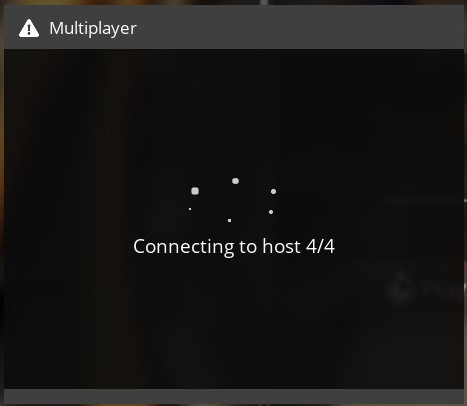
which then results in this error message:
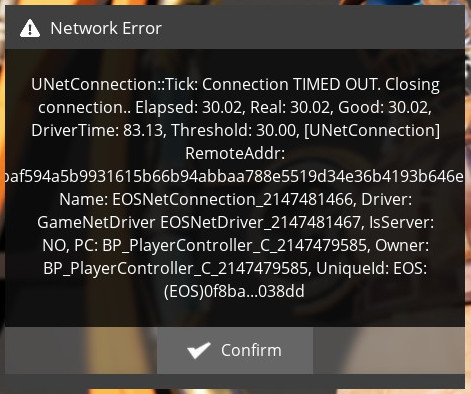
Hosting does not work either, the person trying to connect is also stuck on the "connecting to host 4/4" screen. Once the host was able to see me connect, but I was once again kicked out during the respawn sequence with the same timeout error.
Tested on Arch Linux with Proton-6.14-GE-2.
With some recent update on Manjaro Linux, Proton 6.3-6 i can no longer unfocus the game or alt-tab out from it
It has randomly come back.
Was not able to play multiplayer with Experimental or GE Proton, current have to:
- Use the namespace script from above
- Force Proton 6.3-6
Disable Steam in-game overlay
Only big issue right now is can't click on anything in Build menu, have to click in search bar, type it out and hit enter. After changing from Proton 5 to 6.3, the two other issues went away. Still need to force the old version and use the namespace script for multiplayer.
Regarding the network issues, this is usually caused by additional NICs, or Epic Online Services being weird.
Potential workaround: Join other people's session via session ID.
@TheHooly In my case at least, joining via code doesn't change anything, and I only have my wired interface (checked via terminal). Also it started happening randomly, nothing changed on my part that I know of. Weird.
Experimental build from today won't start with vulkan renderer.
With launch option: %command% -vulkan or after selecting vulkan in the games settings I get the following errors:
LogWindows: Error: === Critical error: ===
LogWindows: Error:
LogWindows: Error: Fatal error: [File:D:/ws/SB-160502110050-fad/UE4/Engine/Source/Runtime/VulkanRHI/Private/VulkanUt
il.cpp] [Line: 803]
LogWindows: Error: VulkanRHI::vkEnumerateDeviceExtensionProperties(Device, LayerName, &Count, nullptr) failed, VkRes
ult=-6
LogWindows: Error:  at D:/ws/SB-160502110050-fad/UE4/Engine/Source/Runtime/VulkanRHI/Private/VulkanLayers.cpp:196
LogWindows: Error:  with error VK_ERROR_LAYER_NOT_PRESENT
LogWindows: Error:
LogWindows: Error:
LogWindows: Error: [Callstack] 0x000000007b01236e EntryPoint() []
LogWindows: Error: [Callstack] 0x000000018025eec6 ReportAssert() []
LogWindows: Error: [Callstack] 0x00000001802616c6 FWindowsErrorOutputDevice::Serialize() []
LogWindows: Error: [Callstack] 0x00000001801de57d FOutputDevice::LogfImpl() []
LogWindows: Error: [Callstack] 0x0000000026c04afd VulkanRHI::VerifyVulkanResult() []
LogWindows: Error: [Callstack] 0x0000000026b8dbf0 FVulkanDevice::GetDeviceExtensionsAndLayers() []
LogWindows: Error: [Callstack] 0x0000000026b9302b FVulkanDevice::QueryGPU() []
LogWindows: Error: [Callstack] 0x0000000026bfff08 FVulkanDynamicRHI::SelectAndInitDevice() []
LogWindows: Error: [Callstack] 0x0000000026bef04d FVulkanDynamicRHI::InitInstance() []
LogWindows: Error: [Callstack] 0x0000000026beed78 FVulkanDynamicRHI::Init() []
LogWindows: Error: [Callstack] 0x00000000032a8820 RHIInit() []
LogWindows: Error: [Callstack] 0x000000014001068e FEngineLoop::PreInitPreStartupScreen() []
LogWindows: Error:
Experimental build from today won't start with vulkan renderer.
Same here with both Proton 6.3-6c and Proton experimental-6.3-20210921. And trying DX12 just pops up a dialog saying DX12 is not supported. DX11 still works. Experimental build CL#165178. Nvidia GTX 1070 with driver 470.63.01.
Replying to https://github.com/ValveSoftware/Proton/issues/3957#issuecomment-924356635
Tested Vulkan with Experimental and Proton-6.16-GE-1, same issue, too.
But DX12/VKD3D works just fine with Proton Experimental. Haven't tested GE...
running 5.13.18-xanmod1 on Ubuntu 21.04
Ryzen 7 5800X / RX 5700 XT w/ Mesa 21.2.1 ( ppa:ernstp/mesarc )
With regards to network issues:
I've had some success solving the join game timeout using https://github.com/netblue30/firejail/. I use the following launch command:
firejail --name=satisfactory --noprofile --net=eth0 --ip=dhcp --keep-dev-shm -- %command%
--net=eth0 must match your network interface.
Note that this breaks the Steam overlay (and it doesn't know you're logged into Steam) but the Epic login seems fine and I can join games with no other issues.
Vulkan now works using Proton: 1633036100 experimental-6.3-20210930 and Satisfactory experimental build CL#165698, with Nvidia GTX 1070 and driver 470.74.
@taisph @Darkhogg @TheHooly @cdgriffith @p-mng @UnstoppableMango @alaskanpuffin And everyone else who's had networking troubles with this game :) The most recent experimental release (experimental-6.3-20211013) has a fix for the problem with multiple network interfaces. Please try disabling any workarounds you are currently using and see if you still see the networking failures with this build.
Thank you for the ping @alasky17, I have tested with the latest experimental on a known "bad" setup and it now works both via local network and when using a VPN!
After using the Proton Experimental build, joining and hosting games work, however, I cannot select any buildings from the build menu. Anyone has a fix for this issue or know what is causing it?
@alasky17 I can also confirm it is now working with no need to delete network interfaces! Thanks!
Trying to launch Satisfactory on the Experimental branch fails for me (I get banner, then blackscreen, then crash to desktop).
Non-Experimental branch of Satisfactory still works.
Log file attached.
steam-526870.log
OS: Arch Linux
KERNEL: 5.14.15-zen1-1-zen
CPU: AMD Ryzen 7 3800XT 8-Core
GPU: AMD Radeon RX Vega (VEGA10, DRM 3.42.0, 5.14.15-zen1-1-zen, LLVM 13.0.0)
GPU DRIVER: 4.6 Mesa 21.2.5
RAM: 32 GB
About the same here. Starting the game in steam result in compiling of vulkan =shaders, and then... nothing else just the steam play button goes back to green.
In log files theres something:
[2021.10.30-10.35.08:145][  0]LogSlate: New Slate User Created.  User Index 0, Is Virtual User: 0
[2021.10.30-10.35.08:145][  0]LogSlate: Slate User Registered.  User Index 0, Is Virtual User: 0
[2021.10.30-10.35.08:147][  0]LogSlate: Using FreeType 2.10.0
[2021.10.30-10.35.08:148][  0]LogSlate: SlateFontServices - WITH_FREETYPE: 1, WITH_HARFBUZZ: 1
[2021.10.30-10.35.08:275][  0]LogStandaloneRenderer: Warning: SlateD3DShaders::CompileShader() - D3DCompilerFunc Result: DXGI_ERROR_80004005 [80004005]
[2021.10.30-10.35.08:275][  0]LogStandaloneRenderer: Warning: <anonymous>:10:8: E5005: Function "min" is not defined.
 Result: DXGI_ERROR_80004005 [80004005]
[2021.10.30-10.35.08:276][  0]LogStandaloneRenderer: Warning: SlateD3DShaders::CompileShader() - D3DCompilerFunc Result: DXGI_ERROR_80004005 [80004005]
[2021.10.30-10.35.08:276][  0]LogStandaloneRenderer: Warning: <anonymous>:7:1: W4300: Redefinition of ESlateShader.
<anonymous>:8:1: W4300: Redefinition of ESlateShader.
<anonymous>:9:1: W4300: Redefinition of ESlateShader.
<anonymous>:10:1: W4300: Redefinition of ESlateShader.
<anonymous>:10:8: E5005: Function "min" is not defined.
 Result: DXGI_ERROR_80004005 [80004005]
[2021.10.30-10.35.26:347][  0]LogSlate: Slate User Destroyed.  User Index 0, Is Virtual User: 0
[2021.10.30-10.35.26:347][  0]LogCore: Engine exit requested (reason: CrashReportClientApp RequestExit)
[2021.10.30-10.35.26:347][  0]LogExit: Preparing to exit.
[2021.10.30-10.35.26:348][  0]LogExit: Object subsystem successfully closed.
[2021.10.30-10.35.26:351][  0]LogModuleManager: Shutting down and abandoning module ImageWrapper (12)
[2021.10.30-10.35.26:351][  0]LogModuleManager: Shutting down and abandoning module InputCore (10)
[2021.10.30-10.35.26:351][  0]LogModuleManager: Shutting down and abandoning module CrashDebugHelper (8)
[2021.10.30-10.35.26:351][  0]LogModuleManager: Shutting down and abandoning module CoreUObject (6)
[2021.10.30-10.35.26:352][  0]LogModuleManager: Shutting down and abandoning module PakFile (4)
[2021.10.30-10.35.26:352][  0]LogModuleManager: Shutting down and abandoning module RSA (3)
[2021.10.30-10.35.26:353][  0]LogExit: Exiting.
[2021.10.30-10.35.26:364][  0]Log file closed, 10/30/21 12:35:26
steam-526870.log
CrashReportClient.log
Maybe @Joshua-Ashton have an idea?
PS:
Another log snippet from a crashlog with 6.20-GE proton:
[2021.10.30-11.45.42:889][  0]LogCrashDebugHelper: BuildVersion: ++FactoryGame+main-CL-170636
[2021.10.30-11.45.42:899][  0]LogWindowsTextInputMethodSystem: Display: IME system deactivated.
[2021.10.30-11.45.42:915][  0]LogSlate: New Slate User Created.  User Index 0, Is Virtual User: 0
[2021.10.30-11.45.42:915][  0]LogSlate: Slate User Registered.  User Index 0, Is Virtual User: 0
[2021.10.30-11.45.42:916][  0]LogSlate: Using FreeType 2.10.0
[2021.10.30-11.45.42:916][  0]LogSlate: SlateFontServices - WITH_FREETYPE: 1, WITH_HARFBUZZ: 1
[2021.10.30-11.45.43:044][  0]LogStandaloneRenderer: Warning: SlateD3DShaders::CompileShader() - D3DCompilerFunc Result: DXGI_ERROR_80004001 [80004001]
[2021.10.30-11.45.43:044][  0]LogStandaloneRenderer: Warning: D3DCompilerFunc failed, no error text provided Result: DXGI_ERROR_80004001 [80004001]
[2021.10.30-11.45.43:044][  0]LogStandaloneRenderer: Warning: SlateD3DShaders::CompileShader() - D3DCompilerFunc Result: DXGI_ERROR_80004001 [80004001]
[2021.10.30-11.45.43:044][  0]LogStandaloneRenderer: Warning: D3DCompilerFunc failed, no error text provided Result: DXGI_ERROR_80004001 [80004001]
[2021.10.30-11.46.01:068][  0]LogSlate: Slate User Destroyed.  User Index 0, Is Virtual User: 0
[2021.10.30-11.46.01:068][  0]LogCore: Engine exit requested (reason: CrashReportClientApp RequestExit)
[2021.10.30-11.46.01:068][  0]LogExit: Preparing to exit.
[2021.10.30-11.46.01:068][  0]LogExit: Object subsystem successfully closed.
Another log while im trying to start the game with 6.20-ge with -vulkan:
FactoryGame.log
CrashReportClient.log
With the latest experimental update I am now having the same symptoms as @plasticbomb1986, after compiling vulkan shaders the play button turns green again but nothing happens
EDIT: With the launch option "d3d11" to disable vulkan, I am getting my old behavour, as in splash screen, then black screen, then crash to desktop
does dx12 work any better?
I came here to just report that the game is starting fine with proton-6.20-ge-1 and proton-experimental and Vulkan renderer.
Mesa 21.3-rc3 on Navi10 (ppa:ernstp/mesarc), Linux 5.14.15-xanmod1-cacule
I've set the Vulkan options in the engine.ini or changed it via ingame settings, not as launch parameter.
and then the mess begins...
While writing here I'm still testing with the proton versions, after switching from proton-6.20-ge-1 to proton-experimental, the game works. Switching to GE again, it now crashes like reported above! I guess switching from experimental to GE messes up the wine bottle or there are some structural changes where GE has it's problems...
After resetting the bottle, everything works again until I switch from experimental to GE. Resetting the bottle fixes it again.
Creating the bottle with Experimental and switching to GE, the game crcashes. Switching back to Experiemental, it starts fine.
Creating the bottle with GE, switching to Experimental works, but the game won't shut down properly on the next start. After the second start, it shuts down now. Switching to GE again - immediate crash. Back to Experimental, it works again.
Experimental does something different with the bottles, so if you have an issue with the game crsahing, I recommend to first reset the bottle.
<yourSteamLib>/steamapps/compatdata/526870
rename that folder and launch the game again. Don't delete it, you maybe want to copy over some settings... ;)
does dx12 work any better?
Same result
Experimental does something different with the bottles, so if you have an issue with the game crsahing, I recommend to first reset the bottle.
<yourSteamLib>/steamapps/compatdata/526870rename that folder and launch the game again. Don't delete it, you maybe want to copy over some settings... ;)
I just tried that, it still does not work for me
EDIT: Also tried with -vulkanlaunch option, still same result with blackscreen and crash to desktop
Experimental does something different with the bottles, so if you have an issue with the game crsahing, I recommend to first reset the bottle.
<yourSteamLib>/steamapps/compatdata/526870rename that folder and launch the game again. Don't delete it, you maybe want to copy over some settings... ;)I just tried that, it still does not work for me
EDIT: Also tried with
-vulkanlaunch option, still same result with blackscreen and crash to desktop
then there is an issue with nvidia drivers i guess?!
a classic, have you tried the latest nvidia drivers?
according to your log you're running the production branch nvidia driver, maybe the New Feature Branch driver (495.xx) helps fixing your issue?
https://www.nvidia.com/en-us/drivers/unix/
or have you tried proton-6.3 or an older GE version? maybe the newer versions use a Vulkan extension that's not available in your driver or something like that?
And I'm not sure if the -vulkan launch option works?!
Devs say to set this in the engine.ini to activate Vulkan from the first start.
<yourSteamLib>/steamapps/compatdata/526870/pfx/drive_c/users/steamuser/AppData/Local/FactoryGame/Saved/Config/WindowsNoEditor/Engine.ini
[/Script/WindowsTargetPlatform.WindowsTargetSettings]
DefaultGraphicsRHI=DefaultGraphicsRHI_Vulkan
Just installed the 495 drivers, added the vulkan settings to the engine.ini file and tested with different Proton versions (always creating a new folder in compatdata, and adjusting engine.ini again).
However, it still not works, although behaviour is a bit different now. It shows the splash screen for a few seconds (much longer than before), and cpu usage goes up, but then crashes.
My proton log for 6.3:
steam-526870.log
Saw some people complaining similar crashes on steam with experimentel branhc, so its possible wont be a wine/proton issue, but at Coffe Stain they have made a mistake, probably.
In the FactoryGame.log I am finding this error:
[2021.10.31-11.14.28:360][  0]LogVulkanRHI: Error: VulkanRHI::vkEnumerateDeviceExtensionProperties(Device, LayerName, &Count, nullptr) failed, VkResult=-6
 at D:/ws/SB-160502110050-fad/UE4/Engine/Source/Runtime/VulkanRHI/Private/VulkanLayers.cpp:196  with error VK_ERROR_LAYER_NOT_PRESENT
In the FactoryGame.log I am finding this error:
[2021.10.31-11.14.28:360][  0]LogVulkanRHI: Error: VulkanRHI::vkEnumerateDeviceExtensionProperties(Device, LayerName, &Count, nullptr) failed, VkResult=-6
 at D:/ws/SB-160502110050-fad/UE4/Engine/Source/Runtime/VulkanRHI/Private/VulkanLayers.cpp:196  with error VK_ERROR_LAYER_NOT_PRESENT
there was a fix in experimental for the Vulkan Api, if you try an older Proton version, stick to DXVK or DX12 via start parameter and check if it's running. Vulkan API won't work...
FWIW, Vulkan works fine here:
Proton 1635348752 experimental-6.3-20211027
Satisfactory experimental build CL#170636
Nvidia GTX 1070, driver 470.82
Ubuntu 20.04.3 LTS
Im getting the same error across all render api implementation:
[2021.10.31-18.22.41:653][  0]LogWindows: Warning: SymLoadModuleExW. Error: 6
[2021.10.31-18.22.41:653][  0]LogWindows: Warning: SymLoadModuleExW. Error: 6
[2021.10.31-18.22.41:653][  0]LogWindows: Warning: SymLoadModuleExW. Error: 6
[2021.10.31-18.22.41:653][  0]LogWindows: Warning: SymLoadModuleExW. Error: 6
[2021.10.31-18.22.41:653][  0]LogWindows: Warning: SymLoadModuleExW. Error: 6
[2021.10.31-18.22.41:653][  0]LogWindows: Warning: SymLoadModuleExW. Error: 6
[2021.10.31-18.22.41:653][  0]LogWindows: Error: === Critical error: ===
[2021.10.31-18.22.41:653][  0]LogWindows: Error:
[2021.10.31-18.22.41:653][  0]LogWindows: Error: Fatal error!
[2021.10.31-18.22.41:653][  0]LogWindows: Error:
[2021.10.31-18.22.41:653][  0]LogWindows: Error: Unhandled Exception: EXCEPTION_ACCESS_VIOLATION reading address 0x0000000000000018
[2021.10.31-18.22.41:653][  0]LogWindows: Error:
[2021.10.31-18.22.41:653][  0]LogWindows: Error: [Callstack] 0x00000000014688b9 UE4CodeGen_Private::ConstructFProperty() []
[2021.10.31-18.22.41:653][  0]LogWindows: Error: [Callstack] 0x000000000146a281 UE4CodeGen_Private::ConstructFProperty() []
[2021.10.31-18.22.41:653][  0]LogWindows: Error: [Callstack] 0x000000000146b1d9 UE4CodeGen_Private::ConstructUScriptStruct() []
[2021.10.31-18.22.41:653][  0]LogWindows: Error:
[2021.10.31-18.22.41:672][  0]LogExit: Executing StaticShutdownAfterError
[2021.10.31-18.22.41:677][  0]LogWindows: FPlatformMisc::RequestExit(1)
[2021.10.31-18.22.41:677][  0]LogCore: Engine exit requested (reason: Win RequestExit)
Went into the proton 6.3.7 folder and replaced both dxvk and vkd3d-proton files, thought maybe thats the issue, but no go.
Experimental build from today won't start with vulkan renderer.
I can confirm that adding launch option -d3d11 in steam resolves this. Then change it back to DX11 in the game's options.
When I have VRR (FreeSync) enabled, I just get a black screen. This happens with both the stable and experimental branches, and with D3D11 (DXVK) and native Vulkan.
Disabling VRR in my compositor makes this game run as it should, but that of course robs me of FreeSync...
Even with -d3d11 start flag, it crashes with exitcode 0 on startup and no visible debug output or symbols, e.g.:
Start monitoring process... Initial process has exited (return code: 0)
Is anyone else still having multiplayer connectivity issues?
I'm on Fedora 34 and had issues connecting to my brother's session (Windows). Booting to a Windows partition on the same box, I am able to connect so I don't believe the issue is on the other end or in my network... but I'd really like to play from Linux if possible. We both selected the Steam / new EOS account (left option) when setting up the game.
On Fedora with my out-of-the-box setup (no specifi proton version selected), I had some minor issues with the tutorial "videos" not playing and got the same connectivity error message (UNetConnection TIMEOUT) as in the OP.
Based on protondb, I updated my launch params as WINE_FULLSCREEN_FSR=1 gamemoderun %command% and had run protontricks 526870 vc2017 and protontricks 526870 dotnet472 vcrun2015 faudio d3dcompiler_47 (I did not use the force option) but neither of these seemed to do much.
I tried Proton-vGE 6.21-GE-2 after seeing the release notes for the 6.20-GE-1 mentioned
-proton-valve: Imported fixes for Satisfactory multiplayer from proton upstream
Installing this and setting the game to force that proton ge version did fix my "video" issues in the tutorial but not my connectivity issues. Based on other comments here, I also tried sudo virsh net-destroy default (as I do have QEmu / virt-manager installed but I do not have docker... I use rootless podman instead so no perma net interface). Unfortunately, this didn't do anything to resolve the issues, connecting by steam id (timeout error) or by session id (session not found).
Any suggestions?
I saw the iptables scripts in the comments by pekhterev and some gist variants of it. I was thinking about trying this next but wasn't clear on the usage instructions outside of editing the username/ip subnet in the script. None of those appear to be making permanent changes and I assume that rebooting the system would be enough to "undo" them. Is that correct? Other than that, I assume from klardotsh's comment that you just close steam, run the script (after editing for user name and ip subnet), and then start steam again, then launch the game?
@zpangwin - Multiplayer is now working for me on Fedora 34. Have you tried using Proton Experimental?
@zpangwin - Multiplayer is now working for me on Fedora 34. Have you tried using Proton Experimental?
Thanks for the quick reply!
I'm not sure which proton version it started me out on but I'll give it a shot next time my brother and I are both on. Do you recommend clearing out the game's compatdata folder when switching versions? I neglected to do so when I switched to GE but I saw someone mentioning it in the comments so wasn't sure.
@zpangwin You should be able to just switch between versions without having to delete anything, but if you run into a problem you can always try clearing it. I'm guessing you know how to switch to Experimental, but if not open Steam, then on the top menu bar click Steam -> Settings -> Steam Play -> under the Advanced section change the drop down to Proton Experimental.
@alaskanpuffin just switched to Experimental (didn't mess with compatdata) and joined his session; no issues. Thanks for the suggestion! Saved me diving down a wrong path for nothing :-)
@zpangwin You should be able to just switch between versions without having to delete anything, but if you run into a problem you can always try clearing it. I'm guessing you know how to switch to Experimental, but if not open Steam, then on the top menu bar click Steam -> Settings -> Steam Play -> under the Advanced section change the drop down to Proton Experimental.
switching to Proton Experimental don't work for me. The game doesn't open. Even if I delete the compatdata folder. Is there a way to view a log or something?
Replying to https://github.com/ValveSoftware/Proton/issues/3957#issuecomment-1005758353
In Steam, right click Satisfactory in your Library, properties, general, in launch options add the below line:
PROTON_LOG=1 %command%
Start the game, a file called steam-526870.log will be created in your home folder: /home/username, if you could attach that to a comment here?
The log is not generated when I use Experimental. With the latest version of Proton GE it does. Other games don't run with Experimental either. Weird. I use xanmod kernel, does it have anything to do with it?
The log is not generated when I use Experimental. With the latest version of Proton GE it does. Other games don't run with Experimental either. Weird. I use xanmod kernel, does it have anything to do with it?
There are some recent additions to the kernel for gaming but I forget the details, anything useful in the terminal if you run steam from there?
The log is not generated when I use Experimental. With the latest version of Proton GE it does. Other games don't run with Experimental either. Weird. I use xanmod kernel, does it have anything to do with it?
There are some recent additions to the kernel for gaming but I forget the details, anything useful in the terminal if you run steam from there?
Sorry for the delay, very busy days!!!
There seems to be a Proton file missing. I ran the game 2 times. After finishing the process for the first time it downloaded something, and when I ran it for the second time, it installed a dependency. But it never shows anything, and the log is still not generated. I ran Steam via terminal, here is what I get
SatisfactoryLog.txt
Hello @alemunter, FileNotFoundError: [Errno 2] No such file or directory: '/mnt/sdb1/Juegos/SteamLibrary/steamapps/common/Proton - Experimental/files/lib/wine/aspnet_regiis.exe' is the line of interest in your log. I read this missing file as a hint that your Proton Experimental install is damaged or incomplete. Can you verify the integrity of Proton's files? If that doesn't help, then https://github.com/ValveSoftware/Proton/issues/4269#issuecomment-794164206 is worth trying.
Just in case it helps, i had the same issues after reinstalling it after a long time.
Deleted the proton bottle, tried different versions / different parameter, verified integrity, but always got the crash at startup (sometimes after the logo was shown),
Finally i tried to just uninstall it, delete the game folder (which at that point only contained logs) and installed it again.
That did the trick and now it runs.
My assumption is that there WAS a bug with the uninstaller when i uninstalled it way back then which left files which somehow did lead to problems.
For me the game runs just fine on vulkan. The issue im facing is basically screwed up audio:
The game is basically unplayable like this sadly.
For me the game runs just fine on vulkan. The issue im facing is basically screwed up audio:
The game is basically unplayable like this sadly.
Try reverting to dx12 in the meantime.
For me the game runs just fine on vulkan. The issue im facing is basically screwed up audio:
The game is basically unplayable like this sadly.Try reverting to dx12 in the meantime.
This also happens on dx12 dx11 and any other graphics api.
This also happens on dx12 dx11 and any other graphics api.
Sounds more like a problem with the sound device/driver. Does other unreal engine based games work for you?
This also happens on dx12 dx11 and any other graphics api.
Sounds more like a problem with the sound device/driver. Does other unreal engine based games work for you?
They indeed do. Tested by playing The Turing Test.
Sound there works flawlessly.
Sound driver is pipewire.
EDIT: Today i tried temp switch to pulseaudio which works surprisingly. Seems to be pipewire issue.
For me It also crashed for me after the splash screen, then black screen, then crash.
Launched with %command% -vulkan, with Proton 7.0-1.
Here's the crashdump.
LogPakFile: Display: Found Pak file ../../../FactoryGame/Content/Paks/FactoryGame-WindowsNoEditor.pak attempting to mount.
LogPakFile: Display: Mounting pak file ../../../FactoryGame/Content/Paks/FactoryGame-WindowsNoEditor.pak.
LogFileManager: Error: Requested read of 160 bytes when 157 bytes remain (file=../../../FactoryGame/Mods/AreaActions/Content/Paks/WindowsNoEditor/AreaActionsFactoryGame-WindowsNoEditor.pak, size=2056928)
LogFileManager: Error: Requested read of 160 bytes when 157 bytes remain (file=../../../FactoryGame/Mods/SML/Content/Paks/WindowsNoEditor/SMLFactoryGame-WindowsNoEditor.pak, size=997408)
LogFileManager: Error: Requested read of 160 bytes when 157 bytes remain (file=../../../FactoryGame/Mods/x3_signs/Content/Paks/WindowsNoEditor/x3_signsFactoryGame-WindowsNoEditor.pak, size=387714182)
[...]
LogWindows: Error: === Critical error: ===
LogWindows: Error:
LogWindows: Error: Fatal error!
LogWindows: Error:
LogWindows: Error: Unhandled Exception: EXCEPTION_ACCESS_VIOLATION reading address 0x0000000000000018
LogWindows: Error:
LogWindows: Error: [Callstack] 0x00000000014bc129 FactoryGame-CoreUObject-Win64-Shipping.dll!UE4CodeGen_Private::ConstructFProperty() [D:\ws\SB-lowprio\UE4\Engine\Source\Runtime\CoreUObject\Private\UObject\UObjectGlobals.cpp:3959]
LogWindows: Error: [Callstack] 0x00000000014bdaf1 FactoryGame-CoreUObject-Win64-Shipping.dll!UE4CodeGen_Private::ConstructFProperty() [D:\ws\SB-lowprio\UE4\Engine\Source\Runtime\CoreUObject\Private\UObject\UObjectGlobals.cpp:4413]
LogWindows: Error: [Callstack] 0x00000000014be979 FactoryGame-CoreUObject-Win64-Shipping.dll!UE4CodeGen_Private::ConstructUScriptStruct() [D:\ws\SB-lowprio\UE4\Engine\Source\Runtime\CoreUObject\Private\UObject\UObjectGlobals.cpp:4554]
LogWindows: Error: [Callstack] 0x000000006c08d134 FactoryGame-SML-Win64-Shipping.dll!Z_Construct_UScriptStruct_FSchematicRegistrationInfo() [C:\jnk\workspace\SML2_master\SML\Plugins\SML\Intermediate\Build\Win64\FactoryGame\Inc\SML\ModContentRegistry.gen.c
pp:303]
LogWindows: Error: [Callstack] 0x00000000014bd409 FactoryGame-CoreUObject-Win64-Shipping.dll!UE4CodeGen_Private::ConstructFProperty() [D:\ws\SB-lowprio\UE4\Engine\Source\Runtime\CoreUObject\Private\UObject\UObjectGlobals.cpp:4308]
LogWindows: Error: [Callstack] 0x00000000014be567 FactoryGame-CoreUObject-Win64-Shipping.dll!UE4CodeGen_Private::ConstructUFunction() [D:\ws\SB-lowprio\UE4\Engine\Source\Runtime\CoreUObject\Private\UObject\UObjectGlobals.cpp:4496]
LogWindows: Error: [Callstack] 0x000000006c08d104 FactoryGame-SML-Win64-Shipping.dll!Z_Construct_UDelegateFunction_SML_OnSchematicRegistered__DelegateSignature() [C:\jnk\workspace\SML2_master\SML\Plugins\SML\Intermediate\Build\Win64\FactoryGame\Inc\SML\Mo
dContentRegistry.gen.cpp:142]
LogWindows: Error: [Callstack] 0x00000000014be6f4 FactoryGame-CoreUObject-Win64-Shipping.dll!UE4CodeGen_Private::ConstructUPackage() [D:\ws\SB-lowprio\UE4\Engine\Source\Runtime\CoreUObject\Private\UObject\UObjectGlobals.cpp:4595]
LogWindows: Error: [Callstack] 0x000000006c093564 FactoryGame-SML-Win64-Shipping.dll!Z_Construct_UPackage__Script_SML() [C:\jnk\workspace\SML2_master\SML\Plugins\SML\Intermediate\Build\Win64\FactoryGame\Inc\SML\SML.init.gen.cpp:40]
LogWindows: Error: [Callstack] 0x000000006c082665 FactoryGame-SML-Win64-Shipping.dll!EReflectedPropertyType_StaticEnum() [C:\jnk\workspace\SML2_master\SML\Plugins\SML\Intermediate\Build\Win64\FactoryGame\Inc\SML\BlueprintReflectedObject.gen.cpp:28]
LogWindows: Error: [Callstack] 0x000000000149c0b7 FactoryGame-CoreUObject-Win64-Shipping.dll!ProcessNewlyLoadedUObjects() [D:\ws\SB-lowprio\UE4\Engine\Source\Runtime\CoreUObject\Private\UObject\UObjectBase.cpp:995]
LogWindows: Error: [Callstack] 0x0000000001430505 FactoryGame-CoreUObject-Win64-Shipping.dll!TBaseStaticDelegateInstance::ExecuteIfSafe() [D:\ws\SB-lowprio\UE4\Engine\Source\Runtime\Core\Public\Delegate
s\DelegateInstancesImpl.h:731]
LogWindows: Error: [Callstack] 0x000000018020cab6 FactoryGame-Core-Win64-Shipping.dll!TMulticastDelegate::Broadcast() [D:\ws\SB-lowprio\UE4\Engine\Source\Runtime\Core\Public\Delegates\DelegateSignatureI
mpl.inl:955]
LogWindows: Error: [Callstack] 0x0000000180226907 FactoryGame-Core-Win64-Shipping.dll!FModuleManager::LoadModuleWithFailureReason() [D:\ws\SB-lowprio\UE4\Engine\Source\Runtime\Core\Private\Modules\ModuleManager.cpp:519]
LogWindows: Error: [Callstack] 0x00000000016480a2 FactoryGame-Projects-Win64-Shipping.dll!FModuleDescriptor::LoadModulesForPhase() [D:\ws\SB-lowprio\UE4\Engine\Source\Runtime\Projects\Private\ModuleDescriptor.cpp:561]
LogWindows: Error: [Callstack] 0x000000000165a645 FactoryGame-Projects-Win64-Shipping.dll!FPluginManager::TryLoadModulesForPlugin() [D:\ws\SB-lowprio\UE4\Engine\Source\Runtime\Projects\Private\PluginManager.cpp:1295]
LogWindows: Error: [Callstack] 0x0000000001647ed5 FactoryGame-Projects-Win64-Shipping.dll!FPluginManager::LoadModulesForEnabledPlugins() [D:\ws\SB-lowprio\UE4\Engine\Source\Runtime\Projects\Private\PluginManager.cpp:1369]
LogWindows: Error: [Callstack] 0x000000014000c472 FactoryGame-Win64-Shipping.exe!FEngineLoop::PreInitPostStartupScreen() [D:\ws\SB-lowprio\UE4\Engine\Source\Runtime\Launch\Private\LaunchEngineLoop.cpp:3250]
LogWindows: Error:
You can see 3 files have some read offset errors.
The game files validates successfully though.
I then uninstalled Satisfactory because I suspected the above files are corrupt, and surprisingly, these files were not removed by the deinstallation process:
steamapps/common/Satisfactory
└── FactoryGame
    ├── Configs
    │   └── SML.cfg
    └── Mods
        ├── AreaActions
        │   ├── AreaActions.uplugin
        │   ├── Binaries
        │   │   └── Win64
        │   │       └── UE4-AreaActions-Win64-Shipping.dll
        │   ├── Content
        │   │   └── Paks
        │   │       └── WindowsNoEditor
        │   │           └── AreaActionsFactoryGame-WindowsNoEditor.pak
        │   └── Resources
        │       └── Icon128.png
        ├── SML
        │   ├── Binaries
        │   │   └── Win64
        │   │       ├── FactoryGame-SML-Win64-Shipping.dll
        │   │       ├── FactoryGame-SML-Win64-Shipping.pdb
        │   │       └── FactoryGame-Win64-Shipping.modules
        │   ├── Content
        │   │   └── Paks
        │   │       └── WindowsNoEditor
        │   │           └── SMLFactoryGame-WindowsNoEditor.pak
        │   ├── Resources
        │   │   └── Icon128.png
        │   └── SML.uplugin
        └── x3_signs
            ├── Content
            │   └── Paks
            │       └── WindowsNoEditor
            │           └── x3_signsFactoryGame-WindowsNoEditor.pak
            └── x3_signs.uplugin
I removed all these files manually, then reinstalled the game with Steam again.
Launched with %command% -vulkan again, with Proton 7.0-1, and now it works :)
(since some people have problems with audio, it works for me flawlessly, with =media-video/pipewire-0.3.48-r1)
When using Vulkan VRR doesn't work on Nvidia (can't test AMD). For some reason the window doesn't have flipping activated which is required for VRR. VKD3D and DXVK do activate flipping so VRR works when using DX12 and DX11. Not sure if this is an issue with the game, the drivers or Proton. I've tested every Proton version including Experimental.
When using Vulkan VRR doesn't work on Nvidia (can't test AMD). For some reason the window doesn't have flipping activated which is required for VRR. VKD3D and DXVK do activate flipping so VRR works when using DX12 and DX11. Not sure if this is an issue with the game, the drivers or Proton. I've tested every Proton version including Experimental.
I think I have the same issue on AMD (https://github.com/ValveSoftware/Proton/issues/3957#issuecomment-968154228). Do you also get a black screen?
I think I have the same issue on AMD ([#3957 (comment)](https://github.com/ValveSoftware/Proton/issues/3957#issuecomment-968154228)). Do you also get a black screen?
No aside from VRR/flipping not working everything else works as expected with Vulkan here. Only tested on Xorg though because Nvidia doesn't support VRR on Wayland yet.
Having a problem on the Steam Deck, where if I try to log in to Epic Online Services, Steam crashes and restarts the console UI. Haven't had any problems when playing solo at least.
For me the game just shows the splash logo, goes black screen and after a few seconds just closes.
Here's the error I found in my clipboard, hope it helps:
Fatal error!

Unhandled Exception: EXCEPTION_ACCESS_VIOLATION reading address 0x0000000000000018

0x000000000157655f FactoryGame-CoreUObject-Win64-Shipping.dll!UnknownFunction []
0x0000000001577f41 FactoryGame-CoreUObject-Win64-Shipping.dll!UnknownFunction []
0x0000000001578db9 FactoryGame-CoreUObject-Win64-Shipping.dll!UnknownFunction []
0x00000000372ed134 FactoryGame-SML-Win64-Shipping.dll!Z_Construct_UScriptStruct_FSchematicRegistrationInfo() [C:\jnk\workspace\SML2_master\SML\Plugins\SML\Intermediate\Build\Win64\FactoryGame\Inc\SML\ModContentRegistry.gen.cpp:303]
0x0000000001577862 FactoryGame-CoreUObject-Win64-Shipping.dll!UnknownFunction []
0x00000000015789a7 FactoryGame-CoreUObject-Win64-Shipping.dll!UnknownFunction []
0x00000000372ed104 FactoryGame-SML-Win64-Shipping.dll!Z_Construct_UDelegateFunction_SML_OnSchematicRegistered__DelegateSignature() [C:\jnk\workspace\SML2_master\SML\Plugins\SML\Intermediate\Build\Win64\FactoryGame\Inc\SML\ModContentRegistry.gen.cpp:142]
0x0000000001578b34 FactoryGame-CoreUObject-Win64-Shipping.dll!UnknownFunction []
0x00000000372f3564 FactoryGame-SML-Win64-Shipping.dll!Z_Construct_UPackage__Script_SML() [C:\jnk\workspace\SML2_master\SML\Plugins\SML\Intermediate\Build\Win64\FactoryGame\Inc\SML\SML.init.gen.cpp:40]
0x00000000372e2665 FactoryGame-SML-Win64-Shipping.dll!EReflectedPropertyType_StaticEnum() [C:\jnk\workspace\SML2_master\SML\Plugins\SML\Intermediate\Build\Win64\FactoryGame\Inc\SML\BlueprintReflectedObject.gen.cpp:28]
0x0000000001556dc8 FactoryGame-CoreUObject-Win64-Shipping.dll!UnknownFunction []
0x00000000014eaef5 FactoryGame-CoreUObject-Win64-Shipping.dll!UnknownFunction []
0x0000000180206075 FactoryGame-Core-Win64-Shipping.dll!UnknownFunction []
0x0000000180220353 FactoryGame-Core-Win64-Shipping.dll!UnknownFunction []
0x000000000170785b FactoryGame-Projects-Win64-Shipping.dll!UnknownFunction []
0x0000000001719ba6 FactoryGame-Projects-Win64-Shipping.dll!UnknownFunction []
0x0000000001707667 FactoryGame-Projects-Win64-Shipping.dll!UnknownFunction []
0x000000014000c2d9 FactoryGame-Win64-Shipping.exe!UnknownFunction []
0x0000000140008fec FactoryGame-Win64-Shipping.exe!UnknownFunction []
0x00000001400091da FactoryGame-Win64-Shipping.exe!UnknownFunction []
0x0000000140013e37 FactoryGame-Win64-Shipping.exe!UnknownFunction []
0x000000014001485a FactoryGame-Win64-Shipping.exe!UnknownFunction []
0x000000007b61467d kernel32.dll!UnknownFunction
Operating System: Manjaro Linux
KDE Plasma Version: 5.27.4
KDE Frameworks Version: 5.105.0
Qt Version: 5.15.9
Kernel Version: 6.1.31-1-MANJARO (64-bit)
Graphics Platform: X11
Processors: 12 × AMD Ryzen 5 3600X 6-Core Processor
Memory: 31,3 GiB of RAM
Graphics Processor: AMD Radeon RX 5700 XT
Satisfactory crash with recent update to unreal engine
Issue transferred from https://github.com/ValveSoftware/Proton/issues/6849.
@jitoxx posted on 2023-06-15T13:08:33:
Compatibility Report
- Name of the game with compatibility issues: Satisfactory
- Steam AppID of the game:526870
System Information
- GPU: Amd Radeon RX 6700 XT
- Driver/LLVM version: Mesa 23.1.2
- Kernel version: Debian 6.3.7-1
- Link to full system information report as Gist: I use Debian unstable and have update my system recently
- Proton version: Proton 8
I confirm:
- [x ] that I haven't found an existing compatibility report for this game.
- [ x] that I have checked whether there are updates for my system available.
Symptoms
As i have update my Satisfactoryversion to the newest experimental, the game crash in the initial loading screen
Reproduction
--> Download Satisfactory experimental latest version and start it with Proton 8.
steam-526870.log
Hello @jitoxx, these look like some lines of interest from your log:
err:d3dcompiler:D3DCompile2 Failed to compile shader, vkd3d result -5.
err:d3dcompiler:D3DCompile2 Shader log:
err:d3dcompiler:D3DCompile2     <anonymous>:38:8: E5017: Aborting due to not yet implemented feature: Ternary operator.
err:d3dcompiler:D3DCompile2     <anonymous>:51:18: E5005: Function "LinearToSrgbBranching" is not defined.
Seeing the same crash trying the experimental branch with UE update. Looked through log and saw the same error lines as well.
Game does launch with '-vulkan' option, albeit graphical glitches and seemingly lower performance.
System Information
Operating System: EndeavourOS
KDE Plasma Version: 5.27.6
KDE Frameworks Version: 5.107.0
Qt Version: 5.15.10
Kernel Version: 6.3.9-zen1-1-zen (64-bit)
Graphics Platform: Wayland
Satisfactory Update 8 launches and runs fine on Ubuntu 23.10 kernel 6.5.0-10-generic x11 nvidia 545.29.02 using proton 1697712483 proton-8.0-4c.
They added DLSS support but I am only seeing TSR and AMD FSR under Vulkan plus Intel XeSS under DX12. Using PROTON_ENABLE_NVAPI=1 %command% seems necessary to make DLSS available (at least under Vulkan).
While Update 7 ran fine on my laptop, Update 8 crashes on the splash screen. Here's an abbreviated issue report:
Compatibility Report
- Name of the game with compatibility issues: Satisfactory
- Steam AppID of the game: 526870
System Information
- GPU: Intel Iris Xe
- Video driver version: Mesa 39497.1.8
- Kernel version: 6.2.0-36-generic
- Link to full system information report as Gist:
- Proton version: Experimental
Reproduction
Install Satisfactory and run with Proton Experimental.
Log:
steam-526870.log
Attached also are two logs from the game:
When running with Vulkan/DX12: https://pastebin.com/9iUNswU4
When running with DX11:https://pastebin.com/y90jKnPQ
Decided to test the game since Update 8 came out of experimental, still having same issues as before, reflecting the same as @Magicalus
Wonder if this is an Intel Issue
Current System information Gist
DX11 LogFactoryGame.log
Hello @Magicalus, since you're using an Intel GPU and there's XeSS references in the log, you might get lucky adapting https://gitlab.freedesktop.org/mesa/mesa/-/merge_requests/24194 to this game and seeing if it has an effect.
@kisak-valve That solved the issue for me, setting in /usr/share/drirc.d/00-mesa-defaults.conf
        <application name="Satisfactory" executable="FactoryGame-Win64-Shipping.exe">
            <option name="force_vk_vendor" value="-1" />
        </application>
Gets the game to load.
Edit:
Created Mesa issue to for fix: https://gitlab.freedesktop.org/mesa/mesa/-/issues/10152
That fix has had no effect for me; the game's log files are essentially identical, with the only differences being the time codes.
Update 8 (up to 0.8.2.7) runs fine for me without a patch. I've not tried tried 0.8.2.9 on linux at the moment.
@Magicalus Not sure if its worth a try, not sure it mattered, but I did also delete my Config folder in the steam compatdata:
{steam folder}/steamapps/compatdata/526870/pfx/drive_c/users/steamuser/AppData/Local/FactoryGame/Saved/Config/
I just deleted my entire compatdata folder for Satisfactory. Twice actually, once when I did it manually, and once when I reinstalled. It did not help.
Hello @kisak-valve, I no longer wish to be the owner of this issue. Would you be able to create a new issue so that I can close this issue and remove it from my issue feed and status?
Thank you,
Hello @rwaltr, this is a relatively uncommon request. Go ahead and close this issue report and then the next person who wants to gives feedback on the game run with Proton can open a new compatibility report and we'll continue tracking feedback there.
I got the same problem now on Satis 8.3.
Some mods gets problems with endless log warning:
Warning: SymLoadModuleExW. Error: 6
Debian, Steam, Proton 8
I got the same problem now on Satis 8.3. Some mods gets problems with endless log warning: Warning: SymLoadModuleExW. Error: 6 Debian, Steam, Proton 8
Mod support isn't related to this repo. Best is to get on the Satisfactory Modding Discord and check for announcements, mod updates and the like.
The game does not launch using Proton Experimental or Proton 8.0-5, using an AMD Ryzen 7 7840U with an AMD Radeon 780M, seems the launcher does even show up on my end, it just crashes, directly.
This issue should be reopened @kisak-valve or a new one should be reported.
The game does not launch using Proton Experimental or Proton 8.0-5, using an AMD Ryzen 7 7840U with an AMD Radeon 780M, seems the launcher does even show up on my end, it just crashes, directly.
This issue should be reopened @kisak-valve or a new one should be reported.
It might work if you force vulkan through the launch options.
@Ryder17z
The launcher is not even starting (the game is said to start in Steam, then almost directly crashes?), I cannot get debug logs for Proton, here is the parameters in steam, I'm using :
PROTON_LOG=1 PROTON_LOG_DIR=/tmp %command% -NO_EOS_OVERLAY -vulkan
@Ryder17z
The launcher is not even starting (the game is said to start in Steam, then almost directly crashes?), I cannot get debug logs for Proton, here is the parameters in steam, I'm using :PROTON_LOG=1 PROTON_LOG_DIR=/tmp %command% -NO_EOS_OVERLAY -vulkan
All I can recommend then is to try Proton-GE and see if the issue persists
@Ryder17z The game did work on a steam deck it did install something like Visual Studio libraries for UE (Unreal Engine?) something some kind of workaround before and it works but not really well, with a controller, so it can be run but the setup isn't clear under Linux.
@Ryder17z The game did work on a steam deck it did install something like Visual Studio libraries for UE (Unreal Engine?) something some kind of workaround before and it works but not really well, with a controller, so it can be run but the setup isn't clear under Linux.
Your probably thinking of the "Visual C/C++ runtime" stuff which is technically independent from Visual Studio. (I guess this is partly why they call it a "runtime" instead of an "sdk" ?)
@Ryder17z do you have any idea which winetricks would do the trick ? for this visual C/C++ runtime for Unreal Engine ?
I'm not sure why on the steam deck it is automatically installed and on desktop the experience is not the same, hmmm
@Ryder17z do you have any idea which winetricks would do the trick ? for this visual C/C++ runtime for Unreal Engine ?
I'm not sure why on the steam deck it is automatically installed and on desktop the experience is not the same, hmmm
Because Valve tweaks things a lot.
Anyway see: https://www.protondb.com/app/526870 there's several things to try here.
There is also Proton-GE that sometimes works better than regular Proton.
Hello, please use #7580 for continued discussion of how this game behaves when run with Proton.
Locking per https://github.com/ValveSoftware/Proton/issues/3957#issuecomment-1815957293.
Proton versions
proton experimentalx13 2024-02proton 8.0-5x2 2024-02proton 8.0-4cx1 2023-11proton 7.0-1x1 2022-03proton 6.3x2 2021-10proton 6.20-ge-1x1 2021-10proton 6.16-ge-1x1 2021-09proton 6.3-6cx1 2021-09proton 6.3-6x2 2021-09proton 6.14-ge-2x1 2021-08proton 6.3-4x1 2021-06proton 5.13x2 2020-12proton 5.13-1x2 2020-10proton 5.0x2 2020-10proton 5.9x1 2020-10
Launch options
PROTON_LOG=1x3 2024-02PROTON_LOG_DIR=/tmpx2 2024-02PROTON_ENABLE_NVAPI=1x1 2023-11WINE_FULLSCREEN_FSR=1x1 2021-12ENABLE_VKBASALT=1x1 2021-04PROTON_USE_WINED3D=1x1 2020-10
Launch lines
PROTON_LOG=1 PROTON_LOG_DIR=/tmp %command% -NO_EOS_OVERLAY -vulkanx2 2024-02PROTON_ENABLE_NVAPI=1 %command%x1 2023-11%command% -vulkanx2 2022-03WINE_FULLSCREEN_FSR=1 gamemoderun %command%x1 2021-12ENABLE_VKBASALT=1 gamemoderun mangohud %command%x1 2021-04PROTON_USE_WINED3D=1 %command%x1 2020-10
Upstream links
- ValveSoftware/Proton/issues/6849x1 2023-06
- ValveSoftware/Proton/issues/4269x1 2022-01
- ValveSoftware/Proton/issues/4281x1 2020-10
DLLs
factorygame-core-win64-shipping.dllx2 2023-06factorygame-coreuobject-win64-shipping.dllx2 2023-06factorygame-projects-win64-shipping.dllx2 2023-06factorygame-sml-win64-shipping.dllx2 2023-06kernel32.dllx1 2023-06ue4-areaactions-win64-shipping.dllx1 2022-03x64.dllx1 2020-06
Compatibility Report
526870System Information
Mesa 19.2.8, LLVM 9.0.05.6.11-200.fc31.x86_64I confirm:
steam-526870.log
Symptoms
When attempting to connect to a friend's session over multiplayer, the actual connection is timed out during initialization. The menu resets and shows a error message indicating that the Unreal component Unet timed out.
Functionality with matchmaking and friend's list appears to be fully functional.
Reproduction