protonscr

Act of War: Direct Action

protonopen appid 2710Game compatibility - Unofficial
ValveSoftware/Proton#3985 · opened 2020-06-14 by springwurm · updated 2025-11-14 · 3 comments · github · game page · search this game
Sspringwurm 2020-06-14 github

Compatibility Report

  • Name of the game with compatibility issues: Act of War: Direct Action
  • Steam AppID of the game: 2710

System Information

  • GPU: AMD Radeon RX 580
  • Driver/LLVM version: Mesa 20.1.1
  • Distro version: Arch Linux
  • Link to full system information report as Gist:
  • Proton version: 5.0-9

I confirm:

  • [X] that I haven't found an existing compatibility report for this game.
  • [X] that I have checked whether there are updates for my system available.

Symptoms

  • No Start:

    • Workaround: PROTON_FORCE_LARGE_ADDRESS_AWARE=0
  • No Video:

    • Workaround: protontricks 2710 wmp9
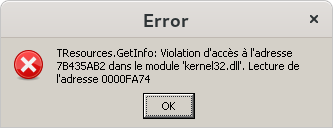
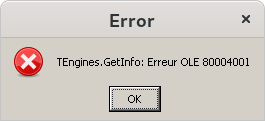
  • Game Error Popup:
    steam-2710_error_1
    steam-2710_error_2

  • gnome-shell panel is visible (with both dxvk and wined3d):

    • Workaround: Alt-Tab out, Alt-Tab back in.
  • Cursor disappears/flashing (with both dxvk and wined3d):

    • On a gnome+wayland session the issue is not present.

Reproduction

  • Start the game

Logs:

steam-2710_PROTON_FORCE_LARGE_ADDRESS_AWARE=0.log
steam-2710_after_install_wmp9.log

wined3d + gnome + xorg session:

wined3d + gnome + wayland session:

dxvk + gnome + xorg session:

Notes:

Sspringwurm 2020-06-18 github

Update 1

  • On KDE Plasma, the panel/taskbar is hidden in the game. No need for "Alt-Tab out, Alt-Tab back in"
Ppquerner 2025-08-28 github

Only got it to start with proton 4.2-9. Videos do not play, but the sound can be heard. Error message from OP still pops up, but upon clicking "OK" the game starts. Fullscreen can be enabled with ALT+ENTER, although not all resolutions are accepted.

Ingame, the cursor cannot be used to "circle in my units", as they have a wierd offset.
Sadly not playable like this.

Mmirh 2025-11-14 github

Try on proton 10.0-3

Proton versions

Launch options