Battlefield 4™
There is also the issue of no ping indicator in multiplayer matches - the leaderboard simply shows - instead of the RTT in ms. Many servers have plugins that automatically kick players with a missing ping. Of note is that all other in-game latency displays, such as in the server browser or in the debug overlay, work correctly.
Unfortunately I don't have the game on steam, but the ratings on ProtonDB suggest that at least some steam players also have the problem. As an attempted workaround, I tried setcap cap_net_raw+epi /usr/bin/wine-preloader, which results in ping working inside wine (which it didn't before), but no change in BF4 ingame latency display.
$ wine ping steampowered.com
Pinging steampowered.com [104.96.45.241] with 32 bytes of data:
Reply from 104.96.45.241: bytes=32 time=34ms TTL=54
Reply from 104.96.45.241: bytes=32 time=31ms TTL=54
Reply from 104.96.45.241: bytes=32 time=34ms TTL=54
Reply from 104.96.45.241: bytes=32 time=38ms TTL=54

Ping statistics for 104.96.45.241
	Packets: Sent = 4, Received = 4, Lost = 0 (0% loss)
Approximate round trip times in milli-seconds:
	Minimum = 31ms, Maximum = 38ms, Average = 34ms
Personally I've never encountered any punkbuster related kicks on a vanilla Wine/Origin setup.
Same issue with the ping, getting kicked is super annoying. Haven't managed to solve it yet with the setcap solution, but others apparently have
Battlefield 4 no longer even opens for me with Proton 5.09, I had to switch to Proton-5.11-GE-1-MF by GloriousEggroll to get it to open. Is anyone else having this problem or is it just me?
edit: the problem was just me. I had Proton installed on an external drive SteamLibrary for some reason, I was in the process of replacing the drive (which meant it no longer existed)
As for the issue with ping not displaying and getting kicked for missing ping, I am not having that issue. I have tried over 10 different servers and I have yet to be kicked once I completed the initial PunkBuster setup.
Everything is working as expected for me once again.
I appear to be having an issue with the game (Origin overlay?). The game starts with Proton 5.11-GE-2-MF. The mouse works in the menus however if I join a game, neither the mouse nor the keyboard work. The keyboard doesn't work in the menus as if I try and change a key binding, there's no response from any keys.
I can't disable the overlay as I own the game through Steam and so it launches Origin in external launcher mode which defaults the overlay on and it can't be turned off from what I can see.
Can anyone shed any light on this?
EDIT: I was using GE proton as 5.09 didn't appear to work. It seems to work using 5.09 however now although the mouse works in the menu, when selecting a deployment point, the selection "scrolls" through vertically and the mouse is frozen in game, but the keyboard works.
I had a similar issue I think with my keyboard not working in Battlefield V, I don't believe it was related to Origin in-game overlay or Steam in-game overlay. I switched from Fullscreen to Borderless and that fixed my keyboard not working in Battlefield V, might be worth a try for you.
I have a similar issue with keyboard not working in both menu and a game, as well as mouse in locked mode in game, though Origin overlay is disabled. Thought at first it was due to XWayland, but it doesn't work in native Xorg window manager either as well as Wine virtual desktop.
When is the ping issue going to be fixed or is there at least a workaround for it?
Well, there is a workaround for ping, you just need to allow wineserver and wine-preloader binaries (both 64 and 32) to use raw sockets.
https://appdb.winehq.org/objectManager.php?sClass=version&iId=31145
I'm having an issue with Origin not recognizing the game as installed. I get all the way through the setup, but when I press play Origin launches and says:
The game Battlefield 4™ Premium Edition does not appear to be installed. Please install it or try relaunching the game.
OS: Arch Linux
Proton version: 5.13-4
When I try to launch the game steam just nothing happens except for Steam showing it as running. Doesn't even launch Origin
OS: Arch Linux
Proton version: Proton 5-21-GE-1
GPU: Nvidia GTX 960
CPU: AMD FX 6300
Any update on the no ping issue? Picked this up during the Winter summer sale on Steam and it works fine (using Proton-5.21-GE-1).
The main issue I have (besides Origin being a bit difficult at launch) is not having a ping, for the majority of the servers I've joined they are running an addon which kicks you for this.
I've found numerous posts on Reddit / forums detailing how to fix this, however they are running these fixes (and the installs) with Lutris and not Steam+Proton.
Just for clarification, I did try the fix on WineHQ and @Cherser-s suggestion but my ping is still missing/the issue remains.
Replying to https://github.com/ValveSoftware/Proton/issues/3994#issuecomment-779256073
No and unfortunately there doesn't seem much interest in fixing the issue. if your total playtime is under 2-hours I sincerely suggest refunding and buying one of the other battlefields.
The setcap issue is explained here https://www.reddit.com/r/linux_gaming/comments/gc5qss/wine_and_ping_support_on_ubuntu_a_guide/
But this solution doesn't work for me either in my ubuntu 20.04, I tried to link the custom proton-ge's libwine.so I'm using in steam to the ld.conf.so.
So from what I understood is that could be solved by a spefic way to build wine. Does somebody have such build ?
After reading this https://github.com/ValveSoftware/Proton/issues/4586 (about ping issue), I tried to run bf4 from a windows steam with a lutris wine build, and after running the setcap trick on the lutris wine's binaries, it seem that ping works ingame. So the only workaround for BF4 and ping issue is to not use Proton.
Installed yesterday and ootb was getting ping
but also getting kicked after 3-4 minutes by punkbuster.
Today I tried to manually reinstall (and update) punkbuster
with the:
WINEPREFIX=$HOME/.steam/steam/steamapps/compatdata/1238860/pfx wine pbsetup.exe
trick
and it broke my ping.
So I removed the proton prefix
and also moved the game (from within steam) from spinning rust to ssd
had it performed the origin and punkbuster setup
and still got no ping
(so actually worse than yesterday :))
I've tried various "setcap cap_net_raw+epi" solutions
also symlinking the used wine* files to my /etc/ld.so.conf
also tried various proton versions
I'm on Debian 10
if anyone has suggestions let me know
As it's said on my previous post, ping doesn't work with proton either with setcap trick, you must run the game directly from a wine build (lutris or wine-tkg as example)
As it's said on my previous post, ping doesn't work with proton either with setcap trick, you must run the game directly from a wine build (lutris or wine-tkg as example)
I hear you mate but there are plenty of ppl here playing it with proton:
https://www.protondb.com/app/1238860
perhaps those are old reports and it broke recently ?
no idea if a distrib issue or a regression, I know many people is playing without the ping on servers that dont' kick for that. Fact is that proton is now bothering with setcap trick.
Interesting, after latest Wine update I can't get Origin working, and it simply hangs while trying to connect to some api server for eternity, if I have capability cap_net_raw+epi on wine-preloader (32 bit version). If I remove this, Origin launches fine, but I think I won't be able to connect to Punkbuster servers.
I simply get winsock error 10035 infinitely, this probably is connected to Origin updater checking, if new version is available.
Has anyone found a fix yet for the ping issue that doesn’t require running Windows Steam in wine though Lutris? I was thinking of buying the game but if the ping issue means it doesn’t work in proton it might not be worth it.
Has anyone found a fix yet for the ping issue that doesn’t require running Windows Steam in wine though Lutris? I was thinking of buying the game but if the ping issue means it doesn’t work in proton it might not be worth it.
Don't buy it. I spent ages trying to fix it and couldn't. You'll be kicked from 95% of the multiplayer servers because of some stupid add-on most of them run.
looks like a patch for the ping issue was proposed last night:
https://source.winehq.org/patches/data/207990
Here's a proton-ge test build with the patch, i was able to play for about 45 min in multiplayer without issue (completed a match start to finish):
https://drive.google.com/file/d/189Y7Khlpeti-1vLiNbWPYV7X-OTAIOxG/view?usp=sharing
Replying to https://github.com/ValveSoftware/Proton/issues/3994#issuecomment-864833324
Not to try and insult you by asking this, but are you 100% sure you were playing on a server that has this issue?
I'm sure you're right correct and it's working - I just thought I'd double check before getting my hopes up.
Still, that being said I guess that only goes to prove the old adage about the internet; "if you want the answer to something don't ask for it, Instead post the wrong answer and someone will correct you almost immediately" 😛
I can confirm the Proton-6.11-GE-1 fixes the issue. I tried it, ping displays nicely, sometimes it takes some couple of seconds to be refreshed and displayed, but it definitely works.
looks like a patch for the ping issue was proposed last night:
https://source.winehq.org/patches/data/207990Here's a proton-ge test build with the patch, i was able to play for about 45 min in multiplayer without issue (completed a match start to finish):
https://drive.google.com/file/d/189Y7Khlpeti-1vLiNbWPYV7X-OTAIOxG/view?usp=sharing
Found this conservation by randomly googling the subject and just created a Github account in order to provide feedback for this type of thing. Going to test your new 6.11 build tonight and report back asap. In any case, thanks for taking the time to fix this issue in ProtonGE. My family and friends have moved over to Ubuntu / Suse / Fedora Linux and we all just bought BF4 on Steam a couple of days ago. Your timing is perfect in our case. Looking forward to the official release.
Cheers
Update: Ok, just played online a couple of rounds: no kicks whatsoever, ping was shown just fine. Worked like a charm.
Interesting, this patch doesn't work for me (in vanilla wine version, that is), if I don't enable raw sockets capability for wine binary files.
I've ran wine ping commands to test this patch.
In the case if I enable those capabilities, then Origin just doesn't start and hangs, looping through some crypt32 calls or something like that. The same happens, if wineserver is already running (regardless of capabilities being set).
UPD: I allowed unprivileged ICMP requests for my user by sysctl. Also Origin started working somehow and doesn't hang just as in case with setcap, so I could start bf4 and play multiplayer with working ping. Though Origin still hangs at the start in case if wineserver wasn't initiated by Origin executable. Something isn't right with Origin itself probably.
Another update: The game is still working just fine ping-wise (with ProtonGE 6.11), but I noticed a different issue.
The game stutters heavily every second or two when playing online. I checked ProtonDB and noticed that there are other users with the same issue. I've tried a bunch of the suggested workarounds (-notexturestreaming, gamemode, turning off bandwith optimization etc.), unfortunately to no avail.
According to one ProtonDB report (from the user "Arge"): "Origin, when being online, seems to heavily stutter this game (as well as Battlefield1 via Lutris) exactly every single second. If one manages to launch the game with the chat of Origin being offline, this stutter doesn't exist."
Is anyone else experiencing the above? I am able to confirm the issue on two separate machines, one equipped with an RTX 2080 Super. OS: Ubuntu 21.04 and 20.04.2.
Thanks!
Are you sure it isn’t compiling shaders? On my Arch Linux i5 6500 and GTX 1060 6GB machine, it does stutter online but not as frequently as every 1 or 2 seconds.
The game stutters heavily every second or two when playing online. I checked ProtonDB and noticed that there are other users with the same issue. I've tried a bunch of the suggested workarounds (-notexturestreaming, gamemode, turning off bandwith optimization etc.), unfortunately to no avail.
I've noticed the same symptom on vanilla wine 6.11 (with setcap on wine{server,{,64}-preloader} to get privileged ICMP). It's intermittent, but when it's there, it's a very obvious regular stutter.
Didn't notice stutters that frequent in privileged ICMP (using vanilla wine as well), but I notice some pretty heavy stutters around every 20-30 seconds, regardless of whether ICMP is privileged or not.
For me, when I start the game it
- launched origin
- did the usual origin shenanigans (opened several windows that were tiled, had to kill them all except one in order to open the real game menu)
But the launch button of the game was greyed out, when I tried to close origin again it said that bf4 was already running and that I should close it before proceeding. And indeed, in my process list there was bf4.exe - but no window was open with the game, nor did nvidia-smi (which reported origin) show it as a client.
Is there anything I can do to resolve this?
We need to figure out this ping thing, I'm not sure what version I'm on but I got banned from a bf4 server for not having a ping - this is going to happen to others, especially with the new handheld that was announced.
The ping is fixed on Proton-GE 6.12.
Did anyone else encounter Origin hang when using privileged (through setcap cap_net_raw+epi on wine-preloader*) ICMP?
Okay for those that missed it like me here's how to install Proton-GE 6.12
git clone https://github.com/p-mng/proton-ge-custom-updater
cd proton-ge-custom-updater
./proroton-ge-custom-updater.sh
Restart steam
Make sure to right click on Battlefield 4 and force Proton-GE 6.12
If you have issues with origin not launching try the regular steam branch and not the beta branch and/or restarting steam again.
Has anyone been able to fix the periodic stutter? I've been playing BF4 for quite a while and amassed a hefty collection of compiled shaders, but still getting some stutters at just the wrong times in combat 😳 lolol
I've tried -notexturestreaming, disabling AppData write permissions, GE patches, various DXVK builds, gamemode, esync/fsync and disabling desktop compositing all to no avail
Only thing I haven't tried is a custom kernel, but I really don't know if it'd be worth messing with to be honest.
Edit: Using Majaro KDE, AMD Ryzen 5 2600 and an RTX 2060
Has anyone been able to fix the periodic stutter? I've been playing BF4 for quite a while and amassed a hefty collection of compiled shaders, but still getting some stutters at just the wrong times in combat flushed lolol
I've tried -notexturestreaming, disabling AppData write permissions, GE patches, various DXVK builds, gamemode, esync/fsync and disabling desktop compositing all to no avail
Only thing I haven't tried is a custom kernel, but I really don't know if it'd be worth messing with to be honest.
Hi there, I am still experiencing the stuttering on my Nvidia system, will test on my AMD RX 560 + i7 PC tonight.
A user on ProtonDB commented on the issue and suggests the following:
"Performance:Slight Performance Problems
Stuttering, need to run at 200% scaling to keep gpu full to prevent stuttering."
Not sure what he means by that though, will try to test it and report back here asap.
Cheers,
Sturm
"Performance:Slight Performance Problems
Stuttering, need to run at 200% scaling to keep gpu
Not sure what he means by that though, will try to test it and report back here asap.Cheers,
Sturm
They are referring to resolution scaling in the game's video settings. Although, my rig cannot run the game at 200% scaling in Windows to begin with so I'm a bit hesitant to try that 🤭 (That's effectively playing at 4k if you have a 1080p monitor)
That being said I could try messing with the CPU governor and/or telling the Nvidia driver you prefer maximum power. I'll edit this post after trying that later tonight.
Edit: It is now later tonight, performance governor and max perf in the Nvidia driver didn't help sadly.
Interesting, after latest Wine update I can't get Origin working, and it simply hangs while trying to connect to some api server for eternity
I tried to force a proton version on bf3 and this happened. Delete the entire .....steam/steam/steamapps/compatdata/ and restart it from steam.
https://steamcommunity.com/app/1238860/discussions/0/3061868384744675919/
The ping is fixed on Proton-GE 6.12.
Doesn't work with Proton 6.3-5
I just forced it as compatibility tool in steam and it still doesnt show my ping in this server (you get banned for being kicked 3 times, i'm 1/3 and trying to test if i will be kicked is making me nervous)
The ping is fixed on Proton-GE 6.12.
Doesn't work with Proton 6.3-5
I just forced it as compatibility tool in steam and it still doesnt show my ping in this server (you get banned for being kicked 3 times, i'm 1/3 and trying to test if i will be kicked is making me nervous)
Advice you to just find some empty low-slots server to test until you know it works 🤭
So when you say "you forced [it]", you mean you launched it with GE-12 right? Did you make sure it was set in Steam, restarted Steam and/or also set it in Battlefield 4's Steam properties?
Try killing all Wine processes before launching BF4 (not sure if this one will help with Proton, but as far as I can tell there's some Wine in there)
you launched it with GE-12 right?
I'm in the process of juggling that right now, but each time i have to destroy the compaddata/ folder and reinstall origin etc before i can even try... game just started, now to test.
Doesn't work with Proton 6.3-5
I was hoping the latest stock proton would have it fixed, so tried it before the GE... which so far appears to work as previously confirmed. Will try it on a pingnazi server now once i figure out how to copy my control settings over.
EDIT: double confirmed Proton-6.12-GE-1.tar.gz - WORKS.

EDIT EDIT: and now i get kicked for 214/200 ping instead of no ping... yay?
Hey there!
The issue with stuttering can be solved in Battlefield 4 as it can be solved in Battlefiled 1. Post processing effects are somehow confliting with Proton. In Battlefield 1, I've disabled motion blur and the other post processing effects in the "graphics" tab and set the post processing quality to low in the "advenced graphics" tab. In Battlefield 4, just setting the motion blur to 0% was enough. I'm playing both games really well on a Core i5 4670K, 16GB RAM and GTX 1070Ti after doing that. Everything is on ultra except for these options.
However, the no ping issue continues. I've tried the latest version of Proton (6.3.5), Proton Experimental, Proton-6.12-GE-1 and Proton-6.15-GE-2. Nothing changed (and, with Proton GE, the menu interface was a bit buggy). So, multiplayer is still broken for me :(
I'm using Debian 11 with GNOME 3.38.
Just tried:
sudo setcap cap_net_raw+epi /home/kairand/.steam/root/compatibilitytools.d/Proton-6.15-GE-2/files/bin/wineserver
sudo setcap cap_net_raw+epi /home/kairand/.steam/root/compatibilitytools.d/Proton-6.15-GE-2/files/bin/wine-preloader
sudo setcap cap_net_raw+epi /home/kairand/.steam/root/compatibilitytools.d/Proton-6.15-GE-2/files/bin/wine64-preloader
My ping is still not showing up. :(
Probably something related to Debian?
Just played some Battlefield 4 on a few different servers, no lag or ping issues. I'm using Ubuntu 20.04 with ProtonGE 6.14-GE-2.
Here's some screenshots of a round of TDM, showing my ping and others ping:
setcap cap_net_raw+epi
Not a fix, just a workaroud.
https://github.com/GloriousEggroll/proton-ge-custom/releases
I'm surprised that the latest official proton doesn't work yet given that this patch code is available. Should be an easy way to tick a longstanding bug off the todo list.
Just played some Battlefield 4 on a few different servers, no lag or ping issues. I'm using Ubuntu 20.04 with ProtonGE 6.14-GE-2.
Here's some screenshots of a round of TDM, showing my ping and others ping:
Thanks for the info! So it seems like this issue is fixed on Ubuntu when using Proton GE.
I don't have lag issues and my ping shows up at the server selection menu. However, it's not appearing when I'm playing.
setcap cap_net_raw+epi
Not a fix, just a workaroud.
https://github.com/GloriousEggroll/proton-ge-custom/releasesI'm surprised that the latest official proton doesn't work yet given that this patch code is available. Should be an easy way to tick a longstanding bug off the todo list.
I've already tried Proton-6.12-GE-1 and Proton-6.15-GE-2, with and without the setcap commands. Unfortunately, my ping is still not showing up. :(
I found this solution - the author mentioned Ubuntu -, but it seems risky: https://www.reddit.com/r/linux_gaming/comments/gc5qss/wine_and_ping_support_on_ubuntu_a_guide/. And, as it seems to be working on Ubuntu now, I'm trying to find out what Debian does differently, or if there's something wrong with my system.
A friend of mine also uses Debian and the GloriousEggroll build didn't solve his problem as well: https://plus.diolinux.com.br/t/battlefield-4-no-debian-11-usando-proton-ping-nao-aparece-nas-partidas/37782/2. It seems like something specific to Debian. And I don't have any idea why.
I've reinstalled everything. Just tried the setcap commands again with many Proton versions. None worked. Same with ProtonGE.
This game is only partially playable on Debian. This fix doesn't work. :(
Providing example of random stutter (ever 30-120s it seems)
https://user-images.githubusercontent.com/3275435/136723946-12757693-4947-461e-96db-05e6fe4ea6ef.mp4
It's showing it as CPU related for something, not sure how to gauge what's causing it. Have the ping fix, 125 resolution scaling (1440p 144hz screen so trying to keep it around 140fps) and also set Motion Blur to 0 as recommended. CPU hovers around 20-40% usage across all cores, none seem to spike.
- Ubuntu 20.04.3
- Proton 6.19-GE-1
- i9-9900k
- AMD 6900XT
@cdgriffith Can you check to see if anything, specfically origin.exe is using a lot of cpu? I've had it's webkit engine destroying my cpu for no reason.
I've had the stutter issues myself albeit using Wine and standalone Origin, not Proton. However, I've just upgraded to Wine-GE 6.19, and playing Battlefield 4 with the EA App instead of Origin the game works flawlessly on my GTX 1060 + Ryzen 5 2600! Can someone on Proton install the EA App instead of Origin and confirm with Proton-GE 6.19? I can't get it running as a non-Steam game.
CC @Penagwin @cdgriffith
https://github.com/GloriousEggroll/proton-ge-custom/releases/tag/6.19-GE-2
I was going to make a video with my system monitor as a pic-in-pic showing micropausing to check for spikes, but apparently it's not going to do it now. When I next play for several hours I am sure it will arise again, I will endeavour to record the relevant graphs.
My experience is that it works fine for a few hours, and then micropausing kicks in.
It feels like a variant of the 'stutter' experience I had with Battlefield Bad Company 2 and all proton versions except Proton 4.11-9-rc4 ie: it works fine for a while, often with an imperceptible stutter and then becomes progressively more stroke inducing/unplayable. ( https://bittube.tv/post/8fef273c-1e72-4ea5-921d-85f1a7ae17e9 - https://github.com/ValveSoftware/Proton/issues/3316 )
Of note in this video is:
- the fps counter drops momentarily to ~40 during micropauses.
- the video pause is apparently not pausing input as well .
- there doesnt seem to be any regularity to its period.
- I'm almost certain I was killed by a wallhacker several minutes later. ( https://bittube.tv/post/4b482c13-6d79-45ef-b770-453ee6d6bac1 )
i9 9900KF, Gigabyte B365M, RTX 2060 TUF 6G OC, 32GB (2x16GB)
monitors: (via HDMI) Kogan 55in 4K UHD HDR LED TV - JU8200 and Kogan 55in 4K LED TV - KU8000
Kubuntu 20.04
5.4.0-88-generic #99-Ubuntu SMP Thu Sep 23 17:29:00 UTC 2021 x86_64 x86_64 x86_64 GNU/Linux
Steam > Origin > BF4 using Proton 6.12-GE-1
DXVK_HUD=fps,gpuload,frametimes,scale=1.0 vblank_mode=1 %command%
"Enable shader pre-caching" OFF (and I deleted the shader directory after disabling it - currently it's at 2.7GB)
Allow background processing of vulkan shaders" OFF
libratbag/Piper, evrouter, xmodmap - for various simple binds that are otherwise impossible ingame
I was going to make a video with my system monitor as a pic-in-pic showing micropausing to check for spikes, but apparently it's not going to do it now. When I next play for several hours I am sure it will arise again, I will endeavour to record the relevant graphs.
(long post)
Try Proton 6.19-GE-2 and play through the EA App, see if that helps. I had your exact issue with an RTX 2060; I use a 1060 now but maybe it'll resolve on this build of Proton-GE. Curious to know if it does, myself.
I've had the stutter issues myself albeit using Wine and standalone Origin, not Proton. However, I've just upgraded to Wine-GE 6.19, and playing Battlefield 4 with the EA App instead of Origin the game works flawlessly on my GTX 1060 + Ryzen 5 2600! Can someone on Proton install the EA App instead of Origin and confirm with Proton-GE 6.19? I can't get it running as a non-Steam game.
CC @Penagwin @cdgriffith https://github.com/GloriousEggroll/proton-ge-custom/releases/tag/6.19-GE-2
Looks like that fixed it for me, but there's another problem: Punkbuster keeps kicking me out, playing through Lutris on Proton-GE 6.19-2. Even after I run the Punkbuster setup, I still get kicked.
Try Proton 6.19-GE-2 and play through the EA App
I thought i Knew how to do this, it seemed to fail and also succeed at the same time when i installed it, but apparently I've forgotten how to even start the app, much less install everything else and play the game.
*googles: I'm not seeing a relevant looking guide...Theres a guide right?
Try Proton 6.19-GE-2 and play through the EA App,
Installed EA App through lutris using Lutris-ge-6.19-1 and it's not showing the games I bought through Steam so can't test that way it seems. Don't see of any switch in steam to make it launch EA App instead of Origin for Battlefield games.
Installed EA App through lutris using Lutris-ge-6.19-1 and it's not showing the games I bought through Steam so can't test that way it seems. Don't see of any switch in steam to make it launch EA App instead of Origin for Battlefield games.
Darn, that's weird but I guess EA must have changed something with how Steam+Origin works when they re-released games on Steam :( Haven't bought any of my EA games through Steam so I had no clue. (Before EA removed their games from Steam back when, I bought Dead Space on Steam and was able to get it showing up in my EA account, thus I thought it still worked like that. My mistake.)
I thought i Knew how to do this, it seemed to fail and also succeed at the same time when i installed it, but apparently I've forgotten how to even start the app, much less install everything else and play the game.
*googles: I'm not seeing a relevant looking guide...Theres a guide right?
Not really AFAIK, but you can use Protontricks which is pretty straightforward
Installed EA App through lutris using Lutris-ge-6.19-1
I'm assuming you need to install EA App as 'non steam game' and then install the game via that.
...which is pretty tedious to do by trial and error given the size of many game installers.
Or install EA App into your BF4 steam ID proton/winebottle via the command line, but I'd be worried it would kill something after watching it fail/succeed install in it's own ID container.
https://www.youtube.com/watch?time_continue=746&v=zYeu7P9L528&feature=emb_logo
Haven't bought any of my EA games through Steam so I had no clue.
You install the EA game you bought via steam as a steam game, and no doubt it does a bunch of scripting transparently to set up Origin, and essentially hide Origin to start the game as directly as possible when you do get your credentials in and it's go time, and each time you push play in steam after that. Works good when it works, but Origin wanting to update all the time is annoying as only windows land can be.... though it seems to be doing it with no user intervention now so maybe thats been scripted into semi-transparency too.
I've had the stutter issues myself albeit using Wine and standalone Origin, not Proton. However, I've just upgraded to Wine-GE 6.19, and playing Battlefield 4 with the EA App instead of Origin the game works flawlessly on my GTX 1060 + Ryzen 5 2600! Can someone on Proton install the EA App instead of Origin and confirm with Proton-GE 6.19? I can't get it running as a non-Steam game.
CC @Penagwin @cdgriffith GloriousEggroll/proton-ge-custom@
6.19-GE-2(release)
It's working flawlessly for me now. Punkbuster did a reinstall but I'm having no issues with it. Also this seemed to fixed some weird bugs I had with the origin windows just being all black
someone on Proton install the EA App instead of Origin
How do you do this? Given that the steam app starts origin to start BF4 I dont see how just cli installing EA App into compatdata/1238860 (like this) could work. Or does it?
Someone should give the cli commands to do this with already.
I've just spent the better part of yesterday revising what i previously learned and forgot about wine figuring out that people love to say "oh just do X and Y" but for those of us who don't regularly invoke wine commands; trying to figure out what they meant is just a path to hours of googling tedious errors.
Can someone just type history and paste the relevant bits.
In my case, it's just saying "Installing OriginThinSetup (1/6)" and stuck there forever.
Oh man.
/media/user/steamdata/.steam/steam/steamapps/common/Battlefield 4/dxvk.conf
dxgi.nvapiHack = False
https://github.com/doitsujin/dxvk/wiki/Configuration#example-configuration
# Report Nvidia GPUs as AMD GPUs by default. This is enabled by default
# to work around issues with NVAPI, but may cause issues in some games.
Probably everyone using an nvidia card should check if this makes a difference.
I've changed so many things that I cant be sure, and I can't be bothered process-of-eliminating what actually did it right now, but it seems like this one switch might have just radically improved BF4 useability.
[edit]
GAH! and just now i see its documented too. ffs
https://github.com/doitsujin/dxvk/wiki/Game-specific-quirks
In my case, it's just saying "Installing OriginThinSetup (1/6)" and stuck there forever.
Update: I managed to install Origin with Proton-GE-6.19 and WINED3D enabled. Origin doesn't launch with dxvk in my laptop. Logged in with Origin account, and now it says "Connecting to Origin" and stuck there every time I launch the game. I need to check some logs.
Probably everyone using an nvidia card should check if this makes a difference.
Just tested it. It seems to make no difference here, unfortunately. :(
I have a GTX 1070Ti (driver 495.44).
gamer runs great for me. I did not have to change anything.
one problem i never had before/maybe not related, i had no ping so i was kicked from the servers.
today i changed to ProtonGE now i have a ping and it works... So every new Proton version should be good enough.
OS: Manjaro Linux
KERNEL: 5.10.85-1-MANJARO
CPU: Intel Core i5-7600K @ 3.80GHz
GPU: NVIDIA NVIDIA GeForce GTX 1070
GPU DRIVER: NVIDIA 495.46
RAM: 24 GB
Updated ProtonGE to version Proton-7.0rc2-GE-1. Performance is a LOT better now. Almost no stutter.
Almost
sigh
I never have any stuttering with an i7 5960x @ 4.3GHz and a GTX 1070 with NVIDIA 470.86 FWIW, works perfectly for me OOTB.
Just tried using Proton-7.0rc2-GE-1 as well as running the game through EA Play instead of Origin and still get microstutters every 9 seconds or so.
Just tried using Proton-7.0rc2-GE-1 as well as running the game through EA Play instead of Origin and still get microstutters every 9 seconds or so.
Do you have a nvidia or amd graphics card?
Did you try to run it with "gamemoderun %command%"
In order for it to work it should be installed.
Do you have a nvidia or amd graphics card?
I'm using Nvidia. GTX 1080ti with the 495.46 driver.
Did you try to run it with "gamemoderun %command%"
Yes, gamemode was run with it.
My specs:
OS: Manjaro Linux
KERNEL: 5.14.21-2-MANJARO
CPU: Intel Core i7-6700K @4.00GHz
GPU: NVIDIA NVIDIA GeForce GTX 1080ti
GPU DRIVER: NVIDIA 495.46
RAM: 16 GB
Mhm, have you try enabling force composition pipeline?
https://m.youtube.com/watch?v=0Ux9bz_Tfw0
I have it enabled to fix screen tearing, maybe it can help.
Just tried using Proton-7.0rc2-GE-1 as well as running the game through EA Play instead of Origin and still get microstutters every 9 seconds or so.
Once I had the microstutters.. I just fixed it by removing the wine prefix and I let the game generate a new one.. Maybe this was caused after changing the proton's version..
Mhm, have you try enabling force composition pipeline? https://m.youtube.com/watch?v=0Ux9bz_Tfw0 I have it enabled to fix screen tearing, maybe it can help.
I do have the enabled. I believe the stutters are through the game because the "frame issues" icon appears in the game whenever the stutter occurs.
Once I had the microstutters.. I just fixed it by removing the wine prefix and I let the game generate a new one.. Maybe this was caused after changing the proton's version..
The wine prefix I used was brand new but I did copy over an older shader cache... I'll try deleting my shader cache tonight and seeing if the issue persists.
There's an issue trying to launch Battlefield 4 on Wayland on NVIDIA (GBM backend) using KDE Plasma (with Kwin compositor). Proton and Origin boot fine, although when the game window pops-up there's just a black screen and a DirectX error window appears. Here are some screenshots:
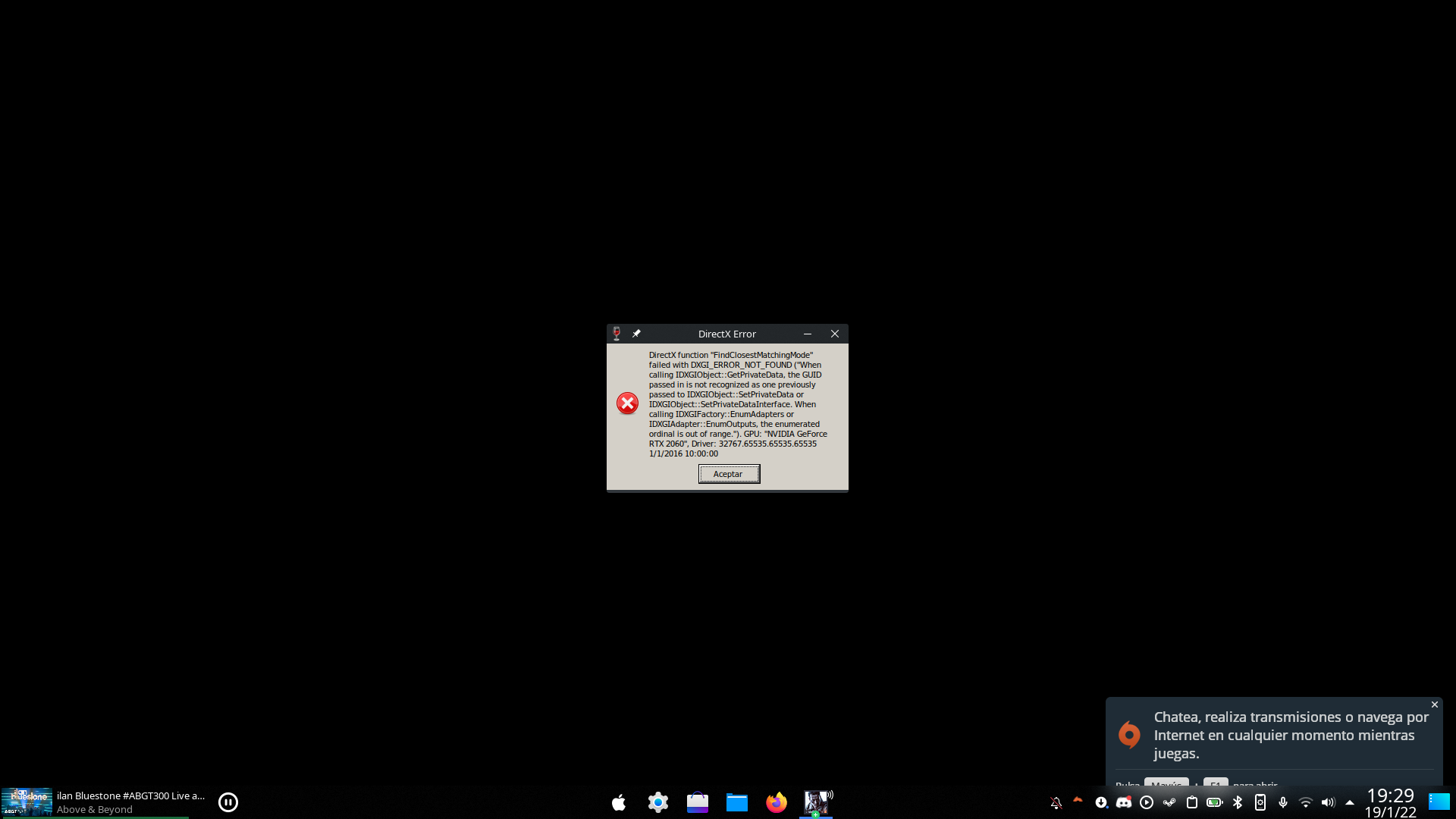
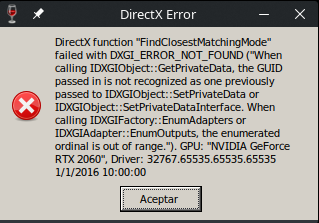
When launching steam from terminal and pressing OK in that window, this is the only thing that is printed about the error:
wine: Unhandled exception 0x887a0002 in thread 914 at address 000000007B01241E (thread 0914), starting debugger...
My GPU is an NVIDIA RTX 2060 Mobile using 495.46 drivers from Arch repos.
The distro is Arch Linux running 5.15.13-zen1-1-zen kernel.
Proton Experimental (as of this writing) with WINE 7.x still does not correctly handle joystick axis. Using Logitech 3D Extreme, which is known to work properly with this game on Windows. Trying to set roll, pitch, yaw, throttle axis, works inconsistently. Can't reliably fly in this game still. Was hoping WINE 7's Joystick API fixing was going to address this :/
I have yet to ever get a joystick working properly with this game.
game is unplayable. keep getting DirectX error when trying to load a map
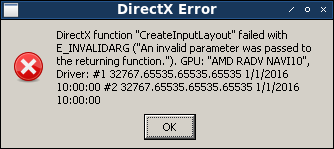
@mathew2214 If possible can you post some logs.
Add PROTON_LOG=1 %command% to the game's launch options, reproduce the issue and attach the log here as a file. It should appear in your users home folder.
If you can also copy your system information from Steam (Steam -> Help -> System Information) and put it in a gist and then link it here. Remember to let it collect for atleast around 15 seconds even if text have already have appeared as it will be working in the background still.
Origin launches black, I can run origin outside of proton. However I cannot get past the login screen and I am able top via
lutris origin install.
paste of log
The game doesn't launch at all for me
Steam system information:
https://gist.github.com/khatibomar/71d6b9c52c3bce63aba8487d5542eccc
PROTON_LOG
https://gist.github.com/khatibomar/af9f3e34819aec9670419b8c8afcfe0b
Hello @khatibomar, looking at your system information, it looks like you're using the NVIDIA proprietary driver, but don't have the video driver's 32 bit userspace libraries installed. Double check that you have the lib32-nvidia-utils system package installed.
@kisak-valve I installed them, how ever same issue game is not running
new steam system info
https://gist.github.com/khatibomar/c0083e6eefc2f59f19069f4a88b8e116
Looking at your updated system information, it's looking healther, but the 32 bit vulkan render path is still broken (https://gist.github.com/khatibomar/c0083e6eefc2f59f19069f4a88b8e116#file-gistfile1-txt-L276-L289). We've seen AMDVLK break other video drivers before and it's installed on your system (lib32-amdvlk system package).
@kisak-valve thanks for help, after removing this package (lib32-amdvlk), the game is launching now :)
game does not start.
I press Play button in Steam and OriginThinSetup.exe starts. It shows that installing in progress and crashes with no files installed.
OS: Debian GNU/Linux testing
KERNEL: 5.18.2
CPU: Intel(R) Core(TM) i5-3550 CPU @ 3.30GHz
GPU: AMD Radeon RX 560
GPU DRIVER: xserver-xorg-video-amdgpu 22.0.0-2
RAM: 16 GB
PROTON_LOG: https://gist.github.com/Extraterrestrial/057cfe4618045f29bdb4af882f30d9bb
Steam system information: https://gist.github.com/Extraterrestrial/20ea8691f6ef8a222dd764f1da9c22bc
here's the proton log of my issue https://gist.github.com/mathew2214/92b0e9fa2052d04c3726d9daecc4ce07
here's my sysinfo https://gist.github.com/mathew2214/65ceb4b3aff6c7a0d7429e4cb87c7a9e
still having that exact same error as before
lol this game still kicks legit users? how long before Proton just handles this anti-cheat need out of the box?
lol this game still kicks legit users? how long before Proton just handles this anti-cheat need out of the box?
I've never had a problem with PunkBuster before, using many different distros. I recently installed Pop!_OS and now I am kicked out of the game after a few minutes: "kicked by PunkBuster".
Has this problem started happening to anyone else? Is anyone using Pop!_OS 22.04 LTS?
My ping is showing normally.
EDIT: as expected, manually updating Punkbuster (I've used Bottles to run the .exe) solved the issue. But I'm still curious why this happened just now and only on Pop!_OS.
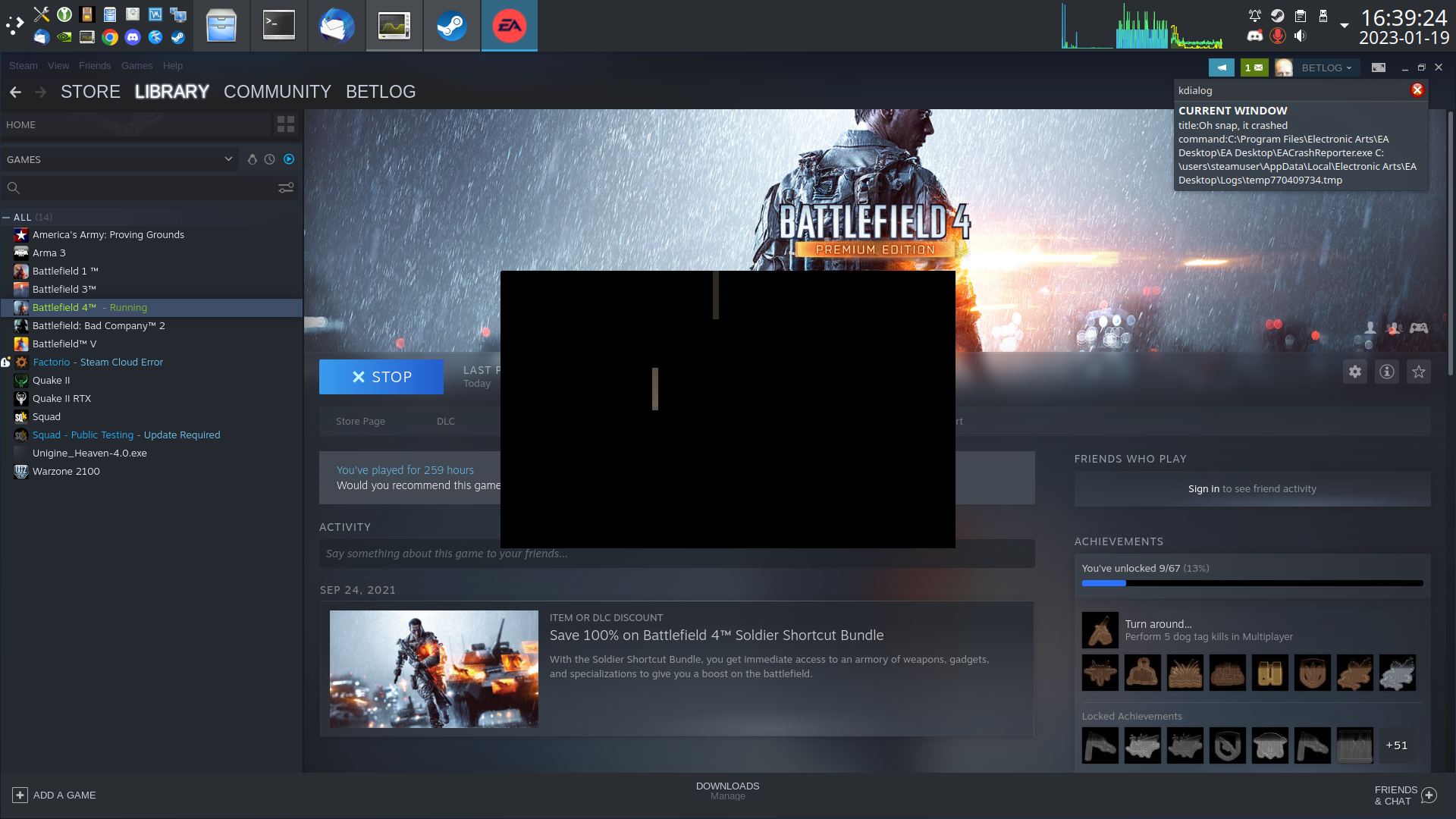
Game almost always fails to exit cleanly.
About a minute after quitting the game Link2EA.exe crashes, unfortunately its message dialog is always either garbled, or black.
(fyi: the steam-gameWrapper.sh script visible in the screenshot is a bunch of pre/post game setup/cleanup of env variables, mouse, keyboard etc.)
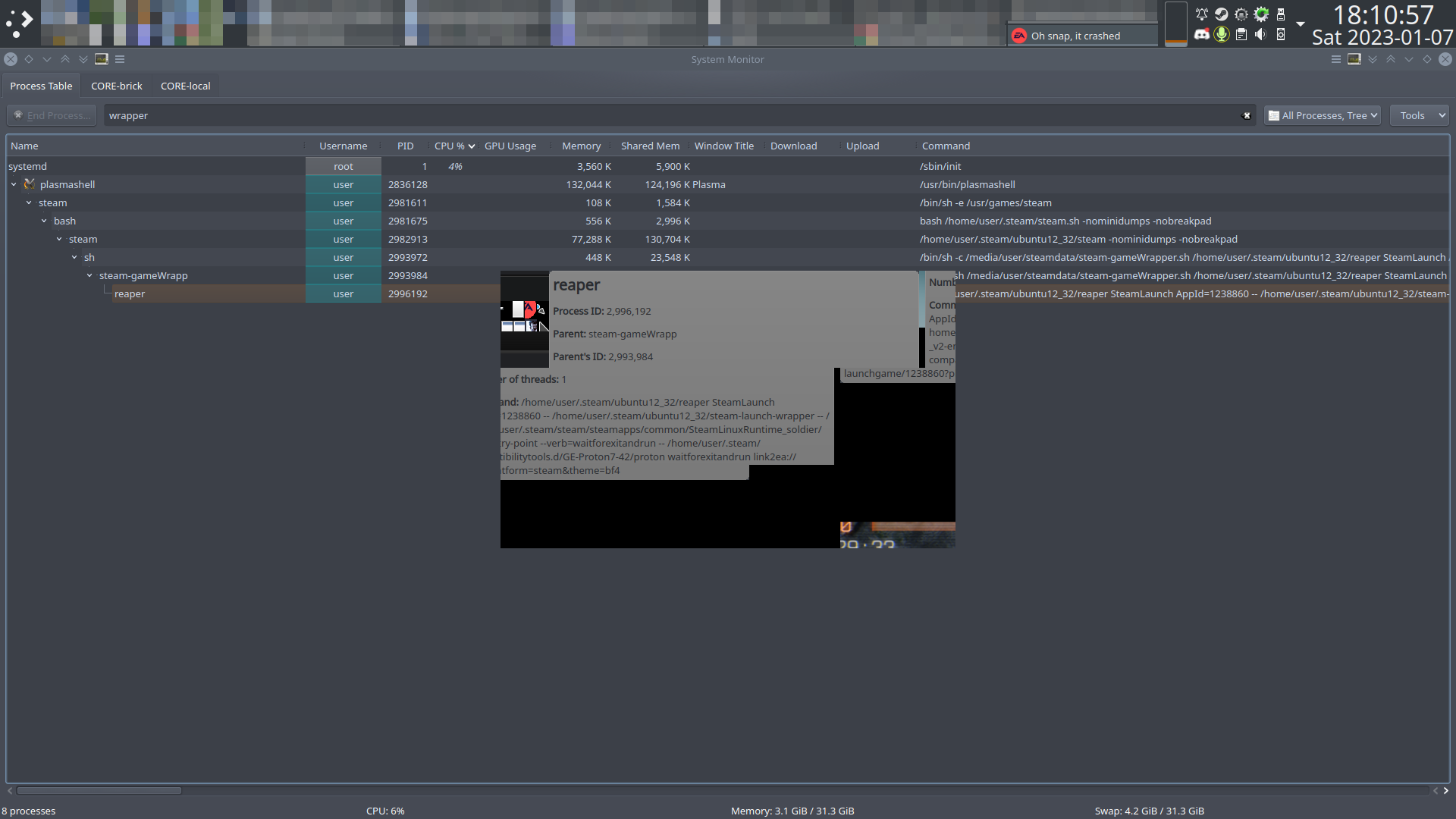
Every few days bf4 fails to start. Sometimes only hours after I have been playing.
Folders I've renamed each time
1238860_stopped working 1hr after a game 2023-01-06
1238860_stopped working 10+ hours after a game 2023-01-10
I'm guessing it relates to EA demanding an update. Normally the blank EA window appears 2 or (iirc) 3 times before the game starts. When the start-failure mentioned here occurs the blank EA window only appears once.
I fixed this a few days ago by:
- rename/delete compatdata folder
- restart game (press buttons to install EA & punkbuster)
PROTON_LOG=1 (and console text)
https://gist.github.com/BETLOG/a191456d293bd5a4e374e840e37bcd45
[edit] this issue seems to have resolved itself
Not even sure how to comment on this. It happened exactly as I was being teamswitched.
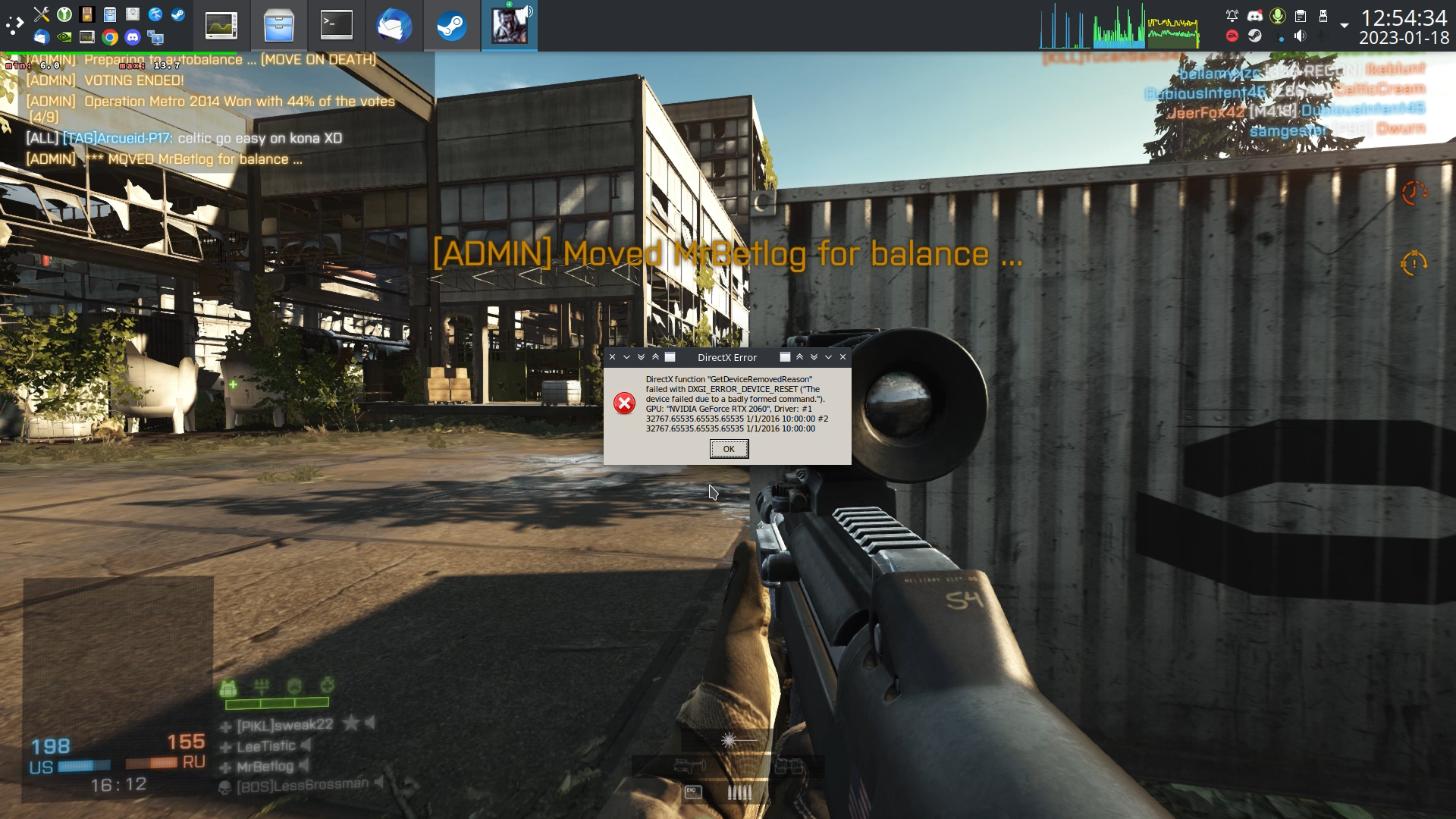
This happens almost every time i exit the game, or attempt to restart it after it has crashed.
I can tell that there is a bunch of buttons on it, but I have no idea what they are. Blacking the dialog out probably isn't a great idea.
@Alexander-Wilms The new EA app has been shipping with other games for a while, and it seems most folks have been able to run it ... Until yesterday, were you still getting the Origin app instead of the EA app? The screenshot you attached looks identical to the EA app that has been working for several weeks after we fixed some things in Proton. Do you have some special verification set up with your EA account? I have never had to enter a code from email.
@Alexander-Wilms Could you try deleting the prefix for the games that no longer work? If the games don't have cloud saves, you will probably want to save the prefix rather than deleting entirely. By default, prefixes are stored at ~/.steam/steam/steamapps/compatdata/appid.
@Alexander-Wilms for me, for BF1, I had to let it load for a whole bunch of minutes. I thought it wasn't loading myself, but eventually it does. So I'd say click play, go get a coffee or something, and try giving it a wide birth hehe
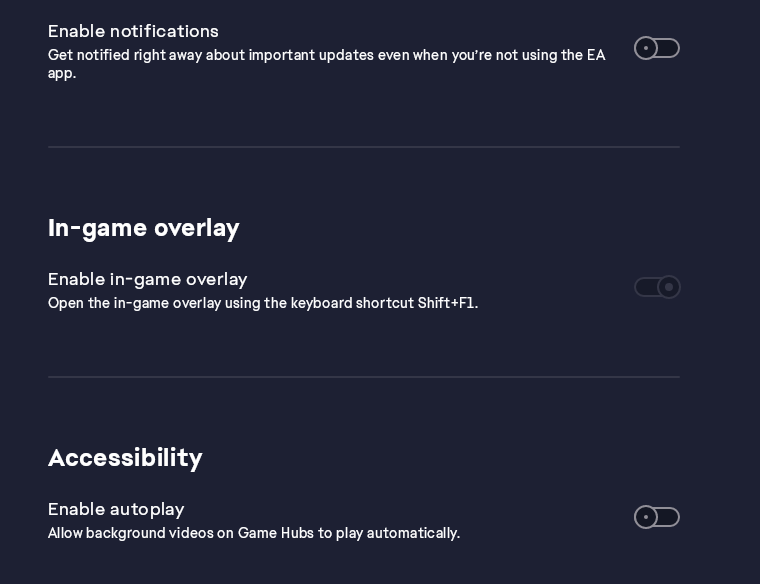
Can not disable in-game overlay
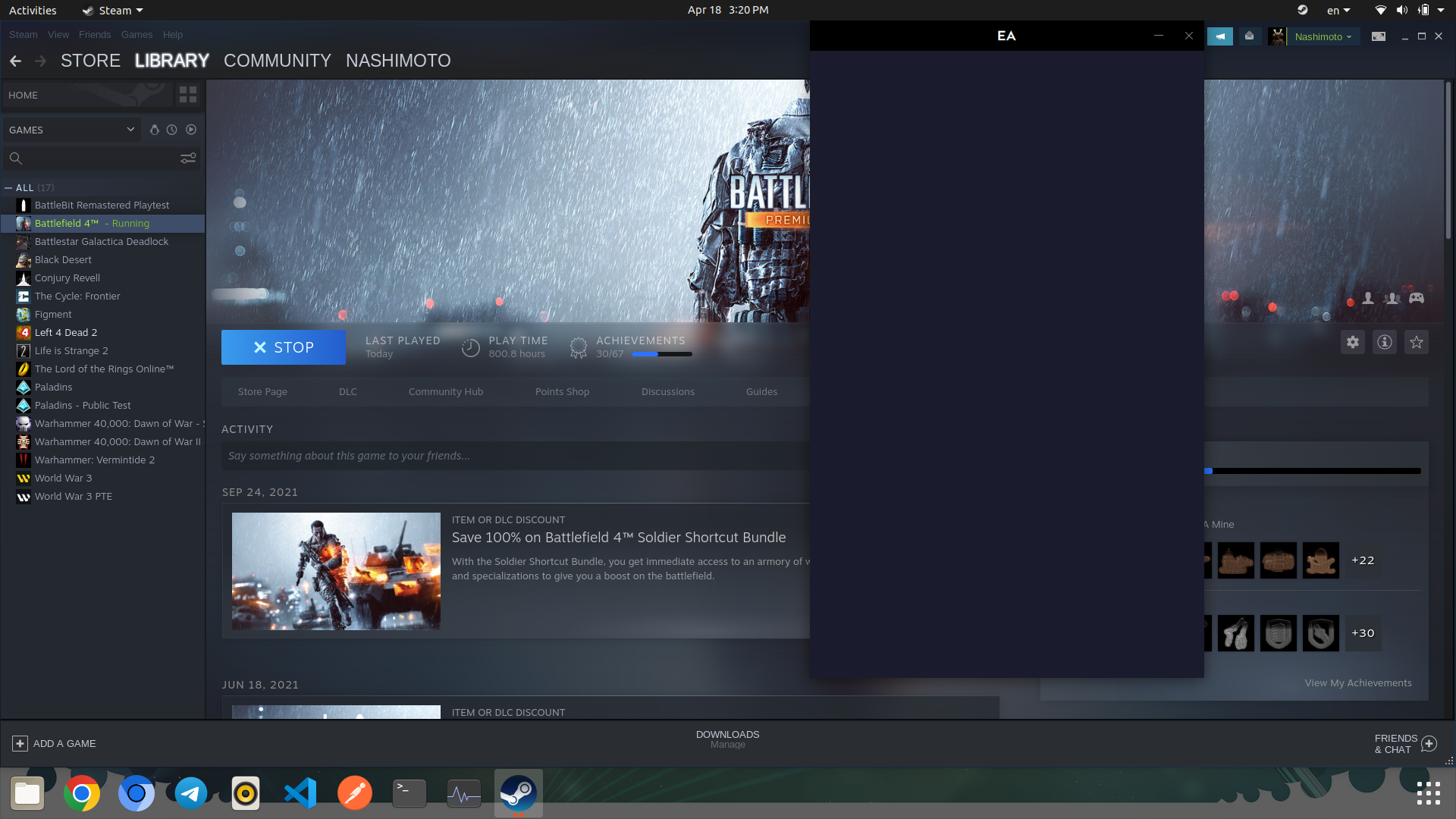
cant run battlefield 4 with proton 8
Issue transferred from https://github.com/ValveSoftware/Proton/issues/6694.
@toyotominashimoto posted on 2023-04-18T09:58:31:
Compatibility Report
- battlefield 4:
- https://store.steampowered.com/app/1238860/Battlefield_4/:
System Information
-
GPU:Mesa Intel® UHD Graphics (TGL GT1)
-
Driver/LLVM version:*-display
description: VGA compatible controller
product: NVIDIA Corporation
vendor: NVIDIA Corporation
physical id: 0
bus info: pci@0000:01:00.0
logical name: /dev/fb0
version: a1
width: 64 bits
clock: 33MHz
capabilities: pm msi pciexpress vga_controller cap_list fb
configuration: depth=32 latency=0 mode=1920x1080 visual=truecolor xres=1920 yres=1080
resources: iomemory:600-5ff iomemory:620-61f memory:81000000-81ffffff memory:6000000000-61ffffffff memory:6200000000-6201ffffff ioport:4000(size=128) memory:82000000-8207ffff
*-display
description: VGA compatible controller
product: Intel Corporation
vendor: Intel Corporation
physical id: 2
bus info: pci@0000:00:02.0
version: 01
width: 64 bits
clock: 33MHz
capabilities: pciexpress msi pm vga_controller bus_master cap_list rom
configuration: driver=i915 latency=0
resources: iomemory:620-61f iomemory:400-3ff irq:157 memory:6202000000-6202ffffff memory:4000000000-400fffffff ioport:5000(size=64) memory:c0000-dffff memory:4010000000-4016ffffff memory:4020000000-40ffffffff -
Kernel version: 5.4 ga
-
Link to full system information report as Gist:
-
Proton version:8.0
I confirm:
- [ ] that I haven't found an existing compatibility report for this game.
- [O ] that I have checked whether there are updates for my system available.
Symptoms
when running bf4 in steam library it runs it as button shows and ea app window for login opens, bu there r no content in window so bf 4 cant be logged in to ea app
7.0-100 (7.0-6 in steam):
Works as far as starting and rendering the game window ( i didn't test beyond that; it probably works fine)
8.0-101 (8.0-2 in steam):
Significant mouse/keyboard interruptions during EA/PB/DX install
Game window appears (windowed), is black and appears to be locked up (no sound or movement, no VK_HUD.
Apparently every proton (steam and GE) in the 8 series can only display a dead, black BF4 window. They also significantly interfere with normal keyboard and mouse input during the proton install process.
I'm not positive its proton's fault, but there also seems to be instances of primary monitor being de-assigned, and everything wanting to render on a secondary screen.
While installing these (and some GE) protons as part of testing which proton works; various errors are visible in dmesg:
[54193.308713] steamwebhelper[60219]: segfault at 1708 ip 00007f87a4991009 sp 00007fff955140c8 error 4 in libGLdispatch.so.0.0.0[7f87a498d000+3b000] likely on CPU 15 (core 7, socket 0)
[54193.308733] Code: 00 64 48 8b 04 25 d8 e8 ff ff ff a0 80 2f 00 00 41 ff a3 f8 0f 00 00 66 2e 0f 1f 84 00 00 00 00 00 64 48 8b 04 25 d8 e8 ff ff a0 08 17 00 00 41 ff a3 00 10 00 00 66 2e 0f 1f 84 00 00 00 00
[63521.264964] steamwebhelper[74207]: segfault at 1708 ip 00007feeebe51009 sp 00007fffb4937f98 error 4 in libGLdispatch.so.0.0.0[7feeebe4d000+3b000] likely on CPU 4 (core 4, socket 0)
[63521.264982] Code: 00 64 48 8b 04 25 d8 e8 ff ff ff a0 80 2f 00 00 41 ff a3 f8 0f 00 00 66 2e 0f 1f 84 00 00 00 00 00 64 48 8b 04 25 d8 e8 ff ff a0 08 17 00 00 41 ff a3 00 10 00 00 66 2e 0f 1f 84 00 00 00 00
[65238.085954] steamwebhelper[89424]: segfault at 1708 ip 00007fcb3fa58009 sp 00007ffd8b218608 error 4 in libGLdispatch.so.0.0.0[7fcb3fa54000+3b000] likely on CPU 3 (core 3, socket 0)
[65238.085970] Code: 00 64 48 8b 04 25 d8 e8 ff ff ff a0 80 2f 00 00 41 ff a3 f8 0f 00 00 66 2e 0f 1f 84 00 00 00 00 00 64 48 8b 04 25 d8 e8 ff ff a0 08 17 00 00 41 ff a3 00 10 00 00 66 2e 0f 1f 84 00 00 00 00
[66782.953533] traps: steamwebhelper[93910] trap invalid opcode ip:7fdec28c013b sp:7ffce6d9bc70 error:0 in libcef.so[7fdebe6ef000+7770000]
For those of us wanting to play more and test less:
7.0-100 (7.0-6 in steam) - works
8.0-101 (8.0-2 in steam) - fail
GE-Proton7-43 - works (ASYNC)
GE-Proton7-52 - works (GPL)
GE-Proton7-54 - works (GPL)
GE-Proton7-55 - works (GPL)
GE-Proton8-1- fail
GE-Proton8-2- fail
GE-Proton8-3- fail
Probably all of the greenticked TKG builds. - works
Hello @BETLOG, please add PROTON_LOG=1 %command% to the game's launch options, reproduce the regression, and attach the generated $HOME/steam-$APPID.log to this issue report as a file. (Proton logs compress well if needed.) Also, please copy your system information from Steam (Steam -> Help -> System Information) and put it in a gist, then include a link to the gist in this issue report.
Sorry, I had intended to do that earlier, but I just had to play for several hours to see if my unwavering 8.5ms frametime graph was for real.
All praise GPL.
Testing: 8.0-2 (8.0-101)
https://gist.github.com/BETLOG/0f0f2474060cfcb3777928394ebe2157
Apparently 92MB is too big, and z01..z04 arent accepted extensions, so remove the last .zip extension from them all.
Feels like I'm doing it wrong.
steam-1238860.log.z03.zip
steam-1238860.log.z02.zip
steam-1238860.log.z04.zip
steam-1238860.log.zip.zip
steam-1238860.log.z01.zip
Should proton logs include the games' proton compatdata setup/install? Or just the game start>fail>exit?
It works fine for me using Proton Experimental and Proton 8.0-2
You got my hopes up.
It seems I have been using the beta steam client for so long I forgot. Now reverted to standard steam.
I'm surprised this log is half the size of the prior one i gumby-posted, even though this one also includes the container/EA/PB/DX setup.
Still fails to get beyond a dead BF4.exe window though.
https://drive.google.com/file/d/1PAR9_G4l3y2hPdXwBAteofNcxs9HfXTy/view?usp=sharing
Maybe it is unrelated, but the way the initial install sequence interrupts mouse/keyboard at random intervals seems to be a direct indicator that the resulting install will fail to launch the game.
I havn't been able to play battlefield 4 in like 8 months. I really miss my favorite game.
Every proton version.
Every GE version.
Deleting compatdata between each runner.
Arch, void, devuan, nothing works.
Log: https://mega.nz/file/H6YGRAzL#8JszUvfGQ8neYFy8Og039MLqTYtEmCI3STJh_oTJpnY
Two things that are clearly not intended function and did not appear until a few months ago:
- Contrast increases after exiting menu (no changes made).
- Settings "save changes" dialog appears, despite no changes being made.
proton 7.0-100
(because 8.x cant even start the game)
Steps to reproduce:
- start bf4
- join online game/create 'test range' session.
- spawn/Deploy
- note contrast
- hit escape (menu appears)
- select 'options'
- do not click anyhting
- hit escape twice (menu disappears, return to game)
- note contrast has increased
This is extremely tedious, the game is already overly black in scenes where nothing could ever be THAT black, and if i dare enter a menu everything is suddenly even darker.
https://github.com/ValveSoftware/Proton/assets/12265451/2dbe2507-b934-4e91-89e5-df29bcbb547e
PROTON_LOG=1 %command%
https://drive.google.com/file/d/1TBxD1NRzjknbUgSVOcgkL9jzypFXk15l/view?usp=sharing
@BETLOG I have 2 suggestions to try for the 8.0 issue you are seeing. 1) Could you try changing/lowering the level of focus loss prevention in the KDE settings? The setting is under Window Management -> Window Behavior. and 2) Could you try Proton - Experimental? For this test, please delete (or move) the prefix first just in case a new prefix works better :)
[edit] it looks like your responses may have been related to https://github.com/ValveSoftware/Proton/issues/3994#issuecomment-1559409609 In which case, no, i cant test with proton experimental, nor any 8 series proton.
I assumed it was a response to: https://github.com/ValveSoftware/Proton/issues/3994#issuecomment-1556077235 (dead black window under 8-X proton)
@alasky17
- Could you try changing/lowering the level of focus loss prevention in the KDE settings?
Changed from low, to none. All other settings in window behaviour>focus are unchanged (defaults).
- Proton - Experimental
ok, 8.0-102
please delete (or move) the prefix first
Always.
... Same result. Dead black window with titlebar.
PROTON_LOG=1 %command%
https://drive.google.com/file/d/1BGO9SUCzINFg_xpswTPguwy1HGkk2MWr/view?usp=sharing
Correction: I CAN run 8-series proton; but it's not a steam proton:
1685831131 TKG-proton-experimental.bleeding.edge.8.0.45426.20230602
I am still unsure which issue you asked me to disable focus stealing prevention for, but the above proton:
- DOES darken-after-menu
- Does NOT dead-blackscreen-window on game launch.
This original report was for NVIDIA gpu, proton version 5.0... so things have come a ways since then.
Today the game is running for me on AMD 5700xt, with KDE Plasma. And so is the EA App.exe too (the origin launcher, multiple exes).
Here is a gist with some supplementary infos. Which shows
a) proton version
b) how to check if ipv6 is enabled state and/or re-enables ipv6 (to do that before launching the BF4 game in steam
c) the names of the background processes. For EA App. What are the exes being launched.
Can confirm (like others)
- Version 8 or proton / wine / GE edition - the game will not display any video output. It just presents an entirely black screen. The game is running, but you cannot see anything, it's al blacked out.
- Wheras
Proton 7.0.-6works - If you mess up, then need to go and delete this folder:
YOUR_STEAM_GAMES_DATA_FOLDER/steamapps/compatdata/1238860
Since that ^^ compatdata/STEAM_GAME_ID folder (=1238860 for BF4). Then this is where proton gets copied into (whenever you change proton versions). And its also the folder where EA auto downloads both the Punkbuster updates (for anti cheat, it works). And also where EA downloads it's EA App.exe launcher programs into.
- If you are running pipewire, and
node.autoconnect = false. Then you need to keep connecting up the audio device probe nodes being created.
Which is probing for your surround sound, in game headset. etc. In fact multiple DIFFERENT executables will be doing this probing over and over again (in turn, as the EA app first loads up, then a 2nd or even 3rd launcher app, then finally the BF4.exe game itself.
Anyhow this is all just to say, if the game is launching, and nothing is happening. Then maybe it is probing for audio under wine. And then the loading stages will not progress, until those audio stream endpoints have been connected (at least some of them, to satisfy the probing routine). And the EA App still does take a long time to load up (in the background).
What could NOT confirm:
- IPV6 situation for EA App.
Whether or not it is in fact needed to enable IPV6. (If you have a system with IPV6 disabled, many of us do). This is because i was trying multiple things at the same time. However 1 of the 2 things Was indeed to re-enable IPV6 networking using the sysctl command shown in my above gist. Since I happened to boot with kernel flags disabling the ipv6.
So after getting over obstacles, as of TODAY. Both EA App (Origin launcher things) + BF4 game itself. Seems to be running / works. And I did not observe any obvious bugs or glitches or crashing. Perhaps it might crash in the background after exiting I cannot remember. But in all other respects... seems to work with the other details provided as per my gist / pastie details.
This is not to say the bug should be closed. Because it still needs to get to bottom of fixing for proton8... that new breakage: gettting the black screen for ANY Proton versions 8 and above. (or wine 8+). Whatever broke it.
Until then, we remain stuck on proton 7.0-6 for this game. (Maybe similar other EA games too, IDK)
I'm unsure how to reproduce the black game screen issue.
I've tried with both radv 23.1.0 and git on proton 8.0-2 and Experimental. Also Both fullscreen and Windowed mode. But it's been fine so far.
This is with a 7900xtx
would like to help, and go back to double check. unfortunately did not make proper note of blackscreen exact precise proton 8 version today... i should have. but failed to do this.
having just gotten it working, am now loathe to break it again.
@BETLOG Are you also using flatpak?
- The game is running
Mine isn't. Or at least it produces no audio that would indicate it running, and yeah: black screen.
Pulseaudio
I'm unsure how to reproduce the black game screen issue.
[edit] wait, no, disregard this. TKG is the only 8.x that works for me
Try an 8-series TKG
https://github.com/Frogging-Family/wine-tkg-git
@BETLOG Are you also using flatpak?
no.
having just gotten it working, am now loathe to break it again.
Just rename the compatdata/<gameId> folder to keep it safe and copy/rename it back after testing.
I can confirm that it works fine for me as well, using Proton 7.0-6
Yes, we know that. It's 8-series that the recent reports are talking about.
Is the black screen also present when using wined3d?
if the TKG build works, and other types of the proton-8 [and/or GE,Experimental,beta]. Then is it worth examining the TKG build options. Or asking the TKG maintainer for comment? To try to understand what might be needed to transfer from TKG to other versions (for GE or steam's own official proton).
Ideally i need to be able to reproduce the issue first.
Does the issue go away in regular Proton when you use wined3d?
Does the issue go away in regular Proton when you use wined3d?
I haven't responded to this query becasue I have never used wined3d afaik, and I'm not sure how I would even go about that. From memory its a proton argument, but googling it is an SEO wasteland of windows references.
[edit] ... UNTIL isearch for proton AND wind3d...doh
PROTON_USE_WINED3D=1 %command%
Ye thats the one. Sorry should have written it. Made an assumption that it was already known.
I'm tired, so I might have the dumb and not be able to brain, but I wasnt expecting this to fail in less than 3 seconds:
remove compatdata/1238860
set proton 8.0-2
PROTON_USE_WINED3D=1 %command%
didnt even start EA, just immediately ended
Proton: Upgrading prefix from None to 8.0-101 (/home/user/.steam/steam/steamapps/compatdata/1238860/)
Traceback (most recent call last):
  File "/home/user/.steam/steam/steamapps/common/Proton 8.0/proton", line 1636, in <module>
    g_session.init_session(sys.argv[1] != "runinprefix")
  File "/home/user/.steam/steam/steamapps/common/Proton 8.0/proton", line 1431, in init_session
    g_compatdata.setup_prefix()
  File "/home/user/.steam/steam/steamapps/common/Proton 8.0/proton", line 789, in setup_prefix
    os.symlink("../drive_c", self.prefix_dir + "/dosdevices/c:")
FileNotFoundError: [Errno 2] No such file or directory: '../drive_c' -> '/home/user/.steam/steam/steamapps/compatdata/1238860/pfx//dosdevices/c:'
GameAction [AppID 1238860, ActionID 1] : LaunchApp changed task to SynchronizingControllerConfig with ""
GameAction [AppID 1238860, ActionID 1] : LaunchApp changed task to SiteLicenseSeatCheckout with ""
GameAction [AppID 1238860, ActionID 1] : LaunchApp changed task to CreatingProcess with ""
GameAction [AppID 1238860, ActionID 1] : LaunchApp waiting for user response to CreatingProcess ""
GameAction [AppID 1238860, ActionID 1] : LaunchApp continues with user response "CreatingProcess"
/bin/sh\0-c\0PROTON_USE_WINED3D=1 /home/user/.steam/ubuntu12_32/reaper SteamLaunch AppId=1238860 -- /home/user/.steam/ubuntu12_32/steam-launch-wrapper -- '/home/user/.steam/steam/steamapps/common/SteamLinuxRuntime_sniper'/_v2-entry-point --verb=waitforexitandrun -- '/home/user/.steam/steam/steamapps/common/Proton 8.0'/proton waitforexitandrun  'link2ea://launchgame/1238860?platform=steam&theme=bf4'\0
Game process added : AppID 1238860 "PROTON_USE_WINED3D=1 /home/user/.steam/ubuntu12_32/reaper SteamLaunch AppId=1238860 -- /home/user/.steam/ubuntu12_32/steam-launch-wrapper -- '/home/user/.steam/steam/steamapps/common/SteamLinuxRuntime_sniper'/_v2-entry-point --verb=waitforexitandrun -- '/home/user/.steam/steam/steamapps/common/Proton 8.0'/proton waitforexitandrun  'link2ea://launchgame/1238860?platform=steam&theme=bf4'", ProcID 1332337, IP 0.0.0.0:0
chdir "/home/user/.steam/steam/steamapps/common/Battlefield 4"
ERROR: ld.so: object '/home/user/.steam/ubuntu12_32/gameoverlayrenderer.so' from LD_PRELOAD cannot be preloaded (wrong ELF class: ELFCLASS32): ignored.
ERROR: ld.so: object '/home/user/.steam/ubuntu12_64/gameoverlayrenderer.so' from LD_PRELOAD cannot be preloaded (wrong ELF class: ELFCLASS64): ignored.
ERROR: ld.so: object '/home/user/.steam/ubuntu12_32/gameoverlayrenderer.so' from LD_PRELOAD cannot be preloaded (wrong ELF class: ELFCLASS32): ignored.
ERROR: ld.so: object '/home/user/.steam/ubuntu12_32/gameoverlayrenderer.so' from LD_PRELOAD cannot be preloaded (wrong ELF class: ELFCLASS32): ignored.
ERROR: ld.so: object '/home/user/.steam/ubuntu12_32/gameoverlayrenderer.so' from LD_PRELOAD cannot be preloaded (wrong ELF class: ELFCLASS32): ignored.
GameAction [AppID 1238860, ActionID 1] : LaunchApp changed task to WaitingGameWindow with ""

(steam:1331648): GLib-GObject-CRITICAL **: 22:45:57.073: g_object_ref: assertion 'G_IS_OBJECT (object)' failed

(steam:1331648): GLib-GObject-CRITICAL **: 22:45:57.073: g_object_unref: assertion 'G_IS_OBJECT (object)' failed
GameAction [AppID 1238860, ActionID 1] : LaunchApp changed task to Completed with ""
Proton: Upgrading prefix from None to 8.0-101 (/home/user/.steam/steam/steamapps/compatdata/1238860/)
Traceback (most recent call last):
  File "/home/user/.steam/steam/steamapps/common/Proton 8.0/proton", line 1636, in <module>
    g_session.init_session(sys.argv[1] != "runinprefix")
  File "/home/user/.steam/steam/steamapps/common/Proton 8.0/proton", line 1431, in init_session
    g_compatdata.setup_prefix()
  File "/home/user/.steam/steam/steamapps/common/Proton 8.0/proton", line 789, in setup_prefix
    os.symlink("../drive_c", self.prefix_dir + "/dosdevices/c:")
FileNotFoundError: [Errno 2] No such file or directory: '../drive_c' -> '/home/user/.steam/steam/steamapps/compatdata/1238860/pfx//dosdevices/c:'

(steam:1331648): GLib-GObject-CRITICAL **: 22:45:58.261: g_object_ref: assertion 'G_IS_OBJECT (object)' failed

(steam:1331648): GLib-GObject-CRITICAL **: 22:45:58.261: g_object_unref: assertion 'G_IS_OBJECT (object)' failed
Game process removed: AppID 1238860 "PROTON_USE_WINED3D=1 /home/user/.steam/ubuntu12_32/reaper SteamLaunch AppId=1238860 -- /home/user/.steam/ubuntu12_32/steam-launch-wrapper -- '/home/user/.steam/steam/steamapps/common/SteamLinuxRuntime_sniper'/_v2-entry-point --verb=waitforexitandrun -- '/home/user/.steam/steam/steamapps/common/Proton 8.0'/proton waitforexitandrun  'link2ea://launchgame/1238860?platform=steam&theme=bf4'", ProcID 1332337
ThreadGetProcessExitCode: no such process 1332490
ThreadGetProcessExitCode: no such process 1332340
ThreadGetProcessExitCode: no such process 1332339
ThreadGetProcessExitCode: no such process 1332338
Uploaded AppInterfaceStats to Steam

(steam:1331648): GLib-GObject-CRITICAL **: 22:45:58.443: g_object_ref: assertion 'G_IS_OBJECT (object)' failed

(steam:1331648): GLib-GObject-CRITICAL **: 22:45:58.443: g_object_unref: assertion 'G_IS_OBJECT (object)' failed

(steam:1331648): GLib-GObject-CRITICAL **: 22:46:00.288: g_object_ref: assertion 'G_IS_OBJECT (object)' failed

(steam:1331648): GLib-GObject-CRITICAL **: 22:46:00.288: g_object_unref: assertion 'G_IS_OBJECT (object)' failed
[2023-06-19 22:47:37] Background update loop checking for update. . .
[2023-06-19 22:47:37] Checking for available updates...
[2023-06-19 22:47:37] Downloading manifest: https://client-update.akamai.steamstatic.com/steam_client_ubuntu12?t=9035574
[2023-06-19 22:47:37] Manifest download: send request
[2023-06-19 22:47:37] Manifest download: waiting for download to finish
[2023-06-19 22:47:38] Manifest download: finished
[2023-06-19 22:47:38] Download skipped: /steam_client_ubuntu12?t=9035574 version 1686880776, installed version 1686880776, existing pending version 0
[2023-06-19 22:47:38] Nothing to do
Question:
My system seems very capable of producing a stable 120fps, and yet despite my conservative low to medium game video settings, and some user.cfg tweaks, it mostly only does 90-100fps.
Notably: whenever I'm in a server with less than about 20 players I get an almost completely unwavering 8ms frametime (120Hz), but otherwise its fluctuating near 30-10ms (30-100fps).
Significantly less than 50% of my CPU/GPU (like: ~30%) are ever used.
What's with that? and how can I fix it?
Typically i precede %command% with:
qdbus org.kde.KWin /Compositor suspend
sudo cpufreq-set --related --governor performance

export PROTON_ENABLE_NVAPI=1 # compulsory for FrostByte
export WINE_CPU_TOPOLOGY=3:0,1,2 # this seems to easily encapsulate bf4's requirements on this 8C/16T system
export DXVK_FRAME_RATE=120 # specific HDMI screen max
export DXVK_HUD=frametimes,compiler,fps
export DXVK_ASYNC=0 # i *was* using it prior to GPLibrary, so my gamewrapper script still has it as an option
export WINEFSYNC=1 # uwu
export vblank_mode=1
nvidia-settings -a SyncToVBlank=1
nvidia-settings -a OpenGLImageSettings=3 # performance
nvidia-settings -a AllowFlipping=0 # required by x11grab for desktop recording
dxvk.conf
dxgi.customVendorId = 10de
# RTX 2060 Tuff
user.cfg
GameTime.MaxVariableFps 121
RenderDevice.ForceRenderAheadLimit 3
RenderDevice.TripleBufferingEnable 0
WorldRender.MotionBlurEnable 1
WorldRender.MotionBlurRadialBlurMax 0.06
WorldRender.MotionBlurQuality 0
WorldRender.MotionBlurMaxSampleCount 20
WorldRender.DxDeferredCsPathEnable 1
WorldRender.FxaaEnable 0
WorldRender.SpotLightShadowmapEnable 0
WorldRender.SpotLightShadowmapResolution 256
The ping / setcap issue is still a thing.
https://github.com/ValveSoftware/Proton/issues/3994#issuecomment-645217863
https://github.com/ValveSoftware/Proton/issues/3994#issuecomment-835517041
Solution:
sudo sysctl net.ipv4.ping_group_range='1000 1000'
Seems to be a debian and derivatives issue only (I'm Kubuntu 23.04)
This also solves the no-ping issue on battlelog web server browser
Perhaps a (slightly) better way... to add your user account to a new;y created ping group:
sudo groupadd ping
sudo usermod --append --groups ping $USER
GID="getent group ping | cut -d":" -f3"

# to enable for this session only
sudo sysctl "net.ipv4.ping_group_range = $GID $GID"

# to make persistent across system reboots
echo "net.ipv4.ping_group_range = $GID $GID" | sudo tee -a /etc/sysctl.conf
However in have not actually tried this myself yet... (but in theory according to the kernel docs, for how it's supposed to work).
so I tryed everything i could find i used proton 7.0-6; proton experimental; proton ge 8-11
I tryed to run it stock
I tryed to run it in gamescope
I enabled my ping group
but I always get an purple box with nothing in it
Has anyone an idea what i still can try out?
Info to my setup
My window manager is hyprland
Computer Information:
Manufacturer: ASUSTeK COMPUTER INC.
Model: ROG STRIX B450-F GAMING II
Form Factor: Desktop
No Touch Input Detected
Processor Information:
CPU Vendor: AuthenticAMD
CPU Brand: AMD Ryzen 7 5800X 8-Core Processor
CPU Family: 0x19
CPU Model: 0x21
CPU Stepping: 0x2
CPU Type: 0x0
Speed: 5488 MHz
16 logical processors
8 physical processors
Hyper-threading: Supported
FCMOV: Supported
SSE2: Supported
SSE3: Supported
SSSE3: Supported
SSE4a: Supported
SSE41: Supported
SSE42: Supported
AES: Supported
AVX: Supported
AVX2: Supported
AVX512F: Unsupported
AVX512PF: Unsupported
AVX512ER: Unsupported
AVX512CD: Unsupported
AVX512VNNI: Unsupported
SHA: Supported
CMPXCHG16B: Supported
LAHF/SAHF: Supported
PrefetchW: Unsupported
Operating System Version:
"Arch Linux" (64 bit)
Kernel Name: Linux
Kernel Version: 6.4.10-arch1-1
X Server Vendor: The X.Org Foundation
X Server Release: 12301002
X Window Manager: wlroots wm
Steam Runtime Version: steam-runtime_0.20230606.51628
Video Card:
Driver: AMD AMD Radeon RX 5700 XT (navi10, LLVM 15.0.7, DRM 3.52, 6.4.10-arch1-1)
Driver Version: 4.6 (Compatibility Profile) Mesa 23.1.5
OpenGL Version: 4.6
Desktop Color Depth: 24 bits per pixel
Monitor Refresh Rate: 164 Hz
VendorID: 0x1002
DeviceID: 0x731f
Revision Not Detected
Number of Monitors: 3
Number of Logical Video Cards: 1
Primary Display Resolution: 1920 x 1080
Desktop Resolution: 5760 x 1155
Primary Display Size: 20.47" x 11.42" (23.43" diag), 52.0cm x 29.0cm (59.5cm diag)
Primary VRAM: 8192 MB
Sound card:
Audio device: USB Mixer
Memory:
RAM: 31992 Mb
VR Hardware:
VR Headset: None detected
Miscellaneous:
UI Language: English
LANG: C.UTF-8
Total Hard Disk Space Available: 805253 MB
Largest Free Hard Disk Block: 716024 MB
Storage:
Number of SSDs: 0
Number of HDDs: 0
Number of removable drives: 0
Just getting 'the app timed out' trying to launch this. Normally works for me, but then this problem starts and I have to spend 30 minutes faffing around with Proton versions and stuff, deleting the prefix and then running with Proton 7 to let the eac app install, and then switching to experimental works, but then I'll try to play the following day and I'll have the same issue and have to spend another 30 minutes faffing around to get past the ea app 'the app timed out' error.
After I finally get it working, I can play a match for a few mins before being booted for some Punkbuster issue. Also sometimes I stop and start the game after it had been working again, and then simply trying to start the game again leads me to the same "the app timed out" error. Super inconsistent and frustrating.
Edit; Disabling fsync appears to solve the punkbuster issue (so far), but the rest of the issues persist.
I'm getting similar behavior as I am with gta iv. The game launches, and then a window never opens. Here's my steam-1238860.log.
The audio disappears and reappears from time to time, sometimes music starts and repeats again and again when loading. PULSE_LATENCY_MSEC=90 %command% is likely most relevant to this issue but it didn't fix it for me.
As of the last steam client update the game no longer starts on the primary monitor.
I get to the EA App opening very briefly before immediately closing. Tried many different Proton versions including the GE version which runs the app fine in Lutris. No dice.
Battlefield 4, stutters after some minutes playing
Issue transferred from https://github.com/ValveSoftware/Proton/issues/8600.
@spartan195 posted on 2025-04-08T09:00:47:
Compatibility Report
- Name of the game with compatibility issues: Battlefield 4
- Steam AppID of the game: 1238860
System Information
- GPU: AMD Radeon RX 7800 XT
- Video driver version: 4.6 (Compatibility Profile) Mesa 25.0.2
- Kernel version: Linux 6.13.8-200.fc41.x86_64
- Link to full system information report as Gist: https://gist.github.com/spartan195/6497dd01067550ab2bdd955e771e8986
- Proton version: Proton Hotfix, Experimental, 9.0-4, happens with all
I confirm:
- [ X] that I haven't found an existing compatibility report for this game.
- [ X] that I have checked whether there are updates for my system available.
Symptoms
After some minutes of playing stutters appear, the game runs great but stops briefly for a second and then keeps going, in some matches it's easy to have this behavior constantly, stutters every few 10 or 15 seconds. The in-game icon alerts on the top right of the screen indicates with an icon if the framerate is below the server's, and after each stutter it's displayed for a second, acknowledging that the game run below the server hz
Reproduction
Just play the game for some minutes, around 10 or 15 and this issue will appear, I'm writing this after switching from EndeavourOS, then ubuntu 24.10 and now Fedora 41, while having the same issue on all.
@Tiagoquix commented on 2025-04-08T11:49:10:
This is probably due to EA app overlay. Try disabling it in the app settings (use Protontricks to run executables inside an existing compatadata/prefix).
Battlefield 4: Players are kicked from lobbies due to PunkBuster
Issue transferred from https://github.com/ValveSoftware/steam-for-linux/issues/11960.
@game123-support posted on 2025-05-01T17:50:56:
Installing Battlefield 4 with Steam Play and joining a server results in the player getting kicked from the lobby due to PunkBuster.
Solution: Installing PunkBuster 3.8 for Battlefield 4.
It is recommended for Valve to make this change as a part of an installation script for the game with Steam Play.
The PunkBuster outdated version issue is EA's fault, as that also happens on Windows.
- GPU: Nvidia GTX 1080
- Video driver version: NVidia driver version 570.144
- Kernel version: Linux 6.12.25-1-MANJARO #1 SMP PREEMPT_DYNAMIC Sat, 26 Apr 2025 05:36:37 +0000 x86_64
- Link to full system information report as Gist: https://gist.github.com/goulashsoup/12bcee68d3a06f685e8a76b97c034586
- Proton version: 1746128130 hotfix-20250501
======================
Proton: 1746128130 hotfix-20250501
SteamGameId: 1238860
Command: ['link2ea://launchgame/1238860?platform=steam&theme=bf4']
Options: {'forcelgadd'}
depot: 3.0.20250306.120299
pressure-vessel: 0.20250225.0 scout
scripts: 0.20250225.0
sniper: 3.0.20250306.120299 sniper 3.0.20250306.120299
Kernel: Linux 6.12.25-1-MANJARO #1 SMP PREEMPT_DYNAMIC Sat, 26 Apr 2025 05:36:37 +0000 x86_64
Language: LC_ALL None, LC_MESSAGES None, LC_CTYPE None
PATH: /home/<user>/.local/share/Steam/steamapps/common/Proton Hotfix/files/bin/:/usr/bin:/bin
Effective WINEDEBUG: +timestamp,+pid,+tid,+seh,+unwind,+threadname,+debugstr,+loaddll,+mscoree
======================
fsync: up and running.
Running Battlefield 4 I get the following series of syscall_fault warnings:
38212.473:05dc:05e0:trace:seh:handle_syscall_fault returning to user mode ip=00006ffffff7cabc ret=c0000005
38212.473:05dc:05e0:trace:seh:handle_syscall_fault code=c0000005 flags=0 addr=0x7cd61ed37ed3 ip=7cd61ed37ed3 tid=05e0
38212.473:05dc:05e0:trace:seh:handle_syscall_fault  info[0]=0000000000000000
38212.473:05dc:05e0:trace:seh:handle_syscall_fault  info[1]=ffffffffffffffff
38212.473:05dc:05e0:trace:seh:handle_syscall_fault  rax=000000000000001f rbx=00007cd61ed37cc4 rcx=00000001000fe680 rdx=0000000000000000
38212.473:05dc:05e0:trace:seh:handle_syscall_fault  rsi=00000000c0000005 rdi=00000001000fe680 rbp=0000000100001d00 rsp=0000000100001b88
38212.473:05dc:05e0:trace:seh:handle_syscall_fault   r8=0000000000000000  r9=0000000000000000 r10=0000000000000000 r11=00000000c0000005
38212.473:05dc:05e0:trace:seh:handle_syscall_fault  r12=0000000100001bb0 r13=000000000000004f r14=0000000000000003 r15=0000000000000000
38212.473:05dc:05e0:warn:seh:handle_syscall_fault backtrace: --- Exception 0xc0000005 at 0x7cd61ed37ed3: /home/<user>/.local/share/Steam/steamapps/common/Proton Hotfix/files/bin/../lib/wine/x86_64-unix/ntdll.so + 0x48ed3 (__wine_syscall_dispatcher + 0x20f).
38212.473:05dc:05e0:trace:seh:handle_syscall_fault returning to user mode ip=00006ffffff7cabc ret=c0000005
38212.473:05dc:05e0:trace:seh:handle_syscall_fault code=c0000005 flags=0 addr=0x7cd61ed37ed3 ip=7cd61ed37ed3 tid=05e0
38212.473:05dc:05e0:trace:seh:handle_syscall_fault  info[0]=0000000000000000
38212.473:05dc:05e0:trace:seh:handle_syscall_fault  info[1]=ffffffffffffffff
38212.473:05dc:05e0:trace:seh:handle_syscall_fault  rax=000000000000001f rbx=00007cd61ed37cc4 rcx=00000001000fe680 rdx=0000000000000000
38212.473:05dc:05e0:trace:seh:handle_syscall_fault  rsi=00000000c0000005 rdi=00000001000fe680 rbp=0000000100001d00 rsp=0000000100001b88
38212.473:05dc:05e0:trace:seh:handle_syscall_fault   r8=0000000000000000  r9=0000000000000000 r10=0000000000000000 r11=00000000c0000005
38212.473:05dc:05e0:trace:seh:handle_syscall_fault  r12=0000000100001bb0 r13=000000000000004f r14=0000000000000003 r15=0000000000000000
38212.473:05dc:05e0:warn:seh:handle_syscall_fault backtrace: --- Exception 0xc0000005 at 0x7cd61ed37ed3: /home/<user>/.local/share/Steam/steamapps/common/Proton Hotfix/files/bin/../lib/wine/x86_64-unix/ntdll.so + 0x48ed3 (__wine_syscall_dispatcher + 0x20f).
The message repeats endlessly, the game isn't crashing because of this immediately, I have no idea if this leads total freezes that I experience later on.
As it says "Exception" I would expect this to not happen.
Is __wine_syscall_dispatcher the function it tries to call or just an offset explanation for the where it calls in the dynamic linked library?
Any idea whats the issue here?
- GPU: Nvidia GTX 1080
- Video driver version: NVidia driver version 570.144
- Kernel version: Linux 6.12.25-1-MANJARO #1 SMP PREEMPT_DYNAMIC Sat, 26 Apr 2025 05:36:37 +0000 x86_64
- Link to full system information report as Gist: https://gist.github.com/goulashsoup/12bcee68d3a06f685e8a76b97c034586
- Proton version: 1746128130 hotfix-20250501
steam-1238860.log
======================
Proton: 1746800607 experimental-10.0-20250509
SteamGameId: 1238860
Command: ['link2ea://launchgame/1238860?platform=steam&theme=bf4']
Options: {'forcelgadd'}
depot: 3.0.20250306.120299
pressure-vessel: 0.20250225.0 scout
scripts: 0.20250225.0
sniper: 3.0.20250306.120299 sniper 3.0.20250306.120299
Kernel: Linux 6.12.25-1-MANJARO #1 SMP PREEMPT_DYNAMIC Sat, 26 Apr 2025 05:36:37 +0000 x86_64
Language: LC_ALL None, LC_MESSAGES None, LC_CTYPE None
PATH: /home/deep/.local/share/Steam/steamapps/common/Proton - Experimental/files/bin/:/usr/bin:/bin
Effective WINEDEBUG: +timestamp,+pid,+tid,+seh,+unwind,+threadname,+debugstr,+loaddll,+mscoree
======================
Running Battlefield 4, the game freezes totally, last log entries after I force quit the game are the following:
39733.337:012c:0140:trace:unwind:dump_unwind_info unwind info at 00006FFFFF97800C flags 0 prolog 0x14 bytes function 00006FFFFF923300-00006FFFFF9239E0
39733.337:012c:0140:trace:unwind:dump_unwind_info     frame register rbp offset 0x80(%rsp)
39733.337:012c:0140:trace:unwind:dump_unwind_info     0x14: leaq 0x80(%rsp),rbp
39733.337:012c:0140:trace:unwind:dump_unwind_info     0xc: subq $0xa80,%rsp
39733.337:012c:0140:trace:unwind:dump_unwind_info     0x5: pushq %r12
39733.337:012c:0140:trace:unwind:dump_unwind_info     0x3: pushq %r13
39733.337:012c:0140:trace:unwind:dump_unwind_info     0x1: pushq %rbp
39733.337:012c:0140:trace:seh:RtlRestoreContext returning to 00006FFFFF90CB2A stack 000000000192F090
39733.337:012c:0140:err:ole:ifproxy_release_public_refs IRemUnknown_RemRelease failed with error 0x800706ba
39733.919:021c:0294:fixme:netprofm:list_manager_GetConnectivity 00000000016680B0, 0000000002F5FABC
39734.913:021c:0294:fixme:netprofm:list_manager_GetConnectivity 00000000016680B0, 0000000002F5FABC
39735.913:021c:0294:fixme:netprofm:list_manager_GetConnectivity 00000000016680B0, 0000000002F5FABC
39736.348:0104:0508:warn:threadname:NtSetInformationThread Thread renamed to L"wine_threadpool_worker"
39736.405:0030:0604:warn:threadname:NtSetInformationThread Thread renamed to L"wine_threadpool_worker"
39736.408:0030:0658:warn:threadname:NtSetInformationThread Thread renamed to L"wine_threadpool_worker"
39736.410:0030:0b4c:warn:threadname:NtSetInformationThread Thread renamed to L"wine_threadpool_worker"
39736.412:0030:0b04:warn:threadname:NtSetInformationThread Thread renamed to L"wine_threadpool_worker"
pid 17632 != 17631, skipping destruction (fork without exec?)
Compatibility Report
- Name of the game with compatibility issues: Battlefield 4
- Steam AppID of the game:1238860
System Information
- GPU: RX 6700 10GB
- Video driver version: Mesa 25.1.1
- Kernel version: Kernel 6.14.7
- Link to full system information report as [Gist]: https://gist.github.com/pollux78/b0792a418e4da7f48e2c43d28795bed1
- Proton version: Proton experimental
I confirm:
- [✅ ] that I haven't found an existing compatibility report for this game.
- [✅ ] that I have checked whether there are updates for my system available.
Symptoms
Launching Battlefield 4 the EA app appears with a couldn't connect to port 316, error code ec10701. then it sits for a while until it stops itself
Directx setup script also takes a while for some reason
EDIT: works now :)
Reproduction
Run Battlefield 4, watch ea app appear with port error, runs in the background for a couple of minutes then closes itself
Proton Log
As of the steam update from 6/2 BF3 and BF4 no longer work on my system. It just exits immediately. If I try to launch the EALauncher.exe using protontricks it exits with this:
$protontricks-launch --appid 1238860 '/home/usr/.steam/steam/steamapps/compatdata/1238860/pfx/drive_c/Program Files/Electronic Arts/EA Desktop/EA Desktop/EALauncher.exe'
pressure-vessel-wrap[72514]: W: Not sharing path --filesystem="/etc" with container because "/etc" is reserved by the container framework
pressure-vessel-wrap[72514]: W: Not sharing path --filesystem="/lib32" with container because "/lib32" is reserved by the container framework
pressure-vessel-wrap[72514]: N: Not sharing "/libx32" with sandbox: Path "/usr" is reserved by the container framework
pressure-vessel-wrap[72514]: W: Not sharing path --filesystem="/sbin" with container because "/sbin" is reserved by the container framework
fsync: up and running.
0150:fixme:oleacc:find_class_data unhandled window class: L"[#32769](/issue/ValveSoftware/Proton/32769)"
0150:fixme:uiautomation:uia_get_providers_for_hwnd Override provider callback currently unimplemented.
0150:fixme:uiautomation:default_uia_provider_callback Default ProviderType_NonClientArea provider unimplemented.
0150:fixme:oleacc:find_class_data unhandled window class: L"[#32769](/issue/ValveSoftware/Proton/32769)"
0150:fixme:uiautomation:base_hwnd_fragment_get_FragmentRoot 000000000081C1F8, 000000000021F9D0: stub!
0150:fixme:uiautomation:base_hwnd_fragment_GetEmbeddedFragmentRoots 000000000081C1F8, 000000000021F9E0: stub!
0108:fixme:wbemprox:client_security_SetBlanket 00006FFFFDFA0EC0, 00000000006C5BE0, 10, 0, (null), 3, 3, 0000000000000000, 0
0108:fixme:wbemprox:client_security_Release 00006FFFFDFA0EC0
info:  Game: EALauncher.exe
info:  DXVK: v2.6.1-269-g44518bb986a7bef
info:  Build: x86_64 gcc 10.3.0
info:  Vulkan: Found vkGetInstanceProcAddr in winevulkan.dll @ 0x6ffffdaae300
info:  Extension providers:
info:    Platform WSI
info:    OpenVR
info:  OpenVR: could not open registry key, status 2
info:  OpenVR: Failed to locate module
info:    OpenXR
warn:  OpenXR: Unable to get required Vulkan instance extensions size
info:  Enabled instance extensions:
info:    VK_EXT_surface_maintenance1
info:    VK_KHR_get_surface_capabilities2
info:    VK_KHR_surface
info:    VK_KHR_win32_surface
warn:  OpenXR: Unable to get required Vulkan Device extensions size
info:  Found device: Intel(R) Arc(tm) A370M Graphics (DG2) (Intel open-source Mesa driver 24.2.8)
info:    Skipping: Device does not support 256 of push data
info:  Found device: Intel(R) Graphics (ADL GT2) (Intel open-source Mesa driver 24.2.8)
info:    Skipping: Device does not support 256 of push data
info:  Found device: llvmpipe (LLVM 19.1.1, 256 bits) (llvmpipe 0.0.1)
info:    Skipping: Software driver
warn:  DXVK: No adapters found. Please check your device filter settings
warn:  and Vulkan drivers. A Vulkan 1.3 capable setup is required.
err:   Failed to initialize DXVK.
0108:fixme:bcrypt:BCryptGenRandom ignoring selected algorithm
0164:fixme:kernelbase:AppPolicyGetThreadInitializationType FFFFFFFFFFFFFFFA, 000000000135FF80
0108:fixme:thread:NtSetInformationThread ThreadIdealProcessor stub!
0108:fixme:ieframe:DllGetClassObject {9ba05972-f6a8-11cf-a442-00a0c90a8f39} {00000001-0000-0000-c000-000000000046} 000000000011F0C0
0108:err:ole:apartment_getclassobject DllGetClassObject returned error 0x80040111 for dll L"C:\\windows\\system32\\ieframe.dll"
0110:fixme:explorer:webbrowser_QueryInterface (0000000140012460)->({00000003-0000-0000-c000-000000000046} 000000000021DC78) interface not supported
0110:fixme:explorer:webbrowser_QueryInterface (0000000140012460)->({00000003-0000-0000-c000-000000000046} 000000000021DB78) interface not supported
0110:fixme:explorer:webbrowser_QueryInterface (0000000140012460)->({00000019-0000-0000-c000-000000000046} 00000000008652D0) interface not supported
01a4:err:module:hacks_init HACK: setting LIBGL_ALWAYS_SOFTWARE.
0108:fixme:kernelbase:AppPolicyGetProcessTerminationMethod FFFFFFFFFFFFFFFA, 000000000011FEF8
Hello @frmdstryr, can you check how it behaves with a current point release of mesa? If you're using Ubuntu (or a derivative), you could try with a PPA like oibaf or kisak-mesa fresh.
Yes it works using the updated libs (25.1.2) from kisak-mesa thank you @kisak-valve!
Hi, I have an unusual issue with my game.
I initially thought everything is fine, I finished playing the campaign, achievements on Steam have been popping up, but to my surprise, I got no access to campaign weapons in the multiplayer.
Turns out that I did not get any achievements on the EA app / Origin.
Thus no assignments on the website and in the launcher.
Anyone had any similar issues? I have been using GE-Proton10-16
PS. The EA's in-game overlay was enabled and operational.
Compatibility Report
- Name of the game with compatibility issues: Battlefield 4
- Steam AppID of the game: 1238860
System Information
- GPU: NVIDIA RTX 5070
- Video driver version: nvidia-open 590.48.01-8
- Kernel version: 6.18.6-arch1-1
- Link to full system information report as Gist: https://gist.github.com/heatd/65e9a135128ea9b5d88c4577f0136d9a
- Proton version: Proton Experimental, GE-Proton10-28
I confirm:
- [X] that I have checked whether there are updates for my system available.
Proton log:
Symptoms
Battlefield 4 as of today (for me) crashes on startup. It seems to crash somewhere in the EA launcher. I did not update packages, nor steam, nor proton (perhaps it was an EA launcher update itself). Updating, rebooting, and switching to proton experimental did not work.
10770.568:0124:014c:warn:seh:dispatch_exception backtrace: --- Exception 0x6be.
10770.568:0124:014c:trace:seh:dispatch_exception code=6be (unknown) flags=0 addr=00006FFFFFC0D157
10770.568:0124:014c:trace:seh:dispatch_exception rip=00006fffffc0d157 rsp=0000000003d9e400 rbp=0000000003d9e4f0 eflags=00000206
10770.568:0124:014c:trace:seh:dispatch_exception rax=0000000003d9e420 rbx=0000000003d9f2a0 rcx=0000000003d9e420 rdx=0000000000000000
10770.568:0124:014c:trace:seh:dispatch_exception rsi=0000000000000014 rdi=0000000000000000  r8=0000000000000000  r9=0000000000000000
10770.568:0124:014c:trace:seh:dispatch_exception r10=0000000003490890 r11=0000000000000042 r12=0000000003d9e5a8 r13=0000000000000005
10770.568:0124:014c:trace:seh:dispatch_exception r14=00006fffffa8d260 r15=00006fffff932ee2 mxcsr=00001f80
10770.568:0124:014c:trace:seh:call_vectored_handlers calling handler at 00006FFFFD8705F0 code=6be flags=0
10770.568:0124:014c:trace:seh:call_vectored_handlers handler at 00006FFFFD8705F0 returned 0
Also possibly relevant (happens earlier):
10767.418:00dc:00e0:trace:seh:dispatch_exception code=6ba (RPC_S_SERVER_UNAVAILABLE) flags=0 addr=00006FFFFFC0D157
0x6be also seems to be an RPC exception code.
Reproduction
Launch the game and watch it crash.
Here's yet another EA app problem... This one seems widespread. Affects at least Mass Effect Andromeda (https://github.com/ValveSoftware/Proton/issues/3997#issuecomment-4071157843), and I've seen one of the Star Wars games mentioned around as well..
Tested with various Proton versions (Proton 10.0-4, 9.0-4, GE-Proton10-28, GE-Proton10-33, Experimental) always with the same result.
Error INST-21-25005 when updating the EA app. Attaching the EA app update logs.
An interesting data point is that one of these last EA app updates seems to have removed support for Windows older than 10, according to the EA forums.
Bug Report: Battlefield 4 — EA App crashes after game launch on Linux (Steam/Proton)
Issue transferred from https://github.com/ValveSoftware/Proton/issues/9731.
@Humbertiux posted on 2026-05-01T18:27:22:
System info
OS: Pop!_OS 24.04 LTS (Linux)
Desktop: GNOME on X11
GPU: NVIDIA RTX 4060 (driver 580.126.18)
Steam: latest
Proton: GE-Proton10-34 / Proton Hotfix (both tested)
BF4 install location: NTFS partition (/media/humberto/Windows-C/SteamLibrary)
Problem description
Battlefield 4 launches via Steam/Proton but the EA Desktop App crashes approximately 60 seconds after launch with the message "La aplicación falló de forma inesperada" (The application failed unexpectedly). When the EA App crashes, it terminates the BF4 process as well, returning the user to the desktop.
The game itself loads and runs correctly (menu visible, FPS normal). The crash originates in the EA App, not in BF4.
Error log (from PROTON_LOG=1)

ERROR: network_change_notifier_win.cc(224) WSALookupServiceBegin failed with: 0
ERROR: PersistenceService > The persistence service is not initialized yet
ERROR: PersistenceContainerUpdateJob > Failed to update container because the Persistence Service is not initialized
ERROR: DirtySDKConnectDetectionJob > Timeout, DirtySDK is not at online, offline or trying to connect at the time of job timeout.
The DirtySDK network timeout (60 seconds) kills the EA App, which in turn kills BF4.
Steps to reproduce
Install BF4 via Steam on Linux with Proton
Launch BF4 — EA App opens, user logs in, BF4 starts loading
After ~60 seconds the EA App shows crash dialog and closes
BF4 closes with it
What was tried (none resolved the issue)
Proton Experimental, GE-Proton10-34, Proton Hotfix — all tested
Deleted and recreated the Proton prefix
Installed vcrun2022, vcrun2019, dotnet48 via protontricks
Set Windows version to win10 via protontricks
Various WINEDLLOVERRIDES for EADesktop.exe
Cleared EA App cache and stale backgroundservice.ini PID
Set user.offlinemode=1 in EA App user config
Blocked EA servers via Wine hosts file
Wrapper script to kill EA App after BF4 launch (workaround, not a fix)
Expected behavior
EA App should fall back to offline mode gracefully when the DirtySDK network check fails, without crashing and without terminating the game process.
Notes
This worked previously on the same hardware with a prior Pop!_OS installation
GTA V Enhanced (also requires a third-party launcher — Rockstar Games) works correctly under the same Proton setup
The issue appears specific to the EA App's DirtySDK network initialization under Wine/Proton
@Humbertiux (I haven't noticed it was a redirection, sorry for the ping kisak)
I believe you have to use proton11 (currently in beta) to play anything EA related. Since you're on GE Proton 10 I would advice you to try the Proton 11 beta first.
EA Desktop app crash
Issue transferred from https://github.com/ValveSoftware/Proton/issues/9933.
@Tiagoquix posted on 2026-07-01T13:13:04:
This was tested with Battlefield 4, but I believe it happens regardless of the game:
I cannot open EADesktop.exe directly (using protontricks/winetricks). It gives me an error about background services crashing. It functions normally when opened together with the game via the Play button on Steam.
My reason to want to open it as standalone is because I cannot disable the EA in-game overlay when the game is open.
https://github.com/user-attachments/assets/59e54e29-53eb-4af9-9650-230df1a29d81
Hi,
I am having a stuttering issue with Battlefield 4 on Linux.
The game freezes and drops FPS every 3 to 6 seconds during gameplay. It happens consistently and makes the game nearly unplayable.
What I already tried :
Different Proton official versions.
Recreated the prefix.
Cleared shader caches.
Disabled the EA App overlay.
Changed in-game graphics settings.
My system:
GPU: RX 9060 XT
CPU: Ryzen 5 5600
Driver: Mesa 26.1.5
Kernel: 7.1.3.2-cachyos-bore
Proton version: Proton Experimental,Proton 11.0,Proton-GE 11-1, Proton Cachyos
Proton versions
proton experimentalx11 2026-07proton 11.0x1 2026-07proton hotfixx3 2026-05ge-proton10-34x1 2026-05ge-proton10-28x2 2026-03ge-proton10-33x1 2026-03proton 10.0-4x1 2026-03ge-proton10-16x1 2025-09proton 7.0-6x3 2023-08proton 8.0-2x3 2023-06proton 8.0x1 2023-06proton 7.0x1 2023-06proton 7.0-100x1 2023-05ge-proton7-43x1 2023-05ge-proton7-52x1 2023-05
Launch options
PROTON_LOG=1)x1 2026-05WINEDLLOVERRIDESx1 2026-05WINEDEBUGx2 2025-05DXVK_ASYNC=0x1 2023-08DXVK_FRAME_RATE=120x1 2023-08DXVK_HUD=frametimes,compiler,fpsx1 2023-08PROTON_ENABLE_NVAPI=1x1 2023-08WINEFSYNC=1x1 2023-08WINE_CPU_TOPOLOGY=3:0,1,2x1 2023-08PROTON_USE_WINED3D=1x2 2023-06PROTON_LOG=1x5 2023-06PROTON_LOGx2 2022-07DXVK_HUD=fps,gpuload,frametimes,scale=1.0x1 2021-10WINEPREFIX=$HOME/.steam/steam/steamapps/compatdata/1238860/pfxx1 2021-05WINEPREFIX="/path/to/library/compatdata/1238860"x1 2020-06
Launch lines
PULSE_LATENCY_MSEC=90 %command%x1 2025-01PROTON_USE_WINED3D=1 %command%x2 2023-06gamemoderun %command%x2 2022-01DXVK_HUD=fps,gpuload,frametimes,scale=1.0 vblank_mode=1 %command%x1 2021-10
Upstream links
- ValveSoftware/Proton/issues/9933x1 2026-07
- ValveSoftware/Proton/issues/9731x1 2026-05
- ValveSoftware/Proton/issues/3997x1 2026-03
- ValveSoftware/steam-for-linux/issues/11960x1 2025-05
- ValveSoftware/Proton/issues/8600x1 2025-04
- ValveSoftware/Proton/issues/6694x1 2023-04
- ValveSoftware/Proton/issues/3316x1 2021-10
- ValveSoftware/Proton/issues/4586x1 2021-04
DLLs
ieframe.dllx1 2025-06winevulkan.dllx1 2025-06
Error codes
0x80040111x1 2025-060x800706bax1 2025-050xc0000005x1 2025-050x887a0002x1 2022-01
Compatibility Report
System Information
I confirm:
Symptoms
This isn't a problem specific to Linux with Proton, but rather, a problem that also exists on Windows. When you first install the game and enter a multiplayer game, after 5 minutes or so you will get kicked from the multiplayer game by PunkBuster, but there is an easy fix available for this. Other than that, the game seems to run quite well for me and I haven't really noticed any other issues.
Solution
The solution to this is fairly simple, it was originally posted by Feline Fowl on ProtonDB. I will crosspost it here so others can easily find it. The solution is as follows: