Mass Effect™: Andromeda
Hello!
I'm playing this game on Proton 5.13-2, and there are no problems during the start (TBH only the controller detection not working).
Been playing this game on Proton 5.13-2 and its been running mostly fine. A couple pop in textures here, the small frame drop there. However when I switched to Proton 6.3-1, I got a massive drop in frame rate. Like 60-50 at best and 17 fps at worse. Has anyone else had the same issue?
Hello @Chaseofthebank, please add PROTON_LOG=1 %command% to the game's launch options, reproduce the regression, and attach the generated $HOME/steam-$APPID.log to this issue report as a file. (Proton logs compress well if needed.) Also, please copy your system information from Steam (Steam -> Help -> System Information) and put it in a gist, then include a link to the gist in this issue report.
Mass Effect Andromeda is not playable with Proton 6.3-3 and 6.3-4 for me, but runs OOTB with Proton 5.13-6
I tried my best to give you useful information to investigate the problem.
- Here is my system info
- Logs have not been written by Proton, so I can not share logs (I used PROTON_LOG=1 %command% as start parameter)
- I tried Proton 5.13-6 --> Runs OOTB
- I tried Proton 6.3-3 and 6.3-4 --> It fails (details below)
- I deleted the prefix between the switches of Proton Versions
Steps to reproduce:
- Download and install Mass Effect Andromeda
- Click on Play Button
That is what happens when I am using Proton 6.3-3 or 6.3-4
- Origin Client Installation starts
- It hangs on the first step of installation
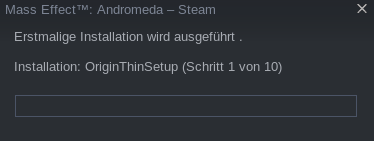
- It seems to be a problem with the OriginThinSetup.exe --> It seems to run in a loop, as it runs one CPU Core at 100% I had to kill that process, even after aborting the game in the steam client it still runs. It must be terminated manually

Please note, that there are probably two different problems
- Mass Effect: Andromeda is my first Origin game. So I had two different situations:
- First: I tried to install and play with Proton 6.3-3 and did not have a linked Origin Account. I remember, the problems where different, but I sadly can not give you details. I can not just make a new none linked Steam Account to buy the game again and make a new Origin Account, which is not linked. Hopefully you can test or investigate that anyways.
- Second: After running it with 5.13-6, I have a linked Origin Account and the game is registered with Origin
Last but not least:
Thanks for the awesome work to all contributors of Proton/SteamPlay
@o-bri It sounds like you might have a stuck process if there isn't a log created at all when you run into the hang. This seems silly, but could you try rebooting and deleting the prefix again and see if you still get the install failure with 6.3-4? Also, are you using the regular Steam client or the beta client?
@alasky17
I already did then, when trying to get the game running. So rebooting can not solve the problem.
For the record, using GE 6.9(nice)-1, first boot honqued out, but with further starts the game is playable out of the box on a 3060 Ti. However, the framerate is a bit all over the place.
Compatibility Report
System Information
GPU: AMD AMD Radeon RX 5600 XT
Driver/LLVM version: 4.6 (Compatibility Profile) Mesa 21.0.3; LLVM 11.1.0
Kernel version: 5.4.118-1-MANJARO
Link to full system information report as Gist
Proton version: 6.3 Experimental 2020-06-02
I confirm:
- [x] that I haven't found an existing compatibility report for this game.
- [x] that I have checked whether there are updates for my system available.
Link to proton logs download from my github logs repository
Symptoms
When starting the game, the overlay gets tiled by window manager, which prevents the game from loading properly and can break the overlay in-game.
Link to a video showing the bug in action.
Reproduction
- Start the game in tiling wm environment.
ME:Andromeda seems to lose audio buffer synchronization when using pipewire instead of pulseaudio - but only if I run without PULSE_LATENCY_MSEC=60. At least, so far I wasn't able to reproduce the problem when setting the parameter, while without it, the problem shows up usually within the first 15-20 minutes of gameplay.
When it happens, audio suddenly goes silent except a short blip of audio maybe 4 times per second. The short blip of audio usually only has the louder sounds, more quiet sounds like music usually can no longer be perceived.
I didn't play it for a longer time, so I cannot say if this is linked to a Proton update. Also, last time I played, I didn't yet use pipewire but pulseaudio. I didn't find other games with the same issue so I think it may be a Proton thing.
- Proton version: Experimental as of 2021-07-05
- Kernel 5.10 LTS with futex2 patches
After lots of frustration with Origin.exe / EALink.exe / DXSETUP.exe / OriginThinSetup.exe crashing/hanging etc. I've figured a way to reliably install the game and have it launch with controller support - with minor issues.
First, delete the WINEPREFIX (compatdata/1238000), then set the game to use Proton 5.13, run the game and Origin / DXSETUP / EALink won't hang / crash etc, but you won't have controller support. Exit the game.
Set the game to use Proton-5.21-GE-1, the game will launch and you will have controller support.
Issues: The game sometimes does not launch if you click "Play", if you click "Play" a second time it will launch. The game will randomly drop some frames every few seconds (not enough to be annoying), this doesn't happen with newer versions of Proton (although using newer versions of Proton will end up in the game not launching most of the time due to hanging/crashing mentioned above).
If you try using Proton-5.21-GE-1 after deleting the WINEPREFIX, it doesn't work because it hangs on DXSETUP.exe ; using 5.13 to run the game on a new WINEPREFIX is required.
Using older or newer versions of Proton-GE (I've tested all versions 5.10+) or Proton 6.3 will hang typically on EALink.exe or Origin will crash when trying to start, sometimes you might get lucky and everything will work.
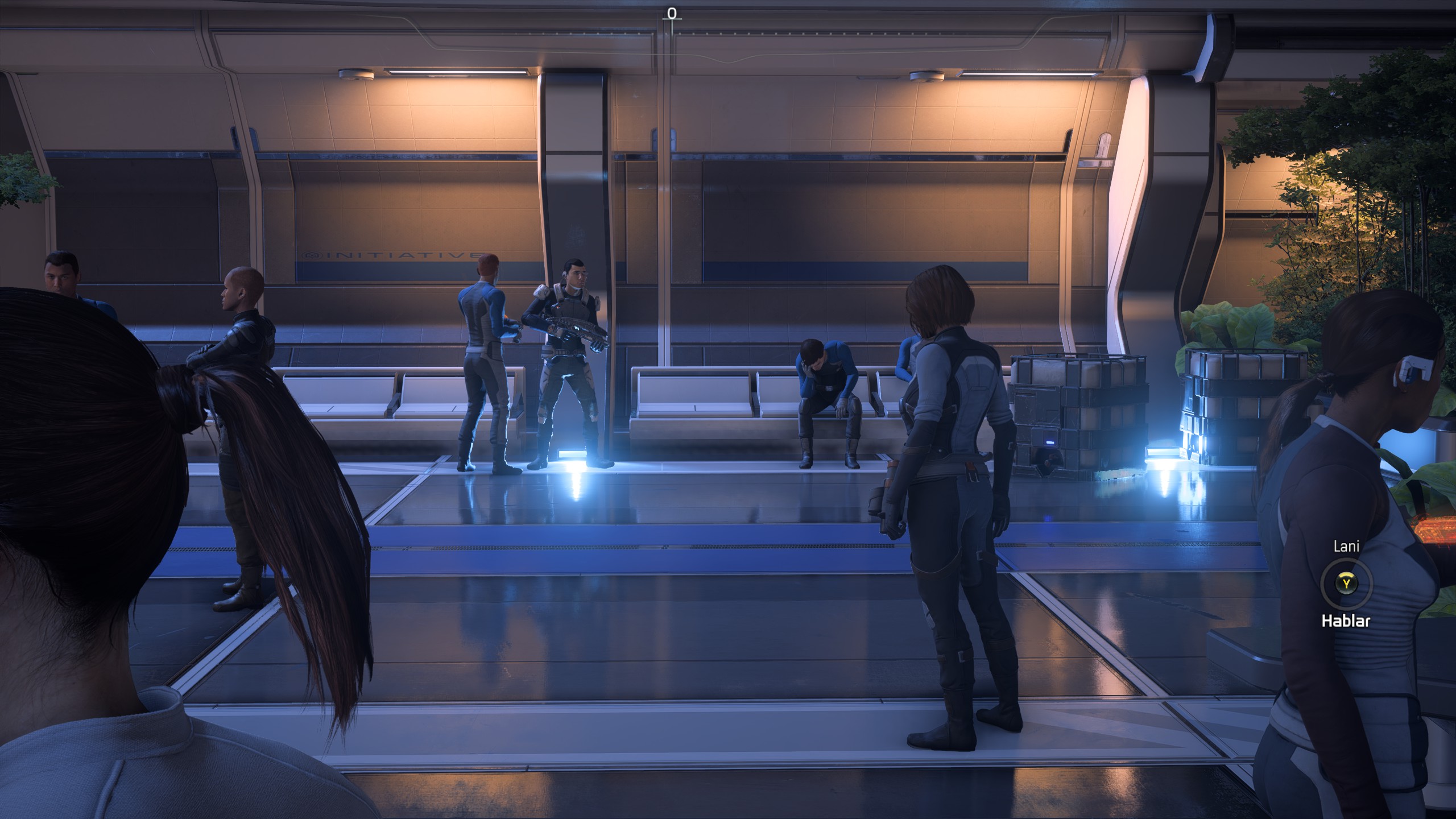
I have a weird issue with the floor reflections on this game. The characters have a vertical shadow that deletes the reflections, here's a screenshot and my specs
.
https://gist.github.com/KibaGasteiz/f90ab0f1bd5509e4139fa99b79c1c067
To be clear, the floor between this lines (https://i.imgur.com/wQEQIZ3.jpg) should have an orange reflection, i've seen gameplays on YouTube and this doesn't happen on Windows it seeems, can't test that.

After the recent Origin Update, Origin crashes every time and the game can not be played on either the Steam Deck or my Flatpak version of Steam.
EDIT:
After reading some of the above replies, I switched my Proton to 5.13.6 and the game launches on the Steam Deck now.
~Anyone's Andromeda stopped launching recently?~
~I bought mine originally from Origin, then decided to buy this during the sale when it was only $6.~
~If it "works", Origin doesn't download the cloud saves.~
Never mind. It just took a while
System Information
OS: Ubuntu 24.04.3 LTS (Noble Numbat)
Kernel: Linux 6.14.0-37-generic
CPU: Intel Core i5-12500H (12th Gen, 16 threads)
RAM: 32 GB
GPU (hybrid):
Intel Iris Xe Graphics (ADL GT2)
NVIDIA GeForce RTX 3050 Laptop GPU
NVIDIA driver: 580.95.05
Mesa: 25.0.7
Vulkan instance version: 1.3.275
Steam & Proton Information
Steam installation: Steam Snap package
Steam version: 1766451605
Steam Play enabled for all titles: Yes
Installed Proton versions:
Proton 6.3
Proton 7.0
Proton 8.0
Proton Experimental
Proton Hotfix
Proton version used: I tried all of them to run MEA, none of them can reach the start menu
Game Information
Game: Mass Effect™: Andromeda
Steam AppID: 1238000
Launcher: Steam
Graphics API: DirectX 11 (DXVK)
Graphics Configuration
OpenGL renderer in desktop session:
Mesa Intel(R) Iris(R) Xe Graphics (ADL GT2)
Vulkan devices available:
Intel Iris Xe Graphics
NVIDIA GeForce RTX 3050 Laptop GPU
llvmpipe (software)
This is a hybrid Intel/NVIDIA laptop, with the Intel GPU being the default renderer in the desktop session.
Expected Behavior
The game should launch normally and reach the main menu. No version of Proton can do that for me.
Actual Behavior
Proton 6.3 can start the EA launcher then it get stuck.
Reproduction Steps
Just click the rectangular green button "PLAY" (?)
steam-1238000_proton_63.log
steam-1238000_proton_hotfix.log
Reproducibility: Always (100%)
Mass effect Andromeda stopped working after EA application update
Issue transferred from https://github.com/ValveSoftware/Proton/issues/9433.
@Cageman1984 posted on 2026-01-25T00:14:42:
Technical Summary: EA App Update Loop & RPC Crash Fix
Issue: The game fails to launch (typically after an EA App update), resulting in an RPC_S_SERVER_UNAVAILABLE (code=6ba) error. This is caused by the EA App's inability to finalize internal updates due to CreateSymbolicLinkW stubs in Proton, leaving the launcher in a "broken" half-updated state.
Environment:
OS: Bazzite / SteamOS (Linux)
Proton Version: Tested on Proton 9.0-4 and GE-Proton
Hardware: Handhelds (ROG Ally X, Steam Deck) and Desktop PC
The Solution (Manual Update Override)
If the EA App hangs at "Preparing Game" or crashes with an RPC error, the "Symbolic Link" must be bypassed manually:
Identify the Prefix: Navigate to the game's compatdata folder:
~/.local/share/Steam/steamapps/compatdata/1238000/pfx/drive_c/Program Files/Electronic Arts/EA Desktop/EA Desktop/
Manual File Migration: * Inside this directory, locate the folder with the highest version number (e.g., 13.x.x.x).
Copy all contents from inside that versioned folder.
Paste and overwrite everything into the parent EA Desktop folder.
Clear Browser Cache: Delete the BrowserCache folder located at:
.../AppData/Local/Electronic Arts/EA Desktop/CEF/BrowserCache
Launch via Desktop Mode: Perform the first launch in Desktop Mode to allow the EA App to finalize its account handshake.
Required Launch Options
To stabilize the EA App's background services and fix library mismatches (ELFCLASS32 errors):
LD_PRELOAD="" WINEDLLOVERRIDES="overlay64=d;igo64=d;upf=d" sleep 15; PROTON_LOG=1 %command% --no-sandbox --disable-gpu
Why this works:
LD_PRELOAD="": Prevents 32-bit library injection conflicts.
wininterface overrides: Disables the EA overlay and feedback services which frequently hang the RPC server.
sleep 15: Gives the background services time to initialize before the game process calls for them.
Manual Move: Solves the CreateSymbolicLinkW stub error where the EA App creates a link it cannot actually follow.
I hope I posted this right. Just wanted to help someone.
EA App broken on Steam Deck
Issue transferred from https://github.com/ValveSoftware/Proton/issues/9580.
@Blayer98 posted on 2026-03-16T22:48:33:
Speaking to people on the EA Forums have proved cumbersome, so I’m posting here to hopefully get a solution or fix…
Currently, I’m trying to install Mass Effect Andromeda from Steam via Steam Deck. Installing the game worked fine a few days ago, but as of today, it’s broken. The EA App installer fails at the end with the following error codes:
INST-21-25005
INST-14-1627
Any help would be really appreciated!
I’ve since fixed this issue by just staying on the Proton version Steam Play recommends. (Proton Experimental)
My application stopped working a while go as well..it appeared it was again an update of the EA app that wouldn't complete. Did the same trick again and now everything works fine again.
Is your app working again @Blayer98 ?
Wednesday, I reinstall Battlefield Hardline that needs the EA Desktop, used Proton Experimental and didn't managed to start the game. It can send me the Battlelog website.
I'm not the only one having this problem.
Proton versions
proton experimentalx3 2026-03proton 9.0-4x1 2026-01proton 6.3x2 2025-12proton 7.0x1 2025-12proton 8.0x1 2025-12proton hotfixx1 2025-12proton 5.13x1 2021-08proton 5.21-ge-1x1 2021-08proton 5.13-6x1 2021-05proton 6.3-3x1 2021-05proton 5.13-2x2 2021-04proton 6.3-1x1 2021-04
Launch options
PROTON_LOG=1x3 2026-01WINEDLLOVERRIDES="overlay64=d;igo64=d;upf=d"x1 2026-01WINEPREFIXx1 2021-08
Upstream links
- ValveSoftware/Proton/issues/4982x1 2026-03
- ValveSoftware/Proton/issues/9580x1 2026-03
- ValveSoftware/Proton/issues/9433x1 2026-01
Compatibility Report
System Information
I confirm:
steam-1238000.log
Symptoms
The error message above is shown and when clicking "Beenden" everything is closed and the state of the game within steam is stopped.
Reproduction
Install Mass Effect™: Andromeda via steam, click launch, wait for the error to appear.
Strange thing though is that it's rated Platinum on ProtonDB https://www.protondb.com/app/1238000
so I wonder if I'm the only one experiencing such a problem and what could be the cause.