3DMark
There is already a report for the demo (different game ID). Should it be merged with this one?
Regarding the issue, any reason to use wined3d instead of DXVK? Last time I've tested, all benchs won't start with wined3d. However, all DX11 benchs work fine with DXVK.
Compatibility Report
- Name of the game with compatibility issues: 3DMark Advanced Edition
- Steam AppID of the game: 223850
System Information
- GPU: Nvidia Geforce RTX2070
- Driver/LLVM version: Nvidia 450.66
- Kernel version: 5.4.0-47-generic
- Link to full system information report as Gist: https://gist.github.com/Johnnii360/bb0655cbf07b76f5ed3c3dd8852d89e8
- Proton version: 5.9-GE-6-ST
I confirm:
- [x] that I haven't found an existing compatibility report for this game.
- [x] that I have checked whether there are updates for my system available.
Symptoms
3DMark isn't able to fetch my whole system/hardware infos and can't run DX12 or Raytracing tests. 3DMark doesn't recognize the Systeminfo Tool (it runs over Java).
Reproduction
I switched Windows version to 10 via Protontricks but no effect. I also added PROTON_USE_VKD3D=1 but it doesn't work. When I add the PROTON_LOG=1 env to the VKD3D the 3DMark starts but freezes then (Window title "..."). That's my complete command line: gamemoderun PROTON_USE_VKD3D=1 %command% (with logging: gamemoderun PROTON_LOG=1 PROTON_USE_VKD3D=1 %command%)
Yeah I didn't expect the Ray Tracing to work (we already know Ray Tracing flat-out does not work in Wine/Proton), but I thought it would at least pick up DX12. I'm also surprised that it can't detect hardware since games and other Windows programs absolutely can detect both CPU and GPU. Cinebench detects CPU fine, games consistently recognize my GPU accurately, etc.
UL released a new Vulkan benchmark "Wild Life". Unfortunately, I'm unable to get it run.
When running it with Proton 5.13-1, I got the following error after launching the benchmark:

The is error is "Invalid argument".
Note that it's impossible by default to select a different device/driver. The only way to do it is to use dxgi.dll from DXVK with the
WINEDLLOVERRIDES="dxgi=n"environment variable. However, selecting a different driver (for instance AMDVLK) will result to this error at launch:
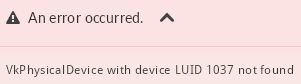
Finally, the benchmark can't even be launched with Proton 5.0-9. I have this instead of the "run" button:
Proton 5.13-1 used to run 3DMark just fine (at least fire strike extreme/ultra), but versions 5.13-2 and 5.13-3 display a white screen:

Note that hovering the mouse over some of those invisible items do change the cursor icon.
Hello @gmiranda, please add PROTON_LOG=1 %command% to the game's launch options, reproduce the regression, and attach the generated $HOME/steam-$APPID.log to this issue report as a file. (Proton logs compress well if needed.) Also, please copy your system information from Steam (Steam -> Help -> System Information) and put it in a gist, then include a link to the gist in this issue report.
Thanks @kisak-valve, here's my system info and 2 logs (one generated by Proton 5.13-4 and another one by 5.0-10).
Note that I can't successfully launch 3DMark under 5.0-10 OR 5.13-4 with logging enabled, the splash screen is stuck at "Scanning SystemInfo......................".
proton_5.0-10_steam-223850.log
proton_5.13-4_steam-223850.log
I've tried replacing (symlink) the included mono version (wine-mono-5.1.1) with Proton 5.0's (4.9.4) but, unfortunately, it does not have any effect.
@gmiranda I think that this regression might be related to https://bugs.winehq.org/show_bug.cgi?id=49990
I can confirm this issue on latest Proton.
It can be worked around by adding --use-gl=osmesa as command line argument. (It was suggested on the winehq bug report).
@MegWATTT
I can confirm this workaround corrects the problem for me. Thanks a ton!
With Proton 7.0-6 on my current system (Ryzen 7 6800H + RX 6650M, hybrid graphics, on Arch Linux with kernel 6.2.8 and Mesa 23.0.0) 3DMark starts right off the bat with no tweaks needed, although the serial key still needs to be manually entered into the registry (and I can only find the show key option on my older system for whatever reason).
Out of the 5 main graphics tests only Fire Strike (DX11) works, while the others can't be run for one reason or another:
- Speed Way (DX12 Ultimate) and Port Royal (ray tracing) reports unsupported.
- Time Spy (DX12), Wild Life (Vulkan) and Night Raid (DX12) fails with "An error occurred." message.
Also, the main UI looks and feels rather laggy at times.
So it appears that 3DMark is capable of using DX12 and Vulkan in some cases, while the CPU profile test also fails the variable rate shading feature test works (and it even shows performance improvements with VRS enabled), and in the API overhead feature test all 4 modes worked (DX11 single thread, DX11 multi thread, DX12, Vulkan 1.0), and in fact the DX12 mode ended up being the fastest by a long shot (22.7 million draw calls vs 13.4 million with Vulkan), so props to vkd3d + RADV + the rest of the stack for that.
Also, the Sky Diver, Cloud Gate and Ice Storm tests work too.
So it appears that 3DMark is capable of using DX12 and Vulkan in some cases, while the CPU profile test also fails the variable rate shading feature test works (and it even shows performance improvements with VRS enabled), and in the API overhead feature test all 4 modes worked (DX11 single thread, DX11 multi thread, DX12, Vulkan 1.0), and in fact the DX12 mode ended up being the fastest by a long shot (22.7 million draw calls vs 13.4 million with Vulkan), so props to vkd3d + RADV + the rest of the stack for that.
Also, the Sky Diver, Cloud Gate and Ice Storm tests work too.
Maybe you want to tell us how do you got to this result?!
Maybe you want to tell us how do you got to this result?!
As in how I got that stuff to run? It just worked, other than having to mess with the registry to add the CD/serial key (following https://github.com/ValveSoftware/Proton/issues/2897#issuecomment-518923509) , but otherwise all I did was pick Proton 7.0-6 and ran 3DMark, downloaded the tests in the UI and ran them, didn't even have to have any launch options (Vulkan stuff tends to pick the dGPU by default even without setting DRI_PRIME=1 on my system for whatever reason).
Ah okay. I thought you maybe added some special start parameters or so. Last I tried to start I couldn't get DX12 functionality either so I thought you are our Messias and found a way to brought it to work. ;)
With Proton 7.0-6 on my current system (Ryzen 7 6800H + RX 6650M, hybrid graphics, on Arch Linux with kernel 6.2.8 and Mesa 23.0.0) 3DMark starts right off the bat with no tweaks needed, although the serial key still needs to be manually entered into the registry (and I can only find the show key option on my older system for whatever reason).
Out of the 5 main graphics tests only Fire Strike (DX11) works, while the others can't be run for one reason or another:
* Speed Way (DX12 Ultimate) and Port Royal (ray tracing) reports unsupported.

* Time Spy (DX12), Wild Life (Vulkan) and Night Raid (DX12) fails with "An error occurred." message.
Also, the main UI looks and feels rather laggy at times.
what mesa version are you using
23.1-git hangs when you reach the part with the time portal and there's also some graphical glitches on my RX 6800
this is all mitigated with RADV_DEBUG=hang, but that makes the performance terrible
I am using proton exp so it could be a vkd3d bug, could you try proton exp as well?
for the DX12 benchmarks to work you need to VKD3D_FILTER_DEVICE_NAME=6650 DXVK_FILTER_DEVICE_NAME=6650, otherwise it tries to do cross adapter things which aren't supported by vkd3d
you also need to install native d3dcompiler_43 and d3dcompiler_47 using protontricks
also do you get hangs in time spy? (I do, I am not sure whose bug it is, vkd3d-proton or mesa, hangs are fixable with RADV_DEBUG=syncshaders, but at significantly reduced performance)
edit: ok so it's not a regression on the mesa side, my laptop running mesa 22.3.7 with vega graphics also freezes (on time spy)
edit: wow night raid performance is excellent, vkd3d-proton is really just amazing
Switching to Proton Experimental and setting VKD3D_FILTER_DEVICE_NAME=6650 DXVK_FILTER_DEVICE_NAME=6650 was enough to make Night Raid work, and adding in the d3dcompiler stuff made Time Spy run too, although with the graphical glitches and freezes.
The CPU profile test works too after the above changes (only tried it after adding the d3dcompiler stuff so not sure if it was necessary for that case).
I'm using Mesa 23.0.0 and kernel 6.2.8 for reference.
Switching to Proton Experimental and setting
VKD3D_FILTER_DEVICE_NAME=6650 DXVK_FILTER_DEVICE_NAME=6650was enough to make Night Raid work, and adding in the d3dcompiler stuff made Time Spy run too, although with the graphical glitches and freezes.The CPU profile test works too after the above changes (only tried it after adding the d3dcompiler stuff so not sure if it was necessary for that case).
I'm using Mesa 23.0.0 and kernel 6.2.8 for reference.
do your graphics glitches and hangs go away with RADV_DEBUG=syncshaders? (if your performance becomes pretty bad with it, that's expected)
does time spy work on proton stable?? (I can't get 3d mark to launch on proton stable :p)
edit: hopefully, speedway should be usable after the release of proton 8, if they port the wine patches that enabled windows 11 support
With Proton Experimental adding RADV_DEBUG=syncshaders does indeed fix the glitches and freezes at the cost of some performance, as expected.
Funnily enough now that I have the device filters and the d3dcompiler stuff Time Spy still works after switching back to Proton 7.0-6, and in fact I don't see the glitches and freezes that I did with Proton Experimental, even without RADV_DEBUG=syncshaders. I did notice that the CPU test part looks oddly dark with 7.0-6 though (regardless of the syncshaders thing), not sure if there are any other subtle graphical issues I missed.
Replying to https://github.com/ValveSoftware/Proton/issues/4034#issuecomment-1484178193
so it's a vkd3d regression, time to bug the maister :p
This is likely a VKD3D issue as the same glitches/hang also happen with AMDVLK
This is likely a VKD3D issue as the same glitches/hang also happen with AMDVLK
That doesn't say much lol, AMDVLK has significantly more bugs than RADV
Well, the fact that it's the exact same glitches makes it more likely to not be a specific driver issue. Additionally, the Windows driver have the same glitches and a driver timeout.
I also tested on ANV on Intel HD 520 (skylake). While it doesn't hang, it has some others big artifacts.
-
Not working "Time Spy" benchmark. After some waiting I get error "SystemInfo data is incomplete. (Some of the data could not be parsed)"
-
I bought paid version with all DLC, but my version is still "Basic Edition". Why?
It looks like I'm not the only one experiencing this: https://steamcommunity.com/app/223850/discussions/0/1643167006283800264/ -
Application did't stop even after closing window. (I should every time press "STOP" button in steam for terminating application)
steam-223850.log
https://gist.github.com/NTMan/33cca4906328793206218192820779ec
For the Time Spy benchmark installing d3dcompiler_43 and d3dcompiler_47 via Protontricks (installable via Flatpak) is still required it seems.
As for the basic edition problem, you'll need to get your serial number/key code/whatever (you can find it by right clicking 3DMark in Steam, then Manage, then CD keys), and then you'll need to open regedit (you can also do this with Protontricks), create a new string value called KeyCode in the HKEY_CURRENT_USER\Software\UL\3DMark key, and then use your serial number as the contents of the KeyCode value.
Also, in my case the app sometimes stops cleanly after closing the window, and sometimes not (don't remember how it was before).
Anyway, here's how the main benchmarks as well as the feature tests work on my system using Proton Experimental and the VKD3D_CONFIG=dxr,dxr11 environment variable set (minus the storage test, which is a separate paid DLC):
Main benchmarks:
- Speed Way (DX12 Ultimate): Shows as unsupported due to reported Windows version not being new enough
- Port Royal (DX12 ray tracing): Crashes right after loading for both the demo and graphics test
- Time Spy (DX12): Runs with some graphical glitches, and also ends up freezing after some time (both with Experimental and 8.0-4)
- The glitches are the same ones I saw before, but the freezes seem to be different (this time the CPU usage falls off a cliff when the freeze happens, and it never recovers, certainly not enough to get a score out of the benchmark)
- When the freeze happens I also see
[drm:amdgpu_job_timedout [amdgpu]] *ERROR* ring gfx_0.0.0 timeout, but soft recoveredin the system logs, didn't check it last time so no idea if that's different or not
- When the freeze happens I also see
- Adding either
RADV_DEBUG=hangorRADV_DEBUG=syncshadersmakes both the glitches and the freezes go away, albeit with reduced performance (more so withhangthansyncshaders) - The app also appears to have been updated to better support systems with hybrid graphics like mine, so hiding the integrated GPU is no longer necessary, and in fact causes the benchmark to not start at all
- That update also appears to prevent it from working with Proton 7.0-6 regardless of whether the integrated GPU is hidden or not, so I can't test if the freeze is a Proton/VKD3D regression or a Mesa/kernel regression
- The glitches are the same ones I saw before, but the freezes seem to be different (this time the CPU usage falls off a cliff when the freeze happens, and it never recovers, certainly not enough to get a score out of the benchmark)
- Night Raid (DX12): Runs as expected
- Fire Strike (DX11): Runs as expected
- Solar Bay (Vulkan 1.1 ray tracing?): Crashes before the loading screen (the one with the progress bar) appears
- Wild Life (Vulkan): Same as Solar Bay
- CPU Profile: Works as expected
Feature tests:
- DirectX ray tracing (Tier 1.1): Works as expected (some bits do appear blurry at times but I'm not sure if those are bugs or just the inherent nature of ray tracing with not enough rays)
- Mesh shaders (DX12 Ultimate): Works as expected (mesh shaders being active improved performance by like 6.6x compared to the baseline)
- PCIe bandwidth (DX12): Works as expected (at least graphically, didn't see any glitches or the like)
- Sampler feedback (DX12 Ultimate): Reported as unsupported by the GPU
- Variable rate shading (DX12 Tier1/2 VRS): Works as expected
- FSR2 (Shader Model 6.0): Crashes before the loading screen (the one with the progress bar) appears
- XeSS (DX12 ray tracing tier 1.1, Shader Model 6.4): Crashes right after loading (like Port Royal)
System specs:
Operating System: Arch Linux
KDE Plasma Version: 5.27.8
KDE Frameworks Version: 5.111.0
Qt Version: 5.15.11
Kernel Version: 6.5.7-arch1-1 (64-bit)
Graphics Platform: Wayland
Processors: 16 × AMD Ryzen 7 6800H with Radeon Graphics
Memory: 30.6 GiB of RAM
Graphics Processor: Radeon 680M + Radeon RX 6650M (hybrid graphics), Mesa 23.2.1
Manufacturer: HP
Product Name: OMEN by HP Gaming Laptop 16-n0xxx
Log file when running Time Spy: steam-223850.log
Replying to https://github.com/ValveSoftware/Proton/issues/4034#issuecomment-1781267495
Sampler feedback emulation is being implemented (through emulation) in vkd3d-proton, for now could you try VKD3D_FEATURE_LEVEL=12_2, along with mesa-git and retest the broken ones ?
With the mesa-git AUR package (version shows as Mesa 24.0.0-devel (git-49b3118302)) and VKD3D_FEATURE_LEVEL=12_2 the app does allow trying the sampler feedback test, but it just crashes halfway through loading.
I also retested the other failing tests (Port Royal, Solar Bay, Time Spy, Wild Life, FSR2, XeSS) and there's no change on those.
Log file when running the sampler feedback test: steam-223850.log
With the mesa-git AUR package (version shows as
Mesa 24.0.0-devel (git-49b3118302)) andVKD3D_FEATURE_LEVEL=12_2the app does allow trying the sampler feedback test, but it just crashes halfway through loading.I also retested the other failing tests (Port Royal, Solar Bay, Time Spy, Wild Life, FSR2, XeSS) and there's no change on those.
Log file when running the sampler feedback test: steam-223850.log
sampler feedback is not done yet, you can check the vkd3d-proton github to know when it's done
Vulkan based tests still seem to fail even on latest bleeding edge, System info also still half broken even with the D3 compilers installed, in some places it knows I have a 3080 and others it has no idea what my gpu is.
With the mesa-git AUR package (version shows as
Mesa 24.0.0-devel (git-49b3118302)) andVKD3D_FEATURE_LEVEL=12_2the app does allow trying the sampler feedback test, but it just crashes halfway through loading.
I also retested the other failing tests (Port Royal, Solar Bay, Time Spy, Wild Life, FSR2, XeSS) and there's no change on those.
Log file when running the sampler feedback test: steam-223850.logsampler feedback is not done yet, you can check the vkd3d-proton github to know when it's done
btw sampler feedback is done
cannot run Full version of 3DMark - opens in demo mode
Issue transferred from https://github.com/ValveSoftware/Proton/issues/7919.
@LDWILLIAMS posted on 2024-07-22T07:40:05:
Compatibility Report
- Name of the game with compatibility issues: 3DMark
- Steam AppID of the game: 223850
System Information
- GPU: RTX 4090
- Video driver version: 555.58.02
- Kernel version: Linux 6.9.9-zen1-1-zen
- Link to full system information report as Gist: https://gist.github.com/LDWILLIAMS/27d846f54890b01222e8cf09f83e5916
- Proton version: tried all
I confirm:
[X] that I haven't found an existing compatibility report for this game.
[X] that I have checked whether there are updates for my system available.
Symptoms
Firstly, I was directed here by valve 'support'.
Open 3DMark, it runs but opens in demo mode, not the advanced version that I have paid for.
Attempting to run the few benchmarks that are available in the demo version results in a zero score and saying that system information is not available
When attempting to sign in to 3DMark.com and merge accounts I get the following error "Account Merge
Merging of accounts failed. Please contact support if the problem persists."
I have raised a ticket with their support.
Reproduction
License Key not transfering from 3DMark to Steam.
Issue transferred from https://github.com/ValveSoftware/Proton/issues/8463.
@SignFront posted on 2025-02-18T16:12:09:
Compatibility Report
- Name of the game with compatibility issues:
- Steam AppID of the game: 223850
System Information
- GPU: 7900 XT
- Video driver version:
- Kernel version: 6.8.0-53-generic
- Link to full system information report as Gist:
- Proton version: Experimental
I confirm:
- [X ] that I haven't found an existing compatibility report for this game.
- [ X] that I have checked whether there are updates for my system available.
Symptoms
Game launches fine, but it is not recognizing that I have a paid version. I should be able to access timespy. I messaged 3Dmark about it, and they said the issue was with Steam. Steam support says that I should reach out here. I have linked the accounts on 3Dmark's website, but it isn't pulling the key into steam. I purchased the game in Steam, and it worked on Windows but it doesn't confirm I have the paid version now that I am running on Linux Mint 22.1
Reproduction
License keys can be added with this command (Requires protontricks, install it on your distro):
Run when you've pasted the cd key steam gives you
protontricks -c 'wine cmd /C reg add "HKEY_CURRENT_USER\Software\Futuremark\3DMark" /v "KeyCode" /t REG_SZ /d "PLACE_YOUR_SERIAL_KEY"' 223850
After that you need d3dcompiler_43 and 47 for Time Spy (at least for me):
protontricks 223850 d3dcompiler_43 d3dcompiler_47
I can't get it to launch at all, no logs whatsoever, I click play on steam, wait some seconds, and it stops. How should I go about troubleshooting this?
I can't get it to launch at all, no logs whatsoever, I click play on steam, wait some seconds, and it stops. How should I go about troubleshooting this?
Don't even bother
I got as far as to run FireStrike and Time Spy but it runs bad and gives artifacts
Everything else crashes, not to mention you have to do the above commands I have for serial activation
Just run unigine or furmark tests
For me Time Spy (both), FireStrike (both), Port Royal and Night Raid run fine without artifacts. The issue is with Speed Way and Steel Nomad (all four), can't get them to start. Nor Solar Bay or Wild Life.
I also compared both TimeSpy and Port Royal to Windows versions and there's an average of 30-35% lower score/fps compared to Windows versions, running at same clocks and GFX voltage.
3DMark Speed Way and Steel Nomad (223850)
Issue transferred from https://github.com/ValveSoftware/Proton/issues/9343.
@pwlsoff posted on 2025-12-28T07:30:41:
Compatibility Report
- Name of the game with compatibility issues: 3DMark Speed Way and 3DMark Steel Nomad
- Steam AppID of the game: 223850
System Information
- GPU: 9070XT
- Video driver version: mesa-git 26.0.0_devel.216242
- Kernel version: 6.18.2
- Link to full system information report as Gist:
- Proton version: GE-Proton10-27 & Experimental & Hotfix
I confirm:
- [x] that I haven't found an existing compatibility report for this game.
- [x] that I have checked whether there are updates for my system available.
steam-223850_steel_nomad.log
steam-223850_speed_way.log
Symptoms
These two benchmarks fail to start. Speed Way is a raytracing benchmark, Steel Nomad has both DX12 (Ultimate I think) and Vulkan versions, both fail to start.
Reproduction
I can't get it to launch at all, no logs whatsoever, I click play on steam, wait some seconds, and it stops. How should I go about troubleshooting this?
Choose Proton Experimental. Starts fine with it.
License keys can be added with this command (Requires protontricks, install it on your distro): Run when you've pasted the cd key steam gives you
protontricks -c 'wine cmd /C reg add "HKEY_CURRENT_USER\Software\Futuremark\3DMark" /v "KeyCode" /t REG_SZ /d "PLACE_YOUR_SERIAL_KEY"' 223850After that you need d3dcompiler_43 and 47 for Time Spy (at least for me):
protontricks 223850 d3dcompiler_43 d3dcompiler_47
For me it was in HKEY_CURRENT_USER\Software\UL\3DMark. Once I made KeyCode in there it recognized the license and I could install all of them.
Installing d3dcompiler_43 and d3dcompiler_47 made Time Spy (& Extreme) work fine no issues.
I can't get it to launch at all, no logs whatsoever, I click play on steam, wait some seconds, and it stops. How should I go about troubleshooting this?
Choose Proton Experimental. Starts fine with it.
Well that's my issue, it doesn't. I went through every major proton version, both GE and Steam versions from 5 to 10. My product key is in the registry under the said key, but even without it I should have at least a demo mode and their launcher window.
Update: I think I've figured it out, the issue was expectably on my end. I was missing the 32-bit version of radeon-vulkan. What might be relevant here for improvements to make, is why have I seen no logs related to this. If there are environment variables or launch flags one could suggest, I'd love to learn more.
Can confirm, after installing d3dcompiler I can run Time Spy, but Steel Nomad crashes with both APIs
DX12 tests don't run on Proton 11, with Proton 10 I was able to run at least TimeSpy and Port Royal. Speed Way and Nomad tests didn't work.
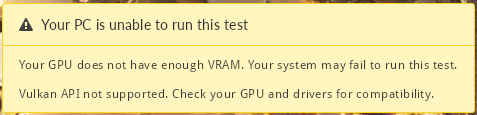
With Proton 11 3DMark say Your PC is unable to run this test You need a DirectX 12 compatible GPU to run this test.
Hello @Valokki, please add PROTON_LOG=1 %command% to the game's launch options, reproduce the regression, and attach the generated $HOME/steam-$APPID.log to this issue report as a file. (Proton logs compress well if needed.) Also, please copy the contents of Steam Runtime Diagnostics from Steam (Steam -> Help -> Steam Runtime Diagnostics) and put it in a gist, then include a link to the gist in this issue report.
Hi @kisak-valve, I made log where I launch 3DMark and browse DX12 tests since I can't launch them.
steam log -> steam-223850.log
Link for Steam Runtime Diagnostics gist -> Klik
@Valokki Thank you for the report! I was able to reproduce this on multiple machines and we are looking into it. :)
Proton versions
proton experimentalx6 2025-12ge-proton10-27x1 2025-12proton 7.0-6x5 2023-10proton 5.0x2 2020-12proton 5.13x1 2020-12proton 5.13-4x1 2020-12proton 5.3x1 2020-12proton 5.13-1x2 2020-12proton 5.0-9x1 2020-10
Launch options
PROTON_LOG=1x3 2026-05VKD3D_FEATURE_LEVEL=12_2`x3 2023-12VKD3D_FEATURE_LEVEL=12_2,x1 2023-10RADV_DEBUG=syncshaders`x2 2023-10RADV_DEBUG=hang`x1 2023-10VKD3D_CONFIG=dxr,dxr11x1 2023-10RADV_DEBUG=syncshaders`.x1 2023-03VKD3D_FILTER_DEVICE_NAME=6650x3 2023-03DXVK_FILTER_DEVICE_NAME=6650`x2 2023-03RADV_DEBUG=syncshaders`?x1 2023-03DXVK_FILTER_DEVICE_NAME=6650`,x1 2023-03RADV_DEBUG=hang,x1 2023-03RADV_DEBUG=syncshaders,x1 2023-03WINEDLLOVERRIDES="dxgi=n"x1 2020-10PROTON_LOG=1`x1 2020-09
Launch lines
gamemoderun PROTON_LOG=1 PROTON_USE_VKD3D=1 %command%x1 2020-09gamemoderun PROTON_USE_VKD3D=1 %command%x1 2020-09
Upstream links
- ValveSoftware/Proton/issues/9343x1 2025-12
- ValveSoftware/Proton/issues/8463x1 2025-02
- ValveSoftware/Proton/issues/7919x1 2024-07
- ValveSoftware/Proton/issues/2897x2 2023-03
- show_bug.cgi?id=49990x1 2020-12
DLLs
dxgi.dllx1 2020-10
Compatibility Report
System Information
I confirm:
firestrike_opengl_Steam-223850.log
Symptoms
Can't run 3DMark firestrike and time spy
Reproduction
1.Open 3DMark and press firestrike.