F1 2020
Confirmed here. Tried DX11 and DX12 entries
The "Sorry, something went wrong, for solutions please visit:" error is an DRM issue (I think.).
Site that it provides says "Currently your game purchase cannot be re-validated successfully, please wait 24 hours and try again."
It seems that OP has the logfile attached from the DRM error, not the actual crash. I have attached logfiles from the game actually crashing which probably has better clues as to why it doesn't work. Also attached what the Ego Dumper shows, although i don't think it has much relevant data.
For the DRM bit: Denuvo triggers after failing to succesfully launch the game 5 times. So after 5 times of launching the game you will have to wait 24 hours to try it again. Otherwise you get the "Sorry, something went wrong..." message.
It seems that OP has the logfile attached from the DRM error, not the actual crash. I have attached logfiles from the game actually crashing which probably has better clues as to why it doesn't work. Also attached what the Ego Dumper shows, although i don't think it has much relevant data.
For the DRM bit: Denuvo triggers after failing to succesfully launch the game 5 times. So after 5 times of launching the game you will have to wait 24 hours to try it again. Otherwise you get the "Sorry, something went wrong..." message.
I wanted to attach a normal log but after DRM blocked me out of the game i couldn't do it, but thanks for providing correct log
PROTON_USE_SECCOMP=1 makes it work (d3d11 mode). There is some issue with the game hang when any log is enabled (yet to be explored), but it seems to work fine with 'PROTON_USE_SECCOMP=1 %command%' launch options for me.
PROTON_USE_SECCOMP=1 makes it work (d3d11 mode). There is some issue with the game hang when any log is enabled (yet to be explored), but it seems to work fine with 'PROTON_USE_SECCOMP=1 %command%' launch options for me.
Can confirm, this worked for me too. I played only about 10 minutes, but everything seemed to work fine.
PROTON_USE_SECCOMP=1 makes it work (d3d11 mode). There is some issue with the game hang when any log is enabled (yet to be explored), but it seems to work fine with 'PROTON_USE_SECCOMP=1 %command%' launch options for me.
This doesn't work for me, still get the EGODUMP
PROTON_USE_SECCOMP=1 makes it work (d3d11 mode). There is some issue with the game hang when any log is enabled (yet to be explored), but it seems to work fine with 'PROTON_USE_SECCOMP=1 %command%' launch options for me.
worked for me. Had an ego dump after 2 hours but was ok up until that point
Seems to work for me also with same performance as windows, however ffb with g29 is unstable/not functioning as intended. ffb always pulls right and doesnt "show" track/wheel friction only bumps which is the same issue that i had with 2019 and ended up giving up and leaving on my windows part. I have the g29-new drivers as well as using ffbfix. Also worth note that in PC2 and dirt rally 2 ffb functions as intended, dirt rally requiring ffbfix.
Works for me but has the same problem as 2019 where alt+tab breaks the game
F1 2020 cannot start most of the time, but sometimes it starts and then works well
Issue transferred from https://github.com/ValveSoftware/steam-for-linux/issues/7353.
@patkoscsaba posted on 2020-09-09T14:31:29:
Your system information
- Steam client version (build number or date): September 3, 2020, at 21:18:20
- Distribution (e.g. Ubuntu): OpenSuse
- Opted into Steam client beta?: [Yes/No] NO
- Have you checked for system updates?: [Yes/No] YES
Please describe your issue in as much detail as possible:
Today I bought and installed F1 2020. I checked Proton DB and the recommended startup parameters. Immediately after the install the game started, no issues, with "PROTON_USE_SECCOMP=1 %command%" and by choosing DX 11. I played for about half an hour, no issues (other than the small known ones).
Then I quit the game.
When I wanted to start it again, nothing happened. More specifically, the DX dialog appears, I choose DirectX 11, then in the library in Steam the game appears as "Running", but after about 10 seconds there is a small flicker on the screen and then nothing. The Play button activates again.
Here is the output from Steam client when the game FAILS to start: https://gist.github.com/patkoscsaba/ddfe2cc80f5a0fb9656ef1c8d51b4b8c
However, if I continue trying to start the game, sometimes, about once every 20 or so tries, it starts again. When it starts the Steam client output is this: https://gist.github.com/patkoscsaba/7f6d08934f4325d3bf9efa0df574b54f
Things I tried, none if these have any effect:
- reboot computer
- restart Steam client
- add / remove the "PROTON_USE_SECCOMP=1 %command%" options. Sometimes the game start with the SECCOMP option, sometimes without. Performance is the same either way. Having this option doesn't seem to produce any effect on the startup issue.
- reinstall game. More specifically, uninstall game, remove any remaining files and the whole F1 2020 folder, install the game again. After reinstall, it did not start at all for the first 10 or so tries.
- disable/enable Steam overlay
Steps for reproducing this issue:
- Install Game
- Start, then quit the game. It doesn't matter how long do you use the game. Just enter main menu and choose quit.
- Try starting the game again from Steam client.
I am willing to provide any additional information that may help. Just let me know what exactly and how to obtain the information (ie. run steam in debug mode or something).
So, while I still have to try about 10 times to get the game running, I found a "hack" to enable partial force feedback (ffb) on Logitech G29.
I used the tool called "Oversteer" and the "new-lg4ff" driver to set up my wheel to my liking. However, I observed that when F1 2020 starts, it just resets all FFB setting to ... well ... nothing. And then there is no FFB in the game.
So I opened a terminal and I decided to continuously run oversteer to set the parameters I want every 5 seconds. This seems to have enabled some of the effect.
So, try this:
- open a console an run the command below. Adjust parameters to your liking.
while true; do oversteer --autocenter 50 --spring-level 40 --damper-level 30 --friction-level 40 /dev/input/event22; sleep 5; done - start the game. You may feel that the game resets the settings and the wheel becomes non-resistant when turned. Just wait a few seconds ... and voila ... oversteer will reset the settings in the background.
What I felt working:
- auto center
- on track effects - maybe - when I was going really fast in a straight line I had to keep the wheel from moving left-right
What I didn't feel:
- sliding effect
- under steer effect
So, it is far from perfect, but it makes the game significantly more enjoyable.
I haven't been able to open the game, not even once :(
I've tried all the suggested solutions but none of them seems to work for me.
Opening the game results in a dump like this
System information
- GPU: GTX 970
- Driver/LLVM version: Nvidia 455.23.04-3
- Kernel: 5.8.12-arch1-1
- Proton: 5.0.9
I haven't been able to open the game, not even once :(
I've tried all the suggested solutions but none of them seems to work for me.
Opening the game results in a dump like this
System information
- GPU: GTX 970
- Driver/LLVM version: Nvidia 455.23.04-3
- Kernel: 5.8.12-arch1-1
- Proton: 5.0.9
Hey. you use regular steam or flatpak version?
I haven't been able to open the game, not even once :(
I've tried all the suggested solutions but none of them seems to work for me.
Opening the game results in a dump like this
System information
- GPU: GTX 970
- Driver/LLVM version: Nvidia 455.23.04-3
- Kernel: 5.8.12-arch1-1
- Proton: 5.0.9
Hey. you use regular steam or flatpak version?
I had really bad issues with flatpak steam where it would only run 1/10 times and so had to switch to regular for this game and it runs 95% first time
I haven't been able to open the game, not even once :(
I've tried all the suggested solutions but none of them seems to work for me.
Opening the game results in a dump like thisSystem information
- GPU: GTX 970
- Driver/LLVM version: Nvidia 455.23.04-3
- Kernel: 5.8.12-arch1-1
- Proton: 5.0.9
Hey. you use regular steam or flatpak version?
I had really bad issues with flatpak steam where it would only run 1/10 times and so had to switch to regular for this game and it runs 95% first time
maybe I have a solution to your problem. you need to install the beta version of Steam and Proton from flathub-beta. And in the incentive, in the settings, select the flatpak version of Proton. This bug was fixed yesterday (thanks for that @gasinvein ). Previously, I could not run the game in the flatpak version, now everything works fine
flatpak remote-add --if-not-exists flathub-beta https://flathub.org/beta-repo/flathub-beta.flatpakrepo
flatpak install flathub-beta com.valvesoftware.Steam
flatpak install flathub-beta com.valvesoftware.Steam.CompatibilityTool.Proton
My two cents regarding the current state of the game version 1.17 with Proton 6.3:
DX12 version is slower than DX11
With the default benchmark settings I reach 66/77/86 FPS (min/avg/max) on DX11 on 4K/60Hz/High Preset, which is similar to Windows. After switching to DX12 these values drop to 30/49/70 FPS.
DX12 version needs a very long time to start
While on DX11 the game has a "normal" start time (about 16 seconds from Play click to beginning of the intro) the DX12 version takes 50 seconds on my PC.
Wired Xbox Series X Controller is working fine with full force feedback out of the box.
Logitech G29 in PS3 mode is surprisingly also working out of the box with force feedback now. In contrast to https://github.com/ValveSoftware/Proton/issues/4047#issuecomment-694150886 I had all forms of ffb (oversteer, understeer, centering, curb vibrations). The only remaining problem for me is the axis detection - I had to reconfigure the controller since the clutch was detected as the gas pedal by default. After configuring gas is shown as Z- and brakes are shown as X-, no idea what this means (see screenshot).

So for me the game is definitely playable now. Not perfect, but playable.
System Information
- GPU: AMD Radeon VII
- Driver/LLVM version: Mesa 20.3.5
- Kernel version: 5.11.11 (Fedora 33)
- Proton version: 6.3
F1 2020 (1080110) G920 Steering Wheel Issue
Issue transferred from https://github.com/ValveSoftware/Proton/issues/4922.
@deviljin112 posted on 2021-06-25T22:32:21:
Compatibility Report
- Name of the game with compatibility issues: F1 2020
- Steam AppID of the game: 1080110
System Information
- GPU: GTX 970
- Driver/LLVM version: nvidia 460
- Kernel version: 5.11.0-18-generic
- Link to full system information report as Gist:
- Proton version: 6.3-5
I confirm:
- [x] that I haven't found an existing compatibility report for this game.
- [x] that I have checked whether there are updates for my system available.
Steam Logs: steam-1080110.log
Symptoms
When going into settings (or into a race) the brake is always at 100%, even after remapping to another pedal / button it remains at 100%. No issues with the acceleration pedal. Checked with "oversteer" - Steering wheel manager - and the brake pedal is detected and reporting correct values. When remapping the pedal again it says "Z-" and when using the clutch it says "X-", but when I remap to a gas pedal it just shows the usual acceleration pedal icon (with either of the 3 mapped to brake it still shows 100% and is non-functioning). I tried USB2 and USB3 and also had no issues with this wheel on Windows 10 (recently made a move to Ubuntu).
Reproduction
- Plug in G920 Steering Wheel
- Boot F1 2020
- Go to settings
- Edit steering
- Press brake and nothing happens (at the bottom display)
- Going into a race also fully applies brake
Edit: According to ProtonDB it does appear that G920 works for some people although those reports are months old, could the recent game update cause this problem?
~I can confirm that F1 2020 is working fine with my G920, just played a few hours. In my case it's Fedora 33 with Linux 5.12.11 and Proton 6.3-5.~
~The mapping icons are a bit weird indeed, but after remapping it works fine here. Have you set your wheel to PS3 mode?~
I actually played with a G29.
Thank you for that confirmation how do i set it to a PS3 mode? I didnt know that is a thing to be honest
It's a switch on the wheel, nothing software side.
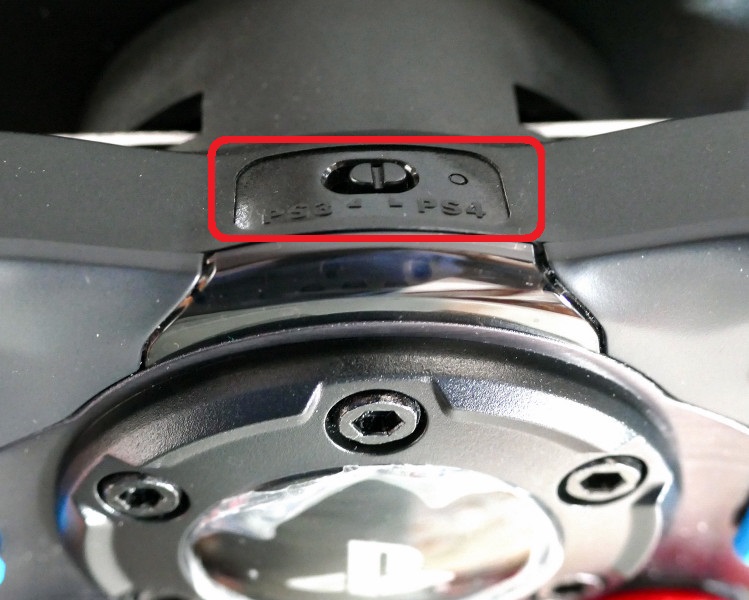
That's a G29 not G920... G920 is an Xbox-variant it doesn't have that switch unfortunately.
Ah you're right, sorry it's getting late :upside_down_face:. In that case ignore what I said, I was playing fine with my G29.
Ive found a rather strange solution BUT it fixed all my G920 Issues on F1.
Here's the steps I took to fix it:
- Before going into Steering settings Hold down Brake Pedal
- Let go of the brake once the settings appear
- Remap brake to the brake pedal (will appear as "Z-")
- Save the configuration
- Re-enter the configuration and now when you press brake it will respond as expected
I also tried this with the Clutch Pedal (as it is easier to hold down 100%) and it also makes the brake responsive even after remapping to the brake pedal afterwards.
I'm honest not sure which of these steps was the actual solution but it fixed F1 for me and that is the best news of the day :D
I hope this helps!
My above report can be marked as Resolved.
@deviljin112 can you check with the current experimental? It includes a layout fix for G920.
System Information
GPU: AMD RX 5500XT
Driver/LLVM version: amdgpu
Kernel version: 5.13.5-arch1-1
Link to full system information report: Sysinfo.txt
Proton version: 6.3-5
Symptoms
The game doesn't open any windows, although it says that the game is running. In proton 5.0-10 it opens a crash reporter.
log file: steam-1080110.log
Hello @DomekRomek, it looks like you're using AMDVLK, can you also test how the game behaves with mesa/RADV?
After changing over to RADV the game has launched just fine
I'm having the following issue with F1 2020:
If I setup a full single player race with VSYNC OFF, the game will auto exit just over 3/4 into the race with no warning.
i.e If I race a track like China, which is 56 laps, anywhere between laps 41 onwards it will shut down. If I have VSYNC ON, then I can complete the race. The problem with having vsync on is that there is too much input lag.
With a shorter race, say 50%, the problem does not manifest itself, since the race finishes before the game can crash.
I have attached a log. I have cut out the middle section of the log since it was 130MB in size and all it contained was Direct Input entries.
System Information
GPU: nVidia Geforce GTX 1660Ti
NVIDIA Driver Version: 470.63.01
Kernel version: 5.14.13-xanmod1
Proton Version: Experimental
DirectX Version: 11
Please let me know if there is any other information I need to provide.
Hello @sean-skt, err:virtual:alloc_area_in_reserved_or_between_callback Could not map in reserved area. ./dlls/ntdll/unix/virtual.c:1339: create_view: Assertion `!((UINT_PTR)base & page_mask)' failed. in your log looks similar to #4690. Like that game, you might get lucky setting the game's launch options to PROTON_NO_FSYNC=1 %command% or PROTON_NO_FSYNC=1 PROTON_NO_ESYNC=1 %command%.
@kisak-valve
Thank you very much for your reply.
PROTON_NO_FSYNC=1 %command% worked for me and fixed my issue. Will continue to do more testing though.
Thanks so much for your help, really appreciate it.
Related threads
- F1® 2020 - Artifacts on various assets (Cars & Character)vkd3dclosed same game
- F1 2020 G920 Steering Wheel Issueprotonclosed same game
Proton versions
proton 5.0-10x1 2021-08proton 6.3-5x1 2021-06proton 6.3x1 2021-04
Launch options
PROTON_NO_FSYNC=1x2 2021-10PROTON_NO_ESYNC=1x1 2021-10PROTON_USE_SECCOMP=1x5 2020-09
Launch lines
PROTON_NO_FSYNC=1 %command%x2 2021-10PROTON_NO_FSYNC=1 PROTON_NO_ESYNC=1 %command%x1 2021-10PROTON_USE_SECCOMP=1 %command%x5 2020-09
Upstream links
- ValveSoftware/Proton/issues/4922x1 2021-06
- ValveSoftware/steam-for-linux/issues/7353x1 2020-09
Compatibility Report
steam-1080110.log
System Information
I confirm:
Symptoms
Starting the game outright crashes it with EgoDumper showing up or comes with error "Sorry, something went wrong, for solutions please visit:"
Reproduction