Among Us
I found other Proton versions do not have this issue, only Proton 5.0 does. For the moment, you can try downgrading to 4.11.
Seems like input works more consistently on 4.11. I was able to break it immediately after downgrading but not on subsequent restarts of the game. Updated the main post with this, thanks.
Hello @Baguettedood, if you run the game with Proton 4.11, then switch back to Proton 5.0 without manually altering the wine prefix, does that have an effect on the keyboard input snafu you're seeing?
After going back to Proton 5.0 it's remained roughly as frequent as using it on 4.11. Seems to happen more often if the game isn't in focus while it starts up, but even then is still unreliable.
Currently, I cannot connect to the server- the game launches and runs, but I can't join or host a game since the latest update that added 6 character codes. No error message, it just has the connecting animation forever.
Currently, I cannot connect to the server- the game launches and runs, but I can't join or host a game since the latest update that added 6 character codes. No error message, it just has the connecting animation forever.
@StarrKiss Can you see if the solution found here fixes it?
- Go to ~/.local/share/Steam/steamapps/compatdata/945360/pfx/drive_c/users/steamuser/AppData/LocalLow/Innersloth/Among Us/
- Delete serverInfo2.dat
I've tried that @Baguettedood but no such file exists.
I can't seem to replicate the keyboard issue when using GloriousEggroll's Proton-5.9-GE-6-ST as suggested here. Proton-GE and maybe other builds of Proton that include wine-staging's rawinput patches (such as proton-tkg) may solve the keyboard input problems.
I found this blog post: https://churchman.nl/2019/03/14/granting-capabilities-using-capsh/
And executed commands:
export -p > ./savedenv
sudo capsh --caps="cap_net_raw+eip cap_setpcap,cap_setuid,cap_setgid+ep" --keep=1 --user=$USER --addamb=cap_net_raw -- -c "source ./savedenv; rm ./savedenv; steam"
It will run steam from which you can run Among Us with working multiplayer features. It seems like mentioned ICMP ping is a problem here.
@Adikso 's post seems to have worked for me... though I'm not sure exactly what his command is doing.
Among Us (945360)
Issue transferred from https://github.com/ValveSoftware/Proton/issues/4223.
@naoliv posted on 2020-09-28T02:09:56:
Whitelist Request
- Name of the game to be whitelisted: Among Us
- Steam AppID of the game: 945360
Maybe asking for whitelist is too strong here, but consider this as a positive feedback, saying that I was able to properly run the game with Proton.
System Information
- GPU: Intel HD Graphics 3000
- Driver/LLVM version: 3.0 Mesa 20.1.8
- Kernel version:
5.8.10 - Link to full system information report as Gist: https://gist.github.com/naoliv/dd213f2c3de50ab1c3878378f2b95ffb
- Proton version:
5.0-9
Since the GPU doesn't support Vulkan, the game was called with PROTON_USE_WINED3D=1 %command%
I confirm:
- [X] that pressing the
Playbutton in the Steam client is sufficient. - [X] that runtime config options are necessary to run the game.
- [X] that no workarounds other than PROTON_* env variables are necessary.
Issues
- [X] I haven't experienced any issues.
- [ ] There are no issues left open for this game.
- [ ] Although I consider the gaming experience equal to Windows there are remaining issues:
@Adikso 's post seems to have worked for me... though I'm not sure exactly what his command is doing.
The command from Adisko grants you temporarily (in a local shell for a duration of its existence only) additional privileges (without granting full root permissions) to send and receive ICMP packets, thus making wine be able to implement ping / ICMP functionality. It is a decent solution. This is what cap_net_raw+eip part does. The pcap part is packet capture (like network analyzer, like wireshark or tcpdump is using pcap), not sure why it is needed, but maybe it is for local discovery of servers, or something, it shouldn't be needed for ICMP I think. Similary I don't think cap_setuid is needed.
I tried to give wine-preloader executable file the these permissions (using setcap), but then there are some issues with dynamic linker. So I think capsh solution from Adisko is more reliable.
@Adisko is the cap_setuid really nacassary? That seems a bit dangerous.
Update. It appears pcap and setuid are needed.
Here is simplified command:
sudo --preserve-env capsh --caps="cap_net_raw+eip cap_setpcap+ep cap_setuid,cap_setgid+ep" --keep=1 --user=$USER -- -c "/usr/bin/env steam"
Among Us russian input does not work
Issue transferred from https://github.com/ValveSoftware/Proton/issues/4246.
@lenwtet posted on 2020-10-08T18:32:56:
Compatibility Report
- Name of the game with compatibility issues: Among Us
- Steam AppID of the game: 945360
System Information
- Proton version: 5.0
I confirm:
- [*] that I haven't found an existing compatibility report for this game.
- [*] that I have checked whether there are updates for my system available.
Symptoms
Russian input does not work in proton. I tried to launch with options > LC_ALL=ru_RU.UTF-8 %command% < but nothing has happened. If I run this game on wine via > LC_ALL=ru_RU.UTF-8 wine "Among Us.exe" < It's works fine.
@lenwtet That would run with your system-installed wine, probably newer with different fixes compared to Proton. What version of wine have you installed to your system?
In addition, have you tried launching Among Us via a version of GloriousEggroll's proton-ge-custom?
@Baguettedood I have installed wine version 5.18. proton-ge-custom did not help
@lenwtet Tell me more about your system. What graphics card/drivers/etc. The information that the compatibility reports ask for when creating a new issue.
When you say "does not work" do you mean it doesn't open at all, or that the game opens fine but you can't move your character/some other issue?
I see a lot of people on ProtonDB mentioning disabling esync as a fix (PROTON_NO_ESYNC=1), always coupled with using wined3d (PROTON_USE_WINED3D=1). Does disabling esync actually help people play the game when not paired with using wined3d or is it just placebo? (i.e Is there a case where he game doesn't load without changing the setting, but does if changing only this setting?) Esync/Fsync/Neither all work on my machine.
With Proton 5.13-1 it's still working without any issues here.
With 5.13-1 I was also able to run another game which I had no success with 5.0-9 (#4222)
Maybe people who had issues could give a try with the new Proton version?
The keyboard issue does seem fixed with Proton 5.13. As far as I'm now aware, there should be no more symptoms directly stemming from Proton, but players may still experience issues depending on configuration/hardware/actual game bugs.
I was able to run it and join a public game with 5.13, but only with the PROTON_USE_WINED3D=1 option, which has the side effect of making all on-screen players the same colour, so it's sadly unplayable, at least with the Nouveau driver. I couldn't get it to work with the NVidia proprietary driver at all.
I still have no keyboard input on Proton 5.13-1 (or 5.0-9). Keyboard input works for me on 4.11-13. I have not set any custom launch options.
I can't replicate the keyboard input issue anymore but I'll include the GloriousEggroll solution for those who still have troubles.
I can't use accents with Proton 5.13 and the US international keyboard.
I'm using PopOS 20.10 by the way.
I can't use accents with Proton 5.13 and the US international keyboard.
I'm using PopOS 20.10 by the way.
@gquittet Hello! I'm dealing with this issue in all multiplayer games running with Proton, since I switched from Windows 10 to Ubuntu. However, I'm using keyboards with the Portuguese ABNT2 layout (with dedicated keys for accents). This can be extremelly annoying and also a critical issue in games like Among Us when you're trying to type in languages like Portuguese, Spanish or French.
XIM is disabled by default in the registry, so you can try enabling it, as shown in https://github.com/ValveSoftware/Proton/issues/3791#issuecomment-670811393. You can also try setting the locale manually, as shown in https://github.com/ValveSoftware/Proton/issues/3528#issuecomment-716204617.
This seems to fix the issue (according to Debian and Slackware users). However, I've tried it in different versions of Ubuntu and it doesn't work. I'm still trying to figure out why. PopOS is based on Ubuntu, so let's see how it goes.
EDIT: GOT IT WORKING! With a fresh install of Ubuntu 20.10. The problem was my system. Now I can confirm that the solution above works. In my case, it wasn't necessary to run with LC_ALL=pt_BR.UTF-8 LANG=pt_BR.UTF-8 %command%.
The keyboard issue does seem fixed with Proton 5.13. As far as I'm now aware, there should be no more symptoms directly stemming from Proton, but players may still experience issues depending on configuration/hardware/actual game bugs.
5.13 doesn't work at all here, see https://github.com/ValveSoftware/steam-runtime/issues/290
Controls does not take into account keyboard layout switch:
- Keyboard layout used for controls will always be starting keyboard layout
- Keyboard layout used for chat is correctly taken into account when switching
Tested with Proton 5.13
Hi. I'm using proton 4.11.13 (because 5 for among us doesn't work). I have my AZERTY turn into a qwerty US (langage also fr/eng) but when I want to play with the qwerty on, AZERTY is always on for the game and the keyboard don't let me play with qsdz but with award. I don't know if I'm clean but I write in qwerty in the game but keyboard play with AZERTY at the same time. Can you help me ? I'm on a Ubuntu 18
@adoloran Try to switch keyboard layout before starting the game. It seems to be a generic problem with Proton.
@haroldm hi thanks for your answer. But it doesn't seem to work either :(
Game does not lauch for me with Proton >=5.0. 4.11 works fine.
@saboya Might be because newer Proton versions require newer drivers (specifically because of newer DXVK versions). What is your graphics driver version?
@Baguettedood Mesa 20.2.2 with 5.9 kernel. Ryzem 3700U / Vega 10.
@saboya I dunno then. Maybe looking through the logs generated by PROTON_LOG=1 could help figure it out, but if what you have works fine then no real need to worry about it.
@Baguettedood Just found out why:
https://github.com/flathub/com.valvesoftware.Steam/issues/642
There's a flatpak-compatible 5.13 Proton alternative there that runs against flatpak environment.
@saboya So Proton 5.0 works fine, you're just having trouble with Proton 5.13?
@Baguettedood Yeah, I just tested here, and 5.0 does work, my bad.
EDIT: GOT IT WORKING! With a fresh install of Ubuntu 20.10. The problem was my system. Now I can confirm that the solution above works. In my case, it wasn't necessary to run with
LC_ALL=pt_BR.UTF-8 LANG=pt_BR.UTF-8 %command%.
It seems like I solve the problem this way with Russian layout, thanks!
It works only with English (US) keyboard layout. When I switch to Russian or Ukrainian in-game I get "???" instead of letters.
It works only with English (US) keyboard layout. When I switch to Russian or Ukrainian in-game I get "???" instead of letters.
@mamantoha The aforementioned issue was about W/A/S/D controls being broken on different (non-QWERTY) layouts. ~I am not sure Among Us allows UTF-8 (in your case, Russian/Ukranian) characters in the in-game nickname input and chat.~
Edit: I was wrong, apparently it does.
@Ristovski as I understand people from Windows do not have this issue.
Also, WASD works well in the Russian/Ukrainian layout. So the issue only with typing.
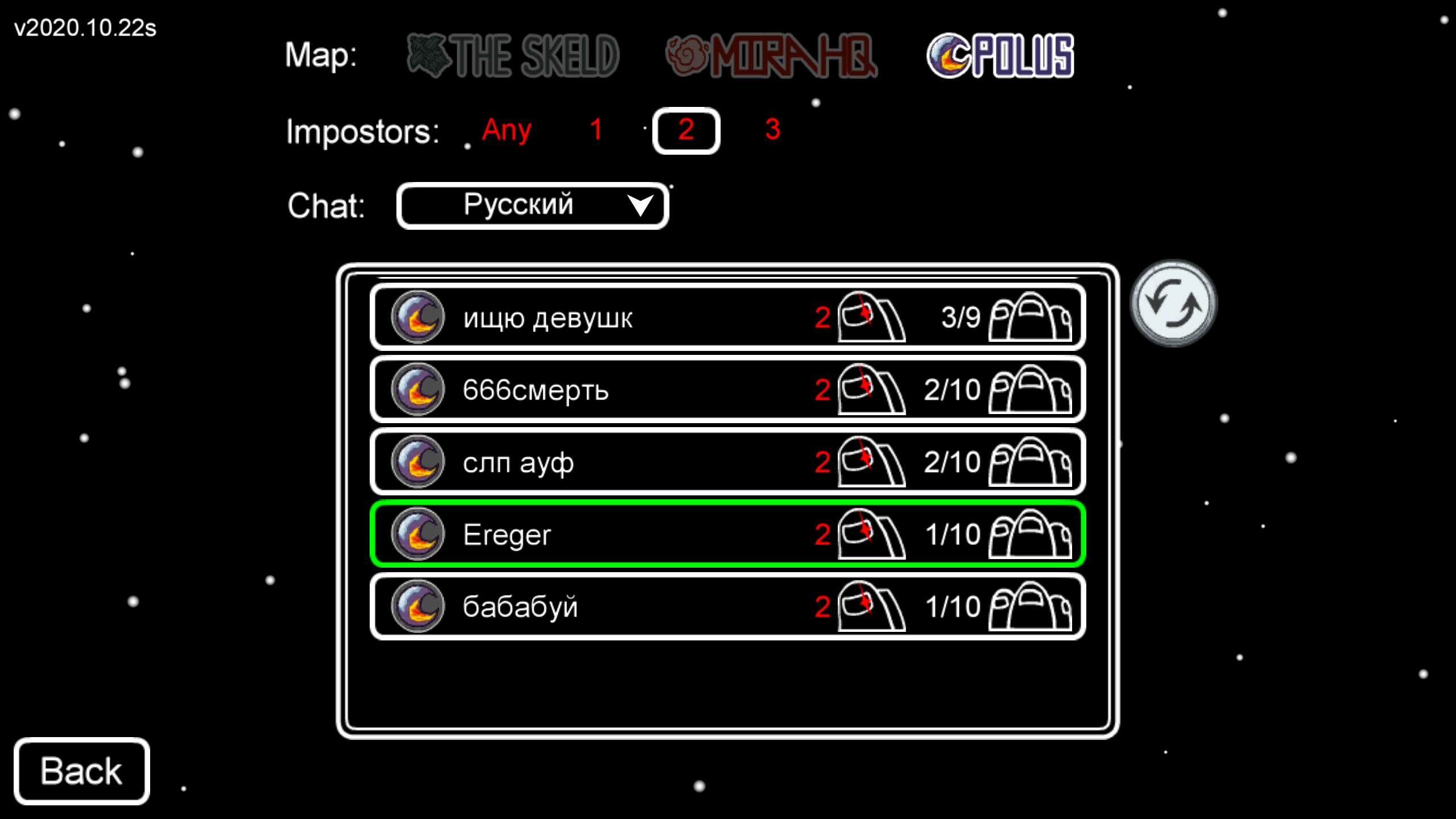
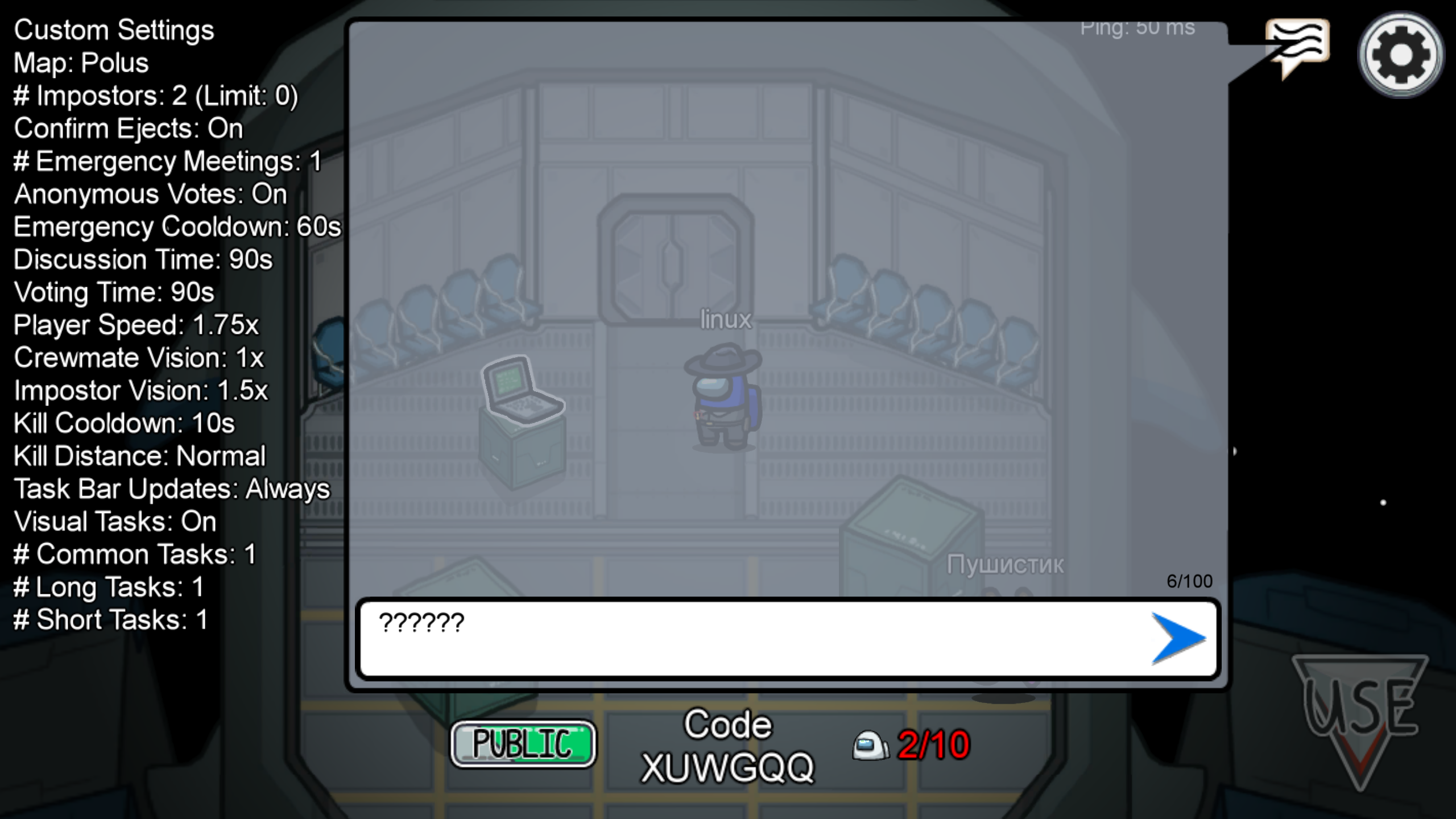
@mamantoha Ah, my apologies! LC_ALL and LANG should fix all the issues, very weird.
Can someone else with a non-US locale confirm it's working for their language?
@Ristovski well, I got it!
My system locale is LANG=en_US.UTF-8.
Then I tried to run Stream via console:
LC_ALL=uk_UA.UTF-8 /usr/bin/steam
Now everything is fine.
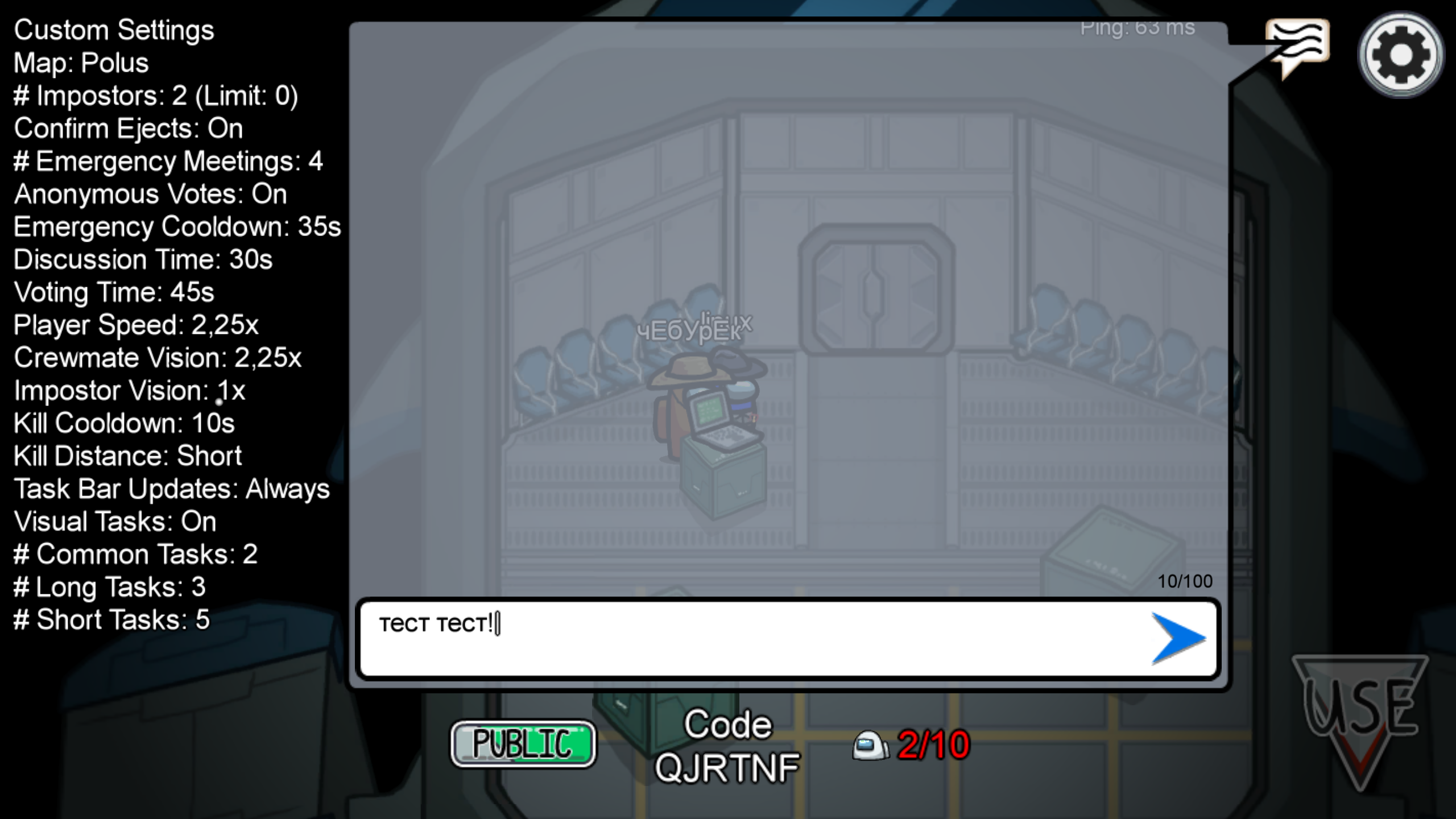
Thanks!
@mamantoha Ah, so it also requires running Steam under that locale. I checked and indeed - Steam seems to explicitly export the C or C.UTF-8 locales, explaining why it wasn't working before.
Update on my issue.
No matter what WM I use I cannot switch movement keys with a graphical tray. However switching layout with setxkbmap -layout us works for both movements and typing keys (although it makes graphical layout switcher tray unhappy).
I'm using Debian and uninstaling ibus had no positive effect. I encountered this behaviour with XFCE and Plasma.
Hello, I'm on Manjaro + Xfce with Proton 5.13-2. It seems Among Us take always the first keyboard layout for movements, so with a french keyboard AZERTY you need first set layout "us,fr" then switch to the layout fr to be able to write with azerty keyboard correctly.
To fix my issue, I use xkb-switch.
I create 2 bash scripts (preAmongUs and postAmongUs):
preAmongUs:
#!/bin/bash
# V1

setxkbmap -layout "us,fr" -variant ",azerty"

sleep 1

xkb-switch -n
postAmongUs:
#!/bin/bash
# V1

setxkbmap -layout "fr,fr,us" -variant "azerty,bepo,"
update access right:
chmod +x preAmongUs
chmod +x postAmongUs
and finally in the "Set launch options..." in Among Us properties type:
/home/PathToScript/./preAmongUs ; %command% ; /home/PathToScript/./postAmongUs
hope this guide above can help others, feel free to update with your keyboard layout.
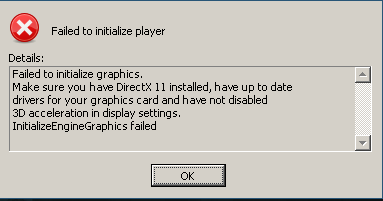
After yesterdays steam runtime upgrade I'm running into this problem:
This is the log of `PROTON_LOG=1 steam` when I run the game:
[945360]Non-Steam Controller Configs Enabled: 1
Installing breakpad exception handler for appid(steam)/version(1607372145)
GameAction [AppID 945360, ActionID 1] : LaunchApp changed task to ProcessingInstallScript with ""
esync: up and running.
Installing breakpad exception handler for appid(steam)/version(1607372145)
CAPIJobRequestUserStats - Server response failed 2
GameAction [AppID 945360, ActionID 1] : LaunchApp changed task to SiteLicenseSeatCheckout with ""
GameAction [AppID 945360, ActionID 1] : LaunchApp changed task to CreatingProcess with ""
GameAction [AppID 945360, ActionID 1] : LaunchApp waiting for user response to CreatingProcess ""
GameAction [AppID 945360, ActionID 1] : LaunchApp continues with user response "CreatingProcess"
Opted-in Controller Mask for AppId 945360: 0
Game update: AppID 945360 "", ProcID 568, IP 0.0.0.0:0
ERROR: ld.so: object '/home/hexa/.local/share/Steam/ubuntu12_32/gameoverlayrenderer.so' from LD_PRELOAD cannot be preloaded (wrong ELF class: ELFCLASS32): ignored.
ERROR: ld.so: object '/home/hexa/.local/share/Steam/ubuntu12_32/gameoverlayrenderer.so' from LD_PRELOAD cannot be preloaded (wrong ELF class: ELFCLASS32): ignored.
Starting app 945360
>>> Adding process 568 for game ID 945360
GameAction [AppID 945360, ActionID 1] : LaunchApp changed task to WaitingGameWindow with ""
ERROR: ld.so: object '/home/hexa/.local/share/Steam/ubuntu12_32/gameoverlayrenderer.so' from LD_PRELOAD cannot be preloaded (wrong ELF class: ELFCLASS32): ignored.
GameAction [AppID 945360, ActionID 1] : LaunchApp changed task to Completed with ""
>>> Adding process 569 for game ID 945360
>>> Adding process 570 for game ID 945360
>>> Adding process 576 for game ID 945360
>>> Adding process 578 for game ID 945360
>>> Adding process 581 for game ID 945360
>>> Adding process 583 for game ID 945360
>>> Adding process 586 for game ID 945360
>>> Adding process 593 for game ID 945360
>>> Adding process 608 for game ID 945360
Game update: AppID 945360 "", ProcID 576, IP 0.0.0.0:0
RecordSteamInterfaceCreation (PID 576): SteamUtils009 / Utils
RecordSteamInterfaceCreation (PID 576): SteamUser019 / User
RecordSteamInterfaceCreation (PID 576): SteamUser019 / User
RecordSteamInterfaceCreation (PID 576): SteamFriends015 / Friends
RecordSteamInterfaceCreation (PID 576): SteamUtils009 / Utils
RecordSteamInterfaceCreation (PID 576): SteamMatchMaking009 / Matchmaking
RecordSteamInterfaceCreation (PID 576): SteamMatchMakingServers002 / MatchmakingServers
RecordSteamInterfaceCreation (PID 576): STEAMUSERSTATS_INTERFACE_VERSION011 / UserStats
RecordSteamInterfaceCreation (PID 576): STEAMAPPS_INTERFACE_VERSION008 / Apps
RecordSteamInterfaceCreation (PID 576): SteamNetworking005 / Networking
RecordSteamInterfaceCreation (PID 576): STEAMREMOTESTORAGE_INTERFACE_VERSION014 / RemoteStorage
RecordSteamInterfaceCreation (PID 576): STEAMSCREENSHOTS_INTERFACE_VERSION003 / Screenshots
RecordSteamInterfaceCreation (PID 576): STEAMHTTP_INTERFACE_VERSION002 / HTTP
RecordSteamInterfaceCreation (PID 576): SteamController006 / Controller
RecordSteamInterfaceCreation (PID 576): STEAMUGC_INTERFACE_VERSION010 / UGC
RecordSteamInterfaceCreation (PID 576): STEAMAPPLIST_INTERFACE_VERSION001 / AppList
RecordSteamInterfaceCreation (PID 576): STEAMMUSIC_INTERFACE_VERSION001 / Music
RecordSteamInterfaceCreation (PID 576): STEAMMUSICREMOTE_INTERFACE_VERSION001 / MusicRemote
RecordSteamInterfaceCreation (PID 576): STEAMHTMLSURFACE_INTERFACE_VERSION_004 / HTMLSurface
RecordSteamInterfaceCreation (PID 576): STEAMINVENTORY_INTERFACE_V002 / Inventory
RecordSteamInterfaceCreation (PID 576): STEAMVIDEO_INTERFACE_V002 / Video
RecordSteamInterfaceCreation (PID 576): STEAMPARENTALSETTINGS_INTERFACE_VERSION001 / ParentalSettings
>>> Adding process 619 for game ID 945360
Installing breakpad exception handler for appid(steam)/version(1607372145)
>>> Adding process 623 for game ID 945360
>>> Adding process 761 for game ID 945360
Installing breakpad exception handler for appid(steam)/version(1607372145)
Game removed: AppID 945360 "", ProcID 576
Game 945360 created interface STEAMAPPLIST_INTERFACE_VERSION001 / AppList
Game 945360 created interface STEAMAPPS_INTERFACE_VERSION008 / Apps
Game 945360 created interface STEAMHTMLSURFACE_INTERFACE_VERSION_004 / HTMLSurface
Game 945360 created interface STEAMHTTP_INTERFACE_VERSION002 / HTTP
Game 945360 created interface STEAMINVENTORY_INTERFACE_V002 / Inventory
Game 945360 created interface STEAMMUSICREMOTE_INTERFACE_VERSION001 / MusicRemote
Game 945360 created interface STEAMMUSIC_INTERFACE_VERSION001 / Music
Game 945360 created interface STEAMPARENTALSETTINGS_INTERFACE_VERSION001 / ParentalSettings
Game 945360 created interface STEAMREMOTESTORAGE_INTERFACE_VERSION014 / RemoteStorage
Game 945360 created interface STEAMSCREENSHOTS_INTERFACE_VERSION003 / Screenshots
Game 945360 created interface STEAMUGC_INTERFACE_VERSION010 / UGC
Game 945360 created interface STEAMUSERSTATS_INTERFACE_VERSION011 / UserStats
Game 945360 created interface STEAMVIDEO_INTERFACE_V002 / Video
Game 945360 created interface SteamController006 / Controller
Game 945360 created interface SteamFriends015 / Friends
Game 945360 created interface SteamMatchMaking009 / Matchmaking
Game 945360 created interface SteamMatchMakingServers002 / MatchmakingServers
Game 945360 created interface SteamNetworking005 / Networking
Game 945360 created interface SteamUser019 / User
Game 945360 created interface SteamUtils009 / Utils
Game 945360 method call count for IClientUser::GetSteamID : 1
Game 945360 method call count for IClientUtils::GetAppID : 24
Game 945360 method call count for IClientUtils::RecordSteamInterfaceCreation : 22
Game 945360 method call count for IClientUtils::GetSteamUILanguage : 1
Uploaded AppInterfaceStats to Steam
Exiting app 945360
No cached sticky mapping in ActivateActionSet.Installing breakpad exception handler for appid(steam)/version(1607372145)
I'm using Steam Play 4.11-13, which used to work until yesterday. Newer versions don't even start up.
My graphics card is fairly new and the drivers are all in place. I can play other titles, like Stellaris, so graphics acceleration is working.
Video Card:
    Driver:  X.Org AMD Radeon RX 5700 (NAVI10, DRM 3.40.0, 5.10.0-rc6, LLVM 9.0.1)
    Driver Version:  4.6 (Compatibility Profile) Mesa 20.2.3
    OpenGL Version: 4.6
Hello @mweinelt, you've included the terminal spew from Steam instead of a Proton log, please check your home folder for steam-945360.log and attach as a file to this issue report. (Proton logs compress well in an archive if needed.) Also, please copy your system information from Steam (Steam -> Help -> System Information) and put it in a gist, then include a link to the gist in this issue report. You'll need to wait a short while for the extended diagnostic information to be gathered.
@kisak-valve Thanks for your guidance. All information put in here https://gist.github.com/mweinelt/2689534c4f9c7c3aaef783e4d0721d8e.
err:wgl:X11DRV_WineGL_InitOpenglInfo couldn't initialize OpenGL, expect problems is the line of interest from your log. Most likely a general NixOS issue with Steam. I wouldn't be surprised if a bunch of games had problems.
Indeed very odd. Guess I'll bisect my system then, should be the steam environment, because other wine environments don't experience this issue.
It's still working on Proton 4.2-9, what does that even mean. /o\
Hi. I’m having the same problem as @mweinelt , also on NixOS. However, switching to Proton 4.2.9 didn’t work.
The game used to work perfectly on the 5.0.10 version, then stopped completely with the lastest game version a few days ago.
@gordonzola quick question: Do you by any chance have PROTON_USE_WINED3D=1 %command% enabled?
I was on the same situation as you. I removed that setting and was able to get the game running (Proton 4.2, NixOS)
Yes, i had it, and the game launches as soon as I removed it. Thanks, i should have thought about this setting
Runs, but can't seem to join any public games. They ARE listed, but get denied each time. This worked with an earlier version (I think 5.13.x), but also maybe an earlier version of the game as well.
@nightsky30 This happened to me when I first installed the game. If you just installed it, just let it try to join a game. In a few
minutes, it will throw a network connection error and show the changelog of the new version. After that, you might be able to play.
Never mind, I just saw you indicate they are listed. Not the same situation unfortunately.
With the new Among Us AirShip Update I'm unable to sign in ingame and it gives me the following error.
"Something went wrong with signing into your account. Please try again later (Error MismatchedProductUserIDs)"
For me the latest update broke being able to connect to the nextwork. I can boot the game but can't anything except local I guess which I don't do.
With the new Among Us AirShip Update I'm unable to sign in ingame and it gives me the following error.
"Something went wrong with signing into your account. Please try again later (Error MismatchedProductUserIDs)"
I believe I've found a workaround for this issue, when in the account menu use the "Randomize Name" button, I believe this logs you in what is called a "Guest" account, so this will allow you to play.
If you want to change your name, close the game, go into the proton prefix of the game and change your name in the game config file directly.
+1 for Error MismatchedProductUserIDs. I was able to log in earlier today when I was just doing freeplay. This error started after I tried changing my proton version. Originally was set to experimental Tried all other proton versions with no results. I tried uninstalling and reinstalling hoping to be able to log in again if not connect to a game but no luck. Even deleted all local files including proton versions and re-installing. Continue to get this error and am unable to join any games.
That worked for me!
For those wondering how to change the name without messing with proton command line, the player name is the first set of characters in the file stored at '/steamapps/compatdata/945360/pfx/drive_c/users/steamuser/AppData/LocalLow/Innersloth/Among Us/playerPrefs'.
Now all we have to do is wait on a fix for the 'MismatchedProductUserIDs' error; since that is most likely on their end. :)
That worked for me!
For those wondering how to change the name without messing with proton command line, the player name is the first set of characters in the file stored at '/steamapps/compatdata/945360/pfx/drive_c/users/steamuser/AppData/LocalLow/Innersloth/Among Us/playerPrefs'.
Now all we have to do is wait on a fix for the 'MismatchedProductUserIDs' error; since that is most likely on their end. :)
It is on their end indeed.
- If you're having issues signing into accounts (MismatchedProductUserIDs and LinkAccountFail), make sure you are not trying to log into multiple accounts on your platform (Steam/Google Play/Epic/etc.) - right now the game only supports connecting one account to the game. This also could happen if you are logged into the same account on multiple devices.
This is what they stated but logging out from the first sign-in doesnt help either.
+1 for Error MismatchedProductUserIDs. I was able to log in earlier today when I was just doing freeplay. This error started after I tried changing my proton version. Originally was set to experimental Tried all other proton versions with no results. I tried uninstalling and reinstalling hoping to be able to log in again if not connect to a game but no luck. Even deleted all local files including proton versions and re-installing. Continue to get this error and am unable to join any games.
Same problem as him @owenhw :(
For me the latest update broke being able to connect to the nextwork. I can boot the game but can't anything except local I guess which I don't do.
Same for me since the airship update. Hosting a game (screen turns black, in-game music stops) and joining public games (finds none) doesn't work. And the only area option I see is NA.
That worked for me!
For those wondering how to change the name without messing with proton command line, the player name is the first set of characters in the file stored at '/steamapps/compatdata/945360/pfx/drive_c/users/steamuser/AppData/LocalLow/Innersloth/Among Us/playerPrefs'.
Now all we have to do is wait on a fix for the 'MismatchedProductUserIDs' error; since that is most likely on their end. :)
Thanks ! For those who didn't find that folder, it's easier to go in steam, in game collection, right click Among US -> manage -> browse local files, go back 2 folders (you will land in "steamapps"), and then follow these instructions (quoted)
Not launching since today, with any:
- Proton version.
- Launch option.
- Runtime or native libraries.
For me the latest update broke being able to connect to the nextwork. I can boot the game but can't anything except local I guess which I don't do.
Same for me since the airship update. Hosting a game (screen turns black, in-game music stops) and joining public games (finds none) doesn't work. And the only area option I see is NA.
Not sure if this was mentioned anywhere else, but downgrading to Proton 5.13-6 solves this.
Hello @MelonCola, please add PROTON_LOG=1 %command% to the game's launch options, reproduce the regression that doesn't happen with Proton 5.13, and attach the generated $HOME/steam-$APPID.log to this issue report as a file. (Proton logs compress well if needed.) Also, please copy your system information from Steam (Steam -> Help -> System Information) and put it in a gist, then include a link to the gist in this issue report.
The last time I played this game on proton everything worked fine except for the fact that I couldn't chat but I learned from youtube that's it's because it's disabled due to age. I don't think it's a proton issue because I had the same issue on geforce now. I think the among us dev team needs to make a fix their age restricting system. The only issue unique to proton was not being able to connect to the server but that can be worked around by switching servers and switching back.
In my case the issue is an incompatibility between Wine and Mesa 21.0.2.
I have to run the game by entering into the terminal:
export MESA_GL_VERSION_OVERRIDE=4.5
wine "/home/es20490446e/.local/share/Steam/steamapps/common/Among Us/Among Us.exe"
Hello @MelonCola, please add
PROTON_LOG=1 %command%to the game's launch options, reproduce the regression that doesn't happen with Proton 5.13, and attach the generated $HOME/steam-$APPID.log to this issue report as a file. (Proton logs compress well if needed.) Also, please copy your system information from Steam (Steam->Help->System Information) and put it in a gist, then include a link to the gist in this issue report.
Actually appears my issue was caused by other game launch options(don't remember which though unfortunately), and after removing them I've been unable to reproduce it on later Proton versions.
I can boot the game up to the main menu and sign into my account, and generally navigate the menus. I cannot play online however. I can only see the North America region, when trying to create a game after configuring the lobby it goes to a black screen, and when trying to join a public game/enter a code for a private game, it loads infinitely.
I'm running Arch Linux and Proton 6.3-3, but have tried Proton 5.13-6, 5.0-10 and 4.11-13 (as well as Proton-tkg 6.7 and Proton-GE 6.5). They all give the same errors after loading up the game. I attempted running Steam with the command given further up and it did not help either unfortunately.
err:winediag:WS_getaddrinfo Failed to resolve your host name IP- Not an error I've come across with Wine before, and looks like something that was prevalent around 2015 with some other games but was patched? It may be related to the below error.err:winediag:SECUR32_initNTLMSP ntlm_auth was not found or is outdated. Make sure that ntlm_auth >= 3.0.25 is in your path. Usually, you can find it in the winbind package of your distribution.- I have verified that I have thesambapackage installed for my system and that thewinbind.serviceandsmb.serviceare enabled and running. Perhaps Samba is not configured correctly? Though I created the/etc/samba/smb.confbased onsmb.conf.default, I was reading something about needing to addntlm auth = yessomewhere in the file. I attempted that at the bottom and it made no difference even after restarting the Samba services and attempting a reboot. Simply installing thesambapackage was sufficient to fix this error previously for me on my main PC many months ago.err:seh:dispatch_exception Fatal EXCEPTION_WINE_CXX_EXCEPTION exception (code=e06d7363) raised- This error appears four times consistently no matter how long I leave the game running for.
My symptoms are similar to those others are experiencing after updating to the "Airship Update".
I can boot the game up to the main menu and sign into my account, and generally navigate the menus. I cannot play online however. I can only see the North America region, when trying to create a game after configuring the lobby it goes to a black screen, and when trying to join a public game/enter a code for a private game, it loads infinitely.
I fixed this error by double clicking the North American server. Not sure how or why, but that fixed it.
@RogerGodzilla Wow, that actually worked! All regions show up now and I can connect to multiplayer games! Thank you!
With this game sometimes is hard to tell if it isn't just a bug on the game itself 😂
I can't type in Korean, I don't know why but in older versions of Among Us it was possible but not anymore.
Twitch account integration links don't work, a minor issue but an issue with certain exclusive items in the future
@RogerGodzilla just appearing to confirm selecting a region is what also fixed it for me, otherwise it's a black screen. Worked fine on Europe.
Skimming through the comments, it looks like nobody else is experiencing my issue...
I normally play on Proton 4.11-13 as it's worked the best for me. Around game version 2021.6.30s, I started getting issues (starting with visual issues and now crashing upon launch), I moved to 5.0-10 and it launches and everything works except for some reason, the game can't see steam. This can be confirmed by attempting to open the store, only to be greeted by Loading Failed: Steam must be running and logged in to view products
I've tried every version of proton after (Including proton-ge-custom 6.16) and they all crash instantly, with the exception of Proton 5.13-6 which hangs at launch and prevents me from launching the game until I fully quit steam (I have to log out of my system some times).
Summary: Game only launches on 5.0-10, but fails to communicate with steam. Features such as the store and logging in (thus free chat and a custom user name) are disabled.
Works perfectly for me now.
Steam: Current Beta
Proton 6.3-7
Radeon RX 5500 XT
Driver: Mesa 21.0.3 ACO
LLVM: 12.0.0
Kernel: 5.11.0-40-generic
My GPU is a Radeon Rewood and it doesn't support Vulkan, so I'm using 'PROTON_USE_WINED3D=1 %command%' to force OpenGL.
Proton 5.13-6 works great, except that I can't sign in with my account (the error is "SteamworksAuthFail"), that means that I can't join any private free chat room with my friends.
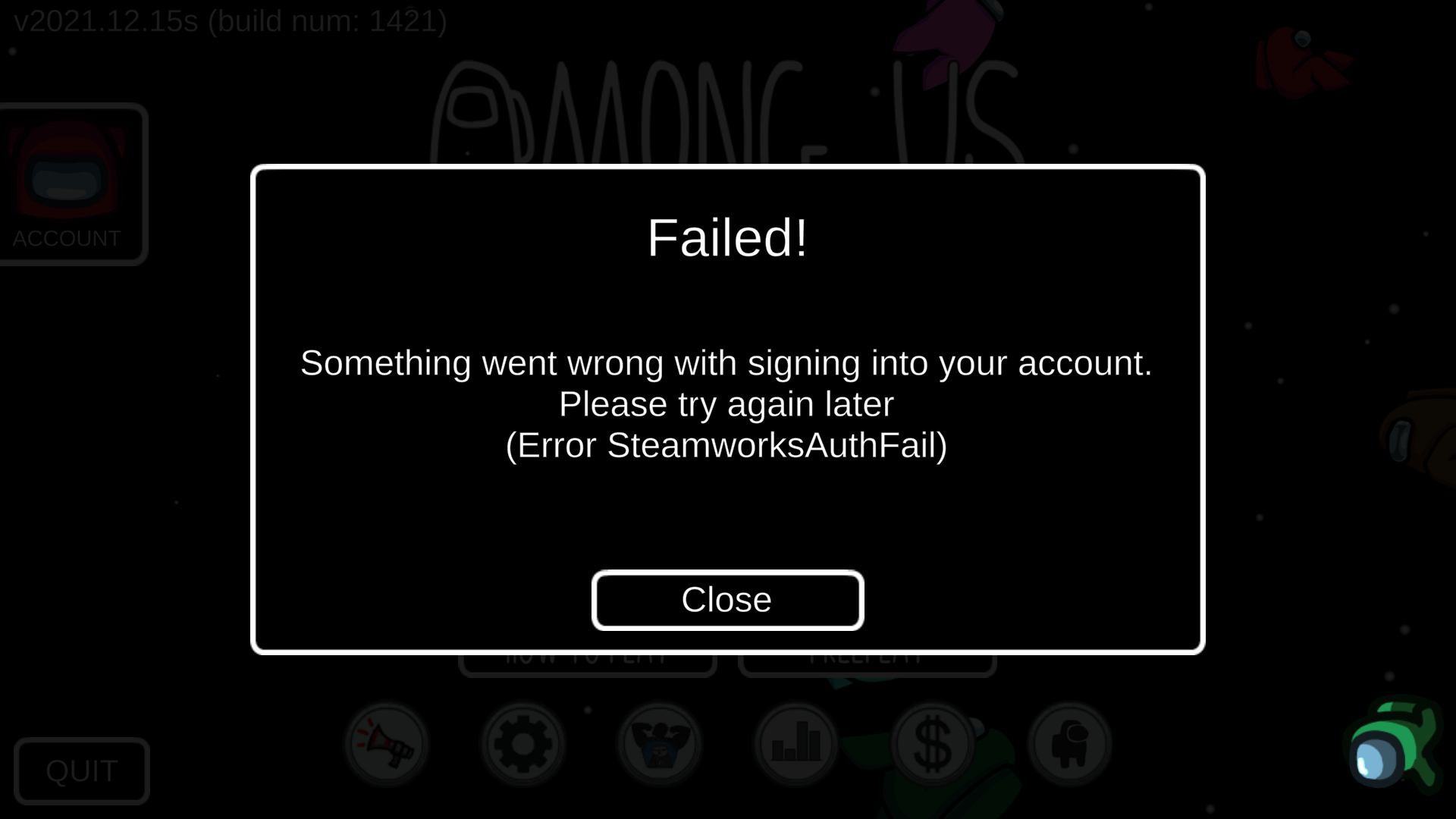
Proton 6.3-8 and Proton Experimental allow me to login into my account, but the graphics are all in shades of red and all messed up.

Please see the 2 attached screenshots.
I'm using Linux Mint 20 fully updated with Mesa drivers. My GPU doesn't support the ATI Radeon drivers, so I don't have them installed.
Arch Linux with the i3 window manager
Got the game working with Proton Experimental and PROTON_USE_WINED3D=1. Account setup and everything worked smoothly, I'll edit this post after further testing.
What is your GPU.
You should always use Mesa on Radeon.
All RX series cards have Vulcan support. This includes all Ryzen series
APUs. Some later R9 series GPUs do still require an override to use the
AMDGPU driver instead of the old Radeon driver.
You should never use the outdated ATI/AMD Catalyst driver and while AMD GPU
Pro is functional it is inferior for gaming and pretty much anything but
verified high-reliability compute functions.
Replying to https://github.com/ValveSoftware/Proton/issues/4190#issuecomment-1027403343
Sorry about the late feedback, but this issue got fixed for me in Proton 7.
Among Us Twitch Drops
Issue transferred from https://github.com/ValveSoftware/Proton/issues/6339.
@Francehelder posted on 2022-11-25T07:52:25:
Hello.
I'm playing the game on Linux with Proton 7.0-4.
The game works fine, but i never get to use twitch drops here.
I tried to connect to Twitch, but it didn't work.
The account has connected, but the callback request doesn't work, it did not open the game.
Any ideia to solve this?


Among us on linux
Issue transferred from https://github.com/ValveSoftware/Proton/issues/6698.
@Greenator posted on 2023-04-18T23:08:42:
I can't get on among us on linux chromebook

This keeps coming up
Hello @Greenator, please add PROTON_LOG=1 %command% to the game's launch options and attach the generated $HOME/steam-$APPID.log to this issue report as a file. (Proton logs compress well if needed.) Also, please copy your system information from Steam (Steam -> Help -> System Information) and put it in a gist, then include a link to the gist in this issue report.
In general, Proton requires a working Vulkan driver for DXVK's DirectX to Vulkan render path to work, and that strongly hints that there isn't a sane video driver providing Vulkan support.
Still not working
Thanks, looking at your system information, your system has to get access to the gpu through mesa/VirGL for OpenGL. The Vulkan equivalent, mesa/Venus is either not built or something is too old to be functional. Unfortunately, that makes your system unsupportable by Proton in general.
You might get lucky by setting the game's launch options to PROTON_USE_WINED3D=1 %command% to tell Proton to use Wine's DirectX to OpenGL render path, but that comes with a significant performance penalty and the launch option is not considered supported.
it is already affect my device memory significantly so I think I will just save for a windows, thanks anyways.
Last version of proton make AmongUS not start (8+ and expermimental, using 7.0-6 doesn't crash)
On Tue, Apr 25, 2023 at 2:05 PM Charbonnier Cylian @.***>
wrote:
Last version of proton make AmongUS not start (8+ and expermimental, using
7.0-6 doesn't crash)—
Reply to this email directly, view it on GitHub
https://github.com/ValveSoftware/Proton/issues/4190#issuecomment-1522202165,
or unsubscribe
https://github.com/notifications/unsubscribe-auth/A372IPQAFPPMYEQCNRL3UXLXDAHAPANCNFSM4RKSKO2A
.
You are receiving this because you were mentioned.Message ID:
@.***>
I don’t know what that means
Issue 3: Unable to type using non-English keyboard layouts
Did some small research, LC_ALL=[lang] LANG=[lang] %command% (replace [lang] with something like pt_BR.UTF-8 for your language and country) does the trick, thanks for the tip to https://github.com/ValveSoftware/Proton/issues/4190#issuecomment-717076454, but it works only on Proton up to 7.0-6, on Proton 8.0-3 and Experimental, when typing on non-English layout, game renders "????" instead of actual characters.
I'm running Arch Linux with kernel 6.4.11-arch1-1 and sway 1.8.1 + xorg-xwayland 23.2.0 from Arch repos. Launching Among Us v2023.7.12s build 3365 from Steam version 1695085405 (1.0.0.78-1 in Arch repos) in Native mode (provided by Arch package steam-native-runtime 1.0.0.75-3).
@evgfilim1 Thank you for bringing this to our attention, and pointing out that it worked with 7.0-x and not 8.0-x. We will investigate and see if there is anything we can do.
Issue 3: Unable to type using non-English keyboard layouts
Did some small research,
LC_ALL=[lang] LANG=[lang] %command%(replace[lang]with something likept_BR.UTF-8for your language and country) does the trick, thanks for the tip to...
https://github.com/ValveSoftware/Proton/blob/proton_8.0/proton script that resets LC_ALL by default. And HOST_LC_ALL should be used instead to override the LC_ALL settings. https://gist.github.com/cfillion/4394c3b8cd051fb45721187053e92296 has explained this problem pretty well. The reason why LC_ALL=ja_JP.UTF-8 works in Proton 7.0 is probably some kind of accident.
    def init_wine(self):
        if "HOST_LC_ALL" in self.env and len(self.env["HOST_LC_ALL"]) > 0:
            #steam sets LC_ALL=C to help some games, but Wine requires the real value
            #in order to do path conversion between win32 and host. steam sets
            #HOST_LC_ALL to allow us to use the real value.
            self.env["LC_ALL"] = self.env["HOST_LC_ALL"]
        else:
            self.env.pop("LC_ALL", "")
So HOST_LC_ALL=ja_JP.UTF-8 %command% should be used instead.
Cyrillic characters are replaced with '?'.
Issue transferred from https://github.com/ValveSoftware/Proton/issues/8460.
@sorelsi posted on 2025-02-16T09:01:08:
Compatibility Report
- Name of the game with compatibility issues: Among Us
- Steam AppID of the game:
System Information
- GPU: Radeon Vega 7 (Ryzen 5500U)
- Video driver version: Mesa 24.3.4
- Kernel version: 6.12.11
- Link to full system information report as Gist: https://gist.github.com/sorelsi/d5a18eda6f4d0b83c62305c9b06b7343
- Proton version: Any (Last tried GE-Proton9-25, Proton 9.0-4)
I confirm:
- [ ✓] that I haven't found an existing compatibility report for this game.
- [ ✓] that I have checked whether there are updates for my system available.
Symptoms
Whenever I try to type in Cyrillic, all letters are replaced with '?'. This problem occurs not only in Among Us but also in House Flipper.
Reproduction
Just start Among Us, join any game, and try to type something in Cyrillic in the chat. The same thing happens when I try to search for anything on the market in House Flipper.
P.S. Wine works perfectly. I tried adding this start parameter: LANG=ru_RU.UTF-8 LC_ALL=ru_RU.UTF-8 %command%, which was suggested by ChatGPT, but it didn't work.
@sorelsi commented on 2025-02-16T09:05:49:
I just noticed that Slime Rancher doesn't have this problem
A recent patch has broke this game, I had to fallback to Proton 8.0 @kisak-valve
Hello @Buggem, please add PROTON_LOG=1 %command% to the game's launch options, reproduce the regression, and attach the generated $HOME/steam-$APPID.log to this issue report as a file. (Proton logs compress well if needed.) Also, please copy the contents of Steam Runtime Diagnostics from Steam (Steam -> Help -> Steam Runtime Diagnostics) and put it in a gist, then include a link to the gist in this issue report.
Ok, I will try it. For now, a downgrade to 8.0 works
@Buggem The game seems to work normally on my end on proton stable (9.0-4), I can create and join matches. When you bring the log it would help to know what kind of issue you have
It fixed itself with the latest proton hotfix
Hi, I have a T430s(Intel i5-3320M) on Arch and it was giving the DirectX11 error when using Proton Hotfix and 9.0-4. I downgraded to 4.11 and it launched but gave an internet error and would not let me join nor host online games.
Edit: Nevermind I am an idiot, I typed in PROTON_USE_WINE3D=1 instead of WINED3D, its working great now
Hi, does Among Us work properly now with the latest stable version of Proton?
This is still happening in Among Us. Using Kubuntu 26.04.
Proton Hotfix, Experimental, Latest and other versions do not help.
@AllIsA1 Could you add some details about your issue? All the previous recent issues on this thread have been solved so I'm not sure what you are referring to.
Proton versions
proton hotfixx3 2026-08proton 8.0x2 2025-03ge-proton9-25x1 2025-02proton 9.0-4x1 2025-02proton 7.0x1 2023-10proton 8.0-3x1 2023-09proton 7.0-4x1 2022-11proton experimentalx2 2022-09proton 5.13-6x4 2022-02proton 6.3-8x1 2022-02proton 6.3-7x1 2021-11proton 4.11-13x1 2021-09proton 6.3-3x1 2021-05proton 5.13x9 2021-04proton 4.2x2 2020-12
Launch options
PROTON_USE_WINE3D=1x1 2025-06PROTON_LOG=1x5 2025-03PROTON_USE_WINED3D=1x5 2023-04PROTON_USE_WINED3D=1`.x1 2022-09MESA_GL_VERSION_OVERRIDE=4.5x1 2021-04PROTON_LOG=1`x1 2020-11PROTON_USE_WINED3D=1`x1 2020-10PROTON_NO_ESYNC=1`),x1 2020-10PROTON_USE_WINED3D=1`).x1 2020-10
Launch lines
LANG=ru_RU.UTF-8 LC_ALL=ru_RU.UTF-8 %command%x1 2025-02LC_ALL=[lang] LANG=[lang] %command%x2 2023-10HOST_LC_ALL=ja_JP.UTF-8 %command%x1 2023-10PROTON_USE_WINED3D=1 %command%x5 2023-04LC_ALL=pt_BR.UTF-8 LANG=pt_BR.UTF-8 %command%x2 2020-11LC_ALL=ru_RU.UTF-8 %command%x1 2020-10VK_ICD_FILENAMES="" %command%x1 2020-09
Upstream links
- ValveSoftware/Proton/issues/8460x1 2025-02
- ValveSoftware/Proton/issues/6698x1 2023-04
- ValveSoftware/Proton/issues/6339x1 2022-11
- ValveSoftware/steam-runtime/issues/290x1 2020-11
- ValveSoftware/Proton/issues/3528x1 2020-10
- ValveSoftware/Proton/issues/3791x1 2020-10
- ValveSoftware/Proton/issues/4246x1 2020-10
- ValveSoftware/Proton/issues/4223x1 2020-09
Compatibility Report
Click for System information
System Information
steam-945360.log
Player.log
I confirm:
Common Issues
Issue 1: Keyboard input sometimes fails to work
workaround/solution: Use GloriousEggroll's proton-ge-custom, avoid alt+tabbing or switching focus while the game starts up.
For those running the itch.io version via regular Wine: Try using wine-staging or another version of Wine with the rawinput patches. Lutris also supports running non-Steam Wine games with Proton.
I'm personally unable to replicate this as of Proton 5.13 but others seem to still have the issue.
Click for outdated details
Older Solution: Use Proton 5.13. Others still seem to experience this issue with Proton 5.13 however. Results may vary.
Game works mostly fine when in mouse-only mode, but keyboard input very rarely works. Seems to happen consistently on Proton 5.0 but harder to replicate on 4.11 (may need more confirmation on whether or not this is just a fluke), but I so far haven't been able to replicate it at all on Proton-5.9-GE-6-ST as suggested here. Other Proton versions with wine-staging's rawinput patches might also resolve the issue.
Workaround: Consider using GloriousEggroll's proton-ge-custom, avoid alt+tabbing or switching focus while the game starts up.
Reproduction
Alternative reproduction method: Launch the game, alt+tab a bunch until it starts up, and the keyboard input might stop working. Switching workspaces instead of alt+tabbing can also trigger it.
The
Player.login the game's AppData directory suggests the keyboard problems stems from Wine/Proton's interaction with Unity's new Raw Input system (RI.Hid):Might become an issue as newer Unity games start using this input system.
Issue 2: "Game doesn't launch after clicking play!" / "It says 'preparing to launch' for 30 seconds but then doesn't open!"
You probably are lacking Vulkan drivers for your system. You can use OpenGL instead of Vulkan (at a performance cost) by setting your launch options to
PROTON_USE_WINED3D=1 %command%.Click for details
If you think your GPU should support Vulkan, check that you actually have Vulkan drivers installed. Search for instructions on how to install Vulkan for your distro + GPU.
If, for some reason, you want to forcibly reproduce this issue on your system that has working Vulkan, you can set your launch options to
VK_ICD_FILENAMES="" %command%. Only do this if you want your game to crash.Ultimately this symptom isn't actually an issue with Wine/Proton but rather a hardware/driver issue, but I've posted it here since it's fairly common.
Issue 3: Unable to type using non-English keyboard layouts
Still being researched, look to the comments for newer information. I'm using a US keyboard so I can't be much help here.
Additional Issues (If you're having problems, read these too):
InitializeEngineGraphics failedorMake sure you have DirectX 11 installedprobably means you are lacking Vulkan drivers for your system, or your GPU doesn't support Vulkan. Set your launch options toPROTON_USE_WINED3D=1 %command%to use OpenGL instead. If this still doesn't work, your hardware might be too old. Among us Will not open in OpenGL mode if your hardware doesn't support OpenGL 3.2 or higher (i.e. your PC/graphics card needs to be made after 2010).If you have your own issues, comment them below. Include as much system information about your hardware/software/drivers as you can, and reproduction steps if possible.