Batman: Arkham Asylum Game of the Year Edition
Seeing the same result on Xubuntu 18.04. Interestingly, Arkham Origins seems to work fine.
Same on Ubuntu 18.04.1 LTS x86_64 / 4.15.0-33-lowlatency / Ryzen 5 1600X / NVIDIA GeForce GTX 1070 / NVIDIA 396.54
Steps to reproduce:
- Install game (35140)
- Exit Steam.
- Open terminal and run: steam steam://rungameid/35140
- Exit Steam (after waiting for 10+ minutes).
Full output: 35140.txt
Arkham Origins runs well, better than with PlayOnLinux & wine 3.12-staging.
Tried again after adding PROTON_NO_ESYNC=1 PROTON_LOG=1 %command% to launch options.
steam-35140.log
Another log if it'll help
Distro: Ubuntu 18.04.1
GPU: Intel Iris Pro 580
Resolution: 1280x720
RAM: 32GB
Controller: DS4
Proton 3.7-5 Beta
https://gist.github.com/daasuharo/cb605b8cd50227982a9bfa4dfcb1f635
@miguev @daasuharo looks like the architecture doesn't match or gameoverlayrenderer is just missing?!
ERROR: ld.so: object '$HOME/.steam/ubuntu12_32/gameoverlayrenderer.so' from LD_PRELOAD cannot be preloaded (wrong ELF class: ELFCLASS32): ignored.
Compatibility Report: Batman: Arkham Asylum Game of the Year Edition (appID: 35140)
Issue transferred from https://github.com/ValveSoftware/Proton/issues/1311.
@furai posted on 2018-09-08T09:35:23:
Compatibility Report
- Name of the game with compatibility issues:
Batman: Arkham Asylum Game of the Year Edition - Steam AppID of the game:
35140
System Information
- GPU:
NVIDIA Corporation GeForce GTX 970M/PCIe/SSE2 - Driver/LLVM version:
NVIDIA 396.54 - Kernel version:
4.18.6 - Link to full system information report as Gist: https://gist.github.com/furai/c8ce8a1c183c5ed769f72aefba0513dd
- Proton version:
3.7-6 Beta
I confirm:
- [x] that I haven't found an existing compatibility report for this game.
- [x] that I have checked whether there are updates for my system available.
Symptoms
Game won't even start.
Reproduction
Install the game on Ubuntu 18.04 via Steam and try to launch it.
@whizse commented on 2018-09-08T10:00:59
Tracked in #421
@furai commented on 2018-09-08T10:06:32
Uhm, what? This is weird, I've searched for issues before posting this, made sure it's not there. I have no idea how I missed that report. Should I post there instead?
Hm, maybe there is a specific way Steam or Proton runs executables?
err:module:LdrInitializeThunk Main exe initialization for L"Z:\\.....\\BmLauncher.exe" failed, status c0000017
Meanwhile the game can be launched directly, using Proton and it's prefix.
Using q4wine I set up :
- Proton as custom wine version
- new prefix pointing to Proton's prefix
- using builtin tools installed
mono,mdx,physx,d3dcompiler_43(according to AppDB) - "icon" for BmLauncher.exe
Launcher started, the game runs fine with all setting to HIGH (except MSAA:2x).
Here is a "beautified" (as an script) console command used by q4wine:
#!/bin/sh

steam_library="/media/Games/SteamLibrary-Wine/SteamApps"

 WINEPREFIX="${steam_library}/compatdata/35140/pfx"

       WINE="${steam_library}/common/Proton 3.7 Beta/dist/bin/wine"
 WINESERVER="${steam_library}/common/Proton 3.7 Beta/dist/bin/wineserver"
 WINELOADER="${steam_library}/common/Proton 3.7 Beta/dist/bin/wine"
WINEDLLPATH="${steam_library}/common/Proton 3.7 Beta/dist/lib64/wine"


cd "${steam_library}/common/Batman Arkham Asylum GOTY/Binaries/" || exit


${HOME}/.steam/steam/ubuntu12_32/steam-runtime/run.sh "${WINE}" BmLauncher.exe  2>&1
NOTE:
steam-runtime/run.sh- to suppress missing libraries warnings, also I have working controller with it- you may need
nvapifor GPU PhysX support - you need Steam launched
@pchome
Hm, maybe there is a specific way Steam or Proton runs executables?
https://github.com/ValveSoftware/Proton/blob/proton_3.7/proton.in#L91
...
wine_path = bindir + "/wine64"
...
Changing this to wine_path = bindir + "/wine" allows run game from Steam by pressing Play button.
Just noticed there is PR #1087 supposed to fix this issue.
trying to play in playonlinux I figure it out thats after install physx and dotnet 3.5 the game runs great, but in x32 prefix with steam, but we can't install dotnet 3.5 in proton cause the prefix is x64, anybody know how is it possible to install dotnet in x64 prefix?
I was able to get this running by first getting Arkham City GOTY working based on the discussion in #309 (setting the windows version to XP and then letting the first-run install .NET), and then copying the wine prefix from City to Asylum's location.
I was able to get this running by first getting Arkham City GOTY working based on the discussion in #309 (setting the windows version to XP and then letting the first-run install .NET), and then copying the wine prefix from City to Asylum's location.
I can confirm copying the pfx folder from Arkham City to Arkham Asylum works perfectly, it even picks up my save from the last time I played it in Windows 3 years ago. :+1:
Tried the same workaround without having Arkham City GOTY in my library, but didn't work.
System.NotImplementedException: The method or operation is not implemented.
at System.Management.ManagementObjectSearcher.Get () [0x00000] in <...>:0
at (wrapper remoting-invoke-with-check) System.Management.ManagementObjectSearcher.Get ()
at BmLauncher.SystemInfo.GetInfo (System.String query Object, System.Int32 &count) [0x0001c] in <...>:0
EDIT: I posted too soon. After clicking the "OK" button in the window with the above error message, and the same again once or twice more, I got the game's start menu. Then when I click on PLAY the game crashes for good, with an entirely different error pop-up:

Do you mean you don't have Arkham City at all? It's possible Arkham City is the only game you can use to make it work.
The workaround did work when copying the pfx files from Arkham City GOTY.
Just purchased that other game, applied the workaround in #309 and then copied the pfx directory.
Now I can play both games, for well over 30 min without much of a glitch.
The first warning pop-up (attached now) did still show up and I had to click OK 3 times before getting to the game's main menu, but after it's being a very smooth ride.

@lucifertdark indeed I did not have Arkham City. Some time ago I got these 2 and Origin and they all run with PlayOnLinux but City would freeze and crash every single time at the very first autosave, before you get to do anything at all, so back then I refunded it and kept only Asylum and Origins. Now, with the prospect of getting Asylum to work and several reports confirming the workaround for City was good, I tried it again and this time it worked. All of this on Debian buster with NVidia 390.87 so not even the latest drivers!
@miguev Glad you got it working. :+1:
Tried the same workaround without having Arkham City GOTY in my library, but didn't work.
System.NotImplementedException: The method or operation is not implemented.
at System.Management.ManagementObjectSearcher.Get () [0x00000] in <...>:0
at (wrapper remoting-invoke-with-check) System.Management.ManagementObjectSearcher.Get ()
at BmLauncher.SystemInfo.GetInfo (System.String query Object, System.Int32 &count) [0x0001c] in <...>:0EDIT: I posted too soon. After clicking the "OK" button in the window with the above error message, and the same again once or twice more, I got the game's start menu. Then when I click on PLAY the game crashes for good, with an entirely different error pop-up:
Flollow @philipl tip above, works fine here, and to run City game you need to do this https://github.com/ValveSoftware/Proton/issues/309
How can I make it work without having batman arkham city?
Or else, can someone share the "pfx" folder of arkham city to test the solution?
I was able to get it to work and run by doing the following:
- Set the prefix to winxp
- Install d3dx9_43 and d3dcompiler_43 using winetricks
- Download the latest version of wine-mono from http://dl.winehq.org/wine/wine-mono/
- Install the wine-mono msi using the wine uninstaller (can be run using winetricks). It may not show anything changing, but I was able to reload the uninstaller and it showed.
- Run the game. It'll show three error popups, but after that the launcher will appear and the game can be played.
It seems like wine does not exit cleanly after closing the launcher or the game. I had to manually kill wineserver, and the proton execution script
It works with protontricks to download dotnet framework. The steps are described on site prótondb. (I've played using steam on fedora)
Grabbed the Arkham Collection recently.
Working after some tweaks with protontricks; I used the following command from the latest report:
protontricks 35140 dotnet20 d3dx9 d3dcompiler_43
DX9 performance isn't equal to Windows nor is as good as newer titles which can use DXVK (i.e. Metal Gear Solid V, Max Payne 3, Dark Souls 3, etc)
Wide open areas particularly struggle.
Those of you with modern CPU's probably won't even notice - my machine is a bit of a dinosaur now.
XBOX360 controller works.
Took a few screenshots.
No major gameplay/graphical issues - very playable overall. Managed to 100% the game with most steam achievements so it can't be that bad =)
Proton 4.2-3 improved the situation a bit:
On launch there are three "System.NotImplementedExeception" popups, then the launcher is shown. Clicking play gives me a "Failed to compile global shader FGFxPixelShader <GFx_PS_CxformMultiply2Texture>" message, then the game crashes.
I'm using a GTX970 card with nvidia blob
steam-35140.log
That's likely about missing Mono functionality [1]:
[00000028:] EXCEPTION handling: System.NotImplementedException: The method or operation is not implemented.

"<unnamed thread>" tid=00000028 this=02550120 , thread handle : 00D44520, state : not waiting
  at System.Management.ManagementObjectSearcher.Get () [0x00000] in <ac811348b1c347198048a5db4fe5e69a>:0
  at (wrapper remoting-invoke-with-check) System.Management.ManagementObjectSearcher.Get () [0x00031] in <ac811348b1c347198048a5db4fe5e69a>:0
  at BmLauncher.Program.GetProcessOwner (int) [0x00018] in <96984e55025348f1980e12aaf1d28209>:0
  at BmLauncher.Program.GetPrevInstance () [0x0000c] in <96984e55025348f1980e12aaf1d28209>:0
  at BmLauncher.Program.Main () [0x00032] in <96984e55025348f1980e12aaf1d28209>:0
  at (wrapper runtime-invoke) object.runtime_invoke_void (object,intptr,intptr,intptr) [0x00027] in <72b294be54bc4854bce603b664bafd63>:0
Batman: Arham Asylum no sound on 4.11-1
Issue transferred from https://github.com/ValveSoftware/Proton/issues/2942.
@jefferyrlc posted on 2019-08-02T18:39:44:
Compatibility Report
- Name of the game with compatibility issues:
- Steam AppID of the game: 35140
System Information
- GPU: GTX 960
- Driver/LLVM version: 430.26
- Kernel version: 4.19
- Link to full system information report as Gist:https://gist.github.com/jefferyrlc/8d5e28d888756608d05168437bb5aac0
- Proton version: 4.11-1
I confirm:
- [x ] that I haven't found an existing compatibility report for this game.
- [x ] that I have checked whether there are updates for my system available.
Symptoms
There is no audio output, audio worked in 4.2 but upon cleaning the pfx and setting the game up to use 4.11-1 there is no audio output
Reproduction
install the game, winetricks, and protontricks
run protontricks 35140 mdx d3dx9 d3dcompiler_43 win10
change the launch options to
PROTON_USE_D9VK=1 %command%
run the game
have no sound
@LeJimster commented on 2019-08-03T23:16:40:
Just tried deleting my working prefix, letting steam create a fresh 4.11-1 prefix and running the same commands.. Everything works fine for me, including sound...
@aeikum commented on 2019-08-05T14:56:39:
Can you check your volume mixer (e.g. pavucontrol) to verify that the game's audio output isn't muted or directed to some other audio device?
I have sound with latest Proton. I had to apply the same reproduction instructions and protontricks as above for the game to run.
Compatibility Report
- Name of the game with compatibility issues: Batman: Arkham Asylum GOTY Edition
- Steam AppID of the game: https://steamdb.info/app/35140/
System Information
- GPU: GTX 760
- Driver/LLVM version: NVIDIA 440.44
- Kernel version: 5.4.15
- https://github.com/shoober420/linux-scripts/blob/main/home/shoober420/sysinfonvidia
- Proton version: 4.11-12
LOG:
steam-35140.log
Symptoms
Crash on launch

These look like some lines of interest from the log:
[ERROR] FATAL UNHANDLED EXCEPTION: System.InvalidOperationException: Invoke or BeginInvoke cannot be called on a control until the window handle has been created.
  at System.Windows.Forms.Control.MarshaledInvoke (System.Windows.Forms.Control caller, System.Delegate method, System.Object[] args, System.Boolean synchronous) [0x00011] in <afc71676634a41889c6929c14e8a57bd>:0
  at (wrapper remoting-invoke-with-check) System.Windows.Forms.Control.MarshaledInvoke(System.Windows.Forms.Control,System.Delegate,object[],bool)
  at System.Windows.Forms.Control.BeginInvoke (System.Delegate method, System.Object[] args) [0x0000f] in <afc71676634a41889c6929c14e8a57bd>:0
  at (wrapper remoting-invoke-with-check) System.Windows.Forms.Control.BeginInvoke(System.Delegate,object[])
  at System.Windows.Forms.WindowsFormsSynchronizationContext.Post (System.Threading.SendOrPostCallback d, System.Object state) [0x0000f] in <afc71676634a41889c6929c14e8a57bd>:0
  at System.__ComObject.Finalize () [0x0001a] in <a1336bab325642fd867e87ca7626bada>:0
Same error with proton 5.0-2.
How to make it work:
-
Install protontricks (Arch Linux users can do so via AUR), then run:
protontricks 35140 mdx d3dx9 d3dcompiler_43 win10 -
Next, fix the game launch command:
Steam -> Library -> Right Click on Game -> Properties -> SET LAUNCH OPTIONS ->PROTON_NO_ESYNC=1 PROTON_USE_D9VK=1 %command%-> OK
The game does not close at exit and needs to get manually killed. I suggest to transform the launcher executables into symlinks to ShippingPC-BmGame.exe.
Even though it runs, Alt+Tab combination does not work as expected. Moreover, if the sole controller is used, the mouse pointer remains visible on screen (can be moved away though, but it's uncomfortable to get off the couch to move the mouse).
I run it with just protontricks 35140 mdx d3dx9 d3dcompiler_43 win10 and it works (no need for PROTON_NO_ESYNC=1 PROTON_USE_D9VK=1).
I'm on 7700K/GTX 1080 TI.
The only additional thing I'd recommend is to reduce PhysX level to normal in the launcher, I've tried to run the game with it on high but the framerate is reduced a lot when approaching dusty areas, and I have no idea whether PhysX is actually being used from hardware or not, even though I've installed it with protontricks too (protontricks 35140 mdx d3dx9 d3dcompiler_43 physx win10 is my actual command).
Even though the launcher gives a warning when enabling PhysX, the game is playable for me on normal level, all the rest is on high settings (you may also completely disable it, I had to do it when fighting Bane).
I also confirm that this launcher stays lurking in memory after exiting the game.
Asylum works for me too with the profile from City with the same launcher issue. Nothing else needed.
I think "PROTON_NO_ESYNC=1" improves performance.
Proton 5.0-8
AMD KABINI (DRM 3.36.0, 5.6.10-gentoo-b1, AMDGPU, LLVM 9.0.1)
Driver Version: 4.6 (Compatibility Profile) Mesa 20.0.4
Batman Arkham Asylum Proton 3.7 is missing dot.net 2.0 and physx install
Issue transferred from https://github.com/ValveSoftware/Proton/issues/4098.
@fcmircea posted on 2020-07-27T22:45:37:
Game installs fine and everything but then fails on launch with the follow error:
Failed to compile global shader
Issue seems to have been indentfied by lutris users here:
https://forums.lutris.net/t/batman-arkhan-asylum-goty-crash-solved/1268
The same update should be made to the steam / proton environment for the game to function properly.
There is a regression with Proton 5.13-1 on this game.
When launching the game, it actually runs a game launcher from which you click on play to launch the game. Now, the game requires some winetricks, but the launcher works fine out of the box with Proton 5.0-9.
Here is the Proton Log:
I'm guessing the problem is here:
[ERROR] FATAL UNHANDLED EXCEPTION: System.ComponentModel.Win32Exception (0x80004005): Error creating window handle.
Batman Arkham Asylum GOTY splash screen crash
Issue transferred from https://github.com/ValveSoftware/Proton/issues/4538.
@RenanRischiotto posted on 2021-01-13T00:00:04:
Compatibility Report
- Name of the game with compatibility issues: Batman Arkham Asylum GOTY
- Steam AppID of the game: 35140
System Information
- GPU: GTX 970
- Driver/LLVM version: NVIDIA 455.45
- Kernel version: 5.9.16-1
- Link to full system information report as Gist: https://gist.github.com/RenanRischiotto/52eed517e1d6e26822a978d9a1445a85
- Proton version: 5.13-4 or Proton Experimental
I confirm:
- [x] that I haven't found an existing compatibility report for this game.
- [X] that I have checked whether there are updates for my system available.
Symptoms
The game crashes on the splash screen after clicking on "Play" with the error "FGFxPixelShader". I've already tried the command "protontricks 35140 mdx d3dx9 d3dcompiler_43 win10".
Reproduction
Launch the game.
I tested with Proton 5.0-10 and it worked, with the command "protontricks 35140 mdx d3dx9 d3dcompiler_43 win10". But the performance is bad, not playable.
I get the error on launch about a pixel shader. I added PROTON_LOG=1 %command% to the game's launch and got the following log:
I have checked whether there are updates for my system available and I am up to date
System Information:
Distro: Manjaro
GPU: RX 580 8GB
Driver/LLVM version: Mesa 20.1.2/11.1.0
Kernel version: 5.12.8-1-MANJARO
Proton version: 6.3-4
https://gist.github.com/Simmonz/5d053deee3e0091bd618d019b33de4ac
@Simmonz, you need the 32bit version of d3dx9_43.dll file in the game binary folder... At least, that worked for me.
Failure to start with Proton experimental and 6.3:
- .NET framework throws error before getting into launcher
- attempting to continue launcher has black bars where text should be
- after that there is general protection error
Proton 5.13 shows launcher fine, but then ends with failure to comile pixel shader.
Mesa 21.1.4, kernel 5.13.4, AMD Vega 56/64, Debian/testing
arkhamasylumneterror.txt
steam-35140.log
Hi everyone..
I had been experiencing some problems too on the latest "experimental" version of proton.
I had downgraded to 6.3 but it still was not working..
Then I installed the suggested packages via protontricks.
"protontricks 35140 mdx d3dx9 d3dcompiler_43 win10"
Still, it didn't work.
Then I downgraded to 5.13 and viola...it worked.
I had to switch tabs and come back after hitting play on the launcher, otherwise it just stayed in a black screen.
I did experience a crash after hitting play on the main menu, I restarted the game, and it worked.
it works with protontricks w_workaround_wine_bug-24013
d3dcompiler_43
d3dx9
mdx
tried with proton experimental and 6.3-7
Error has changed from what it has been to error in D3D9SafeDisassembleShader() with error E_OUTOFMEMORY.
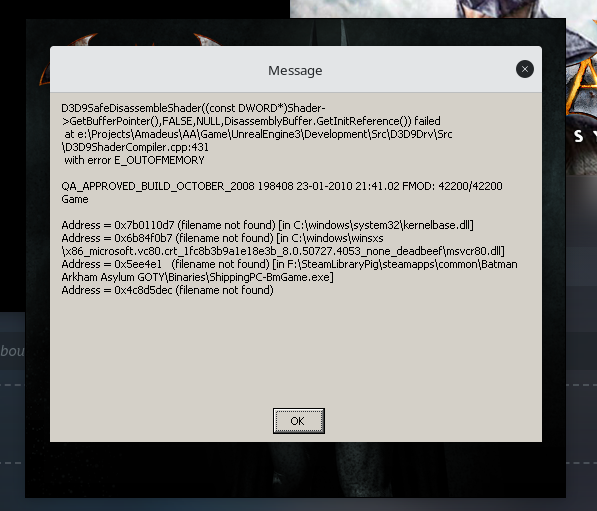
Could be related to this call:
4163.792:0270:0274:fixme:d3dx:D3DXDisassembleShader 02F60030 0 (null) 0349F0E0: stub
Replying to https://github.com/ValveSoftware/Proton/issues/421#issuecomment-979652121
Can confirm, on my system as well the same error.
Ubuntu 20.04 / Proton 6.3-8
Latest experimental loads fine without any proton tricks!
In my case, it doesn't work with the latest Proton Experimental.
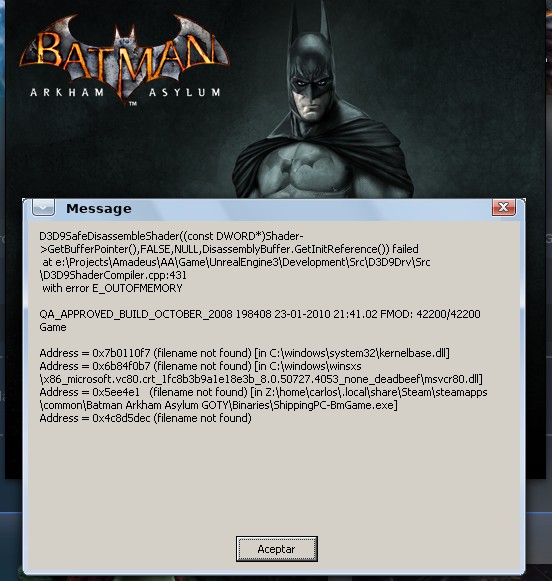
Replying to https://github.com/ValveSoftware/Proton/issues/421#issuecomment-1013592147
On second look its not fixed, Looks like I forgot to turn of an override I had put on to use proton GE, doh! Proton GE which inclldes protonfixes, would have automatically installed the required dlls
I think this game will never be fully fixed, I think there must be something in the code looking for the dll's that we install. Weird that this isn't an issue on Batman City..
Is is necessary to put the files d3dx9_43.dll and d3dcompiler_43.dll in the same folder of ShippingPC-BmGame.exe
I would just install using winetricks/ or proton tricks. There’s a flatpak of protontricks niw with gui interface.
Is is necessary to put the files d3dx9_43.dll and d3dcompiler_43.dll in the same folder of ShippingPC-BmGame.exe
No, they don't.
After changing the Proton version, it now starts with Proton 6.3-8 too. No need to copy the files. I have Mesa 21.3.4 currently.
Gamepad (PS4 controller) does not work for some reason even with or without Steam input (enabled or disabled), which is strange. Gamepad works fine in Arkham City, for example, but not in this.
Edit: if you start the GE-version that changes something and you can start the game with "plain" Proton as well.
Gamepad started working after reinstalling game for some reason.
After changing the Proton version, it now starts with Proton 6.3-8
I can't even run the launcher with 6.3-8, even with Protontricks / winetricks
steam-35140.zip
After changing the Proton version, it now starts with Proton 6.3-8
I can't even run the launcher with 6.3-8, even with Protontricks / winetricks steam-35140.zip
You have some kind of problem with mono/.net installation.
Edit: you might want to try to install Mono 7.0, see winehq.
@ipr I already have that installed; you're jumping to conclusions.
In addition, installing various versions of .NET (not at once but with new prefixes) made no difference. I was testing this for hours.
@ipr I already have that installed; you're jumping to conclusions.
For whatever reason, that is where errors are pointing to:
592565.741:0164:0168:err:module:import_dll Library api-ms-win-crt-conio-l1-1-0.dll (which is needed by L"Z:\mnt\bigStorage\Gaming\SteamLibrary\steamapps\common\Proton 6.3\dist\share\wine\mono\wine-mono-6.4.1\bin\libmono-2.0-x86.dll") not found
So something in that regard is not working.
It SHOULD read like this when it is working correctly:
29766.463:0114:0118:trace:loaddll:build_module Loaded L"C:\windows\system32\api-ms-win-crt-conio-l1-1-0.dll" at 64DC0000: builtin
In your case that is not found (trying to load from wrong location?) so it fails to start.
If you have been trying different things I suggest wiping it clean and starting fresh instead, removing any overrides and whatever you may have.
@ipr
My every attempt used a clean prefix; aside from protontricks, I didn't modify the prefix in any of the attempts in any way
Any references to wine-mono are thereby what come with Proton 6.3-8 by default
@ipr My every attempt used a clean prefix; aside from protontricks, I didn't modify the prefix in any of the attempts in any way Any references to wine-mono are thereby what come with Proton 6.3-8 by default
Then don't use protontricks.
That is opposite to having clean install.
If you can't get into launcher something is already broken in your install and if you are using protontricks then that is breaking it. Process of elimination to likely suspect.
Looks like it’s having trouble loading dlls from your big storage drive? Permissions issue? Or NTFS issue?
Looks like it’s having trouble loading dlls from your big storage drive? Permissions issue? Or NTFS issue?
They are supposed to be symlinks to Proton directory from per-game compatdata so that is a possibility.
Or the first-time installation has failed for some reason. Or there is some override in place that should not be there.
@ipr I said multiple times that I both did and did not use protontricks; I don't know how I can be any more clear about the methodologies used besides what I already said.
@smintman I don't use NTFS (I use BTRFS) and it isn't a permissions issue, at least not caused by myself; Proton versions past 5.0 are known to have permissions issues regarding symlinks they make but, considering how I can't seem to find anyone else having this specific issue, I find this less likely.
I don't have issues with other games running on BTRFS, so I don't expect that to be the reason either.
It seems like Arkham Asylum's PhysX (only covers interactive paper here?) takes a big dump on the framerate. A GTX 1060 6GB goes all the way down to ~30fps/20fps in the simplest prison challenge map, while Arkham City has similar issues but is much more reasonable a relative drop. And this is with PROTON_ENABLE_NVAPI=1 and PROTON_HIDE_NVIDIA_GPU=0, as redundant as it is, both in use in command line options.
I can understand that some PhysX games are using CPU fallback, but I didn't think the first of the series would have the most severe overhead over the others.
(Also, PhysX only works with main Proton and Experimental; GloriousEggroll seems to not use it at all)
Have you tried with a dxvk.conf file with the text dxgi.nvapiHack = False in the same folder of the game's executable?
Have you tried with a dxvk.conf file with the text
dxgi.nvapiHack = Falsein the same folder of the game's executable?
Well PROTON_ENABLE_NVAPI is supposed to do something similar without needing a neighboring file, no?
Regardless, same result.
@SeongGino Yes on proton experimental PROTON_ENABLE_NVAPI=1 should be enough (See here if it is of interest to anyone). For 7.0-1 and below you still need the seperate conf file.
I can try to check the physx issue when i have time.
About PhysX, see https://github.com/jp7677/dxvk-nvapi/wiki/Tips-and-tricks-for-usage-with-DXVK-NVAPI#physx
In a nutshell, The nvcuda.dll library in regular/experimental Proton needs to be replaced with a suitable version and likely the PhysX runtime needs to be updated for that game/prefix. That said, this procedure works for Arkham Knight, dunno for this game.
About PhysX, see https://github.com/jp7677/dxvk-nvapi/wiki/Tips-and-tricks-for-usage-with-DXVK-NVAPI#physx In a nutshell, The
nvcuda.dlllibrary in regular/experimental Proton needs to be replaced with a suitable version and likely the PhysX runtime needs to be updated for that game/prefix. That said, this procedure works for Arkham Knight, dunno for this game.
Well, not to digress, but I use (mainly) Proton-GE, so that already fulfills the library requirement.
For whatever reason, prefixes made with GE have nvcuda's override set to ?? which presumably disables it, so I changed that in all three of my Batman prefixes (so City and Origins in addition to Asylum) as well as the one I use for Arkham Knight from EGS using Wine-GE.
And after installing the PhysX verb, Origins and Knight expose the full PhysX-exclusive settings and the significant drops I get when using effects in City are more or less resolved. So I at least know it's working on this system.
But unfortunately, no change in Asylum. The launcher still doesn't recognize a compatible card when toggling PhysX, and the performance is still garbo even compared to AK at full whack, 1080p... just for paper at that. So I think there's definitely something wrong with this game specifically that needs addressing.
Different PhysX versions have different HW support detection. Newer versions likely supported by dxvk-nvapi, older likely not. Moreover in newer PhysX installers some old versions support was dropped, moved to separate installer and forced to SW-only (IIRC).
There is one trick which sometimes helps: you can install PhysX via winetricks (or alternative) and then rename PhysXDevice.dll (if any) in game's directory (backup it). Game will use PhysXDevice.dll from installed PhysX and will detect HW support (if you lucky enough).
Also you can try to replace that dll with an "verified" version (just remember about 32 and 64 bit).
Different PhysX versions have different HW support detection. Newer versions likely supported by dxvk-nvapi, older likely not. Moreover in newer PhysX installers some old versions support was dropped, moved to separate installer and forced to SW-only (IIRC).
There is one trick which sometimes helps: you can install PhysX via
winetricks(or alternative) and then renamePhysXDevice.dll(if any) in game's directory (backup it). Game will usePhysXDevice.dllfrom installed PhysX and will detect HW support (if you lucky enough).Also you can try to replace that dll with an "verified" version (just remember about 32 and 64 bit).
Unfortunately, this advice applies to literally every other game in this series except Asylum - this is the only one without an associated PhysXDevice library. Only relevant NV library of this kind it has is PhysXExtensions.dll.
1MIN-EDIT: I just had to open my big mouth too early.
I stuck in Arkham City's PhysXDevice.dll into Asylum's binary directory (alongside BmLauncher.exe and etc.), and just with that, the PhysX effects are running with hardware acceleration like it should.
The launcher will still warn that the device isn't a dedicated GTX 260/9800 GTX, but that's now on par with Windows behavior - and much better than the erroneous incompatibility message before.
@SeongGino What Proton version did you use? I can't replicate that
@SeongGino What Proton version did you use? I can't replicate that
This is with GE.
@SeongGino Sorry about that; I had forgotten that the game needed a few protontricks verbs to get running; I have replicated what you described as well, with Proton-tkg :p
Also note, for anyone else, placing the same dll from the physxwinetricks install to substitute for the Arkham City one doesn't work; I'm aware this was iterated in another manner, but in case anyone was wondering, just moving that one to the game folder won't make a difference Lol
Something special about AC's library for it
If it matters, Origins' dll works as well, and the same applies to the one from Borderlands 2. I think the necessary file just needs to be pulled from any other PhysX game newer than AA.
help
Issue transferred from https://github.com/ValveSoftware/Proton/issues/6347.
@Abdullahalshriqi posted on 2022-11-27T17:40:38:

batman Arkham asylum
my pc
amd ryzen 5 3500u
12 gigb ram
vega 8
fedora 37 gnome x.org with steam proton
i have batman arkham city
how i can fix that
@Abdullahalshriqi with it being a d3d9shadercompiler error, you likely need to install the relevant native dx9 compilers. A quick look on protondb gave an answer.

So use protontricks to install those 2 things to your games prefix.
I would like to report that the following fix is is required on my machine in order for the game to start after clicking "PLAY" in the game's initial Launcher window:
- The game is playable [on my Gentoo Linux machine with the compatibility tool
GE-Proton7-42and PhysX=Normal] only if Steam is started withLD_LIBRARY_PATHpointing to a directory in whichlibopenal.so.1is a symlink to Steam'slibopenal.so.1.16.0:
$ tree $HOME/ld_library_path
/home/steam/ld_library_path
├── i386
│   ├── libopenal.so.1 -> libopenal.so.1.16.0
│   └── libopenal.so.1.16.0 -> /home/steam/.local/share/Steam/ubuntu12_32/steam-runtime/usr/lib/i386-linux-gnu/libopenal.so.1.16.0
└── x86_64
    ├── libopenal.so.1 -> libopenal.so.1.16.0
    └── libopenal.so.1.16.0 -> /home/steam/.local/share/Steam/ubuntu12_32/steam-runtime/usr/lib/x86_64-linux-gnu/libopenal.so.1.16.0

$ cd $HOME/.local/share/Steam
$ export LD_LIBRARY_PATH=$HOME/ld_library_path/i386:$HOME/ld_library_path/x86_64
$ ./steam.sh
Cause of the problem: The machine's libopenal.so.1.22.2 is loaded by the ELF loader instead of Steam's libopenal.so.1.16.0 and this causes the game to SEGFAULT immediately after clicking "PLAY" in the game's Launcher window.
Why this game works normally on Proton GE but not on the original Proton ? I dont want to use protonGE.
Because upstream Proton has no embedded DXVK-NVAPI (the same stuff used to enable RTX/DLSS is also needed for HW accelerated PhysX used in old implementations like Batman games). GE works better on average in my case - but if you don't want to, your only other choice is to build Proton yourself with the necessary NVAPI patches.
Or I guess, just not use physics. It works totally fine without them in Valve's Proton. The tangible effect really is quite minor for the performance hit you take.
Because upstream Proton has no embedded DXVK-NVAPI this is not true.
Btaman Arkham Asylum
Issue transferred from https://github.com/ValveSoftware/Proton/issues/6714.
@Abdullahalshriqi posted on 2023-04-23T23:45:33:
proton 8

ubuntu 23.04
@Abdullahalshriqi commented on 2023-04-23T23:48:09:
but arkham city work very fine
System Information:
OS: Slackware 15
NVIDIA Driver Version: 535.104.05
Steam Version: 1698777785
Steam Client Build Date: Mon, Oct 30 10:09 PM UTC -08:00
Steam Web Build Date: Fri, Oct 27 7:29 PM UTC -08:00
Steam API Version: SteamClient020
Proton: 1697709592 experimental-8.0-20231019
Steam System Information: https://gist.github.com/EpicureanGit/9e757e37b20ed10eff8271c0112dcf70
Steam Runtime Diagnostics: https://gist.github.com/EpicureanGit/19b9a3ec029894b46dabb793231146d2
Symptoms and Reproduction:
When I click "PLAY" to run Batman Arkham Asylum GOTY Edition, it crashes, and I receive this pop-up window:
Proton_LOG=1 https://gist.github.com/EpicureanGit/c8432164a4c2a21205f7612086e5a061
With latest Proton Experimental, I have the same issue as @EpicureanGit.
Winetricks is still required to make it run (thanks ProtonDB):
WINEPREFIX="$HOME/.local/share/Steam/steamapps/compatdata/35140/pfx/" WINE="$HOME/.local/share/Steam/steamapps/common/Proton - Experimental/files/bin/wine" winetricks d3dx9 d3dcompiler_43
Batman: Arkham Asylum, Failed to compile global shader
Issue transferred from https://github.com/ValveSoftware/Proton/issues/7706.
@thenumber8equalsign posted on 2024-05-05T20:44:47:
Compatibility Report
- Name of the game with compatibility issues: Batman: Arkham Asylum GOTY Edition
- Steam AppID of the game: 35140
System Information
- GPU: RX 6750XT
- Video driver version: 4.6 (Compatibility Profile) Mesa 23.2.1-1ubuntu3.1~22.04.2
OpenGL Version: 4.6 - Kernel version: 5.15.0-91-generic
- Link to full system information report as Gist: https://gist.github.com/thenumber8equalsign/27314ab23a046454816cf9ade8a6a5b8
- Proton version: Proton Expiremental
I confirm:
- [y] that I haven't found an existing compatibility report for this game.
- [y] that I have checked whether there are updates for my system available.
Symptoms
The game starts, then there is a message that says, "Failed to compile global shader", then the game closes.
Reproduction
- Launch the game
- Click play
* Video driver version:  4.6 (Compatibility Profile) Mesa 23.2.1-1ubuntu3.1~22.04.2
  OpenGL Version: 4.6
You are using really old version of Mesa.
I think you should try to update Ubuntu to a more recent version first.
Batman: Arkham Asylum GOTY edition is missing proton dependencies/win version set which the game needs to be added to the games prefix setup to make the game work out of the box mdx d3dx9 d3dcompiler_43 win10
To fix this you need do the following:
make sure to install proton tricks and do the following command after the game is installed and you ran it
protontricks 35140 mdx d3dx9 d3dcompiler_43 win10
If you are on the Steam Deck install the proton tricks flatpak and do the following
flatpak run com.github.Matoking.protontricks 35140 mdx d3dx9 d3dcompiler_43 win10
Cachyos, RX 6700 10GB, Mesa 25.2.3, Kernel 6.16.8, tried proton experimental, 10 beta, 9, 8, all crash when reaching the bat logo in the intro of loading into the main menu for me, weird as i completed this whole game not long ago so must be some regression.
Hello @pollux78, warn:seh:handle_syscall_fault backtrace: --- Exception 0xc0000005 at 0xef28d081: /run/host/usr/lib32/libvulkan_radeon.so + 0x14c081. hints towards a video driver issue.
Hello @pollux78,
warn:seh:handle_syscall_fault backtrace: --- Exception 0xc0000005 at 0xef28d081: /run/host/usr/lib32/libvulkan_radeon.so + 0x14c081.hints towards a video driver issue.
EDIT: SOLVED, ge-proton mucked something up and so removing the wine prefix fixes the problem with using normal proton for the prefix creation aswell lol
Cachyos, RX 6700 10GB, Mesa 25.2.3, Kernel 6.16.8, tried proton experimental, 10 beta, 9, 8, all crash when reaching the bat logo in the intro of loading into the main menu for me, weird as i completed this whole game not long ago so must be some regression.
I have been trying to get more information out of mesa with the game but using MESA_DEBUG=1 either export or in /etc/environment isn't providing any logs or errors, the only proton runner that gets past the bat logo before the main menu is cachy-proton but it has graphical issues, I am certain this is a regression of some kind as my mesa is up to date and there is no mismatch with 32bit mesa either
If there is any other way I can provide more in depth logs that would be great to know.
Normal Proton experimental behavior
https://github.com/user-attachments/assets/7d69d79a-2c56-4090-a7e2-f30e8f801377
Cachyos-proton
https://github.com/user-attachments/assets/bc06f942-db1f-4a49-bb6d-6dec610856f1
EDIT: i have been testing even a brand new distro install (fedora) and the same problem occurs, many users on my youtube community have been experiencing the same issue even on nvidia hardware, on the steamdeck there is no issues i have heard from users but on desktop linux there seems to be something that is causing this problem.
Using PROTON_USE_WINE3D=1 gets the game past the bat logo but the graphics looks all weird
https://github.com/user-attachments/assets/89de3d8f-6144-4bf1-9b5f-e7a7e8b4d2e1
Worked on getting this running today. Ran into the same crash after intro logos as many others.
I ended up getting a playable experience by using experimental and adding PROTON_USE_WINED3D=1 %command% to the launch options, and then setting vsync in the games options from the popup launcher to stop stuttering. Biggest issue is that the game colors are over saturated and bright. I changed brightness was down, and it is much more tolerable, but still saturated. Not sure how to fix that.
Prior to this, I was able to get past the intro logos with the latest cachy-proton, but with graphical glitches on main screen with significant ghosting, artifacts. Entering the game gives some UI elements but a blank screen overall. GE did not work either. I have tried neither with the launch options.
The protontricks/winetricks stuff was a dead end for me. I followed some instructions because I don't really use these. protontricks didn't do anything, but winetricks did install the above dependencies. Whether this is a piece of the puzzle or now, I am unsure, because the game just crashed after doing these.
I am on PikaOS 4 with all the gubbins they give installed.7900 XT/9950X.
Can't confirm on my desktop, but at least on Steam Deck, this doesn't seem to work on either Proton 9 or Experimental. Winetricks verbs didn't seem to help (and I'm very dubious on how necessary mdx and win10 are - but certainly providing d3d compilers and dx9 extras were ineffective).
Okay so I checked back just to make sure on my desktop, and it's working just fine there. Even reinstalled the game fresh just to be sure, stock launcher and all, current (non-bleeding-edge) Experimental. It's an NVIDIA system. for what it's worth. Plasma-wayland w/ driver 580.95.05.
Seems a bit strange that the game works out-of-the-box on a desktop, but not on the Steam Deck of all things?
Egg on face moment, so for the Deck, if the prefix was created with GE-Proton10, then it's guaranteed to not boot regardless of runner. If the prefix is created with Experimental (or from the default Proton 9, then subsequently run with/upgraded to Experimental), then the game runs fine regardless of Exp or GE runner thereafter.
Replying to https://github.com/ValveSoftware/Proton/issues/421#issuecomment-3420377432
Of course, that fixes the problem 🤦♂️ no issues now lol
On the steam store page, this game is marked as Unsupported for Steam Deck compatibility.
But, I played this game out of the box for approximately 30 hours on the Steam Deck OLED at 60 fps.
The only problem is that you must switch the steam deck to offline mode before running the game, because each time the game loses the internet connection it will bring you back to the game main menu.
I tried everything:
- toggling Steam Cloud ON/OFF
- reinstalling the game cleanly
- using different Proton versions
- using Proton-GE
- trying WINED3D instead of DXVK
- updating my system
- setting compatibility mode to Windows 7
- installing PhysX manually (even though it was set to DISABLED)
- installing some DirectX dependencies from winetricks/protontricks
- installing .NET Framework Desktop Runtime
- installing the DirectX Redist manually
Nothing worked. I always get a General protection fault (filename not found) error for the ShippingPC-BmGame.exe file in the Binaries folder. It only happens after I click Play after the main menu has loaded (when Batman is on the right side).
Apparently, many other people, including people on MS Windows systems, are having the same problem: https://steamcommunity.com/app/35140/discussions/search/?q=general+protection+fault&gidforum=864943954166307257&include_deleted=1
This is on Arch Linux, KDE Plasma, Wayland, AMD.
Tried yesterday again with only Proton Experimental and nothing else. Still the same issue:
(the screenshot below was with Proton-GE, but the error is exactly the same with Valve's Proton)
Tested it again today but this time with Proton Experimental and made a log file as well.
Here:
Proton versions
proton experimentalx10 2026-06ge-proton7-42x1 2022-12proton 6.3-8x6 2022-02proton 6.3x1 2022-02proton 5.13x1 2021-07proton 5.0-10x1 2021-01proton 5.0-9x1 2020-10proton 5.13-1x1 2020-10proton 3.7x4 2020-07proton 5.0-8x1 2020-06proton 5.0-2x1 2020-02proton 4.2-3x1 2019-04proton 3.7-5x1 2018-08
Launch options
PROTON_USE_WINED3D=1x1 2025-10MESA_DEBUG=1x1 2025-09PROTON_USE_WINE3D=1x1 2025-09WINEPREFIX="$HOME/.local/share/Steam/steamapps/compatdata/35140/pfx/"x1 2024-02PROTON_ENABLE_NVAPI=1`x2 2022-04PROTON_ENABLE_NVAPIx1 2022-04PROTON_HIDE_NVIDIA_GPU=0`,x1 2022-04PROTON_LOG=1x2 2021-06PROTON_NO_ESYNC=1"x1 2020-06PROTON_NO_ESYNC=1x3 2020-04PROTON_USE_D9VK=1`).x1 2020-04PROTON_USE_D9VK=1x2 2020-04WINEPREFIX="${steam_library}/compatdata/35140/pfx"x1 2018-09
Launch lines
PROTON_USE_WINED3D=1 %command%x1 2025-10PROTON_NO_ESYNC=1 PROTON_USE_D9VK=1 %command%x1 2020-04PROTON_USE_D9VK=1 %command%x1 2019-08PROTON_NO_ESYNC=1 PROTON_LOG=1 %command%x1 2018-08
Upstream links
- ValveSoftware/Proton/issues/7706x1 2024-05
- ValveSoftware/Proton/issues/6714x1 2023-04
- ValveSoftware/Proton/issues/6347x1 2022-11
- ValveSoftware/Proton/pull/5687x1 2022-04
- ValveSoftware/Proton/issues/4538x1 2021-01
- ValveSoftware/Proton/issues/4098x1 2020-07
- ValveSoftware/Proton/issues/2942x1 2019-08
- ValveSoftware/Proton/issues/309x1 2018-10
- ValveSoftware/Proton/issues/1311x1 2018-09
DLLs
physxdevice.dllx2 2022-04physxextensions.dllx1 2022-04nvcuda.dllx2 2022-040-x86.dllx1 2022-02api-ms-win-crt-conio-l1-1-0.dllx1 2022-02d3dx9_43.dllx3 2022-01d3dcompiler_43.dllx2 2022-01
Error codes
0xc0000005x2 2025-090x80004005x1 2020-10
Arch Linux
Kernel 4.18.3
Proton 3.7
Nvidia GTX 1070 - nvidia-beta 396.54
KDE Plasma 5.13.4
KDE Framework 5.49.0
Qt 5.11.1
The game doesn't even launch. The preparing to launch... dialogue pops up for some seconds then exits without starting the game at all.