Mafia Definitive Edition
Game has useless launcher and it doesn't needed, so you can rename launcher.exe to something.exe and rename mafiadefinitiveedition.exe to launcher.exe
But game also doesn't work and I think it's denuvo and I got activation limit, so can test only tomorrow, but before limit I did simple and relay logs
simple_steam-1030840.log
relay_steam-1030840.tar.gz
Looking at Mafia 3 (and its definitive edition) - which basically uses a similar engine... what pops into my mind is the need to adjust its config by hand, before the game can launch. I tried that after exe rename shenanigans, but I could not find the game writing a config file at the expected location.
I used all my activations for today but found out this game saves configuration to Documents instead of AppData.
/1030840/pfx/drive_c/users/steamuser/My Documents/My Games/Mafia Definitive Edition/Saves/launcconfig.cfg
Initial content for this file is 0 0 0 for me, hope this helps.
Thanks Paul for patches in game with similar issue, now it's running
Be careful, game has denuvo with 5 activation limit (means 5 unsuccessful launches) for 24 hours
- Open game folder (
~/.steam/root/steamapps/common/Mafia Definitive Edition), renamelauncher.exetosomething.exeandmafiadefinitiveedition.exetolauncher.exe - Download proton build - link
- Extract it to
~/.steam/root/compatibilitytools.d(create if it doesn't exists), it should be folder like~/.steam/root/compatibilitytools.d/proton_tkg_5.17.2.r9.gf90534f9with scripts and proton_dist archive - Restart steam, open properties of game, select custom proton and pick proton tkg 5.17 gf90534f9
- In same window open launch options
- Put this
PROTON_USE_SECCOMP=1 %command% - Now you can launch game for init config files, but fullscreen doesn't work and game just launch black screen/black screen with game logo in top-left, so for launch game you should make next item
- Create or open
~/.steam/root/steamapps/compatdata/1030840/pfx/drive_c/users/steamuser/My Documents/My Games/Mafia Definitive Edition/Saves/videoconfig.cfgand edit to-6 0 1920 1080 0 0 0 0 0(1920 1080 is your resolution), same issue like Mafia 3 - Launch the game
Proton build may have issues with glibc, so before launch Mafia, try this build with other non-denuvo games
Screenshot

@ga2mer
Hi, do you have the sources of the build somewhere? I m running on opensuse and I only have glibc 2.31 and the proton build you linked is compiled against 2.32 so it doesn't run on my end :(
You can try https://github.com/Frogging-Family/wine-tkg-git
Apply only first patch from patchset.
Media Foundation issue as usual - black cutscenes
@xDShot you mean only server-Support-noname-named-pipes ?
Can you please explain it "for dummies" to me, please? :)
I have Fedora 32 (fully up-to-date).
I have NVidia GTX 1060 GPU and its packages installed:
xorg-x11-drv-nvidia-libs-450.66-2.fc32.i686
xorg-x11-drv-nvidia-cuda-libs-450.66-2.fc32.x86_64
kmod-nvidia-5.8.11-200.fc32.x86_64-450.66-1.fc32.x86_64
xorg-x11-drv-nvidia-450.66-2.fc32.x86_64
nvidia-persistenced-450.66-1.fc32.x86_64
xorg-x11-drv-nvidia-kmodsrc-450.66-2.fc32.x86_64
xorg-x11-drv-nvidia-cuda-450.66-2.fc32.x86_64
xorg-x11-drv-nvidia-libs-450.66-2.fc32.x86_64
nvidia-settings-450.66-1.fc32.x86_64
xorg-x11-drv-nvidia-cuda-libs-450.66-2.fc32.i686
Installed Steam steam-1.0.0.66-2.fc32.i686
Installed "Mafia: Definitive Edition" inside Steam.
I have single monitor connected to the PC with 4k resolution (3840 x 2160 px)
- I went to Steam "Game properties" -> "Set Launch Options" and inserted
PROTON_USE_SECCOMP=1 %command% - I checked "Force the use of a specific Steam Play compatibility tool" and selected "Proton 5.0-9", beacuse "Steam Linux Runtime" deleted the whole game.
- I created the
Savesdirectory under~/.steam/root/steamapps/compatdata/1030840/pfx/drive_c/users/steamuser/My Documents/My Games/Mafia Definitive Edition/(the directorySaveswas not there)
and I put two files in there:launchconfig.cfgandvideoconfig.cfg
Both have the same content:
0 7 3840 2160 0 0 0 0(the resolution is 4K) - I went to the game data location
.local/share/Steam/steamapps/common/Mafia Definitive Editionand renamed two files:
launcher.exe->old_launcher.exe
mafiadefinitiveedition.exe->launcher.exe
I still does not work and I don't know what else (and how) can I do.
I looked at the repository, but I don't know how to build it ... and where ... (I don't see any Makefile ?)
You can try https://github.com/Frogging-Family/wine-tkg-git
I assume the patches you had in mind were these:
Thanks Paul for patches in game with similar issue, now it's running
But I again don't understand where and when to apply them.
I launch the game with the big green PLAY button in Steam. I don't get any error messages or anything when the game crashes and I don't know where to look for some logs from the crashes.
Here: https://github.com/ValveSoftware/Proton/issues/4168#issuecomment-695025232 the folk also said something about:
The game was playable for me on Nvidia with the following additional workarounds:

Fake AMD video card through dxgi (that is doable by putting dxvk.conf with dxgi.nvapiHack = True to the game directory and using dxvk's or Proton's dxgi.
Use native d3dcompiler_47 override.
But I don´t know how to do such workarounds
@FaramosCZ The answer regarding the application of the patches was ment to be for me when I was asking how to build that proton version manually. Noramlly if you run ubuntu/debian distro with latest glibc you probably don't have to do that. Just download the version of proton linked by @ga2mer (https://drive.google.com/file/d/1sV3LzfNBPKgCTMDa4Gg7E3lIMu6mybqf/view?usp=sharing)
and put it under ~/.local/share/Steam/compatibilitytools.d/ (create that directory if it doesn't exist yet) and restart steam, then enforce the 5.17 version of proton to be used in the game properties
and try to run it
Thanks,
I created the compatibilitytools.d directory under the ~/.local/share/Steam/ path.
I put the extracted archive there.
I restarted Steam and then chosen the new version under "Force the use of a specific Steam Play compatibility tool"; selected "Proton 5.17.2.r9.gf90534f9"
The version of installed GLIBC packages is 2.31
The game still did not launched, unfortunatelly.
try to check ~/steam-1030840.log
and also I am not sure if it is not needed to extract the dist tar.gz inside of the archive.. I have done it.. and put it into compatibilitytools.d/Proton-5.17/dist
I examined the ~/steam-1030840.log.
First of all, there was an error message that indicated it actually needs GLIBC 2.32.
So I installed the appropriate version from Fedora Rawhide.
Then I got past the initiall error.
I got roughly hundred of lines into the log then.
I found a kinda hidden err message about missing /usr/bin/ntlm_auth, which I also fixed. (installed package samba-winbind-clients)
Now I have ~260 lines in the log and I don't see any more errors I would know how to fix.
Here are two logs.
The first is after I renamed the mafiadefinitiveedition.exe to laucher.exe:
https://www.pastebin.cz/raw/hjhVSAr
The second is with the original launcher, which show an unhandled exception at the end:
https://www.pastebin.cz/raw/P1xFdim
hate that denuvo thing. trying and debugging this stuff and run into 24h activation block again :(
well, will continue tomorrow :(
@FaramosCZ I think you can fix that exception by installing .NET 4.5.2 (there are some missing media player .net dlls probably) but you don't need to do that, if you fix it wou will most likely run into another issue related to performanceCounter.dll and it should be possible to launch the game directly without the launcher.
With help of @ga2mer's post - game runs pretty good with RX 590 and FX-8300.
Screenshots


What were the steps to lauch the game successfully?
Running on up-to-date Fedora 32, with glibc 2.32.9 from Fedora Rawhide repo, I followed all above steps. The game is starting for me without crashing, but it appears to be infinitely stuck on the inital loading screen. I run with Mesa 20.1.8 on an Radeon RX 5700. The CPU load on that initial loading screen is taking a bit more than one entire CPU core, without any progress after 5 minutes still.
@erikroe it's stuck on black screen/black screen with small game logo in top-left? If yes, create/edit videoconfig.cfg mentioned in my comment
@ga2mer Thanks, I had written to the wrong file before. Now I went to the correct path you gave and it does work flawless.
I do notice that apparently Fullscreen Mode in the game causes "freezing", so people should not activate it in-game.
Little addition: On my system when the game runs in window mode it does not hide the taskbar of my desktop environment
To fix this you can open a console WINEPREFIX=~/.steam/root/steamapps/compatdata/1030840/pfx/ winecfg and in the graphics options you enable Virtual Desktop.
So I finally managed to compile my own Proton against my versions of glibc and other system libraries.. But I run into that shitty denuvo limit as well. I do not understand how do they dare to limit me how many times per day I want to reinstall my computer with the game.
@Stoobitweet do you have exact apt string for libc? i'm running debian, i don't really know ubuntus urls
@Stoobitweet i am aware of that one but that ubuntu package has a lot of dependencies :( so downloading only it isn't working. but maybe you can give ubuntu apt source link? if i use it only for libc, maybe it won't pull in too much ubuntu packages
I can confirm, the game works for me now ! ( yay \o/ )
What I saw yesterday was actually the Denuvo 24h ban. After that the game could be started.
I then ran into an issue with the screen size and resolution.
The game started in FullHD resolution with window top left corner placed more or less in the middle of my (4K) screen.
The fullscreen mode can't be enabled (the game would became stuck if enabled), but here's a workaround I use:
-
Open the game int he window
-
Optional: Change resolution to your screen resolution (if not yet set)
-
ALT + F7 move the window to fill your whole screen (that was a shortcut to "move window" on my OS)
at this point, you will have nearly fullscreen game - only top window bar and OS bottom menu line would be visible. -
In the settings, enable borderless mode
And you have full screen game !
And break everything else 👍
here it doesn't run either with self compiled proton-tkg nor with proton-ge-6-st and added gamefix.
i'm on nvidia 450.56.11
here's my log from proton-ge-6-st:
https://gist.github.com/fsyy/68ea9654e29c3022b5932a5150da8cb6
@GloriousEggroll
This should work with my latest stable (5.9-ge-6-st) build without any fiddling:
Proton-5.9-GE-6-ST/protonfixes/gamefixes/1030830.py
I suppose the filename should be 1030840.py (the ID of Mafia DE - *30 is Mafia 2 DE), and the script should be like this:
(Note the different replace_command!)
""" Game fix for Mafia Definitive Edition
"""
#pylint: disable=C0103

from protonfixes import util

def main():
    """ Launcherfix and NVIDIA PhysX support.
    """

    # Fixes the startup process.
    util.replace_command('launcher.exe', 'mafiadefinitiveedition.exe')
Still, no dice. Here is the log - unfortunately I just hit the dreaded denuvo limit again, so it might not contain something useful (however, you can verify that the gamefix did work, by the correct cmd in the first lines of the log).
My distro is stuck on glibc 2.30, and I was unsuccessful in compiling my own proton due to 32bit lib shenanigans. So, still nothing here :(
hmm.. i didn't check the steam id of the fix, anyways i tried renaming those files manually too, nothing changed
I suppose the filename should be 1030840.py (the ID of Mafia DE - *30 is Mafia 2 DE), and the script should be like this:
Thanks Paul for patches in game with similar issue, now it's running
Be careful, game has denuvo with 5 activation limit (means 5 unsuccessful launches) for 24 hours
* Open game folder (`~/.steam/root/steamapps/common/Mafia Definitive Edition`), rename `launcher.exe` to `something.exe` and `mafiadefinitiveedition.exe` to `launcher.exe`

* Download proton build - [link](https://drive.google.com/file/d/1sV3LzfNBPKgCTMDa4Gg7E3lIMu6mybqf/view?usp=sharing)

* Extract it to `~/.steam/root/compatibilitytools.d` (create if it doesn't exists), it should be folder like `~/.steam/root/compatibilitytools.d/proton_tkg_5.17.2.r9.gf90534f9` with scripts and proton_dist archive

* Restart steam, open properties of game, select custom proton and pick proton tkg 5.17 gf90534f9

* In same window open launch options

* Put this `PROTON_USE_SECCOMP=1 %command%`

* Now you can launch game for init config files, but fullscreen doesn't work and game just launch black screen/black screen with game logo in top-left, so for launch game you should make next item

* Create or open `~/.steam/root/steamapps/compatdata/1030840/pfx/drive_c/users/steamuser/My Documents/My Games/Mafia Definitive Edition/Saves/videoconfig.cfg` and edit to `-6 0 1920 1080 0 0 0 0 0` (1920 1080 is your resolution), same issue like Mafia 3

* Launch the game
Proton build may have issues with glibc, so before launch Mafia, try this build with other non-denuvo games
Screenshot
Thanks @ga2mer for your post. Works perfectly fine on Ubuntu 20.10 (daily build).
I suppose the filename should be 1030840.py (the ID of Mafia DE - *30 is Mafia 2 DE), and the script should be like this:
(Note the differentreplace_command!)""" Game fix for Mafia Definitive Edition """ #pylint: disable=C0103 from protonfixes import util def main(): """ Launcherfix and NVIDIA PhysX support. """ # Fixes the startup process. util.replace_command('launcher.exe', 'mafiadefinitiveedition.exe')
My apologies, the fix I provided was for Mafia II DE. I somehow got them mixed up. I've removed my previous comment for now. If the game and launcher are in different directories like Mafia II's then my original syntax was correct.
Hello,
I tried to launch the game by following the steps from @FaramosCZ . I'm on Ubuntu 20.04
To resume you need to :
- mkdir ~/.steam/steam/compatibilitytools.d/
- Download and uncompress the proton version in the folder created at step 1
- Install the glibc.6 lib from the "groovy" repositories (change in /etc/apt/sources.list focal to groovy) => apt install libc6
- Rename the launcher.exe to launcher_bak.exe and mafiadefinitiveedition.exe to launcher.exe
- Create the file described by @ga2mer
- Restart steam and select the new Proton version in the game
- Launch the game and it should work
- Reset the /etc/apt/souces.list to its normal settings
Hope it helps.
I have followed this up step by step. But sill no dice.
Sometimes I got a message saying an error has occurred.
@willbeonekenobi if you get an error with an url, that is denuvo's 24h limit :( for whatever reason it counts failed launches as different activations
Alright, fixed it this time.
https://drive.google.com/file/d/1FlNrwG7YOBy5FQc1in6cyUwDDXSoPDGK/view?usp=sharing
Mafia DE and Mafia II DE should work ootb. Has Paul's patches and a protonfix that does all of the command changing, configurations for the screen on first launch, and necessary d3dcompiler override.
Also, for the love of god please stop informing people to update glibc on their systems. That can literally break the entire system.


@GloriousEggroll works like a charm. Did a fresh install to be sure, fired up your build - bam!
And I didn't even need to update my Glibc :D
@GloriousEggroll GE strikes again, you're a beast man! Thank you very much.
@GloriousEggroll I installed your proton version, it works without any tweak ! Thank you for your work !
P.S : I deleted my posts where I updated glibc to avoid people from breaking their system. Sorry for this...
still not working on Debian 11. Did a fresh pfx, using this latest GE proton but no dice :( did see some splash screen for a split second but that's it.
my proton log, maybe someone could tell what is wrong here
steam-1030840.log
I had to reinstall whole game and restart Steam couple of times before it started to work (on Manjaro).
I've played for an hour, until the game crashed. Thank you for this awesome Proton pack <3
I've been playing a few hours with GE's Proton-5.9-GE-7-ST build (https://github.com/ValveSoftware/Proton/issues/4220#issuecomment-700255914). It also works surprisingly good speed wise - my rather dated AMD R9 390X is sufficient to play it on highest details on 1080p.
The only issue I encountered so far was that the game got once or twice stuck on cutscene to game transition (e.g. after the intro cutscene to the first gameplay segment). Stuck as in its only displaying the saving animation, music playing, but black screen otherwise. I was able to fix this by minimizing and maximizing the game (see here https://steamcommunity.com/app/1030840/discussions/0/2844543519798023476/).
Oh, and fullscreen is not working, same as Mafia 3. But hey - I do rather play the game windowed, than not at all <3
Runs great vega 56 aco :D
works ootb !
Thanks a lot for your work ! (:
cheers
dont know my issue - maybe can anyone help me.
i tried the new proton by GloriousEggroll
yesterday on my laptop in the evening with a fresh system it work ootb.
But today on my home computer (i reinstalled ubuntu 20.04)
i got the 24h bann.
Distro:Ubuntu 20.04.1 LTS
Kernel:5.4.0-48-generic
RAM:64 GB
GPU Driver:NVIDIA 450.66
GPU:NVIDIA GeForce RTX 2080 Ti
CPU:Intel Core i9-9900K @ 3.60GHz
After that i checked the lapotp but here, too a 24h denuvo bann.
I dont installed any other thing as i tried to start Mafia.
I m still getting the following segfault:
> which wine
/home/kubapet/.steam/steam/compatibilitytools.d/proton_tkg_5.18.r6.ge6345694/dist/bin/wine
..I had to build my own proton because I m running on glibc 2.31 :/
@kubapet you put PROTON_USE_SECCOMP=1 %command% in game launch options?
@kubapet you put
PROTON_USE_SECCOMP=1 %command%in game launch options?
I do
@kubapet if I read log correctly, you run game directly via wine without steam?
well, yes I just wanted to see some output, but I run steam as well otherwise it complains that it is not running.. And if I run the game from Steam it just crashes and no log is produced, the play button just gets green again
I just tried to switch to a factory repo of opensuse, I installed both 32bit and 64bit versions of glibc-2.32 (seems like it didn't break my system) and I tried to run Mafia using GloriousEggroll's Proton-5.9-GE-7-ST the standard way via steam but still no luck:
@kubapet looks like you have issue with Vulkan initialize
15869.445:00d8:00dc:err:vulkan:wine_vkCreateInstance Failed to create instance, res=-6 and looks like it's VK_ERROR_LAYER_NOT_PRESENT error and tbh, I don't know how to fix that
Sounds like another example of https://github.com/ValveSoftware/steam-for-linux/issues/7368.
@ga2mer @kisak-valve Thanks for support. The game is now running perfectly.
For another OpenSUSE users: it is neccessary to install libvulkan1 libraries from X11:/Wayland repo:
zypper ar https://download.opensuse.org/repositories/X11:/Wayland/openSUSE_Tumbleweed/x86_64/
zypper in libvulkan1
zypper in libvulkan1-32bit
Mafia definitive edition
Issue transferred from https://github.com/ValveSoftware/Proton/issues/4359.
@Mark-papi posted on 2020-11-08T07:42:42:
Compatibility Report
- Name of the game with compatibility issues: mafia definitive edition
- Steam AppID of the game:1030840
System Information
- GPU: GTX 1660 SUPER
Reproduction
When starting the game it crashes automatically with an error https://pastebin.com/F8WgDEuE
Compatibility Report
- Name of the game with compatibility issues:
- Steam AppID of the game:
System Information
- GPU: GTX 1650
- Driver/LLVM version: nvidia 450
- Kernel version: 5.8.0.25-generic
- Link to full system information report as Gist:
- Proton version: Proton-5.9-GE-8-ST
I confirm:
- [x] that I have checked whether there are updates for my system available.
Log for Proton-5.9-GE-8-ST:
steam-1030840.log
Symptoms
- After setting video to fullscreen game does not launch (but in window opens properly).
- Game freezes after several seconds in first mission.
- Run game
- run story mode
- skip cutscenes
- wait 5-10 seconds
- On Linux Mint with Connamon bottom bar is still visible.
It appears that the game doesn't freeze with Proton-5.9-GE-7-ST.
It seems that some of the patches applied on version from @GloriousEggroll have broken something.
Like #3891, I retried the launcher, and it now crashes on a stub function:
wine: Call from 000000007BC2F4D8 to unimplemented function KERNEL32.dll.GetMaximumProcessorGroupCount, aborting
Until the GetMaximumProcessorGroupCount is fixed, bypass the launcher with the launch option:
bash -c 'exec "${@/2KLauncher\/LauncherPatcher.exe/mafiadefinitiveedition.exe}"' -- %command%
Is there a way to play the game in fullscreen in Gnome (Ubuntu 20.10)?
If I enable the fullscreen option, the game freezes on start. But with window borders on or off, the window doesn't cover the entire screen (the Gnome panels are still on top of it):
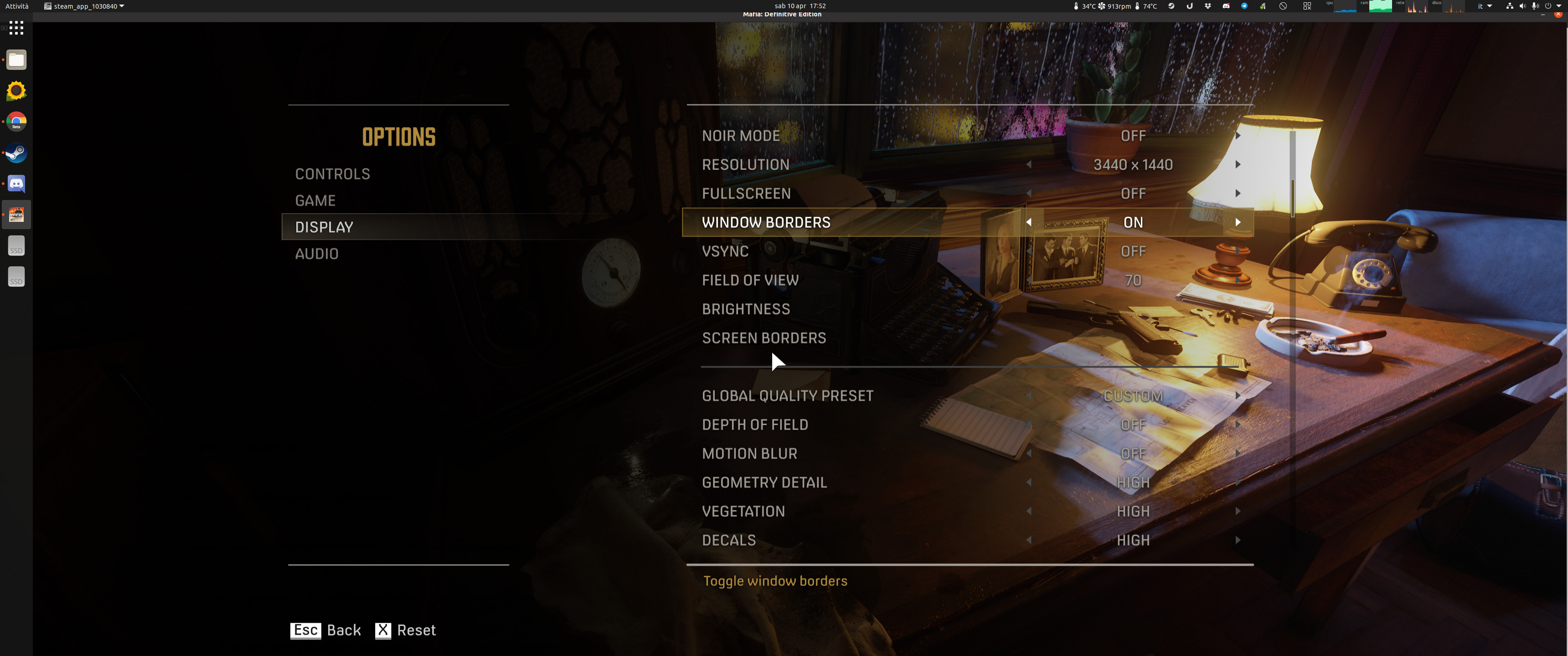

If I enable full screen once the menu it's loaded, it seems to work until I start it again (I haven't played the game but at least doesn't freeze immediately).
Any tips on how to play it fullscreen?
Replying to https://github.com/ValveSoftware/Proton/issues/4220#issuecomment-817159060
hitting the windows key and selecting app from gnome overview while its running sometimes gets rid of top bar, if it does not there is an extension to get rid of the top bar. I normally just alt tab back to app or use the over view
@aeikum @kisak-valve I found in this report https://www.protondb.com/app/1030840#2s8lCU-piE
that the issue with not working full screen has been finally fixed in Proton-6.9-GE1 but it's not mentioned in it's change log https://github.com/GloriousEggroll/proton-ge-custom/releases/tag/6.9-GE-1
so I guess that it was fixed directly in Wine, maybe
in https://www.winehq.org/announce/6.6 in https://bugs.winehq.org/show_bug.cgi?id=43437 (Zanzarah game opens a black fullscreen window and then crashes)
or
in https://www.winehq.org/announce/6.8 in winex11.drv: Correct a full screen condition.
@jqadev I can confirm that Fullscreen finally works with Proton-6.9-GE2!
@leinardi please test this game against Proton Experimental and Proton 6.3-4.
I did it for Mafia III and shared my observations here https://github.com/ValveSoftware/Proton/issues/2142#issuecomment-860581287
@jqadev sorry for the late reply, I finally found some time to test:
- Proton Experimental works the same as Proton-6.9-GE2
- Proton 6.3-4 is still affected by the black screen issue when using full screen
Anyone has issues with saving settings? Looks like at least for keybinds gameinputmodule.pf is simply never rewritten. But it's not a permission issue because if I edit it manually without regenerating CRC at the end the game resets the file fine.
Anyone succeeded in making the mods (ScriptHook) work?
Looks like just adding a dll override for dinput8 is not enough for some reason, it gets executed but then fails to load dinput8.original.dll.
https://www.reddit.com/r/linux_gaming/comments/p5lg3x/any_way_to_make_mafia_de_mods_work_dinput8dll/
I don't see any sign in the log that it tried to load dinput8.original.dll, even though that's what the error dialog claims.
The log shows a crash which I think must have happened during dll initialization.
77477.525:011c:0120:trace:seh:dispatch_exception code=c0000005 flags=0 addr=0000000008328C28 ip=0000000008328C28 tid=0120
77477.525:011c:0120:trace:seh:dispatch_exception  info[0]=0000000000000000
77477.525:011c:0120:trace:seh:dispatch_exception  info[1]=0000000000000000
77477.525:011c:0120:warn:seh:dispatch_exception EXCEPTION_ACCESS_VIOLATION exception (code=c0000005) raised
can this work on a m1 Mac?
After update Proton Experimental to 6.3-20211104b all Mafia games stopped working.
Last good Proton Experimental was 6.3-20211101
steam-1030840.log
steam-1030830.log
steam-360430.log
Unhandled exception: page fault on execute access to 0x41455453 in 32-bit code (0x41455453).
71150.000:0120:0124:trace:seh:NtQueryInformationThread (0x4c,0,0x73f3a0,1c,(nil))
Register dump:
 CS:0023 SS:002b DS:002b ES:002b FS:0063 GS:006b
 EIP:41455453 ESP:00c6f730 EBP:00c6fb6c EFLAGS:00010246(  R- --  I  Z- -P- )
 EAX:38d9f9dc EBX:00c6fe00 ECX:39018008 EDX:ffffffff
 ESI:007ab4b0 EDI:7b609b14
Stack dump:
0x00c6f730:  3b408157 00c6fee4 00000000 00000000
0x00c6f740:  00000000 00000000 00000000 00000000
0x00c6f750:  00000000 bff00000 00004000 00000000
0x00c6f760:  00000000 00000000 00000000 00000000
0x00c6f770:  00000000 a0000000 00004002 00000000
0x00c6f780:  56041800 c53b0d0e 0000400f 00000000
71150.052:0120:0124:trace:seh:NtQueryInformationThread (0x4c,6,0x73fac4,c,(nil))
Backtrace:
=>0 0x41455453 (0x00c6fb6c)
  1 0x3b408a87 EntryPoint+0xffffffff() in steam_api (0x00c6fed8)
  2 0x004c40a7 EntryPoint+0xffffffff() in launcherpatcher (0x00c6ff30)
  3 0x7b62ddf0 EntryPoint+0xffffffff() in kernel32 (0x00c6ff48)
  4 0x7bc5c667 EntryPoint+0xffffffff() in ntdll (0x00c6ff5c)
  5 0x7bc5c8b0 EntryPoint+0xffffffff() in ntdll (0x00c6ffec)
0x41455453: -- no code accessible --
@ivyl please take a look
@NTMan Should be fixed with the latest experimental release - just pushed live a few minutes ago :)
@NTMan Should be fixed with the latest experimental release - just pushed live a few minutes ago :)
Thanks, Proton experimental 6.3-20211106 running like clockwork .
Proton logs is too verbose. 400Mb for 30 min it's ok?
steam-1030840.zip
After update Proton Experimental to 6.3-20211109 all Mafia games stopped working again.
Now launcher says that I am did not buy this game.
steam-1030840.log
steam-1030830.log
steam-360430.log

@NTMan This looks like a 2K launcher update problem :/ It seems to be reporting that across proton versions including 6.3-7 and prior experimental builds :(
@NTMan Could you try again? I couldn't reproduce this today - it like maybe they pushed out a bad update and fixed it. If it is still failing, please try moving or deleting your old prefix to make sure a fresh prefix isn't enough to fix the problem.
On proton proton-6.3-8c and experimental the game crashes after an few minutes, the audio enters an loop and the graphical interface freezes I have to kill the process to be able to close it.
I had to zip the file as it has 100MB of text in it, it seems to be on some kind of loop when it crashes.
steam-1030840.zip
The game worked for me the first time it started. Now the launcher will just pop up for a second and then keeps stuck taking 30% of my CPU.
It seems like it crashes and the crash reporter gets stuck. I also cannot stop the launcher/game through the Steam UI, only sending SIGTERM to the process directly stops it.
I tried bypassing the launcher as some people suggested here but with no success.
Is not possible to play in Spanish from Spain. I select it on the launcher, but the game starts in English.
EDIT: In "...compatdata/1030830/pfx/drive_c/users/steamuser/Documents/My Games/Mafia II Definitive Edition/Data/profiles" there are two profiles, in my case "--" and "76561197967723089", in the first one (seems an wrong name) the language seems to be right ( spanish ), but in the second one, that seems to be the one used by the game,, this value is "english". Changing it , everything seems to work fine
Mafia Definitive Edition: Button Icons appear as white squares
Issue transferred from https://github.com/ValveSoftware/Proton/issues/7462.
@gu3st posted on 2024-01-31T18:57:52:
Compatibility Report
- Name of the game with compatibility issues: Mafia Definitive Edition
- Steam AppID of the game: 1030840
System Information
- GPU: Steam Deck non-OLED 256GB
- Video driver version: Mesa 23.1.3
- Kernel version: 6.1.52-valve9-1-neptune-61
- Link to full system information report as System Info Report Gist:
- Proton version: 8.0-5c
I confirm:
- [x] that I haven't found an existing compatibility report for this game.
- [x] that I have checked whether there are updates for my system available.
Symptoms
In the UI the button glyphs seem to appear correctly, but not in the world. On PC, the advice is to disable Steam Input + Steam Overlay to force the game to fall back to non-Steam Input glyphs, but that's not an option on Steam Deck
Reproduction
Launch the game. Either play a bit until you hit the foot chase scene and you'll see the button prompts for sprint/climb are white squares, not the Steam Input glyphs.
Alternatively, go into Carpedia and test drive a car. Fail the test and see that the retry/quit icons are white glyphs instead of their proper buttons (Y and X appropriately
Button glyphs are blank on Steam Deck Mafia 1 Definitve Editive
Issue transferred from https://github.com/ValveSoftware/steam-for-linux/issues/11575.
@coreybruce posted on 2024-12-14T15:15:21:
Your system information
- Steam client version (build number or date): Steam OS 20241030.1
- Distribution (e.g. Ubuntu): Steam OS
- Opted into Steam client beta?: [Yes/No] No
- Have you checked for system updates?: [Yes/No] Yes
While playing the game certain button glyphs which is most show up as a blank box making the game almost unplayable on the Steam deck or Linux in general
in my machine the game crashes when playing the logo animation
it's an HP Victus FB2082WM and running arch linux
Apart from button glyphs problem I also see some elements of interface pixelated
(Look at the white shape on the doors, it is pixelated while golden mission marks are fine)
It happens also in the main view of main menu (in the settings view everything is fine)
Platform: Steam deck
Proton: default one ( 9.0 I guess)
Hi guys, I try to run the game on an Arch Linux machine with an nVidia GX670 video card which only supports Vulkan 1.2. I had to use Proton 6 (I think, it was 6.13) because later versions crash on launch because of lack of Vulkan 1.2 support.
The game launches and runs pretty smoothly on low graphic settings. But after the first mission is finished, the game is stuck during the loading screen forever. Any ideas if I can make it work with my hardware and this oldish Proton version?
I can't move the character (neither with the keyboard nor with the controller).
The only thing that works is the camera, and when I'm in the menu, the arrow keys do work, but in the game itself they seem to be disabled or don't respond.
Do you need a Proton log?
Proton versions
proton 6.3-8cx1 2022-02proton experimentalx5 2021-11proton 6.9x3 2021-06proton 6.3-4x2 2021-06proton 5.9-ge-7x3 2020-11proton 5.9-ge-8x1 2020-11proton 5.9-ge-6x2 2020-09proton 5.17x2 2020-09proton 5.0-9x1 2020-09
Launch options
PROTON_USE_SECCOMP=1x5 2020-10WINEPREFIX=~/.steam/root/steamapps/compatdata/1030840/pfx/x1 2020-09
Launch lines
PROTON_USE_SECCOMP=1 %command%x5 2020-10
Upstream links
- ValveSoftware/steam-for-linux/issues/11575x1 2024-12
- ValveSoftware/Proton/issues/7462x1 2024-01
- ValveSoftware/Proton/issues/2142x1 2021-06
- show_bug.cgi?id=43437x1 2021-06
- ValveSoftware/Proton/issues/4359x1 2020-11
- ValveSoftware/steam-for-linux/issues/7368x1 2020-10
- ValveSoftware/Proton/issues/4168x3 2020-09
DLLs
original.dllx2 2021-08kernel32.dllx1 2021-04performancecounter.dllx1 2020-09
Compatibility Report
System Information
I confirm:
steam-1030840.log
Symptoms
game crashes without an error
Reproduction
start the game