EA SPORTS FIFA 21
After copying the Origin folder at the root of the game's installation to the __Installer I managed to get Origin installed.
But it still closes after that.
Hello @yossef-dev, this looks like a couple lines of interest from the log:
Unhandled Exception:
System.InvalidProgramException: Invalid IL code in DXHelper.DisplayInfo:InitDisplayModeList (): IL_0024: calli     0x11000009
Hello @yossef-dev, this looks like a couple lines of interest from the log:
Unhandled Exception:
System.InvalidProgramException: Invalid IL code in DXHelper.DisplayInfo:InitDisplayModeList (): IL_0024: calli     0x11000009
Hello, I don't really know what could cause that exception.
Just by intuition I tried doing what Lutris suggested for Fifa 19:
.NET fails to download (using FIFA 19 as an example):

Copy vc_redist.x64.exe found in drive_c/Program Files (x86)/Origin Games/FIFA 19/__Installer/vc/vc2015/redist
Place vc_redist.x64.exe into the dotnet redist folder __Installer/dotnet/dotnet4client/redist
Rename dotNetFx40_Client_x86_x64.exe to dotNetFx40_Client_x86_x64.exe.bak and rename vc_redist.x64.exe to dotNetFx40_Client_x86_x64.exe
Continue with your install
From there: https://github.com/lutris/docs/blob/master/Origin.md
But no luck unfortunately.
So I did a protontricks 1313860 dotnet40 and I got to the launcher of the game at least, but when I press play nothing happens.
I'd need to see the whole IL listing for that method to figure out why Mono considers it invalid. One case I've been seeing a lot is calls to a pinvoke method that has variable arguments, which isn't implemented in Mono.
You could try running with MONO_VERBOSE_METHOD=InitDisplayModeList, which will show an IL listing with what Mono believes is the stack size after each instruction, as well as the method being called here.
I'd need to see the whole IL listing for that method to figure out why Mono considers it invalid. One case I've been seeing a lot is calls to a pinvoke method that has variable arguments, which isn't implemented in Mono.
You could try running with MONO_VERBOSE_METHOD=InitDisplayModeList, which will show an IL listing with what Mono believes is the stack size after each instruction, as well as the method being called here.
Would the info from that flag be written in the same log as Proton? If so here it is:
steam-1313860.log
A little bit more of experimentation since the game officially came out, launching the game and skipping the fifaconfig.exe/Fifa Setup (FYI you can do that by editing FIFASETUP/config.ini and adding AUTO_LAUNCH = 1 ) logs another exception and a more curious one?
Unhandled Exception:
System.ComponentModel.Win32Exception (0x80004005): File not found.

  at System.Diagnostics.Process.StartWithShellExecuteEx (System.Diagnostics.ProcessStartInfo startInfo) [0x00102] in <f508ff7dc2d3475abfc25b6b60600edf>:0
  at System.Diagnostics.Process.Start () [0x00032] in <f508ff7dc2d3475abfc25b6b60600edf>:0
  at (wrapper remoting-invoke-with-check) System.Diagnostics.Process.Start()
  at System.Diagnostics.Process.Start (System.Diagnostics.ProcessStartInfo startInfo) [0x0001b] in <f508ff7dc2d3475abfc25b6b60600edf>:0
  at fifasetup_csharp.StartingForm.LaunchAndFocusGame () [0x0004c] in <2bbbed7c04124792b7176326d70b57d8>:0
  at fifasetup_csharp.Program.DoAutoLaunch () [0x0000d] in <2bbbed7c04124792b7176326d70b57d8>:0
  at fifasetup_csharp.Program.Main (System.String[] args) [0x0002c] in <2bbbed7c04124792b7176326d70b57d8>:0
Seems to be an issue where mono thinks the stack types don't match the function signature in that "icall" instruction. If I remove that check, the launcher shows up, and attempting to start the game gives me that same ShellExecute error.
It seems the issue is that Mono doesn't accept an "i8" value on the stack for a "native int" argument. That part is easy to fix, at least.
So I tried experimenting with this too on my system (Linux Mint 20 (Kernel 5.4.0-48-generic6), GTX 1070, Intel Xeon E3-1230v3)
With the protontricks line from above I managed to open the launcher as well (where you can modify settings and click play).
It didn't launch when clicking play though, as expected.
So, there is a way to make FIFA launch in DX11 instead of DX12, which is done by doing this:
Go to your FIFA21 directory in the documents folder. For me it is here:
/home/kevin/.steam/debian-installation/steamapps/compatdata/1313860/pfx/drive_c/users/steamuser/My Documents/FIFA 21
Then open fifasetup.ini and change DIRECTX_SELECT = 0 to DIRECTX_SELECT = 1
Sadly, this didn't get me any further as well I think ( I don't really know what to look for in the log file though ).
I also tried starting it in windowed mode, but same result.
Maybe someone else can find something usesful from the log file?
steam-1313860.log
I pushed some fixes for the launcher to wine-mono:
https://github.com/madewokherd/winforms/commit/21958434597c6b81ea35e6a6f430cbb65ec66667
https://github.com/madewokherd/mono/commit/a8e476d42ea21bdcb6709211b2bca87e6c4612fa
These will be included in the next wine-mono release (5.1.2 or later). Unfortunately, the game itself crashes here.
Nice, this at least got sorted out.
I really wonder what file does it expect to find, for the ShellExecute error.
I pushed some fixes for the launcher to wine-mono:
madewokherd/winforms@2195843
madewokherd/mono@a8e476dThese will be included in the next wine-mono release (5.1.2 or later). Unfortunately, the game itself crashes here.
Does the game work with these patches?
No, just the launcher.
Tried again with Proton 5.11-beta, still no luck but a different exception has been raised apparently. Still with the autolaunch option because it's the only way until a new version of wine-mono comes out eventually (tried to build it but the cloning was taking too much time, probably a bad connection).
System.InvalidOperationException: Cannot process request because the process (936) has exited.
  at System.Diagnostics.Process.GetProcessHandle (System.Int32 access, System.Boolean throwIfExited) [0x0004e] in <a53e1eeb99d9433188c674f67e6c16c2>:0
  at System.Diagnostics.Process.GetProcessHandle (System.Int32 access) [0x00000] in <a53e1eeb99d9433188c674f67e6c16c2>:0
  at System.Diagnostics.Process.get_ProcessName () [0x0000d] in <a53e1eeb99d9433188c674f67e6c16c2>:0
  at (wrapper remoting-invoke-with-check) System.Diagnostics.Process.get_ProcessName()
  at fifasetup_csharp.StartingForm.IsAppAlreadyRunning (System.String appName) [0x0000a] in <2bbbed7c04124792b7176326d70b57d8>:0
  at fifasetup_csharp.Program.DoAutoLaunch () [0x00005] in <2bbbed7c04124792b7176326d70b57d8>:0
  at fifasetup_csharp.Program.Main (System.String[] args) [0x0002c] in <2bbbed7c04124792b7176326d70b57d8>:0
[ERROR] FATAL UNHANDLED EXCEPTION: System.InvalidOperationException: Cannot process request because the process (936) has exited.
  at System.Diagnostics.Process.GetProcessHandle (System.Int32 access, System.Boolean throwIfExited) [0x0004e] in <a53e1eeb99d9433188c674f67e6c16c2>:0
  at System.Diagnostics.Process.GetProcessHandle (System.Int32 access) [0x00000] in <a53e1eeb99d9433188c674f67e6c16c2>:0
  at System.Diagnostics.Process.get_ProcessName () [0x0000d] in <a53e1eeb99d9433188c674f67e6c16c2>:0
  at (wrapper remoting-invoke-with-check) System.Diagnostics.Process.get_ProcessName()
  at fifasetup_csharp.StartingForm.IsAppAlreadyRunning (System.String appName) [0x0000a] in <2bbbed7c04124792b7176326d70b57d8>:0
  at fifasetup_csharp.Program.DoAutoLaunch () [0x00005] in <2bbbed7c04124792b7176326d70b57d8>:0
  at fifasetup_csharp.Program.Main (System.String[] args) [0x0002c] in <2bbbed7c04124792b7176326d70b57d8>:0 (1)
Finally I have managed to start Fifa 21 on linux using the proton version of GloriousEggroll, exactly the Proton-5.9-GE-8-ST and using the following modifications:
-
protontricks 1313860 dotnet462 allfonts vcrun2012 vcrun2013 vcrun2019
-
Then open fifasetup.ini and change DIRECTX_SELECT = 0 to DIRECTX_SELECT = 1. This file is located in the address where you have the Fifa 21 compdata and ending in /compatdata/1313860/pfx/drive_c/users/steamuser/My Documents/FIFA 21
-
Tried with PROTON_USE_SECCOMP = 1% command% in custom launch options
-
And in the Fifa 21 options I have activated
- In Resolution borderless window.
- Quality of Auto Rendering.
- MSAA Auto options
- Frame rate Set at 60 fps.
And now to enjoy the game
P.S. My computer is an AMD Ryzen 3800x with AMD vega 56.
Best regards
Finally I have managed to start Fifa 21 on linux using the proton version of GloriousEggroll, exactly the Proton-5.9-GE-8-ST and using the following modifications:
protontricks 1313860 dotnet462 allfonts vcrun2012 vcrun2013 vcrun2019
Then open fifasetup.ini and change DIRECTX_SELECT = 0 to DIRECTX_SELECT = 1. This file is located in the address where you have the Fifa 21 compdata and ending in /compatdata/1313860/pfx/drive_c/users/steamuser/My Documents/FIFA 21
Tried with PROTON_USE_SECCOMP = 1% command% in custom launch options
And in the Fifa 21 options I have activated
In Resolution borderless window.
Quality of Auto Rendering.
MSAA Auto options
Frame rate Set at 60 fps.
And now to enjoy the game
P.S. My computer is an AMD Ryzen 3800x with AMD vega 56.
Best regards
Oh that's cool, can you play online also? I can't try it right now I think I'll nuke my prefix because protonfix can't install some of the requirements you've cited.
Well, the easiest way is to copy this file 1313860.py :
https://github.com/pokaspekas/Fifa-21-Linux
into the address /home/your user name/.steam/root/compatibilitytools.d/Proton-5.9-GE-8-ST/protonfixes/gamefixes/
and you just need to start the game with the proton-ge
I await your feedback, Kind regards
Well, the easiest way is to copy this file 1313860.py :
https://github.com/pokaspekas/Fifa-21-Linux
into the address /home/your user name/.steam/root/compatibilitytools.d/Proton-5.9-GE-8-ST/protonfixes/gamefixes/
and you just need to start the game with the proton-ge
I await your feedback, Kind regards
I can't repro it because I can't even get past the Origin lite installation, I've tried it sorry. Couldn't repro it on Lutris either (where Origin is actually installed, the play button does nothing), sorry. I'll see if I can fix that but in the mean time someone else should try it.
Well, the easiest way is to copy this file 1313860.py :
https://github.com/pokaspekas/Fifa-21-Linux
into the address /home/your user name/.steam/root/compatibilitytools.d/Proton-5.9-GE-8-ST/protonfixes/gamefixes/
and you just need to start the game with the proton-ge
I await your feedback, Kind regardsI can't repro it because I can't even get past the Origin lite installation, I've tried it sorry. Couldn't repro it on Lutris either (where Origin is actually installed, the play button does nothing), sorry. I'll see if I can fix that but in the mean time someone else should try it.
I confirm, it didn't work for me too. When I press Play button in FIFA launcher, nothing happens.
CPU: AMD Ryzen 7 2700X
GPU: NVIDIA GeForce RTX 2060 SUPER, drivers: 455.38
Well, the easiest way is to copy this file 1313860.py :
https://github.com/pokaspekas/Fifa-21-Linux
into the address /home/your user name/.steam/root/compatibilitytools.d/Proton-5.9-GE-8-ST/protonfixes/gamefixes/
and you just need to start the game with the proton-ge
I await your feedback, Kind regardsI can't repro it because I can't even get past the Origin lite installation, I've tried it sorry. Couldn't repro it on Lutris either (where Origin is actually installed, the play button does nothing), sorry. I'll see if I can fix that but in the mean time someone else should try it.
Try to see if the game Fifa 21 works in Void linux ..... or not ... who knows ...
@pokaspekas how did you install Origin ?
When i launch Fifa from Steam, it need to install origin, but nothing happen, stuck at "install of OriginThinSetup ... "
edit1: ok, i've replaced the OriginSetup from Fifa 21 whith the legacy setup from : https://www.dm.origin.com/download/legacy
edit2: when launch Fifa, protonFixes dialog is open and nothing happen :(
process :
/bin/sh -c PROTON_LOG=1 '/home/fabien/.local/share/Steam/compatibilitytools.d/Proton-5.9-GE-8-ST'/proton waitforexitandrun 'link2ea://launchgame/1313860?platform=steam&theme=fifa21'
python3 /home/fabien/.local/share/Steam/compatibilitytools.d/Proton-5.9-GE-8-ST/proton waitforexitandrun link2ea://launchgame/1313860?platform=steam&theme=fifa21
EDIT: I forgot to change DIRECTX_SELECT = 0 to DIRECTX_SELECT = 1, it seems to be working now!

Alright with the latest Proton 5.13 next branch I've been able to finally install Origin again.
I tried the protonfixes from @pokaspekas w/ proton ge stable, the game did launch for once but this happens once in loading:

logs: https://gist.github.com/yossef-dev/1331d224848dceff1caca2d1b5d93a30
@yossef-dev Proton13-1 ?
protontricks 1286830 dotnet462 allfonts vcrun2012 vcrun2013 vcrun2019
warning: /home/fabien/.cache/protontricks/proton/Proton 5.13/bin/wine cmd.exe /c echo '%AppData%' returned empty string, error message "wine: failed to initialize: /home/vagrant/build-proton_5.13-local/dist-wine32/lib/wine/ntdll.dll.so: cannot open shared object file: No such file or directory"
:(
@yossef-dev Proton13-1 ?
protontricks 1286830 dotnet462 allfonts vcrun2012 vcrun2013 vcrun2019warning: /home/fabien/.cache/protontricks/proton/Proton 5.13/bin/wine cmd.exe /c echo '%AppData%' returned empty string, error message "wine: failed to initialize: /home/vagrant/build-proton_5.13-local/dist-wine32/lib/wine/ntdll.dll.so: cannot open shared object file: No such file or directory"
:(
This is what I basically did (because I couldn't get Origin to install until the latest Proton 5.13):
-
Delete the wineprefix for the game (a.k.a compatdata) folder (SteamLibrary -> compatdata -> 1313860), run the game on Steam with Proton 5.13 and let the game install Origin and its dependencies.
-
Once it's done close Origin and the game if it was open, and assuming you have Proton-5.9-GE-8-ST installed, download 1313860.py from https://github.com/pokaspekas/Fifa-21-Linux and put it there:
/home/your user name/.steam/root/compatibilitytools.d/Proton-5.9-GE-8-ST/protonfixes/gamefixes/
-
Then you launch the game from Steam with Proton-5.9-GE-8-ST selected, upon the launch a small window is gonna open and install all the verbs from the 1313860.py you downloaded. This can be a very long process depending of how fast your computer downloads and installs things.
-
When it finishes it should open up Origin and launch the game but trying to launch the game, go to your game's compatdata folder and make sure that
fifasetup.iniin/compatdata/1313860/pfx/drive_c/users/steamuser/My Documents/FIFA 21has the valueDIRECTX_SELECTset to 1. From my experience it appears that saving settings in the fifa launcher overrides theDIRECTX_SELECTvalue so make sure it has that value upon launching the game
And now try to launch the game and it should run properly.
Also I'd like to note that online is not working for me I'm getting disconnected because of some desync issues, despite having the vcrun2019_ge installed, @pokaspekas have you got online working on your side?
Yes, i play Fifa, 10 years ago after leaving windob ! thanks a lot !
My problem was to be patient, Origin seems to be slow to launch
online is working for me
Okay I found out why online wasn't working for me, vcrun2019_ge wasn't correctly installed.
When I tried installing it from the command line I saw those lines at the end, essentially aborting the install
cp: cannot create regular file '/media/HDD_Linux/SteamLibrary/steamapps/compatdata/1313860/pfx/dosdevices/c:/windows/system32/api-ms-win-crt-conio-l1-1-0.dll': Permission denied
cp: cannot create regular file '/media/HDD_Linux/SteamLibrary/steamapps/compatdata/1313860/pfx/dosdevices/c:/windows/system32/api-ms-win-crt-heap-l1-1-0.dll': Permission denied
cp: cannot create regular file '/media/HDD_Linux/SteamLibrary/steamapps/compatdata/1313860/pfx/dosdevices/c:/windows/system32/api-ms-win-crt-locale-l1-1-0.dll': Permission denied
cp: cannot create regular file '/media/HDD_Linux/SteamLibrary/steamapps/compatdata/1313860/pfx/dosdevices/c:/windows/system32/api-ms-win-crt-math-l1-1-0.dll': Permission denied
cp: cannot create regular file '/media/HDD_Linux/SteamLibrary/steamapps/compatdata/1313860/pfx/dosdevices/c:/windows/system32/api-ms-win-crt-runtime-l1-1-0.dll': Permission denied
cp: cannot create regular file '/media/HDD_Linux/SteamLibrary/steamapps/compatdata/1313860/pfx/dosdevices/c:/windows/system32/api-ms-win-crt-stdio-l1-1-0.dll': Permission denied
cp: cannot create regular file '/media/HDD_Linux/SteamLibrary/steamapps/compatdata/1313860/pfx/dosdevices/c:/windows/system32/ucrtbase.dll': Permission denied
So I changed the write permissions on the mentioned dlls and now everything works perfectly online included, cheers!
Okay I found out why online wasn't working for me, vcrun2019_ge wasn't correctly installed.
How can I install vcrun2019_ge through command line? Protontricks allows only vcrun2019
Fifa 21 not working on linux ubuntu
Issue transferred from https://github.com/ValveSoftware/Proton/issues/4398.
@sudipta90 posted on 2020-11-18T23:09:49:
I have tried to run fifa 21 on linux ubuntu 18.04.01. Every time it gets stuck at the very first step "thinorigin installation". Several times I saw origin's window pop up and being installed. However, whenever I try to play fifa 21 it tries to install origin and gets stuck at the first of the 9 steps. I am using the latest version of proton
Okay I found out why online wasn't working for me, vcrun2019_ge wasn't correctly installed.
How can I install vcrun2019_ge through command line? Protontricks allows only vcrun2019
The way I did it (which may be stupid but I didn't know better), was to download the .verb from here: https://github.com/GloriousEggroll/protonfixes/blob/master/gamefixes/verbs/vcrun2019_ge.verb and point the file to protontricks
So basically this: protontricks 1313860 /path/to/vcrun2019_ge.verb
@sudipta90 I'm on ubuntu 18.04.5LTS, and FIFA 21 works fine
Same for me, but it was a bug with access permissions on Origin executable
Workaround, install origin like this :
WINEARCH=win64 WINEPREFIX=~/.steam/root/steamapps/compatdata/1313860/pfx ~/.steam/root/compatibilitytools.d/Proton-5.9-GE-8-ST/dist/bin/wine64 ~/.steam/root/steamapps/common/FIFA\ 21/Origin/redist/internal/OriginThinSetup.exe
Okay I found out why online wasn't working for me, vcrun2019_ge wasn't correctly installed.
How can I install vcrun2019_ge through command line? Protontricks allows only vcrun2019
The way I did it (which may be stupid but I didn't know better), was to download the .verb from here: https://github.com/GloriousEggroll/protonfixes/blob/master/gamefixes/verbs/vcrun2019_ge.verb and point the file to protontricks
So basically this:
protontricks 1313860 /path/to/vcrun2019_ge.verb
Thank you very much! It works now both online and offline play! I made report to ProtonDB witth reference to this thread.
Hello,
I've followed the steps in this post: https://github.com/ValveSoftware/Proton/issues/4234#issuecomment-724983058
When I try to launch the game, a new back window appears, but disappears a few seconds later.
I've attached the logs.
I'm on Xubuntu 20.04.1
GPU: GeForce GTX 960
Driver version: 435.21
I got this, but I click on play and nothing...
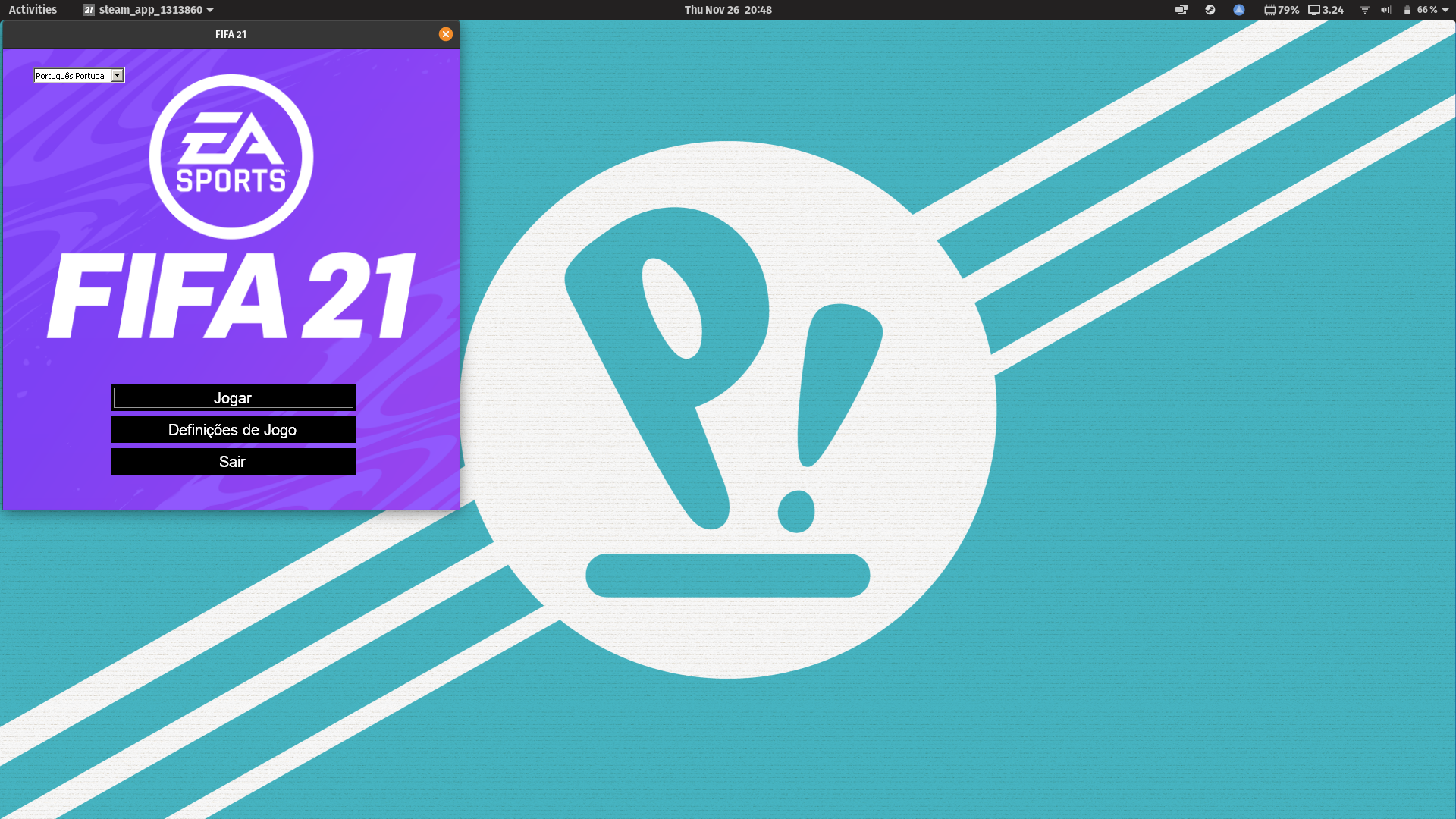
After the latest game update, Origin doesn't start anymore so game doesn't start. 🙁
In this case, you must launch origin from command line to update.
After that, close origin, and launch game from Steam
Anyone got it running without owning the game on Steam? I only have the game on my Origin account… I already created a new prefix and installed the verbs dotnet462, allfonts, vcrun2012, vcrun2013 and vcrun2019_ge (all successfully). I also changed DIRECTX_SELECT to 1 and used the PROTON_USE_SECCOMP environment variable right with Proton-5.9-GE-8-ST. I can start the launcher and click on play, but nothing happens. Some fifa21.exe processes appear but disappear after a few seconds. Can't see any errors being logged…
Edit: Using Proton-Tkg with Wine 6 worked out for me: https://github.com/ValveSoftware/Proton/issues/4234#issuecomment-754187457
In this case, you must launch origin from command line to update.
After that, close origin, and launch game from Steam
I found the reason. New version of Origin doesn't work with PROTON_USE_SECCOMP = 1. I removed this string from command line parameters, it's empty now and Origin starts and launches the game perfectly. I also denied Origin to update automaticaly.
I've tried most of the things in this thread, but I'm still having issues. Origin is updated, but when I launch there's a .NET Framework error for fifaconfig.exe, missing v4.0.30319. This seems to happen even with AUTO_LAUNCH = 1. Trying to install the dotnet verb listed above doesn't seem to do anything...
protontricks ¡ protontricks 1313860 dotnet462
Executing mkdir -p /games/steam/steamapps/compatdata/1313860
------------------------------------------------------
You are using a 64-bit WINEPREFIX. Note that many verbs only install 32-bit versions of packages. If you encounter problems, please retest in a clean 32-bit WINEPREFIX before reporting a bug.
------------------------------------------------------
------------------------------------------------------
WINEPREFIX INFO:
Drive C: total 36
drwxrwxr-x  8 yacin yacin 4096 Nov 28 18:58 .
drwxrwxr-x  4 yacin yacin 4096 Dec 17 12:46 ..
drwxrwxr-x  6 yacin yacin 4096 Nov 28 18:14 ProgramData
drwxrwxr-x  6 yacin yacin 4096 Nov 28 18:03 Program Files
drwxrwxr-x  9 yacin yacin 4096 Nov 28 18:14 Program Files (x86)
drwxrwxr-x  4 yacin yacin 4096 Nov 28 18:12 users
drwxrwxr-x  3 yacin yacin 4096 Nov 28 18:03 vrclient
drwxrwxr-x 18 yacin yacin 4096 Dec 17 12:36 windows
-rw-rw-r--  1 yacin yacin    8 Nov 28 18:03 .windows-serial

Registry info:
/games/steam/steamapps/compatdata/1313860/pfx/system.reg:#arch=win64
/games/steam/steamapps/compatdata/1313860/pfx/user.reg:#arch=win64
/games/steam/steamapps/compatdata/1313860/pfx/userdef.reg:#arch=win64
------------------------------------------------------
------------------------------------------------------
/home/yacin/.cache/protontricks/proton/Proton-5.21-GE-1/bin/wine cmd.exe /c echo '%AppData%' returned empty string, error message ""
------------------------------------------------------
Any ideas? What's the best way to start this from scratch? Just reinstalling the game in steam?
I've tried most of the things in this thread, but I'm still having issues. Origin is updated, but when I launch there's a .NET Framework error for fifaconfig.exe, missing v4.0.30319. This seems to happen even with
AUTO_LAUNCH = 1. Trying to install the dotnet verb listed above doesn't seem to do anything...protontricks ¡ protontricks 1313860 dotnet462 Executing mkdir -p /games/steam/steamapps/compatdata/1313860 ------------------------------------------------------ You are using a 64-bit WINEPREFIX. Note that many verbs only install 32-bit versions of packages. If you encounter problems, please retest in a clean 32-bit WINEPREFIX before reporting a bug. ------------------------------------------------------ ------------------------------------------------------ WINEPREFIX INFO: Drive C: total 36 drwxrwxr-x 8 yacin yacin 4096 Nov 28 18:58 . drwxrwxr-x 4 yacin yacin 4096 Dec 17 12:46 .. drwxrwxr-x 6 yacin yacin 4096 Nov 28 18:14 ProgramData drwxrwxr-x 6 yacin yacin 4096 Nov 28 18:03 Program Files drwxrwxr-x 9 yacin yacin 4096 Nov 28 18:14 Program Files (x86) drwxrwxr-x 4 yacin yacin 4096 Nov 28 18:12 users drwxrwxr-x 3 yacin yacin 4096 Nov 28 18:03 vrclient drwxrwxr-x 18 yacin yacin 4096 Dec 17 12:36 windows -rw-rw-r-- 1 yacin yacin 8 Nov 28 18:03 .windows-serial Registry info: /games/steam/steamapps/compatdata/1313860/pfx/system.reg:#arch=win64 /games/steam/steamapps/compatdata/1313860/pfx/user.reg:#arch=win64 /games/steam/steamapps/compatdata/1313860/pfx/userdef.reg:#arch=win64 ------------------------------------------------------ ------------------------------------------------------ /home/yacin/.cache/protontricks/proton/Proton-5.21-GE-1/bin/wine cmd.exe /c echo '%AppData%' returned empty string, error message "" ------------------------------------------------------Any ideas? What's the best way to start this from scratch? Just reinstalling the game in steam?
@ynadji There seems to be a bug about installing dotnet462 with newer Wine versions, so try to do protontricks 1313860 dotnet40 instead, it works fine for me with Proton-tkg (which is a Proton built with latest Wine basically, should work for Proton 5.13 too).
@yoyossef hmm, protontricks says dotnet40 is already installed unfortunately :(
Could you try to use "Proton Experimental" (Steam official) ? I use this for Squadrons, perhaps it's ok for Fifa ?
@yoyossef hmm, protontricks says
dotnet40is already installed unfortunately :(
:(
I was writing a long tutorial on how I got the game running but this time with the latest official Proton version (5.13-4) but I get this when I try to install dotnet (40 or 462):
warning: This package (dotnet40) is broken in wine-5.13-716-g7f9f4285c2d. Broken since 5.12. Upgrade to >=5.18. See https://bugs.winehq.org/show_bug.cgi?id=49532 for more info. Use --force to try anyway.
So there I tried doing it with Proton GE 5.21_GE but now the Origin install would get stuck... I guess you should try what I'm using: Proton-tkg to have the latest Wine version, but it's installable on Arch distros only I think.
If you're not then I'm sorry but you should wait for a newer Proton with an updated Wine or try the trick of installing Origin with Proton 5.13 and then try everything else with Proton-GE, didn't bother to try it myself because I'd get temp banned by EA for switching wineprefixes this many times.
I'll provide the tutorial anyway in case someone wants to try Proton-tkg:
Running the game w/ Proton-tkg (Wine 6.x)
First make sure that you're starting from a clean prefix (aka remove the
SteamLibrary/compatdata/1313860folder before launching).Once you've ran the game once and thus generated the prefix at
SteamLibrary/compatdata/1313860, you run all the protontricks commands:
- allfonts
- dotnet40
- vcrun2019_ge.verb from https://github.com/GloriousEggroll/protonfixes/blob/master/gamefixes/verbs/vcrun2019_ge.verb
- vcrun2012
- vcrun2013
- d3dcompiler_47
- d3dcompiler_43
- win7
Hi all! I've just bought Fifa 21 on Steam, but can't start it on Ubuntu.
OS: Ubuntu 21.04 Hirsute Hippo (development branch)
KERNEL: 5.8.0-25-generic
CPU: AMD FX-6300 Six-Core
GPU: NVIDIA GeForce GTX 960
GPU DRIVER: NVIDIA 455.28
RAM: 10 GB
Steam Play: Proton Experimental
Any idea?
try with Proton-5.9-GE-8-ST
Finally I have managed to start Fifa 21 on linux using the proton version of GloriousEggroll, exactly the Proton-5.9-GE-8-ST and using the following modifications:
protontricks 1313860 dotnet462 allfonts vcrun2012 vcrun2013 vcrun2019
Then open fifasetup.ini and change DIRECTX_SELECT = 0 to DIRECTX_SELECT = 1. This file is located in the address where you have the Fifa 21 compdata and ending in /compatdata/1313860/pfx/drive_c/users/steamuser/My Documents/FIFA 21
Tried with PROTON_USE_SECCOMP = 1% command% in custom launch options
And in the Fifa 21 options I have activated
In Resolution borderless window.
Quality of Auto Rendering.
MSAA Auto options
Frame rate Set at 60 fps.
And now to enjoy the game
P.S. My computer is an AMD Ryzen 3800x with AMD vega 56.
Best regards
I followed the initial steps but can't find the fifasetup.ini . Any idea why that happens?
Finally I have managed to start Fifa 21 on linux using the proton version of GloriousEggroll, exactly the Proton-5.9-GE-8-ST and using the following modifications:
- protontricks 1313860 dotnet462 allfonts vcrun2012 vcrun2013 vcrun2019
- Then open fifasetup.ini and change DIRECTX_SELECT = 0 to DIRECTX_SELECT = 1. This file is located in the address where you have the Fifa 21 compdata and ending in /compatdata/1313860/pfx/drive_c/users/steamuser/My Documents/FIFA 21
- Tried with PROTON_USE_SECCOMP = 1% command% in custom launch options
- And in the Fifa 21 options I have activated
- In Resolution borderless window.
- Quality of Auto Rendering.
- MSAA Auto options
- Frame rate Set at 60 fps.
And now to enjoy the game
P.S. My computer is an AMD Ryzen 3800x with AMD vega 56.
Best regardsI followed the initial steps but can't find the
fifasetup.ini. Any idea why that happens?
I have the same problem. fifasetup.ini is missing for both Steam and Lutris. It used to be working with Lutris.
Can someone post an exact guide on how to get Fifa 21 running with Proton-6.0-GE-1 and lutris ?
I could get Origin installed (via Wine staging cuz Proton not working with lutris for me, dunno why), but If i try to install Fifa 21 I am getting C++ redis errors and I don't know to fix that :c
Can someone post an exact guide on how to get Fifa 21 running with Proton-6.0-GE-1 and lutris ?
I could get Origin installed (via Wine staging cuz Proton not working with lutris for me, dunno why), but If i try to install Fifa 21 I am getting C++ redis errors and I don't know to fix that :c
I gotchu brodie I'll be making a video and releasing it sometime this week. Finally got it up and running and ill Re-Install it all together on the vid for y'all. See you soon!
Everything was working fine until the last Origin update (I use proton 5.13-5 for updates and 5.9-GE-8-ST for playing). But now it won't start anymore. I'm getting the following error:
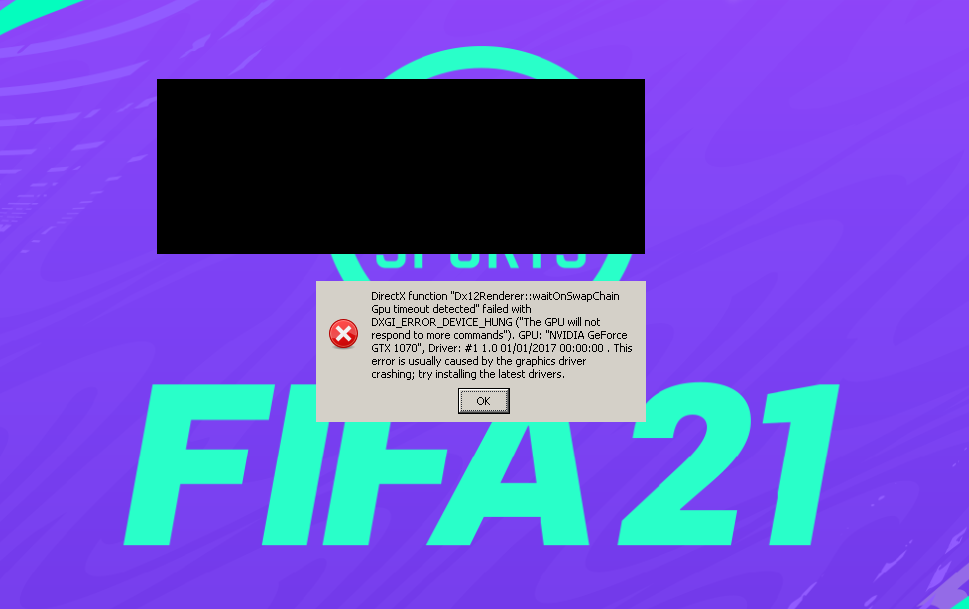
Any ideas?
I'm having an issue with newer builds of proton-tkg (GPU hang at the loading screen), can anyone else confirm? https://github.com/Frogging-Family/wine-tkg-git/issues/280
Everything was working fine until the last Origin update (I use proton 5.13-5 for updates and 5.9-GE-8-ST for playing). But now it won't start anymore. I'm getting the following error:
Any ideas?
I'm noticing "Dx12" in your error box, make sure the game is running using DX11.
I'm having an issue with newer builds of proton-tkg (GPU hang at the loading screen), can anyone else confirm? Frogging-Family/wine-tkg-git#280
Everything was working fine until the last Origin update (I use proton 5.13-5 for updates and 5.9-GE-8-ST for playing). But now it won't start anymore. I'm getting the following error:
<image>
Any ideas?I'm noticing "Dx12" in your error box, make sure the game is running using DX11.
That was it! I had to update my fifasetup.ini again and now it works. Thank you.
I have another question. Has anyone gotten online matches (Seasons) to work? I can connect to the opponent and play a few seconds after kick-off. Then this shows up:

Replying to https://github.com/ValveSoftware/Proton/issues/4234#issuecomment-772815706
Head to $WINEPREFIX/drive_c/users/$USER/My Documents/FIFA 21/settings. Move every file containing an Online (except for your VPro file if present) to another location in order to have a backup. Try to launch the game afterwards, it should get the latest squads and the issue should be resolved, that did the trick for me.
Replying to https://github.com/ValveSoftware/Proton/issues/4234#issuecomment-772815706
Installing vcrun2019_ge fixes this for me, but I still get sync issues during matches regularly and it's very annoying when I play Pro Clubs with friends.
But I think it's unrelated because I had the same issues on Windows, apparently it's related to the high number of cores that my CPU (Ryzen 9 3900X) has cf. Answers EA, I tried to limit the cores for the game to use by putting a taskset -c N in the launch arguments but it doesn't work.
Any hints on my issue would be greatly appreciated, I'm not sure if using taskset is working for the actual game or if it's limiting the number of threads only for Origin in this case.
Replying to https://github.com/ValveSoftware/Proton/issues/4234#issuecomment-773119363
You may try what I did, I did not experience any desync since that. Running with a Ryzen 9 3900XT, without any thread/core limitation.
Replying to https://github.com/ValveSoftware/Proton/issues/4234#issuecomment-773122822
Do you have to do that before every session?
I'll try that next time, thanks.
Replying to https://github.com/ValveSoftware/Proton/issues/4234#issuecomment-773123769
No, I just did it once. :)
Replying to https://github.com/ValveSoftware/Proton/issues/4234#issuecomment-773124199
I followed your instructions but it didn't solve the issue for me unfortunately, seems to be a game bug Windows users are also facing so it's not worth discussing it here anyway (although the systematic disconnection is fixable by installing vcrun2019-ge as previously mentionned).
I've tried the 1313860.py solution but in here, the window with the ProntonFixes' task don't finish. It remains opened for hours (I left 10 hours opened from yesterday to today). I tried three times and in none of them it finishes. How can I see what is running or how can I run it from the terminal?
I gave up with the Python script as I also gave me no idea of the progress of the installation of these packages so I started to install them manually. However, when it tries to install eu fonts and vcrun2019 I get a sha256 mismatch error. Apparently wine/protontricks expects a older version of these packages when they have been updated, so I'm stuck on that.
EDIT: sudo winetricks --self-update fixed this. Xubuntu 20.10.
Okay so I have installed what everyone else has recommended above and now nothing at all launches....
steam-1313860.log
The log is looking fairly bare...
Can someone post an exact guide on how to get Fifa 21 running with Proton-6.0-GE-1 and lutris ?
I could get Origin installed (via Wine staging cuz Proton not working with lutris for me, dunno why), but If i try to install Fifa 21 I am getting C++ redis errors and I don't know to fix that :cI gotchu brodie I'll be making a video and releasing it sometime this week. Finally got it up and running and ill Re-Install it all together on the vid for y'all. See you soon!
Hi, did you get the chance to make a video with a working setup?
This is what worked for me (Arch Linux, but theoretically will work on any Arch-based distro such as Manjaro or Arco):
- Exit Steam and delete your
compatdata/1313680folder if it exists. git clone https://github.com/Frogging-Family/wine-tkg-git.gitinto your home directory and install using the~/wine-tkg-git/proton-tkg/proton-tkg.shfile. (you may need to run the following command BEFORE doing thissudo pacman -S python-fonttools fontforge mingw-w64-gcc, the build kept failing before I installed these dependencies).- Open Steam and run FIFA 21 once using the newly built custom Proton build
Proton-tkg ***. Allow Origin to install and inevitably crash and close. Press exit on any Origin errors that may appear during this process. Exit Steam again. - Install
protontricks, run the following commandprotontricks 1313860 allfonts dotnet40 vcrun2013 d3dcompiler_47 d3dcompiler_43 win7, and run through all the installers. - Open Steam and run FIFA 21 using the latest official Proton build,
Proton 5.13-6at this moment. Origin will throw one more error, just press ok.
Now the FIFA 21 launcher should run, set your graphical settings and launch the game. Everything seems to work flawlessly, and a very stable framerate.
A tip when setting your graphics, select "lock to 60fps", I don't know whether this is the case on Windows, but "lock to 60fps" is basically v-sync, so it will lock the frame rate to the refresh rate of your monitor. I'm getting a beautifully smooth 144fps with this setting.
I've testing this multiple times and it works every time, I hope it works for you.
Replying to https://github.com/ValveSoftware/Proton/issues/4234#issuecomment-782076505
Ok, so this works for me except for when the game is loading after starting it it crashes the graphics drivers. Haven't found anything pointing to why yet.
Replying to [#4234 (comment)](https://github.com/ValveSoftware/Proton/issues/4234#issuecomment-786376666)
Is there an error relating to dx12?
Replying to [#4234 (comment)](https://github.com/ValveSoftware/Proton/issues/4234#issuecomment-782076505)
I tried setting it to use dx11 and that crashed too, except it actually threw an error and just crashed the game instead of the entire computer. It also changed the setting back to using dx12.
Was able to run FIFA, but she artefact. How to fix it? RX 570 Mesa 20.3.4 Proton-TKG 6.3
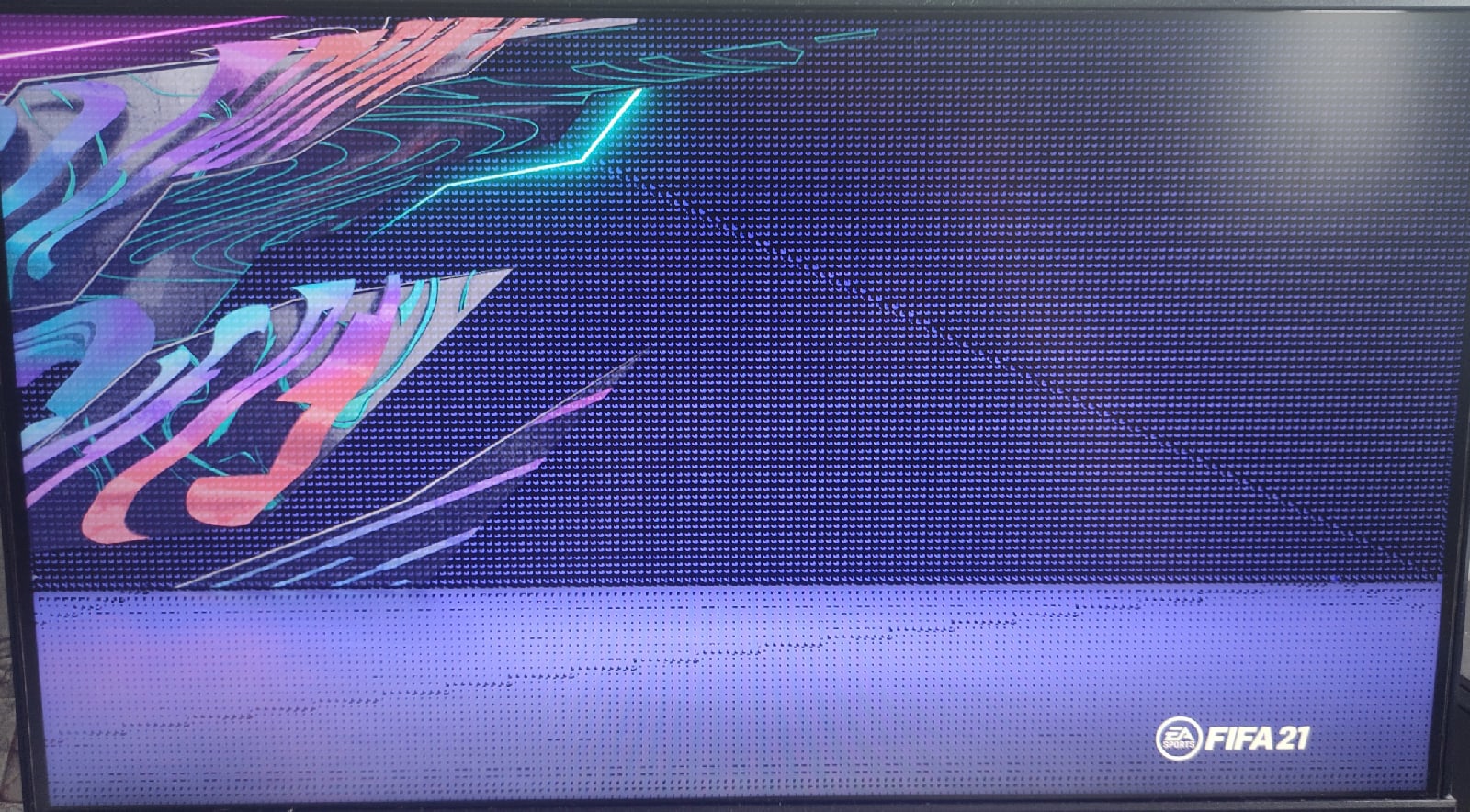
Does not ship further
Replying to https://github.com/ValveSoftware/Proton/issues/4234#issuecomment-782076505
I used the above mentioned comment to install FIFA21. After the install I opened the Fifa Launcher from steam and when I hit play nothing happens. Any suggestions???? My distro is Manjaro Gnome.
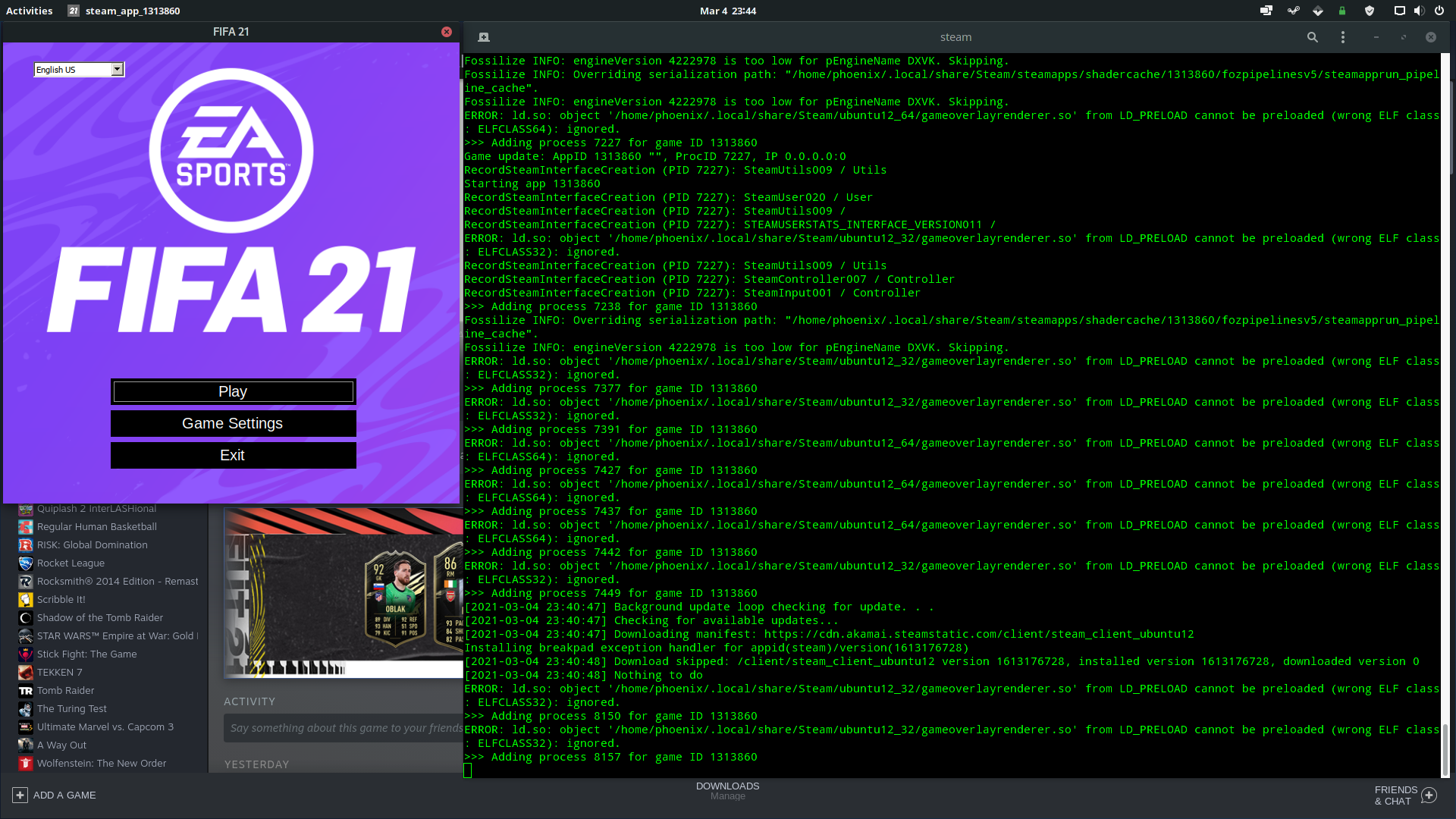
I cannot play online, when I start a game, a message appears saying that I am no longer synchronized with the online game. Does anyone know how to solve?
Replying to [#4234 (comment)](https://github.com/ValveSoftware/Proton/issues/4234#issuecomment-799850845)
Have you installed vcrun2019-ge? It's been mentionned a couple of times in this thread, it should fix the systematic desync issues, cf. https://github.com/ValveSoftware/Proton/issues/4234#issuecomment-730024433 .
By the way I fixed my occasionnal disconnections (due to a bug with CPUs of high core count) by limiting the number of cores of my CPU (Ryzen 9 3900X) with this launch argument: WINE_CPU_TOPOLOGY=8:0,1,2,3,4,5,6,7 %command%. It's a Windows bug as well.
So my experience is finally flawless, have been enjoying the game for 100 hours+, with proton_tkg and the tweaks forementioned. :)
Replying to [#4234 (comment)](https://github.com/ValveSoftware/Proton/issues/4234#issuecomment-790967745)
Have you set your game to run with DX11?
make sure that fifasetup.ini in
/compatdata/1313860/pfx/drive_c/users/steamuser/My Documents/FIFA 21has the valueDIRECTX_SELECTset to1. From my experience it appears that saving settings in the fifa launcher overrides the DIRECTX_SELECT value so make sure it has that value upon launching the game and don't touch the settings again
From: https://github.com/ValveSoftware/Proton/issues/4234#issuecomment-724983058
Replying to [#4234 (comment)](https://github.com/ValveSoftware/Proton/issues/4234#issuecomment-799850845)
Have you installed
vcrun2019-ge? It's been mentionned a couple of times in this thread, it should fix the systematic desync issues, cf. [#4234 (comment)](https://github.com/ValveSoftware/Proton/issues/4234#issuecomment-730024433) .By the way I fixed my occasionnal disconnections (due to a bug with CPUs of high core count) by limiting the number of cores of my CPU (Ryzen 9 3900X) with this launch argument:
WINE_CPU_TOPOLOGY=8:0,1,2,3,4,5,6,7 %command%. It's a Windows bug as well.So my experience is finally flawless, have been enjoying the game for 100 hours+, with proton_tkg and the tweaks forementioned. :)
when i try to install vcrun2019-ge, the following error message appears: sha256sum mismatch! Rename vc_redist.x64.exe and try again.
Replying to [#4234 (comment)](https://github.com/ValveSoftware/Proton/issues/4234#issuecomment-800201439)
Open a text editor of your choice and open vcrun2019_ge.verb, go to line 40 and replace the line with this:
w_download https://aka.ms/vs/16/release/vc_redist.x64.exe f299953673de262fefad9dd19bfbe6a5725a03ae733bebfec856f1306f79c9f7
Then try installing it again.
Seems like the file has been updated so the hash has to be updated as well. Clear ~/.cache/winetricks/vcrun2019_ge if needed.
Replying to [#4234 (comment)](https://github.com/ValveSoftware/Proton/issues/4234#issuecomment-800201439)
Open a text editor of your choice and open vcrun2019_ge.verb, go to line 40 and replace the line with this:
w_download https://aka.ms/vs/16/release/vc_redist.x64.exe f299953673de262fefad9dd19bfbe6a5725a03ae733bebfec856f1306f79c9f7Then try installing it again.
Seems like the file has been updated so the hash has to be updated as well. Clear~/.cache/winetricks/vcrun2019_geif needed.
Where you get these checksum? I need the checksum of x86 version
Replying to [#4234 (comment)](https://github.com/ValveSoftware/Proton/issues/4234#issuecomment-800670456)
Download the file manualy and just run sha256sum /path/to/vc_redist.x86.exe on a terminal.
Replying to [#4234 (comment)](https://github.com/ValveSoftware/Proton/issues/4234#issuecomment-800670456)
Download the file manualy and just run
sha256sum /path/to/vc_redist.x86.exeon a terminal.
Still got the checksum mismatch.
Replying to https://github.com/ValveSoftware/Proton/issues/4234#issuecomment-801138092
Sorted out. It seems to work now, I played a few games and I didn't have a disconnect.
Replying to [#4234 (comment)](https://github.com/ValveSoftware/Proton/issues/4234#issuecomment-790967745)
Have you set your game to run with DX11?
make sure that fifasetup.ini in
/compatdata/1313860/pfx/drive_c/users/steamuser/My Documents/FIFA 21has the valueDIRECTX_SELECTset to1. From my experience it appears that saving settings in the fifa launcher overrides the DIRECTX_SELECT value so make sure it has that value upon launching the game and don't touch the settings againFrom: [#4234 (comment)](https://github.com/ValveSoftware/Proton/issues/4234#issuecomment-724983058)
Yes, I did set that and still no change :( . Anything else I should look for???
P.S. : I'm using Proton-tkg for running the game. Same behavior with Proton-5.9-GE-8-ST. With Proton 5.13 the Origin client doesn't start at all.
P.S. 2 : Is there some log file I'm not checking? Is there any more info that I can provide?
This is what worked for me (Arch Linux, but theoretically will work on any Arch-based distro such as Manjaro or Arco):
- Exit Steam and delete your
compatdata/1313680folder if it exists.git clone https://github.com/Frogging-Family/wine-tkg-git.gitinto your home directory and install using the~/wine-tkg-git/proton-tkg/proton-tkg.shfile. (you may need to run the following command BEFORE doing thissudo pacman -S python-fonttools fontforge mingw-w64-gcc, the build kept failing before I installed these dependencies).- Open Steam and run FIFA 21 once using the newly built custom Proton build
Proton-tkg ***. Allow Origin to install and inevitably crash and close. Press exit on any Origin errors that may appear during this process. Exit Steam again.- Install
protontricks, run the following commandprotontricks 1313860 allfonts dotnet40 vcrun2013 d3dcompiler_47 d3dcompiler_43 win7, and run through all the installers.- Open Steam and run FIFA 21 using the latest official Proton build,
Proton 5.13-6at this moment. Origin will throw one more error, just press ok.Now the FIFA 21 launcher should run, set your graphical settings and launch the game. Everything seems to work flawlessly, and a very stable framerate.
A tip when setting your graphics, select "lock to 60fps", I don't know whether this is the case on Windows, but "lock to 60fps" is basically v-sync, so it will lock the frame rate to the refresh rate of your monitor. I'm getting a beautifully smooth 144fps with this setting.
I've testing this multiple times and it works every time, I hope it works for you.
I tried this steo by step. But when Launching the game with proton-tkg it the game doesn't launch. I get this in Terminal and it's stuck there:
Installing breakpad exception handler for appid(steam)/version(1618256785) Installing breakpad exception handler for appid(steam)/version(1618256785)
Do i have to wait longer?
Replying to https://github.com/ValveSoftware/Proton/issues/4234#issuecomment-822011832
As long as the compatdata folder is created you should be able to continue with the rest of the steps.
I have one. But it's empty. Should i uninstall in steam and do a fresh redownload?
Replying to https://github.com/ValveSoftware/Proton/issues/4234#issuecomment-804653950
After the last update of origin everything works flawlessly, even online play!
Replying to [#4234 (comment)](https://github.com/ValveSoftware/Proton/issues/4234#issuecomment-822011832)
As long as the compatdata folder is created you should be able to continue with the rest of the steps.
Well it get's created but after the start of the game nothing really happens. I don't find a reason for:
No cached sticky mapping in ActivateActionSet.Installing breakpad exception handler for appid(steam)/version(1618256785)
On vkd3d FIFA 21 freezes my pc i have to Hold the power button down to turn it off lol
Was able to run FIFA, but she artefact. How to fix it? RX 570 Mesa 20.3.4 Proton-TKG 6.3
Does not ship further
if you got a fix please help me
Replying to [#4234 (comment)](https://github.com/ValveSoftware/Proton/issues/4234#issuecomment-833684814)
Don't use DX12 (VKD3D), force DX11 (DXVK) following the instructions in this comment: https://github.com/ValveSoftware/Proton/issues/4234#issuecomment-799857545
And remember that touching your Fifa settings through the launcher's GUI resets the setting to DX12 (at least in my experience).
Replying to [#4234 (comment)](https://github.com/ValveSoftware/Proton/issues/4234#issuecomment-833684814)
Don't use DX12 (VKD3D), force DX11 (DXVK) following the instructions in this comment: [#4234 (comment)](https://github.com/ValveSoftware/Proton/issues/4234#issuecomment-799857545)
And remember that touching your Fifa settings through the launcher's GUI resets the setting to DX12 (at least in my experience).
but i want dx12 LOL
Replying to [#4234 (comment)](https://github.com/ValveSoftware/Proton/issues/4234#issuecomment-833684814)
Don't use DX12 (VKD3D), force DX11 (DXVK) following the instructions in this comment: [#4234 (comment)](https://github.com/ValveSoftware/Proton/issues/4234#issuecomment-799857545)
And remember that touching your Fifa settings through the launcher's GUI resets the setting to DX12 (at least in my experience).but i want dx12 LOL
Oh okay, then you probably should write a bug report for VKD3D-proton's github.
idk how to apitrace
Okay I found out why online wasn't working for me, vcrun2019_ge wasn't correctly installed.
How can I install vcrun2019_ge through command line? Protontricks allows only vcrun2019
The way I did it (which may be stupid but I didn't know better), was to download the .verb from here: https://github.com/GloriousEggroll/protonfixes/blob/master/gamefixes/verbs/vcrun2019_ge.verb and point the file to protontricks
So basically this:
protontricks 1313860 /path/to/vcrun2019_ge.verb
I got it to work great, even online. I just had to run protontricks 1313860 /path/to/vcrun2019_ge.verb to do the install, then for some odd reason the game did not work. So I ran protontricks 1313860 /path/to/vcrun2019_ge.verb again and uninstalled it. Afterwords the game worked great.
Thanks
Replying to [#4234 (comment)](https://github.com/ValveSoftware/Proton/issues/4234#issuecomment-844511639)
Yeah I know what you mean, I also had to "repair" the vcrun2019_ge installation when I recently had to make a new prefix to use latest Proton-GE.
I wonder if we'll get all of that process automatized on Proton one day, setting it all up can be tiresome for newcomers, but at least we've got a perfectly working game (besides the UI rendering issues when using DX12: https://github.com/HansKristian-Work/vkd3d-proton/issues/664 ).
Would like to add that I haven't been able to run the Origin version yet. I've added Origin as a non-steam game to Steam and installed FIFA but no success. I'm on Manjaro.
After that decided to purchase one month of EA play through Steam, installed FIFA with Proton-6.8-GE-2 and it's running great, everything is working.
If anyone has had success with the Origin version please let me know. I'm trying to figure out what causes the Steam version to work fine and the Origin version to not launch (can't get past the FIFA21 launcher in Origin version, no errors displayed).
FIFA 21 broken in Proton Experimental that dropped june 2nd 2021, netframework problem
Works now
Following all the suggestions in this thread, I was able to get FIFA working after a few attempts, but with a weird complication that I haven't seen mentioned elsewhere and I'm not sure how to address. I installed directly from Steam, so Origin was installed in the FIFA prefix, and Steam runs it automatically to play the game.
When I start up Steam and run FIFA it seems to work fine. I can play the game, quit, and everything looks normal. No FIFA/Origin processes are left running in the background or anything. Then if I try to launch the game again without restarting Steam first, everything hangs. ps ax shows that EALink.exe is running, but it will just hang forever and Origin and FIFA will never start. I have to manually kill the EA/FIFA related processes at this point, as even quitting Steam leaves those processes running.
I mostly use this box as a server for playing via Steam Link, so having to restart Steam every time I want to play this game is a huge hassle. Any suggestions on what might be causing this/how to deal with it would be greatly appreciated!
Would like to add that I haven't been able to run the Origin version yet. I've added Origin as a non-steam game to Steam and installed FIFA but no success. I'm on Manjaro.
After that decided to purchase one month of EA play through Steam, installed FIFA with Proton-6.8-GE-2 and it's running great, everything is working.If anyone has had success with the Origin version please let me know. I'm trying to figure out what causes the Steam version to work fine and the Origin version to not launch (can't get past the FIFA21 launcher in Origin version, no errors displayed).
any news on this? would also like to run it from Origin version
Just reporting my case, because it might help someone.
With a clean Proton 6.10-1 GE the game was plug and play with DX12 but it would occasionally freeze. With DX11 it wouldn't start (black screen), but I find out it was doing wrong GPU selection (I'm using NVidia offloading), which was fixed adding WINEDLLOVERRIDES="dxgi=n;winedbg.exe=d" to the launch options.
Online wasn't working (disconnects 5s after starting the match) with the protonfixes that 6.10-1 GE implements, and trying to install vcrun2019_ge results in "a newer version is installed" and fails. Will try running it in a clean environment.
@tommy8372 try using lutris if you want to play with Origin.
@bendemeyer What Proton version are you using? I'm using proton 6.10-GE and I don't have this issue, however sometimes I'm forced to let the focus on the Origin window when it's launching, or it will just refuse to open the game launcher (of course now I can't repro it :)))) ).
There's some weird stuff going on, either with the Origin running on Wine or with the linking between Origin and Steam.
@yoyossef are you able to play online in 6.10-1 GE?
I'm getting disconnected 5s into the match and can't seem to find a workaround. Have you applied any protontricks on top of those provided by 6.10GE?
I've noticed, for example, that 6.10 automatically installs vcrun_2019ge when setting up the prefix.
@yoyossef I was seeing that behavior with 6.10-GE-1, and I saw similar results when I tried rebuilding the prefix and running with 6.3 and 6.8-GE-2. I'm less convinced now that it was actually predictably working every time Steam would restart, after lots more troubleshooting the behavior appeared almost entirely random. Sometimes it would launch EALink.exe, which would hang. Sometimes it would manage to launch Origin.exe, which would hang. Sometimes Origin.exe would crash out, and sometimes the game would load properly. After going through that process dozens of times, I couldn't find any reliable pattern in those behaviors.
I ended up doing a full OS reinstall, and now everything appears to be working fine using 6.12-GE-1 without any additional protontricks or other tweaks (Note: I don't play online, so I don't know if that's working). My guess is that I had something screwed up in my wine dependencies or another library somewhere that was making Origin freak out.
Follow-up note: I started experiencing intermittent DX12 errors, and trying to start the game with DX11 just got a blank screen as @sabian2008 reported. Adding the launch option he suggested (WINEDLLOVERRIDES="dxgi=n;winedbg.exe=d") got DX11 working with no issues so far.
I'm having an issue now getting the game to recognize inputs from a remote play client, but I know remote play can be buggy sometimes, so I'm not sure if this is Proton related or just random Steam shenanigans.
Directx 12, Random Crashing, working on DX12? - EA SPORTS™ FIFA 21 (1313860)
Issue transferred from https://github.com/ValveSoftware/Proton/issues/5026.
@ElChaska posted on 2021-07-29T00:22:25:
Compatibility Report
- Name of the game with compatibility issues: EA SPORTS™ FIFA 21
- Steam AppID of the game: 1313860
System Information
- GPU: ASUS STRIX GTX 1080
- Driver/LLVM version: Nnvidia 470.57
- Kernel version: 5.12.0-19.3-liquorix-amd64
- Proton version: Proton Experimental / Proton 6.3-5
Symptoms
Random Crash, in random moment DX12.
Reproduction
Open the game, maybe enter the game and maybe at some random moment, it crashes throwing a problem with DX12.
Question
Is possible working on DX12? or only DX11?
Replying to [#4234 (comment)](https://github.com/ValveSoftware/Proton/issues/4234#issuecomment-888709730)
DX12 with vkd3d-proton on Fifa is known to have some graphical issues last I checked on AMD hw: https://github.com/HansKristian-Work/vkd3d-proton/issues/664
And although I haven't been crashing some people were mentioning it iirc, so you better switch to DX11 anyway by adding this DIRECTX_SELECT = 1 to fifasetup.ini in your prefix (steamapps/compatdata/1313860/pfx/drive_c/users/steamuser/My Documents/FIFA 21).
AMD VLK driver works great with this game no graphical issues on dx12 just need the shaders
i installed a fresh copy of ubuntu 20.04, installed steam, set proton experimental in settings, and was able to start the game with no issues. i can play offline matches but, when going online, like rivals, it says "there was a connection issue, the match is under review" after a few seconds of start it and kicks me to the menu. this happens consistently. try opening the ports that are on ea page without luck. any workaround for this?
Replying to [#4234 (comment)](https://github.com/ValveSoftware/Proton/issues/4234#issuecomment-919115776)
@dvalsagna89 Yes, you should install vcrun2019_ge in your game's prefix to fix those online desync issues, once installed I have no longer been disconnected (with 300+ hours of time played).
It can be done with protontricks (so install that first), download this file: https://github.com/GloriousEggroll/protonfixes/blob/1eb73e07f605ac09787bc2159152551a98191300/gamefixes/verbs/vcrun2019_ge.verb
Open a terminal and run protontricks 1313860 /path/to/vcrun2019_ge.verb
With dx11 I'm getting a 1 sec freeze and my controller freezes and the guy gets a free goal, I never use to get this problem but it's happening on 2 pc going to try it on the third.
FIFA 22 is coming out in October the first, AMDVLK works with the dx12 to vulkan with no graphical bugs but mesa is superior in performance so please fix the graphical bug, and update the ucrtbase.dll so we can play online without desync issues, come one please fix before fifa 22, we know it's going to be a copy paste of fifa 21 game and issues 😆.
Found an interesting crash I've not seen before today. We tried to play with 4 controllers and the game crashes on startup. Removing one controller and it instantly works again. We tried a few combinations and then gave up on playing with 4 people. Afterwards I tried reproducing it with the following result:
Tested with:
2x Dualshock 4 (Bluetooth)
1x Dualshock 3 (Bluetooth)
1x Xbox One Controller (USB)
Running FIFA 21 with 2x Dualshock 4, 1x Dualshock 3 works.
Running FIFA 21 with 1x Xbox One Controller works.
Running FIFA 21 with 1x Dualshock 4, 1x Dualshock 3, 1x Xbox One Controller works.
Running FIFA 21 with 2x Dualshock 4, 1x Dualshock 3, 1x Xbox One Controller crashes on startup. Log: steam-1313860_afterplug4th_crashonly.log
This is reproduciable with Proton 6.3-6, Proton Experimental and Proton-GE (each tested with clean prefixes). Tested on Gnome 40 / kernel 5.13.16.
Anyone here could make Fifa 22 work with these instructions? I've already installed it, but it works intermittently end I can't figure it out.
Change to dx11 you would get better frame rate, with Nvidia u will get a stutter every 30src or every min
EA Sports 21 Steam Online Problem
Issue transferred from https://github.com/ValveSoftware/Proton/issues/5319.
@Batamnxx posted on 2021-11-14T22:34:49:
When I try to play on Fifa 21 online I have a archlilinux distribution (archman) it keeps saying at the start of every game:
" An error has occured and you no long synced with the online match " and I'm not able to play any match online any help please
Can anyone help me please having these problem when I try to play online
" An error has occurred and you no long synced with the online match " this message shows up all help is greatly appreciated
@Batamnxx Yes it's a known issue that can be fixed, see this comment https://github.com/ValveSoftware/Proton/issues/4234#issuecomment-919120356
Hi do I have copy this into the terminal and this should fix the problem?
Open a terminal and run: protontricks 1313860 /path/to/vcrun2019_ge.verb
Da: Yossef Rostaqi @.>
Inviato: lunedì 15 novembre 2021 11:30
A: ValveSoftware/Proton @.>
Cc: Batamnxx @.>; Mention @.>
Oggetto: Re: [ValveSoftware/Proton] EA SPORTS FIFA 21 (1313860) (#4234)
@Batamnxxhttps://github.com/Batamnxx Yes it's a known issue that can be fixed, see this comment #4234 (comment)https://github.com/ValveSoftware/Proton/issues/4234#issuecomment-919120356
—
You are receiving this because you were mentioned.
Reply to this email directly, view it on GitHubhttps://github.com/ValveSoftware/Proton/issues/4234#issuecomment-968750437, or unsubscribehttps://github.com/notifications/unsubscribe-auth/AR3IYPPXL5VJUDU3N6RGUMTUMDOLPANCNFSM4SAZQGYA.
Triage notifications on the go with GitHub Mobile for iOShttps://apps.apple.com/app/apple-store/id1477376905?ct=notification-email&mt=8&pt=524675 or Androidhttps://play.google.com/store/apps/details?id=com.github.android&referrer=utm_campaign%3Dnotification-email%26utm_medium%3Demail%26utm_source%3Dgithub.
@Batamnxx First you need to install protontricks in your distribution (https://github.com/Matoking/protontricks), check online how to install it properly for your Linux distribution.
When done download this file: https://raw.githubusercontent.com/GloriousEggroll/protonfixes/master/gamefixes/verbs/vcrun2019_ge.verb (from a terminal you could do wget https://raw.githubusercontent.com/GloriousEggroll/protonfixes/master/gamefixes/verbs/vcrun2019_ge.verb).
After this, still in the terminal you run protontricks 1313860 /path/to/vcrun2019_ge.verb (/path/to/ is to be replaced with the actual path of the vcrun2019_ge.verb file you've downloaded).
If you're in the same directory of the file you simply can run protontricks 1313860 ./vcrun2019_ge.verb.
When you run this command you should see some vcrun install window you simply proceed, and when finished yes you should no longer see online desync issues (I have 200+ hours of play time w/o issues on Linux).
I have installed archman and already winetricks Is there a video that shows how to do this I'm .New to linux
Scarica Outlook per Androidhttps://aka.ms/AAb9ysg
From: Yossef Rostaqi @.>
Sent: Monday, November 15, 2021 12:14:46 PM
To: ValveSoftware/Proton @.>
Cc: Batamnxx @.>; Mention @.>
Subject: Re: [ValveSoftware/Proton] EA SPORTS FIFA 21 (1313860) (#4234)
@Batamnxxhttps://github.com/Batamnxx First you need to install protontricks in your distribution (https://github.com/Matoking/protontricks), check online how to install it properly for your Linux distribution.
When done download this file: https://raw.githubusercontent.com/GloriousEggroll/protonfixes/master/gamefixes/verbs/vcrun2019_ge.verb (from a terminal you could do wget https://raw.githubusercontent.com/GloriousEggroll/protonfixes/master/gamefixes/verbs/vcrun2019_ge.verb).
After this, still in the terminal you run protontricks 1313860 /path/to/vcrun2019_ge.verb (/path/to/ is to be replaced with the actual path of the vcrun2019_ge.verb file you've downloaded).
If you're in the same directory of the file you simply can run protontricks 1313860 ./vcrun2019_ge.verb.
—
You are receiving this because you were mentioned.
Reply to this email directly, view it on GitHubhttps://github.com/ValveSoftware/Proton/issues/4234#issuecomment-968797396, or unsubscribehttps://github.com/notifications/unsubscribe-auth/AR3IYPL6QHY4T3YJ3HX2U6DUMDTSNANCNFSM4SAZQGYA.
Triage notifications on the go with GitHub Mobile for iOShttps://apps.apple.com/app/apple-store/id1477376905?ct=notification-email&mt=8&pt=524675 or Androidhttps://play.google.com/store/apps/details?id=com.github.android&referrer=utm_campaign%3Dnotification-email%26utm_medium%3Demail%26utm_source%3Dgithub.
@Batamnxx If you're on a Arch-based distro you could follow this video: https://www.youtube.com/watch?v=QIsSwpAARpM
After yay is installed you can simply run yay -S protontricks --aur to install protontricks, you follow the rest of my previous comment after that.
https://raw.githubusercontent.com/GloriousEggroll/protonfixes/master/gamefixes/verbs/vcrun2019_ge.verb the contents of this file once opened into the browser do I have to copy all of into the terminal?
Da: Yossef Rostaqi @.>
Inviato: lunedì 15 novembre 2021 12:14
A: ValveSoftware/Proton @.>
Cc: Batamnxx @.>; Mention @.>
Oggetto: Re: [ValveSoftware/Proton] EA SPORTS FIFA 21 (1313860) (#4234)
@Batamnxxhttps://github.com/Batamnxx First you need to install protontricks in your distribution (https://github.com/Matoking/protontricks), check online how to install it properly for your Linux distribution.
When done download this file: https://raw.githubusercontent.com/GloriousEggroll/protonfixes/master/gamefixes/verbs/vcrun2019_ge.verb (from a terminal you could do wget https://raw.githubusercontent.com/GloriousEggroll/protonfixes/master/gamefixes/verbs/vcrun2019_ge.verb).
After this, still in the terminal you run protontricks 1313860 /path/to/vcrun2019_ge.verb (/path/to/ is to be replaced with the actual path of the vcrun2019_ge.verb file you've downloaded).
If you're in the same directory of the file you simply can run protontricks 1313860 ./vcrun2019_ge.verb.
—
You are receiving this because you were mentioned.
Reply to this email directly, view it on GitHubhttps://github.com/ValveSoftware/Proton/issues/4234#issuecomment-968797396, or unsubscribehttps://github.com/notifications/unsubscribe-auth/AR3IYPL6QHY4T3YJ3HX2U6DUMDTSNANCNFSM4SAZQGYA.
Triage notifications on the go with GitHub Mobile for iOShttps://apps.apple.com/app/apple-store/id1477376905?ct=notification-email&mt=8&pt=524675 or Androidhttps://play.google.com/store/apps/details?id=com.github.android&referrer=utm_campaign%3Dnotification-email%26utm_medium%3Demail%26utm_source%3Dgithub.
Hi did download https://raw.githubusercontent.com/GloriousEggroll/protonfixes/master/gamefixes/verbs/vcrun2019_ge.verb and saved me what to I need to with it ? because I done all the other steps protontricks installed and after protontricks 1313860 /path/to/vcrun2019_ge.verb installed, but it still has the same problem when I try to playonline its still saying
" An error has occurred and you no long synced with the online match "
Kindly can anybody help me thank you
Once downloaded the file https://raw.githubusercontent.com/GloriousEggroll/protonfixes/master/gamefixes/verbs/vcrun2019_ge.verb where do I go and save it in the game after opening in steam local files ?
Once downloaded the file https://raw.githubusercontent.com/GloriousEggroll/protonfixes/master/gamefixes/verbs/vcrun2019_ge.verb where do I go and save it in the game after opening in steam local files ? Please can someone kindly help me I am new to linux and can't get the game to play on line Thank you !!!
Once downloaded the file https://raw.githubusercontent.com/GloriousEggroll/protonfixes/master/gamefixes/verbs/vcrun2019_ge.verb where do I go and save it in the game after opening in steam local files ? Please can someone kindly help me I am new to linux and can't get the game to play on line Thank you !!!
@Batamnxx save it in your Home directory, you just need to install it with protontricks through the terminal opened in your Home dir (protontricks 1313860 ./vcrun2019_ge.verb), I think that my comment has been descriptive enough to guide you.
Please If download TeamViewer can help me?
Scarica Outlook per Androidhttps://aka.ms/AAb9ysg
From: Yossef Rostaqi @.>
Sent: Sunday, November 21, 2021 3:41:12 PM
To: ValveSoftware/Proton @.>
Cc: Batamnxx @.>; Mention @.>
Subject: Re: [ValveSoftware/Proton] EA SPORTS FIFA 21 (1313860) (#4234)
Once downloaded the file https://raw.githubusercontent.com/GloriousEggroll/protonfixes/master/gamefixes/verbs/vcrun2019_ge.verb where do I go and save it in the game after opening in steam local files ? Please can someone kindly help me I am new to linux and can't get the game to play on line Thank you !!!
@Batamnxxhttps://github.com/Batamnxx save it in your Home directory, you just need to install it with protontricks through the terminal opened in your Home dir (protontricks 1313860 ./vcrun2019_ge.verb), I think that my comment has been descriptive enough to guide you.
—
You are receiving this because you were mentioned.
Reply to this email directly, view it on GitHubhttps://github.com/ValveSoftware/Proton/issues/4234#issuecomment-974829275, or unsubscribehttps://github.com/notifications/unsubscribe-auth/AR3IYPOAKBGCOK4SABICOP3UNEAIRANCNFSM4SAZQGYA.
Triage notifications on the go with GitHub Mobile for iOShttps://apps.apple.com/app/apple-store/id1477376905?ct=notification-email&mt=8&pt=524675 or Androidhttps://play.google.com/store/apps/details?id=com.github.android&referrer=utm_campaign%3Dnotification-email%26utm_medium%3Demail%26utm_source%3Dgithub.
Download the 64bit Ucrtbase.dll and paste it in the fifa 21 folder, fifa 22 already have it, and online should work for you.
Where do in download it from and It what folder in fifa 21 thanks
Scarica Outlook per Androidhttps://aka.ms/AAb9ysg
From: massatt212 @.>
Sent: Sunday, November 21, 2021 4:08:53 PM
To: ValveSoftware/Proton @.>
Cc: Batamnxx @.>; Mention @.>
Subject: Re: [ValveSoftware/Proton] EA SPORTS FIFA 21 (1313860) (#4234)
Download the 64bit Ucrtbase.dll and paste it in the fifa 21 folder, fifa 22 already have it, and online should work for you.
—
You are receiving this because you were mentioned.
Reply to this email directly, view it on GitHubhttps://github.com/ValveSoftware/Proton/issues/4234#issuecomment-974833855, or unsubscribehttps://github.com/notifications/unsubscribe-auth/AR3IYPOQYZOESFM5W3PLPATUNEDQLANCNFSM4SAZQGYA.
Triage notifications on the go with GitHub Mobile for iOShttps://apps.apple.com/app/apple-store/id1477376905?ct=notification-email&mt=8&pt=524675 or Androidhttps://play.google.com/store/apps/details?id=com.github.android&referrer=utm_campaign%3Dnotification-email%26utm_medium%3Demail%26utm_source%3Dgithub.
thank you it worked.
Da: massatt212 @.>
Inviato: domenica 21 novembre 2021 16:08
A: ValveSoftware/Proton @.>
Cc: Batamnxx @.>; Mention @.>
Oggetto: Re: [ValveSoftware/Proton] EA SPORTS FIFA 21 (1313860) (#4234)
Download the 64bit Ucrtbase.dll and paste it in the fifa 21 folder, fifa 22 already have it, and online should work for you.
—
You are receiving this because you were mentioned.
Reply to this email directly, view it on GitHubhttps://github.com/ValveSoftware/Proton/issues/4234#issuecomment-974833855, or unsubscribehttps://github.com/notifications/unsubscribe-auth/AR3IYPOQYZOESFM5W3PLPATUNEDQLANCNFSM4SAZQGYA.
Triage notifications on the go with GitHub Mobile for iOShttps://apps.apple.com/app/apple-store/id1477376905?ct=notification-email&mt=8&pt=524675 or Androidhttps://play.google.com/store/apps/details?id=com.github.android&referrer=utm_campaign%3Dnotification-email%26utm_medium%3Demail%26utm_source%3Dgithub.
@yossef-dev Proton13-1 ?
protontricks 1286830 dotnet462 allfonts vcrun2012 vcrun2013 vcrun2019
And now try to launch the game and it should run properly.Also I'd like to note that online is not working for me I'm getting disconnected because of some desync issues, despite having the vcrun2019_ge installed, @pokaspekas have you got online working on your side?
Is this only valid for the Steam version ? How would make it playable for Origin Users?
I tried installing the dependencies via Lutris, changed DIRECTX thing to = 1 but sadly, the fifa launcher starts but the opened game window is just black for dozens of seconds before it crashes.
I wouldn't say that this is a lutris specfic issue, it's more something happening with Proton and Wine configuration.
Origin itself works perfectly and I even played BF1 & BF5.
EDIT: Fixed -> Try installing nvidia-cuda-dev and nvidia-cuda-toolkit <- Careful this might nuke your nvidia drivers and resolution, just reinstall via apt. Also avoid web nvidia installed driver, stick with APT ones.
Lastly install via this script. (I added it for moderation). Origin has to be installed beforehand:
EDIT2: IMPORTANT: Do not use DX12/VK3D! Always use DXVK with FIFA 21 as VK3D will lead to freeze issues on startup as well as other massive issues.
installer:
- task:
    arch: win64
    description: Creating Wine prefix
    name: create_prefix
    prefix: $GAMEDIR
- input_menu:
    description: 'Setting DXVK workarounds please choose your GPU:'
    id: GPU
    options:
    - Not needed for AMD. Ignore this.: AMD
    - ? 'dxgi.customVendorId = 10de

        dxgi.nvapiHack = False

        dxvk.useRawSsbo = True'
      : Nvidia
    preselect: Not needed for AMD. Ignore this.
- write_file:
    content: $INPUT_GPU
    file: $GAMEDIR/dxvk.conf
- task:
    app: vcrun2012
    arch: win64
    description: Installing VCRun2012
    name: winetricks
    prefix: $GAMEDIR
- task:
    app: vcrun2013
    arch: win64
    description: Installing VCRun2013
    name: winetricks
    prefix: $GAMEDIR
- task:
    app: vcrun2019
    arch: win64
    description: Installing VCRun2019
    name: winetricks
    prefix: $GAMEDIR
- task:
    app: allfonts
    arch: win64
    description: Installing Allfonts
    name: winetricks
    prefix: $GAMEDIR
- task:
    app: dotnet462
    arch: win64
    description: Installing .NET 4.6.2
    name: winetricks
    prefix: $GAMEDIR
- task:
    app: d3dcompiler_47
    arch: win64
    description: Installing D3DCompiler(47)
    name: winetricks
    prefix: $GAMEDIR
- task:
    app: d3dcompiler_43
    arch: win64
    description: Installing D3DCompiler(43)
    name: winetricks
    prefix: $GAMEDIR
- task:
    app: nocrashdialog win7
    arch: win64
    name: winetricks
    prefix: $GAMEDIR
system:
  disable_runtime: false
  env:
    DXVK_CONFIG_FILE: $GAMEDIR/dxvk.conf
    DXVK_HUD: 0
    DXVK_LOG_LEVEL: none
wine:
  dxvk: true
  esync: true
  overrides:
    nvapi,nvapi64: disabled
    xaudio2_7: native,builtin
  version: lutris-fshack-6.21-6-x86_64
I need help having this to work on my debian linux. Please!!
Proton versions
proton experimentalx6 2021-09proton 6.3-6x1 2021-09proton 6.3-5x1 2021-07proton 6.10x1 2021-07proton 6.10-1x1 2021-07proton 6.8-ge-2x2 2021-07proton 5.13-6x2 2021-04proton 5.9-ge-8x14 2021-03proton 5.13x6 2021-03proton 6.0-ge-1x3 2021-02proton 5.13-5x3 2021-02proton 5.21-ge-1x2 2021-01proton 5.11x1 2020-10proton 5.0-10x1 2020-10
Launch options
DXVK_CONFIG_FILEx1 2021-12DXVK_HUDx1 2021-12DXVK_LOG_LEVELx1 2021-12WINEDLLOVERRIDES="dxgi=n;winedbg.exe=d"x2 2021-07WINE_CPU_TOPOLOGY=8:0,1,2,3,4,5,6,7x2 2021-03WINEPREFIXx3 2021-02PROTON_USE_SECCOMPx6 2021-01WINEARCH=win64x1 2020-11WINEPREFIX=~/.steam/root/steamapps/compatdata/1313860/pfxx1 2020-11PROTON_LOG=1x1 2020-11
Launch lines
Upstream links
- ValveSoftware/Proton/issues/5319x1 2021-11
- HansKristian-Work/vkd3d-proton/issues/664x2 2021-07
- ValveSoftware/Proton/issues/5026x1 2021-07
- show_bug.cgi?id=49532x1 2021-01
- ValveSoftware/Proton/issues/4398x1 2020-11
DLLs
ucrtbase.dllx5 2021-11api-ms-win-crt-conio-l1-1-0.dllx1 2020-11api-ms-win-crt-heap-l1-1-0.dllx1 2020-11api-ms-win-crt-locale-l1-1-0.dllx1 2020-11api-ms-win-crt-math-l1-1-0.dllx1 2020-11api-ms-win-crt-runtime-l1-1-0.dllx1 2020-11api-ms-win-crt-stdio-l1-1-0.dllx1 2020-11ntdll.dllx2 2020-11
Error codes
0x80004005x1 2020-10
Compatibility Report
System Information
I confirm:
steam-1313860.log
Symptoms
When I press play, nothing happens after the first time setup (waited for 15+ minutes). With custom Proton versions (Proton-GE and Proton-tkg for example) it straight up closes.
It doesn't even install Origin.
Surprising because older Fifa versions were at least launching through Lutris, but this is the first game in the series to make its debut on Steam.
Reproduction
Force the latest Steam Play Proton for EA SPORTS FIFA 21, launch the game.