Yakuza: Like a Dragon
From the log: Unhandled exception: illegal instruction in 64-bit code (0x000000014442dc0e).
Now I'm just getting this

Probably is the activation limit because of trying with different Proton builds... Damn it!
Same here, with Proton 5.13-1: Unhandled exception: illegal instruction in 64-bit code (0x000000014442dc0e).
Here's my full log: steam-1235140.log
I can also confirm that it doesn't boot with 5.13-1 Unhandled exception: illegal instruction in 64-bit code (0x000000014442dc0e)
steam-1235140.log
In the Steam forums I found this thread: https://steamcommunity.com/app/1235140/discussions/0/3005551013354090886/
There are some people claiming to fix this by:
- Copying the mfplat.dll in the game dir
- Launching game on windowed mode
- Disabling the Pachinko DLC?
I can't test it anymore for today because of the DRM. Just tried Kiwami 2 just in case but it runs perfectly.
@alosarjos I'm going to attempt the things you've mentioned and report back. So far disabling the Pachinko DLC didn't fix it, so we can rule that out for now. Thanks for the info though!
Sadly it's not like I have lot of faith in the quality of the port (Japanese titles on PC aren't usually great), but I find it weird that after 3 games (All of them running fine on Proton) we encounter this. Could it be a new version of Denuvo or something like that?
I was thinking it could potentially be an issue with Denuvo, however the quality of this "port" should be higher as it was developed alongside the rest of the localisation, as well as the Xbox Series S/X release. It was also developed directly by RGG Studios, however whether or not that's a positive or a negative remains to be seen.
The lower recommended specs yet vastly improved graphics over Yakuza Kiwami 2 did give me hope for the PC port, so I'm going to assume it's either Denuvo or some unimplemented feature of WINE. This happened recently with World of Warcraft's latest expansion, I believe a similar error occurred with that game. So like you, I'm not hopeful that the mfplat.dll fix will really do all that much. So far, it doesn't seem to fix anything, but I'll keep experimenting and see if I come up with anything.
Now I'm just getting this
[image]
Probably is the activation limit because of trying with different Proton builds... Damn it!
I'm not sure this is down to swapping proton builds. I just got this message myself, same url (though it leads to a 404...), and apart from setting it to use Proton-tkg-5.18 before the first launch, I haven't switched builds yet.

Unless whatever DRM is running here detects a "new machine" after simply installing Media Foundation to the prefix and copying mfplat.dll into the exe directory, the only thing I've done is trying to start the game a handful of times.
steam-1235140.log
Now I'm just getting this
[image]
Probably is the activation limit because of trying with different Proton builds... Damn it!I'm not sure this is down to swapping proton builds. I just got this message myself, same url (though it leads to a 404...), and apart from setting it to use Proton-tkg-5.18 before the first launch, I haven't switched builds yet.
Unless whatever DRM is running here detects a "new machine" after simply installing Media Foundation to the prefix and copying mfplat.dll into the exe directory, the only thing I've done is trying to start the game a handful of times.
steam-1235140.log
Switching Proton builds or removing the compatdata or whatever makes the game run the "Initial launch" will activate the game with Denuvo servers. Sadly there is an activation limit every 24 hours if I'm not mistaken.
PD: I'm getting the 404 too.
I follow up with some sad news. I tried a few workarounds in regards to mfplat.dll being a possible lead, but didn't get anywhere. I tried workarounds mentioned for other games such as installing some winetrick verbs (xact and mf) but wasn't able to get anywhere.
From looking around at other, similar issues with other games, it looks like something that could be related to Denuvo or an unimplemented part of WINE - Likely both are one in the same in our case. At least so far, I don't think it's an issue related to media foundation, and when that's a blocker it seems to produce different errors.
Let's hope someone awesome out there writes a patch in the near future! :+1:
Reading through this thread on the steam forums, it seems like this game is pretty much a crap shoot whether or not you get it running on windows. Might be best to save ourselves some head ache and just wait for the smoke to clear before even trying to figure things out for Proton...
Might be a good idea yeah, we should see some patches trickle out on Steam pretty soon regardless. Nice catch on the forum thread!
I can confirm that the message was having now it's gone and it was related to activation limit because of the Proton versions switching. I have tried what I see on that Steam thread but seems nothing will work. Looks like a problem with wine... Should we report it or has anyone done it already?
@alosarjos I couldn't find any wine bug reports regarding this error or open issues regarding Denuvo Anti-Tamper, so please do report it! The game always fails at the same address (0x000000014442dc0e) so include that 😄
I can confirm that the message was having now it's gone and it was related to activation limit because of the Proton versions switching.
This is really interesting. Perhaps due to the lack of "support" so to speak in wine, this error is occuring for us. I've played a lot of games with Denuvo under wine and switched wine versions pretty often in the same day, and never had this message show up. Or it could be related to a newer/different version of Denuvo that we haven't seen yet. Though interestingly, I didn't get this message yesterday but then again I didn't try that many different versions, I just switched maybe a dozen times at most. I'd include the error in your bug report too just in case it has anything to do with wine.
Hope that wasn't too demanding, just wanted to give some of my input.
@sonic2kk Is the Wine Bug tracking the best place? I'm not sure if Valve is checking this issues by themselves with Wine behind the scenes or some other thing...
@alosarjos Valve to have their own Wine repo but it doesn't seem like that's the best place to file the issue just going by the issue history both current and previously closed. Though previously patches have been submitted to it. I'm not expert though. Also going by previous issues there, it may be faster to submit it to the Wine Bug Tracker directly as there may be more eyes and maintainers on upstream Wine than Valve's flavour.
From what I can tell, it may be better to report this to the Wine bug tracker first at least. This issue is in regards to a game, but there are regularly plenty of game-specific fixes in Wine, even for Steam games. I found one instance of what appears to be a Denuvo fix (Ticket 29168), but it is for a rather old game that I don't think is on Steam. I could not find any fixes specifically relating to game anti-tamper issues for Steam games reported in Wine from my brief searching, but then again as you correctly pointed out other games like Yakuza Kiwami 2 (927380) work fine with Denuvo - I can also vouch for others, such as the whitelisted NieR:Automata (524220). I did find a mention of that game in the patch notes for Wine 5.4, but not anything specific to Denuvo.
It may be something unimplemented in Wine which could only be a good thing to have upstream, however it would also mean that a custom version of Proton would need to be used (e.g. a custom Proton-tkg with the commit patch). Not to say it couldn't be brought into Proton 5.13 vanilla, but it wouldn't happen by default.
Tl;dr - From what I can gather, game specific issues are reported on WineHQ regularly and it should be okay to report them there. Though I can't find Denuvo specific fixes for Steam games, there appear to be fixes for other titles that use Denuvo. But the issue may not be the anti-tamper and may be something that needs implemented (or both!).
Apologies for the double comment, but I did some digging in the logs and found a complaint about warn:seh:irtual_unwind exception data not found in L"YakuzaLikeADragon.exe". This exception is nothing new and has happened for other games in the past, such as most recently Monster Hunter World (582010) where it has recently stopped working. The person who made the comment on this issue was using a custom flavour of Proton, and others were reporting crashes with Proton 5.13. However it seems to be working with Proton-tkg 5.19 and up. I'm not sure what was fixed and with my limited knowledge couldn't find anything relating to the issue we're seeing.
However, there is a patch for Proton-tkg, and that's also in Proton-GE, for Mortal Kombat 11 (976310) which seems to address a similar issue. But if that patch would fix our issue, I think we would have had success with those flavours of Proton.
In any case, both of these games use Denuvo. Both of these games seem to have been updated recently as well. So perhaps this is indeed related to a newer version of the anti-tamper! Yakuza Kiwami 2 hasn't been updated in a while which could mean that these games are indeed using newer versions of the anti-consum- ahem, anti-tamper. At least we can hope that this issue is fixable!
This is an issue with newer Denuvo. The attached patch on top of latest Proton 5.13 should help. With this patch applied I could be able to get in game without issues (tested on Nvidia).
Currently this patch is probably there in recent GE (@GloriousEggroll ) custom builds, but I did not test if the game works with that, probably yes but there might be some unrelated issues potentially.
Game did not launch with Proton-5.9-GE-8-ST-3. Probably should have known this if I just checked the patches it applies first.
Log here. 5.9-GE-8-ST-3-steam-1235140.log
As this game seems to have some pretty sensitive DRM/authentication "features", I'm hesitant to swap proton builds willy-nilly.
I'm getting ready to build GE-5.13 with the above patch listed by gofman. I already know that I can build GE's proton successfully, so I'll try that before regular proton (I'm actually not sure how to apply patches to Valve's build method. I can't see anything about it in the readme.) I'll update later if I get any interesting results.
If you want to test this, I guess in the view of Denuvo bans the most sure way is If you can build latest Proton_5.13-next branch according to the official instructions. You only need to apply the patch in proton's 'wine' directory with 'git am patch_file' (patch_file is the unpacked .patch one) before building. This way you have more chances to reproduce exactly what works here. Or maybe I can just upload my redist build somewhere.
An uploaded redist would definitely help a lot of people, I think. I'll give Valve proton 5.13-next a try before GE then, since this vagrant setup is taking its sweet time.
@gofman I realise it's again an unofficial flavour but I could try applying the patch you attached to Proton-tkg, unless you know of any reason why it may not work. Fingers crossed!
I can confirm the patches by @gofman make the game run, thank you very much!
I compiled proton-tkg with the patches and set WINESECCOMP=1 and PROTON_USE_SECCOMP=1 as launch options fwiw (not sure which was needed for -tkg).
I'd share the build, but It's (somewhat accidentally) compiled with -march=native, so won't run on CPUs other than zen2, might make a generic one to share later if people need it.
I can confirm the patches by @gofman make the game run, thank you very much!
I compiled proton-tkg with the patches and set WINESECCOMP=1 and PROTON_USE_SECCOMP=1 as launch options fwiw (not sure which was needed for -tkg).
I'd share the build, but It's (somewhat accidentally) compiled with-march=native, so won't run on CPUs other than zen2, might make a generic one to share later if people need it.
I tried applying it with the repo's user patch mechanism (putting the patch in the user patch directory and having a mypatch extension then run makepkg - si) but the apply failed, did you apply it yourself?
I have uploaded my build here: https://yadi.sk/d/Ke7K0_m6yuojkw
This is proton_5.13-next with my patch on top. No custom flags are needed.
I managed to start the game using GloriousEggroll's Proton-5.9-GE-8-ST with PROTON_USE_SECCOMP=1. No extra patches were necessary. The game crashed on the first run, but on second attempt launched just fine.
@gofman can confirm your build allows the game to start up! There are a few other issues I'm running into with the game (crashes when trying to save settings, alt+tab is being a bit awkward, etc) but the issue of the game booting up appears to be solved. I'll try GloriousEggroll and if I can get it to build, Proton-tkg as well with the patch and see how the game runs from there. Many thanks for your efforts!
I managed to start the game using GloriousEggroll's Proton-5.9-GE-8-ST with
PROTON_USE_SECCOMP=1. No extra patches were necessary. The game crashed on the first run, but on second attempt launched just fine.
Hot damn. This works for 5.9-GE-8-ST. Ran first try, buy quit to desktop when I tried to apply some graphics settings.
Controller doesn't map properly, which is something I rarely have trouble with in Steam (Xbox elite 2). Dpad doesn't map at all. L-stick click is read as Select. R-stick click is read as l-stick. Analogue triggers do nothing.
Edit: I'm seeing discussions on the steam forums about similar issues with controllers natively. However, the solution there seems to be to enable Xbox Configuration Support in the Steam controller settings, which does nothing for me neither off or on. I usually have this on, and rarely have issues even outside of steam games.
A small update on the issues I was having:
- Deleting my
graphics.inifile inpfx/drive_c/users/steamuser/Application Data/Sega/YakuzaLikeADragon/fixed the crashes - Using Borderless Fullscreen fixes the graphical glitches on alt+tab
- GloriousEggroll with
PROTON_USE_SECCOMP=1does indeed work just like gofman's Proton 5.13-next build.
In terms of performance, my specs are identical to OPs (same GPU/Driver/Kernel version, specifically I played at 1080p and have a Ryzen 3700X) and with all settings at max I get around 80fps uncapped, and 60fps capped. There was some stutter in cutscenes which was unfortunate. During the game's introduction sequence where was a hang for about 5 seconds before a cutscene played. There were very, very infrequent but noticeable jitters at camera angle switches during the game's opening cutscenes. I stuck to playing the game with vsync off and capped at 60fps.
While walking around Kamurocho, there were framedrops down to as low as 45fps for no more than a second at most, and after roaming around what I could in the beginning for around 10 minutes the stutter virtually vanished. I tried walking in and out of restaurants and shops a few times and it all went very smoothly.
The majority of my testing was done with gofman's build, I only tested to see if the game would open to the main menu with Proton-GE. I can't vouch for performance with this build but in the past I have noticed games get decent performance boosts with Proton-GE (NieR:Automata namely). I would also say performance for the game will improve as the game gets updates. Turning down some of the settings would be a good way to get a higher framerate but it didn't improve the stutter at all in my tests.
Overall, very, very pleasing results and not dissimilar to what Yakuza Kiwami 2 had initially. For context, that game has none of the stutter issues I described now but it did for a few weeks after launch. A combination of game patches and updates to Proton and to graphics drivers fixed it overtime.
Huge thanks to everyone on this issue for solving it! :+1:
EDIT: I just realised I left my PROTON_LOG=1 launch option in and this almost definitely will have had an impact on performance (~40fps hit in most games I've tested). I can't launch the game now because of what I assume is the Denuvo activation limit, but the bottom line is your mileage may vary with performance, and the game does work with the given patch!
@sonic2kk Have you tried using a controller at all? If so, I assume everything was fine for you since you make no mention of it?
@olav-valle I used my Steam Controller, it was recognised and worked for the time I used it - My batteries ran out about 5 minutes into playing the game so I didn't test very extensively with it. The rest of my time was spent using the painful keyboard controls heh. I'll do some more testing whenever I can launch the game again and see how I get on!
Using a DS4 controller works fine for me only with steam controller configuration turned off, otherwise the d-pad at least doesn't work.
The game also crashes when setting the graphics option "Multisample" to off and it is automatically turned on again when setting it to 0 manually in the config file.
The game seems to work with a Switch Pro controller when steam controller config is turned off. The game even switches button prompts to match Nintendo's layout, which I don't think I've ever seen in a game. Didn't know the switch controller was officially supported on PC.
Edit: Some mapping errors with the Switch Pro controller aswell. R-stick x-axis is mapped to the y-axis, and the y-axis is unmapped. Every other function seems to be correctly mapped, though.
Still no luck with the Xbox Elite 2, but that may be down to the wireless dongle driver (xow) still being in beta. Or maybe not. 99% of other games work just fine with it, and even wired or in "forced 360 pad compatibility mode" mode it doesn't work.
I can also run the game with Proton-5.9-GE-8-ST and PROTON_USE_SECCOMP=1.
Regarding the controller (Dualshock 4), at first the dpad didn't work but with Steam Input Forced Off it works perfectly and PS4 button prompts also show correctly. With RDR2 I also had to force steam controller config off after which the controller worked beautifully with correct button prompts.
Changing some of the graphics settings crash the game, but I was able to max the graphics by editing graphics.ini and everything seems to work nicely. Haven't played past the intro yet though.
It seems like there's an issue with Xbox controllers and other controllers that use Steam Input. It's mapped to incorrect buttons. But it seems to be a common problem with other users. https://steamcommunity.com/app/1235140/discussions/0/2988663148708252594/
Some of the arcade titles, Space Harrier, Outrun, Super Hang On, and Fantasy Zone don't seem to be having any audio output. Just like in Yakuza 0. Virtua Figher 2 and 5 seem to be fine with the audio
After testing again with my Steam Controller I can confirm that the buttons are incorrectly mapped. The D-Pad is not recognised and the triggers are wrong. Clicking on the right pad acts as the menu button. The game's settings show the correct button inputs as does the Steam Controller Configuration. As @PSebs has rightly pointed out, this seems to be an issue with the game and not a Proton issue. Though interestingly, setting Steam Input to Forced Off didn't work for me so far. Very strange, I'm going to keep testing.
As an aside and followup to earlier: turning the Proton logging off gave me a performance boost of about 20-30fps, I can now run the game at max with around 100-110fps - With texture filtering at 8x and anti-aliasing at FXAA (my own personal preferences) I can get as high as 130fps.
I have tried various things to attempt to fix my Steam Controller, including attempting to use SC-Controller so that Steam would see it as an Xbox One controller. I tried changing Steam Input between Forced On and Forced Off as well. None of what I have attempted so far seems to fix the mapping issues. Very frustrating, as otherwise the game seems to run quite well under Proton!
Edit: Tried a Switch Pro Controller with no luck either, still incorrectly mapped in the exact same way as the Steam Controller.
Edit: Tried a Switch Pro Controller with no luck either, still incorrectly mapped in the exact same way as the Steam Controller.
@sonic2kk That's interesting. For me a Switch Pro controller with Steam config off was the closest I got to a fully working controller. Everything was correct apart from the R-stick where y moved x, and y was unbound.
I even dug out an 8BitDo Nes30 Pro, and neither xinput or dinput mode worked properly. This is all super frustrating, and I have no idea where to even start troubleshooting it. Thankfully, KB+M is okay since it's turn based.
Edit:
What I can tell from reading through all the threads about controller issues on the steam forums, is that these problems are not directly caused by Proton. There are loads of threads identically describing the issues detailed here (d-pad missing, joystick axes wrong, triggers as r-stick) in relation to the same controller models (mostly xbox one/elite and switch pro, with few/rare mentions of ps4).
The major difference here is that the solution to the problem natively (forcing steam controller config on) doesn't work with proton. I've seen posts making claims that the cause of the issue on Windows is that the game software will attempt to detect controller input itself, and doing so incorrectly. This seems to be the root cause of the incorrect input mappings.
As for why the game refuses to acknowledge Steam configs on Linux, I still have no idea. I've tried to look into ways of removing the native input device, so that only the Steam "virtual" joystick device would be listed and available, thinking that the game was maybe automatically selecting js0 as device. So far I haven't had much luck with this, but if anyone knows a sure-fire way of doing this please call out.
The state of this port being what it is (see official Sega sticky on steam forums), this seems like something that could hopefully be resolved by a patch down the line.
Edit, the second:
Got my hands on a PS4 controller, and can confirm that it works almost perfectly with Steam config forced off. Only part seemingly not working is the touch pad to open the map. Turning Steam controller config on makes the game switch to Xbox glyphs instead of PS ones, with the same incorrect/missing mapping that other Xbox pads get. I feel like this is more evidence of the controller issues being the fault of the game's incorrect mapping of specific controller models.
This is some really awesome troubleshooting, thank you for all the detail and extensive testing! The only thing I'd like to add to this is in regards to:
[...] the game software will attempt to detect controller input itself, and doing so incorrectly.
Yakuza games on PC have all had a message at the start of the game that says "Real Yakuza Use a Gamepad", in other words "This game was designed with a controller in mind". However, supposedly, Yakuza: Like a Dragon is meant to tell you that you're a "real yakuza" if using a gamepad. Although the game does indeed detect my controllers although mapped incorrectly, I wonder if your deduction on how the game handles input and this easter egg that doesn't work are related...
Im getting the "sorry something went wrong" problem. I am using proton 5.9-GE-8-ST along with the necessary launch option command. Has anyone found a solution to this problem?
@HassaanMahmood1999 That's a DRM issue related to how Denuvo, the DRM the game uses, sees Wine. Each time you change prefix, it thinks you've launched the game from a different PC and it doesn't want you to do that too many times in one day. There isn't a workaround unfortunately, just wait for at most 24 hours and try to launch again.
The launch option listed for Proton-GE, and the patch provided for Proton 5.13 too, aren't to get around that issue. It's to get around the game crashing. Make sure to keep that launch option in when you try to launch again and don't switch Proton versions too much! I've been burned by that while testing and it's quite annoying...
@sonic2kk Thanks for the info, Does the 24 hour timer resets each time I attempt to open the game?
@HassaanMahmood1999 It shouldn't, and sometimes I didn't even have to wait 3 hours. But to be safe I'd just leave the game for a while and launch it after a day. It sucks but keep in mind that if you had, say, two PCs and did this then the same thing would happen. It's a DRM issue unfortunately.
@olav-valle This is a major shot in the dark but have you tried any of your controller workarounds with the Steam Overlay turned off?
Steam Overlay seems to make no difference, either way. So far the PS4 controller is the only one that works fully (apart from touch pad, but that may be because my system is picking it up and using it as a mouse). Steam Input must be forced off for the game, or PS Configuration Support must be deactivated in General Controller Settings. Otherwise, the game detects the PS4 pad as an Xbox pad (probably because that's what the Steam Input device shows up as if you check the device list of something like jstest) and all its mappings are wrong in the same ways that they are for a real Xbox pad.
Edit: On the subject of the Steam Overlay. If you have it disabled, the game seems to softlock if you access the "DLC/Online Store" menu from your in-game phone. This is supposed to open up the Steam store browser, but since the overlay is disabled, the game simply sits there.
(apart from touch pad, but that may be because my system is picking it up and using it as a mouse
FWIW I disabled the touchpad detection via xorg.conf, but it still doesn't get picked up by the game.
I am no longer getting the DRM issue but now the game window wont even open. My computer's hardware meets the standards of the game and I am using the correct version of proton along with the necessary console command.


Hello @HassaanMahmood1999, setting environment variables have to be done before the command that is used to start the game, and having PROTON_USE_SECCOMP=1 alone causes that to be handed to the game. Steam let's us slip environment variables in front of the command by using %command%, so in your case, you probably wanted to test with PROTON_USE_SECCOMP=1 %command% in the game's launch options.
@kisak-valve Thank you for your help, adding the %command% to the launch option allowed for the game window to open however it remains black. Is there a workaround for this problem?
@kisak-valve Disregard my previous post, the game works now after a reinstall. Thank you for your suggestions
Game just got updated, may be worth checking our list of current problems to see if any has been fixed.
For example, setting off multi-sampling now it's fixed and wont crash the game
1.02 patch notes claim "Fixes for issues with controller mapping on wireless controllers", so here goes.
All tests were done with js-test open to confirm and compare registered inputs. The TL;DR is that Xbox pads still seem broken (at least the Elite 2), PlayStation still works with Steam Input forced off, and Switch Pro still has the R-stick issue.
One detail I hadn't noticed before is that inputs from the paddles on the back of the Elite are incorrectly mapped in the same way as the rest of the controller. E.g., I have one profile where the A paddle acts as R-stick click, and this is picked up by the game as Select in the same way as the actual R-stick click is. I have no idea if this is useful information to anyone, but there it is.
The results, aka "i herd u leik permutations":
| Controller Model | Connection Type (driver) | Forced Steam Input Per-Game Setting | Config. Support (overridden by Per-Game Setting) | Works? | Comment |
|---|---|---|---|---|---|
| Xbox Elite 2 | Wireless Dongle (Xow) | On | On | No response to input. | |
| Xbox Elite 2 | Wireless Dongle (Xow) | Default | On | No response to input. | |
| Xbox Elite 2 | Wireless Dongle (Xow) | Off | Off | Incorrect mappings. Camera rotates and tilts unless RT and LT are pulled 50%. | No D-pad, LT=Ry, RT=Rx, ABXY correct, LB/RB correct, select=LT, start=RT, L-click=Start, R-click=Select, Xbox button = select |
| Xbox Elite 2 | Bluetooth (xpadneo) | Off | On | Incorrect mappings. Camera rotates and tilts. | Same as above, except: L-click=Select, R-click=Start, Xbox button does nothing |
| Xbox Elite 2 | Bluetooth (xpadneo) | Off | Off | Incorrect mappings. Camera rotates and tilts. | Same as above. |
| Xbox Elite 2 | Bluetooth (xpadneo) | On | On | No response to input. | |
| Xbox Elite 2 | Bluetooth (xpadneo) | Default | On | No response to input. | |
| Xbox Elite 2 | Wired (xpad) | Off | Off | Incorrect mappings. Camera rotates and tilts. | Mappings identical to wireless dongle. |
| Xbox Elite 2 | Wired (xpad) | On | On | No response to input. | |
| DualShock 4 | Bluetooth (hid_sony) | Off | Off | No change from before patch: Works, but no touchpad. | |
| DualShock 4 | Bluetooth (hid_sony) | On | On | No response to input. | This is a change from before the patch, where forcing Steam Input on would make the PS4 pad appear to the game as an Xbox pad, with the same incorrect mappings as other Xbox pads. |
| Switch Pro | Bluetooth (hid_generic) | Off | Off | No change from before patch. | Only R-stick is incorrect, with y-axis moving x-axis, and y-axis being unbound. |
| Switch Pro | Bluetooth (hid_generic) | On | On | No response to input. |
Very unfortunate that it's still not working. I wonder if the controller issues were fixed on Windows even, in that are the people who had these mapping issues natively still having them.
Not that I really expected the results to differ much but my Steam Controller still has the incorrect mapping as well. Not surprising since the game still sees it as an Xbox controller. I also tried with various Steam Input forced settings, Steam Overlay on and off, and also tried with SC-Controller. No luck with these options either.
I wonder if the game is still at fault, or if it is an issue that'll get fixed similar to how Yakuza Kiwami's controller support got fixed with a Wine patch.
An interesting side note: This update has pretty significantly boosted performance for me to a reliable 110fps with everything at max settings. The game also felt faster with the Steam Overlay off but I haven't been able to verify yet (MangoHud, my preferred tool, does not currently work with Proton 5.13)
Proton-GE was released which is based on Wine 5.21, so I thought I'd give it a go and see how it worked but had no luck. The new release doesn't require the launch option so it'll work out of the box in that regard, but the controller mappings are still wrong - However, they are wrong in different ways!
Before, R-Stick for me was Start (pause game) and L-Stick was Select (Map). This has now reversed! The D-Pad is still broken, and R-Stick doesn't control the camera. Unfortunately though, the biggest dealbreaker here is that the camera is constantly spinning. I wonder what has caused this spinning camera, I can confirm it isn't there in the custom noname_pipes patched version of Proton from this thread and that if my controller is off, it does not happen. I tried a few different variations of forcing controller on/off and using my Switch Pro Controller, as well as using SC-Controller. They all had the same issues.
Out Run, Super Hang-On, Fantasy Zone and Space Harrier (side arcade games you can play) are still broken for anyone wondering, but they're broken on Windows (and reportedly on Xbox Series X as well). However, the Virtua Fighter 2 and Virtua Fighter 5 seem to work fine. As mentioned by others in this thread, I think we'll just have to wait for a patch for the myriad of issues this release seems to have.
Quick follow up with Proton-tkg with Wine 5.22; still no luck getting the controller to work, but it fixes the spinning camera issue. The button mappings are also back to being the way they are in builds of Proton based on Wine 5.13. The arcade games I mentioned are still busted.
I'll edit this post if I make any progress, but I doubt I will.
EDIT: Amidst my research I found some interesting things, building on top of the table provided by olav-valle. In the game's input.ini file, it lists the input codes for controllers and for keyboard/mouse. Sadly it seems like editing this file does nothing, and mappings are overridden when the game is opened again.
The first value is for the controller, the second value is for the keyboard/mouse. Below are the mappings for showing the main menu and the map.
Display_Main_Menu="9,27"
View_Map="8,9"
On an Xbox Controller, Display_Main_Menu should be mapped to Start, and View_Map should be mapped to Select. To recap, these buttons are in reality bound to Left Stick Down (LSD) for Display_Main_Menu and Right Stick Down (RSD) for View_Map. To my understanding, Yakuza: Like a Dragon expects you to be using an Xbox One controller.
I installed a tool called jstest from joyutils and it gives information on the controller you currently have connected. As I'm using a Steam Controller, I'm using SC-Controller to globally map it as an Xbox 360 controller system-wide. As expected, jstest properly detects this. So for all intents and purposes, going forward I'll be referring to my Steam Controller with SC-Controller to refer to the Xbox 360 controller.
From my inputs with jstest, here are codes (Note that 8 is missing likely as it is the "mode" button, e.g. the Xbox button or Steam button):
A=0
B=1
X=2
Y=3

LBUMP=4
RBUMP=5

SELECT=6
START=7

LSD=9
RSD=10
The face buttons, A/B/X/Y, are correctly mapped, so we can leave those for now. But we have a problem here - The input.ini earlier has different mappings for Select and Start! Here, we don't have an 8, but 9 is mapped to DISPLAY_MAIN_MENU. The code 9 also happens to represent pushing down on the left stick (LSD), and this is also the behaviour we see in the game. As for why 8 is missing with this tool I'm not sure. Here is a visual of how the codes seem to correspond to the buttons on the Xbox 360 Controller:
In other words, the codes we're passing to the game seem to be 8 and 9, which correspond to LSD and RSD. The game is looking for these, as it expects these to be Select and Start. However, our codes in jstest for Select and Start are 6 and 7. The game has the following entry for button code 6:
Party_Status="6,90"
In the game, this is "Toggle Party Status" and by default is bound to Left Bumper. It's the setting that toggles the display of your party members health, level, etc. But this button is mapped correctly - In other words, the game sees 6 as Left Bumper. To check, I tried changing the binding to Right Bumper and the code changed to 7.
From here, I tried remapping the Show Map button to "Back", and it mapped this to Left Trigger. When I checked the INI file, View_Map was bound to code 4! This means the game thinks 4 corresponds to Left Trigger instead of Left Bumper. But why 4? Looking at the mappings on the x360ce website (controller remapping software for Windows), we can see that Left Trigger corresponds to Axis 4. I could not check what the game thinks the Start button is, as it didn't recognise my presses of it at all similar to how it does not detect the D-Pad. This site also lists LSD and RSD as being codes 8 and 9 - The two buttons the game sees for Select and Start!
In other words, the game is receiving the wrong codes. It is also looking for Button 4 (Back) as Axis 4 (Left Trigger). I suspect this Axis issue is a root cause for why the right stick camera is not working and why the D-Pad is not working either. From what I have tested tonight, this is what the game expects:
A=0
B=1
X=2
Y=3

LTRIG=4

LBUMP=6
RBUMP=7

SELECT=8
START=9
I have absolutely no idea why the buttons are messed up like this, but as you can see comparing what jstest sees our input as versus what the game expects, there are discrepancies. The axis issue is quite strange as well, it seems as though the game is not correctly differentiating between Buttons and Axis inputs.
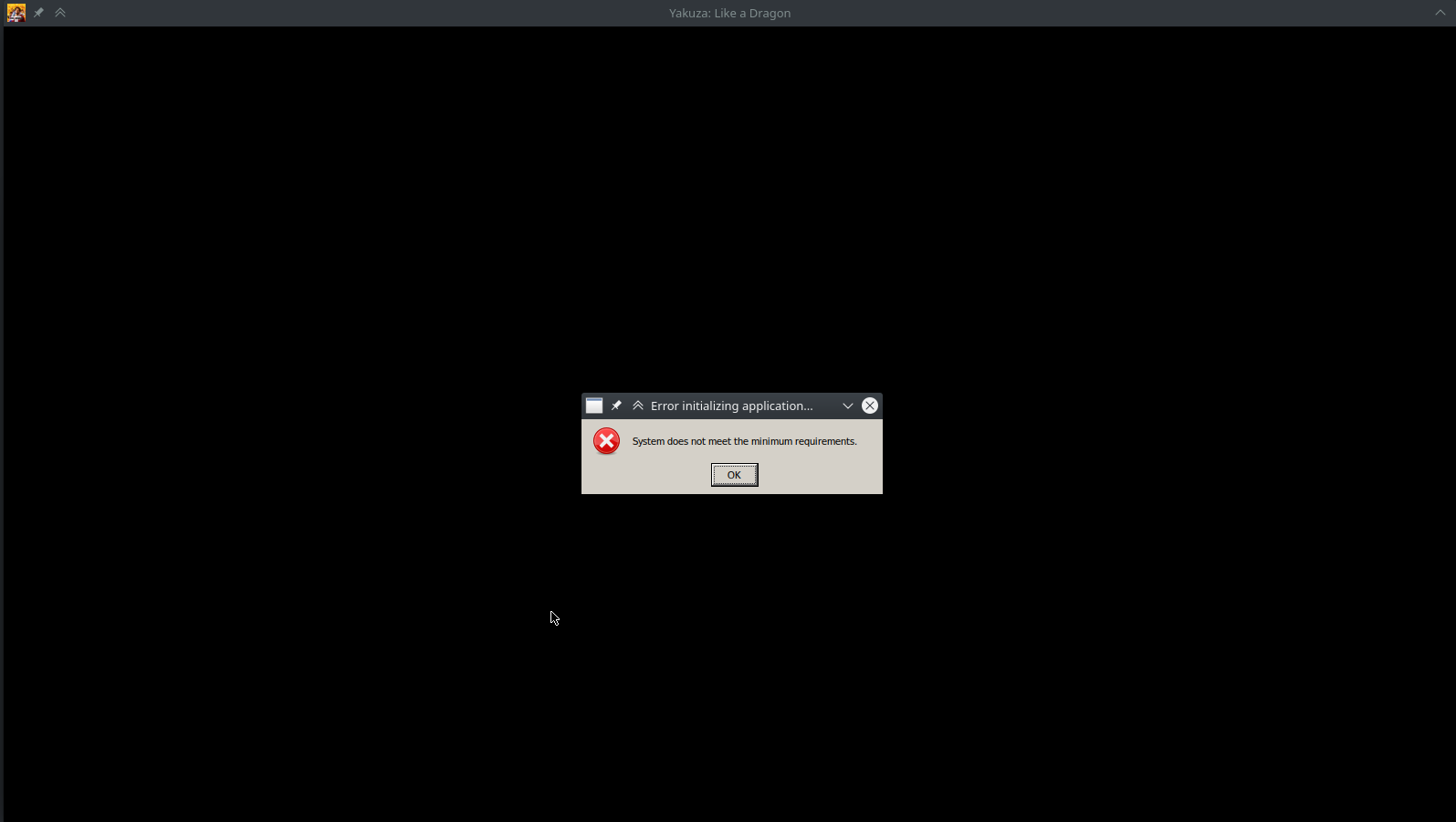
Game just opens a black window with a message box "System does not meet the minimum requirements."

Any ideas what is causing this? Hardware should be good for the game I think.
Launch option: PROTON_LOG=1 PROTON_USE_SECCOMP=1 %command%
Proton Log file: steam-1235140-proton-5.9-GE-8-ST.log
[System]
OS: Debian GNU/Linux testing bullseye
Arch: x86_64
Kernel: 5.9.0-3-amd64
Desktop: XFCE
Display Server: x11
[CPU]
Vendor: AuthenticAMD
Model: AMD Ryzen 7 3700X 8-Core Processor
Physical cores: 8
Logical cores: 16
[Memory]
RAM: 62.8 GB
Swap: 60.5 GB
[Graphics]
Vendor: X.Org
OpenGL Renderer: Radeon RX 5500 XT (NAVI14, DRM 3.39.0, 5.9.0-3-amd64, LLVM 11.0.0)
OpenGL Version: 4.6 (Compatibility Profile) Mesa 20.2.2
OpenGL Core: 4.6 (Core Profile) Mesa 20.2.2
OpenGL ES: OpenGL ES 3.2 Mesa 20.2.2
Vulkan: Supported
@chtaube Your system definitely meets the minimum (and recommended) specs by the looks of it. Only thing I'd suggest trying is switching to Proton-5.21-GE-1 and removing the launch options for the game. See if that solves your issue.
In the meantime, I'll investigate!
EDIT: Doh! Just after posting this I just thought of something! If you have Protontricks installed on your system you can run protontricks 1235140 --gui winecfg to open winecfg for the game's Proton prefix. From here, check your Windows version at the bottom of the window that just opened. Make sure that it's set to Windows 10. If it's not, select it from the dropdown and click apply.
@sonic2kk Thanks for investigating!
Switched to Proton-5.21-GE-1 but unfortunately still doesn't work. Also checked the Windows version as you described and it's set to Windows 10 already. Moved the game to another (faster) Steam library and deleted steamapps/compatdata/1235140 to have the wine prefix recreated, but no effect.
steam-1235140-proton-5.21-GE-1.log
As a side note: When using Proton-5.21-GE-1, games never seem to quit. Steam keeps showing the game as running, even after I'd quit it.
Ok, I got the game running! The issue must be related to the ASUS RX 5500 XT graphics card. Game starts without any issues after I replaced the graphics card with an Sapphire RX 5700 XT.
Anyway, I have another machine with Ryzen 5 3600X + RX 5500 XT where I can test running the game next week. At least, after I got it working on my main machine, I don't have reasons to refund the game :)
Ok, I refunded the game cause I got locked out for 24 hours for whatever reasons. Might give it another try when things have settled.
@chtaube The lockout is related to the Denuvo DRM. Even on Windows, if you launch the game from more than two different PCs too quickly in a day, the game will lock you out. This will only change if/when Denuvo Anti-Tamper is removed from the game, or if SEGA lax the DRM restrictions.
I just tested Patch 1.03, and controller support is still broken regardless of what I test. The old arcade games (OutRun, Super Hang-on, etc) are still broken. Upon reading a comment on a Steam discussion and then investigating myself, it seems like the files for those old games are missing entirely. Many Windows players are also voicing similar complaints around these games, so I would hazard a guess that the arcade game issue is not related to Proton. Pachinko DLC is still broken, and again this is also broken for many users on Windows - The Steam reviews speak for themselves on this matter.
I've been able to confirm that the issue with the arcade games is indeed an issue with the game. It's missing the files for the old arcade games. I followed a Steam guide which takes the files from copies of the game that do work, and was able to get them working. Played a little bit of Out Run and it was fine. Interestingly, this has sound, while the games in Yakuza 0 do not.
As a small aside, I tested the game with the latest Proton-tkg 6.0-RC release and it did not have any controller support. The changelog for Wine 6.0-RC shows some controller changes, however I tested some other games and they worked fine; NieR:Automata, Resident Evil 3, and Hades. Going back to older versions of Proton fixes this issue, however all but the noname_pipes build that was initially provided do not show keyboard prompts if a controller is connected as of Patch 1.03.1 specifically. Pachinko DLC is also still broken but as mentioned, this is also broken on Windows.
Hello @sonic2kk, thanks for identifying that an issue with this game isn't caused by Proton, however, we can not condone third party distribution of game content here, so I've removed the link to the workaround in your last post. Since windows users are equally affected, the best option is to bring that issue to the attention of the game's dev(s).
Just my 2 cents over the controller issues, I've been talking with other LaD players and it looks like the controller issues on Windows are 100% fixed, at least on patch 1.04, so the fix may have to come through the wine/proton devs efforts.
I'm also getting the "System does not meet the minimum requirements." window with Proton 5.13-4/Proton Experimental despite running on a Ryzen 9 3900X w/ a RX 6800XT.
Screenshot
System Information
Processor Information:
    CPU Vendor:  AuthenticAMD
    CPU Brand:  AMD Ryzen 9 3900X 12-Core Processor
    CPU Family:  0x17
    CPU Model:  0x71
    CPU Stepping:  0x0
    CPU Type:  0x0
    Speed:  3800 Mhz
    24 logical processors
    12 physical processors
    HyperThreading:  Supported
    FCMOV:  Supported
    SSE2:  Supported
    SSE3:  Supported
    SSSE3:  Supported
    SSE4a:  Supported
    SSE41:  Supported
    SSE42:  Supported
    AES:  Supported
    AVX:  Supported
    AVX2:  Unsupported
    AVX512F:  Unsupported
    AVX512PF:  Unsupported
    AVX512ER:  Unsupported
    AVX512CD:  Unsupported
    AVX512VNNI:  Unsupported
    SHA:  Unsupported
    CMPXCHG16B:  Supported
    LAHF/SAHF:  Supported
    PrefetchW:  Unsupported

Operating System Version:
    "Arch Linux" (64 bit)
    Kernel Name:  Linux
    Kernel Version:  5.10.0-rc7-98-tkg-upds
    X Server Vendor:  The X.Org Foundation
    X Server Release:  12010000
    X Window Manager:  KWin
    Steam Runtime Version:  steam-runtime_0.20201203.1

Video Card:
    Driver:  AMD AMD SIENNA_CICHLID (DRM 3.40.0, 5.10.0-rc7-98-tkg-upds, LLVM 11.0.0)
    Driver Version:  4.6 (Compatibility Profile) Mesa 21.0.0-devel (git-4eaff8dba7)
    OpenGL Version: 4.6
    Desktop Color Depth: 24 bits per pixel
    Monitor Refresh Rate: 164 Hz
    VendorID:  0x1002
    DeviceID:  0x73bf
    Revision Not Detected
    Number of Monitors:  1
    Number of Logical Video Cards:  1
    Primary Display Resolution:  2560 x 1440
    Desktop Resolution: 2560 x 1440
    Primary Display Size: 27.44" x 15.43" (31.46" diag)
                                            69.7cm x 39.2cm (79.9cm diag)
    Primary VRAM: 16384 MB

Sound card:
    Audio device: ATI R6xx HDMI

Memory:
    RAM:  32090 Mb

VR Hardware:
    VR Headset: None detected
Hello @yoyossef, please copy your system information from Steam (Steam -> Help -> System Information) including the extended diagnostic information and put it in a gist, then include a link to the gist in this issue report.
I suspect that the game is trying to run with lavapipe instead of the video card and temporarily disabling it with something like sudo mv /usr/share/vulkan/icd.d/lvp_icd.x86_64.json /usr/share/vulkan/icd.d/lvp_icd.x86_64.json.disabled might help.
Hello @yoyossef, please copy your system information from Steam (
Steam->Help->System Information) including the extended diagnostic information and put it in a gist, then include a link to the gist in this issue report.I suspect that the game is trying to run with lavapipe instead of the video card and temporarily disabling it with something like
sudo mv /usr/share/vulkan/icd.d/lvp_icd.x86_64.json /usr/share/vulkan/icd.d/lvp_icd.x86_64.json.disabledmight help.
Hi @kisak-valve, here is the complete system info including the extended diagnostic information: system-info
And the logs associated with the run: steam-1235140.log
I did try your recommendation but it didn't work.
Thanks, unfortunately the log doesn't make sense to me, the way I read it:
- the game is in startup
- there's two OutputDebugStringA messages and a bunch of seh noise that comes with them
- the game closes without crashing
Is there any type of controller that works ok in this game on Linux? Does the steam controller work well?
I can confirm that using a win7 VM that the original xbox 360 wireless adapter worked ok even before the recent patches.
@BillFleming I personally use a Steam Controller and it doesn't work. Switch Pro Controller doesn't work, neither does a third party Switch Pro Controller. Wired Xbox 360 clone controller doesn't work, and SC-Controller doesn't work either (tool to make the Steam Controller show up as an Xbox 360 controller).
Some users have had moderate success with the DualShock 4 controller, but the touchpad doesn't seem to work. You could try that controller.
@BillFleming I play with a DS4, and apart from the touchpad issue mentioned earlier it works perfectly fine.
@dgurney Out of curiosity, have you tried mapping it in the Steam Controller Configuration? Or rather, checking if it's mapped? I was looking around last night in the menus and seen an option I think is related to the DS4 touchpad. It probably is already mapped but in the interest of being thorough I thought I'd ask 😅
@sonic2kk Unfortunately none of the Steam mapping options are available since Steam Input must be forced off for the DS4 to be usable.
Thanks, unfortunately the log doesn't make sense to me, the way I read it:
- the game is in startup
- there's two OutputDebugStringA messages and a bunch of seh noise that comes with them
- the game closes without crashing
Hi @kisak-valve, with the help of a few members we found out that using DXVK's dxgi fixes the issue of the game saying that I'm not meeting the minimum required specs.
Adding WINEDLLOVERRIDES=dxgi=n to the launch arguments gets me past that error and the game seems to render correctly.
Maybe some bug report needs to be filled but I wanted to inform you first.
Hello everyone, the new proton-experimental brought some fixes for Yakuza Like a Dragon gamepad handling. I can't test at the moment but I am curious if the situation have improved.
I can say that my steam controller works fine in proton experimental.
x360 wireless controller appears to be working perfectly fine now. 👍 Who do we send Japanese :beer: to for fixing this?
Can also confirm my Steam Controller is working fine with the latest Proton Experimental! Now we can finally be real Yakuza 😄
After finally finding the dongle the xbone wireless controller using xow worked and also for the first time I have seen controller hotplug actually work. I had Dragon running in the background, plugged in the xbone (newer slim) dongle and immediately Yakuza recognized the controller when connected. 👍 👍 👍 😃
I am delighted to report that the PlayStation 5 controller (over USB-C and Bluetooth) works for me with the latest Proton Experimental (I was on Proton-5.21-GE-1 prior to this). I only have the PS5 controller enabled in my controller settings. PlayStation button prompts work as well.
Can confirm that Xbox Elite 2 wireless on XOW now works, with steam input disabled. 🎉
I may have spoken too soon: With my Steam Controller, the triggers are no longer recognised. I've tested with standard Steam Controller drivers, using SC-Controller with Steam Input forced off, and using SC-Controller with Steam Input forced on. Not sure if this was alwasys the case or a regression with the latest 1.07 patch for the game (which is unlikely).
Issue with triggers is still present with the latest Proton Experimental, and with the latest update to the patchset that initially fixed the broader issue with controlles (e.g. on builds of Proton-tkg 6.1 and Proton-GE 6.1 the triggers are still not recognised)
Not sure if this should go here or somewhere else, but I'm seeing a black screen on launch and I'm unable to get past it. Tried a few different versions of proton but no luck. None of the fixes mentioned here worked for me either.
Here's a log of when I tried with Proton 9.0-3: https://pastebin.com/BZcq2D4E
System info:
OS: Arch Linux
KERNEL: 6.11.3-arch1-1
CPU: 12th Gen Intel Core i7-12700K
GPU: NVIDIA GeForce RTX 3070 Ti
GPU DRIVER: NVIDIA 560.35.03
RAM: 64 GB
When playing the game and pressing Steam button – it does open menu in background of the game (you can hear sounds of menu being opened). So you can't interact with SteamOS in any way until you actually exit the game. (Game installed via Heroic and launched from Steam Game Mode interface)
Related threads
- Nvidia driver discussiondxvkclosed same upstream bug
- fsync issuesprotonopen same upstream bug
- Proton 5.13 beta: known issuesprotonclosed same upstream bug
- Yakuza Kiwamiprotonopen same upstream bug
- System compiled dxvk causes stack smashing with wine when playing yakuza-0/kiwami.dxvkclosed same upstream bug
- Monster Hunter World regressionvkd3dclosed same upstream bug
- Monster hutner world: controler not being dected and mosue camera control is broken protonclosed same upstream bug
- Monster Hunter: World (Missing Codecs?)protonclosed same upstream bug
- Monster Hunter World doesn't launchprotonclosed same upstream bug
- Monster Hunter: World doesn't quit properlyprotonclosed same upstream bug
Proton versions
proton 9.0-3x1 2024-10proton experimentalx6 2021-02proton 5.21-ge-1x3 2021-01proton 5.13-4x1 2020-12proton 5.9-ge-8x5 2020-11proton 5.13x9 2020-11proton 5.9x1 2020-11proton 5.13-1x1 2020-11
Launch options
WINEDLLOVERRIDES=dxgi=nx1 2020-12PROTON_USE_SECCOMP=1x8 2020-11PROTON_LOG=1x2 2020-11
Launch lines
PROTON_LOG=1 PROTON_USE_SECCOMP=1 %command%x1 2020-11PROTON_USE_SECCOMP=1 %command%x1 2020-11
Upstream links
- ValveSoftware/Proton/issues/492x1 2020-11
- ValveSoftware/Proton/issues/175x1 2020-11
- show_bug.cgi?id=46998x1 2020-11
- ValveSoftware/wine/pull/83x1 2020-11
DLLs
mfplat.dllx5 2020-11
Compatibility Report
System Information
I confirm:
Proton Log:
steam-1235140.log
Symptoms
Game won't launch