Sacred Gold
For cinematic I had the same problem with Wine 6.1. Install gstreamer plugin ugly/bad i386 fix the issue
Compatibility Report
- Name of the game with compatibility issues: Sacred Gold
- Steam AppID of the game: 12320
System Information
- GPU: GTX 1080
- Driver/LLVM version: 465.27
- Kernel version: 5.11.0-20.1-liquorix-amd64
- Link to full system information report as Gist: https://gist.github.com/Unaccounted4/7ec2e3cd9e7b5236da7cdc54a8a4115d
- Proton version: All
I confirm:
- [ ✔ ] that I have found an existing compatibility report for this game.
- [ ✔ ] that I have checked whether there are updates for my system available.
PROTON_LOG:
steam-12320.log
Symptoms
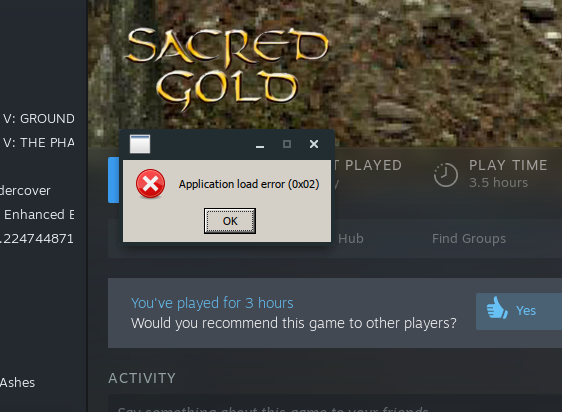
Game doesn't start. Error box appears with Application Load Error 0x02.
Reproduction
Download and launch the game on Ubuntu 20.04. Changing Proton versions doesn't work, part of discovering this was motivated by the RC #4821
@Unaccounted4 Sacred Gold is working well for our QA testers. I suspect a problem with your machine, but I don't know what. My best guess is maybe missing 32-bit OpenGL support, but I don't have strong evidence of that.
Well, I'm not sure what the problem was... but moving the game install folder to ~/.local/share/Steam/steamapps instead of my dedicated games SSD (mounted at /mnt/1TBSSD) now allows me to start the game just fine. This is the only game so far I've seen which has had a problem with this.
I noticed that Sacred Gold does not run too great on Steam, so I wanted to investigate a little and I found some solutions that make the game run better, around 2.5 times faster in my case.
First off, I had no luck fixing it on Steam directly, but I did make it run smoother and better via Wine. The game was also tested on a pureHD mod (which basically just makes the game HD, better texture quality, 1080p [instead of 480p] etc), which is a little more demanding than regular. I could not figure out to run the Steam binary off Steam, and I didn't want to bother with searching for my old CD - pureHD mod is runnable off Steam.
Comparison of performance:
The original, unmodded game, fully zoomed out runs on my PC at ~40 - 60 FPS, often depending on the location I'm in (1024x768 resolution, no fullscreen).
PureHD ran at 15 - 20 FPS (fully zoomed out) depending on the location I'm in (1920x1080, which also has higher texture resolution, not using the defaults).
At medium zoom (which is not really preferred to play on), the unmodded game ran at 60+ FPS (capped at 60, so always shows 60), while pureHD ran at around 24 - 40 FPS (again, medium zoom).
All game settings were exact the same between pureHD and vanilla, and the only difference was resolution (1920x1080 vs 1024x768). Everything else was 1:1.
Running via Wine, Steam version of the game:
Because pureHD does not require you to launch the game via Steam, I accidentally opened it through Wine and decided to check how poorly it'd run on Wine (I actually thought it'll run worse), and noticed that my game is smooth at max zoom, with the pureHD mod, 1920x1080p, uncapped FPS, windowed mode. I used a "hacky(?)" way of showing the FPS in game:
WINEDEBUG=fps env WINEPREFIX="$HOME/wine/WinDrivers" wine start /ProgIDOpen Windows.CompositeFont "$HOME/.local/share/Steam/steamapps/common/Sacred Gold/pureHD.exe" 2>&1 | tee /dev/stderr | sed -u -n -e '/trace/ s/.*approx //p' | osd_cat --lines=1 --color=orange -d 2 -o 8 -O 1
and noticed that my FPS is a rather stable 42, when in this location, via Steam, my FPS was a solid 15 - 16.
I tried to replicate my bottle "WinDrivers" in the Steam bottle, however all I managed to pull off was either the game not launching at all (when the bottle was set to WINEARCH=win32) or having no change (default Steam bottle with my installs). My Wine bottle's instalation: WINEARCH=win32 WINEPREFIX=~/wine/WinDrivers winetricks -q d3dcompiler_42 d3dcompiler_43 d3dcompiler_47 d3dx9 vcrun2003 vcrun2005 vcrun2008 vcrun2010 vcrun2012 vcrun2013 vcrun2022 vcrun6 corefonts tahoma - this bottle also has dsound set to (builtin,native), and Windows version to Windows 7.
Hope this blabber helps you to find some fixes for the game. I spent a few hours toying with it with hopes I can contribute at least a tiny bit to the development and improvements of Proton. If needed, I can also provide a short video with the performance difference. Just let me know and I'll record it any time.
Edit 27th March 2023: After toying with it a little more, I noticed that even a clean wine bottle runs it better than Steam, with no difference between a clean bottle and my previous bottle (listed above). No idea what the game wants anymore...
Found an issue with Sacred (again). Works fine with Proton 4.2-9, also does not work with regular Wine and Wine-Staging. Though don't let it fool ya - this game always has some issues on Linux, sometimes smaller, sometimes bigger. I don't expect them ever to disappear, honestly... Maybe if someone rewrites the game or THQ Nordic does a surprise update as they did with Gothic and Risen (doubt - yes, they own Sacred nowadays).
The issue seems to always be the same - game launches, but then decides that your PC is not worthy, and closes itself after about two seconds. This issue also appeared in Proton 5-ish, Proton 6.1 or 6.2 I believe and Proton 7-ish (not regularly, depended on the update). As mentioned, this issue is a yo-yo - comes back every few Wine or Proton updates. Still playable on 4.2-9, as I mentioned, though not sure how it runs (haven't tested).
The smallest issues it ever has (not had, has) is unstable FPS, but there are (very rare updates of Proton) where it runs better than it ever did on Windows.
People also seem to recommend Proton 3 and 4 in protondb.com as well.
For my PC info etc, read this post here - link provides my PC info and diagnostics (yes, I use RADV, not amdvlk). Also, seems to be similar issue as in the Risen report (this link).
steam-12320.log (Gist did not allow me to post the log, so I had to add it like this).
I'm kind of hesitant on reporting that on Wine forums, one because they don't really focus on games, and two because I'm not active there and they remove access to inactive accounts (and I already made like 5 accounts there in the past...). I feel like Proton is the go-to with a report like that, even though it's about Wine.
I've been playing with Proton 8.25 GE, GoG edition.
There is a very annoying issue: After playing for a while, performance slows to a crawl. I'm not sure what's happening, the game uses DirectX7 so it's running on GL (radeonsi, mesa 23.3). Tried gallium hud and the game seems to maybe run out of VRAM? Uses up to 270MB or so and then perf goes down, from sustained 60fps to 10-30 fps, very stuttery.
I'd have to check but I think I can play up to half an hour or so while running around, before performance goes down and it starts to stutter a lot.
I have a 3900X, 64GB of ram, RX 6600, 8GB of VRAM.
Besides this issue, that I work around by just restarting the game, the rest of the game runs fine. With gamescope I can even use vkBasalt on it and resize the screen properly. Movies don't seem to work but it's not a great loss really.
Sacred Gold from Steam does not work with Proton 9.0-4 or above, including current Proton Experimental (1753369568 experimental-10.0-20250724b). While Proton 9.0-4 and Proton Experimental display a black window briefly and then close, Proton 10.0-2c does not even attempt to run the game (the log file only shows the initial Proton logging information in the top of the file, no Wine output logging).
I have tested with and without Xalia (PROTON_USE_XALIA=0), with Gamescope (gamescope -- %command% and gamescope backend=sdl -- %command%) (in case this is an XWayland issue, similar to one other game in my library), and with Wine's Direct3D implementation if it was not already being used (PROTON_USE_WINED3D=1).
I also tried manually configuring the game settings in STEAM_Settings.cfg to disable fullscreen but to no avail.
I also tried some community Proton releases, such as a couple versions of the latest Wine Master release of Proton-tkg, and GE-Proton10-8. These also exhibit the issue.
Proton Log from running the game with Proton 9.0-4 (as 10.0-2c was not viable) with no other configuration (No environment variables to toggle Xalia or WineD3D, just `PROTON_LOG=1 %command%):
System Information
- OS: endeavourOS
- Desktop: KDE Plasma 6.4.3 Wayland
- GPU: AMD 7900XTX
- Drivers: Mesa-git from Chaotic AUR (
Mesa 25.3.0-devel (git-e4584c9470)) - Kernel: 6.15.9-arch1-1
As an aside: Proton 4.2-9 and 3.16-9 get a window to stay up, but it is a black window. 4.11-13 through to 9.0-4 + Latest Experimental result in a crash after displaying the black screen, and 10.0-2c causes an immediate crash.
In other words, on my setup, the game is unplayable with any Proton version I have tested up to this point.
Proton versions
proton 4.2-9x2 2025-08ge-proton10-8x1 2025-08proton 10.0-2cx1 2025-08proton 9.0-4x1 2025-08proton experimentalx1 2025-08proton 8.25x1 2023-12proton 6.1x1 2023-08
Launch options
PROTON_LOG=1x1 2025-08PROTON_USE_WINED3D=1`).x1 2025-08PROTON_USE_XALIA=0`),x1 2025-08WINEARCH=win32x1 2023-03WINEARCH=win32)x1 2023-03WINEDEBUG=fpsx1 2023-03WINEPREFIX="$HOME/wine/WinDrivers"x1 2023-03WINEPREFIX=~/wine/WinDriversx1 2023-03PROTON_LOGx1 2021-05
Launch lines
gamescope -- %command%x1 2025-08
Upstream links
- ValveSoftware/Proton/issues/554x1 2023-08
- show_bug.cgi?id=16250x1 2018-08
Steam - System Information
Known problem: WineHQ Bugzilla
Simple workaround: Disable movie playback!