Chrono Trigger
Hello @Zero86Sk, please copy your system information from steam (Steam -> Help -> System Information) and put it in a gist, then include a link to the gist in this issue report.
Oh Sorry i had it ready to paste, but forgot
Here is my System:
https://gist.github.com/Zero86Sk/d629f657c1ae861c36657cdf238a7765#file-gistfile1-txt-L3
i added a log if that will help, the game also crashed when i went to a shop and exited out of it.
@Zero86Sk I just played Chrono Trigger on Linux using Proton and have the same issues.
I can provide any info need by devs, and test in any way needed.
Just glad it mostly works!!!
I also get a pretty severe crash when purchasing items/armour which is a pretty big deal
The main issues I face in this game currently are:
Crash when trying to buy anything. There are complicated ways to work around this, but not very consistent.
Crash when switching characters. There are ways of working around this (usually leaving a room, loading the switch screen and waiting, and then moving to the character on the left and quickly switching and leaving)
No videos at all.
Every so often there is a crash when using an item from inventory, or using a healing tech from the menu.
Everything else works well.
So, it is playable, but switching characters to do their side quests at the end is difficult, and requires a few attempts at switching characters.
I played a while. I can't seems to reproduce the crash with proton 3.16
@zzhiyi I cannot even open the game with proton 3.16.4 OR 3.16.6-Beta. It crashes immediately.
What version (with minor point release) specifically are you using?
@kisak-valve if I download some older release should I then
To install a local build of Proton into Steam, make a new directory in ~/.steam/steam/compatibilitytools.d/ with a tool name of your choosing and place the contents of dist into that folder.
I would really like to eventually see the in game videos, and not crash when I do various things.
this is a theory but
i think the store crash might be due to the game wanting a symbol from windows in the prices of items
f.e. Armor costs 10,000
in windows if you change the number divider in the region setting (you can put there , . : anything really)
if you change it to a space the numbers will stop showing correctly and your price and everything will be 0 or not show at all
(slovakia has a space for the number divider, had to change it to ( , ) fix the game in windows)
so the game is pulling actual info off of windows region settings for some reason
if it cant find it in linux after you exit the store it just crashes
@Zero86Sk good theory, but AFAIK Chrono Trigger does not use decimal notation for money. It it is a floating point number, that would be strange programming. If they wrote the program in C/++/etc it would make sense to use an unsigned int rather than a double.
The game crashes in the menu when I try to watch the cut screens I have gotten, and does not show the intro cut scene. It also crashes when trying to buy/sell things in the store. So... my guess is that it has some issue with how it stores/reads information from the harddrive. It could be a problem with Wine's implementation of file system handlers, or could have some bad programming that uses hard-coded things, rather than doing some sort of actual checking using a dirent or whatever the Windows API equivalent is.
Can an unhandled exception with stack trace help anyone? Crash happens when I buy equipment from the shop.
System Information:
Computer Information:
    Manufacturer:  Unknown
    Model:  Unknown
    Form Factor: Desktop
    No Touch Input Detected

Processor Information:
    CPU Vendor:  AuthenticAMD
    CPU Brand:  AMD A8-7600 Radeon R7, 10 Compute Cores 4C+6G
    CPU Family:  0x15
    CPU Model:  0x30
    CPU Stepping:  0x1
    CPU Type:  0x0
    Speed:  3100 Mhz
    4 logical processors
    4 physical processors
    HyperThreading:  Unsupported
    FCMOV:  Supported
    SSE2:  Supported
    SSE3:  Supported
    SSSE3:  Supported
    SSE4a:  Supported
    SSE41:  Supported
    SSE42:  Supported
    AES:  Supported
    AVX:  Supported
    CMPXCHG16B:  Supported
    LAHF/SAHF:  Supported
    PrefetchW:  Unsupported

Operating System Version:
    "Manjaro Linux" (64 bit)
    Kernel Name:  Linux
    Kernel Version:  4.19.62-1-MANJARO
    X Server Vendor:  The X.Org Foundation
    X Server Release:  12005000
    X Window Manager:  GNOME Shell
    Steam Runtime Version:  steam-runtime_0.20190711.3

Video Card:
    Driver:  NVIDIA Corporation GeForce GTX 960/PCIe/SSE2
    Driver Version:  4.6.0 NVIDIA 430.26
    OpenGL Version: 4.6
    Desktop Color Depth: 24 bits per pixel
    Monitor Refresh Rate: 60 Hz
    VendorID:  0x10de
    DeviceID:  0x1401
    Revision Not Detected
    Number of Monitors:  1
    Number of Logical Video Cards:  2
    Primary Display Resolution:  1920 x 1080
    Desktop Resolution: 1920 x 1080
    Primary Display Size: 23.54" x 13.23" (26.97" diag)
                                            59.8cm x 33.6cm (68.5cm diag)
    Primary Bus: PCI Express 16x
    Primary VRAM: 4096 MB
    Supported MSAA Modes:  2x 4x 8x 16x

Sound card:
    Audio device: ATI R6xx HDMI

Memory:
    RAM:  6968 Mb

Miscellaneous:
    UI Language:  English
    LANG:  en_US.UTF-8
    Total Hard Disk Space Available:  787384 Mb
    Largest Free Hard Disk Block:  470892 Mb
    VR Headset: None detected
Crash report:
Unhandled exception: page fault on read access to 0x6e6f7071 in 32-bit code (0x7bc71e32).
0035:fixme:dbghelp:elf_search_auxv can't find symbol in module
Register dump:
 CS:0023 SS:002b DS:002b ES:002b FS:0063 GS:006b
 EIP:7bc71e32 ESP:0032f760 EBP:0032f7b8 EFLAGS:00210206(  R- --  I   - -P- )
 EAX:0100fe02 EBX:00fe0000 ECX:00030000 EDX:6e6f706d
 ESI:0100fdfa EDI:6f635f72
Stack dump:
0x0032f760:  00000000 00000000 7c307b50 7bc715ec
0x0032f770:  00fe0060 00000000 0100fe02 00000000
0x0032f780:  00fe0000 00000002 000000b8 000000b4
0x0032f790:  7b924010 00000000 01a7ad00 00fe0014
0x0032f7a0:  00000008 00000000 0032f7d0 00000009
0x0032f7b0:  01a71440 00000001 0032f7e8 7dfaa318
Backtrace:
=>0 0x7bc71e32 RtlAllocateHeap+0xe2() in ntdll (0x0032f7b8)
  1 0x7dfaa318 msvcrt_heap_alloc+0x47() in ucrtbase (0x0032f7e8)
  2 0x7dfab038 MSVCRT_malloc+0x17() in ucrtbase (0x0032f7f8)
  3 0x104170f3 EntryPoint+0xffffffff() in libcocos2d (0x0032f808)
  4 0x100e42c1 EntryPoint+0xffffffff() in libcocos2d (0x0032f814)
  5 0x102b53d1 EntryPoint+0xffffffff() in libcocos2d (0x0032f834)
  6 0x102b546e EntryPoint+0xffffffff() in libcocos2d (0x0032f84c)
  7 0x102b5dff EntryPoint+0xffffffff() in libcocos2d (0x0032f864)
  8 0x102b5e4e EntryPoint+0xffffffff() in libcocos2d (0x0032f89c)
  9 0x102b5a9b EntryPoint+0xffffffff() in libcocos2d (0x0032f950)
  10 0x102b5d54 EntryPoint+0xffffffff() in libcocos2d (0x0032f9b4)
  11 0x102b07ec EntryPoint+0xffffffff() in libcocos2d (0x0032fa28)
  12 0x102b35b0 EntryPoint+0xffffffff() in libcocos2d (0x0032fb0c)
  13 0x102b4244 EntryPoint+0xffffffff() in libcocos2d (0x0032fb7c)
  14 0x102c1c38 EntryPoint+0xffffffff() in libcocos2d (0x0032fba8)
  15 0x102c1c38 EntryPoint+0xffffffff() in libcocos2d (0x0032fbd4)
  16 0x102c1c38 EntryPoint+0xffffffff() in libcocos2d (0x0032fc00)
  17 0x102c1c38 EntryPoint+0xffffffff() in libcocos2d (0x0032fc2c)
  18 0x102c1c38 EntryPoint+0xffffffff() in libcocos2d (0x0032fc58)
  19 0x102c1c38 EntryPoint+0xffffffff() in libcocos2d (0x0032fc84)
  20 0x102ce4d8 EntryPoint+0xffffffff() in libcocos2d (0x0032fda4)
  21 0x102ce300 EntryPoint+0xffffffff() in libcocos2d (0x0032fdbc)
  22 0x1024d1dc EntryPoint+0xffffffff() in libcocos2d (0x0032fdd0)
  23 0x10195aa2 EntryPoint+0xffffffff() in libcocos2d (0x0032fe78)
  24 0x00610aa6 EntryPoint+0xffffffff() in chrono trigger (0x0032fee4)
  25 0x0069a5b5 EntryPoint+0xffffffff() in chrono trigger (0x0032ff30)
  26 0x7b47f9e2 call_process_entry+0x11() in kernel32 (0x0032ff48)
  27 0x7b481bdc start_process+0xab() in kernel32 (0x0032ffd8)
  28 0x7b47f9ee start_process_wrapper+0x9() in kernel32 (0x0032ffec)
0x7bc71e32 RtlAllocateHeap+0xe2 in ntdll: movl	0x4(%edx),%eax
Modules:
Module	Address			Debug info	Name (182 modules)
PE	  330000-  3b8000	Deferred        sqlite3
PE	  3c0000-  3cb000	Deferred        libvorbisfile
PE	  3d0000-  3d8000	Deferred        libogg
PE	  3e0000-  3f5000	Deferred        vcruntime140
PE	  400000-  7a9000	Export          chrono trigger
PE	  7b0000-  7fc000	Deferred        libcurl
PE	  800000-  8ee000	Deferred        msvcr120
PE	  8f0000-  9c6000	Deferred        msvcr110
PE	  9d0000-  a76000	Deferred        libvorbis
PE	  a80000-  ade000	Deferred        openal32
PE	  ae0000-  b4d000	Deferred        msvcp140
PE	  b50000-  b53000	Deferred        api-ms-win-crt-time-l1-1-0
PE	 13e0000- 151d000	Deferred        steam
PE	10000000-108fe000	Export          libcocos2d
PE	3b400000-3b43a000	Deferred        steam_api
PE	5a4c0000-5a4d3000	Deferred        zlib1
PE	61740000-61743000	Deferred        api-ms-win-crt-locale-l1-1-0
PE	62180000-62183000	Deferred        normaliz
PE	622c0000-622c3000	Deferred        api-ms-win-crt-filesystem-l1-1-0
PE	62aa0000-62af4000	Deferred        glew32
PE	62e40000-62e43000	Deferred        api-ms-win-crt-multibyte-l1-1-0
PE	63340000-63343000	Deferred        api-ms-win-crt-runtime-l1-1-0
PE	63a00000-63a03000	Deferred        api-ms-win-crt-heap-l1-1-0
PE	63ac0000-63ac4000	Deferred        dwmapi
PE	64b40000-64b43000	Deferred        shcore
PE	64d80000-64d84000	Deferred        hid
PE	65200000-65228000	Deferred        ole32
PE	66640000-66649000	Deferred        msacm32
ELF	671f8000-68c3c000	Deferred        libicudata.so.64
PE	68c40000-68c48000	Deferred        shlwapi
PE	69580000-69583000	Deferred        api-ms-win-crt-stdio-l1-1-0
PE	69d80000-69d83000	Deferred        api-ms-win-crt-environment-l1-1-0
PE	69e80000-69e84000	Deferred        propsys
PE	6a300000-6a308000	Deferred        oleaut32
PE	6a6c0000-6a6c3000	Deferred        api-ms-win-crt-utility-l1-1-0
PE	6a900000-6a90f000	Deferred        setupapi
PE	6ac00000-6ac04000	Deferred        mf
PE	6aec0000-6aec4000	Deferred        psapi
PE	6ba80000-6ba83000	Deferred        api-ms-win-core-fibers-l1-1-1
PE	6c0c0000-6c0c4000	Deferred        imm32
PE	6d780000-6d783000	Deferred        api-ms-win-crt-convert-l1-1-0
PE	6df80000-6df83000	Deferred        api-ms-win-crt-string-l1-1-0
PE	6e540000-6e543000	Deferred        api-ms-win-core-synch-l1-2-0
PE	6e8c0000-6e913000	Deferred        comctl32
PE	6fdc0000-6fdc4000	Deferred        rpcrt4
PE	70340000-70344000	Deferred        mmdevapi
PE	70780000-70783000	Deferred        api-ms-win-crt-math-l1-1-0
PE	71240000-71243000	Deferred        kernelbase
PE	71400000-71403000	Deferred        mfplat
ELF	71fd0000-7205c000	Deferred        libvorbisenc.so.2
ELF	72060000-7208e000	Deferred        libvorbis.so.0
ELF	72090000-72103000	Deferred        libflac.so.8
ELF	72108000-721e7000	Deferred        libgcrypt.so.20
ELF	721e8000-72277000	Deferred        libsndfile.so.1
ELF	72278000-76f1a000	Deferred        libllvm-8.so
ELF	76f20000-78a9e000	Deferred        libnvidia-glcore.so.430.26
PE	78aa0000-78b5f000	Deferred        msvcr100
ELF	78b80000-78c33000	Deferred        libsystemd.so.0
ELF	78c38000-78c82000	Deferred        libdbus-1.so.3
ELF	78c88000-78d17000	Deferred        libpulsecommon-12.2.so
ELF	78d18000-78d74000	Deferred        libpulse.so.0
ELF	78d78000-78daa000	Deferred        winepulse<elf>
  \-PE	78d80000-78daa000	\               winepulse
ELF	78eb8000-7a7ff000	Deferred        steamclient.so
ELF	7a800000-7a94c000	Deferred        opengl32<elf>
  \-PE	7a840000-7a94c000	\               opengl32
ELF	7a950000-7a973000	Deferred        libgpg-error.so.0
ELF	7b2d0000-7b2fa000	Deferred        libpng12.so.0
ELF	7b400000-7b848000	Export          kernel32<elf>
  \-PE	7b430000-7b848000	\               kernel32
ELF	7b858000-7b861000	Deferred        libogg.so.0
ELF	7bb10000-7bbff000	Deferred        libglx_nvidia.so.0
ELF	7bc00000-7bd61000	Export          ntdll<elf>
  \-PE	7bc30000-7bd61000	\               ntdll
ELF	7be28000-7bfff000	Deferred        libicuuc.so.64
ELF	7c000000-7c004000	Deferred        <wine-loader>
ELF	7c010000-7c018000	Deferred        libasyncns.so.0
ELF	7c0d8000-7c104000	Deferred        liblzma.so.5
ELF	7c108000-7c289000	Deferred        libxml2.so.2
ELF	7c290000-7c300000	Deferred        libncursesw.so.6
ELF	7c468000-7c47e000	Deferred        winejoystick<elf>
  \-PE	7c470000-7c47e000	\               winejoystick
ELF	7c630000-7c635000	Deferred        libnvidia-tls.so.430.26
ELF	7c678000-7c6c9000	Deferred        libvulkan.so.1
ELF	7c6d0000-7c71d000	Deferred        winevulkan<elf>
  \-PE	7c6e0000-7c71d000	\               winevulkan
ELF	7c720000-7c738000	Deferred        vulkan-1<elf>
  \-PE	7c730000-7c738000	\               vulkan-1
ELF	7c738000-7c762000	Deferred        libudev.so.1
ELF	7c7b8000-7c7de000	Deferred        xinput1_4<elf>
  \-PE	7c7c0000-7c7de000	\               xinput1_4
ELF	7c7e0000-7c81d000	Deferred        uxtheme<elf>
  \-PE	7c7f0000-7c81d000	\               uxtheme
ELF	7c828000-7c830000	Deferred        libxfixes.so.3
ELF	7c830000-7c83d000	Deferred        libxcursor.so.1
ELF	7c840000-7c854000	Deferred        libxi.so.6
ELF	7c858000-7c85c000	Deferred        libxcomposite.so.1
ELF	7c860000-7c86f000	Deferred        libxrandr.so.2
ELF	7c870000-7c87e000	Deferred        libxrender.so.1
ELF	7c880000-7c887000	Deferred        libxxf86vm.so.1
ELF	7c888000-7c88c000	Deferred        libxinerama.so.1
ELF	7c890000-7c94a000	Deferred        winex11<elf>
  \-PE	7c8b0000-7c94a000	\               winex11
ELF	7c950000-7c9ab000	Deferred        usp10<elf>
  \-PE	7c960000-7c9ab000	\               usp10
ELF	7c9b0000-7cb11000	Deferred        libsdl2-2.0.so.0
ELF	7cb18000-7cb83000	Deferred        dinput8<elf>
  \-PE	7cb30000-7cb83000	\               dinput8
ELF	7cb88000-7ce6b000	Deferred        lsteamclient<elf>
  \-PE	7cc90000-7ce6b000	\               lsteamclient
ELF	7d068000-7d094000	Deferred        libexpat.so.1
ELF	7d098000-7d0e4000	Deferred        libfontconfig.so.1
ELF	7d0e8000-7d161000	Deferred        libpcre.so.1
ELF	7d168000-7d2a0000	Deferred        libglib-2.0.so.0
ELF	7d2a0000-7d3a7000	Deferred        libharfbuzz.so.0
ELF	7d3a8000-7d47d000	Deferred        libfreetype.so.6
ELF	7d480000-7de89000	Deferred        shell32<elf>
  \-PE	7d4b0000-7de89000	\               shell32
ELF	7ded0000-7deda000	Deferred        libuuid.so.1
ELF	7dee0000-7df20000	Deferred        libpng16.so.16
ELF	7df20000-7df32000	Deferred        libbz2.so.1.0
ELF	7df38000-7e054000	Export          ucrtbase<elf>
  \-PE	7df70000-7e054000	\               ucrtbase
ELF	7e058000-7e061000	Deferred        libffi.so.6
ELF	7e068000-7e09b000	Deferred        libcrypt.so.1
ELF	7e0a0000-7e146000	Deferred        libsqlite3.so.0
ELF	7e148000-7e18f000	Deferred        libhx509.so.5
ELF	7e190000-7e19f000	Deferred        libheimbase.so.1
ELF	7e1a0000-7e1c9000	Deferred        libwind.so.0
ELF	7e1d0000-7e258000	Deferred        libgmp.so.10
ELF	7e258000-7e28b000	Deferred        libhogweed.so.4
ELF	7e290000-7e2cd000	Deferred        libnettle.so.6
ELF	7e2d0000-7e2e3000	Deferred        libtasn1.so.6
ELF	7e2e8000-7e31c000	Deferred        libidn.so.11
ELF	7e320000-7e378000	Deferred        libp11-kit.so.0
ELF	7e378000-7e392000	Deferred        libz.so.1
ELF	7e398000-7e3ae000	Deferred        libroken.so.18
ELF	7e3b0000-7e3e5000	Deferred        libhcrypto.so.4
ELF	7e3e8000-7e3ed000	Deferred        libcom_err.so.2
ELF	7e3f0000-7e495000	Deferred        libasn1.so.8
ELF	7e498000-7e51b000	Deferred        libkrb5.so.26
ELF	7e520000-7e528000	Deferred        libheimntlm.so.0
ELF	7e528000-7e666000	Deferred        libgnutls.so.30
ELF	7e668000-7e6a5000	Deferred        libgssapi.so.3
ELF	7e6a8000-7e6c4000	Deferred        libsasl2.so.2
ELF	7e6c8000-7e6e1000	Deferred        libresolv.so.2
ELF	7e6e8000-7e6f7000	Deferred        liblber-2.4.so.2
ELF	7e6f8000-7e74a000	Deferred        libldap_r-2.4.so.2
ELF	7e750000-7e7b4000	Deferred        wldap32<elf>
  \-PE	7e760000-7e7b4000	\               wldap32
ELF	7e7b8000-7e7f3000	Deferred        ws2_32<elf>
  \-PE	7e7c0000-7e7f3000	\               ws2_32
ELF	7e7f8000-7e8d0000	Deferred        msvcrt<elf>
  \-PE	7e820000-7e8d0000	\               msvcrt
ELF	7e8d0000-7e8e7000	Deferred        version<elf>
  \-PE	7e8e0000-7e8e7000	\               version
ELF	7e8e8000-7e980000	Deferred        advapi32<elf>
  \-PE	7e900000-7e980000	\               advapi32
ELF	7e980000-7ead9000	Deferred        gdi32<elf>
  \-PE	7e9a0000-7ead9000	\               gdi32
ELF	7eae0000-7ed0d000	Deferred        user32<elf>
  \-PE	7eb10000-7ed0d000	\               user32
ELF	7ed10000-7ede6000	Deferred        winmm<elf>
  \-PE	7ed20000-7ede6000	\               winmm
ELF	7efe8000-7effd000	Deferred        libnss_files.so.2
ELF	f75c8000-f75d0000	Deferred        libxdmcp.so.6
ELF	f75d0000-f75d5000	Deferred        libxau.so.6
ELF	f75d8000-f7604000	Deferred        libxcb.so.1
ELF	f7608000-f7625000	Deferred        libgcc_s.so.1
ELF	f7628000-f768a000	Deferred        libgldispatch.so.0
ELF	f7690000-f76a6000	Deferred        libxext.so.6
ELF	f76a8000-f77f5000	Deferred        libx11.so.6
ELF	f77f8000-f781b000	Deferred        libglx.so.0
ELF	f7820000-f78ed000	Deferred        libm.so.6
ELF	f7ad0000-f7ad6000	Deferred        libdl.so.2
ELF	f7ad8000-f7ae3000	Deferred        librt.so.1
ELF	f7ae8000-f7b4c000	Deferred        libgl.so.1
ELF	f7b50000-f7d2f000	Deferred        libc.so.6
ELF	f7d30000-f7d52000	Deferred        libpthread.so.0
ELF	f7d58000-f7f10000	Export          libwine.so.1
ELF	f7f10000-f7f4e000	Deferred        gameoverlayrenderer.so
ELF	f7f50000-f7f7b000	Deferred        ld-linux.so.2
Threads:
process  tid      prio (all id:s are in hex)
00000008 steam.exe
	00000023    0
	00000009    0
0000000c services.exe
	0000001f    0
	0000001b    0
	00000018    0
	00000011    0
	0000000e    0
	0000000d    0
0000000f plugplay.exe
	00000015    0
	00000014    0
	00000010    0
00000016 winedevice.exe
	0000001c    0
	0000001a    0
	00000019    0
	00000017    0
0000001d winedevice.exe
	00000022    0
	00000021    0
	00000020    0
	0000001e    0
00000024 explorer.exe
	0000002a    0
	00000029    0
	00000028    0
	00000025    0
00000026 (D) Z:\home\grayson\.local\share\Steam\steamapps\common\Chrono Trigger\Chrono Trigger.exe
	00000032    0
	00000031    0
	00000030    0
	0000002f   15
	0000002e    0
	0000002d    0
	0000002c   15
	0000002b    0
	00000027    0 <==
System information:
    Wine build: wine-4.11
    Platform: i386 (WOW64)
    Version: Windows 7
    Host system: Linux
    Host version: 4.19.62-1-MANJARO
pid 16283 != 16282, skipping destruction (fork without exec?)
JS method call WebChat.GetOverlayChatBrowserInfo with 1 arguments
JS method call Storage.SetString with 3 arguments
Game removed: AppID 613830 "", ProcID 16313
@Israel-D @Zero86Sk
Just to clarify the "number divider" thing - the game code can absolutely store the price in an integer data type, however the presentation in human-readable in-game form is something entirely different.
Some of the usual terms for the discussed thing would be "digit group separator", "thousands separator" (or "delimiter" instead of "separator") - if you have "four million" pieces, the proper way to display that number is "4,000,000" in some countries and "4 000 000" in others (and 4.000.000 or 4_000_000 in other cases, but that's beside the point). If there are known issues with this on native as described, I wouldn't be surprised if they happened also on Proton/Wine.
Now that there's an actual stack trace available, the devs may have a better idea what's the culprit.
Do we have any update on the shop crash cause? Anything I can do to help?
the number divide thing is true in windows i tested it
In Slovakia we use f.e. "20 000" if you have it like this the game crashes, you have to change it in windows (the os) to display 20,000 or ", . -" etc there cant be a space there. That solves it in windows.
Not sure if linux settings would do the same. did anyone try D9VK?
I can try D9VK later today and document any findings
I tried PROTON_USE_D9VK=1 %command% for launch options and the result is the same. Accessing the shop crashes the game.
I even have en_US.UTF-8 in /etc/locale.conf:
LC_ALL="en_US.UTF-8"
LANG="en_US.UTF-8"
After a restart, here's my result:
$ locale
LANG=en_US.UTF-8
LC_CTYPE="en_US.UTF-8"
LC_NUMERIC="en_US.UTF-8"
LC_TIME="en_US.UTF-8"
LC_COLLATE="en_US.UTF-8"
LC_MONETARY="en_US.UTF-8"
LC_MESSAGES="en_US.UTF-8"
LC_PAPER="en_US.UTF-8"
LC_NAME="en_US.UTF-8"
LC_ADDRESS="en_US.UTF-8"
LC_TELEPHONE="en_US.UTF-8"
LC_MEASUREMENT="en_US.UTF-8"
LC_IDENTIFICATION="en_US.UTF-8"
LC_ALL=en_US.UTF-8
The result is the same. Shop crashed the game.
I would want to adjust the regional settings for the game, but there's no regional settings (intl.cpl) in the Wine prefix.
Same test with same results as @GraysonPeddie
Having the same problems as described.
However, with Proton GE the game freezes instead of crashing outright.
I get these last two lines before freezing:
250881.445:002b:0036:err:ntdll:RtlpWaitForCriticalSection section 0x1050060 "../../../../proton/wine/dlls/ntdll/heap.c: HEAP.critSection" wait timed out in thread 0036, blocked by 002c, retrying (60 sec)
250881.445:002b:003b:err:ntdll:RtlpWaitForCriticalSection section 0x1050060 "../../../../proton/wine/dlls/ntdll/heap.c: HEAP.critSection" wait timed out in thread 003b, blocked by 002c, retrying (60 sec)
Attaching Proton Log
steam-613830.log
Proton 5.0-6 rc3, overlay not working.
steam-613830.log
@soredake Could you be a bit more descriptive with the problem? I don't get the Steam overlay with shift+tab on any version of Proton with this game.
This game is still crashing at stores in Proton 5.13-6
Should I just move on from this?
In Proton-5-21-GE-1, mine freezes instead when I visit stores and select
"Buy." If I select "Sell," I can select something I want to sell, but the
game freezes. The music still plays either way.
On Sat, Feb 13, 2021 at 1:04 PM 'David Hollinger III' via GitHub <
[email protected]> wrote:
This game is still crashing at stores in Proton 5.13-6
Should I just move on from this?
—
You are receiving this because you were mentioned.
Reply to this email directly, view it on GitHub
https://github.com/ValveSoftware/Proton/issues/440#issuecomment-778654925,
or unsubscribe
https://github.com/notifications/unsubscribe-auth/AEEDSADA3AUKGX2YTQRIOKLS625LFANCNFSM4FRPZS4Q
.
I just got this, and with it crashing on stores it is totally unplayable. Did anyone managed to fix this?
Tested with Proton 6.3 with a shop and the menu "party" and it looks like it doesn't crash anymore. Can someone confirm it?
I did it today on Proton-GE 6.1, the cutscenes are not playing but the shop
is working.
On Thu, Apr 1, 2021 at 4:07 PM Neros @.***> wrote:
Tested with Proton 6.3 with a shop and the menu "party" and it looks like
it doesn't crash anymore. Can someone confirm it?—
You are receiving this because you are subscribed to this thread.
Reply to this email directly, view it on GitHub
https://github.com/ValveSoftware/Proton/issues/440#issuecomment-812142261,
or unsubscribe
https://github.com/notifications/unsubscribe-auth/AAFLUKFAEJMJ7ZQFEQJP6LLTGTG6NANCNFSM4FRPZS4Q
.
I'm still seeing the shop game crash (in this case freeze) on Proton 6.3, Proton-GE 6.1 and Proton-GE 6.5.
In Proton 6.3, the game crashes when it gets to the opening cutscene
I tried again today, Proton 6.3 and Proton-GE 6.5 don't work for me, only Proton-GE 6.1.
Specifically, I am using Proton version: 1612754589 6.1-GE-2 Proton-GE 6.1-2
I wonder what fixed the bug in GE 6.1-2 but not in 6.5.
I can confirm that Proton-GE 6.1-2 fixes the shop crash for me, but Proton-GE 6.1-1 doesn't
@dennisprangle why are you testing with 6.1-X? Proton-GE 6.5-2 is the last release.
@NerosTie
I think the question is why the shop works for 6.1-2 but not in 6.5.
It seem to be currently working with Proton Experimental which is positive.
I tested swapping files between Proton-GE-6.1-2 and Proton-GE-6.5, it seem that proton-fixes and DXVK (or vkd3d) has nothing to do with the bug. It must be some other wine library but I failed to identify it.
Edit:
I am using Proton Experimental. Slackware64 Current. Steam Built: Sep 10 2021, at 01:00:50.
I can buy from stores, the opening video doesn't play. The gamepad binds buttons correctly in game but the buttons are mislabeled. Only game that does this. I'm using a PS2 controller connected to a "Lakeview Research Gamtec.,Ltd SmartJoy PLUS Adapter." For example, the triangle button on the PS2 controller corresponds to Y on the Xbox controller, but it is labeled as A in the game.
"The game crashes at the video that is played when entering the Mystic Mountains for the first time when looking for the Dreamstone." This issue was resolved in later Proton Experimental updates and I beat the game without further problems.
Slackware64 Current. Steam Built: May 19 2021, at 01:54:04. With the new Proton Experimental it crashes at the Square Enix Logo with a pop-up window. Here is the proton log and a screenshot of the pop-up window is in the comment below it in the gist. https://gist.github.com/EpicureanGit/c42b17e304c424f48894ad54fa69a071#file-gistfile1-txt
Tracking note: Marking the last comment as resolved because it should be fixed in Proton Experimental. If you're still seeing an issue with winegstreamer in Proton Experimental, then please add a new note for the Proton devs to ponder.
Tracking note: Marking the last comment as resolved because it should be fixed in Proton Experimental. If you're still seeing an issue with winegstreamer in Proton Experimental, then please add a new note for the Proton devs to ponder.
Hello @kisak-valve -- with the latest Proton Experimental forced in compatibility options, I am not able to see anything but a black screen after the square logo.
Hello @dylanmtaylor, please add PROTON_LOG=1 %command% to the game's launch options and attach the generated $HOME/steam-$APPID.log to this issue report as a file. (Proton logs compress well if needed.) Also, please copy your system information from Steam (Steam -> Help -> System Information) and put it in a gist, then include a link to the gist in this issue report.
@kisak-valve @dylanmtaylor
I can confirm that the game shows nothing but a black screen even with Proton Experimental. But I am not sure if that is the same problem as the one you marked as resolved, the game is not crashing but not playing the introductory video I can still skip it by pressing CANCEL on the controller.
Here is the full log: steam-613830.log
Here is the winegstreamer error:
824.826:0114:014c:fixme:gstreamer:DllGetClassObject {271c3902-6095-4c45-a22f-20091816ee9e} not implemented, returning CLASS_E_CLASSNOTAVAILABLE.
824.826:0114:014c:err:ole:apartment_getclassobject DllGetClassObject returned error 0x80040111 for dll L"C:\\windows\\system32\\winegstreamer.dll"
I can confirm that in Proton Experimental, the game does not crash when I access the shop. However, during the intro I can hear the audio as played by the video, but there's no visual.
Updating as this issue is ongoing. FMV's fail to play and cannot be skipped. FMV plays partially, goes to black and crashes or starts off at black screen then crashes.
Game
AppId: 613830
Name: Chrono Trigger
Proton: 6.3-8
System Information
Full Log: steam.log
Also tested ge-proton-7.0rc and proton-experimental without positive results.
OS: Slackware64-current
NVIDIA Driver Version: 510.54
Linux: 5.16.13
Proton: 1646943044 experimental-7.0-20220310
Trying to play Chrono Trigger's movies found in the Extras menu found in main menu causes game to crash. I let the game load up and play the intro movie. That worked with no problems but if I try to play a movie in Extras the game crashes.
PROTON_LOG=1:
https://gist.github.com/EpicureanGit/e5a4ac86935f412fe0d66f307d83f0a5
The game is crashing when it tries to play the cut-scene for introducing the Ayla character when you first enter 65,000,000 B.C. I was able to play for over 13 hours before I got to this point, but I am unable to progress beyond this point. I've been using Proton Experimental. I've also tried using GE-Proton7-9, but same result.
@ben914 Would you be able to upload your save file somewhere so that we can investigate this without playing 13 hours? I can figure out a private upload location if you don't want other folks piggybacking on your hard work :)
@alasky17 Sure, thanks for your response. Here is the folder with the save data from Steam/steamapps/compatdata/613830/pfx/drive_c/users/steamuser/Documents/My Games/Chrono Trigger. I believe these are the files you want, if not, let me know.
The 3rd save slot is the one where the issue occurs. Once loaded, if you go to the left there are a few light columns that warp you to different time periods. Going to 65,000,000 B.C., and just after your first battle is where the cut-scene tries to play, but crashes the game. Most times it crashes right away when trying to play the cut-scene, but one time it started to play, but crashed in the middle of the video.
P.S. As a side note a couple other minor issues is that fullscreen, or borderless display options cut off the very bottom of the screen making text at the bottom unreadable. I had to change to windowed mode. Also in my 13 hrs of playing my controller randomly stopped working twice. I was using the Steam Controller. I tried reconnecting it, and also tried switching to a Dual Shock 4 controller, but neither worked, and had to restart the game both times that it happened to get working again.
@ben914 Thank you for the game save! We will look into this - on first glance it appears to be perf related, so if you have a way to temporarily improve the perf (close a bunch of chrome tabs or something) you might be able to get past the crash and continue your playthrough :)
The game is crashing when it tries to play the cut-scene for introducing the Ayla character
For me the intro cinematic does not crash, but plays at less than 1fps until it just freezes at some point. While this could be overpowered very well by performance, I doubt my setup is the problem.
@alasky17 Well, I got past the point where it was crashing, but I wouldn't say the issue is exactly resolved.
I tried closing any unnecessary background processes, and also tried switching to I lighter desktop environment (LXDE). I still had the same issue, but then I tried to uninstall and reinstall the game, and it worked the first time after the reinstall. I saved to a new slot the first chance I got afterwards. Out of curiosity I went back and tried loading from the older save slot a few times, but It was crashing again, so I don't know if it had anything to do with being the first run after a fresh reinstall, or if it was just luck, but at least I do have a functional save after the problem area.
I have probably tried getting past this spot over 30 times, and only had this one success, so something still needs to be done to make the game a more stable experience if other people also experience this issue.
If you find a potential fix I will keep a copy of the save file just before the problem area, just in case you want me to test on my end some more.
Replying to https://github.com/ValveSoftware/Proton/issues/440#issuecomment-1070210406
FWIW - I ran into similar on the Steam Deck yesterday, but instead of the Ayla cutscene which ran flawlessly for me the first time, it was one further into the game -- the frog masamune cutscene at the magic cave. The game crashed a few times in a row either before or during this scene, and I had to keep reloading the game and trying again. It was not a pleasant experience.
I captured this footage of the moment that it crashes, trying to make it as spoiler-free as possible. https://imgur.com/a/CTOiI7Q
It doesn't always crash before the video, sometimes it crashes during it. This video does contain some spoilers for the game. https://imgur.com/a/agiMMsf
I'm attaching my save data at the point of the crash to this comment to help reproduce.
I didn't capture this crash from a steam deck - I used my laptop, but putting PROTON_LOG=1 %command% in the launch options, and loading the save, here's what I get: steam-613830.log
Replying to [#440 (comment)](https://github.com/ValveSoftware/Proton/issues/440#issuecomment-1070210406)
FWIW - I ran into similar on the Steam Deck yesterday, but instead of the Ayla cutscene which ran flawlessly for me the first time, it was one further into the game -- the frog masamune cutscene at the magic cave. The game crashed a few times in a row either before or during this scene, and I had to keep reloading the game and trying again. It was not a pleasant experience.
I just got to that scene today on my play through, and for me I got through that cut scene the first try, but in the many times I've launched the game trying to get past the Alya cut-scene the beginning intro scene actually crashed a couple times for me. Sound like the cut-scene are somewhat unstable in general, and for what ever reason someone might have an extra hard time getting past a specific one.
This seems to be the case. Playing cutscenes definitely has a good chance to crash the game entirely
I believe I've discovered an issue with this game running audio through JACK. The system I use is configured for low latency audio, so everything is PulseAudio bridged to JACK. This never causes problems, so it took me quite a while to finally figure this out.
In my standard configuration, FMVs do not play, and all audio during the game is unmitigated saturation via the right channel; the left channel is silent. Tonight I decided to sit on the couch and ran my audio to a soundbar via Bluetooth. I thought to test Chrono Trigger just in case, and to my surprise, the intro FMV played and audio was perfect. I stopped what I was doing to post this here.
If anyone would like more information, I'd be happy to provide more details. I warn you, if you test this, it is PREPOSTEROUSLY loud. Please be careful.
EDIT:
OS: Arch Linux 2022.03.01
Kernel: Linux 5.16.15
Proton: 7.0-1
I'm using jack2 1.9.20 over pulseaudio 15.0.
I experienced the same behavior as settyness: All audio blaring from the right channel or right speaker only, FMVs would not play.
I have a usb audio device Behringer UMC404HD which was set to a multi-channel setup and has never caused any issues before.
I changed the sound device to a stereo 'Pro Audio' profile from pipewire and now Chrono Trigger with Proton Experimental plays all FMVs, and audio is correct in the game.
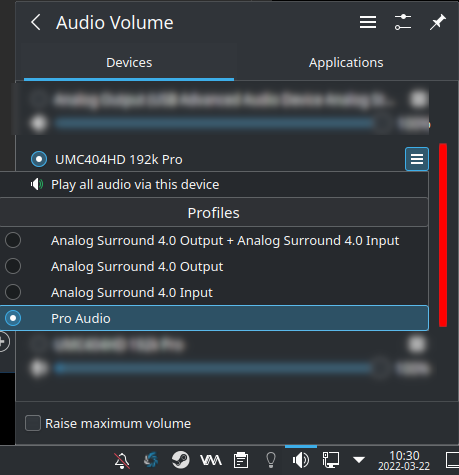
I share the exact same audio interface!
And for the record, I utilized pure PulseAudio via my setup and still experienced the same issue. I wonder if the interface may be the issue, though because we share the exact same, we can't rule out that model!
I tested the game watching the opening FMV with Proton Experimental, Standard Proton, Pro Audio and Digital Stereo.
The audio made no difference to me. However with Standard Proton I got heavy stutterers on the FMV and on Proton Experimental everything worked fine.
So maybe the audio issue is exclusive to your hardware?
PS: I experienced in game stutterers on Proton Experimental. I don't remember seeing those before. But I didn't test thoroughly so it could be an one off or something else I was doing.
I faced the same issue on 65,000,000 B.C. cutscene, but managed to go on after a few tries. Now I'm stuck again in the Magic Cave cutscene. Exactly the same as before, screen goes black when the cutscene should start and the game crashes. I have a log for the last crash though: steam-613830.log.
I'm running Manjaro Plasma with Proton Experimental.
Hi, the cutscenes seem to be working well on my side, but the game occasionally seems to freeze for a few frames every few seconds.
This can be seen in the linked gif, in the middle of the walk animation. (don't mind the black screen)
Here's the system: https://gist.github.com/Louis-Simon22/a0b77efdf2f418568f97e0076e9d2fbf

If I let the intro video play, cutscenes works just fine in that session. Not sure if it was just luck, but I've been able to pass a few more cutscenes doing just that. And the times I've skipped the intro, cutscenes did the black screen.
@alomsimoy @dylanmtaylor @ben914 The most recent experimental update (experimental-7.0-20220629) has some work that we believe should fix the crashing :D I was no longer able to reproduce the crash on the 65,000,000 B.C cutscene. Please let me know if you still get any crashing during cutscenes with this build update :)
@alomsimoy @dylanmtaylor @ben914 The most recent experimental update (experimental-7.0-20220629) has some work that we believe should fix the crashing :D I was no longer able to reproduce the crash on the 65,000,000 B.C cutscene. Please let me know if you still get any crashing during cutscenes with this build update :)
Let me give it a shot on my steam deck and report back, very hopeful it resolves it. I will use force version to set it to experimental.
Wow, color me surprised. With the same save file that crashed in 7.0-3 or whatever was the previous newest, I'm no longer getting a crash in experimental. It seems to have fixed it! :) @alasky17
Just an update, I put another 8 hours or so into this game since my last comment, no crashes at all, and I'm almost at the very end of the game. The game is rock solid now on the latest experimental. Very stable. I'm really curious what the fix was from a technical perspective.
@dylanmtaylor Awesome! fwiw, the commits that fixed it are labeled as CW-Bug-ID 19945 and 20680 in the git log.
The game is crashing when it tries to play the cut-scene for introducing the Ayla character when you first enter 65,000,000 B.C. I was able to play for over 13 hours before I got to this point, but I am unable to progress beyond this point. I've been using Proton Experimental. I've also tried using GE-Proton7-9, but same result.
I just encountered the same issue. When I started the game for the 4th time in a row, the cutscene played out normally and game progressed further normally. Since "retrying" worked, I didn't have to experiment with different Proton versions. First three attempts ended up in either a crash or black screen displayed indefinitely though.
@biphobe Was this with experimental or Proton 7.0-3?
@biphobe Was this with experimental or Proton 7.0-3?
Proton 7.0-3.
@biphobe That is good. Right now, the fix is only in experimental, not 7.0-3 :)
Incidentally, there is a frametime spike to 99ms every 2 seconds during any gameplay that is not an FMV when running on Steam Deck on proton experimental, making the game feel horrible.
According to a protondb user, setting the game to use just 3 cores via Power Tools fixes this ¯_(ツ)_/¯
Incidentally, there is a frametime spike to 99ms every 2 seconds during any gameplay that is not an FMV when running on Steam Deck on proton experimental, making the game feel horrible.
According to a protondb user, setting the game to use just 3 cores via Power Tools fixes this ¯_(ツ)_/¯
Try this, game are buggy on windows too
Incidentally, there is a frametime spike to 99ms every 2 seconds during any gameplay that is not an FMV when running on Steam Deck on proton experimental, making the game feel horrible.
According to a protondb user, setting the game to use just 3 cores via Power Tools fixes this ¯_(ツ)_/¯
Try this, game are buggy on windows too
Unfortunately that doesn't solve the problem on Steam Deck 😕
Incidentally, there is a frametime spike to 99ms every 2 seconds during any gameplay that is not an FMV when running on Steam Deck on proton experimental, making the game feel horrible.
According to a protondb user, setting the game to use just 3 cores via Power Tools fixes this ¯(ツ)/¯Try this, game are buggy on windows too
Steam Input cannot be disabled on the Steam Deck. Only on the PC client
In Proton 7.0-5 and Experimental, there are times when cutscenes still display the black screen after ending the cutscene indefinitely or result in a hard crash, causing a reboot of my Steam Deck.
@BlueGrassBlade When this happens, are you always able to get through the cutscene on the second try? If you see this again, the save game file from immediately after the black screen happens and before you try to fix it would be very valuable for us to be able to investigate further :)
@alasky17 On the second try, not always. Sometimes, yes. Sometimes no. Switching Proton versions does however, seem to be a bit more consistent in getting past the cutscene on the next attempt. Not that it should be the case of course nor behave that way.
For example, I run the game via Proton Experimental in Steam Deck's Gaming Mode. Go through a cutscene (some of them have no issues, some do). In some occassions where I am met with an indefinite black screen after the cutscene finishes, I close the game and restart the game but this time with Proton stable. The cutscene plays and the game loads properly afterwards into the overworld/map/dungeon. If I play on Proton stable first and then switch to Experimental, the same applies.
Basically running this game on either Proton Experimental or latest stable version does not allow me to get past it unless I switch versions. For the record, I have also tried just using Proton Experimental and loading the cutscene segment up to 3 times. And it still does not get past the black screen. Only switching Proton versions work.
Just an additional point but Proton 7.0-5 and Experimental both do not have the microstuttering which people have previously complained about which is great. But cutscenes getting stuck/crashing is still a glaring issue regardless of which Proton version.
I should add that my Steam Deck does have Decky loader installed which I have heard some users mentioning that it causes some implications on their gaming experience, however few there may be. On my end, what I can do is try to disable Decky and give it another go. But I honestly doubt that it has any bearing on cutscenes getting stuck. It shouldn't affect it in such an aggregious way but I'll test it out. Will update here.
@BlueGrassBlade I have a feeling that there is some race condition happening. Maybe switching Proton versions changes the timing just enough to get past it. Unfortunately, these can be incredibly tricky to track down. I think the best hope is if you can get a save game right before one of the problem videos :)
Regarding Decky loader - it could be changing the timing just enough that you are more likely to hit the race condition? But that could be very hard to prove based on how inconsistent the problem sounds from your description.
Is anyone experiencing god awful audio? Just installed this game and current Proton Expermental has no sound for video, and the game audio is mono and echoed.. it's like both channels are being forced out one channel - and that audio problem happens on all versions I've tested.
Proton 7.0-6 and GE-8-32 have perfect working sound in the cutscenes, but the same horrible audio in the menu. I havent gone any further than the menu because there's no way I'm playing without sound, or with that horrible sound.
I cannot find anyway to fix this on EndeavourOS, all other games have perfect sound and video, even Harvestella (with GE proton) - whatever is wrong with Chrono Trigger is a mystery and I see no mention of audio issues on ProtonDB or here.
Hello @Routhinator, please add PROTON_LOG=1 %command% to the game's launch options and attach the generated $HOME/steam-$APPID.log to this issue report as a file. (Proton logs compress well if needed.) Also, please copy your system information from Steam (Steam -> Help -> System Information) and the contents of Steam Runtime Diagnostics from Steam (Steam -> Help -> Steam Runtime Diagnostics) and put them in a gist, then include a link to the gist in this issue report.
There's a couple of years of changes between Proton Experimental and Proton 7, so it would be useful to figure out the oldest easily testable version of Proton with the audio issue and the newest version that behaves better.
@kisak-valve apologies it's been a busy week. I determined two things and need to get this dump to you so the problem can be found.
-
The audio-channel (which affects ALL core game sound and not cutscenes) is related to my Focusrite Scarlet 4i4 I use for my primary audio. I need to switch my PC to the internal intel audio before playing (which is only possible for me to play using my TV and steam link since the output on that mobo audio card is shot). The midi output of the game seems horribly broken on the Focusrite
-
The cutscene audio issue, which behaves differently, only works on GE-Proton-8-32 or Proton 7.0-6 when using the Focusrite, and only works with 7.0-6 with the mobo audio.
I will follow-up with the traces as requested - but thought I'd drop this update at least as perhaps the Focusrite audio issue is known?
@Routhinator If you are using Pipewire for audio, you can use this script to create a stereo PulseAudio sink.
#!/bin/bash
pactl load-module module-null-sink object.linger=1 media.class=Audio/Sink sink_name=pulseaudio-out channel_map=stereo
However, you will need to use a program such as Carla or similar program in order to connect the sink to your audio interface's 2-channel outputs.
Once done, simply switch your output in your System Settings program (that came with your desktop environment of choice) to the PulseAudio Sink output. That's how I do it for Final Fantasy III and IV 3D Remake.
Certain games seem to not work with multi-channel configurations such as your audio interface and my 5.1-channel home theater system that's going out from my GPU to my home theater receiver.
@GraysonPeddie thanks, ill back up my audio and see what EndeavourOS is using by default.
I will be very surprised if this is required though because i can play every other FF game in my collection with perfect sound (and I have them all) - this channel issue is exclusive to Chrono Trigger on proton. (I just tried it on an emulator with perfect sound)
Interesting. The only issue I ran into is with Final Fantasy 4 3D Remake where the audio glitched out while playing an intro video. I switched to stereo and no issues so far. I tested Chrono Trigger in Steam and no issues with both 5.1 and stereo.
Sorry I cannot be of much help there.
@Routhinator Are you able to try completely unplugging the Focusrite from your system completely and see if you still hear the regressive problem with cutscene audio with your motherboard? Could you also provide the specific Focusrite model you are using? Also, when you get a chance to get logs as @kisak-valve requested, could you specifically get 2 logs of the behavior on 7.0-6 vs experimental-9.0, both with the motherboard instead of the Focusrite? Instead of the default PROTON_LOG=1, please use PROTON_LOG=+tid,+seh,+mmdevapi,+winmm,+driver,+msacm,+midi,+dsound,+dsound3d,+xaudio2,+xapofx,+dmusic,+mci,+pulse,+oss,+alsa,+coreaudio,+timestamp %command% to get more detailed logs :)
Feel free to also get other logs with Focusrite - there is a chance those could help folks fix your default setup too :)
@Routhinator Are you able to try completely unplugging the Focusrite from your system completely and see if you still hear the regressive problem with cutscene audio with your motherboard? Could you also provide the specific Focusrite model you are using? Also, when you get a chance to get logs as @kisak-valve requested, could you specifically get 2 logs of the behavior on 7.0-6 vs experimental-9.0, both with the motherboard instead of the Focusrite? Instead of the default PROTON_LOG=1, please use PROTON_LOG=+tid,+seh,+mmdevapi,+winmm,+driver,+msacm,+midi,+dsound,+dsound3d,+xaudio2,+xapofx,+dmusic,+mci,+pulse,+oss,+alsa,+coreaudio,+timestamp %command% to get more detailed logs :)
Feel free to also get other logs with Focusrite - there is a chance those could help folks fix your default setup too :)
Sorry life is preventing me from getting the debug logs. Might not be until next weekend now... however apart from the log i wanted to note that a few of your asks here are answered in my second comment.
-
The internal card works but the outputs are gone. I can only test that and use it over steam link from my TV. The internal soundcard is just proof that its specific to the Focusrite device.
-
Im not really concerned about the cutscenes. Frankly dont care about them and wish i could turn them off. Its a well known issue on ProtonDB anyway and i followed the guidance on there to drop to version 7 to fix the custscenes on both cards. The cutscenes use h264 so this is a known issue for Proton and also affect Harvestella.
-
The model of my Focusrite is the Scarlett 4i4 as mentioned. It is my only working sound card. I will not be unplugging it but i will get the debug logs for it.
-
The sound issue that is "awful" is the games core sound. The midi sound. And it seems that this game muxes left and right channels into the right channel and causes volume to go to 400%, become very screechy and does not respond to volume controls. This sound issue does not exist in any other game I've found yet. This issue is also not mentioned by anyone on protondb or here. This is the only issue i am concerned with as it prevents the game being playable directly on my PC.
Hopefully that clears up the misunderstandings about what is actually being troubleshot here. Ill get the logs as soon as life allows. I have multiple personal threads that derail my days at unpredictable times currently. Might not get it until this weekend
Finally got to gathering information. Here is the requested outputs while using the Focusrite Scarlett 4i4 and experiencing garbled midi audio
https://gist.github.com/Routhinator/0d9ce1d220ea0c7d82f1c9c612f5e932
Specific device is the Focusrite Scarlett 4i4 3rd Generation https://focusrite.com/products/scarlett-4i4-3rd-gen
Folks, it seems there is a regression for this title when using Proton 10.0-2 (beta) and Experimental (2025-07-25): the game window keeps blinking (kind with a translucent background) and you can barely interact with the desktop (Plasma 6.4.3 ). I've tried with X11, Wayland, DXVK and WineD3D. No problems with Proton 9.0-4.
Logs: steam-613830.tar.gz
Main error lines: 73.688:011c:014c:err:service:device_notify_proc failed to get event, error 1726
Specs:
- OS: Arch
- Kernel: 6.12.41
- GPU: RX 6700 XT (Mesa 25.1.7)
- CPU: Ryzen 7 5700G (8c/16t)
- DE: Plasma 6.4.3 (X11 and Wayland)
@ranplayer Thank you for the report! This one might be tricky to fix, but it is on our radar and we are working on it :)
Thank you @alasky17 (:
For some reason, this game won't show the correct icon when I create a shortcut on linux
It display correctly in the library list
Sourcefile seems to be correct
Name=CHRONO TRIGGER
Comment=Play this game on Steam
Exec=steam steam://rungameid/613830
Icon=steam
Terminal=false
Type=Application
Categories=Game;
And it show's correctly on windows
Proton versions
proton 10.0-2x1 2025-08proton 9.0-4x1 2025-08proton 7.0-6x2 2024-08proton experimentalx19 2024-08proton 7.0-5x2 2023-01proton 7.0-3x2 2022-07ge-proton7-9x2 2022-07proton 6.3x4 2021-04proton 6.1-ge-2x1 2021-04proton 5.13-6x2 2021-02proton 5.0-6x1 2020-04proton 3.16x2 2019-02
Launch options
PROTON_LOG=+tid,+seh,+mmdevapi,+winmm,+driver,+msacm,+midi,+dsound,+dsound3d,+xaudio2,+xapofx,+dmusic,+mci,+pulse,+oss,+alsa,+coreaudio,+timestampx2 2024-08PROTON_LOG=1,x2 2024-08PROTON_LOG=1x4 2024-08PROTON_LOG=1:x1 2022-03PROTON_USE_D9VK=1x1 2019-12
Launch lines
PROTON_USE_D9VK=1 %command%x1 2019-12
DLLs
winegstreamer.dllx1 2021-07
Error codes
0x80040111x1 2021-07
When you run the game after the SQUARE ENIX logo, there should be an animated sequence playng.
It just stays black
You can continue by pressing ENTER
There are also other sequences that you can unlock that don't play.