Hello @Nerun, PROTON_USE_WINED3D=1 is not a supported launch option. The better riddle to pursue is why the game is underperforming with DXVK on your system. Please copy your system information from Steam (Steam -> Help -> System Information) and put it in a gist, then include a link to the gist in this issue report.
Hi @kisak-valve,
Here my info:
https://gist.github.com/Nerun/e8c2d4d7eba323de46b9c4747ab7fa4f
ADDENDUM:
I tested Proton 6.3-5 with the option PROTON_USE_WINED3D11=1 instead of just PROTON_USE_WINED3D=1. This time it worked, but it had those graphical anomalies I've already mentioned (dark screen). So now I know that graphical anomalies happen because of using OPENGL instead of DXVK. But if i don't use OPENGL, i have very low FPS and becomes unplayable.
ALSO:
Graphic settings at FAST (lowest setup).
Proton 6.3-5 >>> FPS 16
Proton 5.13-6 >>> FPS 20
Proton 6.3-5 + PROTON_USE_WINED3D11=1 >>> FPS 40
Proton 5.13-6 + PROTON_USE_WINED3D11=1 >>> FPS 50
I have installed Windows 10 in dual boot. My FPS with the same hardware is 120+.
I have installed Windows 10 in dual boot. My FPS with the same hardware is 120+.
Hello! I moved from Windows 10 to Linux, and all the issues you are talking about are happening on a fresh installation.
Just wanted to let Steam know it's more than a few users having the issue. A quick google search shows quite a few players of Empyrion having similar issues.
Just sitting on a loaded game, creative, pulling a whole 5 fps looking at the ground. I have a GTX 970 w/ AMD FX 9590.
On Windows in the same situation I'll be pulling upwards of 300 fps, so it's not the cards issue, as some users would like to speculate. Older != worse(unless you're running Pentium… Then we can talk).
I am aware wine adds overhead since it's decoding for Linux to read, so issues are expected, ;p I hope a lot of the game breaking bugs can be fixed though!!
I'll leave an issue for the developers of the game as well for perhaps supporting Linux natively. Likewise, I hate windows, and I'd prefer not to go back to it ;p
I have GTX 1650 and I5. The game was very much playable. It changed about 2 weeks ago. The only tihng that changed was the "upgrade" od the game engine and new Proton Expemiental and te same time. Me to don't want to go to Win again.. on for one game, wich I like very much playing. I'm using Linux Mint by the way. What happened? It was so fun but now the frames as just too low. Not witm my specs.. no way! If the Proton devs are reading. Please, fix it.. or at leas look into this issue.
Here is my gist.
https://gist.github.com/LinMintUser/1b42417b6fa66cac27111f5960a756ba
Dear Devs.... what happened? It worked good and now it don't work. I think it wasn't Eleon because their new engine update happened long before the fps started dropping badly. Please, do look into this issuse :-)
Is this thread even active?
kisak-valve Sir?
as of 2021-DEC-30 proton experimental bleeding-edge and Linux 5.16-rc7.
game runs without issues, just that performance is abysmal.
setting PROTON_USE_WINED3D11=1 only hurts the framerate even more and also adds the darkening artifact.
running the game at minimum settings with no launch arguments makes the framerate playable, but not enjoyable. AMD Navi10, 24-bit 1080p at 60Hz. Threadripper 1950X.
when im lucky i can sometimes get above 30fps, but thats rare.
system info gist: https://gist.github.com/mathew2214/21dc1bd58a9397ca9ca2dacea231d1fd
Replying to https://github.com/ValveSoftware/Proton/issues/4911#issuecomment-1003198099
Try to match your desktop resolution to the games resolution and test again. I run the game on a GTX1070 and I got >90 in planets around 40ish in POIs with lots of lights and on areas with vessels with big number of polygons and 144 (main monitor max Hz) on space while flying with view from cockpit (not 3rd person) Your card 5700 is by far better than mine. Also do tests with your compositor pipeline disable, if this makes sense on AMD GPUs. Lower shadows and SSAO, set water medium or low, sky reflections and paralax occlusion to low and other details to medium i.e grass and deco distance, (I have texture details to high though) and lower a notch the AA( I have mine to max). Also set performance to your GPU on adaptive (again if this is available on AMD GPUs which I do not know). I never use D3D, just default DXVK and either Proton latest version, Proton Experimental or Proton GE . Only thing is that with Proton Experimental I have the less crashes when I do Alt+TABing (1 out of 4) than with the other Proton versions. Finaly I have purposly crippled my GPU power to 70% its max and performance stables on 60FPS MAX of my other monitor. I do not use Vsync, have game MAX FPS set to 144. Have done tests with limiters mangohud, it works but I prefer uncapped for Empyrion.
I was trying to play in Linux again. Doesn't work anymore. Version Empyrion 1.7.7. I have tried all versions of Proton, from 5 to Experimental, with and without PROTON_USE_WINED3D11=1. Didn't worked. None of them. Game didn't start anymore.
I was trying to play in Linux again. Doesn't work anymore. Version Empyrion 1.7.7. I have tried all versions of Proton, from 5 to Experimental, with and without PROTON_USE_WINED3D11=1. Didn't worked. None of them. Game didn't start anymore.
Delete the prefix and try again. Please share results.
(/SteamLibrary/steamapps/compatdata/383120)
Also , one thing I noticed is that many times when Emyprion crashes when loading a specific save game if I delete the cache folder of the relevant save, game loads perfectly fine.
Replying to https://github.com/ValveSoftware/Proton/issues/4911#issuecomment-1061109742
No way... deleted prefixes, deleted Proton, deleted game itself, reinstalled everything... Nothing.
Looks like there may be a regression with version 1.8 of the game, just released - while the main menu somtimes loads, the moment you cursor over any of the menu entries (normally accompanied by an audio 'click' cue and the text highlighting), the game crashes and dumps through the Unity crash handler. Sometimes it doesn't even load the menu, and goes straight to the crash handler.
Tried latest Proton Experimental, GloriousEggroll 7.20, Proton 7.0-3, Proton 6.3-8, and Proton 5.13-6. With Proton 6.3, it doesn't outright crash, and you can cursor over the menus and hear the audio cues, but not click anything. With Proton 5.13, the menus work as normal, however (haven't tested trying to start a game session there yet).
Tried deleting my prefix and letting it be recreated a few times, tried continuing from the same prefix that Proton 5.13 worked with with Proton Experimental, tried a couple different options from users at ProtonDB to no avail. Currently testing with just DRI_PRIME=1 PROTON_LOG=1 %command% (laptop is an all-AMD system with APU + 6800M dGPU), but even removing all custom launch options and using the APU doesn't seem to make a difference.
steam-383120.log
Client_220616-202014-21.log
steam-systeminfo-kithop.txt
Support of vuplex for Empyrion Galactic Survival
Issue transferred from https://github.com/ValveSoftware/Proton/issues/5924.
@8836290 posted on 2022-06-20T09:34:28:
Running latest version of Empyrion Galactic Survival, the internal PDA (personal Digital Assistant) that contains game information, missions and tutorials, was enriched with video playback by means of Unity3D's vuplex web view. Attempting to play such videos result in white background of the PDA player and by opening the game's console I saw a fault message spamming until I exit the save I was running (not the game itself):
[3D WebView] 413101100 [Chromium stdout] : [0616/174322.885:ERROR:sandbox_policy_base.cc(358)] Failed to add sandbox rule. error = 2, subsystem = 0, semantics = 0, pattern = 'Z:\mnt\Linux Games\SteamLibrary\steamapps\common\Empyrion - Galactic Survival\Client\Empyrion_Data\Plugins\x86_64\VuplexWebViewChromium\log-chromium.txt'
Looking in the relevant log found the following :
222/125413.941:ERROR:network_change_notifier_win.cc(228)] WSALookupServiceBegin failed with: 0
[0222/125414.211:WARNING:gpu_process_host.cc(1296)] The GPU process has crashed 1 time(s)
[0222/125414.468:WARNING:gpu_process_host.cc(1296)] The GPU process has crashed 2 time(s)
[0222/125414.721:WARNING:gpu_process_host.cc(1296)] The GPU process has crashed 3 time(s)
[0222/125414.974:WARNING:gpu_process_host.cc(1296)] The GPU process has crashed 4 time(s)
[0222/125415.226:WARNING:gpu_process_host.cc(1296)] The GPU process has crashed 5 time(s)
[0222/125415.477:WARNING:gpu_process_host.cc(1296)] The GPU process has crashed 6 time(s)
[0222/125415.478:ERROR:browser_gpu_channel_host_factory.cc(154)] Failed to launch GPU process.
[0222/125417.751:ERROR:ChromiumLogFunctions.h(15)] 33675924 Opening the shared resource failed with error code: 18446744071562084353
[0329/124655.998:ERROR:network_change_notifier_win.cc(228)] WSALookupServiceBegin failed with: 0
To add to the vuplex request: this is what it looks like:
https://steamcommunity.com/sharedfiles/filedetails/?id=2828335962
Other than that, it works pretty good on the steam deck using Proton Experimental. I think I am at more than 50% of my time on the steam deck.
Empyrion 1.8 introduces some crashes though, that has been reported by windows users too.
I haven't tested online multiplayer.
Regarding Vulpex, are we covered by Proton 8.0-4? From the release notes :
"Fixed videos in Empyrion - Galactic Survival not working on certain setups"
In my case the videos now play properly.
Fixed issues for Empyrion 1.10.4 and Proton 8.0-4.
proton 8.0-4x2 2023-10proton experimentalx5 2022-07proton 5.13-6x3 2022-06proton 5.13x1 2022-06proton 6.3x1 2022-06proton 6.3-8x1 2022-06proton 7.0-3x1 2022-06proton 6.3-5x2 2021-06PROTON_LOG=1x1 2022-06PROTON_USE_WINED3D11=1.x2 2022-03PROTON_USE_WINED3D11=1x1 2021-12PROTON_USE_WINED3D11=1`x1 2021-06PROTON_USE_WINED3D=1`.x1 2021-06PROTON_USE_WINED3D=1`x1 2021-06PROTON_LOG=1`x1 2021-06PROTON_USE_WINED3D=1x1 2021-06DRI_PRIME=1 PROTON_LOG=1 %command%x1 2022-06PROTON_USE_WINED3D=1 %command%x1 2021-06
GAME:
Empyrion - Galactic SurvivalPROTON VERSION:
6.3-4I was playing
Empyrion 1.4.xwithProton 5.13-6and launch optionPROTON_USE_WINED3D=1 %command%(due to drastic FPS drop) and everything was working fine.Since update
1.5.xthere is an annoying graphical issue: when i press M to see the map, or when i talk to a trader, the screen becomes darker. To fix it i just need to look at any builded block (like my motorcycle, for example) and screen get back to normal. This is annoying because when in a ship in the space, if i see the map i need to stop the ship, get out, look at cockpit and get in again otherwise space will be too much dark.The issue above does not happens with
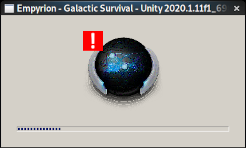
Proton 6.3-5orProton Experimental. But, and i don't know why, the launch option to use Wine D3D instead of DXVK (above mentioned) just doesn't work withProton 6.3-5and above versions. Game launches, appears a "Unity" loading screen and crashes (screenshot attached).Without Wine D3D launch option, game runs in
Proton 6.3-5, but with drastic FPS drop (from 60 to 20). But no graphic issues.I used the
PROTON_LOG=1option, attached log.steam-383120.log
CONCLUSION:
It's playable with
Proton 5.13-6and launch optionPROTON_USE_WINED3D=1 %command%, but graphic issues.I want play it with
Proton 6.3-5and launch optionPROTON_USE_WINED3D=1 %command%, with no graphic issues. There is a way?