Ys IX: Monstrum Nox
Hello @daigennki, please check ulimit -Hn and verify it is a high value and not 4096.
It might be interesting to test how this game behaves with PROTON_NO_ESYNC=1 %command% or an fsync-enabled kernel.
Hello.
ulimit -Hn returns 524288 on my system. As for PROTON_NO_ESYNC=1, looks like that might have fixed the crashes for now as I am able to play the game for 20 minutes without a crash. I'll play it for longer when I have the time, and leave a comment here if it happens again.
Also, I can't quite tell if it helped with the stuttering. I'll have to play it for longer to see if it really went away, since I'm playing the part of the game with mostly cutscenes and not much movement. Just looking at the Steam overlay framerate counter though, it looks like there might still be some brief drops every now and then. Maybe it's something to do with shader compilation, which wouldn't be surprising given that the game just released today and there aren't any precompiled shaders yet (if I understand how that works correctly).
Thank you!
Okay, so I played the game for a little longer, and it does seem like PROTON_NO_ESYNC=1 has stopped the crashes from happening. However, it has not helped with the stuttering. It's pretty annoying, so it would be nice if we could figure out what's causing the stuttering.
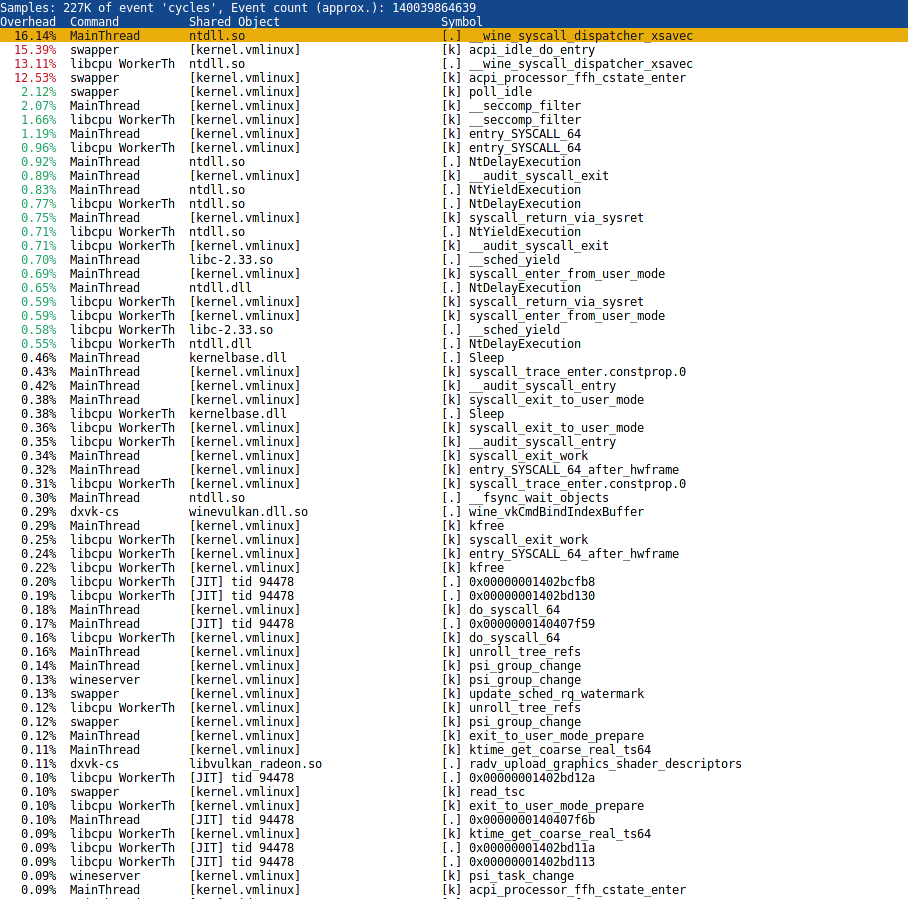
The game is extremely CPU bound in the city. Did a trivial perf capture in one of the heaviest scenes I found, and __wine_syscall_dispatcher_xsavec is somehow the major culprit. No idea what that means.
The stuttering might be related to how the game uses D3D11 occlusion queries, and how much/little dxvk in combination with the amd driver likes it. At least that's something we noticed when doing the Stadia port.
The game has major performance issues when you go near or are looking through a tree, bush or any other kind of foliage, disabling shadows and lowering the screen resolution are the only means to remove the performance hit.
The game causes a hard X11 crash for me at the first cutscene where the main character is shot. Music continues to play, but the screen briefly flickers and the whole system becomes (graphically) unresponsive.
04:00.0 VGA compatible controller: Advanced Micro Devices, Inc. [AMD/ATI] Renoir (rev c1)
Hello @kazetsukaimiko, please add PROTON_LOG=1 %command% to the game's launch options and attach the generated $HOME/steam-$APPID.log to this issue report as a file. (Proton logs compress well if needed.) Also, please copy your system information from Steam (Steam -> Help -> System Information) and put it in a gist, then include a link to the gist in this issue report.
Thanks @kisak-valve .
System info:
https://gist.github.com/kazetsukaimiko/99e5feaf8d45ec3dacad4ec28410e355
Log:
steam-1351630.log.gz
I have a few corrections to make:
- It is not a hard graphical lockup, the screen blanks for a moment then restores. It appears frozen, but its the game not drawing. Alt-F4 eventually prompts to close the unresponsive application and alt-tabbing seems to work.
- Not sure if it is related to proton logging, but I had some difficulty reproducing the issue after adding the logging option... at first it would happen on that cutscene reliably at the same point every time but now occasionally it will make it past. Still seems to happen later during gameplay if I make it past.
Running with PROTON_NO_ESYNC or on the zen kernel (protondb suggestions) doesn't seem to impact crashiness.
Thanks, your system information is missing the extended diagnostics information to confirm, but Driver version : 2.0.203 in your Proton log hints that you're using AMDVLK. Can you check if the same issue happens with mesa/RADV?
@kisak-valve My bad, gist updated.
@kisak-valve Update: I was able to play through the entire game on mesa/RADV.
I am still experiencing stuttering in the main town. 6.3-8 performs better than 7.0-1 and Experimental, though.
The interesting thing is, when I first installed it, it ran smooth, no stuttering. Then the next day I loaded the game and it was stuttering. The following day, it was smooth. But, ever since, it's been stuttering. It was after this that I started experimenting with different versions and found 6.3-8 works the best, though it still stutters, but not nearly as bad as 7.0-1.
I am still experiencing stuttering in the main town. 6.3-8 performs better than 7.0-1 and Experimental, though.
The interesting thing is, when I first installed it, it ran smooth, no stuttering. Then the next day I loaded the game and it was stuttering. The following day, it was smooth. But, ever since, it's been stuttering. It was after this that I started experimenting with different versions and found 6.3-8 works the best, though it still stutters, but not nearly as bad as 7.0-1.
the stutter seems to be random, logging in and out of your DE fixes the problem most of the time
There was a performance patch to Ys IX yesterday, so I tried running it through the latest Proton Experimental for a few minutes in the city part (albeit still with the PROTON_NO_ESYNC=1 gamemoderun %command% startup options). It seems like the stuttering has significantly reduced to the point that any stuttering left can be ignored. I haven't played it for a long time to check for other issues yet though.
I hope this is the right place to report my issue:
A friend and I try to play this game via remote play together on Ubuntu and the actual remote control part works fine but the game crashes the pulse audio process when it fails to combine the audio sinks. The crazy thing is that it worked for exactly one time (the first time) and never again thereafter. Please let me know if I should any other information.
Here are the relevant syslog entries:
pulseaudio[56699]: Assertion 'u->time_event == e' failed at ../src/modules/module-combine-sink.c:369, function time_callback(). Aborting.
systemd[1463]: pulseaudio.service: Main process exited, code=killed, status=6/ABRT
systemd[1463]: pulseaudio.service: Failed with result 'signal'.
systemd[1463]: pulseaudio.service: Consumed 1.783s CPU time.
steam.desktop[18793]: PulseAudio: Context connection failed
Proton versions
proton experimentalx1 2022-05proton 6.12-ge-1x1 2021-07proton 6.3-5x1 2021-07
Launch options
PROTON_NO_ESYNC=1x2 2022-05PROTON_NO_ESYNCx1 2021-12PROTON_LOG=1x2 2021-12PROTON_NO_ESYNC=1`x1 2021-07PROTON_NO_ESYNC=1`,x1 2021-07
Launch lines
PROTON_NO_ESYNC=1 gamemoderun %command%x1 2022-05PROTON_NO_ESYNC=1 %command%x1 2021-07
Compatibility Report
System Information
I confirm:
Symptoms
Game crashes after about 12 minutes, and because there are some cutscenes longer than that with no saving allowed, it's unplayable unless the cutscenes are skipped. Sometimes there is some stuttering as well. Graphics settings appears to not make much of a difference for either issue.
Lipsync also doesn't work, but it's the same issue as Ys VIII and can be fixed with the command
protontricks 1351630 xact.A DualSense controller also does not work with the game.
All of the above issues except for the lipsync issue and DualSense issue are also present in Proton-6.12-GE-1.
Reproduction
Launch the game with Proton 6.3-5, try to play for 15 minutes or so.
Log file
Log file generated with PROTON_LOG=1 option is attached. It was very large at 1.6 GiB, so it's compressed as a 22.3 MiB .gz file.
Of particular note is this at the end, though I'm not completely sure if it has anything to do with the crash:
steam-1351630.log.gz