IL-2 Sturmovik: Cliffs of Dover Blitz Edition
Hello @coljac, your logs indicate that you tested the game with Proton 5.0-10, and that this game uses Windows Presentation Framework. Wine-mono 4.9.4 in Proton 5.0-10 is too old to support that.
You may have a better chance of success with the game and Proton 5.13 or newer.
@kisak-valve You're correct, I thought I was using 6.3. Here's the log for proton 6.3: In this case, I get a splash screen briefly, then it quits. This may be a relevant bit from the (attached) log:
Main3D: Couldn't initialize render context:
41920.630:0124:0128:trace:seh:RtlGrowFunctionTable 000000000C1E05A0, 195
41920.630:0124:0128:trace:seh:RtlGrowFunctionTable 000000000C1E05A0, 196
41920.630:0124:0128:trace:seh:RtlGrowFunctionTable 000000000C1E05A0, 197
41920.630:0124:0128:trace:seh:RtlGrowFunctionTable 000000000C1E05A0, 198
System.InvalidProgramException: Invalid IL code in maddox.core.WRenderContext:create (string,string,maddox.core.WRenderContext/Mode&,maddox.core.WRenderContext/Caps&,int,int): IL_0070: ldc.i4.s  24


  at $1xAKYcqgD3AaANwyScK0EIvmlWTYrIpbDfiV0ufwVsE.3B5i19SP6YEmzEhx3Lj_Jss () [0x0053b] in <03307181a4f9476a9a63531a47056622>:0
  at AYB56PA7FbyE$$8MFI6r974O4H8hT6AeUdaoTWW4GX4D.dIpkxXebLtWgGXTdBc5GdyA () [0x001c6] in <03307181a4f9476a9a63531a47056622>:0
The first problem is with our handling of this line in Launcher64.exe.config: <probing privatePath="parts/core;parts/bob" />
We only have this set up for loading assemblies, not native dll's referenced via DllImport. I'm not sure where is the correct place to fix that.
Looking at the method causing the invalid IL error, it's using a vararg pinvoke call, which was implemented in Wine Mono 6.2.0 (Proton 6.3 currently has Wine Mono 6.1.2). You can either install that manually via the msi (newest is https://dl.winehq.org/wine/wine-mono/6.3.0/wine-mono-6.3.0-x86.msi) or try proton experimental which has 6.2.2.
We only have this set up for loading assemblies, not native dll's referenced via DllImport. I'm not sure where is the correct place to fix that.
It turns out Mono finds the native dll referenced via DllImport just fine, but it depends on another dll in the same directory, which isn't being searched for dependencies. This should just be a matter of using the LOAD_WITH_ALTERED_SEARCH_PATH flag when loading those dll's.
After fixing the dll load issue and using latest Wine Mono, the next problem is that it tries to read C:\Program Files (x86)\Steam\userdata\\config\localconfig.vdf. I worked around this by symlinking ~/.steam/root/userdata to the directory in the Wine prefix. After that, the menu comes up, but I didn't try to start the game.
@madewokherd After adding a symlink such that 'C:\Program Files (x86)\Steam\userdata\config\localconfig.vdf' is visible within wine, and then running with proton experimental, the splash screen still appears but the menu didn't successfully show up. The log is below which includes:
=================================================================
	Native Crash Reporting
=================================================================
Got a UNKNOWN while executing native code. This usually indicates
a fatal error in the mono runtime or one of the native libraries
used by your application.
=================================================================
wine: Unhandled exception 0xe06d7363 in thread 124 at address 000000007B01236E (thread 0124), starting debugger...
137893.895:0120:0124:trace:seh:start_debugger Starting debugger L"winedbg --auto 288 652"
ERROR: ld.so: object '/home/coljac/.local/share/Steam/ubuntu12_32/gameoverlayrenderer.so' from LD_PRELOAD cannot be preloaded (wrong ELF class: ELFCLASS32): ignored.
137893.919:0170:0174:trace:loaddll:build_module Loaded L"C:\\windows\\system32\\winedbg.exe" at 00007FB7FA400000: builtin
137893.920:0170:0174:trace:loaddll:build_module Loaded L"C:\\windows\\system32\\kernelbase.dll" at 000000007B000000: builtin
137893.920:0170:0174:trace:loaddll:build_module Loaded L"C:\\windows\\system32\\kernel32.dll" at 000000007B600000: builtin
137893.920:0170:0174:trace:seh:sigsys_handler SIGSYS, rax 0xffff, rip 0x600000000005.
137893.920:0170:0174:trace:seh:install_bpf Seccomp filters already installed.
137893.921:0170:0174:trace:loaddll:build_module Loaded L"C:\\windows\\system32\\ucrtbase.dll" at 00000003AF670000: builtin
137893.922:0170:0174:trace:loaddll:build_module Loaded L"C:\\windows\\system32\\dbghelp.dll" at 00000003BE590000: builtin
137893.922:0170:0174:trace:loaddll:build_module Loaded L"C:\\windows\\system32\\sechost.dll" at 000000032A700000: builtin
137893.922:0170:0174:trace:loaddll:build_module Loaded L"C:\\windows\\system32\\advapi32.dll" at 0000000330260000: builtin
137893.925:0170:0174:trace:seh:NtQueryInformationThread (0x48,0,0x63f760,30,(nil))
137893.931:0170:0174:trace:seh:NtQueryInformationThread (0x5c,0,0x63f760,30,(nil))
137893.931:0170:0174:trace:seh:NtQueryInformationThread (0x60,0,0x63f760,30,(nil))
137893.931:0170:0174:trace:seh:NtQueryInformationThread (0x64,0,0x63f760,30,(nil))
137893.931:0170:0174:trace:seh:NtQueryInformationThread (0x6c,0,0x63f760,30,(nil))
137893.931:0170:0174:trace:seh:NtQueryInformationThread (0x70,0,0x63f760,30,(nil))
137893.931:0170:0174:trace:seh:NtQueryInformationThread (0x74,0,0x63f760,30,(nil))
137893.931:0170:0174:trace:seh:NtQueryInformationThread (0x78,0,0x63f760,30,(nil))
137893.931:0170:0174:trace:seh:NtQueryInformationThread (0x7c,0,0x63f760,30,(nil))
137893.931:0170:0174:trace:seh:NtQueryInformationThread (0x80,0,0x63f760,30,(nil))
137893.931:0170:0174:trace:seh:NtQueryInformationThread (0x84,0,0x63f760,30,(nil))
137893.931:0170:0174:trace:seh:NtQueryInformationThread (0x88,0,0x63f760,30,(nil))
137893.931:0170:0174:trace:seh:NtQueryInformationThread (0x8c,0,0x63f760,30,(nil))
137893.931:0170:0174:trace:seh:NtQueryInformationThread (0x90,0,0x63f760,30,(nil))
137893.931:0170:0174:trace:seh:NtQueryInformationThread (0x94,0,0x63f760,30,(nil))
137893.931:0170:0174:trace:seh:NtQueryInformationThread (0x98,0,0x63f760,30,(nil))
137893.931:0170:0174:trace:seh:NtQueryInformationThread (0x9c,0,0x63f760,30,(nil))
137893.931:0170:0174:trace:seh:NtQueryInformationThread (0xa0,0,0x63f760,30,(nil))
137893.931:0170:0174:trace:seh:NtQueryInformationThread (0xa4,0,0x63f760,30,(nil))
137894.004:0170:0174:trace:seh:NtQueryInformationThread (0x3ac,0,0x63f760,30,(nil))
137894.004:0120:0178:trace:mscoree:_CorDllMain (0000000004DA0000, 2, 0000000000000000)
137894.004:0120:0124:trace:seh:call_teb_handler handler at 000000007BC68380 returned 1
137894.004:0120:0178:trace:seh:NtQueryInformationThread (0xfffffffffffffffe,12,0x193afccc,4,(nil))
137894.005:0120:0178:trace:mscoree:_CorDllMain (0000000004DA0000, 3, 0000000000000000)
137894.005:0120:0124:trace:seh:RtlVirtualUnwind type 1 rip 0000000356778C20 rsp 000000000093FFE8
137894.005:0120:0124:trace:seh:dump_unwind_info **** func 8c20-95a1
137894.005:0120:0124:trace:seh:dump_unwind_info unwind info at 00000003567945F8 flags 0 prolog 0x13 bytes function 0000000356778C20-00000003567795A1
137894.005:0120:0124:trace:seh:dump_unwind_info     0x13: subq $0x508,%rsp
137894.005:0120:0124:trace:seh:dump_unwind_info     0xc: pushq %rbx
137894.005:0120:0124:trace:seh:dump_unwind_info     0xb: pushq %rsi
137894.005:0120:0124:trace:seh:dump_unwind_info     0xa: pushq %rdi
137894.005:0120:0124:trace:seh:dump_unwind_info     0x9: pushq %rbp
137894.005:0120:0124:trace:seh:dump_unwind_info     0x8: pushq %r12
137894.005:0120:0124:trace:seh:dump_unwind_info     0x6: pushq %r13
137894.005:0120:0124:trace:seh:dump_unwind_info     0x4: pushq %r14
137894.005:0120:0124:trace:seh:dump_unwind_info     0x2: pushq %r15
137894.005:0120:0124:trace:seh:RtlVirtualUnwind inside prolog.
Unhandled exception: C++ exception(object = 0x93e2f0, type = 0x4d30ec8, base = 0x4cc0000) in 64-bit code (0x000000007b01236e).
Register dump:
 rip:000000007b01236e rsp:000000000093e170 rbp:000000000093e2b0 eflags:00000202 (   - --  I   - - - )
 rax:000000000093e1b0 rbx:000000000093e3a0 rcx:000000000093e190 rdx:0000000000000001
 rsi:000000000093e2b0 rdi:000000000093e1d0  r8:0000000000000004  r9:000000000093e290 r10:00000001802df954
 r11:000000000093e340 r12:0000000000000000 r13:000000009983508a r14:000000000093e2f0 r15:00000000001e1860
Stack dump:
I also tried uninstalling wine-mono 6.2 and installed 6.3.0 into the game's wineprefix (so running WINEPREFIX=/steam/steamapps/compatdata/754530/pfx "/steam/steamapps/common/Proton - Experimental/files/bin/wine" uninstaller shows 6.3.0 installed), but the exception seems the same. That log is appended as well.
Oh, github's formatting messed up the path in my earlier post, it should have said C:\Program Files (x86)\Steam\userdata\<userid>\config\localconfig.vdf
@madeworkherd Using Proton Experimental, with wine mono 6.3.0, I was unable to reproduce the reported success in getting as far as the menu. Are you able to share any further info on wine version/configuration which got to this step? Despite various attempts I seem to have hit a road block with the "unhandled C++ exception" above. The only other thing to add is that trying on a machine with no GPU, the game got as far as the splash screen and ended up in an endless loop with the following (I killed it after the log file reached 11G):
=================================================
System.NullReferenceException: Object reference not set to an instance of an object
  at iIer_m0niFeAfdO$W3iyIyiI$ngG4FHCF6MXe1TJ$JOb.RCg41tE05t0y9dUsvW1Y5dA (System.Boolean ) [0x003d3] in <b93f6138a8d9484f8477c4a558d9dab3>:0
  at iIer_m0niFeAfdO$W3iyIyiI$ngG4FHCF6MXe1TJ$JOb.Sgxp5$MrmAubVQbC9P7ADJM () [0x00000] in <b93f6138a8d9484f8477c4a558d9dab3>:0
  at xyxg72wf9bJ567Yz2522U8xGm17btCKoTb8ZxYKhp3sq.s1J6D1WkYrSB0YrRqEzT6Lg (System.Boolean , System.Boolean ) [0x00050] in <b93f6138a8d9484f8477c4a558d9dab3>:0
=================================================
75909.692:010c:0110:trace:seh:dispatch_exception code=c0000005 flags=0 addr=000000000DE01731 ip=000000000DE01731 tid=0110
75909.692:010c:0110:trace:seh:dispatch_exception  info[0]=0000000000000000
75909.692:010c:0110:trace:seh:dispatch_exception  info[1]=0000000000000000
75909.692:010c:0110:warn:seh:dispatch_exception EXCEPTION_ACCESS_VIOLATION exception (code=c0000005) raised
75909.692:010c:0110:trace:seh:dispatch_exception  rax=0000000000000000 rbx=0000000000000012 rcx=0000000000000000 rdx=0000000000000000
75909.692:010c:0110:trace:seh:dispatch_exception  rsi=000000000d64aab0 rdi=0000000000000001 rbp=000000000093ee70 rsp=000000000093ee10
75909.692:010c:0110:trace:seh:dispatch_exception   r8=0000000000000000  r9=00000000000003a8 r10=000000000d6f8133 r11=000000000c32aed0
75909.692:010c:0110:trace:seh:dispatch_exception  r12=0000000000000000 r13=0000000000000000 r14=0000000000000000 r15=000000000195d510
75909.692:010c:0110:trace:seh:call_vectored_handlers calling handler at 0000000359141BC0 code=c0000005 flags=0
75909.692:010c:0110:trace:seh:call_vectored_handlers handler at 0000000359141BC0 returned 0
75909.692:010c:0110:trace:seh:call_vectored_handlers calling handler at 00000002EDF80140 code=c0000005 flags=0
75909.692:010c:0110:trace:seh:call_vectored_handlers handler at 00000002EDF80140 returned 0
75909.692:010c:0110:trace:seh:call_vectored_handlers calling handler at 0000000180103340 code=c0000005 flags=0
[0000000000000110:] EXCEPTION handling: System.NullReferenceException: Object reference not set to an instance of an object
75909.692:010c:0110:trace:seh:call_vectored_handlers handler at 0000000180103340 returned ffffffff
Well, if the symlink didn't work, you might be getting a C++ exception for a different reason than I did, but just to make sure you could get a +file log to see the exact unix filename it's trying to access.
@madewokherd Thanks for taking another look. Looking at the longer log (+file) I found the .vdf was still an issue - I symlinked the wrong directory - and once I fixed this, I could get the menu to work and it navigates fine.
Launching the game resulted in a crash, it seems to result in the same "C++ exception". Here's the logs with and without `WINEDEBUG="+file".
I saw this in the log just before the C++ exception:
ERROR: HAL Error: Can't delete old index buffer: HAL\d3d11\TIndexBuffer_D3D11.cpp(41)
So I tried with +d3d11 logging and PROTON_USE_WINED3D=1. That got me through a training mission, but the framerate was unsteady and generally bad. That might've been because of logging, but when I turned off d3d11 logging and tried again for a few seconds, it still didn't feel smooth to me. :/
Great work. I did a quick test with PROTON_USE_WINED3D=1 and no logging on. I was able to start a training mission and the performance seemed fine - no noticeable lag at all. I will attempt a longer test including trying to use a joystick and pedals, and see if this holds up.
An update on this game - I hope this is a place where the information is relevant/useful.
When run as above (proton experimental, PROTON_USE_WINED3D=1), the game is working. A HOTAS joystick was detected and worked, but USB pedals do not. After many experiments although the CH Pro Pedals USB pedals were visible (e.g. with wine control using the right protonWINEPREFIX etc), the game still could not see them. While debugging I discovered the following: Running explorer.exe in the game's WINEPREFIX using the environment variables copied from steam:
export STEAM_COMPAT_DATA_PATH='/steam/steamapps/compatdata/754530'
# ... and many more

/steam/steamapps/common/Proton\ -\ Experimental/proton run explorer.exe
And then navigating to the install (on Z:) and running Launcher64.exe, the game runs AND the pedals are accessible. (I was trying to run the JoystickWizard.exe but this would not launch.) I can't imagine why this would be the case but I have reproduced it: running via steam, no pedals; running with this hack, pedals. Clearly there is some setting or environment variable that differs, however I'm not sure what it could be. SDL_GAMECONTROLLER... something?
After lots of testing, to summarize:
- PROTON_USE_WINED3D=1 requred
- Symlnk to userdata in the prefix Program Files/Steam folder seems to be required
- Making symlinks to the dlls in parts/core in the game root seems to be required
Otherwise it works fine, barring the issue above with controller detection that may or may not be generally reproducible.
I have no problem with controler (Thrustmaster Hotas X on Fedora 34), however I disabled Steam controller support per game.
I do have some graphical glitches, though, cockpit is white in 1st person, and plane glows white in 3rd person view.
I've only symlinked DLL files form parts/core and parts/bob directories, do I need all other files/dirs symlinked to game root too ?
@piotr-gbyliczek Do you have a log? It may show the inability to load some dlls if that's the case. But the answer is no, only parts/core seem to be required on my end.
A further issue that I have encountered: The campaign menu takes ages to come up, and I can't get past it. One CPU gets stuck at 100% and nothing further renders. Logging also seems to stop at that point.
I will try to get logs in the evening. Any suggestion to what level of logging would be best? I tried it before, using userconfig.py file in proton's folder, and the result was I think over 400MB and growing. Not a problem putting it out there, just thinking it may be too much info to be useful.
I had only tried training missions and single missions, they were working fine. will try to do campaign today, too.
I seem to be able to run it with just symlinks to 3 dlls mentioned in launcher.exe.manifest, but earlier I did a bit of blanket symlinking, so maybe if I hit some issue, like campaign menu hanging, I will try to do that again to see if that is solved.
I also noticed that you have nvidia card (assuming that latest protondb entries are yours), I have amd, so glitches I see may be related to that.
@piotr-gbyliczek I should note that I'm not a proton expert, just someone who's played around with this particular game, so I may not learn anything from the logs, hopefully others can comment.
Just try turning on the default logging with PROTON_LOG=1, then running briefly. It should compress down to a fraction of that size.
Yes, I have an NVidia card - that could well explain some differences. What were the three DLLs you mentioned - I will try that also.
@coljac I understand that, no problem. Not expecting you to personally fix it for me :)
I've removed the game completely yesterday (both game dir and proton prefix.) and reinstalled it for some sort of structured approach. Apart from a log file with almost vanilla state, which is ~400kb, all others are about 130 - 150 MB each. I think I will just add latest one here.
steam-754530.log-base-links-userdata-campaign.gz
The dlls I meant are the ones listed in Launcher64.exe.config file : ./parts/core/fmod.dll, ./parts/core/fmodex.dll and
./parts/core/steam_api.dll, all symlinked to the game dir. I also tried with all dlls in ./parts symlinked to game dir ( ran find ./parts -iname "*.dll" -exec ln -s {} ; in game dir), but no change to behaviour.
Now, I mentioned graphical glitches, see attached screenshots:
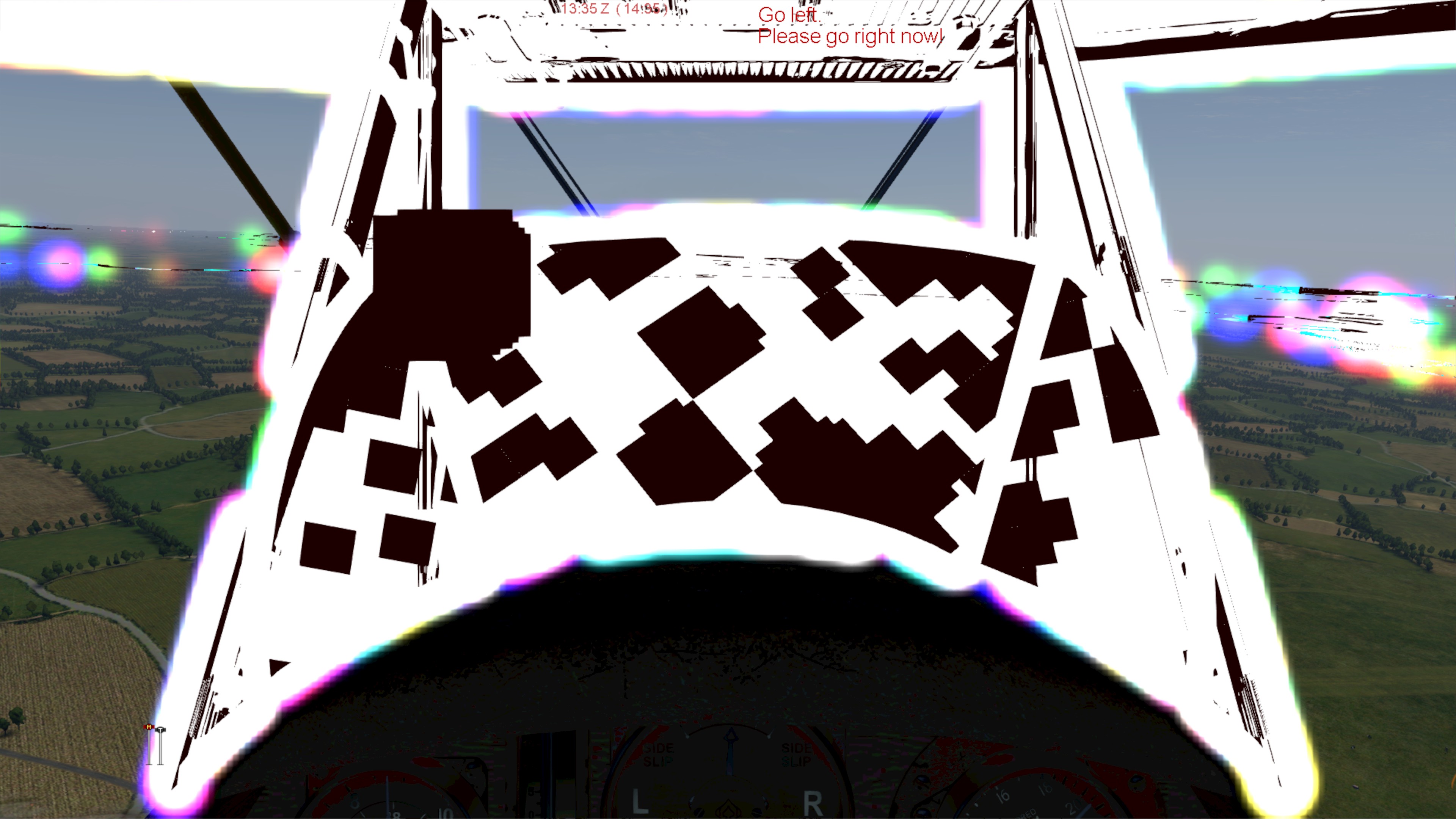
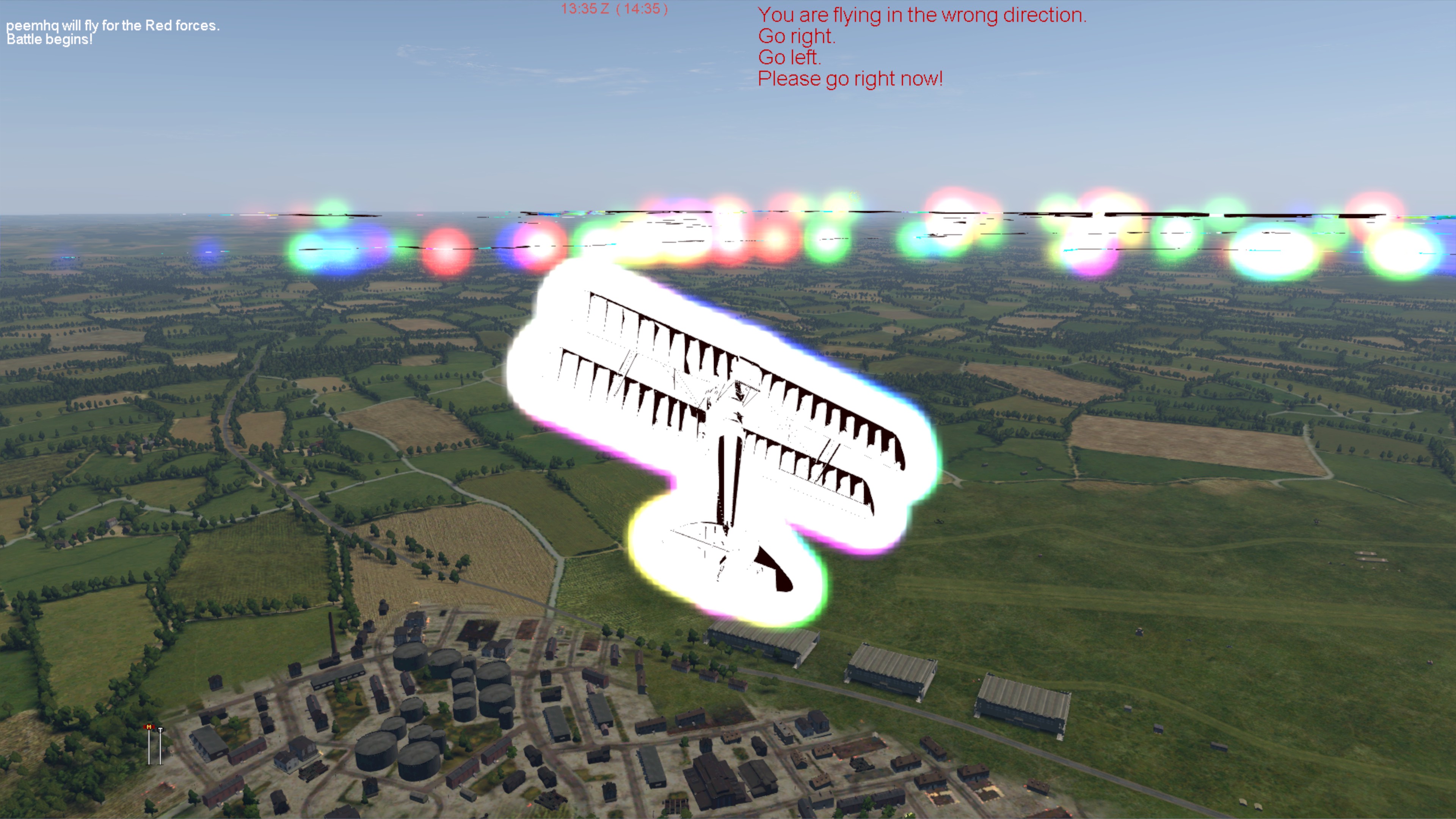
Strangely, I think I have managed to get two different behaviours off of fresh reinstalls, as I did one the day before also.
Yesterday the game was starting ok, I was able to go to training missions and run through them (just a bit, not pleasant experience due to above graphical glitches), but campaign menu was frozen and too long time to even load, I was not able to go any further there.
The day before, I think the graphical glitches were gone (I can see them in Options/Planes on the 3D models, and they were not there this time), but could not get to any of the missions. The mission would start loading and at about 90% it would stop briefly and game would crash. However, campaign menu was responsive there for me, and I could start campaign mission (up to 90% loading crash) without any delays in the menus themself.
Hello @piotr-gbyliczek, it should be noted at this point that using PROTON_USE_WINED3D=1 is an unsupported launch option, and any rendering artifacts while using that is largely inherited from upstream wine. Ideally, we'd want the game to run out of the box with DXVK (the default) before evaluating graphical glitches.
That said, if you want to continue troubleshooting rendering issues with wined3d, then get the game setup in vanilla wine, reproduce the issue there, and report the issue to wine's issue tracker (https://bugs.winehq.org/). The mesa/radeonsi graphics devs might also be interested in taking a look.
Hi @kisak-valve. I was not aware of PROTON_USE_WINED3D depreciation and this seems to be the only option that lets the game run. I will try to do some testing around DXVK, see if there is any hint in logs that would point towards why it only runs with wined3d, as it stands.
You seemed to have missed the intent of what I wrote. It's not that the launch option is now deprecated, it never was considered supported. That doesn't make it any less useful for troubleshooting.
We get wined3d more or less for free from upstream wine, and it doesn't hurt to keep it around, but most quirks with it aren't investigated here. Instead, upstream supports that render path and fixes in wined3d come in with all the other wine changes when Proton does a major rebase onto a newer version of wine.
Ah. That makes sense, I see. I will try DXVK anyway, but expect it will not work. In which case I will report it against Wine.
Ah, the plot thickens !
After cleaning up wine prefix, removing user-settings.py file from proton - experimental folder and removing PROTON_USE_WINED3D=1 from launch options, it seems that game can work with DXVK. All it needed was a symlink of userdata directory into the prefix and symlinks of 3 dlls from ./parts/core to the game dir (both mentioned above).
It seems that this is the case in which game seems to be free from graphical glitches, but crashes at 90% loading any mission.
Attached a log file from that session.
steam-754530.log
Only thing I can see there so far is :
[0000000000000114:] EXCEPTION handling: System.IO.FileNotFoundException: Could not load file or assembly 'Z:\home\peem\SteamLibrary\steamapps\common\Proton - Experimental\files\share\wine\mono\wine-mono-6.3.0\lib\mono\gac\PresentationCore\4.0.0.0__31bf3856ad364e35\pl-PL\PresentationCore.resources.dll' or one of its dependencies.
I've created the pl-PL folder and symlinked 2 files present in Proton - Experimental\files\share\wine\mono\wine-mono-6.3.0\lib\mono\gac\PresentationCore\4.0.0.0__31bf3856ad364e35 into it, but it did not change the game's behaviour, still crashing at 90% loading of any mission.
From the log:
ERROR: HAL Error: Can't delete old index buffer: HAL\d3d11\TIndexBuffer_D3D11.cpp(41)
[...]
=================================================================
	Native Crash Reporting
=================================================================
Got a UNKNOWN while executing native code. This usually indicates
a fatal error in the mono runtime or one of the native libraries
used by your application.
=================================================================
wine: Unhandled exception 0xe06d7363 in thread 230 at address 000000007B01236E (thread 0230), starting debugger...
I think this looks like https://github.com/ValveSoftware/Proton/issues/5007#issuecomment-891173793.
Are we did the full circle then :)
Not sure what it means, this was the comment that pointed me and - probably - @coljac towards using unsupported wined3d, right ?
Are we saying this is bug in application and it will not work with DXVK ? Or is this somehow still using wined3d on my machine ? Actually, it may be irrelevant, I feel like both answers mean we need to report bug with wine and /or with game developers :)
Just an update: While the menus still work, the game still crashes when entering the game proper with Proton Experimental as of 2020-10-02. It's the same:
fatal error in the mono runtime or one of the native libraries used by your application.
=================================================================
wine: Unhandled exception 0xe06d7363 in thread 24c at
address 000000007B01236E (thread 024c), starting debugger...
Log attached.
I followed CaptainPanda34's entry on protondb and it works very well. I suspect his issues are present for me as well but am going to wait until the VR upgrade to come back to it. It looks very nice as far as I can tell!
I had previously run :
sudo winetricks --self-update
( very important as if you/your distro doesn't have latest winetricks you will get old dlls installed by protontricks )
protontricks 754530 d3dcompiler_47
As I installed this game on an external drive:
cd /media/USERID/EXTERNAL_DRIVE_NAME/SteamLibrary/steamapps/compatdata/754530/pfx/drive_c/Program Files (x86)/Steam
ln -s /home/USERID/.steam/root/userdata/ userdata
Excited to see this in VR! Any week now?
Game works, but the mouse cursor is invisible in the game menu. This is a regression; the cursor is visible in Proton 7.0, and invisible in Proton 8.0, 9.0, Experimental.
- GPU: Steamdeck, AMD Custom GPU 0405
- Video driver version: 4.6 (Compatibility Profile) Mesa 23.1.3 (git-87ebaf765d)
- Kernel version: Linux 6.1.52-valve16-1-neptune-61
- Link to full system information report as Gist: https://gist.github.com/raven-intheclouds/92be77d149d5d7ce33a5ef8c06537ae9
- Proton version: proton-9.0-1
After doing the following as noted in the previous comment:
ln -s "$HOME/.steam/root/userdata" "$HOME/.local/share/Steam/steamapps/compatdata/754530/pfx/drive_c/Program Files (x86)/Steam/userdata"
The game starts, renders and plays fine on Proton 9.0, 8.0. It has normal perfomance from what it looks like. I haven't tried binding joysticks. This is on Steamdeck docked and game mode.
For Proton 7.0, one needs to use PROTON_USE_WINED3D=1 %command%.
I would be glad to debug, please ping me if so.
Hello @raven-intheclouds, please add PROTON_LOG=1 %command% to the game's launch options, reproduce the regression, and attach the generated $HOME/steam-$APPID.log to this issue report as a file. (Proton logs compress well if needed.) Also, please note if running the game with PROTON_USE_WINED3D=1 %command% on newer Proton has any effect to the regression you've described so that it can be removed from the differential diagnosis.
Argh, sorry, forgot to append the log. The following log is from starting the game, clicking into quick missions, and starting the first mission to fly for some seconds, which renders fine.
Running with PROTON_USE_WINED3D=1 %command% on Proton 9 still shows the regression of invisible cursor.
Game works, but the mouse cursor is invisible in the game menu. This is a regression; the cursor is visible in Proton 7.0, and invisible in Proton 8.0, 9.0, Experimental.
This regression is now gone in Proton 9.0-3 and 9.0-4. The game shows the system pointer on its menus, and the game pointer correctly when one starts flying and is inside of the cabin.
The game seems to work fine here, but one needs to set it on to fullscreen, at least for me.
Proton versions
proton 7.0x2 2024-12proton 8.0x2 2024-12proton 9.0-3x1 2024-12proton 9.0x1 2024-06proton 9.0-1x1 2024-06proton experimentalx5 2021-10proton 6.3x2 2021-07proton 5.0-10x1 2021-07proton 5.13x1 2021-07
Launch options
PROTON_USE_WINED3D=1x5 2024-06PROTON_LOG=1x1 2024-06PROTON_USE_WINED3Dx1 2021-09PROTON_USE_WINED3D=1`x2 2021-09PROTON_LOG=1,x1 2021-09PROTON_USE_WINED3D=1`),x1 2021-08SDL_GAMECONTROLLERx1 2021-08STEAM_COMPAT_DATA_PATH='/steam/steamapps/compatdata/754530'x1 2021-08WINEPREFIXx1 2021-08PROTON_USE_WINED3D=1.x1 2021-08WINEDEBUG="+file"x1 2021-08WINEPREFIX=/steam/steamapps/compatdata/754530/pfxx1 2021-07
Launch lines
PROTON_USE_WINED3D=1 %command%x3 2024-06
DLLs
resources.dllx1 2021-09fmod.dllx1 2021-09fmodex.dllx1 2021-09steam_api.dllx1 2021-09advapi32.dllx1 2021-07dbghelp.dllx1 2021-07kernel32.dllx1 2021-07kernelbase.dllx1 2021-07sechost.dllx1 2021-07ucrtbase.dllx1 2021-07
Compatibility Report
System Information
I confirm:
Symptoms
The game fails to launch at all.
Looking at the proton log, it complains about DLLs that it can't open. (Log 1). For each of these I created symlinks in the same directory as the main executable, which did seen to resolve these errors. After doing this this, there are null reference exceptions in the log and lines like this (Log 2):
Which are a bit beyond my ken.
Reproduction
Hit play; game listed as running for a few seconds, then exits.
steam-754530_log_1.log
steam-754530_log_2.log