GrandChase
Some players provided some useful information at https://www.protondb.com/app/985810 like:
"I was able to run the game after running:
protontricks 1677470 mfc42 mfc140 vcrun6 dotnet40
The dotnet40 installation gave me an error, but the game opened anyway."
and
"cjkfonts needed so you don't get missing fonts."
and
"Just installed vcrun2019"
Also, almost everyone seems to be using Proton 6.3-5.
I've never used protontricks before, so I'm not sure how to proceed. However, I've found this article:
https://www.simpler.website/html/2021/1/protontricks.html
So I'm gonna try something like
sudo apt install -y python3-pip python3-setuptools python3-venv
python3 -m pip install --user pipx
python3 -m pipx ensurepath
source ~/.bashrc
pipx install protontricks
and then
protontricks 985810 mfc42 mfc140 vcrun6 dotnet40
or maybe
protontricks 985810 vcrun2019 (?)
and report back what happens.
Edit: Updated the appID from the beta to the new ID.
Update:
protontricks 985810 vcrun2019 gave me an sha256sum mismatch error:
"sha256sum mismatch! Rename /home/user/.cache/winetricks/vcrun2019/vc_redist.x86.exe and try again."
So I tried the other command:
protontricks 985810 mfc42 mfc140 vcrun6 dotnet40 and it gave me an "Unknown arg mfc140" and when I checked with protontricks 985810 list-installed only mfc42 was installed, it stopped at mfc140 and ignored the rest.
So I ran:
protontricks 985810 mfc42 vcrun6 dotnet40 but it failed the installation of the dotnet framework and gave me an "status 67. Aborting" in the terminal.
Also got this:
------------------------------------------------------
This package (dotnet40) may not fully work on a 64-bit installation. 32-bit prefixes may work better.
------------------------------------------------------
------------------------------------------------------
dotnet40 does not yet fully work or install on wine.  Caveat emptor.
------------------------------------------------------
I never had luck with dotnet before, but then I realized that the player Yupi on ProtonDB had said "The dotnet40 installation gave me an error, but the game opened anyway."
So I tried to open the game and got this:
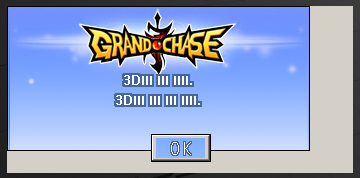
Launching Steam then the game from terminal didn't get me any useful info by the way.
I'm not sure what to do now. I'm trying Proton 5.0-10 and Proton Experimental, but not getting my hopes up.
Update 2:
I got some characters with Proton 5.0-10:

Same thing for Proton Experimental, but with a worse font for some reason:
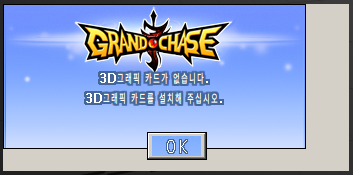
According to Google, apparently it translates to "No 3D graphics card. Please install a 3D graphics card."
I have no idea how to proceed now. Any help is appreciated.
Edit: apparently I'm using "winetricks 20200412". Should I try to update it or pipx in some way? Does anyone know how to do this?
I had success running this protontricks fork as @jvschiavo suggested. The exact command I used was protontricks 985810 mfc42 vcrun6 dotnet40. I also had issues with the dotnet40 installation but it wasn't necessary for succesfully runing the game. Getting back to steam and running GrandChase the game opens normally!
All the game features seem to work so far excepting the key characters. Heres an exemple of a skill tooltip from a windows running version:
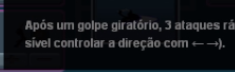
And the actual version on linux:
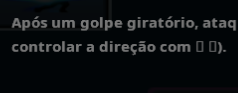
Although the language on the screenshots was pt. I can confirm that the same happens with en.
@lsmenicucci thanks for reporting back. Maybe my problem is specific about my GPU. If that's the case I have no idea about how to solve it myself, I'll have to get help from the smarter guys around here.
But I'll tell me friend to do the same as we both did to see if he gets more luck.
@jvschiavo What's your GPU?
I got it working with (my report for ProtonDB is pending review) Proton Experimental:
- Install Steam and GrandChase
- Install Protontricks with the instructions at https://github.com/Matoking/protontricks#pipx-recommended
1.1.sudo apt install python3-pip python3-setuptools python3-venv pipx
1.2. Close and re-open Terminal
1.3.pipx install protontricks - Run GrandChase before running protontricks
- Run
protontricks 985810 mfc42 mfc140 vcrun6 dotnet40 cjkfonts - Add
MESA_GL_VERSION_OVERRIDE=4.4 PROTON_USE_WINED3D=1 %command%to the Launch Options on Steam for the app (think this is: right click on GrandChase in Steam, click Properties, click Launch Options on the left sidebar)
4.1.MESA_GL_VERSION_OVERRIDE=4.4is for a Wine-related bug specific to Ubuntu 21.04
4.2.PROTON_USE_WINED3D=1is to disable Vulkan, which isn't compatible with my CPU-inbuilt and poor Intel HD 4000 graphics
4.3. Without%command%at the end of the launch options the game will not successfully launch. I don't know why it works but I'm very glad I remembered to add it! - Launch GrandChase
I suspect the key for you might be adding PROTON_USE_WINED3D=1 %command% to the launch options as that will disable Vulkan which might be proving problematic for your graphics card.
As GrandChase doesn't work out of the box with Proton it should be deemed incompatible by Valve (unless they change policy and support Protontricks as part of a default install script).
@Ads20000 Hey, thanks for your answer and sorry for the late reply.
I also have an integrated GPU: Mesa DRI Intel(R) HD Graphics 4400 (HSW GT2) (0xa16) (as shown with glxinfo -B)
I did not touch anything until 17 days after your reply, when I got time again, and realized that both the game and Proton have had some updates, so I just tried running it again and it simply worked! I have been playing it since then. :)
I also want to point out that I wasn't able to see Korean characters, having squares instead. Then I updated protontricks with cjkfonts but I was still getting the same results after that. But some days later, after the game got an update, it simply started showing the Korean characters correctly. I wasn't sure if the game had any fixes regarding this, but a friend of mine installed the game last Sunday the same way we did, with cjkfonts included, and she also got squares. I think she might see the characters correctly after the next update, but don't know why. 🤷♀️
Here is some info about my system:
user@computer:~$ wine --version
wine-5.0 (Ubuntu 5.0-3ubuntu1)
user@computer:~$ winetricks --version
20200412 - sha256sum: 7651c93e39fcb080483c38836513bf912273a87ea97d137f6b958ed3d9628c3d
user@computer:~$ protontricks -V
protontricks (1.6.0)
user@computer:~$ protontricks 985810 list-installed
Executing mkdir -p /home/user/.steam/steam/steamapps/compatdata/985810
------------------------------------------------------
You are using a 64-bit WINEPREFIX. Note that many verbs only install 32-bit versions of packages. If you encounter problems, please retest in a clean 32-bit WINEPREFIX before reporting a bug.
------------------------------------------------------
Using winetricks 20200412 - sha256sum: 7651c93e39fcb080483c38836513bf912273a87ea97d137f6b958ed3d9628c3d with wine-6.3 and WINEARCH=win64
mfc42
vcrun6
w_workaround_wine_bug-34803
remove_mono
winxp
remove_mono
winxp
w_workaround_wine_bug-34803
remove_mono
winxp
sourcehansans
fakechinese
fakejapanese
fakekorean
unifont
cjkfonts
It got somewhat messy, and had duplicates for some items each time I tried running the command.
The game is quite laggy and seems to be resource intensive, it also takes something like 10 minutes to launch, but that is probably because of my i3-4005U CPU @ 1.70GHz with integrated graphics and slow HDD...
I have some weird bugs, which I'm not sure if are Proton's fault or the game's fault, since the latter is so buggy.
One annoying bug I have and that I think other people playing on Windows don't experience is when I type accentuated characters. If I type an "é" in the middle of a long sentence, the cursor goes back to the beginning, which is weird and hinders typing in portuguese. The chat in itself is very buggy overall.
Ah, when I was trying to get some more performance out of my PC, I realized that the game doesn't even start at 1280x720p :/
But besides all that, I have been playing fine. Thanks again for taking your time to help me. :)
Bad news: the game doesn't work anymore
Since their last update on 2021/10/07 the game is not playable anymore through Proton. They introduced an anti-cheat that says "hack detected" when you try to launch it. =/
Good news: After 14 days, the game is working again!
Not sure if they disabled the anti-cheat or what, but it works. :)
Huh, I still get the same error and the game closes
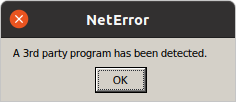
when trying to load the game (on Proton 6.3-7)
Replying to https://github.com/ValveSoftware/Proton/issues/5023#issuecomment-949028760
Can you believe that literally after reporting the game working here I went to play again and it had an update of 1.2 MB that broke everything again...? Yeah... I got so sad and so disappointed that I didn't have forces to report back again with this news...
:sob: I'm hoping to get through to their dev team via customer service, I've replied to CS' initial reply and it sounds like they'll forward my feedback to dev team once I remember things like what level my characters were... xD
I don't get it. Why do the level of your characters matter?
I assume it's a standard response for some check
I have forwarded the information that you've provided to the designated team for checking.
We cannot give you a specific timeline for this, but we will send you an update as soon as the team gives us the needed reply.
This is the reply I got from GrandChase support 27/10/2021, still waiting... per their email it may be a while (if ever) before we hear anything, but at least I got it logged with them...
Our other hope is that Valve's general progress on getting Proton to work with anticheat is what solves this issue, even if GC never do anything their end.
Reply I got from KOG on 25/06/2022, after asking whether they could add Proton as an exception to their anti-cheat program.
Hello Chaser,
Upon further checking on your ticket report, kindly be informed that the GrandChase Classic game requires a WIndowsOs that's why you're receiving an error warning when opening the game on your end. What we recommend is for you to have a laptop or a desktop that has a WindowsOS for you to play the game normally.
We hope this information helps. For other concerns, please feel free to contact us again.
Regards,
GrandChase Classic Support
And another reply today (28/06/2021) after I asked if there are plans to introduce Linux support:
With regard to your inquiry, I'm afraid that I do not have access to the very specific information that you require. However, what I can do on my end is to relay your interest on making the game compatible to be run via Linux OS to the designated team for review/discussions. No guarantees can be provided for any immediate changes or for its actual implementation, but I'll make sure that your voice is heard. As such, we'd advise staying tuned on our Steam page for any related updates/announcements.
from their latest patch notes it seems like they support the game now.
Grand Chase Classic (985810)
Issue transferred from https://github.com/ValveSoftware/Proton/issues/9986.
@ALTBrawl posted on 2026-07-19T00:00:54:
Proton Version: Proton 11.0
APPID: 985810
Game: Grand Chase Classic
PC Specifications : https://gist.github.com/ALTBrawl/1e9c4039d5676bb7660fdb86bfae0e93
Well, this is more of a question than a bug report.
I have been using Proton 11.0 and noticed that Grand Chase Classic occasionally freezes. The freezes can happen while I'm inside a stage, even though there is plenty of available RAM and the game should be able to continue running normally.
I've also noticed that the game can sometimes freeze simply by switching to another application and then returning to it. In some cases, instead of recovering from the freeze, Steam displays a message saying that the game has stopped responding, with the options to Wait or Force Quit. Most of the time, if I choose Wait, the game resumes after a few seconds and continues running normally.
I would also like to mention that all of my in-game settings are already configured to the lowest possible graphics options, with all unnecessary effects and features disabled, but these freezes still happen.
I'm not sure if this is a known issue with Proton 11.0 or if it is specific to Grand Chase Classic. I would like to ask the community: which Proton version do you recommend using for Grand Chase Classic? Has anyone else experienced similar freezes or crashes while playing the game on Linux or Steam Deck?
I would appreciate hearing about other players' experiences and which Proton version has been the most stable for them.
I have been using Proton 11.0 and noticed that Grand Chase Classic occasionally freezes. The freezes can happen while I'm inside a stage, even though there is plenty of available RAM and the game should be able to continue running normally.
I've noticed this as well. It's been some months since I last played, and as far as I remember it was working normally, but last week when I tried to play again it started freezing.
@ALTBrawl @jrom99 how often does the issue happen? after nearly an hour no issues with freeze over here. It'd also be good to know if you've tried proton 10 and if it made a difference in your experience, and if the game is being run fullscreen or not. @jrom99 it'd also be good if you listed your gpu, driver version, linux version and desktop environment.
Update: And it'd also be good to confirm which version of the game htis is about, grandchase classic (1677470) doesn't appear to be available anymore
@jrom99 it'd also be good if you listed your gpu, driver version, linux version and desktop environment.
Grand Chase classic is not at 1677470. I'm playing the game in full screen mode, it happened again when I used Mari's La Geas 3rd skill during the vice-boss stage in Kungji Village, but there were times where it happened without any special intervention or during stage cinematics (i.e.: beginning of a stage in the new continent where it changed background for Iris cutscene).
System specs
OS: Fedora Linux 44 (GNOME 50 on Wayland)
dGPU: NVIDIA GeForce RTX™ 3050 Laptop GPU
iGPU: Intel® Graphics (ADL
Proton Hotfix version
Grand Chase specs
App ID: 985810
Build ID: 24216137
@ALTBrawl @jrom99 how often does the issue happen? after nearly an hour no issues with freeze over here. It'd also be good to know if you've tried proton 10 and if it made a difference in your experience, and if the game is being run fullscreen or not. @jrom99 it'd also be good if you listed your gpu, driver version, linux version and desktop environment.
Update: And it'd also be good to confirm which version of the game htis is about, grandchase classic (1677470) doesn't appear to be available anymore
No, I don't play in full-screen mode; I play in windowed mode, and these crashes happen randomly—I have no way of knowing exactly when the game crashes—but I have my Steamlog, which I don't know much about (at least that's what I found out when I looked it up), but apparently it records or shows the moment the crash occurs. So, if you’d like to take a look, here it is: https://drive.google.com/file/d/1rswDkKvSn5fbdQn_2gDZsXwsaVHYNQJA/view?usp=drive_link @simifor
@jrom99 it's not recommended to set hotfix to random games, when a game needs it it's usually pinned for the game so it 's selected automatically. In this case it'd be good to know if older proton versions are affected by this random crash so it'd be good if you and @ALTBrawl tried with proton 10 to see if the issue still happens.
@ALTBrawl also a time range would still be useful even if there's variation, something like "as early as 5 minutes and as long as 2 hours" just as an example
@jrom99 it's not recommended to set hotfix to random games, when a game needs it it's usually pinned for the game so it 's selected automatically. In this case it'd be good to know if older proton versions are affected by this random crash so it'd be good if you and @ALTBrawl tried with proton 10 to see if the issue still happens.
@ALTBrawl also a time range would still be useful even if there's variation, something like "as early as 5 minutes and as long as 2 hours" just as an example
@simifor Hi, I tested the experimental version of Proton. The game still crashes sometimes, but much less often than when I was using versions 11.0, 10, and 9.0-4. So, for me, the experimental version of Proton provided the best gaming experience.
Related threads
- Grand Chase Classicprotonclosed same game
Proton versions
proton hotfixx1 2026-07proton 11.0x2 2026-07proton 6.3-7x1 2021-10proton experimentalx4 2021-07proton 5.0-10x2 2021-07proton 6.3-5x1 2021-07
Launch options
WINEARCH=win64x1 2021-08WINEPREFIXx1 2021-08MESA_GL_VERSION_OVERRIDE=4.4x1 2021-07PROTON_USE_WINED3D=1x1 2021-07PROTON_LOG=1x1 2021-07
Launch lines
MESA_GL_VERSION_OVERRIDE=4.4 PROTON_USE_WINED3D=1 %command%x1 2021-07PROTON_USE_WINED3D=1 %command%x1 2021-07
Upstream links
- ValveSoftware/Proton/issues/9986x1 2026-07
Compatibility Report
System Information
I confirm:
Here is the log obtained by setting
PROTON_LOG=1 %command%: Right HereSymptoms
The game does not open at all.
Reproduction
Just install the game and try to run it.