Age of Empires IV Technical Stress Test
Hello @ThaChillera, err:module:import_dll Library api-ms-win-core-localization-l1-2-3.dll (which is needed by L"Z:\\data\\steamlibrary\\steamapps\\common\\Age of Empires IV Beta\\RelicCardinal.exe") not found from your log looks like a line of interest.
Workaround:
- Use Proton Experimental
- Backup
api-ms-win-appmodel-runtime-l1-1-1.dll,kernel32.dllandkernelbase.dllfrom~/.steam/root/steamapps/common/Proton - Experimental/files/lib64/wine/or redownload Proton Experimental for other games - Place dlls from this archive
dlls_proton_experimental.zip
to~/.steam/root/steamapps/common/Proton - Experimental/files/lib64/wine/
Should work, but maybe not
Patch for latest Proton Wine - aoe4.zip (for some reason the github does not allow to upload the patch, so zip)
UPD: compiled dlls from proton wine instead master for better compatibility and with localization-1-2-3
Hello @ga2mer, for the sake of reproducibility, can you describe what you changed to create those dlls or share patches?
Hello @ga2mer, for the sake of reproducibility, can you describe what you changed to create those dlls or share patches?
- Game want
GetUserDefaultGeoNamefromapi-ms-win-core-localization-l1-2-3.dll(but 1-2-2 works, so looks like doesn't) - Game want
GetCurrentPackagePathfromapi-ms-win-appmodel-runtime-l1-1-1.dlland yesterday it was pushed into Wine, so I just builded latest Wine master and replace changed files
UPD: everything in my previous comment
Thanks for the fix. Game runs, although there are some graphics issues. Buildings, units and world objects are invisible or black. Units are T-pose. Performance is ok, medium settings, a bit stuttery. Game does not run in exclusive fullscreen, use only borderless. Also set resolution scale to 100%.
So I got this working also using the steps from ga2mer but it’s not playable. The menu loads and work perfectly. I was able to create a multiplayer game with a single AI (I was expecting issues, so I didn’t want to inconvenience a real player). Audio also works fine (music, unit sounds, building sounds, UI sounds, etc). The issue is the graphics. The trees and ground textures were very low resolution. They actually were pixelated. Units were invisible, but selection highlights worked. Buildings were also mostly invisible with parts of them visible as you moved around with the screen. Ultimately it “works” but is not currently playable.
I tried on Windows also, and funny enough is that screen scroll has a annoying (and UX breaking) lag to it in Windows but on Proton it was butter smooth and responsive.
I'm running an Nvidia laptop, and had to add the following to the game’s launch options otherwise it just closes after 2 seconds:
__NV_PRIME_RENDER_OFFLOAD=1 __GLX_VENDOR_LIBRARY_NAME=nvidia %command%
Proton logs from the session:
steam-1015520.log
I also have the issue where I can't see anything in the match, the menus are working perfectly but the second I start a match everything is invisible all buildings, units, trees, resources etc are invisible
Hi, is anyone working on fixing this before the actual release?
How to patch 0001-GetCurrentPackagePath-stub-and-localization-l1-2-3.patch?
And how to check if it is successful
I have just installed the game now on the open beta release and I have the same behavior described by @cbstryker
Didn't tried it on windows (unfortunately ~or not~ i don't have it installed)
I found these errors in the logs above, I'm not sure how to approach fixing them but they could be helpful
ntlm_auth was not found or is outdated. Make sure that ntlm_auth >= 3.0.25 is in your path. Usually, you can find it in the winbind package of your distribution

initialize_vr_data Could not load libopenvr_api.so
I can reproduce the missing units, trees, etc here as well. The default "Gameplay Resolution Scale" was set to an unbearably low 25% as well. Increasing it worked fine, though.
Also, on startup I got a message saying my AMD graphics driver was too old (which is slightly strange given I'm running on nVidia hardware). Clicking through worked, and it only showed up the first time. This is probably because of the NvAPI workaround:
info: DXGI: NvAPI workaround enabled, reporting AMD GPU
Edit: also seeing a bunch of these in the logs, maybe related? Or maybe they're just resetting and doing non-indexed draws, and this is fine:
01a8:warn:d3d12_command_list_IASetIndexBuffer: Got NULL index buffer view, indexed draw calls will be dropped.
It looks like the game isn't trying to do any indexed draws: none of the associated warnings (Application attempts to perform an indexed draw call without index buffer bound) seem to appear anywhere. So this is probably not actually a problem.
Other worrying lines (though more likely to be performance issues or other things, rather than the cause of this issue) include:
0138:warn:vkd3d_is_linear_tiling_supported: Attempting to create linear image, but not supported. usage: 0x1f, flags: 0, fmt: 37, image_type: 1
0138:info:vkd3d_bindless_state_get_bindless_flags: Device does not support VK_VALVE_mutable_descriptor_type.
0114:warn:d3d12_resource_validate_create_info: Ignoring optimized clear value.
0114:fixme:d3d12_swapchain_init: Ignoring swap effect 0x4.
0114:fixme:d3d12_swapchain_init: Ignoring buffer usage 0x30.
0114:fixme:d3d12_swapchain_init: Ignoring swapchain flags 0x2.
warn:  DXGI: MakeWindowAssociation: Ignoring flags
0114:warn:vkd3d_allocate_device_memory: Memory allocation failed, falling back to system memory.
01a8:warn:d3d12_pipeline_state_init_graphics: DSV format is DXGI_FORMAT_UNKNOWN.
01a8:fixme:d3d12_pipeline_state_get_or_create_pipeline: Extended dynamic state is supported, but compiling a fallback pipeline late!
01a8:warn:d3d12_pipeline_state_init_graphics: Unused input element {1,3,4,9,17}
I has the same issue with textures and missing units/buildings. I am running on Proton 6.16 GE
I tried the game out as well. Similar issues as above. Game launches, multiplayer instantly crashes, the tutorial/learning mode is launchable, but buildings and units and other map objects are invisible.
I have the same problem as @cbstryker but with AMD hardware. The runs fine, but buildings and units are mostly invisible.
@sulix thanks for the logs..
I did the stress test today.. The rendering issue are probably because of vkd3d as this game uses Direct X 12 and there are bunch of d3d12 errors. Not sure should I report it to the upstream wine or @HansKristian-Work any idea :)
Here's a screenshot of the issue: the Town Centre and berry bushes (and trees) should all be visible, but only the berry bush I had selected is:
https://davidgow.net/stuff/aoe4-invisibleobjects.png
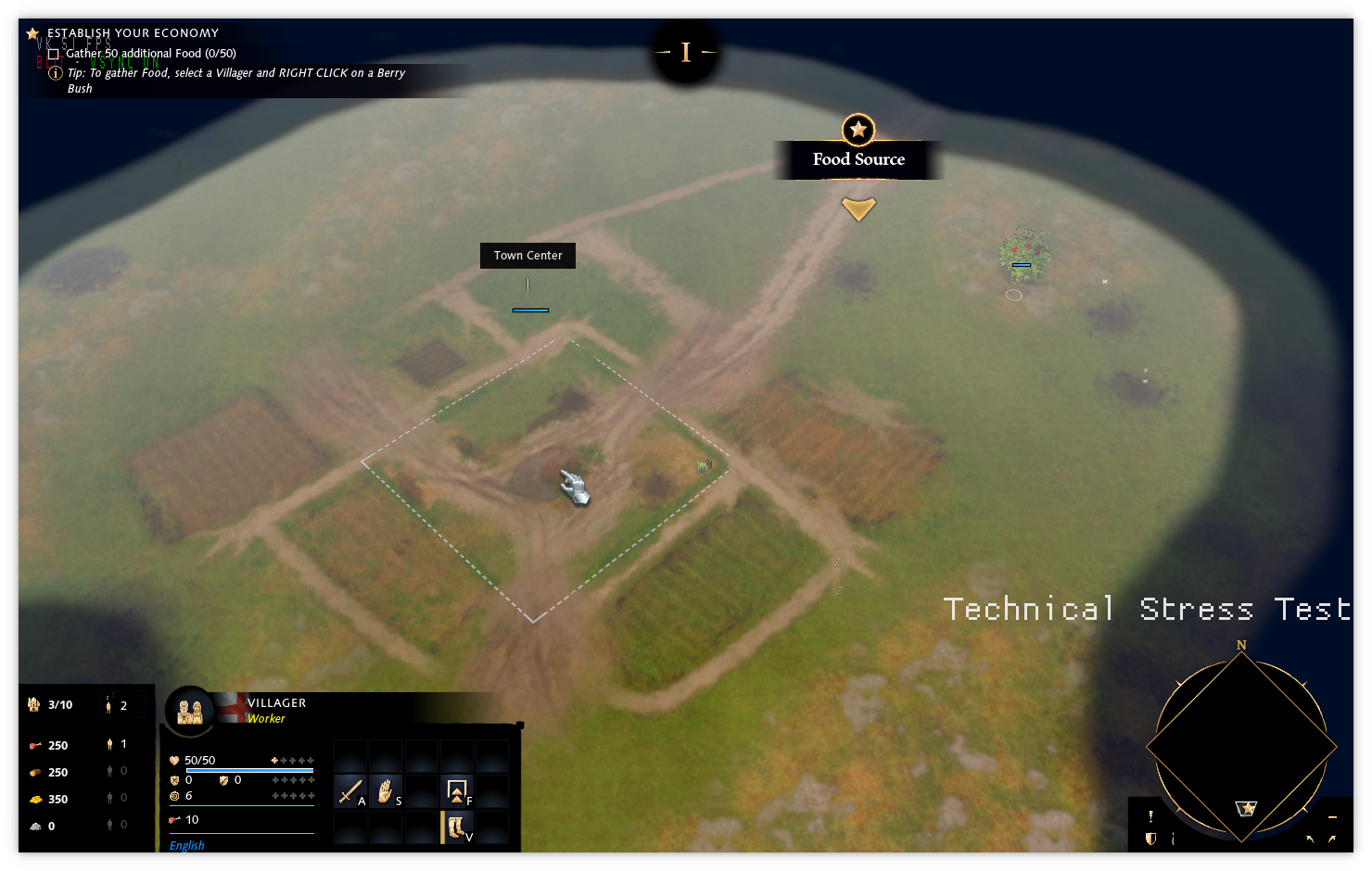
I agree that this looks d3d12/vkd3d-y.
Some more notes:
There were a number of shader warnings as well, when VKD3D_SHADER_DEBUG=warn was set:
VKD3D_SHADER_DEBUG=warn was set:
01ac:warn:parse_dxbc: Ignoring DXBC checksum.
01ac:warn:skip_dword_unknown: Skipping 4 unknown DWORDs:
01ac:warn:skip_dword_unknown: 	0x6149dfef
01ac:warn:skip_dword_unknown: 	0xff9314a5
01ac:warn:skip_dword_unknown: 	0x2fc4ddf0
01ac:warn:skip_dword_unknown: 	0x8caa30f4
01ac:warn:skip_dword_unknown: Skipping 1 unknown DWORDs:
01ac:warn:skip_dword_unknown: 	0x00000008
01ac:warn:skip_dword_unknown: Skipping 1 unknown DWORDs:
01ac:warn:skip_dword_unknown: 	0x00000008
01ac:warn:vkd3d_dxbc_compiler_emit_dcl_global_flags: Unhandled global flags 0x1.
01ac:warn:shader_sm4_read_instruction_modifier: Unhandled modifier 0x800000c2.
01ac:warn:shader_sm4_read_instruction_modifier: Unhandled modifier 0x00044443.
01ac:warn:shader_sm4_read_instruction_modifier: Unhandled modifier 0x800000c2.
01ac:warn:shader_sm4_read_instruction_modifier: Unhandled modifier 0x00044443.
Most of these seem harmless: the unknown DWORD stuff hits every shader in vkd3d, and are just the aforemention checksum being skipped.
Backporting this change from regular vkd3d to vkd3d-proton does fix this message, but not the bug:
01ac:warn:shader_sm4_read_instruction_modifier: Unhandled modifier 0x800000c2.
According to the DXVK code, the final modifier type, used in 0x00044443 is ResourceReturnType. There's also a 0x00155543 and 0x00199983 like that: none of them seem to be different types per-compoenent, which is the only thing Vulkan should be unable to handle. All of this seems to be handled elsewhere as part of dcl_resource handling.
There are also a bunch of Vulkan validation layer warnings. It took be a while to get these to show (due to needing the pressure-vessel beta, and vkd3d not successfully finding the validation layer itself, and needing to use VK_INSTANCE_LAYERS=VK_LAYER_KHRONOS_validation manually).
On startup, a lot of these are a result of the various limits being exceeded, e.g.:
VUID-VkPipelineLayoutCreateInfo-descriptorType-03024(ERROR / SPEC): msgNum: -349439268 - Validation Error: [ VUID-VkPipelineLayoutCreateInfo-descriptorType-03024 ] Object 0: handle = 0x7fc0785501c8, type = VK_OBJECT_TYPE_DEVICE; | MessageID = 0xeb2bfadc | vkCreatePipelineLayout(): max per-stage storage buffer bindings count (2000002) exceeds device maxPerStageDescriptorUpdateAfterBindStorageBuffers limit (1048576). The Vulkan spec states: The total number of descriptors with a descriptorType of VK_DESCRIPTOR_TYPE_STORAGE_BUFFER and VK_DESCRIPTOR_TYPE_STORAGE_BUFFER_DYNAMIC accessible to any given shader stage across all elements of pSetLayouts must be less than or equal to VkPhysicalDeviceDescriptorIndexingProperties::maxPerStageDescriptorUpdateAfterBindStorageBuffers (https://www.khronos.org/registry/vulkan/specs/1.2-extensions/html/vkspec.html#VUID-VkPipelineLayoutCreateInfo-descriptorType-03024)
    Objects: 1
        [0] 0x7fc0785501c8, type: 3, name: NULL
VUID-VkPipelineLayoutCreateInfo-descriptorType-03025(ERROR / SPEC): msgNum: 677655566 - Validation Error: [ VUID-VkPipelineLayoutCreateInfo-descriptorType-03025 ] Object 0: handle = 0x7fc0785501c8, type = VK_OBJECT_TYPE_DEVICE; | MessageID = 0x2864340e | vkCreatePipelineLayout(): max per-stage sampled image bindings count (2000000) exceeds device maxPerStageDescriptorUpdateAfterBindSampledImages limit (1048576). The Vulkan spec states: The total number of descriptors with a descriptorType of VK_DESCRIPTOR_TYPE_COMBINED_IMAGE_SAMPLER, VK_DESCRIPTOR_TYPE_SAMPLED_IMAGE, and VK_DESCRIPTOR_TYPE_UNIFORM_TEXEL_BUFFER accessible to any given shader stage across all elements of pSetLayouts must be less than or equal to VkPhysicalDeviceDescriptorIndexingProperties::maxPerStageDescriptorUpdateAfterBindSampledImages (https://www.khronos.org/registry/vulkan/specs/1.2-extensions/html/vkspec.html#VUID-VkPipelineLayoutCreateInfo-descriptorType-03025)
    Objects: 1
        [0] 0x7fc0785501c8, type: 3, name: NULL
VUID-VkPipelineLayoutCreateInfo-descriptorType-03026(ERROR / SPEC): msgNum: -1076908350 - Validation Error: [ VUID-VkPipelineLayoutCreateInfo-descriptorType-03026 ] Object 0: handle = 0x7fc0785501c8, type = VK_OBJECT_TYPE_DEVICE; | MessageID = 0xbfcfaec2 | vkCreatePipelineLayout(): max per-stage storage image bindings count (2000000) exceeds device maxPerStageDescriptorUpdateAfterBindStorageImages limit (1048576). The Vulkan spec states: The total number of descriptors with a descriptorType of VK_DESCRIPTOR_TYPE_STORAGE_IMAGE, and VK_DESCRIPTOR_TYPE_STORAGE_TEXEL_BUFFER accessible to any given shader stage across all elements of pSetLayouts must be less than or equal to VkPhysicalDeviceDescriptorIndexingProperties::maxPerStageDescriptorUpdateAfterBindStorageImages (https://www.khronos.org/registry/vulkan/specs/1.2-extensions/html/vkspec.html#VUID-VkPipelineLayoutCreateInfo-descriptorType-03026)
    Objects: 1
        [0] 0x7fc0785501c8, type: 3, name: NULL
VUID-VkPipelineLayoutCreateInfo-pSetLayouts-03039(ERROR / SPEC): msgNum: 2004556686 - Validation Error: [ VUID-VkPipelineLayoutCreateInfo-pSetLayouts-03039 ] Object 0: handle = 0x7fc0785501c8, type = VK_OBJECT_TYPE_DEVICE; | MessageID = 0x777b1b8e | vkCreatePipelineLayout(): sum of storage buffer bindings among all stages (2000002) exceeds device maxDescriptorSetUpdateAfterBindStorageBuffers limit (1048576). The Vulkan spec states: The total number of descriptors of the type VK_DESCRIPTOR_TYPE_STORAGE_BUFFER accessible across all shader stages and across all elements of pSetLayouts must be less than or equal to VkPhysicalDeviceDescriptorIndexingProperties::maxDescriptorSetUpdateAfterBindStorageBuffers (https://www.khronos.org/registry/vulkan/specs/1.2-extensions/html/vkspec.html#VUID-VkPipelineLayoutCreateInfo-pSetLayouts-03039)
    Objects: 1
        [0] 0x7fc0785501c8, type: 3, name: NULL
VUID-VkPipelineLayoutCreateInfo-pSetLayouts-03041(ERROR / SPEC): msgNum: -1762640868 - Validation Error: [ VUID-VkPipelineLayoutCreateInfo-pSetLayouts-03041 ] Object 0: handle = 0x7fc0785501c8, type = VK_OBJECT_TYPE_DEVICE; | MessageID = 0x96f03c1c | vkCreatePipelineLayout(): sum of sampled image bindings among all stages (2000000) exceeds device maxDescriptorSetUpdateAfterBindSampledImages limit (1048576). The Vulkan spec states: The total number of descriptors of the type VK_DESCRIPTOR_TYPE_COMBINED_IMAGE_SAMPLER, VK_DESCRIPTOR_TYPE_SAMPLED_IMAGE, and VK_DESCRIPTOR_TYPE_UNIFORM_TEXEL_BUFFER accessible across all shader stages and across all elements of pSetLayouts must be less than or equal to VkPhysicalDeviceDescriptorIndexingProperties::maxDescriptorSetUpdateAfterBindSampledImages (https://www.khronos.org/registry/vulkan/specs/1.2-extensions/html/vkspec.html#VUID-VkPipelineLayoutCreateInfo-pSetLayouts-03041)
    Objects: 1
        [0] 0x7fc0785501c8, type: 3, name: NULL
VUID-VkPipelineLayoutCreateInfo-pSetLayouts-03042(ERROR / SPEC): msgNum: -2121676734 - Validation Error: [ VUID-VkPipelineLayoutCreateInfo-pSetLayouts-03042 ] Object 0: handle = 0x7fc0785501c8, type = VK_OBJECT_TYPE_DEVICE; | MessageID = 0x8189c842 | vkCreatePipelineLayout(): sum of storage image bindings among all stages (2000000) exceeds device maxDescriptorSetUpdateAfterBindStorageImages limit (1048576). The Vulkan spec states: The total number of descriptors of the type VK_DESCRIPTOR_TYPE_STORAGE_IMAGE, and VK_DESCRIPTOR_TYPE_STORAGE_TEXEL_BUFFER accessible across all shader stages and across all elements of pSetLayouts must be less than or equal to VkPhysicalDeviceDescriptorIndexingProperties::maxDescriptorSetUpdateAfterBindStorageImages (https://www.khronos.org/registry/vulkan/specs/1.2-extensions/html/vkspec.html#VUID-VkPipelineLayoutCreateInfo-pSetLayouts-03042)
    Objects: 1
        [0] 0x7fc0785501c8, type: 3, name: NULL
Later on, we get a bunch of issues with trying to copy a rectangle from an image which is bigger than the image itself in vkCmdCopyImage():
vkCmdCopyImage():
VUID-vkCmdCopyImage-srcOffset-00144(ERROR / SPEC): msgNum: 578268019 - Validation Error: [ VUID-vkCmdCopyImage-srcOffset-00144 ] Object 0: handle = 0x7fc00c423758, type = VK_OBJECT_TYPE_COMMAND_BUFFER; | MessageID = 0x2277ab73 | vkCmdCopyImage(): Source image pRegion 0 x-dimension offset [0] + extent [4] exceeds subResource width [2]. The Vulkan spec states: For each element of pRegions, srcOffset.x and (extent.width + srcOffset.x) must both be greater than or equal to 0 and less than or equal to the width of the specified srcSubresource of srcImage (https://www.khronos.org/registry/vulkan/specs/1.2-extensions/html/vkspec.html#VUID-vkCmdCopyImage-srcOffset-00144)
    Objects: 1
        [0] 0x7fc00c423758, type: 6, name: NULL
VUID-vkCmdCopyImage-srcOffset-00145(ERROR / SPEC): msgNum: -29873156 - Validation Error: [ VUID-vkCmdCopyImage-srcOffset-00145 ] Object 0: handle = 0x7fc00c423758, type = VK_OBJECT_TYPE_COMMAND_BUFFER; | MessageID = 0xfe382bfc | vkCmdCopyImage(): Source image pRegion 0 y-dimension offset [0] + extent [4] exceeds subResource height [2]. The Vulkan spec states: For each element of pRegions, srcOffset.y and (extent.height + srcOffset.y) must both be greater than or equal to 0 and less than or equal to the height of the specified srcSubresource of srcImage (https://www.khronos.org/registry/vulkan/specs/1.2-extensions/html/vkspec.html#VUID-vkCmdCopyImage-srcOffset-00145)
    Objects: 1
        [0] 0x7fc00c423758, type: 6, name: NULL
VUID-vkCmdCopyImage-dstOffset-00150(ERROR / SPEC): msgNum: 951450318 - Validation Error: [ VUID-vkCmdCopyImage-dstOffset-00150 ] Object 0: handle = 0x7fc00c423758, type = VK_OBJECT_TYPE_COMMAND_BUFFER; | MessageID = 0x38b5face | vkCmdCopyImage(): Dest image pRegion 0 x-dimension offset [0] + extent [4] exceeds subResource width [2]. The Vulkan spec states: For each element of pRegions, dstOffset.x and (extent.width + dstOffset.x) must both be greater than or equal to 0 and less than or equal to the width of the specified dstSubresource of dstImage (https://www.khronos.org/registry/vulkan/specs/1.2-extensions/html/vkspec.html#VUID-vkCmdCopyImage-dstOffset-00150)
    Objects: 1
        [0] 0x7fc00c423758, type: 6, name: NULL
VUID-vkCmdCopyImage-dstOffset-00151(ERROR / SPEC): msgNum: 1269922318 - Validation Error: [ VUID-vkCmdCopyImage-dstOffset-00151 ] Object 0: handle = 0x7fc00c423758, type = VK_OBJECT_TYPE_COMMAND_BUFFER; | MessageID = 0x4bb17a0e | vkCmdCopyImage()): Dest image pRegion 0 y-dimension offset [0] + extent [4] exceeds subResource height [2]. The Vulkan spec states: For each element of pRegions, dstOffset.y and (extent.height + dstOffset.y) must both be greater than or equal to 0 and less than or equal to the height of the specified dstSubresource of dstImage (https://www.khronos.org/registry/vulkan/specs/1.2-extensions/html/vkspec.html#VUID-vkCmdCopyImage-dstOffset-00151)
    Objects: 1
        [0] 0x7fc00c423758, type: 6, name: NULL
This seemed much more likely to be related to the issue, but avoiding vkCmdCopyImage completely by forcing use_copy to false here just made things worse, as it broke copies with src = depth/stencil. This made the terrain invisible, and the objects which previously only rendered when selected still only rendered when selected. At one point when playing with this, I did get the town centre to show up in the wrong spot on the screen at once point, though I think that may have been a coincidence.
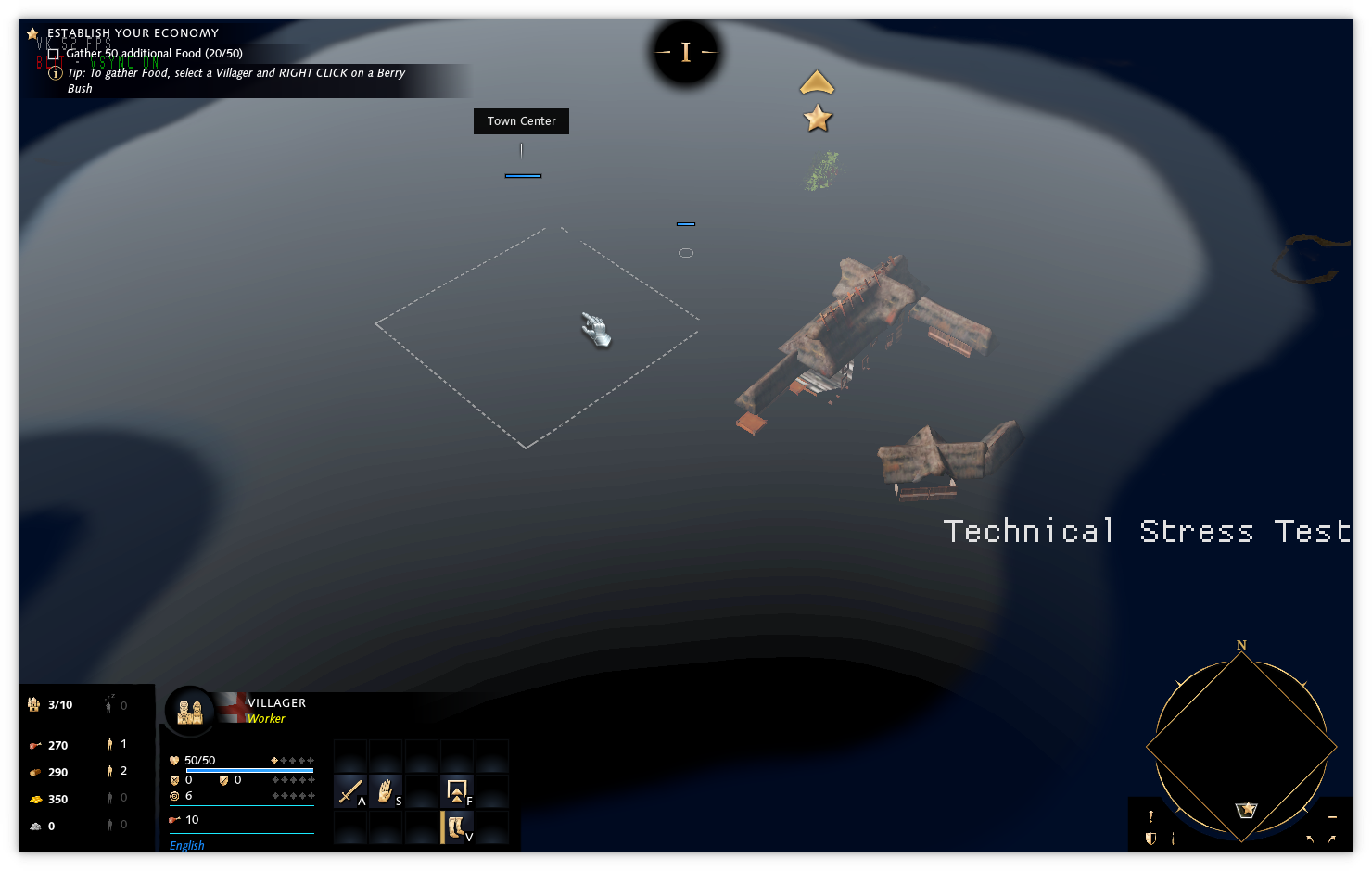
Finally, the game just shows a black screen on Intel integrated graphics, and gives off some extra Vulkan validation warnings:
VUID-VkShaderModuleCreateInfo-pCode-04147(ERROR / SPEC): msgNum: 1028204675 - Validation Error: [ VUID-VkShaderModuleCreateInfo-pCode-04147 ] Object 0: handle = 0x7fb9b0578b60, type = VK_OBJECT_TYPE_DEVICE; | MessageID = 0x3d492883 | vkCreateShaderModule(): The SPIR-V Extension (SPV_EXT_physical_storage_buffer) was declared, but none of the requirements were met to use it. The Vulkan spec states: If pCode declares any of the SPIR-V extensions listed in the SPIR-V Environment appendix, one of the corresponding requirements must be satisfied (https://www.khronos.org/registry/vulkan/specs/1.2-extensions/html/vkspec.html#VUID-VkShaderModuleCreateInfo-pCode-04147)
    Objects: 1
        [0] 0x7fb9b0578b60, type: 3, name: NULL
VUID-VkBufferCreateInfo-sharingMode-01419(ERROR / SPEC): msgNum: 475737432 - Validation Error: [ VUID-VkBufferCreateInfo-sharingMode-01419 ] Object 0: handle = 0x7fb9b0578b60, type = VK_OBJECT_TYPE_DEVICE; | MessageID = 0x1c5b2d58 | vkCreateBuffer: pCreateInfo->pQueueFamilyIndices[1] is VK_QUEUE_FAMILY_IGNORED, but it is required to provide a valid queue family index value. The Vulkan spec states: If sharingMode is VK_SHARING_MODE_CONCURRENT, each element of pQueueFamilyIndices must be unique and must be less than pQueueFamilyPropertyCount returned by either vkGetPhysicalDeviceQueueFamilyProperties or vkGetPhysicalDeviceQueueFamilyProperties2 for the physicalDevice that was used to create device (https://www.khronos.org/registry/vulkan/specs/1.2-extensions/html/vkspec.html#VUID-VkBufferCreateInfo-sharingMode-01419)
    Objects: 1
        [0] 0x7fb9b0578b60, type: 3, name: NULL
Edit: Haven't had any further luck.
- Clamping vkCmdCopyImage() calls doesn't seem to help anywhere. It fixes the vulkan validation warnings, but nothing else.
- Running with Exclusive Fullscreen mode causes a crash on startup
- Collecting 50 food in the tutorial leads to the following crash:
Click to expand
01b8:warn:shader_sm4_read_instruction_modifier: Unhandled modifier 0x800002c2.
01b8:warn:shader_sm4_read_instruction_modifier: Unhandled modifier 0x00199983.
01b8:warn:parse_dxbc: Ignoring DXBC checksum.
01b8:warn:skip_dword_unknown: Skipping 4 unknown DWORDs:
01b8:warn:skip_dword_unknown: 	0x610336f3
01b8:warn:skip_dword_unknown: 	0xb6864f24
01b8:warn:skip_dword_unknown: 	0xdebb6b05
01b8:warn:skip_dword_unknown: 	0x9dcda43e
01b8:warn:skip_dword_unknown: Skipping 1 unknown DWORDs:
01b8:warn:skip_dword_unknown: 	0x00000008
01b8:warn:skip_dword_unknown: Skipping 1 unknown DWORDs:
01b8:warn:skip_dword_unknown: 	0x00000008
01b8:warn:vkd3d_dxbc_compiler_emit_dcl_global_flags: Unhandled global flags 0x1.
01b8:warn:shader_sm4_read_instruction_modifier: Unhandled modifier 0x800002c2.
01b8:warn:shader_sm4_read_instruction_modifier: Unhandled modifier 0x00199983.
01b8:fixme:d3d12_pipeline_state_get_or_create_pipeline: Extended dynamic state is supported, but compiling a fallback pipeline late!
156203.217:0130:0134:trace:seh:dispatch_exception code=c0000005 flags=0 addr=000000014336DDA1 ip=000000014336DDA1 tid=0134
156203.217:0130:0134:trace:seh:dispatch_exception  info[0]=0000000000000001
156203.217:0130:0134:trace:seh:dispatch_exception  info[1]=0000000000000000
156203.217:0130:0134:warn:seh:dispatch_exception EXCEPTION_ACCESS_VIOLATION exception (code=c0000005) raised
156203.217:0130:0134:trace:seh:dispatch_exception  rax=0000000000000000 rbx=0000000000000000 rcx=0000000000000000 rdx=0000000000000000
156203.217:0130:0134:trace:seh:dispatch_exception  rsi=0000000000000000 rdi=000000000093cb36 rbp=0000000000000001 rsp=000000000093c2a0
156203.217:0130:0134:trace:seh:dispatch_exception   r8=0000000000000000  r9=0000000000000001 r10=0000000000000fff r11=000000000093be10
156203.217:0130:0134:trace:seh:dispatch_exception  r12=0000000000000000 r13=0000000000000000 r14=00000000af6de190 r15=0000000000000000

[…boring seh stuff…]


wine: Unhandled page fault on write access to 0000000000000000 at address 000000014336DDA1 (thread 0134), starting debugger...
156203.219:0130:0134:trace:seh:start_debugger Starting debugger L"winedbg --auto 304 204"
[…boring seh/NtQueryInformationThread stuff from the crash handler…]

Unhandled exception: page fault on write access to 0x00000000 in 64-bit code (0x000000014336dda1).
Register dump:
 rip:000000014336dda1 rsp:000000000093c2a0 rbp:0000000000000001 eflags:00010206 (  R- --  I   - -P- )
 rax:0000000000000000 rbx:0000000000000000 rcx:0000000000000000 rdx:0000000000000000
 rsi:0000000000000000 rdi:000000000093cb36  r8:0000000000000000  r9:0000000000000001 r10:0000000000000fff
 r11:000000000093be10 r12:0000000000000000 r13:0000000000000000 r14:00000003af6de190 r15:0000000000000000
Stack dump:
0x000000000093c2a0:  000000000093c309 000000014074f8b6
0x000000000093c2b0:  0000000145718828 0000000146205f00
0x000000000093c2c0:  0000000000000006 000000000093cda8
0x000000000093c2d0:  44465556448c2aab 0000000003794ee0
0x000000000093c2e0:  000000018c22a550 0000000189807e30
0x000000000093c2f0:  0000000000000006 0000000000000006
0x000000000093c300:  0000000044465556 0000000000000000
0x000000000093c310:  00000000448c2aab 0000000000000000
0x000000000093c320:  0000000044465556 0000000000000000
0x000000000093c330:  00000000448c2aab 0000000000000000
0x000000000093c340:  0000000000000000 0000000115f55330
0x000000000093c350:  0000000003794ee0 000000018c22a550
Backtrace:
=>0 0x000000014336dda1 EntryPoint+0x100e1ab39() in reliccardinal (0x0000000000000001)
  1 0x00000003af692931 EntryPoint+0x2fffa6880() in ucrtbase (0x0000000000000001)
  2 0x00000003af69331e EntryPoint+0x2fffa726d() in ucrtbase (0x0000000000000001)
  3 0x00000003af6dfe18 EntryPoint+0x2ffff3d67() in ucrtbase (0x0000000000000001)
  4 0x00000003af6e2c42 EntryPoint+0x2ffff6b91() in ucrtbase (0x000000000093ccc6)
  5 0x00000003af6e424f EntryPoint+0x2ffff819e() in ucrtbase (0x000000000093ccc6)
  6 0x0000000140b38104 EntryPoint+0xfe5e4e9b() in reliccardinal (0x000000000093ccc6)
  7 0x0000000140b380b0 EntryPoint+0xfe5e4e47() in reliccardinal (0x000000000093ccc6)
  8 0x0000000140b3807e EntryPoint+0xfe5e4e15() in reliccardinal (0x000000000093ccc6)
  9 0x0000000140386fca EntryPoint+0xfde33d61() in reliccardinal (0x0000000000000001)
  10 0x000000014049dcc5 EntryPoint+0xfdf4aa5c() in reliccardinal (0x0000000000000002)
  11 0x000000014049dc3e EntryPoint+0xfdf4a9d5() in reliccardinal (0x000000000093ed80)
  12 0x000000014049dbf3 EntryPoint+0xfdf4a98a() in reliccardinal (0x000000000093ed80)
  13 0x0000000144645fac EntryPoint+0x1020f2d43() in reliccardinal (0x000000000093ed80)
  14 0x000000014464599d EntryPoint+0x1020f2734() in reliccardinal (0x000000014045786c)
  15 0x00000001404579ff EntryPoint+0xfdf04796() in reliccardinal (0x000000014045786c)
  16 0x0000000140457aa9 EntryPoint+0xfdf04840() in reliccardinal (0x000000014045786c)
  17 0x0000000140459ff5 EntryPoint+0xfdf06d8c() in reliccardinal (0x000000000093efb0)
  18 0x000000014073979a EntryPoint+0xfe1e6531() in reliccardinal (0x000000000093f240)
  19 0x000000014073964d EntryPoint+0xfe1e63e4() in reliccardinal (0x000000000093f240)
  20 0x000000014044e6a1 EntryPoint+0xfdefb438() in reliccardinal (0x000000000093f240)
  21 0x000000014044e501 EntryPoint+0xfdefb298() in reliccardinal (0x000000000093f3d8)
  22 0x000000014044d15e EntryPoint+0xfdef9ef5() in reliccardinal (0x000000000093f3d8)
  23 0x00000001407ed0b6 EntryPoint+0xfe299e4d() in reliccardinal (0x000000000093f490)
  24 0x000000014088c42a EntryPoint+0xfe3391c1() in reliccardinal (0x0000000000000008)
  25 0x000000014088ba70 EntryPoint+0xfe338807() in reliccardinal (0x0000000000000008)
  26 0x00000001405427fc EntryPoint+0xfdfef593() in reliccardinal (0x000000000093f720)
  27 0x000000014053f99a EntryPoint+0xfdfec731() in reliccardinal (0x000000000093f900)
  28 0x00000001405404e0 EntryPoint+0xfdfed277() in reliccardinal (0x000000000093fa70)
  29 0x00000001405405c0 EntryPoint+0xfdfed357() in reliccardinal (0x000000000093fa70)
  30 0x000000014136ac4b EntryPoint+0xfee179e2() in reliccardinal (0x0000000000000000)
  31 0x0000000142553192 EntryPoint+0xffffff29() in reliccardinal (0x0000000000000000)
  32 0x000000007b62c9a9 EntryPoint+0xffffffffffffffff() in kernel32 (0x0000000000000000)
  33 0x000000007bc5e6a3 EntryPoint+0xffffffffffffffff() in ntdll (0x0000000000000000)
0x000000014336dda1 EntryPoint+0x100e1ab39 in reliccardinal: movl	$0,0x0000000000000000
Modules:
Module	Address					Debug info	Name (81 modules)
PE	          940000-          9d2000	Deferred        msvcp140
PE	          9e0000-          9f9000	Deferred        vcruntime140
PE	          a00000-          a0f000	Deferred        amd_ags_x64
PE	          a10000-          ae7000	Deferred        cell_v140_release_x64_wide_4_0
PE	         cbb0000-         cd8a000	Deferred        gameoverlayrenderer64
PE	        7b000000-        7b0d5000	Deferred        kernelbase
PE	        7b600000-        7b812000	Export          kernel32
PE	        7bc00000-        7bc9e000	Export          ntdll
PE	       138000000-       13948e000	Deferred        steamclient64
PE	       13b400000-       13b44fe00	Deferred        steam_api64
PE	       140000000-       14bd38000	Export          reliccardinal
PE	       180000000-       180339000	Deferred        tensorflowlite_c
PE	       1c8b40000-       1c8b60000	Deferred        msacm32
PE	       1c8db0000-       1c8e3c000	Deferred        msvcrt
PE	       1cd860000-       1cd868000	Deferred        api-ms-win-crt-utility-l1-1-0
PE	       1d97a0000-       1d97a7000	Deferred        api-ms-win-core-fibers-l1-1-1
PE	       1dc810000-       1dc81d000	Deferred        schannel
PE	       1dd3f0000-       1dd4bd000	Deferred        crypt32
PE	       1e6c10000-       1e6c1d000	Deferred        wer
PE	       1f51e0000-       1f51ef000	Deferred        hid
PE	       21a7e0000-       21a855000	Deferred        setupapi
PE	       228450000-       22847a000	Deferred        propsys
PE	       231ae0000-       231b62000	Deferred        rpcrt4
PE	       236df0000-       236e49000	Deferred        dsound
PE	       23d820000-       23da48000	Deferred        user32
PE	       241850000-       241857000	Deferred        api-ms-win-crt-environment-l1-1-0
PE	       262250000-       262259000	Deferred        api-ms-win-crt-runtime-l1-1-0
PE	       26b4c0000-       26b642000	Deferred        gdi32
PE	       2739c0000-       273af6000	Deferred        oleaut32
PE	       28ba60000-       28ba67000	Deferred        api-ms-win-crt-time-l1-1-0
PE	       29e400000-       29e435000	Deferred        msctf
PE	       2bb750000-       2bb894000	Deferred        comctl32
PE	       2d4d40000-       2d4d57000	Deferred        bcrypt
PE	       2de970000-       2de9a2000	Deferred        rsaenh
PE	       2e3540000-       2e3591000	Deferred        shlwapi
PE	       2e8f10000-       2e9028000	Deferred        ole32
PE	       2edf00000-       2ee0e7000	Deferred        dxgi
PE	       2f1fa0000-       2f1fad000	Deferred        version
PE	       2f61f0000-       2f6213000	Deferred        explorerframe
PE	       2f7230000-       2f725d000	Deferred        uxtheme
PE	       2f7f20000-       2f7f2c000	Deferred        vcruntime140_1
PE	       2fe110000-       2fe11a000	Deferred        api-ms-win-crt-multibyte-l1-1-0
PE	       30a2c0000-       30a2c9000	Deferred        api-ms-win-crt-stdio-l1-1-0
PE	       30c980000-       30c988000	Deferred        api-ms-win-core-synch-l1-2-0
PE	       3126f0000-       312709000	Deferred        shcore
PE	       327020000-       327072000	Deferred        combase
PE	       32a700000-       32a729000	Deferred        sechost
PE	       330260000-       33029f000	Deferred        advapi32
PE	       336850000-       33687a000	Deferred        mmdevapi
PE	       33b9e0000-       33b9ed000	Deferred        powrprof
PE	       33ea00000-       33ea09000	Deferred        api-ms-win-crt-string-l1-1-0
PE	       344840000-       344848000	Deferred        api-ms-win-crt-filesystem-l1-1-0
PE	       346ba0000-       346bc0000	Deferred        jsproxy
PE	       350a30000-       350a39000	Deferred        api-ms-win-crt-convert-l1-1-0
PE	       351680000-       351688000	Deferred        api-ms-win-core-localization-l1-2-1
PE	       355100000-       355107000	Deferred        api-ms-win-crt-locale-l1-1-0
PE	       358120000-       358164000	Deferred        winhttp
PE	       35b570000-       35b598000	Deferred        gameux
PE	       35e4e0000-       35e723000	Deferred        d3d12
PE	       360a80000-       360a8a000	Deferred        api-ms-win-crt-math-l1-1-0
PE	       361860000-       36191b000	Deferred        windowscodecs
PE	       3785e0000-       3785ec000	Deferred        vulkan-1
PE	       39b510000-       39b518000	Deferred        api-ms-win-crt-heap-l1-1-0
PE	       3a93b0000-       3a93c0000	Deferred        xinput1_4
PE	       3aa4c0000-       3aa4cc000	Deferred        dhcpcsvc
PE	       3af670000-       3af728000	Export          ucrtbase
PE	       3afd00000-       3afd1a000	Deferred        imm32
PE	       3b8f00000-       3b8fb7000	Deferred        winmm
PE	    7f5c84010000-    7f5c84013000	Deferred        winepulse
PE	    7f5c865c0000-    7f5c865c4000	Deferred        xaudio2_9
PE	    7f5cb1dd0000-    7f5cb1dd3000	Deferred        wineopenxr
PE	    7f5cb1e30000-    7f5cb1e34000	Deferred        winevulkan
PE	    7f5cb1e90000-    7f5cb1e93000	Deferred        kerberos
PE	    7f5cb1eb0000-    7f5cb1eb4000	Deferred        dnsapi
PE	    7f5cb1ed0000-    7f5cb1ed3000	Deferred        netapi32
PE	    7f5cb1f10000-    7f5cb1f13000	Deferred        secur32
PE	    7f5cb40b0000-    7f5cb40b3000	Deferred        lsteamclient
PE	    7f5cb53f0000-    7f5cb53f4000	Deferred        winex11
PE	    7f5cb5820000-    7f5cb60f7000	Deferred        shell32
PE	    7f5cb63b0000-    7f5cb63b4000	Deferred        ws2_32
PE	    7f5cb6620000-    7f5cb6624000	Deferred        iphlpapi
Threads:
process  tid      prio (all id:s are in hex)
00000020 steam.exe
	00000024    0
	000000cc    0
00000030 services.exe
	00000034    0
	00000038    0
	00000044    0
	00000060    0
	00000078    0
	00000084    0
	000000b0    0
	000000f0    0
0000003c winedevice.exe
	00000040    0
	0000004c    0
	00000050    0
	00000054    0
00000058 plugplay.exe
	0000005c    0
	00000064    0
	00000068    0
	0000006c    0
	0000008c    0
	000001e4    0
	000001e8    0
00000070 winedevice.exe
	00000074    0
	0000007c    0
	00000080    0
	00000088    0
	00000094    0
	00000098    0
	0000009c    0
	000000a0    0
	000000a4    0
000000a8 svchost.exe
	000000ac    0
	000000b4    0
	000000b8    0
000000bc tabtip.exe
	000000c0    0
	00000114    0
	0000011c    0
000000c4 explorer.exe
	000000c8    0
	000000dc    0
	000000e0    0
000000e8 rpcss.exe
	000000ec    0
	000000f8    0
	000000fc    0
	00000100    0
	00000104    0
	00000108    0
00000130 (D) Z:\home\david\.local\share\Steam\steamapps\common\Age of Empires IV Beta\RelicCardinal.exe
	00000134    0 <==
	00000138   -1
	0000013c   -1
	00000140   -1
	00000144    0
	00000148    0
	0000014c    0
	00000150    0
	00000154    0
	00000158    0
	0000015c    0
	00000160    0
	00000168    0
	0000016c    0
	00000170    0
	00000174    0
	00000178    0
	0000017c    0
	00000184    0
	00000190    0
	00000194   -1
	00000198    0
	0000019c   15
	000001a0    0
	000001a4    0
	000001a8    0
	000001ac    0
	000001b0    0
	000001b4    0
	000001b8    0
	000001bc    0
	000001c0    1
	000001c4    1
	000001c8    1
	000001cc    0
	000001d0    0
	000001d4   -1
	000001d8   -1
	000001dc    0
	000001e0    0
	000001ec    0
	000001f0   -2
	000001f4   -2
	000001f8   -2
	000001fc   -2
	00000200   -2
	00000204   -2
	00000208   -2
	0000020c   -2
	00000218   15
	00000254    0
	00000264    0
System information:
    Wine build: wine-6.3
    Platform: x86_64
    Version: Windows 10
    Host system: Linux
    Host version: 5.13.0-16-generic
Same Issues with models not rendering. Using current current Proton Experimental, Mesa 21.2.1, Arch (Linux arch 5.14.5-arch1-1) and Tiling WM.
Fullscreen doesn't work either but borderless fullscreen does. Does somebody know where to graphic settings file is located so that i don't have to reinstall every time to try some stuff out?
Beside models not rendering (healthbars are visible), the game crashes suddenly when just collecting berries in the tutorial without doing anything else.
EDIT: Game crashes in the tutorial when the additional 50 food are gathered and the next tutorial step should appear.
CrashLog
@josefbachmann Yep, I had the same issue. Only borderless fullscreen does. To edit the settings, the file you're looking can be found by:
- Going to the steam library folder where the game is (i.e. the
steamappsfolder) - Navigate to
compatdata/1015520/pfx/drive_c/users/steamuser/My Documents/My Games/Age of Empires IV - Beta/ - You should see your local settings and config files saved here.
configuration_system.luahas most of the menu settings, includingwindowmode, which you can set as an int to get back to borderless fullscreen.
Hope that helps, and that you have better luck that I did with the invisible buildings and units.
Replying to https://github.com/ValveSoftware/Proton/issues/5048#issuecomment-922251964
@RF5 Do you mind sharing your configuration_system.lua pleas,e so the game will start under borderless mode. Also what did you do to get the game working?
For those who are wondering, by default it is in borderless mode:
	[83] =
	{
		setting = "windowmode",
		variantUInt = 0,
	},
Here's a RenderDoc capture showing the bug:
https://davidgow.net/stuff/aoe4-berrybush-rdoc.rdc.bz2
There's one berry bush selected, which does render (for some reason). All the units seem to be rendered in Colour Pass #2, and one part of the berry bush is event 408.
Crashed for me loading the match with proton 6.3-6
Replying to https://github.com/ValveSoftware/Proton/issues/5048#issuecomment-922329282
This works with textures?
This works with textures?
Nope, sadly this is what the game looks like atm:

Since Aoe IV is using DirectX 12, I'm trying with this compatibility layer atm, but doesn't work:
https://github.com/HansKristian-Work/vkd3d-proton
Hi, I don't normally comment on these threads since I don't have too much to add, but I wanted to mention that "out of the box" I have the game running similar to @xsellier's screenshot above. All I did to configure it is to force Proton Experimental mode in Steam and launch the game. No VKD3D or D3D12 hacks or patches.
Hardware specs are RTX 2070, Ryzen 3900X, on an Aorus X570 Ultra motherboard. Software specs are Arch Linux, kernel 5.10.56-1-lts (just got home from a road trip so I'm a few weeks behind), nvidia-dkms (et al) 470.63.01-1, and Proton Experimental, and i3.
The game launches fine, menus work, and the windowing is no more problematic than most Proton games running on i3. I'm able to observe network games and the engine works fine. The only show-stopping bug I'm aware of is the buildings and units not rendering, which reproduces. I occasionally see parts of the models rendering, such as building gates.
I'll be following the thread and trying out suggestions during the Stress Test beta. Shout-out to the folks working on this. You're appreciated.
So, I was able to finish the Intro Tutorial, albeit with everything being invisible.
There was a consistent crash when 50 food had been collected. The game's warning.log had the following messages in it:
(F) [18:02:31.046] [000000312]: Fatal Error: CRT Invalid Parameter passed to unknown function.
(I) [18:02:31.046] [000000312]: DB -- no symbols loaded
(F) [18:02:31.046] [000000312]: -- FATAL EXIT --
 Fatal Error: CRT Invalid Parameter passed to unknown function.
(I) [18:02:31.049] [000000312]: D3DLOG Begin
(I) [18:02:31.049] [000000312]: D3DLOG End

Application crashed.
The Fatal Error: CRT Invalid Parameter passed to unknown function. message, combined with ucrtbase showing up a lot in the crash logs, suggested that it could be worked around using the real VC++ runtime library, which turned out to be the case.
My guess is that the function at fault might be __stdio_common_vsnwprintf_s, but I haven't looked further.
As for the invisible units, they do flicker around a bit (including, amusingly, the rocks near cliffs). My hunch is that there's either some weird occlusion query thing, or some data is not being passed properly to shaders (maybe position/orientation data) or is hitting weird NaN issues or something. Or all of the above — it's definitely weird: sometimes the graphics do seem to rotate/shear oddly, too, so it could be a bad matrix(?). To be honest, I have no clue.
I have the same experience as the above commenters, game launches fine (Proton Experimental), and I can start a game. For some reason it detects my settings as being ultra low and scales everything down to the lowest possible setting which was a bit confusing at first. Unit models are not visible, although sometimes they clip into existence for a while until they magically disappear again. Units can be selected and given commands. Game seems to be working fine for everything else, although I was not able to go much further than producing some villagers because of the invisible units.
I run an nvidia GPU (gtx960) using latest proprietary drivers. For some reason AoE IV alerts me on startup that my "AMD" GPU is not supported, which is a bit weird.
I run an nvidia GPU (gtx960) using latest proprietary drivers. For some reason AoE IV alerts me on startup that my "AMD" GPU is not supported, which is a bit weird.
I got that same warning, the game thinks I'm in unsupported AMD driver while I am on GeForce 920M. But this warning only appears if I launch the game with __NV_PRIME_RENDER_OFFLOAD=1 __VK_LAYER_NV_optimus=NVIDIA_only %command%. Although, if I see the log, the game knows I am on GeForce 920M, but prints unknown driver.
I am on Fedora 34, X11, Nvidia 470, proton experimental (tried proton-6.16-ge results the same), Can only get it launched, sounds playing, but screen is black, nothing shows.
My friends and I are all really looking forward to playing this game. Is there anything I can do to promote investigation/development of this issue?
12 hours for the release, will be testing this with the latest vkd3d upstream changes, they are already in the latest Proton GE and probably proton experimental too.
@jatin-cbs alright! Please update us with new information as soon as you can! :)
I'm really looking forward to be able to play this game on linux too!
The game is officially released! @kisak-valve the "beta" in the title of this issue could be removed now.

Still the buildings and units are missing vkd3d is not able to render them. Everything else and the UI is smooth tho. But unplayable just because of missing buildings and units rendering :(
@kisak-valve its not the technical stress test, its stable release on steam. Technical stress test was done last month.
Hello @jatin-cbs, appid 1015520 is definitely still the technical stress test. What's not clear to me is if it's still publicly accessible or if it will stay in lockstep with updates to the main game release in appid 1466860. Since it's not clear, I don't want to summary mangle feedback between the two appids.
@kisak-valve 1466860 you can change the app id to this. This is the public release appid. The stress test is now over and was given to some people which was not the complete game. The main game appid is the only one getting updates. 1015520 app id will redirect to 1466860. so the stress test appid is no more publicly accessible.
Doesn't launch with experimental proton. Manjaro linux with updated Nvidia drivers.
After looking around some more, and re-reviewing your request, no, I don't think we should mangle feedback between separate appids. If at some point the game devs decide to reuse the technical stress test for a future experiment, we'll want to continue the discussion here, otherwise, feedback for the main game should be in a separate compatibility report.
Feel free to use the feedback here as a reference in the new compatibility report, but in general we shouldn't mix feedback between appids since there can be subtle, but important differences. This is the same reason we track feedback for game demo separately from their main game releases.
Closing because it appears that appid 1015520 is no longer publicly accessible.
Proton versions
proton experimentalx6 2021-10proton 6.16x2 2021-09proton 6.3-6x1 2021-09
Launch options
VKD3D_SHADER_DEBUG=warn``x1 2021-09
Launch lines
__NV_PRIME_RENDER_OFFLOAD=1 __VK_LAYER_NV_optimus=NVIDIA_only %command%x1 2021-09__NV_PRIME_RENDER_OFFLOAD=1 __GLX_VENDOR_LIBRARY_NAME=nvidia %command%x1 2021-08
DLLs
api-ms-win-appmodel-runtime-l1-1-1.dllx2 2021-08api-ms-win-core-localization-l1-2-3.dllx2 2021-08kernel32.dllx1 2021-08kernelbase.dllx1 2021-08
Error codes
0x800000c2x1 2021-090x800002c2x1 2021-090x8189c842x1 2021-090x8caa30f4x1 2021-09
Compatibility Report
System Information
I confirm:
steam-1015520.log
Symptoms
Crashes on launch, don't see anything
Reproduction
Launch