Errno 22 Invalid argument with vrclient.dll and proton 6.3-6
Last week, everything was working properly, I supposed it is bug in the new Proton release.
Hello @halvors, @alexzk1, can you two check if you're seeing the same issue as this issue report by completely closing Steam, then run steam in a terminal and see if the same authentication rejected hint is in the terminal spew?
Referencing: https://github.com/ValveSoftware/Proton/issues/775#issuecomment-903113026 and https://github.com/ValveSoftware/Proton/issues/150#issuecomment-903110891
I see only this:
Starting app 359320
Loaded Config for Local Selection Path for App ID 359320, Controller 0: /home/alex/.local/share/Steam/steamapps/workshop/content/241100/756154829/257091088001268018_legacy.bin
Loaded Config for Local Override Path for App ID 359320, Controller 0: /home/alex/.local/share/Steam//controller_base/empty.vdf
Adding process 7455 for game ID 359320
GameAction [AppID 359320, ActionID 1] : LaunchApp changed task to WaitingGameWindow with ""
GameAction [AppID 359320, ActionID 1] : LaunchApp changed task to Completed with ""
Adding process 7456 for game ID 359320
Adding process 7457 for game ID 359320
Proton: Upgrading prefix from 5.13-1 to 6.3-3 (/home/alex/.local/share/Steam/steamapps/compatdata/359320/)
Proton: Removing ShellExecute DDE registry entries.
Adding process 7675 for game ID 359320
Traceback (most recent call last):
File "/home/alex/.local/share/Steam/steamapps/common/Proton - Experimental/proton", line 1276, in
g_session.init_session(sys.argv[1] != "runinprefix")
File "/home/alex/.local/share/Steam/steamapps/common/Proton - Experimental/proton", line 1090, in init_session
g_compatdata.setup_prefix()
File "/home/alex/.local/share/Steam/steamapps/common/Proton - Experimental/proton", line 655, in setup_prefix
self.migrate_user_paths()
File "/home/alex/.local/share/Steam/steamapps/common/Proton - Experimental/proton", line 629, in migrate_user_paths
merge_user_dir(src=old, dst=new)
File "/home/alex/.local/share/Steam/steamapps/common/Proton - Experimental/proton", line 102, in merge_user_dir
try_copy(src_file, dst_file, copy_metadata=True)
File "/home/alex/.local/share/Steam/steamapps/common/Proton - Experimental/proton", line 123, in try_copy
shutil.copy2(src, dst)
File "/usr/lib/python3.7/shutil.py", line 263, in copy2
copyfile(src, dst, follow_symlinks=follow_symlinks)
File "/usr/lib/python3.7/shutil.py", line 120, in copyfile
with open(src, 'rb') as fsrc:
IsADirectoryError: [Errno 21] Is a directory: '/home/alex/.local/share/Steam/steamapps/compatdata/359320/pfx/drive_c/users/steamuser/Local Settings/Application Data/Frontier Developments'
Game removed: AppID 359320 "", ProcID 7455
Uploaded AppInterfaceStats to Steam
Exiting app 359320
Thanks, in comparison, @cassbeck's log has
Traceback (most recent call last):
  File "/ssdgames/steam/steamapps/common/Proton 6.3/proton", line 1264, in <module>
    g_session.init_session(sys.argv[1] != "runinprefix")
  File "/ssdgames/steam/steamapps/common/Proton 6.3/proton", line 1078, in init_session
    g_compatdata.setup_prefix()
  File "/ssdgames/steam/steamapps/common/Proton 6.3/proton", line 761, in setup_prefix
    try_copy(g_proton.lib_dir + "wine/fakedlls/vrclient.dll", dst)
  File "/ssdgames/steam/steamapps/common/Proton 6.3/proton", line 123, in try_copy
    shutil.copy2(src, dst)
  File "/usr/lib/python3.7/shutil.py", line 264, in copy2
    copystat(src, dst, follow_symlinks=follow_symlinks)
  File "/usr/lib/python3.7/shutil.py", line 229, in copystat
    _copyxattr(src, dst, follow_symlinks=follow)
  File "/usr/lib/python3.7/shutil.py", line 165, in _copyxattr
    os.setxattr(dst, name, value, follow_symlinks=follow_symlinks)
OSError: [Errno 22] Invalid argument: '/ssdgames/steam/steamapps/compatdata/252950/pfx//drive_c/vrclient/bin/vrclient.dll'
The authentication rejected error might be a red herring here. and the more important detail is that Proton's python script is getting interrupted by an error.
I'm seeing the same error here for Bioshock 1 Remastered under Proton 6.3-6 or Proton Experimental (6.3-20210819) and the game doesn't start.
08:19:23 steam.desktop[50704]: >>> Adding process 62509 for game ID 409710
08:19:23 steam.desktop[62509]: Traceback (most recent call last):
08:19:23 steam.desktop[62509]:   File "/srv/steam/steamapps/common/Proton 6.3/proton", line 1264, in <module>
08:19:23 steam.desktop[62509]:     g_session.init_session(sys.argv[1] != "runinprefix")
08:19:23 steam.desktop[62509]:   File "/srv/steam/steamapps/common/Proton 6.3/proton", line 1078, in init_session
08:19:23 steam.desktop[62509]:     g_compatdata.setup_prefix()
08:19:23 steam.desktop[62509]:   File "/srv/steam/steamapps/common/Proton 6.3/proton", line 761, in setup_prefix
08:19:23 steam.desktop[62509]:     try_copy(g_proton.lib_dir + "wine/fakedlls/vrclient.dll", dst)
08:19:23 steam.desktop[62509]:   File "/srv/steam/steamapps/common/Proton 6.3/proton", line 123, in try_copy
08:19:23 steam.desktop[62509]:     shutil.copy2(src, dst)
08:19:23 steam.desktop[62509]:   File "/usr/lib/python3.7/shutil.py", line 264, in copy2
08:19:23 steam.desktop[62509]:     copystat(src, dst, follow_symlinks=follow_symlinks)
08:19:23 steam.desktop[62509]:   File "/usr/lib/python3.7/shutil.py", line 229, in copystat
08:19:23 steam.desktop[62509]:     _copyxattr(src, dst, follow_symlinks=follow)
08:19:23 steam.desktop[62509]:   File "/usr/lib/python3.7/shutil.py", line 165, in _copyxattr
08:19:23 steam.desktop[62509]:     os.setxattr(dst, name, value, follow_symlinks=follow_symlinks)
08:19:23 steam.desktop[62509]: OSError: [Errno 22] Invalid argument: '/srv/steam/steamapps/compatdata/409710/pfx//drive_c/vrclient/bin/vrclient.dll'
08:19:23 steam.desktop[50704]: Game removed: AppID 409710 "", ProcID 62262
08:19:23 steam.desktop[50704]: Uploaded AppInterfaceStats to Steam
08:19:23 steam.desktop[50704]: Exiting app 409710
The file in question exists and access permissions are ok:
$ ll /srv/steam/steamapps/compatdata/409710/pfx//drive_c/vrclient/bin/vrclient.dll
-rwxrwxr-x+ 1 eveline eveline 8200 Aug 19 15:54 /srv/steam/steamapps/compatdata/409710/pfx//drive_c/vrclient/bin/vrclient.dll
Reinstalling game & wiping wine prefix didn't help.
Workaround
Game used to run fine under Proton 6.3-5 and Proton Experiemental at that time. So I managed to retrieve an older version of Proton Experimental (6.3-20210730) from 2nd PC and put it in compatibilitytools.d. The game start now fine and the above traceback is absent from the log.
I have the same problem with proton experimental:
Could not connect to X session manager: None of the authentication protocols specified are supported
Could not connect to X session manager: None of the authentication protocols specified are supported
Loaded Config for Local Selection Path for App ID 252950, Controller 0: /home/seb/.steam/debian-installation/steamapps/workshop/content/241100/1587909035/966483288118316973_legacy.bin
Loaded Config for Local Override Path for App ID 252950, Controller 0: /home/seb/.steam/debian-installation//controller_base/empty.vdf
GameAction [AppID 252950, ActionID 3] : LaunchApp changed task to ProcessingInstallScript with ""
Traceback (most recent call last):
  File "/ssdgames/steam/steamapps/common/Proton - Experimental/proton", line 1276, in <module>
    g_session.init_session(sys.argv[1] != "runinprefix")
  File "/ssdgames/steam/steamapps/common/Proton - Experimental/proton", line 1090, in init_session
    g_compatdata.setup_prefix()
  File "/ssdgames/steam/steamapps/common/Proton - Experimental/proton", line 773, in setup_prefix
    try_copy(g_proton.lib_dir + "wine/fakedlls/vrclient.dll", dst)
  File "/ssdgames/steam/steamapps/common/Proton - Experimental/proton", line 123, in try_copy
    shutil.copy2(src, dst)
  File "/usr/lib/python3.7/shutil.py", line 264, in copy2
    copystat(src, dst, follow_symlinks=follow_symlinks)
  File "/usr/lib/python3.7/shutil.py", line 229, in copystat
    _copyxattr(src, dst, follow_symlinks=follow)
  File "/usr/lib/python3.7/shutil.py", line 165, in _copyxattr
    os.setxattr(dst, name, value, follow_symlinks=follow_symlinks)
OSError: [Errno 22] Invalid argument: '/ssdgames/steam/steamapps/compatdata/252950/pfx//drive_c/vrclient/bin/vrclient.dll'
GameAction [AppID 252950, ActionID 3] : LaunchApp changed task to SynchronizingCloud with ""
GameAction [AppID 252950, ActionID 3] : LaunchApp changed task to ProcessingShaderCache with ""
Fossilize INFO: Setting autogroup scheduling.
I've got the same issue with Arch and Everspace2 it used to work just fine with proton 6.3-5 and experimental and now doesn't launch:
Loaded Config for Local Selection Path for App ID 1128920, Controller 0: /home/usuario/.local/share/Steam/steamapps/workshop/content/241100/2361257447/1764815757267846022_legacy.bin
Loaded Config for Local Override Path for App ID 1128920, Controller 0: /home/usuario/.local/share/Steam//controller_base/empty.vdf
GameAction [AppID 1128920, ActionID 10] : LaunchApp changed task to ProcessingInstallScript with ""
Traceback (most recent call last):
  File "/storage/Games/SteamLibrary/steamapps/common/Proton 6.3/proton", line 1264, in <module>
    g_session.init_session(sys.argv[1] != "runinprefix")
  File "/storage/Games/SteamLibrary/steamapps/common/Proton 6.3/proton", line 1078, in init_session
    g_compatdata.setup_prefix()
  File "/storage/Games/SteamLibrary/steamapps/common/Proton 6.3/proton", line 761, in setup_prefix
    try_copy(g_proton.lib_dir + "wine/fakedlls/vrclient.dll", dst)
  File "/storage/Games/SteamLibrary/steamapps/common/Proton 6.3/proton", line 123, in try_copy
    shutil.copy2(src, dst)
  File "/usr/lib/python3.7/shutil.py", line 264, in copy2
    copystat(src, dst, follow_symlinks=follow_symlinks)
  File "/usr/lib/python3.7/shutil.py", line 229, in copystat
    _copyxattr(src, dst, follow_symlinks=follow)
  File "/usr/lib/python3.7/shutil.py", line 165, in _copyxattr
    os.setxattr(dst, name, value, follow_symlinks=follow_symlinks)
OSError: [Errno 22] Invalid argument: '/storage/Games/SteamLibrary/steamapps/compatdata/1128920/pfx//drive_c/vrclient/bin/vrclient.dll'
GameAction [AppID 1128920, ActionID 10] : LaunchApp changed task to SynchronizingCloud with ""
GameAction [AppID 1128920, ActionID 10] : LaunchApp changed task to SiteLicenseSeatCheckout with ""
GameAction [AppID 1128920, ActionID 10] : LaunchApp changed task to CreatingProcess with ""
GameAction [AppID 1128920, ActionID 10] : LaunchApp waiting for user response to CreatingProcess ""
GameAction [AppID 1128920, ActionID 10] : LaunchApp continues with user response "CreatingProcess"
/bin/sh\0-c\0PROTON_LOG=1 /home/usuario/.local/share/Steam/ubuntu12_32/reaper SteamLaunch AppId=1128920 -- '/storage/Games/SteamLibrary/steamapps/common/SteamLinuxRuntime_soldier'/_v2-entry-point --verb=waitforexitandrun -- '/storage/Games/SteamLibrary/steamapps/common/Proton 6.3'/proton waitforexitandrun  '/storage/Games/SteamLibrary/steamapps/common/EVERSPACE??? 2/Everspace2.exe' -dx11\0
Game update: AppID 1128920 "", ProcID 10456, IP 0.0.0.0:0
ERROR: ld.so: object '/home/usuario/.local/share/Steam/ubuntu12_32/gameoverlayrenderer.so' from LD_PRELOAD cannot be preloaded (wrong ELF class: ELFCLASS32): ignored.
ERROR: ld.so: object '/home/usuario/.local/share/Steam/ubuntu12_64/gameoverlayrenderer.so' from LD_PRELOAD cannot be preloaded (wrong ELF class: ELFCLASS64): ignored.
ERROR: ld.so: object '/home/usuario/.local/share/Steam/ubuntu12_32/gameoverlayrenderer.so' from LD_PRELOAD cannot be preloaded (wrong ELF class: ELFCLASS32): ignored.
ERROR: ld.so: object '/home/usuario/.local/share/Steam/ubuntu12_32/gameoverlayrenderer.so' from LD_PRELOAD cannot be preloaded (wrong ELF class: ELFCLASS32): ignored.
ERROR: ld.so: object '/home/usuario/.local/share/Steam/ubuntu12_32/gameoverlayrenderer.so' from LD_PRELOAD cannot be preloaded (wrong ELF class: ELFCLASS32): ignored.
pid 10462 != 10457, skipping destruction (fork without exec?)
Starting app 1128920
Loaded Config for Local Selection Path for App ID 1128920, Controller 0: /home/usuario/.local/share/Steam/steamapps/workshop/content/241100/2361257447/1764815757267846022_legacy.bin
Loaded Config for Local Override Path for App ID 1128920, Controller 0: /home/usuario/.local/share/Steam//controller_base/empty.vdf
>>> Adding process 10456 for game ID 1128920
GameAction [AppID 1128920, ActionID 10] : LaunchApp changed task to WaitingGameWindow with ""
GameAction [AppID 1128920, ActionID 10] : LaunchApp changed task to Completed with ""
>>> Adding process 10457 for game ID 1128920
>>> Adding process 10460 for game ID 1128920
>>> Adding process 10713 for game ID 1128920
Traceback (most recent call last):
  File "/storage/Games/SteamLibrary/steamapps/common/Proton 6.3/proton", line 1264, in <module>
    g_session.init_session(sys.argv[1] != "runinprefix")
  File "/storage/Games/SteamLibrary/steamapps/common/Proton 6.3/proton", line 1078, in init_session
    g_compatdata.setup_prefix()
  File "/storage/Games/SteamLibrary/steamapps/common/Proton 6.3/proton", line 761, in setup_prefix
    try_copy(g_proton.lib_dir + "wine/fakedlls/vrclient.dll", dst)
  File "/storage/Games/SteamLibrary/steamapps/common/Proton 6.3/proton", line 123, in try_copy
    shutil.copy2(src, dst)
  File "/usr/lib/python3.7/shutil.py", line 264, in copy2
    copystat(src, dst, follow_symlinks=follow_symlinks)
  File "/usr/lib/python3.7/shutil.py", line 229, in copystat
    _copyxattr(src, dst, follow_symlinks=follow)
  File "/usr/lib/python3.7/shutil.py", line 165, in _copyxattr
    os.setxattr(dst, name, value, follow_symlinks=follow_symlinks)
OSError: [Errno 22] Invalid argument: '/storage/Games/SteamLibrary/steamapps/compatdata/1128920/pfx//drive_c/vrclient/bin/vrclient.dll'
Game removed: AppID 1128920 "", ProcID 10456
Uploaded AppInterfaceStats to Steam
Exiting app 1128920
No cached sticky mapping in ActivateActionSet.No cached sticky mapping in ActivateActionSet.
The setxattr failure seems to be the most common failure here. I wonder if it is related to filesystem capabilities.
@cassbeck Your failing path has /ssdgames/. What filesystem is that path (e.g. NTFS, FAT, NFS...?)
@evelineraine Your failing path has /srv/steam/. What filesystem is that path?
@nentibusarchitectura Your failing path has /storage/. What filesystem is that path?
The
setxattrfailure seems to be the most common failure here. I wonder if it is related to filesystem capabilities.
I have ext4 + that folder "compdata" is symlink to another drive for me, so I have game files installed on SSD by steam, but launch prefix "compdata" is symlinked to hdd.
both are ext4
Because when u move game using steam from drive to drive it does not copy prefix, so have to do all settings again etc, so I just symlinked everything to original prefix.
@alexzk1 Thanks for the information. I think you're having a different failure from the other users. I'm installing Elite now to try to reproduce the problem, will let you know what I find out.
@alexzk1 Thanks for the information. I think you're having a different failure from the other users. I'm installing Elite now to try to reproduce the problem, will let you know what I find out.
Just to let u know, their launcher is tricky with stock mono, i was installed some patched long ago. However in this case it does not come to this step. I even tried open-sourced launcher and it was not able to run game.
Hello @alexzk1, since you're symlinking to an unexpected folder, you might be seeing an issue where the symlink destination isn't getting mounted into the Steam Linux Runtime - Soldier container environment. Please give https://github.com/ValveSoftware/steam-runtime/issues/334 a read (at least the first handful of comments).
If that's not part of your issue, then I'd expect setting STEAM_COMPAT_MOUNTS wouldn't have a significant effect.
Hello @alexzk1, since you're symlinking to an unexpected folder, you might be seeing an issue where the symlink destination isn't getting mounted into the Steam Linux Runtime - Soldier container environment. Please give ValveSoftware/steam-runtime#334 a read (at least the first handful of comments).
well, it is 2 steam folders. on HDD, then I moved game to SSD, then symlinked original compat from HDD to SSD. ... and well, game's windows configs are symlinked outside too but it was working last 2 years, and now works with 5.13
@kisak-valve Seems it is related to vrclient as the dumps above?
[19900]Non-Steam Controller Configs Enabled: 1
Installing breakpad exception handler for appid(steam)/version(1626824053)
Installing breakpad exception handler for appid(steam)/version(1626824053)
CAPIJobRequestUserStats - Server response failed 2
Could not connect to X session manager: None of the authentication protocols specified are supported
Could not connect to X session manager: None of the authentication protocols specified are supported
Could not connect to X session manager: None of the authentication protocols specified are supported
Could not connect to X session manager: None of the authentication protocols specified are supported
Could not connect to X session manager: None of the authentication protocols specified are supported
GameAction [AppID 19900, ActionID 1] : LaunchApp changed task to ShowLaunchOption with ""
GameAction [AppID 19900, ActionID 1] : LaunchApp waiting for user response to ShowLaunchOption ""
Could not connect to X session manager: None of the authentication protocols specified are supported
Could not connect to X session manager: None of the authentication protocols specified are supported
Installing breakpad exception handler for appid(steam)/version(1626824053)
Installing breakpad exception handler for appid(steam)/version(1626824053)
Installing breakpad exception handler for appid(steam)/version(1626824053)
Installing breakpad exception handler for appid(steam)/version(1626824053)
Installing breakpad exception handler for appid(steam)/version(1626824053)
Installing breakpad exception handler for appid(steam)/version(1626824053)
Installing breakpad exception handler for appid(steam)/version(1626824053)
Installing breakpad exception handler for appid(steam)/version(1626824053)
GameAction [AppID 19900, ActionID 1] : LaunchApp continues with user response "0"
GameAction [AppID 19900, ActionID 1] : LaunchApp changed task to ProcessingInstallScript with ""
Installing breakpad exception handler for appid(steam)/version(1626824053)
Installing breakpad exception handler for appid(steam)/version(1626824053)
Installing breakpad exception handler for appid(steam)/version(1626824053)
Installing breakpad exception handler for appid(steam)/version(1626824053)
Proton: Upgrading prefix from 5.13-1 to 6.3-3 (/mnt/applications/SteamLibrary/steamapps/compatdata/19900/)
Proton: Removing ShellExecute DDE registry entries.
Proton: Removing stale builtin /mnt/applications/SteamLibrary/steamapps/compatdata/19900/pfx//drive_c/windows/system32/amd_ags_x64.dll
Proton: Removing stale builtin /mnt/applications/SteamLibrary/steamapps/compatdata/19900/pfx//drive_c/windows/syswow64/amd_ags_x64.dll
Traceback (most recent call last):
  File "/mnt/applications/SteamLibrary/steamapps/common/Proton 6.3/proton", line 1264, in <module>
    g_session.init_session(sys.argv[1] != "runinprefix")
  File "/mnt/applications/SteamLibrary/steamapps/common/Proton 6.3/proton", line 1078, in init_session
    g_compatdata.setup_prefix()
  File "/mnt/applications/SteamLibrary/steamapps/common/Proton 6.3/proton", line 761, in setup_prefix
    try_copy(g_proton.lib_dir + "wine/fakedlls/vrclient.dll", dst)
  File "/mnt/applications/SteamLibrary/steamapps/common/Proton 6.3/proton", line 123, in try_copy
    shutil.copy2(src, dst)
  File "/usr/lib/python3.7/shutil.py", line 264, in copy2
    copystat(src, dst, follow_symlinks=follow_symlinks)
  File "/usr/lib/python3.7/shutil.py", line 229, in copystat
    _copyxattr(src, dst, follow_symlinks=follow)
  File "/usr/lib/python3.7/shutil.py", line 165, in _copyxattr
    os.setxattr(dst, name, value, follow_symlinks=follow_symlinks)
PermissionError: [Errno 13] Permission denied: '/mnt/applications/SteamLibrary/steamapps/compatdata/19900/pfx//drive_c/vrclient/bin/vrclient.dll'
GameAction [AppID 19900, ActionID 1] : LaunchApp changed task to SiteLicenseSeatCheckout with ""
GameAction [AppID 19900, ActionID 1] : LaunchApp changed task to CreatingProcess with ""
GameAction [AppID 19900, ActionID 1] : LaunchApp waiting for user response to CreatingProcess ""
GameAction [AppID 19900, ActionID 1] : LaunchApp continues with user response "CreatingProcess"
Opted-in Controller Mask for AppId 19900: 0
/bin/sh\0-c\0PROTON_FORCE_LARGE_ADDRESS_AWARE=1 /home/halvors/.steam/debian-installation/ubuntu12_32/reaper SteamLaunch AppId=19900 -- '/mnt/applications/SteamLibrary/steamapps/common/SteamLinuxRuntime_soldier'/_v2-entry-point --verb=waitforexitandrun -- '/mnt/applications/SteamLibrary/steamapps/common/Proton 6.3'/proton waitforexitandrun  '/mnt/applications/SteamLibrary/steamapps/common/Far Cry 2/bin/FarCry2.exe'\0
Game update: AppID 19900 "", ProcID 304611, IP 0.0.0.0:0
ERROR: ld.so: object '/home/halvors/.steam/debian-installation/ubuntu12_32/gameoverlayrenderer.so' from LD_PRELOAD cannot be preloaded (wrong ELF class: ELFCLASS32): ignored.
Starting app 19900
>>> Adding process 304611 for game ID 19900
GameAction [AppID 19900, ActionID 1] : LaunchApp changed task to WaitingGameWindow with ""
ERROR: ld.so: object '/home/halvors/.steam/debian-installation/ubuntu12_64/gameoverlayrenderer.so' from LD_PRELOAD cannot be preloaded (wrong ELF class: ELFCLASS64): ignored.
ERROR: ld.so: object '/home/halvors/.steam/debian-installation/ubuntu12_32/gameoverlayrenderer.so' from LD_PRELOAD cannot be preloaded (wrong ELF class: ELFCLASS32): ignored.
ERROR: ld.so: object '/home/halvors/.steam/debian-installation/ubuntu12_32/gameoverlayrenderer.so' from LD_PRELOAD cannot be preloaded (wrong ELF class: ELFCLASS32): ignored.
ERROR: ld.so: object '/home/halvors/.steam/debian-installation/ubuntu12_32/gameoverlayrenderer.so' from LD_PRELOAD cannot be preloaded (wrong ELF class: ELFCLASS32): ignored.
pid 304616 != 304613, skipping destruction (fork without exec?)
GameAction [AppID 19900, ActionID 1] : LaunchApp changed task to Completed with ""
>>> Adding process 304612 for game ID 19900
>>> Adding process 304613 for game ID 19900
>>> Adding process 304614 for game ID 19900
>>> Adding process 304883 for game ID 19900
Traceback (most recent call last):
  File "/mnt/applications/SteamLibrary/steamapps/common/Proton 6.3/proton", line 1264, in <module>
    g_session.init_session(sys.argv[1] != "runinprefix")
  File "/mnt/applications/SteamLibrary/steamapps/common/Proton 6.3/proton", line 1078, in init_session
    g_compatdata.setup_prefix()
  File "/mnt/applications/SteamLibrary/steamapps/common/Proton 6.3/proton", line 761, in setup_prefix
    try_copy(g_proton.lib_dir + "wine/fakedlls/vrclient.dll", dst)
  File "/mnt/applications/SteamLibrary/steamapps/common/Proton 6.3/proton", line 123, in try_copy
    shutil.copy2(src, dst)
  File "/usr/lib/python3.7/shutil.py", line 264, in copy2
    copystat(src, dst, follow_symlinks=follow_symlinks)
  File "/usr/lib/python3.7/shutil.py", line 229, in copystat
    _copyxattr(src, dst, follow_symlinks=follow)
  File "/usr/lib/python3.7/shutil.py", line 165, in _copyxattr
    os.setxattr(dst, name, value, follow_symlinks=follow_symlinks)
PermissionError: [Errno 13] Permission denied: '/mnt/applications/SteamLibrary/steamapps/compatdata/19900/pfx//drive_c/vrclient/bin/vrclient.dll'
Game removed: AppID 19900 "", ProcID 304611
Uploaded AppInterfaceStats to Steam
Exiting app 19900
No cached sticky mapping in ActivateActionSet.Installing breakpad exception handler for appid(steam)/version(1626824053)
Installing breakpad exception handler for appid(steam)/version(1626824053)
Seems it is related to vrclient as the dumps above?
have no idea, i don't work for valve, i just play games.
@evelineraine Your failing path has
/srv/steam/. What filesystem is that path?
@aeikum it's on a btrfs subvolume:
$ findmnt --target /srv/steam/
TARGET SOURCE                      FSTYPE OPTIONS
/      /dev/mapper/luks-***[/root] btrfs  rw,relatime,seclabel,compress=zstd:1,ssd,space_cache,subvolid=257,subvol=/root
@cassbeck Your failing path has
/ssdgames/. What filesystem is that path (e.g. NTFS, FAT, NFS...?)
A classical ext4 volume for me
TARGET    SOURCE    FSTYPE OPTIONS
/ssdgames /dev/sda1 ext4   rw,noatime,errors=remount-ro
I there a way to make the game work with my steam installation ?
Can I downgrade the proton version to the previous one 6.3.5 ?
If you have a temporary work around it should be nice.
I there a way to make the game work with my steam installation ?
Can I downgrade the proton version to the previous one 6.3.5 ?
If you have a temporary work around it should be nice.
I play Elite using 5.13, just set it in options in steam. Because option 6.3 and "experimental" both fail.
@cassbeck Thanks for the info, I think I've found the problem. I've uploaded a test build to the Proton 6.3 app in Steam to try to fix this.
Anyone experiencing this problem, can you go to the Proton 6.3 Properties, select the BETAS tab, and choose the "issue5102" branch? If you don't see it, you may have to restart the Steam client. It should do a small download. Then see if your games are working again.
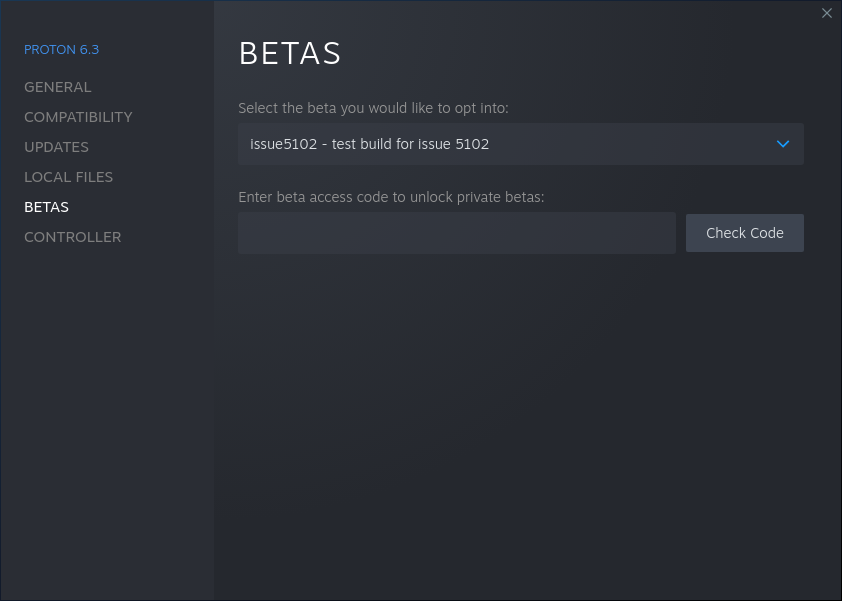
Anyone experiencing this problem, can you go to the Proton 6.3 Properties, select the BETAS tab, and choose the "issue5102"
I think it is the same fail...
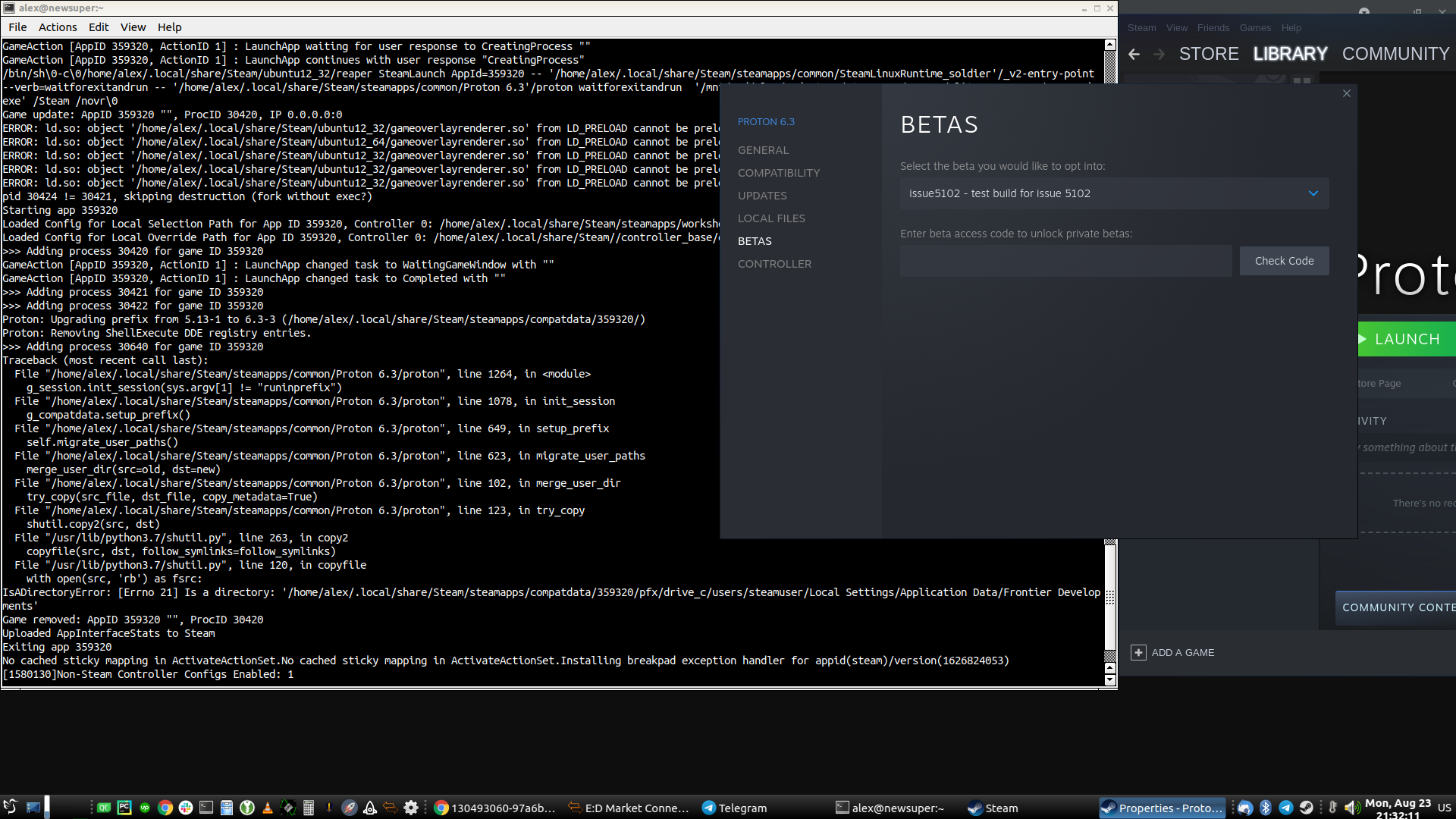
Anyone experiencing this problem, can you go to the Proton 6.3 Properties, select the BETAS tab, and choose the "issue5102" branch? If you don't see it, you may have to restart the Steam client. It should do a small download. Then see if your games are working again.
Thanks a lot !!!
It is working fine for me :D
Thanks for reporting and retesting. I've pushed the fix live now on both Proton 6.3 and Proton Experimental.
@alexzk1 Your issue is something separate. I wasn't able to reproduce the issue in Elite, unfortunately. We can try digging into it if you like (we should make a new bug for it), although you may be able to fix it by just removing the prefix (make a backup first!). It sounds like you're in a pretty weird setup to begin with.
Thanks for reporting and retesting. I've pushed the fix live now on both Proton 6.3 and Proton Experimental.
Thanks a lot, I confirm the official release 6.3 is now working well !!!
Good job team :+1:
@alexzk1 Your issue is something separate. I wasn't able to reproduce the issue in Elite, unfortunately. We can try digging into it if you like (we should make a new bug for it), although you may be able to fix it by just removing the prefix (make a backup first!). It sounds like you're in a pretty weird setup to begin with.
I think it is my symlink to game setup it tries to copy:
Error part:
File "/usr/lib/python3.7/shutil.py", line 263, in copy2
copyfile(src, dst, follow_symlinks=follow_symlinks)
File "/usr/lib/python3.7/shutil.py", line 120, in copyfile
with open(src, 'rb') as fsrc:
IsADirectoryError: [Errno 21] Is a directory: '/home/alex/.local/share/Steam/steamapps/compatdata/359320/pfx/drive_c/users/steamuser/Local Settings/Application Data/Frontier Developments'
Now what is it?:
ls -l "/home/alex/.local/share/Steam/steamapps/compatdata/359320/pfx/drive_c/users/steamuser/Local Settings/Application Data/Frontier Developments"
lrwxrwxrwx 1 alex alex 57 Jun 27 13:11 '/home/alex/.local/share/Steam/steamapps/compatdata/359320/pfx/drive_c/users/steamuser/Local Settings/Application Data/Frontier Developments' -> '/home/alex/Games/EliteDanger/Config/Frontier Developments'
[alex@newsuper ~]$
And I have 1 more such, well, Elite does logs + config both are jewels to keep for long, thats why 1st I do I symlink those folders to storage, also screenshots folder I symlink to /dev/null because they used fixed F10 to create shoots so I can't unmap it.
I think your code reads symlink as file (which is special record on FS) instead following it.
Bioshock works for me now too with updated Proton 6.3-6 (proton-6.3-6c).
Thank you!
@nentibusarchitectura Your failing path has
/storage/. What filesystem is that path?
It is a regular ext4 rw volume with default options, the only special thing about my set-up is that I use permission ACLs in the Steam games library folder, but this has always been the case since the first time I deployed Steam, this particular partition hasn't changed since Steam was released for Linux.
(note: just saw there is been a fix published, will test now)
Anyone experiencing this problem, can you go to the Proton 6.3 Properties, select the BETAS tab, and choose the "issue5102" branch? If you don't see it, you may have to restart the Steam client. It should do a small download. Then see if your games are working again.
The latest fix fixes my issues too, thank you very much!
@alexzk1 Ah! That gave me enough information to see the problem. I have a fix for this. I've updated the issue5102 branch on Proton 6.3 with the new fix, can you give it a try?
@alexzk1 Ah! That gave me enough information to see the problem. I have a fix for this. I've updated the issue5102 branch on Proton 6.3 with the new fix, can you give it a try?
It seems it's working now, launcher started.
@alexzk1 Thanks for reporting and testing. Our QA will need to take a look at it, so it may take some time to get into an official release, but you can use that branch in the meantime.
@alexzk1 Today's Proton Experimental build includes the fix for your issue. It is still not in the main 6.3 branch yet.
Closing as fixed in Proton 6.3-7.
Leaving a comment here even though this issue has been closed for a while, since it's referenced from elsewhere when talking about using non-default directories with Proton and the Steam Linux Runtime:
Starting from pressure-vessel version 0.20220803.0 in today's "Steam Linux Runtime - soldier" and "Steam Linux Runtime - sniper" betas, more top-level directories are available to games by default, reducing the need to use STEAM_COMPAT_MOUNTS. Please see ValveSoftware/steam-runtime/issues/470 for more details.
Of the paths mentioned here, the FHS paths /srv/steam and /mnt/applications no longer need STEAM_COMPAT_MOUNTS with this change, but the custom/non-standard paths /ssdgames and /storage still would.
Proton versions
proton 6.3-7x1 2021-10proton experimentalx5 2021-08proton 6.3x12 2021-08proton 6.3-6x3 2021-08proton 6.3-6cx1 2021-08proton 6.3-5x2 2021-08proton 5.13-6x1 2021-08
Launch options
STEAM_COMPAT_MOUNTSx2 2022-08
Upstream links
- ValveSoftware/steam-runtime/issues/334x2 2021-08
- ValveSoftware/Proton/issues/150x1 2021-08
- ValveSoftware/Proton/issues/775x1 2021-08
DLLs
vrclient.dllx5 2021-08amd_ags_x64.dllx1 2021-08
Compatibility Report
System Information
I confirm:
steam-252950.log
https://gist.github.com/cassbeck/786b362f30a0870f962c7eeb23062d9c
Symptoms
Could not connect to X session manager: Authentication Rejected, reason : MIT-MAGIC-COOKIE-1 authentication rejectedReproduction