Deathloop
Just adding in another report, so you have more to work with. Symptoms are the same as OP.
System Information
-
GPU: GTX 1080 Ti
-
Driver/LLVM version: nvidia 470.57.02
-
Kernel version: 5.13.16-xanmod1
-
Link to full system information report as gist here
-
Proton version: Proton Experimental (experimental-6.3-20210913)
Log:
steam-1252330.log
Same symptoms as OP; the Deathloop.exe starts but there is no window, it just lingers at 1.2 GB RAM usage and does nothing:
System Information
-
GPU: AMD Radeon RX 5600 XT
-
Driver/LLVM version: 4.6 (Compatibility Profile) Mesa 21.0.3
-
Kernel version: 5.11.0-34-generic
-
Link to full system information report as gist here
-
Proton version: Proton Experimental (experimental-6.3-20210913). Also tried 6.3-9c.
Logs:
steam-1252330.log (Experimental)
Pastebin of 6.3-9c log: https://pastebin.com/qxVridHE
Same here:
System Information
- GPU: RX 6900 XT
- Driver/LLVM version: mesa 21.2.1-1
- Kernel version: 5.14.3-arch1-1
- Link to full system information report as Gist:
- Proton version: Tried with
experimantal-6.3-20210913and6.3-6
Logs:
No window displayed has well and after one minute waiting i have this error message:
---------------------------------------------------------------------------
_DEATHLOOP ERROR

DEATHLOOP using VoldEngine 1.708.0.34 Sep 8
2021 10:47:07

Error 0xc000001D (Illegal Instruction) occurred in
thread 'DEATHLOOP' at instruction location
0x0000000141FDE2E1.

Callstack (BB575E3C)

0. 0x0000000141FDE2E1
+0x1FDE2E1

1. 0x0000000141FC90B8
+0x1FC90B8

2. 0x0000000141FCB26B
+0x1FCB26B

3, 0x0000000141FCB15B
+0x1FCB15B
4. 0x0000000140C10596

+0xC10596
5. 0x0000000140B97C69
+0xB97C69

6. 0x0000000140838487

+0xB38487

7, 0x0000000140838A80)
+0XB38A80

8. 0x0000000140B09C26

+0xB09C26

9. 0x000000007B62C8F9

+0x2C8F9
10. 0x000000007BC59873

+0x59873

Deathloop.exe

Deathloop.exe

Deathloop.exe

Deathloop.exe

Deathloop.exe

Deathloop.exe

Deathloop.exe

Deathloop.exe

Deathloop.exe

kernel32.dll

ntdll.dll

OS: Microsoft Windows 10 Build 17763
MEM: 1168.313 MB (used) 1221.766 MB (peak)
GPU: unknown
GPU drivers: unknown.

A full report and a crash dump were written to C:
users\steamuser\AppData\Local\Arkane Studios
(Deathloopbase\1.708.0.34120210915_133531)

For additional support please visit http://
help.bethesda.net/
-----------------------------------------------------------------------
System information:
OS: Pop!_OS 21.04
KERNEL: 5.11.0-7620-generic
CPU: Intel Core i7 940 @ 2.93GHz
GPU: NVIDIA NVIDIA GeForce GTX 1660
GPU DRIVER: NVIDIA 470.57.02
RAM: 8 GB
Hello @AkharmLeOugre, looking around a little bit, apparently the current version of the game on Steam needs cpu support for AVX (unconfirmed) which your CPU does not support. That doesn't help troubleshoot the earlier feedback, just a note that you have an additional snafu with the game.
apparently the current version of the game on Steam needs cpu support for AVX (unconfirmed) which your CPU does not support
The game runs on my windows machine with a no AVX CPU so AVX is unlikely to be required
Deathloop need Windows 10 Build 18363 to run https://imgur.com/a/85biV3i.
Based on @AkharmLeOugre report, proton simulate Windows 10 Build 17763. It might be the problem ?
With latest Proton Experimental 6.3-20210916 the Deathloop started working.
I got excited after NTMan's comment and tried to start it. It now does something. I get a splash screen with a mouse cursor that is a watch. That's as far as I get. :(
The proton changelog mentions that it is only playable with RADV
I left it doing nothing for a few minutes and it's up and running. Controller doesn't work. Frame rate seems great so far.
Got excited since someone got it running. This is what im getting with proton experimental now after the update

Running on Proton Experimental, I've made it as far as a splash screen, which then just sits there until I stop the game from the Steam client.
Pop!_OS 21.04, kernel 5.13.0-7614-generic
AMD Ryzen 5 3600X 6-Core Processor
AMD Radeon RX Vega 64 (VEGA10, DRM 3.41.0, 5.13.0-7614-generic, LLVM 12.0.0)
4.6 (Compatibility Profile) Mesa 21.2.1 (kisak-mesa)
32GB RAM
Full system spec: https://gist.github.com/KGOrphanides/d4f4ad960f75515a86301394561f7a9b
Screenshot: https://theos-cloud.eu/index.php/s/ops7TjNACFRrWqy
Giant chuffing log: https://theos-cloud.eu/index.php/s/6Yxf3JHMiTf5CrY
Leave it running for 5-10 minutes, @KGOrphanides
The progress bar will fill and you may even get Not Responding, Force Quit? but just leave it running.
@elijahsgh is correct, it launches after six minutes (I timed it) and we are in business.
Runs perfectly at detected settings (mouse and keyboard, haven't tested with a controller) and I successfully played the first loop. The game complained that I was using too much VRAM, but this was apparently because it thought I had 6GB rather 8GB. (Can provide screenshots if it would be helpful.)
Further notes:
- alt-tabbing out and back can result in a black screen
- on one attempt it froze while connecting to Bethesda.net (I have rural internet backed up by 4G, so I'm going to assume networking issues here)
- to avoid potential v-sync issues I used only my primary 100Hz 3440x1440 display
Can confirm: the game stucks during the first start for about 5 minutes and then runs normally., but in my case I saw few artifacts when borders of the objects has visible square regions around them. Probably will need to play with graphics settings in order to address that.
Arch @ 5.14.3-zen1
AMD Ryzen 7 5800X
AMD Radeon RX 6700XT
RAM 32Gb
Getting exactly the same Access Violation as @NotTheEnclave screenshotted, takes less than a minute to pop up. Specs in my previous post.
OK, so what is the game doing during those 5-10 minutes? compiling shaders?
OK, so what is the game doing during those 5-10 minutes? compiling shaders?
... probably Denuvo. This game features an anti-Tamper that decrypts assets during loads. Who knows.
Small Proton Experimental update: the game should now be playable with Nvidia GPUs.
I saw few artifacts when borders of the objects has visible square regions around them.
In my case it was Temporal Post-processing Anti-Aliasing that was causing the issue, setting it to High or lower fixed it.
@piv-pav
Got it running with experimental, played through the first level fine. Leaving the first area the game crashed with this error.

Getting the same error as @thoughtorgan in the exact same scenario: after beating the first area/tutorial, the error shows up in the loading screen for the 2nd area, Updaam.
I'm on an NVIDIA RTX 2080Ti if it matters, and upon starting the game again after it crashed with the error, I get the same error except it happens at the very start of the game now (as soon as the menu shows up)
EDIT: Upon a subsequent reboot, the game loads into the menu fine now and loads the 2nd area fine. Will update if it crashes again at the next area's loading screen.

I'm running into the same problem as @benoit2600. The game launches on latest Proton Experimental, but doesn't make it to the splash screen. After the Preparing to launch... window goes away, the Windows version error pops up, and then a black screen - there is no splash screen for me - until I force quit it. I've left it running for 15+ minutes. Here are my logs.
System information: https://gist.github.com/archangel013/40d630f837d6557d2f5548fdf2ed9df3
Proton log: steam-1252330.log
The game was patched today. It appears from two attempts to start it up since the patch that potentially it may now be borked for Proton Experimental at least on NVidia. Doesn't appear to be loading any more. I've had crashes previously (including the void engine one loading into Updaam) but that was actually in game or loading into a 'new' area. Or I'm just unlucky. Anyone else tried to run it since it was patched?
Nope just unlucky it started up on the fourth go. Other three goes no additional memory was allocated and no load was placed on any cores for some reason when I started the game.
Are you on open beta or main?
I'll give it a try but I want to make sure which release you're on. Also
I'm AMD/AMD.
On Tue, Sep 21, 2021 at 1:32 PM eaglemmoomin @.***>
wrote:
The game was patched today. It appears from two attempts to start it up
since the patch that potentially it may now be borked for Proton
Experimental at least on NVidia. Doesn't appear to be loading any more.
I've had crashes previously but that was actually in game or loading into a
'new' area. Or I'm just unlucky. Anyone else tried to run it since it was
patched?—
You are receiving this because you were mentioned.
Reply to this email directly, view it on GitHub
https://github.com/ValveSoftware/Proton/issues/5156#issuecomment-924253392,
or unsubscribe
https://github.com/notifications/unsubscribe-auth/AA4CXQRT7QBXHJZHAE5DPJ3UDDFVNANCNFSM5D66F2XQ
.
Replying to https://github.com/ValveSoftware/Proton/issues/5156#issuecomment-924361846
Main. Haven't switched over to the beta.
If you're currently stuck I would try the beta.
In the Steam software select Betas and enter the code: juliannashotme
You'll be on the [open_beta] release. I don't believe it had an update today so mine seems to be working the same as it was before.
If you're currently stuck I would try the beta.
In the Steam software select Betas and enter the code: juliannashotme
You'll be on the [open_beta] release. I don't believe it had an update today so mine seems to be working the same as it was before.
Thanks, I'll try it out.
Same problem as op: Hit play, no window appears. "Stop" button remains as "Stop" indefinitely.
Tested with Beta Code juliannashotme and without.
GPU: RX 5700XT
Driver/LLVM version: xorg-x11-drv-amdgpu.x86_64 21.0.0-1.fc34
Kernel version: 5.13.16-200.fc34.x86_64
Link to full system information report as gist here
Proton version: Proton Experimental (date 2021-09-21).
Some related context that might be useful for those who are stuck with long launch times (5 minutes or so isn't unusual), I had the same issue running it in Windows for a while. That disappeared recently though, might have been in a Deathloop update.
Tried running Deathloop with Proton Experimental (using GTX 2070S) yesterday, splashcreen appeared, then crashed. I'll try again today and update this comment with more details.
@peterge1998
Driver/LLVM version: xorg-x11-drv-amdgpu.x86_64 21.0.0-1.fc34
Can't really guess without any logs at least, but it might be that 21.0.0 Mesa is too old for that, things now change quickly when it is d3d12. I'd suggest trying with current stable Mesa at least (21.1.x).
UPDATE: Sorry, this is xorg-x11-drv version, not the relevant Mesa, and judging by 'fc34' host Mesa version should be fine (unless you are using amd pro driver??). So the same log as suggested below could maybe give some clue.
@OctarineSourcerer If it is crashing again, could you please attach a compressed log with launch options VKD3D_DEBUG=trace PROTON_LOG=1 %command%? VKD3D_DEBUG=trace will generate real lot of logs and affect performance, so it is ok for starting once and record crash during start, but not how you routinely run the game. So if it is crashing just sometimes maybe just PROTON_LOG=1 %command% being enabled will give some clue.
@OctarineSourcerer If it is crashing again, could you please attach a compressed log with launch options VKD3D_DEBUG=trace PROTON_LOG=1 %command%? VKD3D_DEBUG=trace will generate real lot of logs and affect performance, so it is ok for starting once and record crash during start, but not how you routinely run the game. So if it is crashing just sometimes maybe just PROTON_LOG=1 %command% being enabled will give some clue.
@gofman Hmm, okay so the past 3 times it didn't crash on launch, but did crash when attempting to load into Karl's Bay as Colt. Zip attached with the logs:
deathloopLogs.zip
System info still the same (see at top of thread), though using latest Proton Experimental.
Interestingly, with VKD3D_DEBUG=trace set or not, the game warned me about excess VRAM allocation, which isn't the case when run on Windows. I've also seen some reports on the Deathloop subreddit of people getting the same warning without issue, though that may only apply up to a point.
Yes, maybe this is relevant (in the deathloopVulkan.log):
0150:err:vkd3d_allocate_device_memory: Failed to allocate device memory (size 15728640, type_flags 0x1, type_mask 0x80).
Which is generally inline with the warning about excess VRAM allocation, whatever reason for that is.
BTW, you mentioned loading as as Colt, does multiplayer - loading as Julliana - work in general? I could not try myself (at least yet) as it apparently requires a lot of playing to get that unlocked.
Had a couple shots at loading as Julianna, got to the Connecting stage both times, where it stayed for long minutes. Don't know if that's Proton-specific or not, as I've had similar sometimes (rarely) in Windows too, but here's the proton log just in case.
steam-1252330.zip
11506.956:0134:0260:err:secur32:schan_AcquireClientCredentials Could not find matching protocol
Probably needs DTLS support at this point at least... hopefully soon.
@gofman
Can't really guess without any logs at least, ~but it might be that 21.0.0 Mesa is too old for that, things now change quickly when it is d3d12. I'd suggest trying with current stable Mesa at least (21.1.x).~
UPDATE: Sorry, this is xorg-x11-drv version, not the relevant Mesa, and judging by 'fc34' host Mesa version should be fine (unless you are using amd pro driver??). So the same log as suggested below could maybe give some clue.@OctarineSourcerer If it is crashing again, could you please attach a compressed log with launch options VKD3D_DEBUG=trace PROTON_LOG=1 %command%? VKD3D_DEBUG=trace will generate real lot of logs and affect performance, so it is ok for starting once and record crash during start, but not how you routinely run the game. So if it is crashing just sometimes maybe just PROTON_LOG=1 %command% being enabled will give some clue.
I tried to remove compatdata and reinstall + validate files.
Now i cant even install the game. With Proton Experimental it always stays at installing VC Redist 1 of 3 ...
Selecting any different version to install does nothing, it just stays there...
I tried to remove compatdata and reinstall + validate files.
Now i cant even install the game. With Proton Experimental it always stays at installing VC Redist 1 of 3 ...
Selecting any different version to install does nothing, it just stays there...
NTFS mount by any chance?
NTFS mount by any chance?
Nope.
/games/SteamLibrary/steamapps/common/DEATHLOOP
cat /etc/fstab
UUID=686a814f-2413-4c28-9463-65507926ffd9 / btrfs
Edit: i reinstalled, but still stuck at 1 of 3...
If you're currently stuck I would try the beta.
In the Steam software select Betas and enter the code: juliannashotme
You'll be on the [open_beta] release. I don't believe it had an update today so mine seems to be working the same as it was before.Thanks, I'll try it out.
The game seems to be behaving itself on the beta if that's useful to anybody on NVidia.
I was getting the same crash on level exit as others are reporting, so I thought I'd add another trace log for people to look at. However, my game has now suddenly started consistently crashing on the loading screen after the intro videos before getting to the main menu.
That's probably the same video memory problem:
0164:warn:vkd3d_allocate_device_memory: Memory allocation failed, falling back to system memory.
0164:err:vkd3d_allocate_device_memory: Failed to allocate device memory (size 10747904, type_flags 0x1, type_mask 0x80).
0178:warn:d3d12_command_list_IASetIndexBuffer: Got NULL index buffer view, indexed draw calls will be dropped.
5437.302:0124:0164:trace:seh:dispatch_exception code=c0000005 flags=0 addr=0000000140AEE54F ip=0000000140AEE54F tid=0164
Did you try lowering graphics settings?
Hmm, I tried deleting blackreefConfig.cfg and that did something, because then it launched just fine. I then proceeded to crank all the settings as far as they go, exit, and then it launched just fine again. Assuming that's 10747904 KiB, then it's trying to allocate literally all (or slightly more than) the 11 GB of VRAM that I have.
A Proton Experimental Update was released at 20:14. At least it showed up under my Downloads...
My problem (hanging at install on latest Fedora) is now resolved. The game installed just fine and now i am able to launch into the green "playing DEATHLOOP" status. However, i did not see the game's main menu after waiting 5 min...
I have set PROTON_LOG=1 %command%, but no logs are produced in ~, after being started for 5 min and then killing the game's process.
But the process Deathloop.exe is doing something:

Okay, i am blind. sorry for spam, but this log exists shortly after launch:
steam-1252330.log
(I am running public_beta)
I'm having the same issue of the game launching and just spinning without showing anything (left it for an hour). Attached is the log (truncated to the first 10,000 lines because it keeps growing).
I think this is enough reason for the observed behaviour in this case (yes, some other games may still work but this one is unlikely to under these conditions; I guess at least any Denuvo protected game won't run as well):
222418.332:00d0:00d4:err:seh:install_bpf Native libs are being loaded in low addresses, sc_seccomp 0x14743b8eb530, syscall 0x14743d603f50, not installing seccomp.
222418.332:00d0:00d4:err:seh:install_bpf The known reasons are /proc/sys/vm/legacy_va_layout set to 1 or 'ulimit -s' being 'unlimited'.
I recommend removing VM-related tweaks performed on host and try with default relevant settings. I am not sure that the reasons guessed in the log are exactly what happening, but there should be some options causing it.
Also, next time could you please compress the log instead of cutting it.
@gofman It was 150MB (and growing) - would you like me to paste a compressed version of the full log?
/proc/sys/vm/legacy_va_layout is set to 0 and ulimit -s is indeed set to default but that appears to be the default for me. At least if I've configured it it was done a long time ago and is not in any of the usual places.
Edit: Apparently I have to wait for the Denuvo time limit to expire again. I can get more logs tomorrow.
@pnomolos At this moment no need for other logs, it is pretty clear what is wrong in the present log. Normally, yes, you just compress the log and attach it, they compress very well. If it is growing that means that the game is still running, it would make sense to kill it first.
The log result clearly suggests that the Linux is using legacy VM allocator, this is not going to work in this case. I am think that it is not something that Steam or Proton could accidentally change as this is not the issue encountered by the other users. I encountered such setup just once and that time it turned out to be a ulimit settings set in something like ~/.bashrc or ~/.loginrc by the user years ago and forgotten. Unfortunately I can't guess where the wrong setting is coming from in your case. I suggest to start from creating a new user for checking and typing 'ulimit -s', that should normally be '8192'.
UPDATE: Note that such setup suggests you have ASLR disabled (address space randomization), that's not what distros do by default for security reasons.
@gofman Thanks for the input. I think I've sorted out where the ulimit misconfiguration was and fixed it. As I mentioned, I've already exceeded the number of Denuvo activations for a 24h period and I'll try the game again tomorrow.
steam-1252330.log
This is a log with latest Experimental.
The install Error i had is gone, if i close all steam processes. (Some are left if you click stop in steam!)
When install and generating shaders completes, it "launches" for 2 seconds. Then it crashes instantly without showing any error. Maybe the log file helps.
I'd like to report that after fixing the ulimit issue I was able to run the game fine. I have some issues around windowing and multi-monitors but that's a different battle :)
Hello @peterge1998, err:ntoskrnl:ZwLoadDriver failed to create driver L"\\Registry\\Machine\\System\\CurrentControlSet\\Services\\winehid": c0000142, err:plugplay:load_function_driver Failed to load driver L"winehid", status 0xc0000142., and err:module:process_init failed to load L"C:\\windows\\system32\\explorer.exe", error 4000000e in your Proton log makes me suspect that something is unhealthy with the game's wineprefix or the Proton Experimental install on your system instead of there being a game-specific issue on your system.
Out of mild curiosity, what filesystem are you using with /games/SteamLibrary/? Do other games work with Proton experimental on that Steam library?
Out of mild curiosity, what filesystem are you using with
/games/SteamLibrary/? Do other games work with Proton experimental on that Steam library?
Its still in a normal folder in / on a btrfs drive, like i wrote above.
cat /etc/fstab
UUID=686a814f-2413-4c28-9463-65507926ffd9 / btrfs
Games like Doom Eternal do work with Proton Experimental on my system.
I reinstalled Proton Expererimental and now this message is shown on launch:
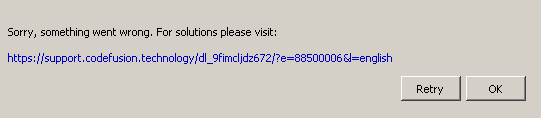
So I've spent way too much time debugging the random "access violation" crashes in this game... In my case they were all related to the VRAM budget not the ulimit/legacy_va_layout/non ext partition etc.
For some reason (dxvk/nvidia driver/game itself?) the whole VRAM buffer is not entirely available for the game (as in native Windows). Only if I set low textures + med shadows (reported as slightly below 6 GB in the game's UI) everything actually works. Trying to bump up textures to more than low, will result in over-allocating the VRAM buffer, usually the crash was around 7700 MB. The card is RTX 3070 with 8 GB + the latest nvidia module (470.74) compiled for kernel 5.13.
All other graphical settings can be cranked up to the max and the game runs ultra smooth. Zero stuttering and most importantly no crashes after few hours of gameplay. Ah, and with high textures it was definitely not the game's buggy camera type of stutter and it also happened with vsync off. Seems like the game was actually swapping the textures in and out of the VRAM resulting in frame time peaks.
But the question is what is sucking the VRAM on Nvidia cards?! Is it just the crap running in the background, like hardware accelerated steam client or chrome? But why does it not happen on AMD?
Update: turning off gpu accel in steam client + turning off the steam layout frees up more ram, the game shows 7700MB +/- 80 , which matches the nvidia-smi output, but still it will crash on Nvidia with textures above low, likely on the loading screen.
I can actually report similar behavior with a 6900xt. The game runs
perfectly smooth with every setting cranked to max other than texture
resolution. As soon as textures are above the lowest setting it starts to
stutter, even if every other option is at the lowest setting. I think I
also remember the game reporting 12gb of total vram, when my card actually
has 16, but I won't be able to verify that for a few hours.
I haven't experienced any crashes. That might be down to differences in
amds driver VS nvidias
On Mon, Sep 27, 2021, 3:48 PM Jan Pietek @.***> wrote:
So I've spend way too much time debugging the random "access violation"
crashes in this game... In my case they were all related to the VRAM budget.For some reason (dxvk/nvidia driver/game itself?) the whole VRAM buffer is
not entirely available for the game (as in native Windows). Only if I set
low textures + med shadows (reported as slightly below 6 GB in the game's
UI) everything actually works. Trying to bump up textures to more than low,
will result in over-allocating the VRAM buffer, usually the crash was
around 7700 MB. The card is RTX 3070 with 8 GB + the latest nvidia module
(470.74) compiled for kernel 5.13.All other graphical settings can be cranked up to the max and the game
runs ultra smooth. Zero stuttering and most importantly no crashes after
few hours of gameplay. Ah, and with high textures it was definitely not the
game's buggy camera type of stutter and it also happened with vsync off.
Seems like the game was actually swapping the textures in and out of the
VRAM resulting in frame time peaks.But the question is what is sucking the 2GB of VRAM on Nvidia cards?!
Judging from the reports on protondb it does not happend on AMD.—
You are receiving this because you are subscribed to this thread.
Reply to this email directly, view it on GitHub
https://github.com/ValveSoftware/Proton/issues/5156#issuecomment-928264257,
or unsubscribe
https://github.com/notifications/unsubscribe-auth/AKKNZR5UQOZMPGZ7U5I5KZDUEDKBXANCNFSM5D66F2XQ
.
Triage notifications on the go with GitHub Mobile for iOS
https://apps.apple.com/app/apple-store/id1477376905?ct=notification-email&mt=8&pt=524675
or Android
https://play.google.com/store/apps/details?id=com.github.android&referrer=utm_campaign%3Dnotification-email%26utm_medium%3Demail%26utm_source%3Dgithub.
Yeah, it reports roughly 13380 MB for the total VRAM. I say "roughly" because the number actually jumps around a bit, which seems odd. It fluctuates between 13370 and 13390
I wasn't able to play multiplayer today. I thought this worked before but I can't remember if I did it from this computer...
Anyone managed to player multiplayer from Proton? Mine goes through Searching -> Matchmaking -> Found, does the count down, and gets stuck at Connecting...
Same crash as @thoughtorgan
Splash screen ok, until epilepsy warning and crash
Log from proton experimental, but try with 6.3.7 and GE 6.18.2 same crash
Deathloop_log_20211002_134918.zip
spec: System Spec
@FHenry, the game crashes failing to allocate graphics memory:
0154:err:vkd3d_allocate_device_memory: Failed to allocate device memory (size 2097152, type_flags 0x1, type_mask 0x80).
Your graphics card is:
    Pilote : NVIDIA Corporation GeForce GTX 1650 Ti with Max-Q Design/PCIe/SSE2
    Mémoire vidéo principale : 4096 Mo
But the game requires:
Graphics: Nvidia GTX 1060 (6GB) or AMD Radeon RX 580 (8GB)
Ok, I got out, I didn't check that, rtfm...
Thought I'd give this a go with the latest Proton Experimental and was able to finish a whole day of running a loop through the map and killing everything in my way. No signs of instability despite cranking it to the Ultra preset. So, this seems fully playable on nVidia now.
It can still randomly crash on load. Check Updaam in the evening, it's the most resource heavy load. But on the whole it's way better now with latest Experimental. Resolution change works for fullscreen+borderless, minimizing the game is mostly OK too. Vsync off and 120 fps limit in game with strangle set to force vsync and lock 60 fps makes the camera/mouse movement smooth. Some of those issues could be game not proton related.
steam-1252330.log
Nvidia seems to work pretty good. But the game is still not loading for me with RX 5700XT. I have just updated everything to latest version available and cleared compatdata.
steam-1252330.log Nvidia seems to work pretty good. But the game is still not loading for me with RX 5700XT. I have just updated everything to latest version available and cleared compatdata.
It shows this error now:
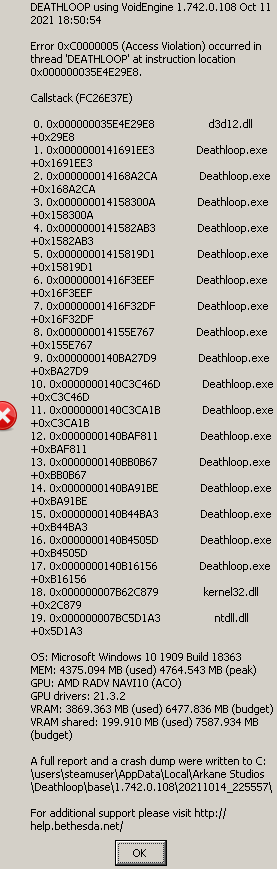
Yup, it still crashes (access violation) with the major update and latest proton exp. I couldn't get a single load without a crash of the Updamm level in the evening later in the game. This exact savegame loads correctly on Windows with the same hardware.
I'm now getting the Access Violation error again after Deathloop "Game Update 1" yesterday. I initially experienced these errors during game launch but they were fixed for me after Proton Experimental and Proton-6.18-GE-1 updates a few weeks ago.
I tried Proton Experimental and Proton-6.19-GE-2 today but Access Violation error occurs anytime I try to load my save from the main game menu. Here are the logs for recent crash if it helps at all:
Still ongoing.
Game won't start with Proton Experimental, will start with Proton-6.19-GE-2, but throws this on starting a level.
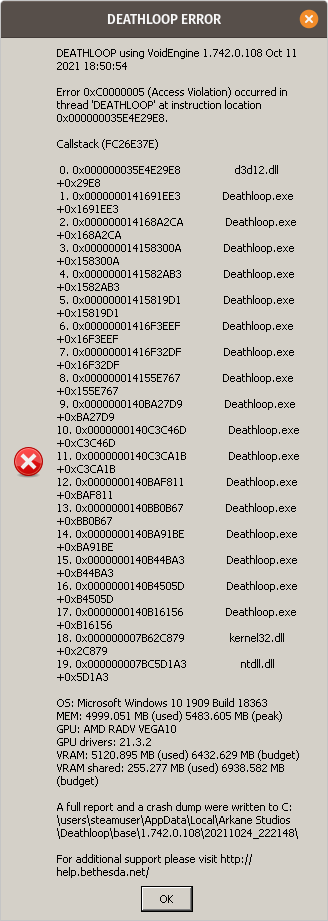
After several updates updaam/evening map loaded fine with nvidia (access violation is gone), taking ridiculous amount of time on a PCIE 4.0 SSD, but on Windows it's the same issue. Framerates on Linux are still far behind Win, even with DLSS Balanced 1440p on 3070 RTX. Plus I got several freeze frame type of crashes (during gameplay/combat) that are specific to Proton. That's the last issue which prevents Deathloop to be playable for me on Proton. I wonder if somebody experienced those too.
Replying to https://github.com/ValveSoftware/Proton/issues/5156#issuecomment-950389286
Using todays Proton GE 6.20, the game launches into the first level! Before i had a similar error message, just like yours.
Arch Linux
Gnome Shell 40.5
AMD Ryzen 1700 OC (3.6Ghz)
AMD 5700XT
Game is "playable" with Proton Experimental but performance is pretty terrible, very noticeable on the first city. Lowering textures to lowest possible value helps kinda a lot but texture quality shouldn't be an issue with this GPU and the game installed on an SSD...
There seems to be something else.
i played with Proton GE 6.20 loading times were very high too but it run, after level change it crashed.
OS: Manjaro Linux KDE
KERNEL: 5.10.75-1-MANJARO
CPU: Intel Core i5-7600K @ 3.80GHz
GPU: NVIDIA NVIDIA GeForce GTX 1070
GPU DRIVER: NVIDIA 470.82.00
RAM: 24 GB
now it does not start with Proton GE 6.20
https://gist.github.com/McMarius11/3d4074fe0214666157f1f776952122d5
edit: trying 6.3-7 waited 10 minutes then tried this GE again now it boots... alt+tab does not crash the game
with Proton-Experimental it runs but don't press alt+tab or change applications it will freeze the game
6.3-7 does does not start and will stuck in running and nothing happens.
after that i changed to Proton-Experimental it ran but i had one graphic glitch (gray right border that changes from transparent to gray) and after i took a screenshot or pressing alt+tab will crash the game.
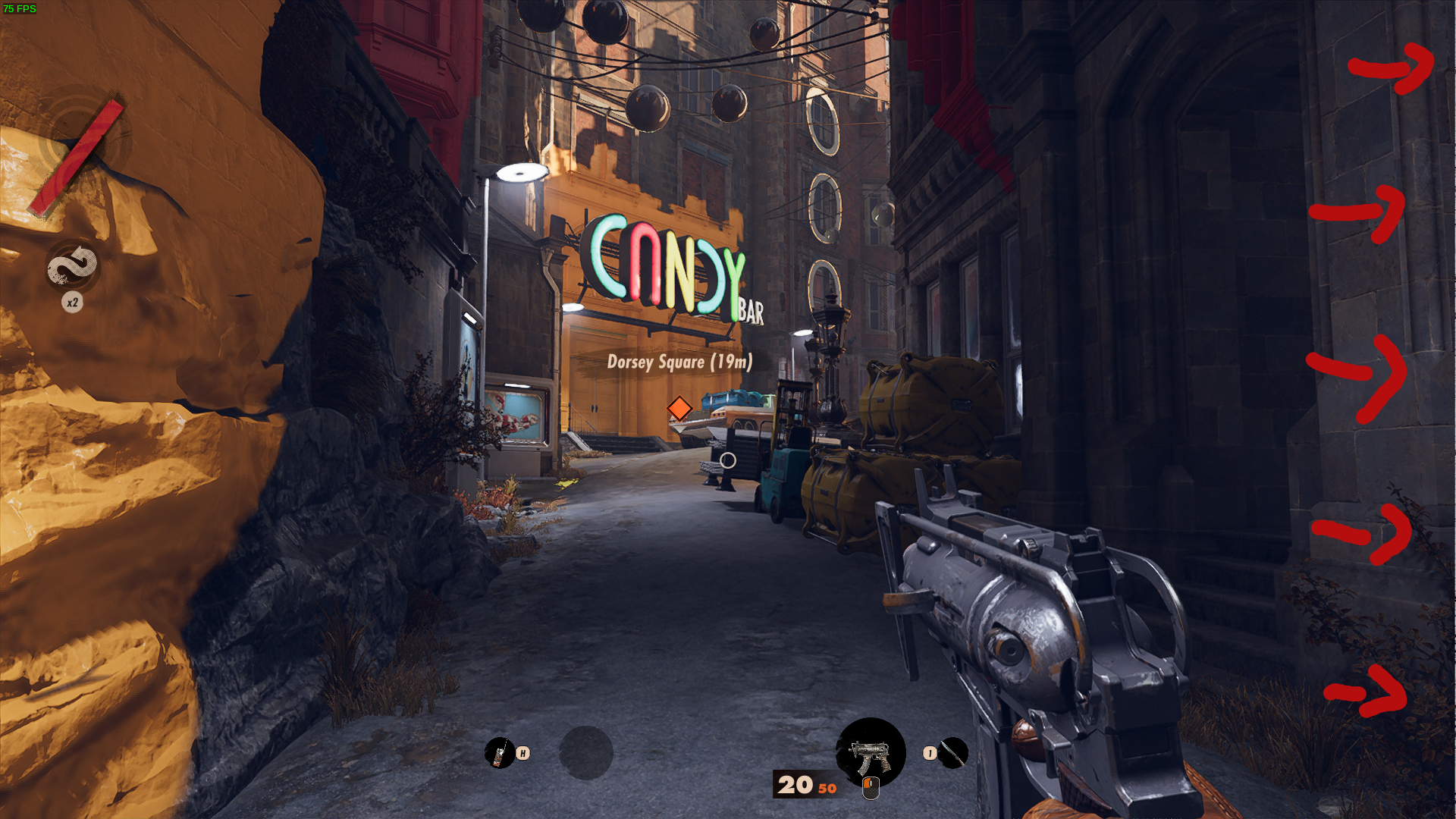
performance in this level is pretty bad
@McMarius11 Can you try what worked for me? Just reduce texture quality. It had a strangely huge impact on performance on my end.
Also would like to report that DualSense special features like adaptive triggers require to disable Steam Input for the game. Not sure if that's something on Valves end
After todays update (Update 2) it stopped working...
Arch Linux Updated
Ryzen 1700
Gnome 41.1
AMD 5700XT
Mesa 21.2.5
Proton Experimental
Hello @alosarjos, wine: Call from 000000007BC34528 to unimplemented function ws2_32.dll.GetHostNameW, aborting looks like the line of interest from your log.
Implemented in upstream wine 6.7 (https://source.winehq.org/git/wine.git/commit/998e5eaddb3f893824ac513680634852271097a7).
@kisak-valve Is that something on my end I can do something about?
Game Update 2 crash is now fixed in Experimental. Thanks @kisak-valve for swift and accurate assessment, cherry-picking the commit was enough to make the game playable :-)
Holy crap that was fast! Thanks a lot guys!!!
Now I hope at some point the textures issue can be fixed...
@McMarius11 Can you try what worked for me? Just reduce texture quality. It had a strangely huge impact on performance on my end.
i tested it again with the proton-experimental build also with low textures it does not change the graphic glitch. ProtonGE did not have the issue
Even with Proton Experimental, I get a failure on startup with the error message "Couldn't create a DirectX 12 device. Please check if your GPU is compatible with DirectX feature level 12.0"
I have an R9 390: here's my system information.
steam-1252330.log doesn't appear to be giving any insights.
I get the same as stuartpb, using nvidia's proprietary drivers.
@stuartpb, looks like vkd3d-proton is unable to implement D3D_FEATURE_LEVEL_12_0 on top of your GPU due to unsupported Vulkan features.
Also looks like you GPU doesn't meet the minimum requirements of the game.
Graphics: Nvidia GTX 1060 (6GB) or AMD Radeon RX 580 (8GB)
@stuartpb as ivyl said, you don't even have Vulkan support on your GPU unless you disable the radeon kernel driver and force support for your GPU in the amdgpu kernel driver.
This can be done two ways, both of which are described in the Arch Wiki here
Basically just add radeon.si_support=0 radeon.cik_support=0 amdgpu.si_support=1 amdgpu.cik_support=1 in your GRUB_CMDLINE_LINUX_DEFAULT= line in /etc/default/grub (obviously don't erase anything already in that line, just add this to it, inside the quotes). Then update grub and reboot.
But you will still be unlikely to play this game, for the reasons ivyl said. Your GPU doesn't meet minimum requirements and your GPU is lacking necessary features.
@McMarius11 how did you even get that far?
Game freezes right here for me on Nvidia:
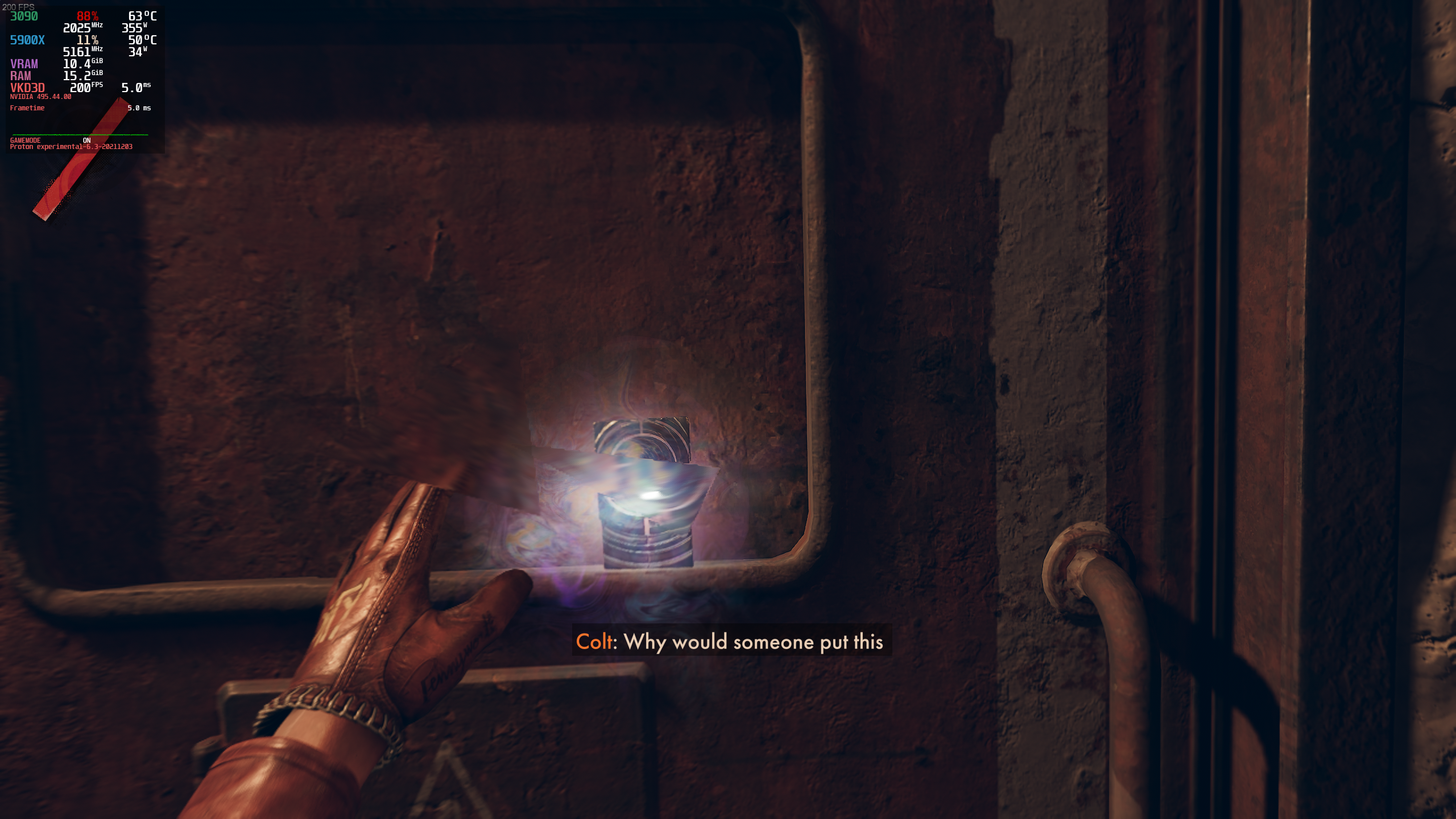
I've tried with both Experimental and GE 6.21. Freezes at that exact spot every time. I'm not sure if there are any launch options that are supposed to be used, but yeah I can't get past this part (near the beginning of the game, after you first get the grenades).
@gardotd426 I can see from the screenshot that you're using the 495 branch for the Nvidia drivers. Have you tried the 470 branch?
I encountered the exact same crashes, but downgrading the driver and turning all the settings to low fixed the issue. I don't think adjusting the settings was necessary though, just the driver switch.
@gardotd426:
@stuartpb as ivyl said, you don't even have Vulkan support on your GPU unless you disable the
radeonkernel driver and force support for your GPU in theamdgpukernel driver.This can be done two ways, both of which are described in the Arch Wiki here
Basically just add
radeon.si_support=0 radeon.cik_support=0 amdgpu.si_support=1 amdgpu.cik_support=1in yourGRUB_CMDLINE_LINUX_DEFAULT=line in/etc/default/grub(obviously don't erase anything already in that line, just add this to it, inside the quotes). Then update grub and reboot.
I use systemd-boot, not grub, and I already have amdgpu support for my graphics card enabled (and radeon support disabled) via /etc/modprobe.d/amdgpu.conf, as described on that page. I can confirm this at runtime:
[stuart@stushiba ~]$ cat /sys/module/amdgpu/parameters/cik_support
1
[stuart@stushiba ~]$ sudo lshw | grep \\-display -A 10
           *-display
                description: VGA compatible controller
                product: Hawaii PRO [Radeon R9 290/390]
                vendor: Advanced Micro Devices, Inc. [AMD/ATI]
                physical id: 0
                bus info: pci@0000:08:00.0
                version: 80
                width: 64 bits
                clock: 33MHz
                capabilities: pm pciexpress msi vga_controller bus_master cap_list rom
                configuration: driver=amdgpu latency=0
Indeed, if I didn't have Vulkan support enabled, I wouldn't be using Proton.
But you will still be unlikely to play this game, for the reasons ivyl said. Your GPU doesn't meet minimum requirements and your GPU is lacking necessary features.
While I'll admit that my graphics card doesn't meet the listed minimum (the RX 580, a very recent and expensive card), I don't get what features it's lacking. The popup lists DirectX 12 support, and that's what this card has. Other DirectX 12 games, like Control, play on it through Proton just fine.
@stuartpb again, @ivyl already explained why.
looks like vkd3d-proton is unable to implement D3D_FEATURE_LEVEL_12_0 on top of your GPU due to unsupported Vulkan features.
You're not using DirectX12. DirectX12 support is (in many ways) irrelevant here, because in reality you're using Vulkan. You're not using DX12 at all. Every GPU that supports Vulkan doesn't support the same number of Vulkan extensions and features, that's not how it works. This is actually part of the reason why Pascal GPUs often struggle from horrible performance in vkd3d-proton games. Because yes, they're Vulkan-capable, but they're missing support for certain extensions/features that are needed for good performance (there are other reasons, but that's one of them).
The same is true here. Your GPU doesn't support some Vulkan features that affect your ability to run this game. Even if it did support those Vulkan extensions, it being that far below the minimum requirements basically guarantees it would probably be unplayable (it's been shown plenty of times that the "minimum requirements" for games are often way too low, and you really need more than what the game developers say).
the RX 580, a very recent and expensive card
The RX 580 is almost 5 years old and was a midrange card at the time. When we're talking about brand new game that's using the latest graphics API and is being translated through another graphics API that didn't even exist when your GPU was released, and has undergone extensive evolution and development since then, it's not at all surprising.
It's really unfortunate that Deathloop doesn't also support Vulkan or DX11 (though your GPU would probably still struggle), but as ivyl said, if it doesn't support the required Vulkan features to advertise the correct DX12 support, there's nothing you can do. Again, the fact that it might actually support that DX12 feature level doesn't matter when we're talking about Vulkan, which has to translate it.
As for why you can run Control, this section from Wikipedia should help explain
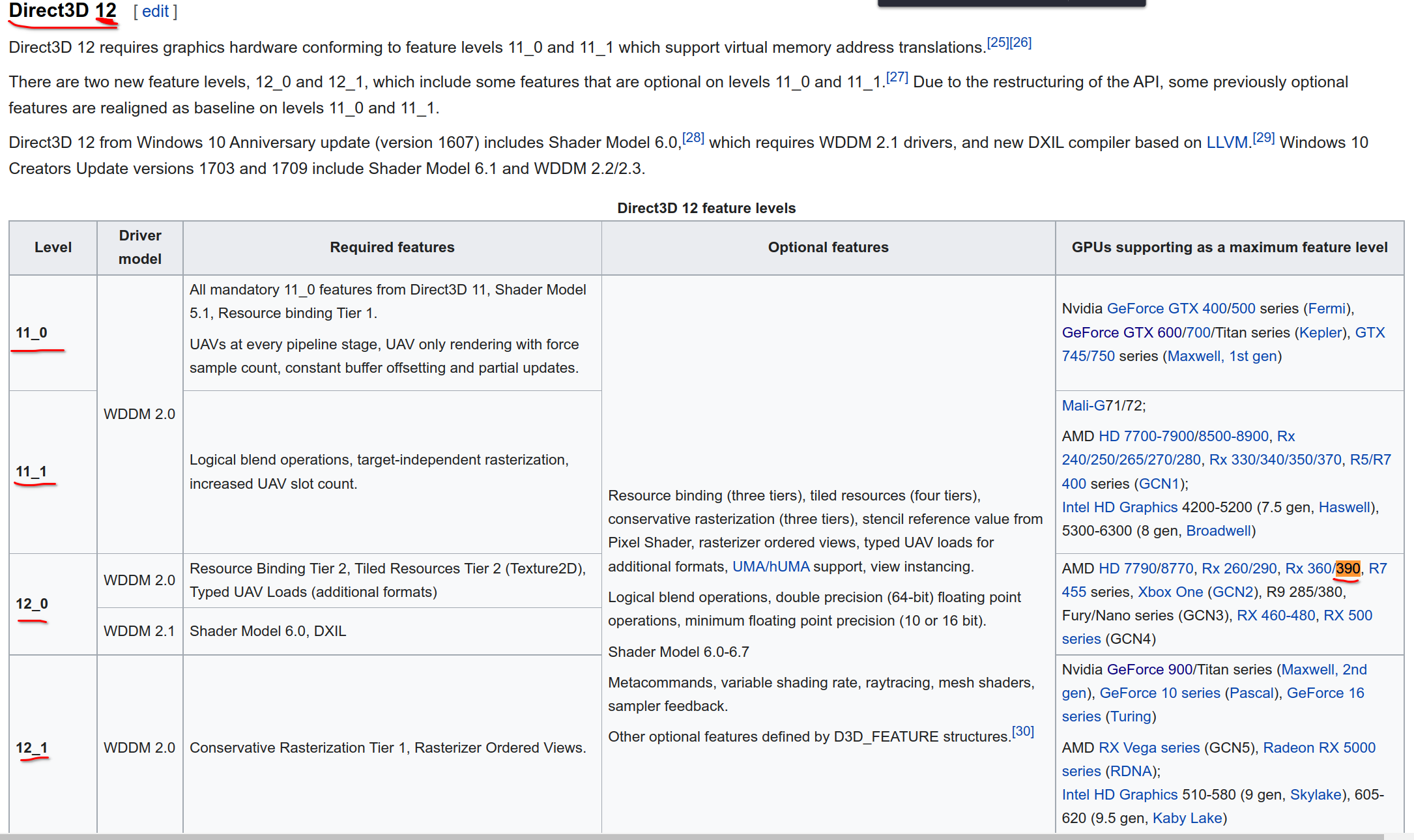
Control probably requires DIRECT3D_FEATURE_LEVEL_11_0 or 11_1. No, that doesn't mean "DirectX11." Each D3D version has it's own feature levels. Direct3D 12 starts at 11_0. While your GPU supports up to DX12 DIRECT3D_FEATURE_LEVEL_12_0 (but not 12_1 or above), it doesn't support the Vulkan extensions/features in order to advertise that support.
What this means is that you could run this game using DX12 on Windows (though it probably would perform very poorly if it even ran correctly at all), but you can't play the game when translated from DX12 to Vulkan. If you tried to use vkd3d-proton on Windows (yes that's a thing), you'd likely get the exact same error as you get on Linux.
@gardotd426 I can see from the screenshot that you're using the 495 branch for the Nvidia drivers. Have you tried the 470 branch?
I encountered the exact same crashes, but downgrading the driver and turning all the settings to low fixed the issue. I don't think adjusting the settings was necessary though, just the driver switch.
I downgraded my drivers from current on arch to 470xx and it worked! But it's now crashing when I try to load Updaam. Oh well
Deathloop crashes every time on first slab cutscene
Issue transferred from https://github.com/ValveSoftware/Proton/issues/5433.
@KidDogDad posted on 2021-12-21T23:00:53:
Compatibility Report
- Name of the game with compatibility issues: Deathloopo
- Steam AppID of the game: 1252330
System Information
- GPU: NVIDIA GeForce RTX 3060
- Driver/LLVM version: NVIDIA 495.44
- Kernel version: 5.15.10.zen1-1
- Link to full system information report as Gist: https://gist.github.com/KidDogDad/5659705c7b6187edd3be7d1e3feb3a44
- Proton version: Tried on Proton Experimental 12/20/2021 update, and on Proton Experimental Bleeding Edge (build ID 7918251)
I confirm:
- [ x ] that I haven't found an existing compatibility report for this game.
- [ x ] that I have checked whether there are updates for my system available.
Symptoms
The game launches and plays fine until the cutscene on picking up the first slab. It crashes reliably every time on this cutscene, rendering the game unplayable.
Reproduction
On my system, this reproduces every time I get to that cutscene.
@KidDogDad and @aphick are experiencing the same thing we were experiencing, namely that there's something broken in 495.
I downgraded to 470.94 and it's worked perfectly. I played for hours. Updaam was fine. I haven't had a crash since.
I even went back to the 495 drivers and can still play just fine now that I'm past that first shard-picking-up point.
Anyway, you're not getting past that (very early) part of the game with 495. I don't know if the vulkandev branch will work either. But the current stable branch, 470.94, works perfectly.
Downgrading to 470 worked for me too.
Once you get past that point you can go back to 495 and continue playing. At least I have, I played for about an hour and haven't had a crash since.
But that bug should definitely be reported to Nvidia. Unless @liam-middlebrook can handle it?
Downgrading to 470 worked for me too.
How are yall downgrading this happens if i try swapping to the older driver
- removing nvidia-utils breaks dependency 'nvidia-utils=495.44' required by linux514-nvidia,
- if possible, remove linux514-nvidia and retry
disregard for now i think i see my issue
ok was able to get it to work with 470 but crashed in the spoiler ||in colts apartment there is a|| computer if u interface with it the game freezes like the alt tab issue
cant get the spoiler to work sorry for anyone that read this issue
didnt crash this time so just mark it up as general instability
Compatibility Report
- Name of the game with compatibility issues: Deathloop
- Steam AppID of the game: 1252330
System Information
- GPU: GTX 1060 6GB/PCIe/SSE2
- Driver/LLVM version: 4.6.0 NVIDIA 470.86
- Kernel version: 4.15.0-163-generic
- Link to full system information report as gist here
- Proton version: 1640116296 experimental-6.3-20211221
I confirm:
- [x] that I haven't found an existing compatibility report for this game.
- [x] that I have checked whether there are updates for my system available. I have not made a dist-upgrade to Ubuntu 20 yet.
Log:
Symptoms
- Game freezes at level loading screen after completing a previous level
- Game must be forcibly terminated
- Freeze recurs after relaunching game and attempting to resume play
Reproduction
- Launch a new game
- Progress to a new location/level
- Wait roughly 1 minute and observe loop animation has frozen (lasts for at least 5 minutes without resolving)
- Quit game via Steam GUI
- Restart game
- Reload existing game
Workaround?
I originally ran into this issue running driver version 440. When I upgraded to 470 and restarted, I was able to load the next level and progress again, at which point the bug recurred.
Unfortunately, upgrading to 495 and attempting to run the game again led to the same results, and downgrading back to 470 did also.
This could be related to the behavior in https://github.com/ValveSoftware/Proton/issues/5156#issuecomment-997107717.
@lake-effect it's probably more likely related to the unfixable issues Pascal has with vkd3d games. Though idk what GPU @aphick uses. But everyone else has been able to downgrade to 470 to get past that first slab freeze issue, then continue playing. I actually even upgraded back to 495 after getting past that slab scene, and have played aboue 3 or 4 hours since with no crashes. On a few different locations (Updaam, Karl's Bay, and one more I don't remember the name of).
If @aphick also also has a Pascal (or earlier) GPU, then it's probably that issue. Performance (and to a lesser extent compatibility) is unfixably bad on Pascal and earlier Nvidia GPUs. Here's one of the vkd3d-devs saying as much:
Low D3D12 performance on Nvidia Pascal (and older) GPUs is expected and likely won't improve much. The hardware has a bunch of limitations that make it very hard to extract good performance.
Pascal and earlier don't support bindless UBO and also don't support a lot of Vulkan extensions that vkd3d-proton requires in order for it to work well and properly.
If @aphick also also has a Pascal (or earlier) GPU, then it's probably that issue. Performance (and to a lesser extent compatibility) is unfixably bad on Pascal and earlier Nvidia GPUs. Here's one of the vkd3d-devs saying as much:
It's a 3060!
Replying to https://github.com/ValveSoftware/Proton/issues/5156#issuecomment-1003730860
This is a giant bummer especially considering that upgrading to 470 seemed like it fixed it once, but it doesn't sound like it's worth determining why. Thanks for looking into it!
Just wanted to chime in that I started playing the game today and was able to play past the first slab door without crashing with a GTX 1080ti with the 495.46 driver and Proton-7.0rc3-GE-1. I haven't experienced any crashes other than the alt-tab freeze issue.
Specs:
OS: Manjaro Linux KDE
KERNEL: 5.14.21-2-MANJARO
CPU: Intel Core i7-6700K @ 4.00GHz
GPU: NVIDIA GeForce GTX 1080ti
GPU DRIVER: NVIDIA 495.46
RAM: 16 GB
Any new updates on this by any chance?
Any new updates on this by any chance? :/
On what exactly? What issues are you experiencing? I am able to run the game fine on 495 (after using 470 to get past that first slab) and have several hours played with no issues.
But this is your first comment on this thread so no one knows what issue you're having or what updates you're asking about.
Any new updates on this by any chance? :/
On what exactly? What issues are you experiencing? I am able to run the game fine on 495 (after using 470 to get past that first slab) and have several hours played with no issues.
But this is your first comment on this thread so no one knows what issue you're having or what updates you're asking about.
i personally get alot of crashing still from alt tabbing and with the game taking so long to launch its just not worth restarting the game if it crashes
I just tried playing Deathloop with the Nvidia 510.47.03 drivers and I was finally able to get past the slab crash! Something must have gotten fixed with the new drivers, or maybe it was a Proton Experimental update. Either way, I played for a good 3.8 hours without any issues.
EDIT: There's a weird bug where performance drops dramatically on loading a new level. Going into graphics settings, immediately backing out, and clicking Yes to "Apply new settings" seems to to reset game performance until the next level load.
Deathloop's been running smoothly for a good few months, but I've had this crash three times in a row today, once in loadout and twice in game. I played for around an hour before it started happening after completing an objective, and there's no obvious overheating happening.
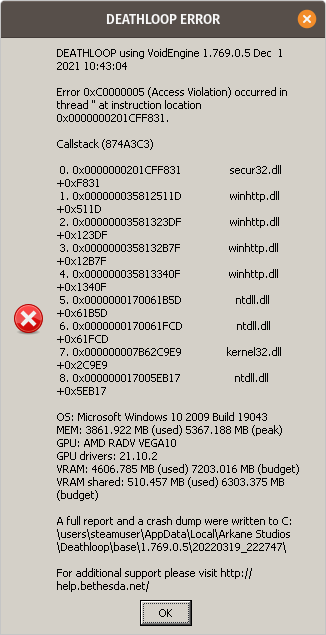
This appears to the be the mildly infamous Error 0xC0000005 experienced by some Windows users (see https://stealthoptional.com/how-to/deathloop-error-0xc0000005-access-violation-how-to-fix-error-code-0xc0000005-and-stop-deathloop-crashing/ for one description thereof.)
ETA:
Vsync is NOT enabled.
I've dropped my refresh rate to 100 to match my monitor (it was previously at 120) and haven't crashed in the two games I've had since.
I recently upgraded to a 6700XT and now I can't even load this game any more. By the time it hits the Bethesda intro video, my memory has filled up to 100% while my VRAM has only gone up slightly. This has happened using Proton Experimental, 7.0-1, and GE.
Similar specs to my earlier post except with a 6700XT instead of a 1080ti.
Textures on Deathloop become black with viewed up close. The sky also corrupts.
Issue transferred from https://github.com/ValveSoftware/Proton/issues/5765.
@LethalManBoob posted on 2022-04-12T18:59:25:
Compatibility Report
- Name of the game with compatibility issues: Deathloop
- Steam AppID of the game: 1252330
System Information
- GPU: RTX 3070
- Driver/LLVM version: 510.60.02
- Kernel version: 5-15-33-xanmod1-tt-1
- Proton version: Experimental (works fine on 7.0.1)
I confirm:
- [X] that I haven't found an existing compatibility report for this game.
- [X] that I have checked whether there are updates for my system available.
Symptoms:
Textures become black when viewed up close. This sometimes takes a view seconds to start happening.
First person weapons exibit this as well, becoming completly black.
The sky sometimes will be corrupted into a crystal-like circlular pattern.
Reproduction:
On experimental, run the game with textures higher than low and/or enable dxr via command line.
I cannot take a screenshot with gnome as it softlocks the pc.
It looks like Experimental is the closest to working with the 6700XT, but no dice?
Compatibility Report
- Name of the game with compatibility issues: Deathloop
- Steam AppID of the game: 1252330
System Information
- GPU: AMD 6700XT
- Driver/LLVM version: AMD Radeon RX 6700 XT (navy_flounder, LLVM 13.0.1, DRM 3.45), 4.6 (Compatibility Profile) Mesa 22.0.0-devel
- Kernel version: 5.4.0-107-generic, 5.15.0-24-lowlatency (identical results)
- Link to full system information report as gist here
- Proton version: Multiple, no successful launch
- AMDGPU installed with
amdgpu-install --usecase=dkms,graphics --vulkan=pro --accept-eula(so why does the Steam app log mention radv?)
lspci -k outputs:
03:00.0 VGA compatible controller: Advanced Micro Devices, Inc. [AMD/ATI] Device 73df (rev c1)
	Subsystem: Gigabyte Technology Co., Ltd Device 232e
	Kernel driver in use: amdgpu
	Kernel modules: amdgpu
I confirm:
- [x] that I haven't found an existing compatibility report for this game.
- [x] that I have checked whether there are updates for my system available.
Log
steam-1252330-proton7.0-2.log.zip
steam-1252330-proton_experimental.log.zip
steam-1252330-proton_experimental_singlemonitor.log.zip
steam-1252330-proton6.3-8.log.zip
steam-1252330-proton_5.13-6.log
steam-1252330-proton_ge7-15.log
Symptoms
- Game runs and either:
- Crashes on black loading screen after branding videos (Proton 6.3-8)
- Freezes and requires force quit on loading splash (Proton 7.0-2)
- Plays title screen music with no video endlessly (physical monitors actually report No Signal), requires restart (Proton Experimental, 2 displays)
- Crashes before loading title screen (Proton Experimental, single display)
- Crashes before initializing window (Proton 5.13-6)
- Crashes with a Windows dialog (GE-Proton7-15):
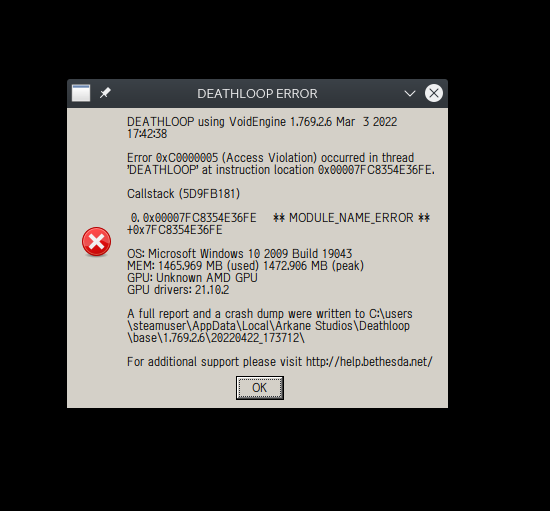
- Crashes during intro video (mostly blank) with a frame glitch (GE-Proton7-6):

Reproduction
- Launch Deathloop through Steam
- Wait
Deathloop used to run fine on the Steam Deck, but after the new Photo Mode and Accessibility update, I can't seem to get in-game at all (tried both with Colt and Julianna), the game just keeps on loading forever (and the one time it did load, I couldn't do anything, it was a black screen with the HUD visible, and the game was frozen). I tried Proton 7.0-2, Experimental and GE-Proton7-17.
I'm also experiencing infinite load screens on the Steam Deck, also tried forcing to load with Proton Experimental.
Post Proton log if you can
Will try when I get a moment. What I saw is that, by triggering the left and right menus on the steam decks and hiding them back, doing some times, it would freeze the game for a second and then it finishes the infinite loading loop.
UPDATE: Seems to be something related to FPS cap. I can disable it, the loading screen will end and then re-enable it
FPS cap in Deathloop is the weirdest thing ever. Recently Deathloop started working for me nicely with newest updates, proton 7.20, FSR 2.0 and 6600XT, but ONLY if I allow up to 3500 FPS during the loading screen. If the FPS during loading is capped to fixed 60 with strangle, then it would take ages to load.
The real deathloop is trying to get this game running on Linux, am I right 😏
For real though I would be super grateful if someone would take a look at any or all of the logs in https://github.com/ValveSoftware/Proton/issues/5156#issuecomment-1106911402. It's frustrating to see that this game is supposed to be supported as of 6.38 but encounter so many problems with so many versions of Proton.
For real though I would be super grateful if someone would take a look at any or all of the logs in [#5156 (comment)](https://github.com/ValveSoftware/Proton/issues/5156#issuecomment-1106911402). It's frustrating to see that this game is supposed to be supported as of 6.38 but encounter so many problems with so many versions of Proton.
Well, for one thing, you've done literally the one thing you should never do under any circumstances when running an AMD GPU on Linux:
AMDGPU installed with amdgpu-install --usecase=dkms,graphics --vulkan=pro --accept-eula (so why does the Steam app log mention radv?)
Never do that. Ever. You have zero reason to, and even AMD themselves don't recommend it. Before I go on, I'll answer this:
so why does the Steam app log mention radv?
Because you have RADV installed, and that's what is being used. If you're fooling around with stuff like this you should also know that you can literally have as many Vulkan drivers installed on your system as you want, and with AMD GPUs, you actually have 3 to choose from. You even demonstrated that you knew this by choosing vulkan-amdgpu-pro instead of amdvlk, which is the FOSS version of the pro driver.
Anyway, if you want a specific Vulkan driver to be the one used by an application, and that application isn't using it by default, then you just use VK_ICD_FILENAMES. Always specify both 32 and 64 bit drivers, as pretty much half the time you're going to end up with a launcher or some such bullshit that's still 32-bit, and if you just specify 64-bit, it'll crash.
Your gist you posted yourself lists all the Vulkan ICD files available to you:
  "vulkan" : {
    "icds" : [
      {
        "json_path" : "/etc/vulkan/icd.d/amd_icd64.json",
        "library_path" : "/opt/amdgpu-pro/lib/x86_64-linux-gnu/amdvlk64.so",
        "api_version" : "1.3.206",
        "issues" : [
        ]
      },
      {
        "json_path" : "/etc/vulkan/icd.d/amd_icd32.json",
        "library_path" : "/opt/amdgpu-pro/lib/i386-linux-gnu/amdvlk32.so",
        "api_version" : "1.3.206",
        "issues" : [
        ]
      },
      {
        "json_path" : "/usr/share/vulkan/icd.d/intel_icd.x86_64.json",
        "library_path" : "/usr/lib/x86_64-linux-gnu/libvulkan_intel.so",
        "api_version" : "1.2.182",
        "issues" : [
        ]
      },
      {
        "json_path" : "/usr/share/vulkan/icd.d/radeon_icd.i686.json",
        "library_path" : "/usr/lib/i386-linux-gnu/libvulkan_radeon.so",
        "api_version" : "1.2.182",
        "issues" : [
        ]
      },
      {
        "json_path" : "/usr/share/vulkan/icd.d/lvp_icd.i686.json",
        "library_path" : "/usr/lib/i386-linux-gnu/libvulkan_lvp.so",
        "api_version" : "1.1.182",
        "issues" : [
        ]
      },
      {
        "json_path" : "/usr/share/vulkan/icd.d/intel_icd.i686.json",
        "library_path" : "/usr/lib/i386-linux-gnu/libvulkan_intel.so",
        "api_version" : "1.2.182",
        "issues" : [
        ]
      },
      {
        "json_path" : "/usr/share/vulkan/icd.d/radeon_icd.x86_64.json",
        "library_path" : "/usr/lib/x86_64-linux-gnu/libvulkan_radeon.so",
        "api_version" : "1.2.182",
        "issues" : [
        ]
      },
      {
        "json_path" : "/usr/share/vulkan/icd.d/lvp_icd.x86_64.json",
        "library_path" : "/usr/lib/x86_64-linux-gnu/libvulkan_lvp.so",
        "api_version" : "1.1.182",
        "issues" : [
        ]
      }
    ],
So if for some reason you wanted to force vulkan-amdgpu-pro to be used, you would add the following environment variable to the launch options for the game: VK_ICD_FILENAMES=/etc/vulkan/icd.d/amd_icd32.json:/etc/vulkan/icd.d/amd_icd.64.json
Go ahead and try that since you already have all the bullshit installed anyway, but immediately afterward, completely remove AMDGPU-PRO and all its components. Then install the mesa packages you need to get you working OpenGL and Vulkan, and you're done. If you just want to make it easy on yourself, just go to https://github.com/lutris/docs and go to the "InstallingDrivers.md" page and follow the relevant instructions for AMD+your distro.
@lake-effect Sorry, hadn't looked detailed at your logs. The radv driver is indeed usually the one recommended for gaming and is also the one valve collaborates with. You are ofc welcome to report any issues you find using amdvlk if you would want to use that, they'd probably appreciate it. https://github.com/GPUOpen-Drivers/AMDVLK
But since it seems you have installed the PRO version that is probably not as relevant here.
If AMDGPU-pro works the same way as amdvlk then the VK_ICD_FILENAMES method might not work with the newer versions since they disable it. So to use radv without uninstalling pro you would proabably have to use AMD_VULKAN_ICD=RADV %command% or use DISABLE_LAYER_AMD_SWITCHABLE_GRAPHICS_1=1 in addition to VK_ICD_FILENAMES
To clear up some potential confusion. AMDGPU is the name of of the vulkan capable kernel space driver and it comes included in the kernel. The user space drivers radv, amdvlk (amd open source) & AMDGPU-PRO (amd closed source) then all activate that kernel module and use it to provide vulkan and other stuff. Tho the naming can be confusing the AMDGPU kernel driver and the AMDGPU-PRO user space drivers are not the same and you don't need the latter to use the former.
@Blisto91 That's super helpful, thanks! When I get some time this weekend or sooner I'll try cycling through those other drivers and posting my results.
DEATHLOOP (1252330)
Issue transferred from https://github.com/ValveSoftware/Proton/issues/5928.
@Voltansky posted on 2022-06-23T23:04:33:
Compatibility Report
- Name of the game with compatibility issues: DEATHLOOP
- Steam AppID of the game: 1252330
System Information
- Hardware: Steamdeck 512 GB
- Proton version: 7.0-3 / Experimental
I confirm:
- [x] that I haven't found an existing compatibility report for this game.
- [x] that I have checked whether there are updates for my system available.
Symptoms:
Sound is breaking (stopping for a split second) when using gyro as mouse via steam input. Sound is breaking in-game glyphs are changing from gamepad to mouse.
Anyway, if you want a specific Vulkan driver to be the one used by an application, and that application isn't using it by default, then you just use
VK_ICD_FILENAMES. Always specify both 32 and 64 bit drivers, as pretty much half the time you're going to end up with a launcher or some such bullshit that's still 32-bit, and if you just specify 64-bit, it'll crash.So if for some reason you wanted to force vulkan-amdgpu-pro to be used, you would add the following environment variable to the launch options for the game:
VK_ICD_FILENAMES=/etc/vulkan/icd.d/amd_icd32.json:/etc/vulkan/icd.d/amd_icd.64.jsonGo ahead and try that since you already have all the bullshit installed anyway, but immediately afterward, completely remove
AMDGPU-PROand all its components. Then install the mesa packages you need to get you working OpenGL and Vulkan, and you're done. If you just want to make it easy on yourself, just go to https://github.com/lutris/docs and go to the "InstallingDrivers.md" page and follow the relevant instructions for AMD+your distro.
No combination of the above settings worked, but removing those drivers and using radv worked perfectly.
No combination of the above settings worked, but removing those drivers and using radv worked perfectly.
Then you didn't actually specify the two RADV drivers like I said. I didn't tell you to do VK_ICD_FILENAMES=/etc/vulkan/icd.d/amd_icd32.json:/etc/vulkan/icd.d/amd_icd64.json. I said that to specify a Vulkan driver, use VK_ICD_FILENAMES and specify both 32 and 64 bit drivers, and specifically said "if you want to use vulkan-amdgpu-pro, use VKD_ICD_FILENAMES=/etc/vulkan/icd.d/amd_icd32.json:/etc/vulkan/icd.d/amd_icd64.json. If you want to specify RADV, you would do VK_ICD_FILENAMES=/usr/share/vulkan/radeon_icd.i686.json:/usr/share/vulkan/icd/radeon_icd.x86_64.json. If you have RADV installed, it's literally impossible for this to not work. And that report given listing the icd files available showed that the files were there.
So you never tried VK_ICD_FILENAMES=/usr/share/vulkan/icd.d/radeon_icd.i686.json:/usr/share/vulkan/icd/radeon_icd.x86_64.json. But either way, you got it working so it doesn't matter. Only now you only have the one option for vulkan drivers, the whole reason many people keep more than one AMD vulkan driver insttalled is for cases where AMDVLK or vulkan-amdgpu-pro work better than RADV (like for ray tracing). The examples of cases like this are dwindling fast as RADV improves, but there used to be quite a bit of games where using vulkan-amdgpu-pro or AMDVLK was the only way to get a playable experience. Doom Eternal is a famous example, RADV gave 50% or less of Windows performance for at least 6 months after launch, vulkan-amdgpu-pro gave almost-Windows-level perf.
Yes it's possible that the above might not work as said earlier.
If the AMD pro drivers work the same as amdvlk (haven't tested) then the VK_ICD_FILENAMES method doesn't work without also DISABLE_LAYER_AMD_SWITCHABLE_GRAPHICS_1=1
But it's easier to just use amd's own thing then which comes with at least amdvlk AMD_VULKAN_ICD=RADV
Tho again i have not tested if this is the case with the pro drivers. So might be mistaken on that part.
DEATHLOOP: problem when using the SteamDeck FPS limiter
Issue transferred from https://github.com/ValveSoftware/Proton/issues/6094.
@hervegirod posted on 2022-08-15T09:03:14:
Compatibility Report
- Name of the game with compatibility issues: DEATHLOOP
- Steam AppID of the game: 1252330
System Information
- GPU: Steam Deck AMD RDNA 2
- Driver/LLVM version: Steam Deck Steam OS 3.3
- Kernel version: Steam Deck Steam OS 3.3
- Proton version: 7.0.3
I confirm:
- [X] that I haven't found an existing compatibility report for this game.
- [X] that I have checked whether there are updates for my system available.
Symptoms
If I use the Steam Deck FPS limiter rather than the in-game FPS limiter, the game takes ages to load (several minutes). If I use the game limiter, there is no problem.
Reproduction
In the Steam Deck, set the Steam Deck FPS limiter to 30 FPS, then the game takes a LOT of time to load the save game. If the Steam Deck limiter is set to Off (even if the in-game limiter is set to 30 FPS for example), loading takes a normal time to load.
System Information
- GPU: Steam Deck AMD RDNA 2
- Driver/LLVM version: Steam Deck Steam OS 3.3.1
- Kernel version: Steam Deck Steam OS 3.3.1
- Proton version: 7.0.4
Symptoms
At the end of a mission on a map, the game waits for the server forever. I have a black screen with the same message as when starting the game about accessing the server. There is no problem for accessing the server when starting the game, and after force quitting the game and restarting it the progression has been correctly saved.
update: it is not limited to exiting an area. The game is only able to connect to the game server once, at the start of the game. Every subsequent connection seems to fail.
I was in the single player mode.
Reproduction
In the Game, be sure to be in single player mode. And to set the frame limiter in game (not on the console level). Exit a map. Then the game waits forever for the server (several minutes at least, I don’t know if the server is accessed at the end).
Alternatively, go back to the main menu while in game, and try to resume your play (you will be at the start screen when you must choose between the two characters): the game won’t be able to access the game server. Again, if you force quit, and restart the game, you will see the same screen but the game will be able to the game server without any problem.
About my last report, it seems to work when using the last Proton Experimental version (19/08). It is 2 AM so I only had time to check the second case when quitting by the menu (the first one is much longer to check because I need to finish a mission, I am still in this game session in the tutorial part). I will try the first case tomorrow evening.
Update: it still not work with the last Proton Experimental version. I suspect that it has to do with the sleep function. Maybe putting the console to sleep midgame in-game break the server connection whenever it is used. I will try to play without using this function to see if I'm right.
Update: it is confirmed that it is due to the sleep function on the Deck. If I don't use the sleep function and play the game as on my PC, I have no problem after exiting a map. If I use the sleep function in-game, the game can't connect anymore to the server. I don't know if it's a Deck bug, a Proton bug, or a specific bug on this game.
For me, its a broken mess. I'm on a RX 6700XT and the game is really broken and is full of artifacts. The frame-time becomes inconsistent when going higher then lower for texture quality. I also get very low FPS in the game. The world sometimes on the launch decides to be empty terrain and only have game objects to show up. The game settings don't show the amount of vram right for me and the vram changes in the menu by itself (??).
The game doesn't work in Proton_GE and only works with experimental currently.
Running Proton Experimental Bleeding edge.
An update to my last comment:
I tried using mesa's git version and things are better now. The game itself is a really poorly optimized mess. The VRAM usages tanks to maximum even with the 12GB VRAM that I have on 1440p. There are occasional FPS drops through out the play through and stutters. One thing that helped me to eliminate some issues were the FPS limit and not having Vsync on. Texture quality though, Do not go higher then high or you'll experience horrible frametime. I'm not sure if the VRAM situation is proton's fault though. I tried many versions and that VRAM hog still exists.
Alt Tabbing is fixed in Proton-GE-7-31, though you'll experience artifacts randomly on launch even in the menu. Proton 7.0-4 seems to be the best release for me in deathloop.
isnt there a way to force a vram cap via dxvk.conf?
isnt there a way to force a vram cap via dxvk.conf?
I've noticed by using the latest Proton-GE (Proton-GE-7-31) the memory usage has been decreased by 600mb and seems to be preforming better then Proton 7.0-4. It's very funny because the game doesn't even identify the amount of VRAM right. It keeps changing if you pause once in a while. It clearly shows the engine is having trouble to identify the right amount of resources on the system.
When loading the world, the vram tanks to using the FULL VRAM even if it was less then the half before loading the terrain. Based on my results, Proton GE seems to be improving the VRAM usage a bit.
I'm going to test how things go without VRR on (as it seems VRR support for deathloop on pc is garbage) and also going to try vram cap, as you mentioned.
Oh wow. Setting the Ambient Occlusion to Performance makes the game's stability and FPS much much better. I have no idea what is happening in this case, but an ambient occlusion shouldn't be affecting FPS and frame-time this much...
VRAM cap isn't helpful and VRR doesn't seem to be affecting frames for me that much (if any, it makes it better)
There's either something broken with this game engine, or more improvements in proton is required.
Yep. VRAM seems to be the only reason the game stutters and has very low FPS. Simply set the texture quality to LOW and Ambient Occlusion to Performance and watch insane FPS, nearly double....
Anyone else getting degredation of performance over time? I go from 80-90 fps to 50-60 when i revisit a level after leaving.
Also what is going on with the shadows in the game? 👀
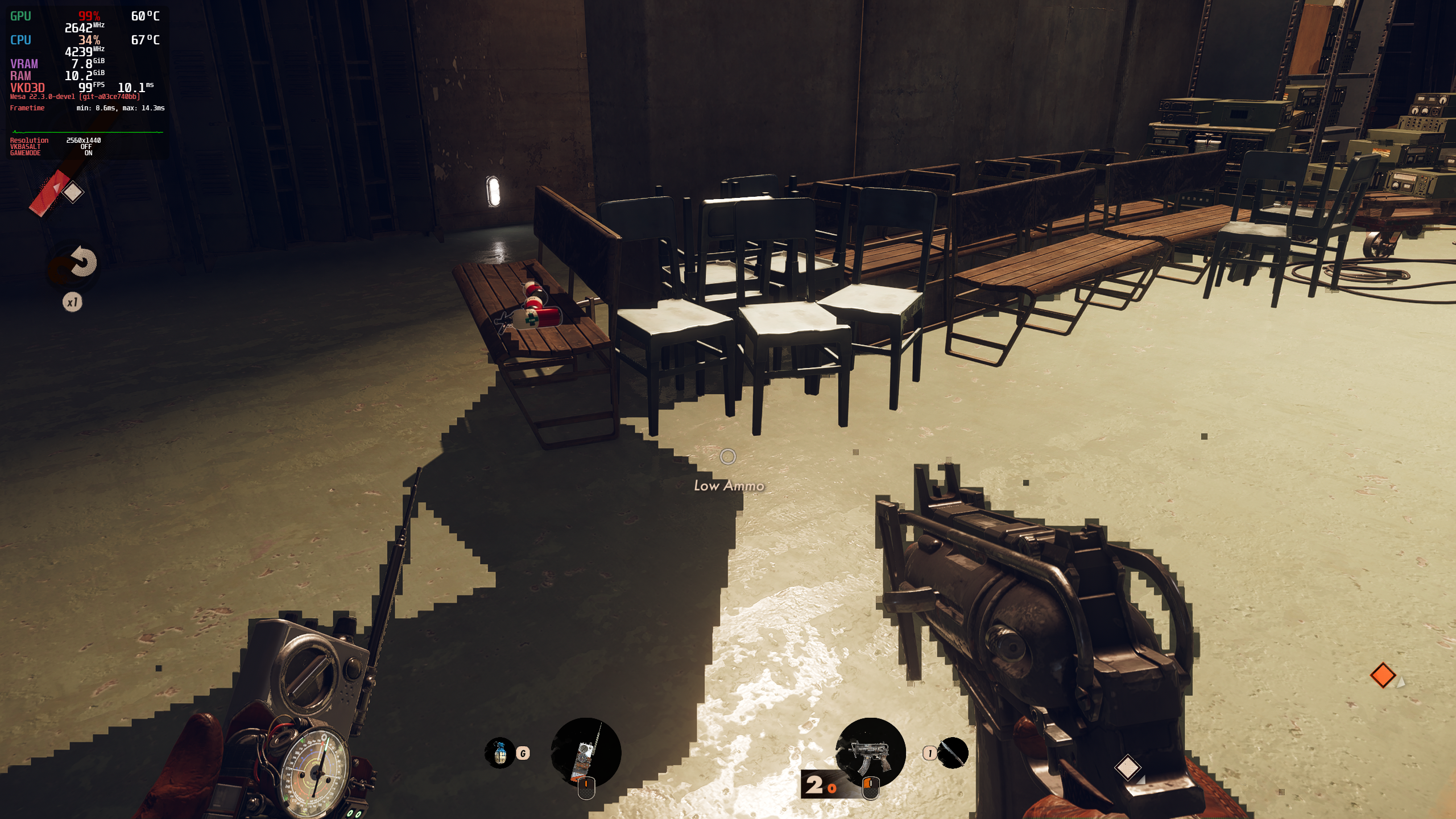
Anyone else getting degredation of performance over time? I go from 80-90 fps to 50-60 when i revisit a level after leaving.
It seems like once the game starts to hit the 600th frame in the game, the engine starts to do stutters and framedrops (As per what Digital Foundry says) but it is much worse on proton compared to playing the game on windows it seems.
The game is going to have an update in the incoming Tuesday across all platforms (also when Xbox version of deathloop releases) so I'm guessing they hopefully address some big issues this game has in terms of framerate, frametime and VRAM.
The shadow in the game on Proton is completely broken though. I'm not exactly sure if it's because of Mesa or vkd3d proton, but it's a very pesky bug.
@DashCruft Are you using mesa-git?
Yes. Although it's good to mention that the issue exists even on the non-git version of mesa.
Yeah. Im using mesa-git and the shadows are blocky too. Not sure if a regression
Yeah, try to revert 1762e6b5406bf6c0ebec84a21fa8eb62f812dd2b ("aco: Improve SCC nocompare optimization when SCC is clobbered.")?
If reverting it doesn't fix the issue, please explain how to easily reproduce the issue in-game (graphics settings and such), thanks!
Just tested on today's update. Yeah, reverting 1762e6b5406bf6c0ebec84a21fa8eb62f812dd2b as @hakzsam says, fixes the shadows. Should we make an issue on the Mesa gitlab?
Just tested on today's update. Yeah, reverting 1762e6b5406bf6c0ebec84a21fa8eb62f812dd2b as @hakzsam says, fixes the shadows. Should we make an issue on the Mesa gitlab?
yeah that seems like something reasonable to do
This RADV regression should be fixed in main. Please re-test and confirm, thanks!
Latest Mesa git (latest commit too) and Latest proton experimental (bleeding-edge), and the issue still exists:


As a side-note, I'd like to mention that the game runs fantastic ever since the latest update on PC. The frame time is very much consistent and the engine runs the game more matured then before. Other then the current shadow bug, everything else is perfect for me.
Hello @DashCruft, for reference sake, what commit hash for mesa and date on Proton experimental. Just writing "latest" becomes difficult to evaluate after a relatively short amount of time.
Hello @DashCruft, for reference sake, what commit hash for mesa and date on Proton experimental. Just writing "latest" becomes difficult to evaluate after a relatively short amount of time.
Sorry I should've known. The latest commit on my mesa compile is f9dbb65e7feac3e5d8558e21b2a6a2928f3682b9
Someone else said the opposite https://gitlab.freedesktop.org/mesa/mesa/-/issues/7305 ? I'm wondering...
@alosarjos Are you sure the issue is fixed for you then?
In my case I could easily see this issue on the beginning of the first level and now is gone

This screenshot is with commit e7e989f62e9 + This MR for testing: https://gitlab.freedesktop.org/mesa/mesa/-/merge_requests/18499
@DashCruft On your latest screenshot I see Mangohud reporting commit dcc52618952, you sure you tested recompiling after the fix merge?
huhhh. This is odd. Git must've did the funny (or I have). Going to recompile again the main mesa repo.
I accidentally didn't choose the right mesa version to test the game on. I can fully confirm this issue is now completely resolved by the new merge that occurred in the mesa-git repo recently. (https://gitlab.freedesktop.org/mesa/mesa/-/issues/7305)
I also apologize for the confusion that occurred.

@DashCruft That merge still hasn't occurred. But I see you are now on commit e7e989f6 from main which is pretty recent.
TLDR: The 18499 MR has nothing to do with this.
Sorry again 💀 mentioned the wrong PR. My bad.
Great, thanks for confirming, happy gaming!
I'm getting the following dialog:

Or, in text form, "DEATHLOOP Requires Windows 10 or higher".
On two different Debian machines, one running Debian testing (towards 12/Bookworm) with Radeon 5700 XT and the other on Debian Stable (11/Bullseye) with NVidia GTX 1070. Same result for both experimental and Proton 7.0.5. Not sure what I'm doing differently when it seems to be running fine for others.
Use protontricks to set the windows version to 10 (Select default prefix, then select winecfg)
It seems like your proton has defaulted to windows 7.
Thanks for the hint, but deleting the compatdata folder for the game was enough so that it was re-created. I think it had defaulted to a Proton version that created a Windows 7 prefix, and kept the Windows version when I upgraded the prefix.
Hopefully this is useful to someone else in the future.
Trying to play this game it's being a nightmare. It uses up all of my VRAM, I have a 3070 and I know it's not a lot of VRAM but still, takes up the 8GB of VRAM the GPU has. No matter I set the game on low or ultra, on low it takes a little more time to fill up the 8GB but still, it does.
And loadings make the game crash, throwing this errors:
Trying to play this game it's being a nightmare. It uses up all of my VRAM, I have a 3070 and I know it's not a lot of VRAM but still, takes up the 8GB of VRAM the GPU has. No matter I set the game on low or ultra, on low it takes a little more time to fill up the 8GB but still, it does.
And loadings make the game crash, throwing this errors:
only thing i can think of is to set texture quality to low
the engine is borked
Trying to play this game it's being a nightmare. It uses up all of my VRAM, I have a 3070 and I know it's not a lot of VRAM but still, takes up the 8GB of VRAM the GPU has. No matter I set the game on low or ultra, on low it takes a little more time to fill up the 8GB but still, it does.
And loadings make the game crash, throwing this errors:only thing i can think of is to set texture quality to low the engine is borked
It actually is. Game is all set to low.
Compatibility Report
System Information
- GPU: RX 6700-XT
- Video driver version: Mesa 23.2.1, -TkG 24.0.0_devel.181120.b5bcb658b4d (tested both)
- Kernel version: 6.6.2-273-tkg-eevdf
- Link to full system information report as Gist: https://gist.github.com/kode54/d8d7bd021d6904ae23aa3788a07dfc24
- Proton version: GE-Proton8-24, also tried Proton 7.0-6
Symptoms
Same alt+tab issue as everyone else, but I didn't come to report that. Primary issue is that when I'm running the game at "Fullscreen" 1920x1080 on my 3840x2160 monitor, the upscaled surface has tiling glitches. Running the game unscaled via Borderless Fullscreen (only fills top left quarter of desktop) or Windowed, there are no glitches.
Adding a video captured from the monitor. The glitch does not show up on unscaled mirrored outputs, as I was unable to capture it from a 1080p output with an HDMI capture device, and it did not appear in OBS screen capture.
https://f.losno.co/v/IMG_0492.mp4 (1080p60, AV1, 59MB)
Also having issues with alt-tab, whenever I come back to the game it's not a black screen but just completely unresponsive and I have to force quit.
Proton 8.0-5
Freedesktop SDK 23.08 (Flatpak runtime) (64 bit)
Kernel Name: Linux
Kernel Version: 6.7.4-200.fc39.x86_64
Driver: AMD AMD Radeon RX 6950 XT (radeonsi, navi21, LLVM 17.0.6, DRM 3.57, 6.7.4-200.fc39.x86_64)
Driver Version: 4.6 (Compatibility Profile) Mesa 23.3.4 (git-27405fd573)
The problem i'm having with deathloop, is that the performance seems to degrade overtime. When you start the game it runs perfect fine, but after sometime have a huge loss the fps and frametimes
@kisak-valve
Compatibility Report
- Name of the game with compatibility issues: Deathloop
- Steam AppID of the game: 1252330
System Information
- Distro: Gentoo Linux (LLVM18-based + glibc-2.40-r5)
- Desktop Environment: KDE Plasma 6.1.5 (Wayland)
- GPU: AMD RX 7800 XT (VRAM: 16GBs)
- Video driver version: Mesa 24.2.7 (LLVM 18.1.8, DRM 3.57)
- Kernel version: 6.10.9-tkg-eevdf-gentoo-llvm18-generic_v3
- Link to full system information report: gist
- Proton version: 9.0-3e
- Launch Arguements:
DXVK_HUD=compiler DISPLAY=:1 PROTON_LOG=1 gamemoderun %command%
(DISPLAY=:1was for rendering togamescopeafter launching it from a terminal)
I confirm:
- [x] that I have checked whether there are updates for my system available.
Symptoms
I'm not explicitly sure if this is a result of playing in online mode, but playing the game for too long (initially it took a long while, but my second occurrence happened within minutes) causes the framerate to severely drop to the point of the game running so poorly that it's effectively unplayable. I'm talking frame losses anywhere between 40 and 56, at least; I know the game is VRAM hungry, given what I've seen in the settings menu, but there's absolutely no way this game could hypothetically be eating 16GBs or otherwise seriously struggling even at 4K@60Hz with FSR2 on. Something's going on here.
Reproduction
- Launch gamescope in a terminal window:
gamescope --nested-refresh=60 -w 3840 -h 2160 -f -b -R --rt --force-grab-cursor --hide-cursor-delay 3000 --fade-out-duration 200 --prefer-vk-device --adaptive-sync - Add
DISPLAY=:1to the game's Steam Launch Arguements - Launch the game
- Set the game to 4K@60Hz with FSR2 in the settings menu
- Play the game up until multiplayer is unlocked
- Turn multiplayer on in the "level select" menu (Friend's Only Mode is what I used)
- Play the game until performance inevitably disintegrates
Similarly, my brother plays the game on the Steam Deck and the game just crashes for him periodically on default settings...
No idea how this game got Verified... This (misleading) status was the reason for the purchase decision, for both of us.
Similarly, my brother plays the game on the Steam Deck and the game just crashes for him periodically on default settings... No idea how this game got Verified... This (misleading) status was the reason for the purchase decision, for both of us.
I never had this problem when playing on Steam Deck but I played before the big OS (3.6.19) update. I will try it on the latest OS update to see if I have the same problem.
Granted, in the case of the Steam Deck, I forgot to mention that the exception was that he also used FSR2
I played a couple of sessions on deck without issue, longest session was around 2 hours 40 minutes.
@ThisNekoGuy I see now that he was using FSR2, but are you sure that besides that, he was using the default settings?
I ask because it appears that the game syncs settings across devices, so if it was played on a desktop before, it's possible the deck is using higher than intended settings.
In the graphics settings, there's an option to restore defaults, so I'd be interested if anything besides FSR2 changed, if not I'll check with that. I'll try to get some testing on desktop at some point.
are you sure that besides that, he was using the default settings?
I guarantee you he was, because he doesn't even have a desktop. The Steam Deck is his only PC device. In fact, I even had him drop the game to 720p (the only other graphical difference) because there were even frame issues at the main menu where there wasn't a consistent 60 frames (it was somewhere between ~45-ish to ~55-ish, I think, at the default resolution) when connected to an external monitor.
Personally, on my own desktop hardware, it of course wasn't as severe until the game finally decides to chug once loaded into levels.
After messing with stuff for a while on my end, I found that FSR2 seemed to be the reason for chugging (and FSR1 introduced visual glitches), and I was forced to turn it off. I have no idea if that's connected to the game crashing on the Steam Deck, but I figured it's at least worth mentioning.
@ThisNekoGuy did your brother exclusively play with an external monitor? or did he also with the steam deck as is? has the issue been observed with both configurations? If possible, I would like proton logs from your brother's deck, just to see if it's also a memory issue on his side.
I tried FSR2 on deck, an hour in the default adaptive setting, and another hour with it set to performance, both in the same session, no performance degradation observed there.
Yeah, it was exclusively on an external monitor.
I'll have him make a log when he has time to do it again (he might be able to do it today but I'm not sure)
@ThisNekoGuy just in case it might be a factor, was he using a gamepad or mouse and keyboard (or both)?
Mouse and Keyboard; he did try a controller once but he decided to switch back afterwards
Deathloop is crashing in experimental-11.0-20260622b on Nvidia (with 610 drivers) but works fine on AMD. The crash seems to happen right after dxvk-nvapi is initialized. I've tried disabling nvapi which seems to change the behavior and crashes the game later. The game works fine with experimental-11.0-20260617.
I have the games on Epic, and the logs are using Proton Experimental with vcrun2022 installed in the prefix since games from Epic seem to be need it generally. The prefix was in every other way clean before testing.
Log of the failure from experimental-11.0-20260622b: steam-1252330-experimental-20260622b.log
Updated log with PROTON_LOG=+setupapi: steam-1252330.log
Proton versions
proton experimentalx37 2026-06proton 8.0-5x1 2024-02ge-proton8-24x1 2023-11proton 7.0-6x1 2023-11proton 7.0x1 2023-01proton 7.0-4x2 2022-09proton 7.20x1 2022-06proton 7.0-2x2 2022-05ge-proton7-17x1 2022-05ge-proton7-15x1 2022-04ge-proton7-6x1 2022-04proton 5.13-6x1 2022-04proton 6.3-8x1 2022-04proton6.3-8x1 2022-04proton7.0-2x1 2022-04
Launch options
PROTON_LOG=+setupapi`:x1 2026-06PROTON_LOG=1x5 2024-11DXVK_HUD=compilerx1 2024-11VKD3D_DEBUG=tracex3 2021-09VKD3D_DEBUG=trace`x1 2021-09
Launch lines
DXVK_HUD=compiler DISPLAY=:1 PROTON_LOG=1 gamemoderun %command%x1 2024-11AMD_VULKAN_ICD=RADV %command%x1 2022-06VKD3D_DEBUG=trace PROTON_LOG=1 %command%x3 2021-09
Upstream links
- ValveSoftware/wine/pull/336x1 2026-06
- ValveSoftware/Proton/issues/6094x1 2022-08
- ValveSoftware/Proton/issues/5928x1 2022-06
- ValveSoftware/Proton/issues/5765x1 2022-04
- HansKristian-Work/vkd3d-proton/issues/465x2 2022-01
- ValveSoftware/Proton/issues/5433x1 2021-12
DLLs
ws2_32.dllx1 2021-11kernel32.dllx1 2021-09ntdll.dllx1 2021-09
Error codes
0xc0000005x1 2022-030xc0000142x1 2021-090xc000001dx1 2021-09
Compatibility Report
System Information
I confirm:
Log:
steam-1252330.log
Symptoms
Hit play, no window appears. "Stop" button remains as "Stop" indefinitely.
Reproduction
Run game