The Cycle: Frontier
Compatibility Report
- Name of the game with compatibility issues: The Cycle: Frontier
- Steam AppID of the game: 868270
System Information
- CPU: 11th Gen Intel i7-11700K
- GPU: NVIDIA GeForce GTX 1080 Ti
- Driver version: 520.56.06
- Kernel version: 6.0.7-201.fsync.fc36.x86_64
- Proton version: 7.39 GE, 7.41 GE
I confirm:
- [x] that I haven't found an existing compatibility report for this game.
- [x] that I have checked whether there are updates for my system available.
Symptoms
Im having issues getting the game started, it launches normaly and the videos start playing. when loading starts after the intro the game crashes. I have tried different proton versions and ive had a discussion on theire discord server about it, but still cannot figure out why this is happening
Reproduction
Just install the game through steam, set proton version and try and start the game.
Any help in this matter would be appreciated
Since the latest version, 3.0.1, it doesn't start anymore... actually it happened even in version 2.9.5.
steam-heroic-TheCycleEarlyAccess.log
I tried running The Cycle Frontier via Proton GE-Proton7-53 and Proton Experimental. Starting up the game under both versions of Proton results in a crash dialog upon game startup. I have been unable to proceed past the crash dialog.
Environment: Arch Linux running Linux 6.2.8-zen1-1-zen - Mesa 23.0.1 - KDE Plasma 5.27.3 (Wayland)
Screenshot of Crash Dialog:
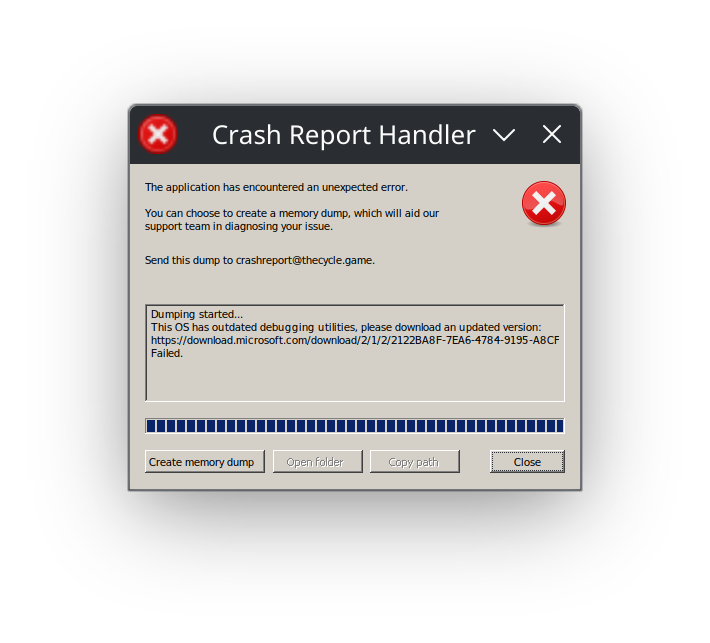
Hotfix Update 3.0.2 resolved the issue with launching the game. I was able to log in to the game and interact with it normally this morning with GE-Proton7-53. No special launch options were used.
I've tried both Proton 7 and 8, the game crashes every hour or so, sometimes in the middle of a game, sometimes it will crash on launch for no reason, but usually that's not a big deal. Considering the Nature of the game being an extraction game, you can loose high tier loot to a crash in the middle of a fight, Insurance is quite expensive and provides little value for PvP encounters, If you happen to die to Neutral creeps, and no one loots your gear, you will get the loot back, but that's a big IF, otherwise you will only get money back, and considering crafting times and the clunky way you kit out weapons (having to buy each item individually with no filters or organization in the shop), it can ruin the experience.
Broken again after patch 3.4.0
The game now (as of 2023-06-09) stops at the following screen shortly after launching:
This appears to be an anti-cheat issue given that the game tried to (re)install BattlEye on the first launch of the new game version. The new BattlEye installer also prominently mentioned (several times) that it was installing a kernel mode driver. This was on an installation of the game that was previously working back in early April (around the 3.0.2 time frame).
Update: I was able to get the game working by forcing it to use Proton version "GE-Proton8-4". The previous test attempt was not forcing any specific Proton version.
Update: I was able to get the game working by forcing it to use Proton version "GE-Proton8-4". The previous test attempt was not forcing any specific Proton version.
I'm using Heroic, with my own custom-build version of WINE that used to work with this game previously
Proton versions
ge-proton8-4x2 2023-06ge-proton7-53x2 2023-03proton experimentalx1 2023-03
Compatibility Report
System Information
I confirm:
steam-1600360.zip
Symptoms
Something seems to cause a 90% chance to freeze on the game first launching for me, presumably some kind of intro video, I realise on ProtonDB there's actually a lot of success there but I've tried Arch and PopOS and have the same issue. By chance I can sometimes spam escape/space/mouse click to try and 'skip' videos and it might get through, and I've also had some success by deleting every video file in
/The Cycle Playtest/Prospect/Content, though it still requires a manual key input to skip and isn't really an ideal 'fix' and I can't be totally sure this is a 100% success rate fix eitherReproduction
For me it's as simple as installing and running with proton enabled, it freezes every time if I don't delete the video files or don't input any keys to try and skip the intro, this has happened across mesa versons and distros