Alice: Madness Returns
I've heard the crackling music in vanilla Wine too. That may not be a Proton issue.
I had to spam the button to pass the EA activation.
No crashes in 3-5 minutes.
Origin: Alice Madness Returns workaround
Issue transferred from https://github.com/ValveSoftware/Proton/issues/2635.
@bendat78 posted on 2019-05-04T09:19:01:
Compatibility Report
- Name of the game with compatibility issues: Origin: Alice Madness Returns
- Steam AppID of the game: -
System Information
- GPU: RX 560
- Driver/LLVM version: Mesa 19.1.0-dev (git-801c5f3319)
- Kernel version: 5.1.0-050100rc7-generic / Ubuntu 18.04.2
- Proton version: 4.2-3
- Origin version: 10.5.38.25027 - 0
I confirm:
- [x] that I haven't found an existing compatibility report for this game.
- [x] that I have checked whether there are updates for my system available.
Reproduction + Workaround on Ubuntu 18.04.2
- Installing Origin
- Download: https://download.dm.origin.com/origin/live/OriginSetup.exe
- Create a directory for Origin and copy the setupfile there
- edit /etc/systemd/user.conf and /etc/systemd/system.conf so the line reads
DefaultLimitNOFILE=1024:1048576 - reboot
- verify with
ulimit -Hn
should be 1048576 - Open a shell and run
while true; do inotifywait Origin; chmod u+w Origin; done
in it (Origin being the directory you copied the setup file to) this keeps all files in that directory writable while the installer tries to create them read-only and then tries to write them :) - Use Steam to run OriginSetup.exe by adding it as a non-steam game, choose Proton 4.2-3
- Run the installer through steam
- Choose the directory you created (and running the above shell for) as target for the installer
- Installing might not work at once, you might have to restart (kill steam, origin and wine processes before you try again)
- After installation change the properties of OriginSetup in Steam to run Origin.exe instead
- Run Origin from within Steam (remember me on login seems to be the best bet to start Origin reliably) (btw: no need for running the shell anymore)
- Download Alice
- Start Alice
- Enjoy
@bendat78, can you recall what your previous limit was before making this change? On my Debian Stretch, the default limit is already 1048576.
@Rosuav Before it was 4096 on my Ubuntu 18.04.2, which gave me out file handles errors
https://github.com/zfigura/wine/blob/esync/README.esync
@Rosuav
Also keep in mind this workaround does not apply to the steam version of Alice but the one on Origin, which might be different in itself. (i.e. mirrors edge on Origin doesn't work with this workaround and the steam version doesnt require it)
Compatibility Report
- Name of the game with compatibility issues: Alice: Madness Returns
- Steam AppID of the game: https://steamdb.info/app/19680/
System Information
- GPU: GTX 760
- Driver/LLVM version: NVIDIA 440.44
- Kernel version: 5.4.15
- https://github.com/shoober420/linux-scripts/blob/main/home/shoober420/sysinfonvidia
- Proton version: 4.11-15
LOG:
steam-19680.log
Symptoms
Times out after selecting "Create account" at EA login screen
UPDATE:
LOG2:
steam-19680.log
After trying again and letting it sit after clicking "Create account", I finally got an error message.

With Proton 7.0 game works for me. I think it doesn't use Origin any more.
Game lags for me whenever I move the mouse
There is a graphical problem in the first level - the effect where you shrink, the screen goes black except for text, making it unplayable. As soon as you get out of that mode, it goes back to normal but you cant see what you're doing when youre in 'shrunk' mode.
EDIT: adding protonlog
Alice: Madness Returns (19680)
Issue transferred from https://github.com/ValveSoftware/Proton/issues/6019.
@DavidinCT posted on 2022-07-21T12:30:35:
Compatibility Report
- Name of the game with compatibility issues:
- Steam AppID of the game:
System Information
- GPU:
- Driver/LLVM version:
- Kernel version:
- Link to full system information report as Gist:
- Proton version:
I confirm:
- [x] that I haven't found an existing compatibility report for this game.
- [x] that I have checked whether there are updates for my system available.
Symptoms
Reproduction
@DavidinCT commented on 2022-07-21T12:35:43:
I have been playing this game on Proton. The game runs and with the right controls (SteamDeck) it seems to run really good. The issue in the game you shrink to get in small places, on a Windows PC or Xbox, it will show like a bubble background(with a sound like hiccups).
On Proton this shows just a black screen making these parts un-passable. This makes the game unplayable as there are parts in the game that YOU NEED to get small to pass. You can play to point but can not pass...
This was installed off a retail CD.
@DavidinCT commented on 2022-07-21T13:59:05:
I found more info on this, I have not tested this but, I will... It might be a work-around...
https://steamcommunity.com/app/19680/discussions/0/3417683648802408868/
I got this to stop by disabling post processing in the video settings. Hopefully that helps
#
@opal1974 commented on 2022-07-23T16:24:16:
I already reported this, and this entry is a duplicate:
https://github.com/ValveSoftware/Proton/issues/522
6019 should be merged with 522
Can confirm that turning off post processing fixes the black screen issue, but then the game doesn't look as pretty. And it's a bit too tedious to open the menu, go to graphics settings, then enable/disable post processing, so i just leave it off at all times. 😟
Ran into the same issue today.
Thanks for the reports. Should be fixed upstream in dxvk soon.
Edit: It is now
@Blisto91 So the fix did make the black screen go away for chapters 1 and 2, but it's back in chapter 3 unfortunately. If it helps, I have the zipped "AliceGame' folder which contains a checkpoint in chapter 3. You just have to wait a few seconds, then push L to go small and you'll see it.
The contents of the zip file go here:
/home/deck/.local/share/Steam/steamapps/compatdata/19680/pfx/drive_c/users/steamuser/Documents/My Games/Alice Madness Returns/
The important folder is "Checkpoints" but I figured I would include the game config files too in case they are relevant.
Thanks for all your hard work on this!
Thanks for the report again and for providing a save, i will check it out. This is on proton experimental right?
Thank the dxvk devs not me. I just try help testing and providing logs and such 🙂
Oh wow, I just checked and force compatibility was unchecked, so it would have been the latest stable version. There must have been some kind of partial fix in there.
I did just switch to experimental and it looks like it's resolved. Thanks for pointing that out!
Hehe good to hear.
The game crashes for me on Steam Deck at the completion of the first Radula Room in chapter 3. I go in, correctly answer "Dreams" to the riddle, collect the paint pot, then it does the zoom in to Alice's eye thing and I'm dumped back to Steam.
The deck is on whatever the current stable branch version is as of this writing, and the game is using the default settings (i.e., it does not have a specific Proton version being forced).
I transferred the save game to my Win box and played past that point without any crash, so I don't think it is a problem within the game itself. I have attached the same folder @mavispuford did above, in case that helps. If you load the game from this save file, you will be standing directly outside the problematic Radula Room.
Hello @eyeonus, please add PROTON_LOG=1 %command% to the game's launch options, reproduce the game crash, and attach the generated $HOME/steam-$APPID.log to this issue report as a file. (Proton logs compress well if needed.)
Here you are:
Thanks, I think the log hints at a null pointer access violation related to APEX Framework and the game's main thread.
All I can say is, it's not the first time the game has crashed on exiting a Radula Room, but it is the first time it's crashed on every exit consistently, so hopefully the info I've provided helps to figure out the issue.
Game consistently displays keyboard glyphs in all tutorial windows, which is not noted in the game details.
Please list "This game sometimes shows mouse, keyboard, or non-Steam-Deck controller icons" to the compatibility notes.
Compatibility Report
- Name of the game with compatibility issues: Alice: Madness Returns
- Steam AppID of the game: 19680
System Information
- Steam Deck: Steam OS Stable Channel v3.4.4
- Driver/LLVM version: 4.6, Mesa 22.2.0 (git-17e5312102)
- Kernel version: 5.13.0-valve36-1-neptune
- Link to full system information report as Gist
- Proton version: ??? / Default Proton
I confirm:
- [X] that I haven't found an existing compatibility report for this game.
- [X] that I have checked whether there are updates for my system available.
Symptoms
A:MR when installed on a Micro SD card doesn't create the necessary folder structure to save your game. Manually creating the folder structure inside Proton compatdata/pfx fixes the issue.
Correct path: %USERPROFILE%\Documents\My Games\Alice Madness Returns\AliceGame\CheckPoint\
Reproduction
Launch game. Try to save.
Are the blinding glares and flickers in the first wonderland level a game issue or a dxvk issue? It is not pleasant to look at.
This is footage on the Deck: https://youtu.be/_5rX4HQkyXo
Proton version does not matter. Happened on 7.0-6 and experimental. The flickers only happen on the Deck. On my desktop neither GTX 1060 or RX 5700 causes these flickers.
Alright, the issue was most likely caused by leftover DLLs. Reinstall removed the flickers.
Proton unable to install dotnet35.exe
Issue transferred from https://github.com/ValveSoftware/Proton/issues/7875.
@tenplus1 posted on 2024-07-05T13:34:29:
Game: Alice Madness Returns
Os: Ubuntu 24.04
GPU: Radeon 780M
Mesa: 24.0.05
Kernel: 6.8
Proton: 9.0-2
This game use to run on proton the last few times I had it installed (last year), but now it downloads, installs, builds vulkan shaders, and when run fails to open because dotnet35.exe cannot be installed.
No error is shown but in console it fails on the dotnet35.exe install and wants the user to enable it via add/remove features in Windows which I cannot access (pic shown):
https://www.digitalcitizen.life/wp-content/uploads/2020/10/win_remove_features_9.png
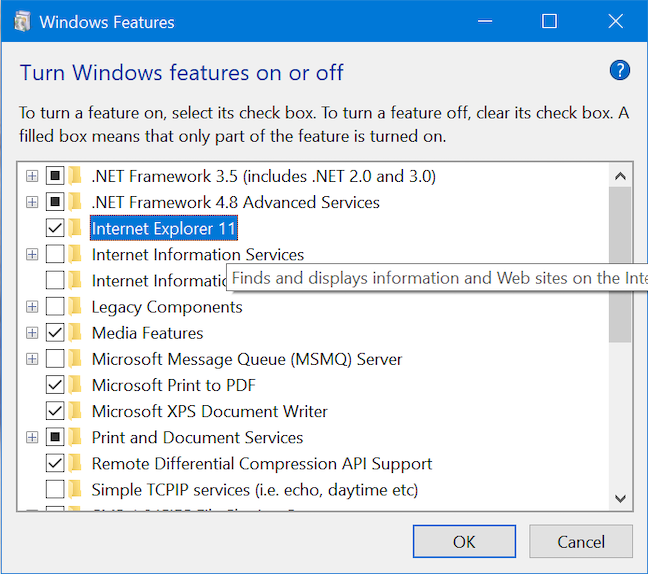
Would it be possible to include the basic dotnet35.exe install inside the proton layer itself as a default for games to use ?
Hello @tenplus1, in general, the wine-mono subcomponent should be handling the .NET framework requirements of games.
Please add PROTON_LOG=1 %command% to the game's launch options, reproduce the regression and attach the generated $HOME/steam-$APPID.log to this issue report as a file. (Proton logs compress well if needed.) Also, please copy your system information from Steam (Steam -> Help -> System Information) and the contents of Steam Runtime Diagnostics from Steam (Steam -> Help -> Steam Runtime Diagnostics) and put them in a gist, then include a link to the gist in this issue report.
It would be useful to note the most recent version of Proton you know works with the game.
@tenplus1 I installed the game fine on my desktop and deck. I recommend verifying game files, removing the existing prefix, and trying again. If the issue persists, make sure to provide the information pointed out by kisak
@simifor - I've verified the game and proton installs many times and it still refused to work, so on a whim I started installing different proton versions going back one at a time, then I hit proton 4.11 which seems to have the proper dependencies for dotnet35 already active and the game worked fine, albeit using an older proton so I'm missing newer features.
I can't run the game.
steam-19680.log
https://gist.github.com/Rabcor/9bd2f5b08cb58efb4a40f1601baa74aa
I usually just get:
wine: failed to open L"Z:\\home\\rabcor\\.local\\share\\Steam\\steamapps\\common\\Alice Madness Returns\\DotNet\\dotNetFx35setup.exe": c0000135
Maybe it has somethign to do with the game being 32 bit?
I tried many different versions of proton(experimental, 9, 4.11, ge-custom, cachyos), on both steam-native and steam-runtime, always same issue.
EDIT: I verified integrity and it fixed it. the problem was likely that I was following this:
https://steamcommunity.com/sharedfiles/filedetails/?id=3014521889
And I'm guessing one of the settings caused the issue, but it's also possible I botched it and made a typo
Update: ANY modification of DefaultEngine.ini causes this problem to occur. I believe the cause is some kind of problem with my text editor, if I edit it with nano the problem is not present.
Proton versions
proton 4.11x1 2024-07proton experimentalx1 2022-10proton 7.0x1 2022-02proton 4.2-3x1 2019-05
Launch options
PROTON_LOG=1x2 2024-07
Upstream links
- ValveSoftware/Proton/issues/7875x1 2024-07
- ValveSoftware/Proton/issues/6019x1 2022-07
- ValveSoftware/Proton/issues/2635x1 2019-05
crash.log