King's Quest
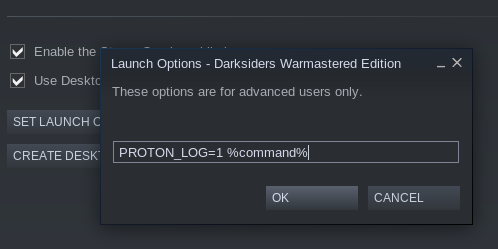
Try start this game with this parameters PROTON_LOG=1 %command%, then you will find log file with appid in your /home directory.
Here you go, hope it helps!
steam-345390.log.gz
I'm getting similar results using Proton 3.16:
steam-345390.log.gz
I got it up and running after installing .NET40.
It works great with Proton 3.7-8 with an override for xaudio2_7, otherwise the voices are barely audible and the game's audio controls don't work.
However with 3.16-4 there are rendering issues, the game is mostly black.
3.7:
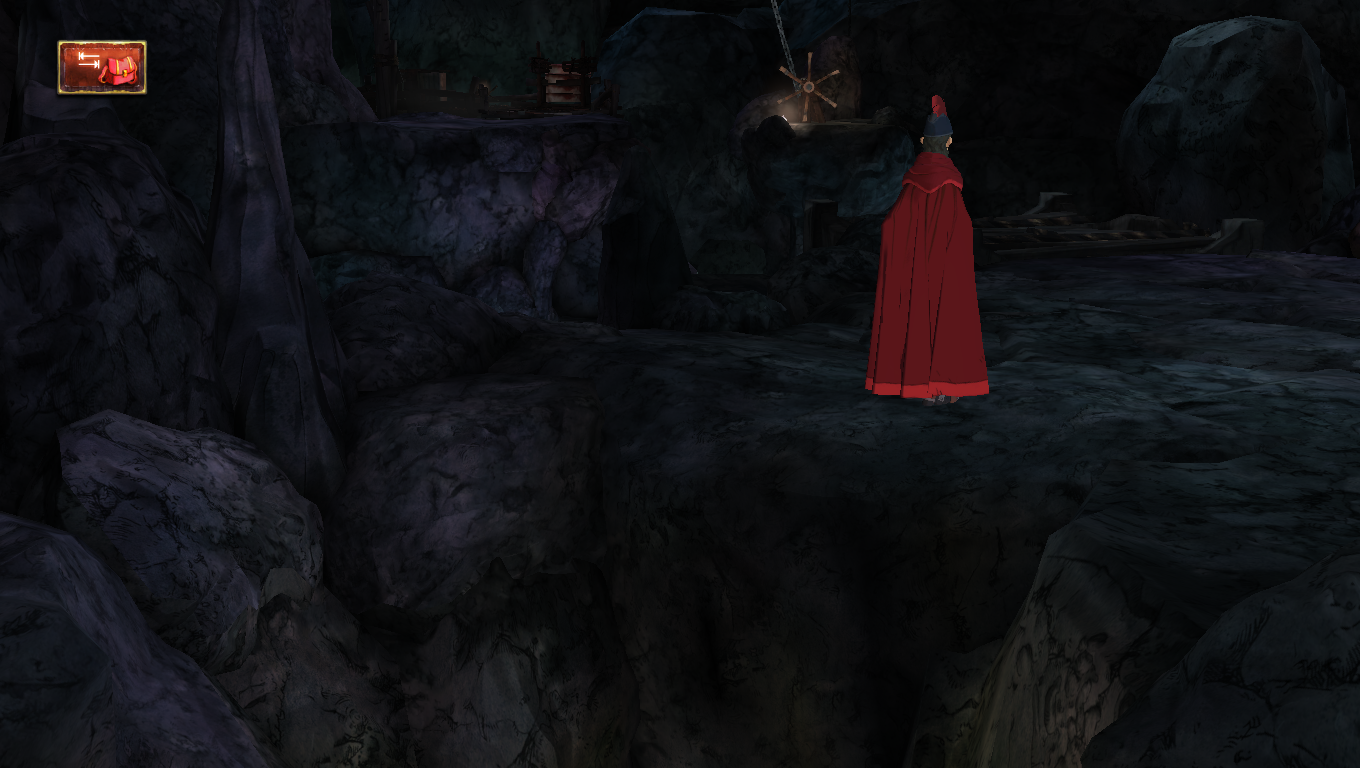
3.16:
steam-345390.log
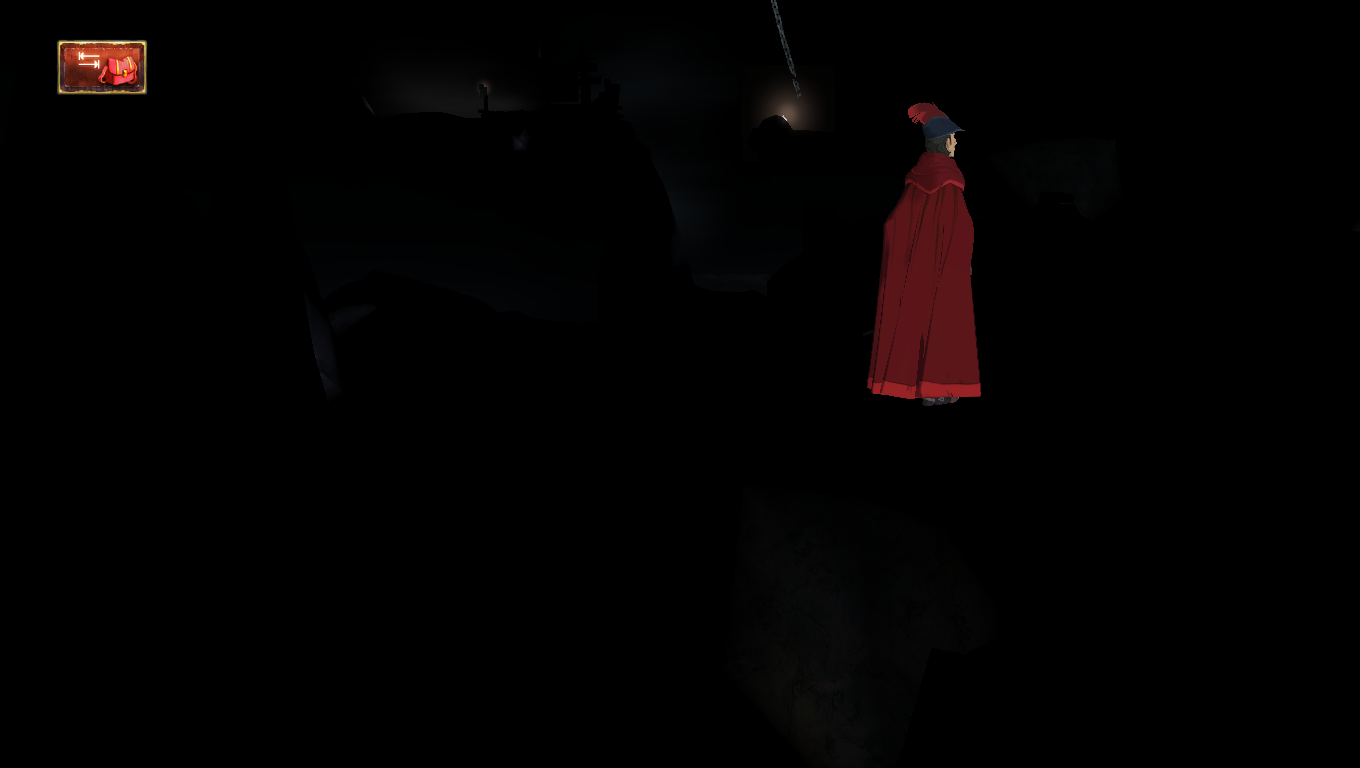
Still failing in Proton 4.2 :cry:
Progress: With 4.2-3 it installs, launches and closes (process kept lingering afterwards) fine and the audio works, too, all without tinkering. But it still suffers from the regression with the graphics. Lots of objects remain black.
Had the same problem, with Proton 3.7-8, 3.7-8 beta, 3.16-4 or 3.16-9 beta the game does not launch: it says "running" and then does not anymore and there isn't even a black screen.
Switched to Proton 4.2-4 and it launches fine, though the graphics are mostly black, like in @neodamode's 3.16 screenshot.
Running Kubuntu 18.04, Intel IGD
Is this working properly with Proton 4.11? (e.g. without rendering issues)
Is this working properly with Proton 4.11? (e.g. without rendering issues)
Yes. It looks like all issues are solved now.
Confirmed!, @kisak-valve is it time for a whitelist request?
Yes, it seems like it, although I feel like there's some shading missing because it looks kinda flat, but I could be wrong. Also no more audio crackling.
What-/ whoever fixed it also fixed the black areas in Killer Is Dead.
Works properly on Proton 5.0-9, I've opened Whitelist request: #4149
King's Quest (345390)
Issue transferred from https://github.com/ValveSoftware/Proton/issues/4149.
@joshas posted on 2020-08-25T20:07:36:
Whitelist Request
- Name of the game to be whitelisted: King's Quest
- Steam AppID of the game: 345390
System Information
- GPU: AMD Radeon RX 5600 XT
- Driver/LLVM version: Mesa 20.1.5 / LLVM 10.0.0
- Distro version: Fedora 32 (Workstation Edition)
- Link to full system information report as Gist: https://gist.github.com/joshas/b5d991b590e9ac9283179339418be775
- Proton version: 5.0-9
I confirm:
- [x] that pressing the
Playbutton in the Steam client is sufficient. - [ ] that runtime config options are necessary to run the game.
- [x] that no workarounds other than PROTON_* env variables are necessary.
Issues
- [x] I haven't experienced any issues.
- [x] There are no issues left open for this game.
- [ ] Although I consider the gaming experience equal to Windows there are remaining issues:
Completed all five episodes using mouse and keyboard controls, no issues.
Hello, is anyone seeing an issue with this game and Proton 5.0 that would block it from being whitelisted?
Hi, @kisak-valve!
Just gave it a quick try with a clean wineprefix and the game works perfectly and without any issues (only played 5 minutes though).
This game had been working fine as of this summer under the latest Steam and Proton at the time, on Linux Mint 20.2 on an older laptop with Intel HD 4400, without any additional Wine/winetricks/etc. installation nor any runtime parameters.
On a new machine with Linux Mint 20.2 and the latest Steam and Proton, the game no longer works out of the box. Clicking Play, it changes to Running for a second, then goes back to enabling Play. Nothing extra shows if I had launched Steam from the command line at the time.
I've tried:
- Verifying the game files
- Reinstalling the game
- Using older versions of Proton (see below) as well as the Experimental.
- Disabling the Steam overlay (although that had worked fine on prior hardware, except for its screenshots coming out blank)
- Switching between Intel UHD, NVIDIA GeForce RTX 3050 Ti, and "NVIDIA on-demand mode" before starting.
- A couple runtime parameters like
PROTON_USE_WINED3D(I forget what else at this point) - Uninstalling the DLC via the DLC tab in Properties (leaving only Chapter 1, or Ch1+Season Pass, or Ch1+Ch2+Season Pass)
I'm hesitant to install Wine separately if there's any way to get it running without it (which I hope there is given success with prior hardware without this).
With PROTON_LOG the output (with latest Proton but not Experimental) is:
======================
Proton: 1633030452 proton-6.3-7
SteamGameId: 345390
Command: ["/home/me/.steam/steam/steamapps/common/King's Quest/Binaries/Win/KingsQuest.exe"]
Options: {'forcelgadd'}
depot: 0.20211014.30
pressure-vessel: 0.20210906.2
scripts: v0.20210917.0-0-g1cf127d
soldier: 0.20211013.0 soldier 0.20211013.0
======================
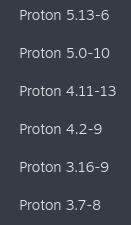
The older versions of Proton that I tried:
Any advice is welcome...I hope this report helps.
Also should note I'm on NVIDIA's latest 470.74 driver on a 5.11.0-38 Linux kernel, both installed via Mint's built-in tools.
Scratch that, entirely uninstalling and reinstalling the game did work, on my second time just now. Not sure what the difference was from my previous attempt, but now it works on latest and Experimental Proton both.
[Regression] King's Quest (345390) works perfectly with 5.0-10, crashes on startup with any later Proton
Issue transferred from https://github.com/ValveSoftware/Proton/issues/8534.
@berolinux posted on 2025-03-16T20:35:47:
King's Quest (345390) works perfectly with 5.0-10, crashes on startup with any later Proton (5.13-6 to current Proton Experimental).
@berolinux commented on 2025-03-16T20:37:24:
Proton logs from last good version
Proton logs from (crashing) current version
Hello @berolinux, please copy the contents of Steam Runtime Diagnostics from Steam (Steam -> Help -> Steam Runtime Diagnostics) and put it in a gist, then include a link to the gist in this issue report.
Hello @berolinux, please copy the contents of Steam Runtime Diagnostics from Steam (
Steam->Help->Steam Runtime Diagnostics) and put it in a gist, then include a link to the gist in this issue report.
https://gist.github.com/berolinux/1a53444783226f7a8a746506823ae255
Thanks, looking at your Proton log and https://gist.github.com/berolinux/1a53444783226f7a8a746506823ae255#file-gistfile1-txt-L4981-L4994 / https://gist.github.com/berolinux/1a53444783226f7a8a746506823ae255#file-gistfile1-txt-L8546-L8558, this isn't a Proton regression. Instead, the 32 bit Vulkan render path is broken inside of the runtime containers used with Proton. It's not immediately clear why this is happening, because it's fine with one of the Steam Linux Runtime variants (https://gist.github.com/berolinux/1a53444783226f7a8a746506823ae255#file-gistfile1-txt-L2322-L2350)
https://gist.github.com/berolinux/1a53444783226f7a8a746506823ae255#file-gistfile1-txt-L1633-L1639 is likely the relevant hint here, you have 32 bit and 64 bit AMDVLK, but that video driver has removed support for your hardware generation. Please explicitly configure your system to use mesa/RADV or move/remove AMDVLK and retest.
Confirmed working with Proton Experimental after removing AMDVLK.
Related threads
- [Regression] King's Quest works perfectly with 5.0-10, crashes on startup with any later Protonprotonclosed same game
- King's Questprotonclosed same game
Proton versions
proton experimentalx2 2025-03proton 6.3-7x1 2021-10proton 5.0x1 2020-08proton 5.0-9x1 2020-08proton 4.11x2 2019-07proton 3.7-8x2 2019-05proton 4.2-4x1 2019-05proton 4.2x1 2019-03proton 3.16x1 2018-10proton 3.7-4x1 2018-08
Launch options
PROTON_LOGx1 2021-10PROTON_USE_WINED3Dx1 2021-10PROTON_LOG=1x1 2018-08
Upstream links
- ValveSoftware/Proton/issues/8534x1 2025-03
- ValveSoftware/Proton/issues/4149x1 2020-08
Debian Unstable
awesomewm
Radeon RX 280X
Mesa 18.1.6
Proton 3.7-4 Beta
Didn't find any useful log.