Hello @adnub, Proton 4.11 is quite old to use as a reference. You've basically said that there's a regression somewhere in 2 years of development. Can you check what the newest mainline Proton release behaves as expected and the oldest release that has trouble?
I have some info on this. Am currently playing GW1 and I had to go back to Proton 4.11-13 to properly play the GW1 Triology.
More Specifically
Proton Experimental: Login Error as shown in original Post
Proton 6.3-8: Same login Error
Proton 5.13-6 & 5.0-10: Allow login, playable in most areas, but I experienced crashes on the Pre-Searing Regent Valley, making the region unplayable.
Proton 4.11-13: Working without problems so far, in Pre- and Post-Searing Ascalon regions.
I will update if I find more crashes.
My conclusion is that there is indeed some kind of regression, and I would think that it is the case for more then 1 problem.
The problems in 6.3 are network related and make me unable to test if the Regent-Valley crash in 5.x (which seemed to be a rendering problem, though this is just my intuition speaking) would happen in 6.x too.
Should the network error be fixed I would be happy to test 6.3 or Experimental further.
PC-Details:
Kernel: 5.14.21-2-MANJARO x86_64
Distro: Manjaro Xfce 4.16.0
MOBO: MPG X570 GAMING PLUS (MS-7C37)
CPU: AMD Ryzen 5 3600
RAM: 32gb DDR4
GPU: Radeon RX 590
7.0-1 fixed the network issue, and Regent Valley is playable too (the region crashed in 5.x), but I now have to disable Steam-Overlay, because opening that (shift + tab) immediately freezes the game and I can't find any way to recover.
This problem starts at 6.3-8, works fine before that.
PC-Details:
Kernel: 5.16.7-1-MANJARO x86_64
Distro: Manjaro Xfce 4.16.0
MOBO: MPG X570 GAMING PLUS (MS-7C37)
CPU: AMD Ryzen 5 3600
RAM: 32gb DDR4
GPU: Radeon RX 590
The problem with the overlay I reported on 7.0-1 is fixed in 7.0-3, and from my short testing in Fort Ranik and Regent Valley (Both pre searing) 7.0-3 seems to work without problems.
Experimental however cashed as soon as I loaded into a character, but I guess a few troubles are to be expected from Experimental.
So all my previously noted problems seem to be fixed in 7.0-3.
(I'll test some longer play sessions in future)
Hello @NysNight, please add PROTON_LOG=1 %command% to the game's launch options, reproduce the crash with Proton Experimental, and attach the generated $HOME/steam-$APPID.log to this issue report as a file. (Proton logs compress well if needed.) Also, please copy your system information from Steam (Steam -> Help -> System Information) and put it in a gist, then include a link to the gist in this issue report.
Here is the gist: https://gist.github.com/NysNight/8c3a4dd3e474da98ee07371747e1909a
Precise description of what's happening:
When I'm in my character screen and load into the world (Testing in fort Ranik, pre searing) the game sometimes freezes immidiately on hitting 100% and fading out the loading screen. Pretty much the first, or one of the first rendered frames seems to cause a problem.
Now that I had the time to test it more thoroughly I have trouble reproducing it consistently.
The freeze behaviour actually reminds me of the freeze I experienced with Proton 5.13-6 & 5.0-10 in Regent Valley, where I had this same behaviour when trying to load into the map, as stated in my post above on Jan 8th.
I was able to reproduce the freeze in 1/6 tries with proton logging.
protonlog:
steam-29720.log
Game: Guild Wars Trilogy
Platform: SteamOS
Device: Official Steam Deck, 512gb version
Upon playing the game, without forcing a compatibility layers through Steam, the game would freeze at the Catacombs pre-searing. After attempting to fix this issue by switching to ProtonGE, the game would not freeze, but failed to play any sound.
A solution was discovered through applying an advanced launch option line of:
PROTON_USE_WINED3D=1 %command%
Additionally, the application needed to be forced to use Proton 5.13-6.
As of yet, no other issues have occurred. Will update if found.
Hello @Hodgrim, please add PROTON_LOG=1 %command% to the game's launch options, reproduce the game freeze, and attach the generated $HOME/steam-$APPID.log to this issue report as a file. (Proton logs compress well if needed.) Also, please copy your system information from Steam (Steam -> Help -> System Information) and put it in a gist, then include a link to the gist in this issue report.
This can likely be closed as Guild Wars Reforged has been launched and is Steam Deck verified now!
proton 5.13-6x3 2022-07proton experimentalx2 2022-06proton 4.11-13x2 2022-01proton 6.3-8x1 2022-01proton 4.11x1 2021-11proton 6.3-7x1 2021-11PROTON_LOG=1x2 2022-07PROTON_USE_WINED3D=1x1 2022-07PROTON_USE_WINED3D=1 %command%x1 2022-07
Compatibility Report
System Information
I confirm:
steam-29720.log
Symptoms
When starting the game and attempting to log in, you get a connection error.
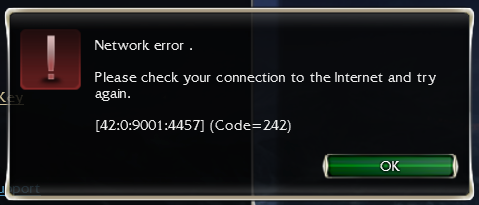
This works fine in Proton 4.11-13 but won't work in Proton 6.3-7.
Reproduction