Proton 6.3-8 RC Testing
Added support for selected BattlEye games
What exactly does this mean? Is it you, BattlEye or the individual game's devs who select the game for Proton compat?
Because some BE games like Planetside 2 seem to be working without any official indication of the developer having "opted in" and I want be safe trying them out.
Also, is there a way to get an official list of BE games that are compatible?
Thank you so much for your work!
Hello @Atemu, please see https://store.steampowered.com/news/group/4145017/view/3104663180636096966 for the release announcement that went along with the initial support for BattlEye.
I can't get Black Ops II to launch, it seems to crash nearly instantly before being able to launch any window.
Operating System: Arch Linux
KDE Plasma Version: 5.23.3
KDE Frameworks Version: 5.87.0
Qt Version: 5.15.2
Kernel Version: 5.15.2-arch1-1 (64-bit)
Graphics Platform: X11
Processors: 12 × AMD Ryzen 5 3600 6-Core Processor
Memory: 31.4 GiB of RAM
Graphics Processor: NVIDIA GeForce GTX 1080 Ti/PCIe/SSE2
Are the patches from the following thread present in 6.3-8? BO2 won't launch on modern kernels without them
I have noticed that some people have gotten BO2 running and they were all explicitly running Steam Beta of the client.
After switching to Beta, the game launches fine.
BO2 Multiplayer does not launch for me. I'm using steam beta and Proton 6.3-8 RC
Mass Effect Legendary Edition. Mass Effect 1 has no sound. Only Mass Effect 1 is affected; the sound in Mass Effect 2 and Mass Effect 3 works.
Friendly reminder that we want the discussion on this issue report to focus on regressions between Proton 6.3-7 and the release candidate and inconsistencies with the tentative changes noted above.
@Sultech, Call of Duty: Black Ops II is split apart into several separate games with different appids. There can be subtle differences between them. The tentative changelog should be referring to the single player campaign (202970), while the multiplayer (202990) should be evaluated separately.
@rcuyegkeng the behavior you've described is not a new regression in the release candidate and is being discussed at https://github.com/ValveSoftware/Proton/issues/4823.
Playable:
Disgaea 4 Complete+
what change makes this game on the list?
here is my test in video form: Youtube Link
in text:
a clean install will result in locking-up even before the title screen (from what i know, it is mfplat related)
and with MovieSkip=1 set in the config (continuing after the clean install), it goes to the title screen, probably also playable, but no audio and probably no cutscenes
TL;DR: from what i can tell, the compat state of this game is the same as before before 6.3.-8
system: Manjaro 21.1.6 KDE Plasma Wayland & Pipewire on kernel 5.15.0 (custom compiled, with manjaro config)
also as a side note: mostly when starting the game, somehow it always executes the "first time setup: directx for windows"
edit: forgot to get & attach the proton logs:
clean install: steam-1233880.log
movieskip: <cant get it to the title screen anymore, so it is not like in the video / text>
Update 2 days later: tested Proton 6.3-8-rc4, which behaves about the same
@hasezoey thanks for reporting this. We have merged the following commits that were already in experimental to help with the video playback / game locking up:
645fc26692be ("winegstreamer: Implement IMFTransform::GetOutputCurrentType in colorconvert")
8fc874096166 ("dxva2: Remove AYUV from accepted input formats.")
4d985c2af2dc ("mf/session: Forward MR_STREAM_VOLUME_SERVICE requests to SAR node.")
838847456290 ("evr/presenter: Fix a crash when releasing partially initialized object.")
71dba791cb27 ("evr/mixer: Implement stream rectangle scaling.")
8288eb343852 ("evr/mixer: Handle substream zorder for dxva blitting.")
5ef1b17e36d8 ("evr/presenter: Handle shutdown state in more methods.")
7fa395121ff0 ("evr/tests: Add some more presenter tests for shutdown state.")
d97b70f301e3 ("evr/presenter: Handle type invalidation calls without attached mixer.")
627e92208c65 ("evr/tests: Skip tests if default presenter can't be created.")
9666a0fe9279 ("evr/mixer: Improve output type candidates attributes configuration.")
23d151d182c0 ("evr/presenter: Invalidate media type on destination rectangle change.")
77ac2aa9b7cc ("evr/presenter: Remove scaling by zoom rectangle.")
fc5f8aab4c24 ("evr: Trace normalized rectangle arguments.")
Looks like the game still locks up with RC which means we may need a few more patches. As mentioned in the post this changelog has not yet been verified by our QA staff, and can change before the final release as we add or remove features during RC testing. We'll either fix this or pull the game from the list of fixed titles.
New Release Candidate has been published and the changelog above has been updated. I have removed Disgaea 4 Complete+ form the playable list as it requires quite a few more changes from Experimental to be ported over. The new build should now also fix intro video playback in Biomutant.
The post now includes a few extra links and clarifications inspired by the discussion in this issue.
BO2 Multiplayer does not launch for me. I'm using steam beta and Proton 6.3-8 RC
@Sultech Do you have Proton 6.3-8 RC selected for the multiplayer part of the game too? Black Ops II has 2 game listings in the Steam client and both have to be set to use the same Proton version for it to work. ("Call of Duty Black Ops II" and "Call of Duty Black Ops II - multiplayer")
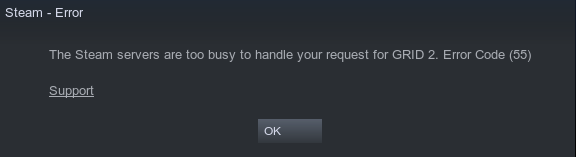
I'm getting this error when playing any game that uses CEG drm
@alasky17 Yes I have Proton 6.3-8 RC selected for the multiplayer. The game does not open at all.
EVE Online still does not work out of the box, even with Proton 6.3.8-RC, without the workaround outlined here: https://forums.eveonline.com/t/client-not-launching-properly-solved/335585/2
A patch for this issue exists, but have not been mainlined yet: https://www.winehq.org/pipermail/wine-devel/2021-October/199483.html
Bugreport: https://bugs.winehq.org/show_bug.cgi?id=51821
Hello @kimmalmo, please add a note to #1223 because that feedback is not a regression between Proton 6.3-7 and the 6.3-8 release candidate.
New RC build is up. It includes fix for DEATHLOOP (the game regressed after Update 2) and we had to pull the fix for Control windowing as it was regressing other games.
Cue Club 2 fails to start on the latest RC. Most of the time it just makes a black window and immediately quits, but sometimes it creates a small error dialog:

Here are the generated logs. There is no steam-$appid.log generated when run through Flatpak.
@HugLifeTiZ Is Cue Club 2 working on 6.3-7?
@alasky17 Yes, it is.
@HugLifeTiZ you have hit a problem with proprietary 32bit Nvidia driver. It advertises VK_NVX_binary_import Vulkan extension but doesn't allow to crate a Vulkan device using it. I believe it was fixed in the driver 495. We've picked a DXVK workaround for this, so the game should work for you now even on 470 :-)
The new RC is up. Thanks for the report!
Thank you! I have to stay on 470 because of ValveSoftware/steam-for-linux#8212. I can confirm that Cue Club 2 now starts on the latest RC. 🙂
Proton 6.3-8 just got released.
Proton versions
proton 6.3-8x6 2021-11proton 6.3-7x2 2021-11proton 6.3x3 2021-11
Launch options
Upstream links
- show_bug.cgi?id=51821x1 2021-11
- ValveSoftware/Proton/issues/4823x1 2021-11
- show_bug.cgi?id=46472x1 2021-11
Hey. We've put together a new 6.3 Release Candidate build for you to test.
In the Steam client, the Proton 6.3 app should have a "proton-6.3-8-rc" beta
branch which you can choose to start testing the 6.3-8 Release Candidates (note
that the name of the build in the Steam Settings dialog will not be updated). We
will post changes here when we push new builds. The source for the latest RC
build is available on the proton_6.3-rc branch in this repositories. This branch
may be force pushed.
In this issue, we are interested only in problems that are new to the 6.3-8 RC
builds. If you find new problems in the release candidate branch, please confirm
that the problem does not occur in on the "none" branch before reporting it
here.
Here is the tentative changelog. As always, this changelog has not yet been
verified by our QA staff, and can change before the final release as we add or
remove features during RC testing.
Playable:
Added support for selected BattlEye games (requires Steam Beta Client).
Improve compatibility with games using Valve's CEG DRM.
Support DLSS in DX11 and DX12 games (guarded by
PROTON_ENABLE_NVAPI=1anddxgi.nvapiHack = False).Support latest Steamworks SDK.
Fix crashes in Project Wingman, Satisfactory and other Unreal Engine 4 games using the Vulkan renderer.
Fix a rare crash when starting Baldur's Gate 3.
Fix networked multiplayer in RaceRoom Racing Experience.
Fix cutscene desync in Assassin's Creed: Odyssey.
Fix audio stuttering in Gahkthun Steam Edition.
Fix Atomic Shop and random crashes on start in Fallout 76.
Fix Paradox Launcher (used by Europa Universalis IV) failing to display anything.
Fix video freezing and causing game to hang in Deep Rock Galactic.
Fix Industries of Titan not listing any resolutions and monitors.
Fix Bloons TD6 not being able to access account settings, see
docs/ICMP_ECHO.md.Fix Project CARS 3 ignoring inputs after Alt+Tab.
Fix stuck Alt key after Alt+Tabbing out and back for Warhammer: Chaosbane.
Support Thai characters in Mirror and other Unity games.
Support Korean and Arabic characters in Cyberpunk 2077 launcher.
Fix connection issues in Satisfactory on systems with multiple network interfaces.
Fix Biomutant videos not playing.
Update dxvk to v1.9.2-13-g714ca482.
Update vkd3d-proton to v2.5-50-g0251b404.
Update wine-mono to 6.4.1.