Dinner with an Owl
Dinner with an Owl (1567420)
Issue transferred from https://github.com/ValveSoftware/Proton/issues/5623.
@Mephistople posted on 2022-02-26T11:46:38:
Compatibility Report
- Name of the game with compatibility issues: Dinner with an Owl
- Steam AppID of the game: 1567420
System Information
- GPU: NVIDIA GeForce RTX 2080 Ti Rev. A
- Driver/LLVM version: 510.54
- Kernel version: 5.16.7-1-MANJARO
- System Info
- Proton version: Proton Experimental
I confirm:
- [x] that I haven't found an existing compatibility report for this game.
- [x] that I have checked whether there are updates for my system available.
steam-1567420.log
Symptoms
When I hit play, it says that the games running but no game ever opens.
Reproduction
- Install game
- Hit play
- Observe the game is not starting.
In the game folder the game is located there is an .exe file called Settings.
If you open it in regular wine, it gives you the option to choose from either OpenGL, DX9 or DX11.
You can also choose between windows mode or fullscreen.
Have tried all different combinations, witch none of them worked.
By default it's set to DX11 in full screen.
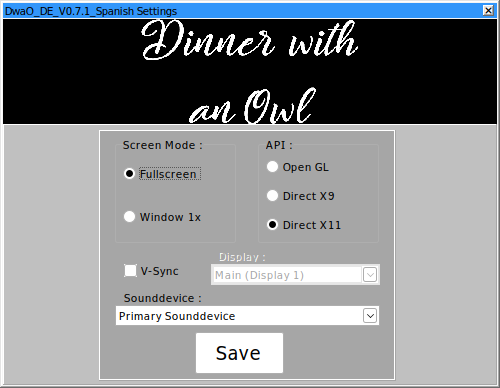
Thanks to [RUS]siv-siv in the Dinner with an Owl steam community for getting the game to work.
The game seems to work if you set the windows version to windows vista, in winecfg.
I also needed to set directx11 in the launcher (Settings.exe), found in the game root folder.
As the game default OpenGL render would not work.
This fix also seems to work on Owl Observatory Demo (2764710), as they both share the same engine PaC-DK.
Works OOTB now
Proton versions
proton experimentalx1 2022-02
Upstream links
- ValveSoftware/Proton/issues/5623x1 2022-02
Compatibility Report
System Information
I confirm:
steam-1567420.log
Symptoms
Game doesn't launch.
DwaO.exeis running, but there is no window.Reproduction
Try to start the game