Dungeon Fighter Online
With Proton 7.0.1, this should now be playable. I'm trying to run it with the standalone client launched through Steam with Proton so I can get back into my old account, so I'm not sure if this is relevant here.
It's installed and fully patched, and I can log in with the launcher. However after logging in, the ToS pops up and requires me to click the agree button before being able to launch the game. If I click it, the launcher crashes and the ToS still pops up the next time I try to log in.
Error
(steam:89380): Gtk-WARNING **: 06:10:30.200: gtk_disable_setlocale() must be called before gtk_init()

(steam:89380): GLib-CRITICAL **: 06:10:30.200: unquote_string_inplace: assertion 'err == NULL || *err == NULL' failed
GameAction [AppID 2691235131, ActionID 3] : LaunchApp changed task to SiteLicenseSeatCheckout with ""
GameAction [AppID 2691235131, ActionID 3] : LaunchApp changed task to CreatingProcess with ""
GameAction [AppID 2691235131, ActionID 3] : LaunchApp waiting for user response to CreatingProcess ""
GameAction [AppID 2691235131, ActionID 3] : LaunchApp continues with user response "CreatingProcess"
/bin/sh\0-c\0/home/user/.local/share/Steam/ubuntu12_32/reaper SteamLaunch AppId=2691235131 -- '/home/user/.local/share/Steam/steamapps/common/SteamLinuxRuntime_soldier'/_v2-entry-point --verb=waitforexitandrun -- '/home/user/.local/share/Steam/steamapps/common/Proton 7.0'/proton waitforexitandrun  "/home/user/.local/share/Steam/steamapps/compatdata/2691235131/pfx/drive_c/Neople/DFO/NeopleLauncher.exe"\0
Game process added : AppID 0 "/home/user/.local/share/Steam/ubuntu12_32/reaper SteamLaunch AppId=2691235131 -- '/home/user/.local/share/Steam/steamapps/common/SteamLinuxRuntime_soldier'/_v2-entry-point --verb=waitforexitandrun -- '/home/user/.local/share/Steam/steamapps/common/Proton 7.0'/proton waitforexitandrun  "/home/user/.local/share/Steam/steamapps/compatdata/2691235131/pfx/drive_c/Neople/DFO/NeopleLauncher.exe"", ProcID 96182, IP 0.0.0.0:0
chdir /home/user/.local/share/Steam/steamapps/compatdata/2691235131/pfx/drive_c/Neople/DFO/
GameAction [AppID 2691235131, ActionID 3] : LaunchApp changed task to Completed with ""
ERROR: ld.so: object '/home/user/.local/share/Steam/ubuntu12_32/gameoverlayrenderer.so' from LD_PRELOAD cannot be preloaded (wrong ELF class: ELFCLASS32): ignored.

(steam:89380): Gtk-WARNING **: 06:10:30.240: gtk_disable_setlocale() must be called before gtk_init()

(steam:89380): GLib-CRITICAL **: 06:10:30.240: unquote_string_inplace: assertion 'err == NULL || *err == NULL' failed
ERROR: ld.so: object '/home/user/.local/share/Steam/ubuntu12_64/gameoverlayrenderer.so' from LD_PRELOAD cannot be preloaded (wrong ELF class: ELFCLASS64): ignored.
ERROR: ld.so: object '/home/user/.local/share/Steam/ubuntu12_32/gameoverlayrenderer.so' from LD_PRELOAD cannot be preloaded (wrong ELF class: ELFCLASS32): ignored.

(steam:89380): Gtk-WARNING **: 06:10:30.250: gtk_disable_setlocale() must be called before gtk_init()

(steam:89380): GLib-CRITICAL **: 06:10:30.250: unquote_string_inplace: assertion 'err == NULL || *err == NULL' failed
ERROR: ld.so: object '/home/user/.local/share/Steam/ubuntu12_32/gameoverlayrenderer.so' from LD_PRELOAD cannot be preloaded (wrong ELF class: ELFCLASS32): ignored.
ERROR: ld.so: object '/home/user/.local/share/Steam/ubuntu12_32/gameoverlayrenderer.so' from LD_PRELOAD cannot be preloaded (wrong ELF class: ELFCLASS32): ignored.
pid 96186 != 96183, skipping destruction (fork without exec?)
fsync: up and running.
wine: RLIMIT_NICE is <= 20, unable to use setpriority safely
ThreadGetProcessExitCode: no such process 96336
ThreadGetProcessExitCode: no such process 96334
ThreadGetProcessExitCode: no such process 96184
[S_API FAIL] SteamAPI_Init() failed; no appID found.
Either launch the game from Steam, or put the file steam_appid.txt containing the correct appID in your game folder.
MESA-INTEL: warning: Haswell Vulkan support is incomplete
WARNING: radv is not a conformant Vulkan implementation, testing use only.
MESA-INTEL: warning: Haswell Vulkan support is incomplete
WARNING: radv is not a conformant Vulkan implementation, testing use only.
ThreadGetProcessExitCode: no such process 96339
MESA-INTEL: warning: MESA-INTEL: warning: Haswell Vulkan support is incompleteHaswell Vulkan support is incomplete

WARNING: radv is not a conformant Vulkan implementation, testing use only.
WARNING: radv is not a conformant Vulkan implementation, testing use only.
MESA-INTEL: warning: MESA-INTEL: warning: Haswell Vulkan support is incompleteHaswell Vulkan support is incomplete

WARNING: radv is not a conformant Vulkan implementation, testing use only.
WARNING: radv is not a conformant Vulkan implementation, testing use only.
Crash Annotation GraphicsCriticalError: |[0][GFX1]: Potential driver version mismatch ignored due to missing DLLs 0.0.0.0 and 0.0.0.0 (t=46.3449) [GFX1]: Potential driver version mismatch ignored due to missing DLLs 0.0.0.0 and 0.0.0.0
wine: Unhandled page fault on read access to 00000000 at address 10144B38 (thread 0140), starting debugger...
Unhandled exception: page fault on read access to 0x00000000 in 32-bit code (0x10144b38).
Register dump:
CS:0023 SS:002b DS:002b ES:002b FS:0063 GS:006b
EIP:10144b38 ESP:00a4d5c8 EBP:00a4d634 EFLAGS:00210202(  R- --  I   - - - )
EAX:00000000 EBX:00000000 ECX:00000000 EDX:00000000
ESI:00a4d5d0 EDI:00a4d5d4
Stack dump:
0x00a4d5c8:  00000000 10c99bc8 00000000 00000000
0x00a4d5d8:  00c08230 00a4d658 00000000 10c9abc8
0x00a4d5e8:  00c08230 10c9a21b 00c08278 10c97989
0x00a4d5f8:  26494bf0 00c08278 00000000 00000032
0x00a4d608:  100b5355 00000032 00000000 00c08278
0x00a4d618:  00c08348 00a4d638 00a4d6a4 10c9c647
Backtrace:
=>0 0x10144b38 EntryPoint+0x1439a8() in xul (0x00a4d634)
1 0x10c9b9ea EntryPoint+0xc9a85a() in xul (0x00a4d6a4)
0x10144b38 xul+0x144b38: movl   0x0(%ecx),%eax
Modules:
Module  Address                 Debug info      Name (70 modules)
PE      00140000-0019c000       Deferred        combase
PE      00400000-0084e000       Deferred        neoplelauncher
PE      00fc0000-01088000       Deferred        winmm
PE      01ab0000-01ab8000       Deferred        api-ms-win-crt-heap-l1-1-0
PE      01ac0000-01ac9000       Deferred        api-ms-win-crt-string-l1-1-0
PE      01ad0000-01ad8000       Deferred        api-ms-win-crt-utility-l1-1-0
PE      01ae0000-01aed000       Deferred        userenv
PE      01af0000-01b20000       Deferred        uxtheme
PE      023e0000-024dd000       Deferred        mozglue
PE      043f0000-045ff000       Deferred        nss3
PE      063d0000-064e3000       Deferred        lgpllibs
PE      10000000-15654000       Export          xul
PE      3b400000-3b438000       Deferred        steam_api
PE      61500000-6152f000       Deferred        iphlpapi
PE      61740000-61784000       Deferred        advapi32
PE      61940000-619cd000       Deferred        wininet
PE      61f00000-61f09000       Deferred        api-ms-win-crt-convert-l1-1-0
PE      61f80000-61f8b000       Deferred        api-ms-win-crt-math-l1-1-0
PE      62d40000-62d47000       Deferred        api-ms-win-crt-environment-l1-1-0
PE      62fc0000-6304e000       Deferred        rpcrt4
PE      631c0000-631e1000       Deferred        secur32
PE      63480000-6348d000       Deferred        version
PE      63740000-63749000       Deferred        api-ms-win-crt-runtime-l1-1-0
PE      637c0000-63869000       Deferred        urlmon
PE      63bc0000-63bda000       Deferred        shcore
PE      64a40000-64a94000       Deferred        shlwapi
PE      64ec0000-64fee000       Deferred        oleaut32
PE      65d40000-65d48000       Deferred        api-ms-win-crt-filesystem-l1-1-0
PE      65f40000-65f4d000       Deferred        kerberos
PE      66240000-66258000       Deferred        bcrypt
PE      66600000-66607000       Deferred        api-ms-win-crt-locale-l1-1-0
PE      66b00000-66b3e000       Deferred        win32u
PE      67840000-6784a000       Deferred        psapi
PE      67ec0000-687f8000       Deferred        shell32
PE      688c0000-688ea000       Deferred        netapi32
PE      69180000-69190000       Deferred        wsock32
PE      69480000-694ad000       Deferred        mlang
PE      6a040000-6a062000       Deferred        msacm32
PE      6a280000-6a32e000       Deferred        msvcrt
PE      6a400000-6a533000       Deferred        ole32
PE      6aa40000-6aa48000       Deferred        usp10
PE      6b7c0000-6b7c9000       Deferred        api-ms-win-crt-stdio-l1-1-0
PE      6bc00000-6bc2c000       Deferred        sechost
PE      6bcc0000-6bd40000       Deferred        setupapi
PE      6c9c0000-6ca45000       Deferred        gdi32
PE      6cc40000-6cd9e000       Deferred        comctl32
PE      6cf40000-6cf47000       Deferred        api-ms-win-crt-time-l1-1-0
PE      6d780000-6d7a8000       Deferred        ws2_32
PE      6dd00000-6dd0c000       Deferred        schannel
PE      6e3c0000-6e479000       Deferred        jscript
PE      6e4c0000-6e4d6000       Deferred        dnsapi
PE      6e8c0000-6e995000       Deferred        crypt32
PE      6ec40000-6ec4e000       Deferred        dwmapi
PE      6ed00000-6ef41000       Deferred        user32
PE      6f480000-6f48c000       Deferred        nsi
PE      6f4c0000-6f4e8000       Deferred        wintrust
PE      6f600000-6f60a000       Deferred        api-ms-win-crt-multibyte-l1-1-0
PE      6f700000-6f789000       Deferred        ieframe
PE      6f900000-6f93c000       Deferred        msctf
PE      6fe40000-6fe74000       Deferred        rsaenh
PE      6ff00000-70113000       Deferred        mshtml
PE      702c0000-702d7000       Deferred        api-ms-win-crt-private-l1-1-0
PE      70940000-70960000       Deferred        mpr
PE      70b40000-70c1c000       Deferred        ucrtbase
PE      70e80000-70e8a000       Deferred        msimg32
PE      71200000-7121c000       Deferred        imm32
PE      7b000000-7b0ec000       Deferred        kernelbase
PE      7b600000-7b81a000       Deferred        kernel32
PE      7bc00000-7bca8000       Deferred        ntdll
PE      f60e0000-f60e4000       Deferred        winex11
Threads:
process  tid      prio (all id:s are in hex)
00000020 steam.exe
      00000024    0
      000000c8    0
      00000148    0
00000030 services.exe
      00000034    0
      00000038    0
      00000044    0
      00000054    0
      00000068    0
      00000074    0
      00000098    0
      000000b0    0
      00000100    0
0000003c winedevice.exe
      00000040    0
      0000004c    0
      00000050    0
      00000058    0
      0000005c    0
      000000bc    0
00000060 winedevice.exe
      00000064    0
      0000006c    0
      00000070    0
      00000078    0
      0000007c    0
      00000080    0
      00000084    0
      0000008c    0
00000090 plugplay.exe
      00000094    0
      0000009c    0
      000000a0    0
      000000a4    0
000000a8 svchost.exe
      000000ac    0
      000000b4    0
      000000b8    0
000000c0 conhost.exe
      000000c4    0
000000cc explorer.exe
      000000d0    0
      000000e0    0
      000000ec    0
000000f4 rpcss.exe
      000000f8    0
      00000108    0
      0000010c    0
      00000110    0
      00000114    0
      00000128    0
      00000154    0
0000012c tabtip.exe
      00000130    0
      00000138    0
      00000144    0
0000013c (D) C:\Neople\DFO\NeopleLauncher.exe
      00000140    0 <==
      0000014c    0
      0000015c    0
      00000160    0
      00000164    0
      00000168    0
      0000016c    0
      00000170    0
      00000174    0
      00000178    0
      0000017c    0
      00000180    0
      00000184    0
      00000188    0
      0000018c    0
      00000190   -1
      00000194   -1
      00000198    0
      0000019c    0
      000001a0    0
      000001a4    0
      000001a8    0
      000001ac   -1
      000001b0    0
      000001b4    0
      000001b8    0
      000001bc    0
      000001c0    0
      000001c4    0
      000001c8    0
      000001cc    0
      00000224    0
      00000228    0
      00000230    0
      0000023c    0
System information:
  Wine build: wine-7.0
  Platform: i386 (WOW64)
  Version: Windows 10
  Host system: Linux
  Host version: 5.16.10-201.fsync.fc35.x86_64
ThreadGetProcessExitCode: no such process 96499
ThreadGetProcessExitCode: no such process 96427
ThreadGetProcessExitCode: no such process 96409
ThreadGetProcessExitCode: no such process 96378
ThreadGetProcessExitCode: no such process 96372
ThreadGetProcessExitCode: no such process 96366
ThreadGetProcessExitCode: no such process 96344
ThreadGetProcessExitCode: no such process 96341
ThreadGetProcessExitCode: no such process 96335
ThreadGetProcessExitCode: no such process 96333
pid 96337 != 96336, skipping destruction (fork without exec?)
Game process removed: AppID 0 "/home/user/.local/share/Steam/ubuntu12_32/reaper SteamLaunch AppId=2691235131 -- '/home/user/.local/share/Steam/steamapps/common/SteamLinuxRuntime_soldier'/_v2-entry-point --verb=waitforexitandrun -- '/home/user/.local/share/Steam/steamapps/common/Proton 7.0'/proton waitforexitandrun  "/home/user/.local/share/Steam/steamapps/compatdata/2691235131/pfx/drive_c/Neople/DFO/NeopleLauncher.exe"", ProcID 96182
ThreadGetProcessExitCode: no such process 96353
ThreadGetProcessExitCode: no such process 96183
Uploaded AppInterfaceStats to Steam

(steam:89380): Gtk-WARNING **: 06:10:52.148: gtk_disable_setlocale() must be called before gtk_init()

(steam:89380): GLib-CRITICAL **: 06:10:52.148: unquote_string_inplace: assertion 'err == NULL || *err == NULL' failed
Replying to https://github.com/ValveSoftware/Proton/issues/5394#issuecomment-1047742417
Is your old account one linked with your Steam account or have you created in their website?
I am asking this because my account was created in Neople's website, which when opening the launcher it now forces you to have a Steam linked account. To solve this I created a dummy account with a spare e-mail, then click log-out and log-in with my Neople account, unfortunately I have to log-out and log-in every time I open the launcher.
This is an annoying workaround but this is a problem on their side. I couldn't find a way to link an existing account to my Steam account.
Edit: By the way, the game runs perfectly fine under Proton now, just don't change the resolution to "Windowed (free)" or you will have to manually change the config files to fix it.
@wizardlink Neople account. To be clear, I'm using the game downloaded from Neople's site added as a non-Steam game with Proton compatibility enabled.
I tried running the Steam version to the patcher at least to see if there were any different dlls listed in config_info, but it matched the one in my non-Steam added compatdata folder.
EDIT: Tried the above trick of logging out of a Steam account with the proper Steam version to log in to my Neople account. Same crash upon accepting the ToS popup...
@wizardlink Neople account. To be clear, I'm using the game downloaded from Neople's site added as a non-Steam game with Proton compatibility enabled. I tried running the Steam version to the patcher at least to see if there were any different dlls listed in config_info, but it matched the one in my non-Steam added compatdata folder.
EDIT: Tried the above trick of logging out of a Steam account with the proper Steam version to log in to my Neople account. Same crash upon accepting the ToS popup...
That's odd... I am trying to understand though, what do you mean with accepting the pop-up? When I open up DFO I only have a button on the top right of it to close it, I thought you meant that but got confused.
This is how it looks to me:
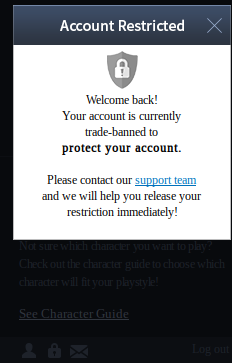
EDIT: I assume this is the pop-up you're talking about, since I don't have any other pop-up in the launcher unless I'm closing it.
@wizardlink Right, I should have included a screenshot. For context, this account has not been used once since 2019.
The Agree button becomes clickable once scrolled to the bottom of the ToS. Clicking it causes the patcher to immediately crash.
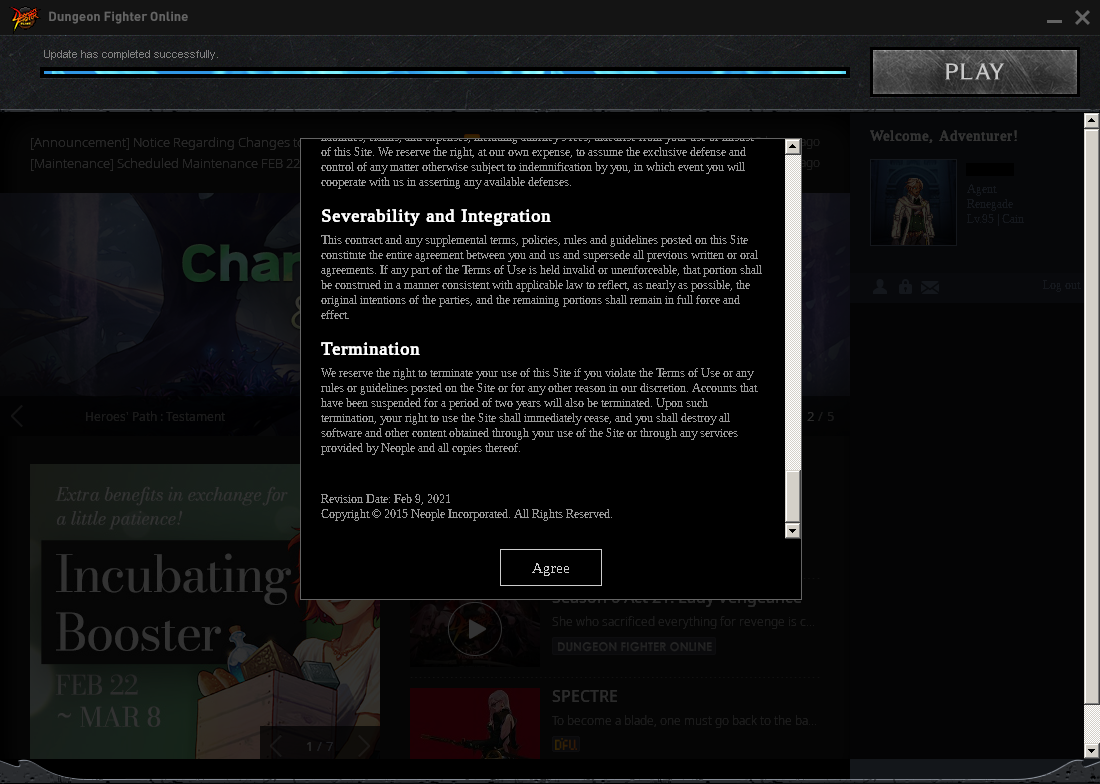
@wizardlink Right, I should have included a screenshot. For context, this account has not been used once since 2019.
The Agree button becomes clickable once scrolled to the bottom of the ToS. Clicking it causes the patcher to immediately crash.
Well, I give up. I have been trying on my free time to tackle this issue and potentially finding a solution, however there are a lot of edge case scenarios where your error falls in, the most common case I saw was due to a package mismatch in Ubuntu... But these reports are from 3-4y ago so they should not be a problem on LTS, if you even use Ubuntu.
I did not want to bother you about this since the Deck just launched, but @kisak-valve could you help us out with this edge case? I cannot reproduce it due to the fact that this popup only appears for returning players.
I did open an issue last week on WineHQ's bug tracker [link], since my crash is the same with Wine staging 7.2 as with Proton. The log from that has ieframe messages right before the backtrace that aren't in Proton's log.
Speaking of which, here's a proper Proton log of Steam's DFO launcher crashing from accepting the Terms of Service.
steam-495910.log
I did open an issue last week on WineHQ's bug tracker [link], since my crash is the same with Wine staging 7.2 as with Proton. The log from that has ieframe messages right before the backtrace that aren't in Proton's log.
Speaking of which, here's a proper Proton log of Steam's DFO launcher crashing from accepting the Terms of Service. steam-495910.log
I'm having the exact same issue as Don, same warning about a page fault, tried Proton 7.0-1, 7.0-3, GE 7-9 and GE 7-20, all crash upon accepting terms.
@DonKatsu I managed to fix this.
I installed steam+DFO in a windows VM, accepted terms of service and copied the files out of the vm, and it worked.
After 16/08/2022, the game disconnects after some minutes ingame, even if the connection is working properly. I suspect the culprit is the latest Nexon Game Security update, which doesn't seem to really like Proton. Weird, since the game ran perfectly before this update.
Similar to what @PirulicchioInfuocato said, I also have the issue of disconnect after some minutes ingame.
Heard it was due to proton's inability to handle DFO's heartbeat checks
Proton versions
proton 7.0-1x1 2022-06proton 7.0x1 2022-02proton experimentalx1 2021-12
Upstream links
- show_bug.cgi?id=52619x2 2022-06
Compatibility Report
System Information
I confirm:
steam-495910.log
Symptoms
Upon opening the game it complains that it doesn't has enough space, as seen here:

From what I have read, even after fixing the issue you still cannot press "Play" in the launcher as it's greyed out; I confirmed this by installing the game externally.
I must also add that the game supposedly (mixed messages across forums) has an anti-cheat, so it might not even be possible to be ran.
Reproduction