文字遊戲(Word Game)
Note that the demo version released by the developer themselves can be played perfectly using Wine 7.0.
UPDATE: The demo version released on Steam, however, also crashed on the title screen
steam-1507970.zip.
Hello @brlin-tw, err:steamclient:create_win_interface Don't recognize interface name: SteamInput006 looks like a line of interest from the log.
This interface should be available in Proton Experimental (91d52a089cf67818f7b0a46b851cc230e171c1b1). Please test the game with Proton Experimental and share a log if it has the same behavior.
@kisak-valve
Thanks for your help! I've tried running the game using Proton Experimental but it also pretty much crashed at the same point: steam-1109570.zip
The line of interest seems to be gone, though.
I've implemented a utility that workaround Proton to run the game title without crashes.
Some discovery:
The game crash seems to be due to the fact that the game uses Chinese characters in their assets:
$ cd "${STEAM_LIBRARY_DIR}"
$ tree steamapps/common/文字遊戲
steamapps/common/文字遊戲
├── steam_api64.dll
├── 文字遊戲.exe
└── 文字遊戲.pck
and, for some reason, the steam.exe shipped by Proton seems to be dropping the user's locale settings(even when LC_ALL and/or HOST_LC_ALL environment variables are set)(workaround-and-run-word-game-via-steam-play.sh is a modified PROTON_DUMP_DEBUG_COMMANDS run script, which, essentially dropped steam.exe from the command chain)
$ STEAM_LIBRARY_DIR=/media/brlin/Ubuntu/SteamLibrary ./workaround-and-run-word-game-via-steam-play.sh chcp.com
Info: Checking runtime environment...
Info: Using Proton distribution located at "/media/brlin/Ubuntu/SteamLibrary/steamapps/common/Proton - Experimental".
Info: Applying real desktop workarounds...
Info: Running game with workarounded configuration...
0060:fixme:font:get_name_record_codepage encoding 29 not handled, platform 1.
    ...duplicate lines stripped
0080:fixme:font:get_name_record_codepage encoding 29 not handled, platform 1.
    ...duplicate lines stripped
002c:fixme:font:get_name_record_codepage encoding 29 not handled, platform 1.
    ...duplicate lines stripped
00bc:fixme:font:get_name_record_codepage encoding 29 not handled, platform 1.
    ...duplicate lines stripped
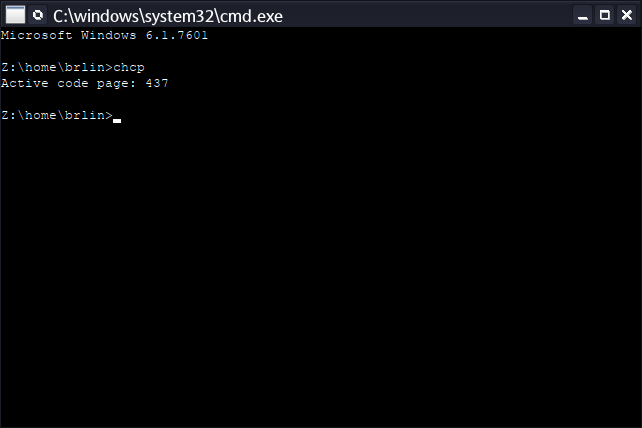
Active code page: 950
# The chcp command doesn't seem to be producing output for some reason,
# so I launch the command shell and run the command manually instead
# (the following screenshot)
$ STEAM_LIBRARY_DIR=/media/brlin/Ubuntu/SteamLibrary ./workaround-and-run-word-game-via-steam-play.sh steam.exe cmd
Info: Checking runtime environment...
Info: Using Proton distribution located at "/media/brlin/Ubuntu/SteamLibrary/steamapps/common/Proton - Experimental".
Info: Applying real desktop workarounds...
Info: Running game with workarounded configuration...
esync: up and running.
wine: RLIMIT_NICE is <= 20, unable to use setpriority safely
005c:fixme:font:get_name_record_codepage encoding 29 not handled, platform 1.
    ...duplicate lines stripped
007c:fixme:font:get_name_record_codepage encoding 29 not handled, platform 1.
    ...duplicate lines stripped
002c:fixme:font:get_name_record_codepage encoding 29 not handled, platform 1.
    ...duplicate lines stripped
0024:fixme:font:get_name_record_codepage encoding 29 not handled, platform 1.
    ...duplicate lines stripped
00b8:fixme:font:get_name_record_codepage encoding 29 not handled, platform 1.
    ...duplicate lines stripped
0024:fixme:font:get_name_record_codepage encoding 20 not handled, platform 1.
    ...duplicate lines stripped
00b8:fixme:font:get_name_record_codepage encoding 20 not handled, platform 1.
    ...duplicate lines stripped
Setting breakpad minidump AppID = 1109570
Steam_SetMinidumpSteamID:  Caching Steam ID:  76561198263951753 [API loaded no]
00c4:fixme:font:get_name_record_codepage encoding 29 not handled, platform 1.
    ...duplicate lines stripped
00c8:err:steam:initialize_vr_data Could not load libopenvr_api.so.
00c4:fixme:font:get_name_record_codepage encoding 20 not handled, platform 1.
    ...duplicate lines stripped
MESA-INTEL: warning: Performance support disabled, consider sysctl dev.i915.perf_stream_paranoid=0

00d0:fixme:font:get_name_record_codepage encoding 20 not handled, platform 1.
    ...duplicate lines stripped
00dc:fixme:font:get_name_record_codepage encoding 20 not handled, platform 1.
    ...duplicate lines stripped
00e4:fixme:font:get_name_record_codepage encoding 20 not handled, platform 1.
    ...duplicate lines stripped
MESA-INTEL: warning: Performance support disabled, consider sysctl dev.i915.perf_stream_paranoid=0

0120:fixme:font:get_name_record_codepage encoding 29 not handled, platform 1.
    ...duplicate lines stripped
00c4:fixme:imm:ImeSetActiveContext (0x1d03d0, 0): stub
00c4:fixme:imm:ImmReleaseContext (0000000000010020, 00000000001D03D0): stub
00dc:fixme:imm:ImeSetActiveContext (0x1f03d0, 1): stub
00dc:fixme:imm:ImmReleaseContext (0000000000010062, 00000000001F03D0): stub
0124:fixme:oleacc:find_class_data unhandled window class: L"[#32769](/issue/ValveSoftware/Proton/32769)"
The following error will be emitted when I add steam.exe back to the command chain and launch the game, which I believe is due to the fact that Wine is run under a incompatible locale:
wine: could not open working directory L"Z:\\media\\brlin\\Ubuntu\\SteamLibrary\\steamapps\\common\\\6587\5b57\904a\6232\\", starting in the Windows directory.
012c:err:module:process_init L"Z:\\media\\brlin\\Ubuntu\\SteamLibrary\\steamapps\\common\\\6587\5b57\904a\6232\\\6587\5b57\904a\6232.exe" not found
0024:err:steam:run_process Failed to create process L"\"Z:\\media\\brlin\\Ubuntu\\SteamLibrary\\steamapps\\common\\\6587\5b57\904a\6232\\\6587\5b57\904a\6232.exe\"": 126
Full output: output.txt
I've implemented a utility that workaround Proton to run the game title without crashes.
I have verified that using this utility one can pretty much complete all of the game content(even the achievements).
A known issue is that the Steam overlay can't be shown, which is expected due to the removal of steam components.
Proton versions
proton experimentalx2 2022-02proton 6.3-8x1 2022-02
Launch options
PROTON_DUMP_DEBUG_COMMANDSx1 2022-02
DLLs
steam_api64.dllx1 2022-02
Compatibility Report
System Information
I confirm:
Symptoms
The game crashes at the title screen, right when the yellow slash appears as the following screenshot depicts:
It is noticeable that the background music is loaded and playing properly.
The Proton log(steam-1109570.zip) presents a
Unhandled exception: page fault on write access to 0x7f0bd36c in 64-bit code (0x00007f597cf5e8c8).error.Reproduction