Quake: Online Multiplayer doesn't work
Works if you set wine prefix version to Windows 7
With proton? Will test and report back..Thank you
OK, tested with setting win7. No dice. Still the same problem. Looks like sort of playfab issue.
No longer starts on Proton Experimental
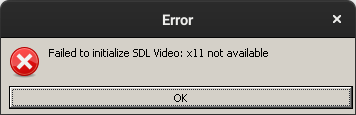
Fixed by adding SDL_VIDEODRIVER=windows %command%
Ok, not the best solution as on wayland session cursor is not kept into game instance and tends to move away from game window.
I found the cause. I had SDL_VIDEODRIVER=x11 in ~/.config/environment.d/ which caused SDL2.dll not finding the sdl video driver.
Online not working is still a problem, especially since this is the only way to play the game in multiplayer privately without forwarded ports or VPN services like Hamachi. Nevermind I was tripping, the remaster works flawlessly, matchmaking just sucks. If it weren't for glquake not functioning, I'd say it should be verified.
Having a different issue with the Quake remaster but, in the spirit of "one game one report" I'm going to post it here:
When I try to launch the Quake remaster on my laptop, with the game running Vulkan natively, I get TERRIBLE performance out of the gate - 1-3 FPS and then a complete executable lockup.
Any assistance would be appreciated.
Hello @SteveHeist, looking at your system information, it looks like mesa/lavapipe is getting set as the first Vulkan device (https://gist.github.com/SteveHeist/ac5a23f05f7f0413bc5445e5c943683f#file-systeminfo_extended-txt-L167-L172 and https://gist.github.com/SteveHeist/ac5a23f05f7f0413bc5445e5c943683f#file-systeminfo_extended-txt-L332-L346), so the game is rendering on your CPU.
I suspect this is misbehavior from DRI_PRIME=pci-0000_84_00_0 getting set in the environment. If you haven't done this yourself, then there's a chance that it's from PrefersNonDefaultGPU=true getting sub-optimally handled by your desktop environment in a similar way to https://github.com/ValveSoftware/steam-for-linux/issues/8179. As a test, you could completely close Steam, then run steam from a terminal and see if that has an effect on the extended diagnostics in Steam's system information and the game.
The test you described fixes the issue with mismatched vulkan order, but even running Quake from the console-ran steam doesn't seem to fix the issue with the system trying to render it in software. However, manually forcing DRI_PRIME=1 into the launch options for the game does. So I dunno.
Latest Proton Experimental update breaks online multiplayer with same (or similar) issue as OP. There is also an additional message telling me to check that my system time is correct, however I believe this is just the same message as OP, but a version from the latest game update. Was able to fix by downgrading to Proton 8.0-2 so can confirm is not due to any changes I have made.
@Individualised This should be fixed with the latest experimental release. Please let me know if the Proton 8.0-2 behavior is not restored :)
@alasky17 Appears to work, thank you for the quick response
Latest Proton Experimental update breaks online multiplayer with same (or similar) issue as OP. There is also an additional message telling me to check that my system time is correct, however I believe this is just the same message as OP, but a version from the latest game update. Was able to fix by downgrading to Proton 8.0-2 so can confirm is not due to any changes I have made.
Not really. Tried Experimental Bleeding Edge, Proton 8 and Proton 9, as well as Proton GE 9.3. Looks like MS FAB library gets triggered and dies. Just tried today, results exactly the same no matter which Proton I use.
Tried today with Proton Experimental and ProtonGE 9.11. Still the same. With the update, it tells me that I should check my time settings. Which I did on multiple occassions, and it is set properly. I am quite sorry I paid for the game to be honest. I own original version, so running it using Irowall is much better - but there are no players in it, so I'd like to make the steam remaster work.
Any other tips to try? I've since upgraded my OS to Kubuntu 24.04, and NVIDIA drivers to version 555. All other games work fine on my setup (even notorious Fallout 4). Just this old classic doesn't. I can play single-player just fine with no issues, but Multiplayer is unusable.
Works for me across several systems for years, including multiplayer. Win version setting no longer required. You might need to figure out with your distro. Probably something to do with kernel (if it not updated for years), glibc, hardware or time itself.
Some readings: https://wiki.archlinux.org/title/System_time
Works for me across several systems for years, including multiplayer. Win version setting no longer required. You might need to figure out with your distro. Probably something to do with kernel (if it not updated for years), glibc, hardware or time itself.
Some readings: https://wiki.archlinux.org/title/System_time
Probably not my case ;-) My kernel version is 6.8.0-39, running Kubuntu 24.04 (latest), and as for Proton, I tried both Experimental and Stable, as well as ProtonGE 8.10, 9.10 and 9.11, all with the same results (and I wiped the cache in between trying).
As for time, I synced directly with google. I sync with my router, which itself is synced to Google and local CZ time sources (tik.cesnet.cz, tak.cesnet.cz):
root@Mainframe:~# timedatectl status
Local time: Út 2024-07-30 11:43:43 CEST
Universal time: Út 2024-07-30 09:43:43 UTC
RTC time: Út 2024-07-30 09:43:44
Time zone: Europe/Prague (CEST, +0200)
System clock synchronized: yes
NTP service: active
RTC in local TZ: no
root@Mainframe:~# timedatectl timesync-status
Server: 10.43.16.1 (10.43.16.1)
Poll interval: 34min 8s (min: 32s; max 34min 8s)
Leap: normal
Version: 4
Stratum: 2
Reference: C37190C9
Precision: 4us (-18)
Root distance: 33.789ms (max: 5s)
Offset: +14.120ms
Delay: 179us
Jitter: 31.345ms
Packet count: 56
Frequency: +14,467ppm
root@Mainframe:~#
I do not believe it is related to timesync. It looks like playfab, MS cloud sync library, has some issues. Why - I do not know. But so far, it looks like noone ever investigated properly the cause.
I got the game from Gog.com, I also cannot play online. It says there is no internet connection when trying to connect to a match.
Problem with the remaster? Problem with Wine?
Still broken, I presume, with no fix? Due to the time server complaint?
Proton versions
proton experimentalx4 2024-07proton 8.0-2x3 2024-04
Launch options
SDL_VIDEODRIVER=x11`x1 2022-08SDL_VIDEODRIVER=windowsx1 2022-08DXVK_ASYNC=1x1 2022-02PROTON_ENABLE_NVAPI=1x1 2022-02PROTON_LOG=1x1 2022-02PROTON_NO_ESYNC=1x1 2022-02PROTON_NO_GLSL=1x1 2022-02__GL_SHADER_DISK_CACHE=1x1 2022-02__GL_THREADED_OPTIMIZATION=1x1 2022-02
Launch lines
SDL_VIDEODRIVER=windows %command%x1 2022-08__GL_SHADER_DISK_CACHE=1 __GL_THREADED_OPTIMIZATION=1 PROTON_NO_GLSL=1 PROTON_ENABLE_NVAPI=1 VSYNC=0 PROTON_NO_ESYNC=1 DXVK_ASYNC=1 PROTON_LOG=1 VK_ICD_FILENAMES=/usr/share/vulkan/icd.d/nvidia_icd.jsox1 2022-02
Upstream links
DLLs
sdl2.dllx1 2022-08
Compatibility Report
System Information
GPU: NVIDIA GeForce GTX1650
Driver/LLVM version: nvidia 510.54
Kernel version: 5.15.0-18-generic
Links to full system information reports:
https://pastebin.com/5bBkLKCq
https://gist.github.com/virnik0/7e2ed791752e9437f8fae12ed90baf8c
https://gist.github.com/virnik0/237df0bed83bab3d387eeae472af6da5
mainframe.pdf
Proton version: 6.3-8, 7.0-1, Experimental
I confirm:
Launch Options used:
__GL_SHADER_DISK_CACHE=1 __GL_THREADED_OPTIMIZATION=1 PROTON_NO_GLSL=1 PROTON_ENABLE_NVAPI=1 VSYNC=0 PROTON_NO_ESYNC=1 DXVK_ASYNC=1 PROTON_LOG=1 VK_ICD_FILENAMES=/usr/share/vulkan/icd.d/nvidia_icd.json gamemoderun %command% -skipmoviessteam-2310.log
Symptoms
Multiplayer Online doesn't work. The game fails to show response time to listed lobbies.
If I try to connect to any multiplayer lobby, I am being told that the lobby doesn't exist.
I can't create new multiplayer (online) lobby. Searching for a match never finds anything.
Reproduction
a) Run the game


b) Enter Multiplayer-> Online, try to either create a new game or join existing available games.
I have tried setting Win version to Win7:
protontricks 2310 win7I have tried to wipe Proton runtime directory and restart steam/game:
rm -rf /home/virnik/.local/share/Steam/steamapps/compatdata/2310I also wiped runtime directory before switching Proton runtime version.
I made sure that my RTC is set as close to time source as possible
But I also tried syncing directly with CZ/Google time source, but the difference was really mediocre and wouldn't have any real impact:
My local time source status:
10.43.16.1 is my local router, which itself sync with local CZ ATOM clock source and Google NTP.
Quake logs:
kexBNet.log
kexPlayfab.log
The game is otherwise stable, tried available mods, all runs. Localnet multiplayer with bots seems to work, no crashes (three matches on normal difficulty, 10min each).