Yu-Gi-Oh! Master Duel
Hello @Retchut, can you test if removing the amdvlk and lib32-amdvlk system packages influences how the game behaves?
That seemed to do the trick. Why did it fix it, however?
I can't launch the game. PROTON_USE_WINED3D=1 didn't fix it either. The game only starts when I use Proton v4.11-13 (with the PROTON_USE_WINED3D=1 flag), but it shows this error
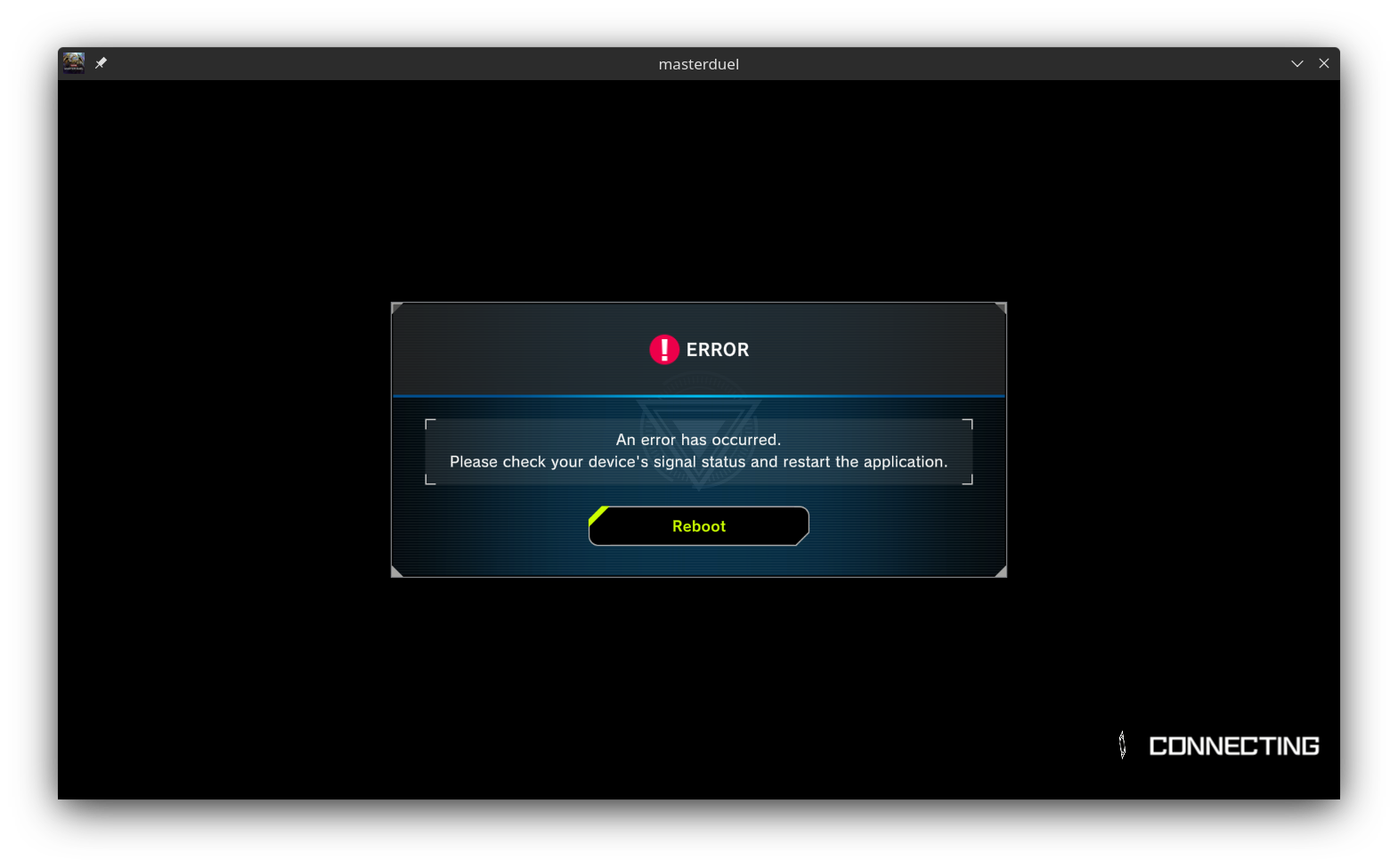
I press Reboot, but the error is the same.
My machine uses the optimus technology to switch between the two gpus, and the game runs on this same machine when it has windows on it
/bin/sh\0-c\0PROTON_USE_WINED3D=1 optirun /home/<user>/.local/share/Steam/ubuntu12_32/reaper SteamLaunch AppId=1449850 -- '/home/<user>/HDD/Games/SteamLibrary/steamapps/common/SteamLinuxRuntime_soldier'/_v2-entry-point --verb=waitforexitandrun -- '/home/<user>/HDD/Games/SteamLibrary/steamapps/common/Proton - Experimental'/proton waitforexitandrun  '/home/<user>/HDD/Games/SteamLibrary/steamapps/common/Yu-Gi-Oh!  Master Duel/masterduel.exe'\0
Game process added : AppID 1449850 "PROTON_USE_WINED3D=1 optirun /home/<user>/.local/share/Steam/ubuntu12_32/reaper SteamLaunch AppId=1449850 -- '/home/<user>/HDD/Games/SteamLibrary/steamapps/common/SteamLinuxRuntime_soldier'/_v2-entry-point --verb=waitforexitandrun -- '/home/<user>/HDD/Games/SteamLibrary/steamapps/common/Proton - Experimental'/proton waitforexitandrun  '/home/<user>/HDD/Games/SteamLibrary/steamapps/common/Yu-Gi-Oh!  Master Duel/masterduel.exe'", ProcID 15744, IP 0.0.0.0:0
chdir /home/<user>/HDD/Games/SteamLibrary/steamapps/common/Yu-Gi-Oh!  Master Duel
ERROR: ld.so: object '/home/<user>/.local/share/Steam/ubuntu12_32/gameoverlayrenderer.so' from LD_PRELOAD cannot be preloaded (wrong ELF class: ELFCLASS32): ignored.
GameAction [AppID 1449850, ActionID 1] : LaunchApp changed task to WaitingGameWindow with ""
ERROR: ld.so: object '/home/<user>/.local/share/Steam/ubuntu12_32/gameoverlayrenderer.so' from LD_PRELOAD cannot be preloaded (wrong ELF class: ELFCLASS32): ignored.
GameAction [AppID 1449850, ActionID 1] : LaunchApp changed task to Completed with ""
ERROR: ld.so: object '/home/<user>/.local/share/Steam/ubuntu12_64/gameoverlayrenderer.so' from LD_PRELOAD cannot be preloaded (wrong ELF class: ELFCLASS64): ignored.
ERROR: ld.so: object '/home/<user>/.local/share/Steam/ubuntu12_32/gameoverlayrenderer.so' from LD_PRELOAD cannot be preloaded (wrong ELF class: ELFCLASS32): ignored.
ERROR: ld.so: object '/home/<user>/.local/share/Steam/ubuntu12_32/gameoverlayrenderer.so' from LD_PRELOAD cannot be preloaded (wrong ELF class: ELFCLASS32): ignored.
ERROR: ld.so: object '/home/<user>/.local/share/Steam/ubuntu12_32/gameoverlayrenderer.so' from LD_PRELOAD cannot be preloaded (wrong ELF class: ELFCLASS32): ignored.
pid 15794 != 15791, skipping destruction (fork without exec?)
Installing breakpad exception handler for appid(steam)/version(1647446817)
primus: fatal: failed to load any of the libraries: /usr/lib/nvidia/libGL.so.1:/usr/lib32/nvidia/libGL.so.1:/usr/lib/libGL.so.1:/usr/lib32/libGL.so.1
/usr/lib/nvidia/libGL.so.1: cannot open shared object file: No such file or directory
/usr/lib32/nvidia/libGL.so.1: cannot open shared object file: No such file or directory
/usr/lib/libGL.so.1: cannot open shared object file: No such file or directory
/usr/lib32/libGL.so.1: cannot open shared object file: No such file or directory
Installing breakpad exception handler for appid(steam)/version(1647446817)
Game process removed: AppID 1449850 "PROTON_USE_WINED3D=1 optirun /home/<user>/.local/share/Steam/ubuntu12_32/reaper SteamLaunch AppId=1449850 -- '/home/<user>/HDD/Games/SteamLibrary/steamapps/common/SteamLinuxRuntime_soldier'/_v2-entry-point --verb=waitforexitandrun -- '/home/<user>/HDD/Games/SteamLibrary/steamapps/common/Proton - Experimental'/proton waitforexitandrun  '/home/<user>/HDD/Games/SteamLibrary/steamapps/common/Yu-Gi-Oh!  Master Duel/masterduel.exe'", ProcID 15744
❯ ls /usr/lib32/libGL*
/usr/lib32/libGLdispatch.so                /usr/lib32/libGLESv2.so.2        /usr/lib32/libGLX_mesa.so.0
/usr/lib32/libGLdispatch.so.0              /usr/lib32/libGLESv2.so.2.1.0    /usr/lib32/libGLX_mesa.so.0.0.0
/usr/lib32/libGLdispatch.so.0.0.0          /usr/lib32/libGL.so              /usr/lib32/libGLX_nvidia.so
/usr/lib32/libGLESv1_CM_nvidia.so          /usr/lib32/libGL.so.1            /usr/lib32/libGLX_nvidia.so.0
/usr/lib32/libGLESv1_CM_nvidia.so.1        /usr/lib32/libGL.so.1.7.0        /usr/lib32/libGLX_nvidia.so.390.147
/usr/lib32/libGLESv1_CM_nvidia.so.390.147  /usr/lib32/libGLU.so             /usr/lib32/libGLX.so
/usr/lib32/libGLESv2_nvidia.so             /usr/lib32/libGLU.so.1           /usr/lib32/libGLX.so.0
/usr/lib32/libGLESv2_nvidia.so.2           /usr/lib32/libGLU.so.1.3.1       /usr/lib32/libGLX.so.0.0.0
/usr/lib32/libGLESv2_nvidia.so.390.147     /usr/lib32/libGLX_indirect.so.0
/usr/lib32/libGLESv2.so                    /usr/lib32/libGLX_mesa.so
❯ ls /usr/lib/libGL*
/usr/lib/libGLdispatch.so                /usr/lib/libGLESv2.so.2        /usr/lib/libGLX_mesa.so.0
/usr/lib/libGLdispatch.so.0              /usr/lib/libGLESv2.so.2.1.0    /usr/lib/libGLX_mesa.so.0.0.0
/usr/lib/libGLdispatch.so.0.0.0          /usr/lib/libGL.so              /usr/lib/libGLX_nvidia.so
/usr/lib/libGLESv1_CM_nvidia.so          /usr/lib/libGL.so.1            /usr/lib/libGLX_nvidia.so.0
/usr/lib/libGLESv1_CM_nvidia.so.1        /usr/lib/libGL.so.1.7.0        /usr/lib/libGLX_nvidia.so.390.147
/usr/lib/libGLESv1_CM_nvidia.so.390.147  /usr/lib/libGLU.so             /usr/lib/libGLX.so
/usr/lib/libGLESv2_nvidia.so             /usr/lib/libGLU.so.1           /usr/lib/libGLX.so.0
/usr/lib/libGLESv2_nvidia.so.2           /usr/lib/libGLU.so.1.3.1       /usr/lib/libGLX.so.0.0.0
/usr/lib/libGLESv2_nvidia.so.390.147     /usr/lib/libGLX_indirect.so.0
/usr/lib/libGLESv2.so                    /usr/lib/libGLX_mesa.so
❯ optirun glxinfo | grep "renderer"
OpenGL renderer string: NVS 5200M/PCIe/SSE2
Hello @pro-anon, your NVIDIA Quadro NVS 5200M is part of the Fermi generation. This video card generation does not support Vulkan and the NVIDIA 390 series video driver is older than the support cutoff for Proton. Your system is unsupportable by Proton.
@kisak-valve
Is there a way to play steam games without Proton that also supports legacy hardware tho?
For some reason, the game stopped to work for me sometime last week after having worked out of the box since it launched.
The moment I launch the game, I get the error message "There was no response from the game server" without any delay at all. Pressing "Retry" doesn't even seem to attempt to establish any connection, instead just bringing up the same error message immediately again. Pressing "Reboot" takes a moment longer to do the same.
On my Android device, I can play the game just fine from the same network. I even tried to disable all network devices on my Linux machine (Mint 19.3, by the way) except for a WiFi dongle to connect to the same WiFi as my Android, but got the same error behavior as described above.
Fully reinstalling the game, including deletion of the game's Proton prefix and the game's folder in steamapps/common, didn't help either. I tried such a clean installation with Proton versions 5.13-6, 6.3-8, 7.0-2, Experimental, and even the Glorious Eggroll version GE-Proton7-17, and all of them behaved the same way.
I tried to observe the game's network traffic using tcpdump, and while I can't exclude for certain that I might simply have overlooked packages sent by the game, the game doesn't seem to produce any traffic at all on the LAN bridge that handles outgoing and incoming packages on my machine. The game definitely didn't produce any TCP traffic on the ports 27015 and 27036, and no UDP traffic on the ports 27015 and 27031 to 27036, which the game uses according to portforward.com; I checked those specifically after I didn't find any communication that I could connect to Master Duel in the unfiltered tcpdump.
It's almost like the game can't make use of my internet connection. A friend of mine, on whose Linux machine the game runs flawlessly using Proton Experimental, disabled his network devices and started the game to see how the game behaved then, and it behaves exactly like on my machine. Remembering that the game Remnant: From the Ashes fails to connect to multiplayer sessions when virtual network adapters are active, he also tried running the game with the bridge from Docker active, but it worked without any problems, so that's probably not it.
No idea whether it's relevant at all, but it stopped working on my computer when my internet provider seemed to have had trouble connecting to the game. On my phone, I had to switch to mobile data to successfully connect, otherwise it would behave the same way it does on my computer since then. However, by now, it works again on my phone. Anyone got any ideas?
EDIT: I should mention, this is the only application on my computer that has any trouble connecting to the internet, so unless it's something ridiculously specific, it's not due to faulty configuration of network devices or the like. Also, while trying to fix this, I masked ufw and apparmor to check if those are getting in the way somehow, but still no dice.
Proton versions
ge-proton7-17x1 2022-05proton experimentalx1 2022-05proton 7.0-1x1 2022-03
Launch options
PROTON_USE_WINED3D=1x1 2022-05PROTON_USE_WINED3D=1`x2 2022-05
Compatibility Report
System Information
I confirm:
Proton log:
steam-1449850.log
Symptoms
When running the game with any version of Proton I've tested (above 5.0), I am presented with the following error message:
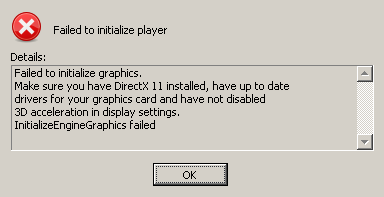
By setting
PROTON_USE_WINED3D=1inside the game's launch options, it is playable, albeit with abhorrent performance. Additionally, after 20 or so minutes, the game crashes.Reproduction
Install the game and run it using proton.