Jan Zeleny's Mashinky
@kubapet Does it work if you try to use experimental bleeding edge? I'm wondering if it's related to this upstream issue which just got fixed.
@kubapet Does it work if you try to use experimental bleeding edge? I'm wondering if it's related to this upstream issue which just got fixed.
Sorry, how do I test the bleeding edge version? It is not in the dropdown, do I have to install it manually somehow?
@kubapet If you in your steam library search for proton and then right click on experimental -> properties -> under the beta tab select bleeding edge. This should update proton experimental with all the latest upstream changes (more unstable/untested so i advise not using it in general) and then you can try launching the game again.
After you are done you can just go back in and set bleeding edge back to None.
Ah, thanks, I wasn't aware of that possibility.. But it is the same on Bleeding edge.. But it used to work on Experimental few weeks ago..
But it is apparently something related specifically to DX9, as in the linked issue. Since this game is DX9 only and the symptoms are similar
@kubapet Roger.
If you're willing and able then you can make a issue in the dxvk repo. They should hopefully be able to fix it. Especially since it's a recent regression.
@Blisto91 thanks, I've reported that, https://github.com/doitsujin/dxvk/issues/2541,
btw they want me to generate some apitrace by downloading and replacing some dx-* dll libraries which I found to be cumbersome, wouldn't it be possible to automate it somehow? so that it is one command in proton distribution, e.g. running the application with some env flags or something? or even better adding it as an option to the Steam UI?
@kubapet There isn't a built in option, at least not for dxvk.
Ideally if you are able then it might me easiest and preferable to generate a apitrace on windows.
Secondly in linux without dxvk (through regular wine). But i don't have any real experience with that.
The third option is to do it through a regular steam proton launch, but i'm not sure if it's as useful.
For the first and last option you download the apitrace files and extract the lib/wrappers/ dxgi.dll, dxgitrace.dll, d3d9.dll in the same folder as the games .exe file. Then launch the game (it might be very slow and poor performance) and then as quickly as possible get to the point with the issue and then shut down the game (alt f4 or something). It should then generate a .trace file on your desktop (on windows. through proton it would be in the games compatdata desktop folder).
The file might be very big and have to be uploaded to a cloud service and then linked.
Edit: oh i see you managed to make one :+1:
@Blisto91 Thanks for reply, yes, :)
..I see that there is no built-in option, but it would be nice if there was, since dxvk is indivisible part of Proton, so it would make sense to allow players who has no experience with development to just report the bugs with automatically dumping the traces.. Like that the apitrace binaries would be optional part of the proton bundle (or it would be possible to download them optionally) .. But I m not sure, maybe there is some licensing issue etc.. Just sayin that it would make it much easier to report issues :)
@kubapet i understand your point and agree it would make it easier and might make bug hunting and fixing faster.
You can make a new proton issue with the request feature template and suggest it 😁. Tho not sure if it should be a dxvk orvkd3d-proton issue instead hmm.
I see a dxvk dev made a pr regarding the issue pretty fast. Gj providing quick feedback 👍
@kubapet i understand your point and agree it would make it easier and might make bug hunting and fixing faster. You can make a new proton issue with the request feature template and suggest it grin. Tho not sure if it should be a
dxvkorvkd3d-protonissue instead hmm.
I think Proton issue would make sense, because it should wrap the the debugging / tracing possibility for either DX9,11 or 12.. I ll think about it and I will try to formulate it somehow.
I see a dxvk dev made a pr regarding the issue pretty fast. Gj providing quick feedback +1
Thanks again for your support, I saw that the merge bot has already updated the dxvk submodule, so I updated the bleeding edge proton in my lib and retried and the bug is fixed :)
Proton versions
proton experimentalx2 2022-03proton 7.0-1x1 2022-03
Upstream links
- doitsujin/dxvk/issues/2541x1 2022-03
- doitsujin/dxvk/issues/2535x2 2022-03
DLLs
d3d9.dllx1 2022-03dxgi.dllx1 2022-03dxgitrace.dllx1 2022-03
Compatibility Report
System Information
I confirm:
Symptoms
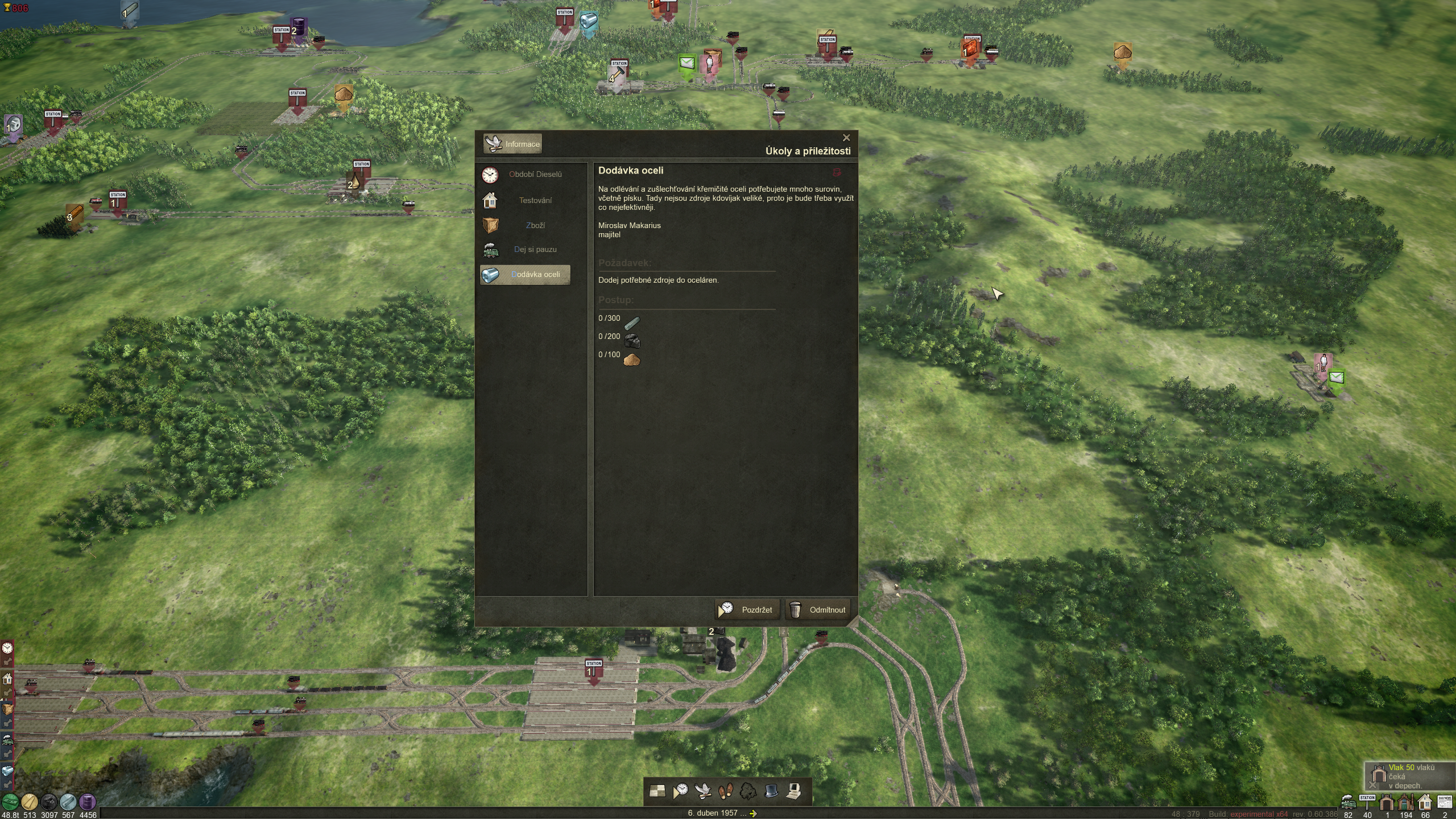
The game UI (windows + menus) are missing the bacground texture and texts. It works fine with Proton 7.0-1 and 6.3-8, it is just the Experimental branch where it started to cause problems. See attached screenshot
Reproduction
Just install the game, force the use of Proton Experimental and start the game

steam-598960.log