Ye i see it when run through proton and using RadeonSI OpenGL. Didn't find that any RadeonSI mesa variables changed it.
As a workaround it seems to not happen when i force it to run OpenGL through zink (OpenGL through Vulkan driver)
__GLX_VENDOR_LIBRARY_NAME=mesa MESA_LOADER_DRIVER_OVERRIDE=zink GALLIUM_DRIVER=zink %command%
Tho i have not played any of the game to see if it has any other issues. This is with mesa 22.0.2
Hey. I've got Linux runtime working on steam deck. If you go into settings (in the game, not steam settings) and go through its controller configurator, it'll detect the buttons just fine. To get that to work, just use steam input to map a button you won't use (I used one of the back ones) to the enter key. Use the stick and your mapped enter key to navigate the game menus until you reach controller configuration and from there it starts detecting everything just fine. Would be nice if these bugs could get fixed but thanks to your post about this I'm able to enjoy this game on deck so cheers 😊
Thank you so much, I also needed to map the "Esc" key to go back from controller settings and then save, you can do almost everything with the touch screen actually. Will play with Linux Runtime for the moment.
Right! I forgot about the escape key. Wrote that at work. The other quirky thing I noticed is that configuring controls in steam input only works if you map in game actions, instead of mapping buttons. For whatever reason, the steam input for this game has an in game actions menu that lists every controller button it uses as though it's an event, and that's the only mapping that works besides keyboard. So any external controllers need to be mapped to in game actions "A" "B" "Up" "Down" etc instead of "A button" etc. I've never seen that anywhere else. It's already done by default for the Deck controls and I'd have never noticed it if I didn't look and fiddle with it.
Hey just tried Proton experimental today and it looked good to me. Have you tried since the last update?
Hey just tried Proton experimental today and it looked good to me. Have you tried since the last update?
Didn't saw your post, sorry.
The game is actually running great with Proton 7.0-4 so this issue should be marked as fixed.
@kisak-valve please do it and thank you for your hard work ;)
Edit: Didn't saw that i could actually close the issue by myself!
proton experimentalx2 2022-10proton 7.0-4x1 2022-10MESA_LOADER_DRIVER_OVERRIDE=zinkx1 2022-05PROTON_LOG=1](https://gist.github.com/KibaGasteiz/edd6b76a69937be955b0acd71c0dc3cd)x1 2022-05
Compatibility Report
System Information
I confirm:
PROTON_LOG=1
Symptoms
Sprites always rendered at the top, so you can see characters in front of 3d stuff.

Proton:
Linux port:
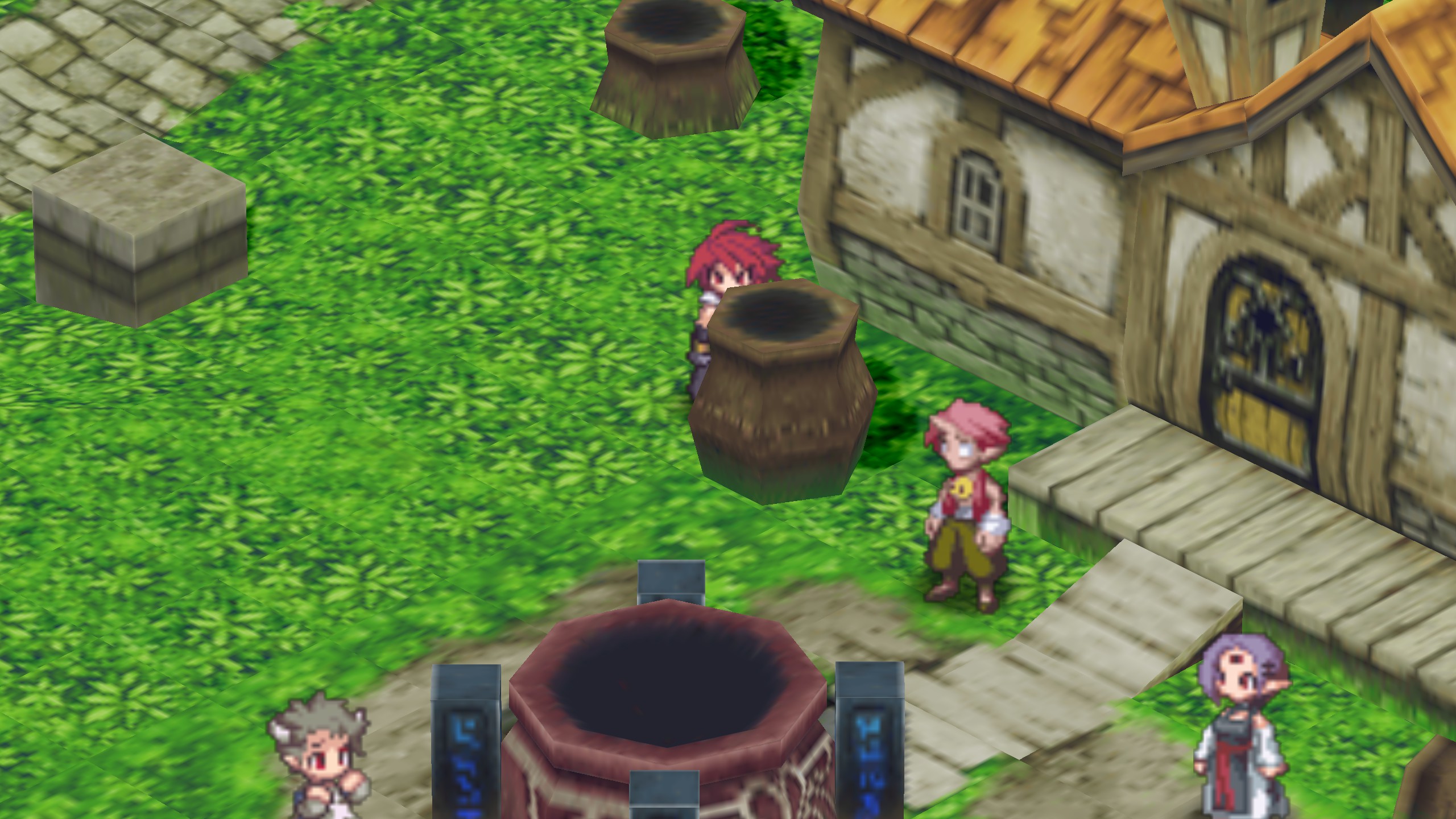
This issue with Proton also affects the Steam Deck, but for some reason using the Linux Port on Deck will have controller mapping issues. This issues with controller are present on my PC when using the Proton version.
So on my PC i can play the Linux port with no problem and works perfectly, using Proton i got this graphical issue and the controller one too.
On Steam Deck i have the graphical issue if using Proton and the controller issue if using the Linux Port.
Reproduction
Just launch, load your save and walk behind any 3d object.