protonscr

Darksiders Genesis - No higher than low textures for NVIDIA and AMD

protonclosed appid 710920
ValveSoftware/Proton#5951 · opened 2022-07-01 by Patola · updated 2022-07-01 · 3 comments · github · game page · search this game
1 matching comments, n / p to jump
PPatola 2022-07-01 github

Compatibility Report

  • Name of the game with compatibility issues: Darksiders Genesis
  • Steam AppID of the game: 710920

System Information

I confirm:

  • [X] that I haven't found an existing compatibility report for this game. -- I have found an existing compatibility report from 2019 with no activity for a long time and with completely different issues.
  • [X] that I have checked whether there are updates for my system available.

Symptoms

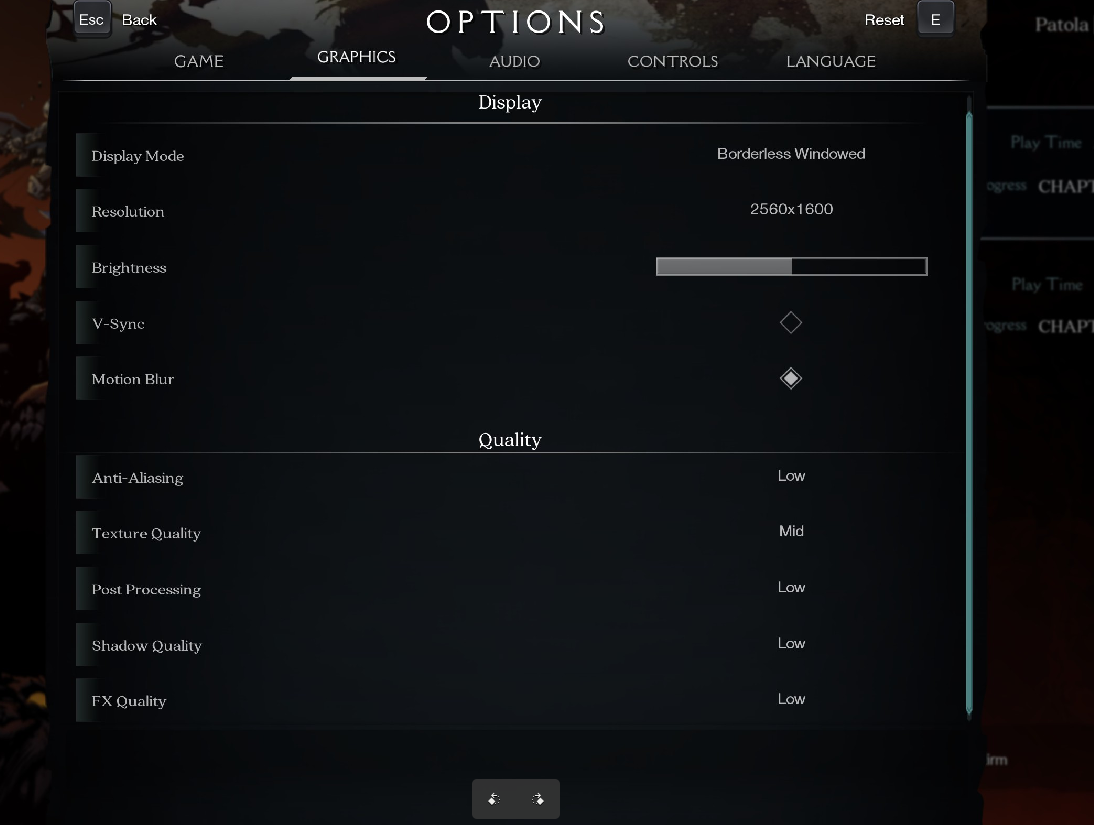
  • Darksiders Genesis will hang up at the loading screen when starting a new game or loading an existing savegame if the "Textures" options is "mid" or higher (see screenshot).

Reproduction

  • Load the game.
  • On graphics options, set the textures option to "mid" or higher (seen screenshot). The other graphics options do not make a difference. Also tried with all display modes (windowed, bordless windowed, fullscreen) and they don't make a difference. Different resolutions also do not make a difference. Tried on two systems.
  • The game will hang when starting a new game or load an existing game.
  • With the textures set to low, it will fully work.
  • For the record, the game works on my Steam Deck in 1280x800 even with all graphics options set to Ultra, but since it has low VRAM it might just be that the game ignores that and loads low-res textures.

The attached logfiles are for the desktop PC (system 1). Two proton logs, one when loading a savegame with textures set to low (steam-710920-low-textures.log) and the other one with the textures set to mid, trying to load the same savegame.

For the note, running htop via ssh on the system at the time. When I try to load the savegame, processor usage goes to 100% on all processors and shortly the machine stops responding. This happens with the laptop and desktop PCs. dmesg does not show any message when this happens.

steam-710920-mid-textures-hang.log
steam-710920-low-textures.log
screenshot

PPatola 2022-07-01 github

Might be of note that once I realised this was happening, I disabled the Steam overlay to prevent any interference from other factors. I am also using icewm on both systems, a window manager that does not have any compositor.
Also I tried changing motion blur and v-sync and they do not make any difference.
The two hosts continue having a "ping" reply when they hang, but any new attempt to ssh to them hangs up.

PPatola 2022-07-01 github

Tried with PROTON_NO_ESYNC=1 PROTON_NO_FSYNC=1, no change in behavior.

Kkisak-valve maintainer 2022-07-01 github

Hello @Patola, we're using one issue report per unofficially supported game title, so I've gone ahead and transferred this issue report to https://github.com/ValveSoftware/Proton/issues/3313#issuecomment-1172424296.

Proton versions

Launch options

Upstream links