Tom Clancy’s The Division® 2
The latest update claims to have "Fixed an issue that caused the game to be unable to boot on Steam Deck". Maybe you could retest this? See https://store.steampowered.com/news/app/2221490/view/3632750190483497136
Thanks, good to know. And yes the game started working.
But:
-
Enabling DX12 render cause the game crash. It doesn't matter which Proton was chosen the result are same.
a) steam-2221490-DX12-experimental-bleeding-edge-7.0-33594-20230118.log
b) steam-2221490-DX12-7.0-6-rc5.log


-
In DX11 not enough performance even on 7900XTX GPU (of course on this card I expect 60FPS in 4K with ultra settings)


Hello @NTMan, can you open an issue report with your findings on the VKD3D-Proton issue tracker (https://github.com/HansKristian-Work/vkd3d-proton) so that they can start pondering if there's something to improve there?
Is the DX11 performance any better with Bleeding Edge with latest DXVK? Maybe it has something to improve that 16ms queue sync. Otherwise might be worth to report it to DXVK as well.
Also @NTMan, I see in one of your d3d12 logs that you have RADV_DEBUG=hang enabled, I assume that you didn't have that set when testing DX11 performance? Otherwise this might explain the terrible performance because it also enables syncshaders.
Seems like d3d12 crashes right after printing
0434:warn:d3d12_query_heap_create: Invalid query heap type 5.
not sure if that's actually a problem though.
Hello @NTMan, can you open an issue report with your findings on the VKD3D-Proton issue tracker (https://github.com/HansKristian-Work/vkd3d-proton) so that they can start pondering if there's something to improve there?
Will it go like that? https://github.com/HansKristian-Work/vkd3d-proton/issues/1381#issue-1548216566
Also @NTMan, I see in one of your d3d12 logs that you have RADV_DEBUG=hang enabled, I assume that you didn't have that set when testing DX11 performance? Otherwise this might explain the terrible performance because it also enables
syncshaders.
Good catch. I forgot to remove this after collecting logs for a bug report of GPU hang when playing Callisto Protocol.
Without RADV_DEBUG=hang FPS is reached expected 60FPS. Unfortunately, despite the fact that the GPU has a margin of performance (judging by the % load in DXVK_HUD), FPS still regularly drops, see the red peaks on the DXVK_HUD chart.

But it's still much better than it was. So thank you very much.
What steps are required to make the game launch? For me, the game will just create a small window that immediately closes, over and over again, but it never actually launches properly. Fresh install of the game.
Maybe you hit DX12 render crash? Try remove game bottle and try to use stable proton for bottle creation.
I'm unable to reproduce the poor performance at least in the solo area thingy that the game throws you into early on:

What exactly is your DXVK build from anyway? Bleeding edge ships current DXVK master which is based on 2.0, and not 1.10.3, so I'm a bit confused why you're running the old version.
See above, poor performance was due to RADV_DEBUG=hang and DXVK 1.10.3 is from stable proton 7.
50 FPS and 60% GPU load is still rather poor.
Yeah, I guess. Maybe DXVK master does much better than 1.10.3 here.
D3D12 should work with https://github.com/HansKristian-Work/vkd3d-proton/pull/1382 (not counting uplay overlay issues, but we're working on those anyway).
50 FPS and 60% GPU load is still rather poor.
Even if switch to Proton bleeding edge (DXVK 2), turn off vsync and stand in one place, the graph frame time still registers a regular increase frame time which repeats at regular intervals. I have no idea why this is happening.

May sysprof capture helps? capture.zip
Gameplay demonstration with spikes of frame time https://youtu.be/NTiTWSyN5PU
I'm also unable to launch the game with DX12 Renderer.
D3D12 is already fixed upstream and might already work in bleeding-edge.
D3D12 is already fixed upstream and might already work in bleeding-edge.
Yeah, I can confirms that DX12 works, unfortunately it not solved the issue with regular increasing frame time as I demonstrated in this comment.
Yeah, no idea what that is but it's not related to graphics in any way. It also just does not happen on my system.
Replying to https://github.com/ValveSoftware/Proton/issues/6451#issuecomment-1396871337
How to run with VKD3D? not working here
Replying to https://github.com/ValveSoftware/Proton/issues/6451#issuecomment-1397492031
Use bleeding edge proton for this.

Replying to https://github.com/ValveSoftware/Proton/issues/6451#issuecomment-1397552550
thank you so much!!!!!!!
anyone here have a problem to ubisoft auto disconect for inactivity and close game?
anyone here have a problem to ubisoft auto disconect for inactivity and close game?
i keep getting disconnected in the dark zone area on dx12 also on dx12 and dx11 there seems to be some textures not loading on some mpc skins and some graphical glitches on some textures in the world only happening on dx12 it seems

game runs good on the steam deck except for the stuttering (freezing) if you move in different areas the game just stops for half a second, if this is fixed, it would be a very pleasant experience. i had no crash for playing 1,5 hours
game runs good on the steam deck except for the stuttering (freezing) if you move in different areas the game just stops for half a second, if this is fixed, it would be a very pleasant experience. i had no crash for playing 1,5 hours
If you use proton-ge-43 with DXVK_ASYNC=1 the stutters will go away on dx11
game runs good on the steam deck except for the stuttering (freezing) if you move in different areas the game just stops for half a second, if this is fixed, it would be a very pleasant experience. i had no crash for playing 1,5 hours
If you use proton-ge-43 with DXVK_ASYNC=1 the stutters will go away on dx11
thanks for the tip it's better but sadly not perfect, did you try it on the steam deck?
game runs good on the steam deck except for the stuttering (freezing) if you move in different areas the game just stops for half a second, if this is fixed, it would be a very pleasant experience. i had no crash for playing 1,5 hours
If you use proton-ge-43 with DXVK_ASYNC=1 the stutters will go away on dx11
dxvk async conflict with dxvk-cache, GE get out from proton-GE, to avoid I change from "RADV_PERFTEST=gpl" works perfect, no stuttering, but here in nobara is creating a file under var/spool/abrt/, that its suppose to be temporally but its getting 7/9gb from my root, if someone have any tips I'll appreciate.
Game freezes with experimental and causes discord to shut down. Sometimes the X server also restarts.
Game freezes with experimental and causes discord to shut down. Sometimes the X server also restarts.
With the last proton-GE and experimental BE works nice here, just some stutterings
Just now I am unable to start the game. "Ubisoft Connect has detected an unrecoverable error and must shutdown".
I'm using Proton Experimental bleeding-edge. Seems like other ubisoft games are affected too.
Just now I am unable to start the game. "Ubisoft Connect has detected an unrecoverable error and must shutdown". I'm using Proton Experimental bleeding-edge. Seems like other ubisoft games are affected too.
Same thing after ubi connect launcher update.

i keep getting disconnected in the dark zone area on dx12 also on dx12 and dx11 there seems to be some textures not loading on some mpc skins and some graphical glitches on some textures in the world only happening on dx12 it seems
Not loaded weapon textures also appears on windows(whatever api used):

captured right now on windows, so it have nothing to proton
Oh damn, it's not that big of a issue I would say since your mostly out exploring but hopefully it gets fixed lol
anyone elso geting freezing system with X11?
I had some gpu hangs when using dx12, but that seems to have been fixed with newer vkd3d versions which already landed in proton exp bleeding edge. Which proton version do you use ?
I had some gpu hangs when using dx12, but that seems to have been fixed with newer vkd3d versions which already landed in proton exp bleeding edge. Which proton version do you use ?
GPU hang its normal, I'm using experimental bleeding edge, in wayland sometimes ceash, but X11 always after a few minutes playing.
No hangs with proton exp bleeding edge, works like a charm here. 6900xt
with a recent mesa git build.
tuxtergames @.***> schrieb am Mi., 8. Feb. 2023, 19:29:
I had some gpu hangs when using dx12, but that seems to have been fixed
with newer vkd3d versions which already landed in proton exp bleeding edge.
Which proton version do you use ?GPU hang its normal, I'm using experimental bleeding edge, in wayland
sometimes ceash, but X11 always after a few minutes playing.—
Reply to this email directly, view it on GitHub
https://github.com/ValveSoftware/Proton/issues/6451#issuecomment-1423062701,
or unsubscribe
https://github.com/notifications/unsubscribe-auth/AIPVS4ZURGWNOB6GRUKNHWLWWPQYFANCNFSM6AAAAAAT22X3XM
.
You are receiving this because you commented.Message ID:
@.***>
Hi,
I cannot seem to be able to launch the game from Steam with Proton. Regardless of Proton version.
After the game was downloaded, I click Play, then the prefix is created and the game prerequisites are installed. When Ubisoft Connect first starts, it patches itself and restarts and present a login dialog requesting email and password. After entering anything (both valid account details and some not valid things) in the dialog boxes, the login button does nothing and Ubisoft Connect cannot proceed.
Tried with Proton 7.0-6 and Experimental (with bleeding edge).
While troubleshooting I have found that clicking on the Settings text in Ubisoft Connect, then on restart Ubisoft Connect allows the login to proceed, but the game does not appear installed in my Ubisoft Connect library. I also cannot link my Steam account to my Ubisoft account (the option is not present on Ubisoft account page)
Seems there is something wrong with the Ubisoft uplay_steam_mode?
Distro: Debian 12 (bookworm/testing)
Kernel: 6.2.1-x64v3-xanmod1
Mesa: 22.3.6
Proton: 7.0-6 or Experimental (with bleeding edge)
Proton log:
steam-2221490.tar.gz
When watching videos in game (like the pre-recorded footage you pickup) and the skill videos there is alot of noise and the video is low quality. Also, some skill videos show white squares instead of a video. Anyone have a fix?
I am still experiencing DE crashes with the division 2. It is the only game that does that. Basically X just restarts and all my games crash.
@sangoku116 @mercifulboss at the minimum you should also edit your comments and include some useful info like:
Distro:
Kernel version:
Mesa version or NVIDIA driver version:
Proton version:
With amdgpu and Mesa, the DE crashes and GPU hangs are quite present if you check the Mesa git issues, depending on GPU used.
@sangoku116 @mercifulboss at the minimum you should also edit your comments and include some useful info like:
Distro: Kernel version: Mesa version or NVIDIA driver version: Proton version:
With amdgpu and Mesa, the DE crashes and GPU hangs are quite present if you check the Mesa git issues, depending on GPU used.
Arch Linux
LQX Kernel
XFCE
AMD Radeon 6900 XT
Mesa-Git
Any Proton version
Not an issue with any other game and has been an issue with division 2 ever since its steam release.
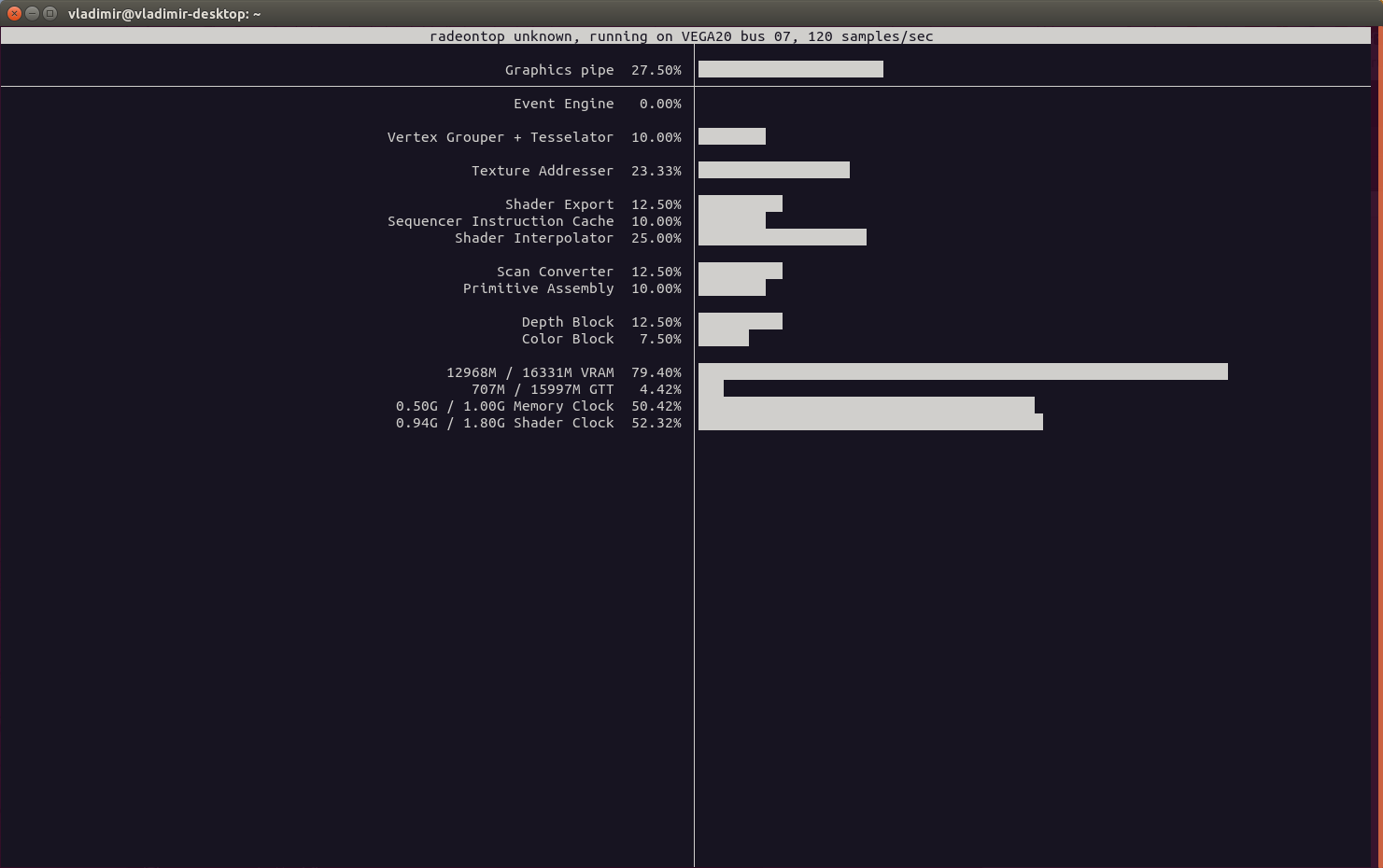
Is normal that DX12 renderer much more video memory hungry?
video memory consumption with DX11 render
video memory consumption with DX12 render

and in my system
DX11:

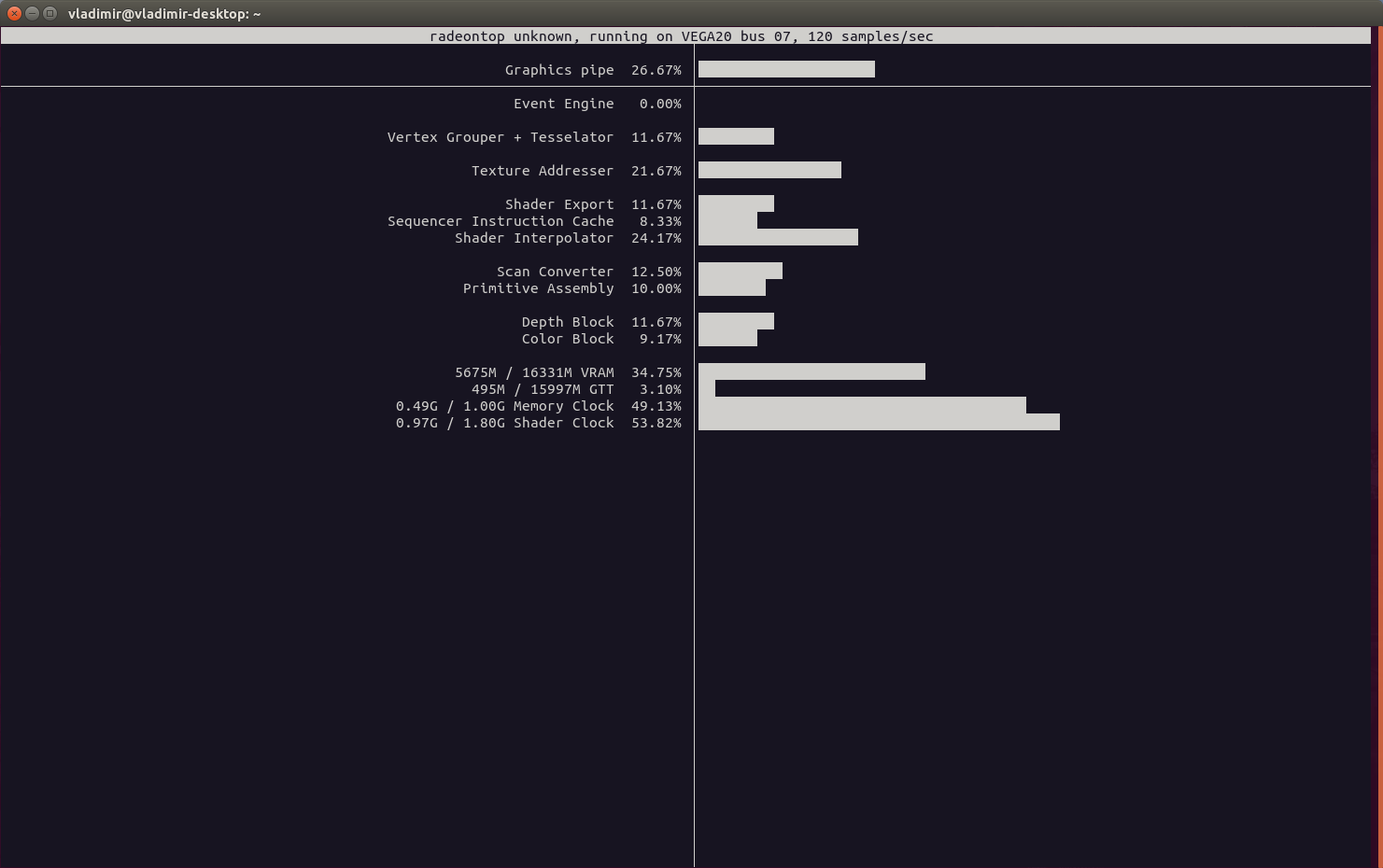
DX12:
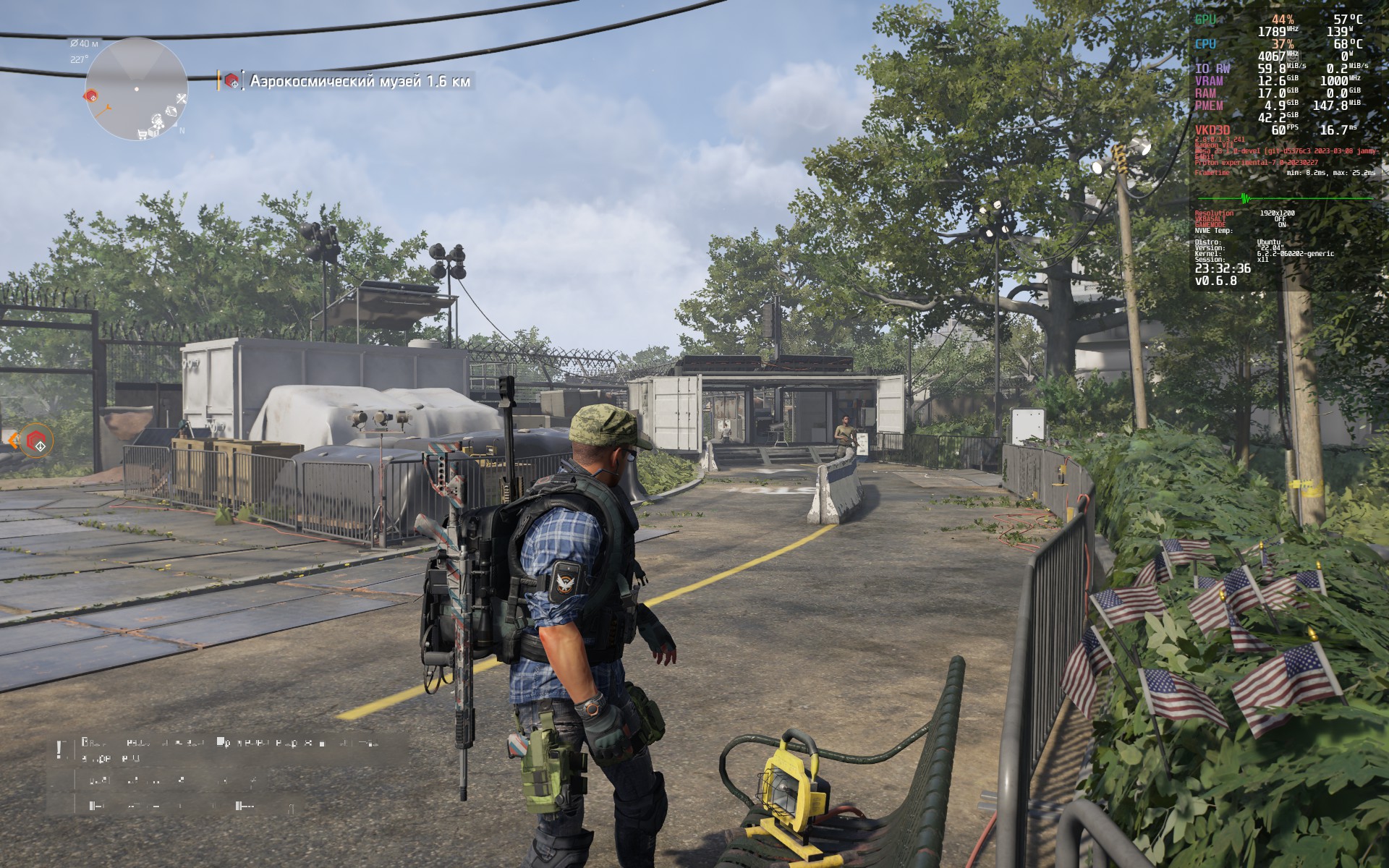
Trying identify the problem with sudden fps drops from 120+ to 20.
First of all, I use Asus GX650PY for testing, its a laptop with rtx4090, so there is more than enough hardware performance for 5 year old game. I use separate modern ssd`s for system and games.
I tested this game on windows 10, only drivers, updates and steam installed. I do get a 150-200 fps and a smooth as silk graphics in motion.
On linux (debian testing, linux mint) I do get a 60-150 fps and a choppy visuals. Sometimes when I run game its drops frames to 20 fps and back to 120+ fps every 5-10 seconds. I found that "validate game files" in steam sometimes fix this for next run.
I tried to offload entire system to dGPU, tried dx12, same issues.
So, is there a way to check what make game struggle?
Is game try to load some stuff in background? I can observe fps drops even when in game I'm standing still in white house, looking on chest.
On Ubuntu 23.04, using Gnome Shell (X11, Nvidia), the game starts and runs fine, but afterwards the AppIndicator Ubisoft Connect icon is completely unresponsive, either to right-click or left-click, which means we have to kill the game using the Steam UI. There is nothing in the journal logs, either systemwide or using --user.
Happens on Proton Experimental, including the Bleeding Edge branch.
This game should be working fine now. In Fedora 38 and Nobara 37, up-to-date as of today. Proton Experimental (non-bleeding-edge) has this game opening perfectly fine with no Ubisoft Connect issues. You will have to hit Stop after leaving the game to make sure the Ubisoft tray icon closes as well, but outside of that it's running fine.
Note that I'm running in the most recent KDE release as of this writing and in Wayland with a Ryzen 5 5600x + RX6600XT.
Anyone else having audio latency problems? This game has like 300ms audio delay
Could be server related
I can't seem to get above 30fps on any version of proton with an i7-12700KF and a GeForce RTX 4060 Ti. I have tried both DX11 and DX12; performance seems better on DX12. I had to mess with the installation a lot. For some reason, Steam initialized the prefix as a Vista machine and it wouldn't turn on DX12. I have since changed it to a Windows 10 prefix, and installed vkd3d, which got DX12 working, but my fps is still abysmal. The benchmark tool in game correctly reported my GPU, but said the usage was constantly at 0%. I am on official Nvidia drivers provided by Fedora, and on a linux-tkg kernel optomized for intel CPUs. I am still missing graphics options like HDR because the game seems to think my GPU can't support it. I am not hitting any limits on RAM, GPU, or CPU. I am using the following launch options: DXVK_FILTER_DEVICE_NAME="NVIDIA GeForce RTX 4060 Ti" VKD3D_FEATURE_LEVEL="12_2" DXVK_ASYNC=1 PROTON_ENABLE_NVAPI=1 DXVK_ENABLE_NVAPI=1 PROTON_HIDE_NVIDIA_GPU=0 gamemoderun %command% -dx12 Any have any ideas?
Any have any ideas?
What distro are you on? What version of the NVIDIA proprietary drivers are you running? Does Proton Experimental work without any flags?
What distro are you on? What version of the NVIDIA proprietary drivers are you running? Does Proton Experimental work without any flags?
I am on Fedora 37, NVIDIA driver 535.129.03. Proton experimental without any flags does "work", but the fps is far worse than the proton GE 8-14 I have switched to as a last resort.
Thanks for responding by the way!
What I noticed lately is that limiting the amount of cores for the game
helps a lot here on my 5950x. Limiting it to 8 cores on one of the ccds
works much better than showing the game alle cores
BoneRattler @.***> schrieb am Do., 30. Nov. 2023, 19:30:
What distro are you on? What version of the NVIDIA proprietary drivers are
you running? Does Proton Experimental work without any flags?I am on Fedora 37, NVIDIA driver 535.129.03. Proton experimental without
any flags does "work", but the fps is far worse than the proton GE 8-14 I
have switched to as a last resort.Thanks for responding by the way!
—
Reply to this email directly, view it on GitHub
https://github.com/ValveSoftware/Proton/issues/6451#issuecomment-1834327635,
or unsubscribe
https://github.com/notifications/unsubscribe-auth/AIPVS44KSZBUI5TZIDPMJNLYHDGCVAVCNFSM6AAAAAAT22X3XOVHI2DSMVQWIX3LMV43OSLTON2WKQ3PNVWWK3TUHMYTQMZUGMZDONRTGU
.
You are receiving this because you commented.Message ID:
@.***>
What I noticed lately is that limiting the amount of cores for the game helps a lot here on my 5950x. Limiting it to 8 cores on one of the ccds works much better than showing the game alle cores
I think you are on to something. Constricting my cores to 8 physical, no virtual threads, seemed to help. Even dropping to 4 was an improvement. I'm not really sure how my processor is laid out for the optimal core grouping, but I'll play around with it. It still doesn't seem to be 60fps, but it's getting closer. For reference, I used this flag: WINE_CPU_TOPOLOGY=8:0,2,4,6,8,10,12,14
Replying to https://github.com/ValveSoftware/Proton/issues/6451#issuecomment-1834368143
add "nosmt" to your kernel boot options, run sudo mkinitcpio -P, reboot and try and see if that fixes it.
In my experience, this increases stutter in some games like wolfenstein youngblood but do report your experiences.
also maybe try nowatchdog and mitigations=off
I HAVE FOUND A SOLUTION TO LOW FPS!
I am not super versed in Linux kernel update history, but this game's performance is suffering from a new feature added to the Linux kernel (~6+ ish) meant to penalize badly written programs that misuse CPU cache.
If you check dmesg, The Division 2 is triggering the kernel's split lock trap. Once triggered, the new kernel patch causes the program to enter Misery Mode, which is meant to annoy users into harassing developers to code better. Unfortunately, this hurts the user through the performance of that program. There are real reasons for this to exist, but in the mean time it can be disabled by changing the runtime value at /proc/sys/kernel/split_lock_mitigate to 0, or booting the kernel with the split_lock_detect=off flag.
Note: For those playing on Steam Deck, just run with Proton Experimental and it'll run fine.
I'm having this issue where easy anticheat just keeps loading and the game never launches, was working fine a couple weeks ago with benchmarking, i have cleared the wine prefix and used experimental(bleeding edge) with no luck
RX 6700 10gb, ryzen 7600, arch, mesa 24.3.1, kernel 6.13 rc2
EDIT: Works fine now
Game is unplayable and freezes for me since update 22.1, would work fine before. The fps is fine it runs at 200 just freezes every 5 seconds even after the sudo sysctl -w kernel.split_lock_mitigate=0
Have you run it in Proton GE?
Have you run it in Proton GE?
Yes and experimental
Had the same problem after returning to the game last week. It seems like current proton versions (9.0, experimental) include changes that may cause instability on some machines. Running the game with GE-Proton9-4 (April 2024) fixed most crashing issues for me. I run NVIDIA proprietary driver 535.216.03 / GeForce 1070 / X11.
Today's play session actually felt good. Had only about 2 freezes, but ran at about 145fps instead of 200. Despite the lower frames, it was very playable and an enjoyable experience due to it not freezing. Unsure if it's due to the experimental updates, mesa or kernel. I haven't gotten around to try to play for the past 2-3 weeks.
Can't get past the EAC loading screen, it keeps looping on the EAC splash screen. I'm using Endeavour OS with Nvidia RTX3060, and the version I'm using is the Epic Games through Heroic Games Launcher. The same issue as mentioned by @polluxau . Also tried with several Proton versions.
Game crashes after ~10 minutes of gameplay on latest patch set.
Seems to never spawn EAC(?)
Having issues on a Ryzen 9800X3D, and AMD RX 9070. Textures flickers, please see video here (if you are light sensitive, this video might cause you issues): https://www.youtube.com/watch?v=y7hsOzYDOEg
Arch Linux with Kernel 6.18 and Mesa 25.3.2.
Tried Proton Experimental and GE and CachyOS, latest versions.
Ubisoft Connect only launches if I use this variable as well: PROTON_USE_WINED3D=1 %command%
Replying to https://github.com/ValveSoftware/Proton/issues/6451#issuecomment-3702070278
if you are using the wined3d environment means the game is running under opengl which is not what you want at all, clear the wine prefix by using protontricks and try again without this environment variable. if you have the same issue please provide a log by doing PROTON_LOG=1 %command% it will output a log in the home folder, upload this log to here, if it is to big compress it with zip.
Replying to [#6451 (comment)](https://github.com/ValveSoftware/Proton/issues/6451#issuecomment-3702070278)
if you are using the wined3d environment means the game is running under opengl which is not what you want at all, clear the wine prefix by using protontricks and try again without this environment variable. if you have the same issue please provide a log by doing PROTON_LOG=1 %command% it will output a log in the home folder, upload this log to here, if it is to big compress it with zip.
Thank you :)
Just to give you a bit of context, the trouble is that Ubisoft Connect will refuse to work without that variable, then it doesn't start and that means the game doesn't start. I have to use it also with Ghost Recon Breakpoint, otherwise once again Ubisoft Connect will not launch, and then Breakpoint runs fine (that was a solution I found on ProtonDB).
I attached the log after clearing the prefix as you asked (you are seeing the demo of The Division 2 atm, but it's exactly the same issue as with the full version, I refunded it due to this problem but I figured I'd try to fix it with the demo and maybe buy it again).
Okay, I think this is due to Arch and the fact that by default it uses Steam's own runtime, rather than Arch's own dependencies (recent change). Steam Runtime might be lacking some dependencies that allow the Ubisoft Launcher to work.
When using the Flatpak version of Steam it all works fine on Arch, Ubisoft connect starts out of the box, no extra launch variables. Fedora starts it as well (with any Proton version). Regata OS starts it successfully.
My version of Fedora has up-to-date mesa via the Terra repos so it is not a mesa regression from Arch having newer mesa.
So the solution on Arch would be to either try the Steam native package that is now on the AUR (but I am not spending a gazillion years compiling every time it updates), or use the Flatpak version alongside the pacman version only for Ubisoft games. I have not tested using the native version of Steam from the AUR to verify this theory, I have honestly lost interest given that I don't want to compile it every time. Given that the games I would run via Flatpak are only from Ubisoft and my system runs them from the Flatpak without any noticeable performance drop, I am just going to roll with that.
If Steam swaps to 64 bit (which it might do soon given that the Windows version is doing so), this might not even be a problem in future.
Faugus Launcher was also unsuccessful on Arch only, I think it IS because it uses the Steam runtime (I can see it being printed in the launch windows) so it doesn't try to pull extra 32 bit deps from Arch. Works fine, once again, on Fedora.
Ubisoft Connect won't initialize the game anymore with Proton Experimental, it just opens the homepage of the launcher.
Reverting to Proton 10.0-4 fixes this issue.
Linux Mint 22.3 - Cinnamon 64-bit
6.17.0-14-generic
Hello @Aless4ndro13, with Proton Experimental, please add PROTON_LOG=1 %command% to the game's launch options and attach the generated $HOME/steam-$APPID.log to this issue report as a file. (Proton logs compress well if needed.)
Here's the file.
@Aless4ndro13 Could you save your old prefix and see if a fresh prefix fixes the issue? I could not reproduce and the game started for me without issue on experimental.
I deeply apologize for this comment.
Is there an official, clean way to make a new prefix or I just need to delete the folder and its content and launch the game, generating a new prefix?
I used protontricks to delete all The Division's 2 pfx content, I ran the game and it downloaded 22gb.
The game has launched first time with GE-Proton (which didn't work at first).
I'll update if crashes happen.
- Game froze while changing video settings;
- Game froze in the menu;
- Game froze in the menu while dismissing a DLC notification.
Now UbiConnect opens the main page, it appears I have to manually start the game via the Ubisoft Launcher.
@Aless4ndro13 Sorry I missed your message and no need to apologize! I'm often unsure of the level of detail to provide, and I almost gave more explicit instructions ... next time :)
FWIW - to "delete the prefix" in my opinion the cleanest way is to simply go into the location where your game prefix is stored (default ~/.steam/steam/steamapps/compatdata/[appid]) and then either delete the folder with the appid of the game, or (in this case) rename the prefix folder so that a new prefix gets created while preserving the old prefix - eg mv 2221490 2221490.bak.
It is strange that you are forced to start the game via the Ubisoft Launcher as it was auto-logging in and launching for me every time. Ubisoft connect works in mysterious ways unfortunately - I'm glad it is launching for you now.
Sorry @alasky17, did you also install some secondary Windows' libraries, like .NET or Visual C++? Changed some Wineconfigs?
@Aless4ndro13 No - I didn't do anything except delete the prefix and launch on Proton - Experimental. I also don't have any DLCs installed though - I'm not sure what prompted the 22GB re-install you mentioned.
After the latest "Cherry Blossom" update, the game started experiencing random freezes, but these occur after playing for a few minutes (sometimes after 10 minutes, other times after 30 minutes).
There is no specific in-game action that triggers the problem; the game simply freezes on the screen and after a few seconds closes on its own, displaying the Ubisoft Connect splash screen synchronizing saved games with the server.
I performed several tests, including completely uninstalling the game and reinstalling it on a different hard drive, deleting the shader caches and the compdata folder, and testing various versions of Proton: 8-32, 9.04, 10.0-4, 11-beta-1. I also tested the experimental, GE, and cachyOS versions. The problem persists in all of them. I also tested disabling all possible overlays, no launch arguments, windowed mode, fullscreen mode, fake fullscreen mode, DirectX 11 and 12, reduced latency disabled, and graphics settings at minimum (and maximum).
Specs:
AMD Ryzen 7 3700X
NVIDIA GeForce RTX 2070 SUPER [Discrete]
64GB RAM
CachyOS x86_64
Linux 7.0.0-1-cachyos
KDE Plasma 6.6.4
I posted the steamlog on privatebin because the Gist is giving an upload error.
https://privatebin.net/?3e02a0543d3ba34d#21A1uLsVEY45wXa2E2uqs6VM9DhNzRzn13B1umDiYdT5
The Steam version cannot use Japanese as the dialogue language. When switching from English to Japanese in Steam game properties, the game updates its localization files and failed to start the game. It has an error during the EAC startup, showing "failed to loaded embedded resources".
I have tested the Ubisoft version installed with other game launcher (Lutris) and it is fine there.
Hello, there seems to be memory leak? using any version of proton with division 2. Starts about 6gb and goes up gradually crashing the game. This leads to gradual system memory increase over several hours until the game crashes.
Will try to log as well from now, to get more insight of the issue, anyone else experiencing this?
Where should i paste log? Over 150mb?
Analysis from lag shows:
Thousands of trace:seh:NtGetContextThread calls
Repeated blocks of RtlVirtualUnwind2 + dump_unwind_info for the same functions (around base 6fff9d860020)
System has 32gb mem, might have issue sooner with lower mem? Steam overlay is disabled, as ubi one is on.
Might be related?
Unhandled exception in Xalia:
System.ComponentModel.Win32Exception (0x80004005): Access denied
at Xalia.Interop.Win32RemoteProcessMemory.ReadBytes(...)
Will test PROTON_USE_XALIA=0
Replying to https://github.com/ValveSoftware/Proton/issues/6451#issuecomment-4743935043
I have the same issue with increasing memory usage over playtime as well.
The Division 2 not allowing game to be fully started due to EAC
Issue transferred from https://github.com/ValveSoftware/steam-for-linux/issues/13347.
@wxlfsangel posted on 2026-06-26T08:48:52:
Your system information
- Steam client version (build number or date): 1781041600
- Distribution (e.g. Ubuntu): Garuda Linux Broadwing (64-bit)
- Opted into Steam client beta?: No
- Have you checked for system updates?: Yes
- Steam Logs: steam-logs.tar.gz
- GPU: AMD
Please describe your issue in as much detail as possible:
After intro videos, pressing space to connect to the online services kicks me out with a "CHARLIE-03" error, and the following screen.
Major changes haven't happened to the system from the last time the game ran properly.
Steps for reproducing this issue:
- Hit play in steam, skip intro videos.
- hit space on character select screen to connect.
- encounter that screen, with game exiting after hitting confirm.
Proton versions
proton experimentalx11 2026-03proton 10.0-4x1 2026-03ge-proton9-4x1 2024-12proton 7.0-6x1 2023-03
Launch options
PROTON_USE_XALIA=0x1 2026-06PROTON_LOG=1x3 2026-03PROTON_USE_WINED3D=1x1 2025-12WINE_CPU_TOPOLOGY=8:0,2,4,6,8,10,12,14`x1 2023-12DXVK_ASYNC=1x4 2023-11DXVK_ENABLE_NVAPI=1x1 2023-11DXVK_FILTER_DEVICE_NAME="NVIDIA GeForce RTX 4060 Ti"x1 2023-11PROTON_ENABLE_NVAPI=1x1 2023-11PROTON_HIDE_NVIDIA_GPU=0x1 2023-11VKD3D_FEATURE_LEVEL="12_2"x1 2023-11RADV_PERFTEST=gpl"x1 2023-01RADV_DEBUG=hangx3 2023-01DXVK_HUDx1 2023-01RADV_DEBUG=hang`x1 2023-01
Launch lines
PROTON_USE_WINED3D=1 %command%x1 2025-12DXVK_FILTER_DEVICE_NAME="NVIDIA GeForce RTX 4060 Ti" VKD3D_FEATURE_LEVEL="12_2" DXVK_ASYNC=1 PROTON_ENABLE_NVAPI=1 DXVK_ENABLE_NVAPI=1 PROTON_HIDE_NVIDIA_GPU=0 gamemoderun %command% -dx12x1 2023-11
Upstream links
- ValveSoftware/steam-for-linux/issues/13347x1 2026-06
- HansKristian-Work/vkd3d-proton/pull/1382x1 2023-01
- HansKristian-Work/vkd3d-proton/issues/1381x1 2023-01
Error codes
0x80004005x1 2026-06
Compatibility Report
System Information
I confirm:
steam-2221490.log
Symptoms
EAC splash screen looped in cycle
Screencast from 2023-01-14 02-19-39.webm
Reproduction
Always