Brotato
Hello @ProMix0, we're tracking issues with games run with Proton in the Proton issue tracker, so I've transferred this issue report.
Please copy your system information from Steam (Steam -> Help -> System Information) and put it in a gist, then include a link to the gist in this issue report.
If you completely close Steam, then run steam from a terminal, are there any hints in the terminal spew when you tell Steam to start the game? Also, if you set the game's launch options to PROTON_LOG=1 %command%, does that generate a log file at $HOME/steam-$APPID.log? If it does, then please attach that log to this issue report as a file. (Proton logs compress well if needed.)
Please copy your system information
are there any hints in the terminal
No, I guess

does that generate a log
Yep, it does:

Useful, right? (sorry for toxic)
And now, updates
To make the game works I was followed this guide. After restarting Steam I realized that can't run the game. After a few attempts I got that variables STEAM_COMPAT_CLIENT_INSTALL_PATH and STEAM_COMPAT_DATA_PATH must be defined. There is part of my .bashrc:
export STEAM_COMPAT_DATA_PATH=~/.steam/debian-installation/steamapps/compatdata
export STEAM_COMPAT_CLIENT_INSTALL_PATH=~/.local/share/Steam/steamapps/compatdata # un-existing path
After that next command will start the game:
~/.steam/debian-installation/steamapps/common/Proton\ -\ Experimental/proton run Brotato.exe
(logs in homedir still useless even when PROTON_LOG=1)
Command in original post also starts correctly... before I did restart Steam. I can't figure out why and how to fix it (but I did it twice)
Anyway, successful run looks like this:
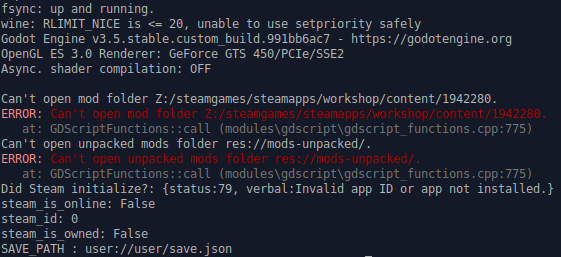
Unsuccessful (via original post command) interrupts after message from wine silently
I hope this can be useful
Your first screenshot has the critical detail *** stack smashing detected ***: terminated and paired with your system information Driver Version: 4.6.0 NVIDIA 390.157, that tells us you've encountered https://github.com/ValveSoftware/steam-runtime/issues/420.
Sorry, but the NVIDIA 390 series video driver is older than the support cutoff for Proton, and your Fermi generation video card does not support Vulkan, which makes your system unsupportable in general.
That said, you might get lucky with some games by using Proton 5.0 or older, which predates the use of the Steam Linux Runtime - Soldier container environment and the linked issue report. Also, you can try setting the game's launch options to PROTON_USE_WINED3D=1 %command% to tell Proton to use wine's DirectX to OpenGL render path, but this is also not considered supported and comes with a significant performance penalty.
The guide you found bypasses the Steam Linux Runtime - Soldier container environment. This might work by luck, but a future system update might break it in unexpected ways. Again, that's not really a supportable configuration.
Switching to Proton 5.0-10 helps, thanks
Proton versions
proton 5.0-10x1 2023-02proton 5.0x1 2023-02
Launch options
PROTON_USE_WINED3D=1x1 2023-02PROTON_LOG=1`)x1 2023-02STEAM_COMPAT_CLIENT_INSTALL_PATHx1 2023-02STEAM_COMPAT_CLIENT_INSTALL_PATH=~/.local/share/Steam/steamapps/compatdatax1 2023-02STEAM_COMPAT_DATA_PATHx1 2023-02STEAM_COMPAT_DATA_PATH=~/.steam/debian-installation/steamapps/compatdatax1 2023-02PROTON_LOG=1x1 2023-02
Launch lines
PROTON_USE_WINED3D=1 %command%x1 2023-02
Upstream links
- ValveSoftware/steam-runtime/issues/420x1 2023-02
Your system information
Please describe your issue in as much detail as possible:
I expected to run game Brotato, id: 1942280 via Steam, but it doesn't
After some attempts to work around (including triple reinstall with different package managers and moving games directory to another disk) I just execute launch command from command line logs
/home/misha/.steam/debian-installation/ubuntu12_32/reaper SteamLaunch AppId=1942280 -- /home/misha/.steam/debian-installation/ubuntu12_32/steam-launch-wrapper -- '/home/misha/.steam/debian-installation/steamapps/common/SteamLinuxRuntime_soldier'/_v2-entry-point --verb=waitforexitandrun -- '/home/misha/.steam/debian-installation/steamapps/common/Proton - Experimental'/proton waitforexitandrun '/steamgames/steamapps/common/Brotato/Brotato.exe'and it works!
I was try to manually change start command to simple running via Proton, but it's also don't work
So, next question - why the game (other games runs normally) can't be launched from Steam client?
Steps for reproducing this issue: