Hello @coolcatco888, what's the newest version of Proton that you know behaves as expected?
Hello @coolcatco888, what's the newest version of Proton that you know behaves as expected?
I do not know other than Proton GE 7-41. I am not sure how to downgrade Proton 7.0-6 further.
@coolcatco888 Could you please copy your system information from Steam (Steam -> Help -> System Information) and put it in a gist, then include a link to the gist in this issue report?
Also, if any of those games run on Proton 6.3-8, could you make sure you don't see the same issue there? That would be the easiest way to "downgrade" for regression testing.
Here is my gist for my System Information: https://gist.github.com/coolcatco888/89503f8c5bae0041e4f238592475a596
Also I can confirm that Cyberpunk 2077 still works as expected in Proton 6.3-8. The game launches correctly in the middle monitor (my primary monitor).
@coolcatco888 Thank you for the info and for testing 6.3-8. Unfortunately, we have not been able to reproduce the problem yet (with testing with 3 monitors and Ubuntu 22.04) which makes it difficult to triage. If you have any ideas about things different about your setup that we could try to replicate, please let me know :) For starters - what is the resolution of each of the monitors (preferably from left to right)?
I have uploaded a build for you to test so that we can start narrowing down this regression - https://www.codeweavers.com/xfer/alasky/proton-test/ with the unlock code "proton". You can drop the tar bundle in ~/.steam/steam/compatibilitytools.d (you might need to create a folder named this if one does not already exist) and then untar it there and reboot Steam. You should see Proton 7.0-5 version now available in the drop-down list of versions to choose from.
Here is my arandr output:
xrandr --output XWAYLAND2 --mode 1048x1680 --pos 0x198 --rotate normal --output XWAYLAND0 --primary --mode 3840x2160 --pos 1050x0 --rotate normal --output XWAYLAND1 --mode 1920x1080 --pos 4890x469 --rotate normal
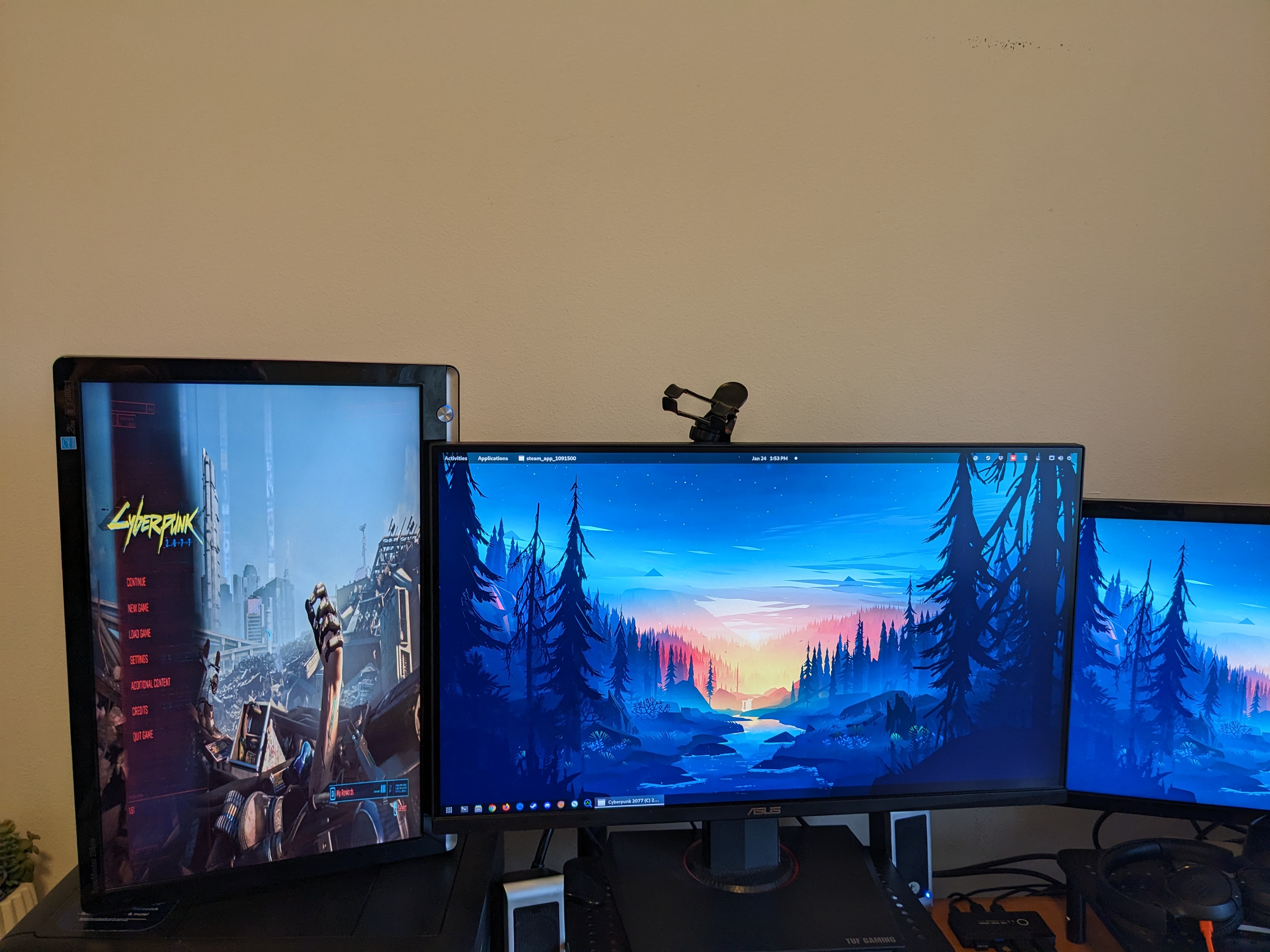
The resolutions show monitors from left to right. Also, I am using Gnome 42.5 under Wayland with extensions. I should note that the left-most monitor, XWAYLAND2, is actually in the portrait orientation.
Here are my list of Gnome extensions:
$ gsettings get org.gnome.shell enabled-extensions
['[email protected]', '[email protected]', '[email protected]', 'no-overview@fthx', '[email protected]', '[email protected]', '[email protected]']
Other things to note, I am using Xanmod Kernel with Kisak Mesa PPA version of Mesa GL.
Thank you all so much for trying to troubleshoot this problem with me.
EDIT: I can confirm that Proton 7.0-5 works as expected. Also, the problem still exists in 7.0-6 even if I disable all Gnome extensions.
@coolcatco888 Thank you for the details! That is all very useful for us :) Have you tried using X11 instead of Wayland? I would be curious if this problem is unique to Wayland.
I made a custom build with just the commits that I strongly suspect are the culprit reverted, and I put it in that same upload location. Could you test that build to confirm if I'm right about my suspicion? You can stick it in compatibilitytools.d the same way as the official proton 7.0-5 build :) https://www.codeweavers.com/xfer/alasky/proton-test/
Hi @alasky17,
I can confirm that your custom build with the reverted commits fixed the issue for both Cyberpunk 2077 and Assassin's Creed Odyssey.
I tried Gnome on X11 and the issue is not reproducible for both 7.0-6 and your custom build. However, in Cyberpunk my main monitor is switched from 1 to 3.
So to summarize, in Cyberpunk, my monitor ids from left to right:
Custom Build in Wayland: 3, 1, 2
Custom Build (and 7.0-6) in X11: 1, 3, 2
In 7.0-6 in Wayland monitors 3 and 1 are the same. (left-most monitor) Where the middle monitor is unassigned.
Here is my xrandr layout left to right in X11:
# 3 Monitor Setup
/usr/bin/xrandr --output DisplayPort-2 --rate 59.88 --mode 1680x1050 --scale 2x2 --pos 0x0 --rotate right --output DisplayPort-0 --rate 59.94 --primary --mode 3840x2160 --pos 2100x0 --rotate normal --output DisplayPort-1 --right-of DisplayPort-0 --rate 59.94 --mode 1920x1080 --scale 2x2 --pos 5940x540 --rotate normal --output HDMI-A-0 --off --fb 9780x3360
Could you also put the link to the problematic commits in your reply? I am curious how this works.
Thank you so much for root causing the issue!
@coolcatco888 Sorry for the delay! We have been busy trying to make sure that this (and many other regressions) get fixed :)
First off - thank you so much for the info - with the detailed xrandr, we were able to repro locally, which is a big help in getting this fixed. And thank you for testing the revert build - it is good to know that my suspicions were correct so that we can get the right folks to take a look :)
As to your question - the commits I reverted in the test build were:
f2f5394825854c8b904731fa898ff10a0c1ad6df winex11.drv: Support _NET_WM_FULLSCREEN_MONITORS
6e333f4d99d16f022a88c4cb91b67176a5e7f8b6 user32/tests: Test creating a fullscreen window spanning multiple monitors
There is a 99.9999999% chance that reverting the commit in user32/tests was unnecessary :)
The "good" news is, the regression that you found seems extraordinarily specific to your setup. I suspect that even rearranging which ports your monitors are plugged into could "fix" the problem while we investigate.
I swapped DisplayPort-0 with DisplayPort-2 which is a "hacky fix". (DP-2: 4k monitor, DP-0: Samsung Monitor - 1680x1050). No other combination works at the moment.
This temporary workaround is not ideal because now my bootscreen is displayed on the portrait monitor which means it is rotated 90 degrees.
Do you know when this issue will be fixed?
Thanks again for your efforts!
@coolcatco888 Unfortunately, this is a really tricky one :/ You are the only user who has reported this, and we could only reproduce on one setup after replugging all of the monitors to exactly mirror the order that yours are. Additionally, this is one of the trickiest areas of wine to change. I don't want to get your hopes up with a timeline, but the bug is filed and we are aware of it and trying to make progress :)
@coolcatco888 Unfortunately, this is a really tricky one :/ You are the only user who has reported this, and we could only reproduce on one setup after replugging all of the monitors to exactly mirror the order that yours are. Additionally, this is one of the trickiest areas of wine to change. I don't want to get your hopes up with a timeline, but the bug is filed and we are aware of it and trying to make progress :)
No problem, thanks for the update!
I've been having this very issue for months, such that I had been running version 6.3-8 since 7.0-6 released. Today I decided to check if it was listed as a regression bug in here and found this issue. I tested both version 7.0-5 and the 7.0-6-triple-monitor-revert from the link @alasky17 posted and confirmed that both work properly for me.
With vanilla 7.0-6 every game is stuck on a specific monitor and I can't change it. With both 7.0-5 and the 7.0-6-triple-monitor-revert I can use Meta/Super/Win+Shift+left/right to freely change which monitor the display is on. Thank you so much for root causing this issue, I greatly appreciate it. I can also confirm that @coolcatco888 is not the only person who experiencing this issue.
Here's my setup information in case it helps with debug.
System:    Kernel: 5.15.0-73-generic x86_64 bits: 64 Desktop: Cinnamon 4.8.6 Distro: Linux Mint 20.1 Ulyssa
Machine:   Type: Desktop System: ASUS product: N/A v: N/A
           Mobo: ASUSTeK model: ROG CROSSHAIR VIII HERO (WI-FI) v: Rev X.0x
           UEFI: American Megatrends v: 4201 date: 04/26/2022
CPU:       AMD Ryzen 7 5800X3D
Graphics:  Device-1: Advanced Micro Devices [AMD/ATI] driver: amdgpu v: kernel
           Display: x11 server: X.Org 1.20.13 driver: amdgpu,ati unloaded: fbdev,modesetting,radeon,vesa
           resolution: 1920x1080~60Hz, 1920x1080~60Hz, 1920x1080~60Hz
           OpenGL: renderer: AMD DIMGREY_CAVEFISH (RX 6600) (DRM 3.42.0 5.15.0-73-generic LLVM 12.0.0) v: 4.6 Mesa 21.2.6
In my situation the game is stuck on the monitor that I set as my primary monitor, so switching the cables around doesn't change which monitor it displays on, but changing which monitor I set as primary does. Unfortunately since that changes where Cinnamon's taskbar is, I didn't want to change which monitor was my primary monitor, so I had just been using version 6.3-8 instead.
@lunesar The particular patch in question is quite different on the 8.0 branch compared to the 7.0 branch. I believe @coolcatco888 was seeing the issue on 8.0 as 7.0-6 (please correct me if I'm wrong and/or please test this if you haven't already :). Could you try the beta branch of Proton 8.0 for Proton 8.0-3 and confirm if you are seeing the same problem there as you see on 7.0-6?
Also - which game(s) are you seeing this with? Asking mainly in case there is an easier/smaller test case we can use for future testing, since CP2077, AC: Odyssey, etc are all quite massive downloads.
I can't even get Proton 8.0 to run at all, which I was trying to debug a bit yesterday with no luck, so I do not know the behavior on the 8.0 branch, only the 7.0 branch. I believe I have this issue on all games that use Proton, but the ones I was specifically testing with were Satisfactory, The Planet Crafter, Frostpunk, and Dyson Sphere Program.
Did some testing to find the smallest disk size game possible for you. I found that Deathmatch Classic also has this behavior. That game says that it requires 46 MB for the installation, though when I actually installed it the local files came to about 500 MB when completely installed.
Also while testing other smaller games, I did find that some small 2D games, such as VVVVVV and Cave Story+, did not have this issue. Maybe this issue is specific to 3D rendering or DirectX.
To clarify, it was Proton 8.0-2 that I couldn't get to run at all. I haven't tried the 8.0-3 Beta. In the Steam Play drop down is that the same as Proton Experimental? Or do I need to download it from somewhere on this github to place in my compatibilitytools.d directory. If I do need to download from github, I don't see a release or tag for it.
Hello @lunesar, Proton 8.0 and newer requires Vulkan 1.3. You need mesa 22.0 or newer for that. The kisak-mesa fresh PPA is one option to update that on your system.
I did a system update to Linux Mint 21 to see if that updated Vulkan, Mesa, and the Kernel enough for Proton 8.0 and it did.
==========
VULKANINFO
==========

Vulkan Instance Version: 1.3.204
System:
  Kernel: 5.19.0-43-generic x86_64 bits: 64
    Desktop: Cinnamon 5.4.12 Distro: Linux Mint 21 Vanessa
Machine:
  Type: Desktop System: ASUS product: N/A v: N/A
  Mobo: ASUSTeK model: ROG CROSSHAIR VIII HERO (WI-FI) v: Rev X.0x
    UEFI: American Megatrends v: 4201
    date: 04/26/2022
CPU:
  AMD Ryzen 7 5800X3D
Graphics:
  Device-1: AMD Navi 23 [Radeon RX 6600/6600 XT/6600M] driver: amdgpu
    v: kernel
  Display: x11 server: X.Org v: 1.21.1.4 driver: X: loaded: amdgpu,ati
    unloaded: fbdev,modesetting,radeon,vesa gpu: amdgpu resolution:
    1: 1920x1080~60Hz 2: 1920x1080~60Hz 3: 1920x1080~60Hz
  OpenGL:
    renderer: AMD Radeon RX 6600 (navi23 LLVM 15.0.6 DRM 3.47 5.19.0-43-generic)
    v: 4.6 Mesa 22.2.5
With these changes I confirmed that the issue is present in Proton 7.0-6, Proton-8.02, Proton Experimental, and Proton Hotfix. The issue is not present and works properly in the three test versions you posted above, proton-7.0-5, proton-7.0-6-triple-monitor-revert, and experimental-8.0-WINEMR306-40893-20230417-p633447-w1661e8-dcaf310-v4f3649.
@lunesar Thank you for testing (and I'm glad you got 8.0 working in general, thank you @kisak-valve!). That is what I suspected but it is good to confirm :). We are working on this but it is slow going so far since we only have been able to repro locally on one setup :/
Also, thank you for the tip about Deathmatch Classic :D
Looking through the Support _NET_WM_FULLSCREEN_MONITORS commit, the lines I'm most suspicious of causing this issue are these ones right here:
    /* Update xinerama monitors for xinerama_get_fullscreen_monitors() */
    rect = get_primary_monitor_rect();
    xinerama_init( rect.right - rect.left, rect.bottom - rect.top );
At the end of xinerama_init we have
X11DRV_DisplayDevices_SetHandler( &handler );
Which I suspect may be making it so all attempts to change the monitor when xrandr14_device_change_handler gets called to immediately revert back to the primary monitor as xinerama_init get called at the very end of xrandr14_device_change_handler.
Edit: I tried making my own build with
xinerama_init( rect.right - rect.left, rect.bottom - rect.top );
commented out and that didn't fix the issue, so it's not as simple as I was hoping.
TLDR: This is a mutter bug that's fixed in mutter 43.0. Please upgrade your system or use the attached libmutter-10-0_42.9-0ubuntu1_amd64-bug-22097-wayland-transform-fix.deb with the fix backported. The package it is for is Ubuntu 22.04.
libmutter-10-0_42.9-0ubuntu1_amd64-bug-22097-wayland-transform-fix.zip
This is a mutter bug that gets triggered by "winex11.drv: Support _NET_WM_FULLSCREEN_MONITORS.". To reproduce this bug, the secondary monitor MUST have the 1680x1050 resolution and in portrait right mode. Mutter needs to be running in a Wayland session. A third monitor on the right is not necessary. When this bug happens, xrandr reports the left monitor resolution as 1048x1680 instead of 1050x1680, which can be used to tell if the bug is fixed.
The bug is from a mismatching monitor index in Mutter. Wine sends a _NET_WM_FULLSCREEN_MONITORS client message to the WM and asks to change to monitor 0. Mutter then finds a monitor with xinerama_index == 0 and changes to that monitor, except it's the wrong monitor.
static void
meta_x11_display_ensure_xinerama_indices (MetaX11Display *x11_display)
{
  ...

  for (l = logical_monitors; l; l = l->next)
    {
      MetaLogicalMonitor *logical_monitor = l->data;

      for (j = 0; j < n_infos; ++j)
        {
          if (logical_monitor->rect.x == infos[j].x_org &&
              logical_monitor->rect.y == infos[j].y_org &&
              logical_monitor->rect.width == infos[j].width &&
              logical_monitor->rect.height == infos[j].height)
            {
              MetaX11DisplayLogicalMonitorData *logical_monitor_data;

              logical_monitor_data =
                ensure_x11_display_logical_monitor_data (logical_monitor);
              logical_monitor_data->xinerama_index = j;
            }
        }
    }

  meta_XFree (infos);
}
MetaLogicalMonitor *
meta_x11_display_xinerama_index_to_logical_monitor (MetaX11Display *x11_display,
                                                    int             xinerama_index)
{
  ...

  logical_monitors =
    meta_monitor_manager_get_logical_monitors (monitor_manager);

  for (l = logical_monitors; l; l = l->next)
    {
      MetaLogicalMonitor *logical_monitor = l->data;
      MetaX11DisplayLogicalMonitorData *logical_monitor_data;

      logical_monitor_data =
        ensure_x11_display_logical_monitor_data (logical_monitor);

      if (logical_monitor_data->xinerama_index == xinerama_index)
        return logical_monitor;
    }

  return NULL;
}
First, see in meta_x11_display_ensure_xinerama_indices(). Note that xinerama_index is initialized when the xinerama screen geometry equals the MetaLogicalMonitor geometry. So that when the xinerama screen geometry is the not same as that of a MetaLogicalMonitor, xinerama_index is uninitialized and remains 0. As a result, this means there are two monitors with xinerama_index being 0. See in meta_x11_display_xinerama_index_to_logical_monitor(), it finds a MetaLogicalMonitor by comparison of xinerama_index. With two monitors both being 0, the wrong monitor may be used. This also explains why I can't reproduce the bug in the first place because my primary monitor is the first to be found.
Next, the question is why the monitor geometry doesn't match. The left monitor in Mutter has the size of 1050x1680 but the monitor from Xinerema has the size of 1048x1680, which can also be checked by the xrandr tool. The 1048 size is most likely coming from xwayland_cvt() in hw/xwayland/xwayland-cvt.c in the xwayland source code. I didn't verify this part. Because CVT modes should have the width be multiples of 8 so 1048 is returned instead of 1050. xwayland_cvt() is called from output_get_rr_modes(), which is from apply_output_change() in Mutter.
static void
apply_output_change(struct xwl_output *xwl_output)
{
    ...

    /* When we have received an xdg-output for the mode size we might need to
     * rotate back the stored logical size it provided.
     */
    if (xwl_output->xdg_output == NULL
        || xwl_output->rotation & (RR_Rotate_0 | RR_Rotate_180)) {
        mode_width = xwl_output->width;
        mode_height = xwl_output->height;
    } else {
        mode_width = xwl_output->height;
        mode_height = xwl_output->width;
    }

    /* Build a fresh modes array using the current refresh rate */
    randr_modes = output_get_rr_modes(xwl_output, mode_width, mode_height, &count);
See how mode_width should be initialized according to xwl_output->rotation. So instead of 1050, 1680 should be used as the width. The reason is that xwl_output->rotation is not rotated. This can also be verified by the 'wl_output' interface output of the weston-info command, in which the left monitor output transform is reported as normal instead of 90°. The wrong transform is from meta-wayland-outputs.c in src/wayland in the Mutter 42.9 source code.
static void
send_output_events (struct wl_resource *resource,
                    MetaWaylandOutput  *wayland_output,
                    MetaMonitor        *monitor,
                    gboolean            need_all_events,
                    gboolean           *pending_done_event)
{
  ...

  if (need_all_events ||
      old_logical_monitor->rect.x != logical_monitor->rect.x ||
      old_logical_monitor->rect.y != logical_monitor->rect.y ||
      is_different_rotation (old_logical_monitor, logical_monitor))
    {
      ...

      /*
       * TODO: When we support wl_surface.set_buffer_transform, pass along
       * the correct transform here instead of always pretending its 'normal'.
       * The reason for this is to try stopping clients from setting any buffer
       * transform other than 'normal'.
       */
      transform = WL_OUTPUT_TRANSFORM_NORMAL;

      wl_output_send_geometry (resource,
                               logical_monitor->rect.x,
                               logical_monitor->rect.y,
                               width_mm,
                               height_mm,
                               subpixel_order,
                               vendor,
                               product,
                               transform);
      need_done = TRUE;
    }
This bug in mutter is later fixed by https://gitlab.gnome.org/GNOME/mutter/-/commit/01a4ec1841b7b29dc446257ad1bf2252f80f7009, which is included in Mutter 43.0. I built a libmutter-10-0_42.9-0ubuntu1_amd64-bug-22097-wayland-transform-fix.deb with the fix backported. I installed the new libmutter package, log out and log in to make the new libmutter take effect and confirmed this bug is gone.
Would this mutter bug also explain what I'm seeing?
To reproduce this bug, the secondary monitor MUST have the 1680x1050 resolution and in portrait right mode.
I'm using 3 monitors at 1920x1080 in landscape mode, and I'm seeing similar behavior as well. Does your post about the fix mean that I'm encountering a different bug?
Also I don't even think I have mutter installed:
apt-cache policy mutter
mutter:
  Installed: (none)
  Candidate: 42.9-0ubuntu1
  Version table:
     42.9-0ubuntu1 500
        500 http://archive.ubuntu.com/ubuntu jammy-updates/universe amd64 Packages
     42.0-3ubuntu2 500
        500 http://archive.ubuntu.com/ubuntu jammy/universe amd64 Packages
Would this mutter bug also explain what I'm seeing?
To reproduce this bug, the secondary monitor MUST have the 1680x1050 resolution and in portrait right mode.
I'm using 3 monitors at 1920x1080 in landscape mode, and I'm seeing similar behavior as well. Does your post about the fix mean that I'm encountering a different bug?
Yeah, could be a different bug. Please open another bug report.
@lunesar If you file a new issue (I'm assuming that this behavior is for multiple games and not just a single title), please tag me :)
proton 7.0-5x4 2023-06proton 8.0x4 2023-06proton 7.0-6x3 2023-06proton experimentalx2 2023-06proton 8.02x1 2023-06proton hotfixx1 2023-06proton 8.0-2x1 2023-06proton 8.0-3x1 2023-06proton 6.3-8x2 2023-03
Proton 7.0-6 and up always display fullscreen games in the left-most monitor on a multi-monitor setup.
I have 3 monitors and I use the middle 4K monitor for gaming. However, now fullscreen mode puts games in the left-most monitor regardless of whether I use Fullscreen or Windowed Borderless. This did not happen before. Trying to set it to the right-most monitor and back does not resolve the issue as the game can only be displayed on the left-most and right-most monitor.
Selecting a lower resolution in Windowed Borderless and Windowed lets you display in the middle monitor but the moment I set the resolution to match the middle monitor (4K) it snaps immediately to the left-most monitor.
This is true for Cyberpunk, Assassin's Creed Odyssey, Farcry 5 and basically any game. My current workaround is to use an older Proton version like Proton GE 7-41.
See Image: