Ori and the Blind Forest: Definitive Edition
Games being slow the first time they are launched, or the first time playing through particular areas, is unfortunately normal. These stutters are caused by the compilation of the shaders. Fortunately, these shaders are cached to the disk, so subsequent plays should be fluid.
I didn't know that, thank you for the information :)
On 22.08 10:18, Jaap Buurman wrote:
Games being slow the first time they are launched, or the first time playing through particular areas, is unfortunately normal. These stutters are caused by the compilation of the shaders. Fortunately, these shaders are cached to the disk, so subsequent plays should be fluid.
--
You are receiving this because you authored the thread.
Reply to this email directly or view it on GitHub:
https://github.com/ValveSoftware/Proton/issues/67#issuecomment-414984572
I noticed one small issue with this game. I use a multi-monitor setup, and this game unlike others launches on the wrong monitor. Most other games will come up on the display I've marked as "primary" via display setup. I can get it to the correct monitor by switching into Windowed mode, then dragging it to the display I want, then choosing fullscreen. Exiting and re-launching after that and it then comes up correctly on the primary display.
What drivers are you using?
The Definitive Edition works for me, but there is no sound, and it'll black out when fighting monster (or only render the shooting particle). The normal edition won't even launch.
It's probably because I'm running mesa 18.0 though.
Computer Information:
    Manufacturer:  Unknown
    Model:  Unknown
    Form Factor: Desktop
    No Touch Input Detected

Processor Information:
    CPU Vendor:  GenuineIntel
    CPU Brand:  Intel(R) Core(TM) i5-6400 CPU @ 2.70GHz
    CPU Family:  0x6
    CPU Model:  0x5e
    CPU Stepping:  0x3
    CPU Type:  0x0
    Speed:  3300 Mhz
    4 logical processors
    4 physical processors
    HyperThreading:  Unsupported
    FCMOV:  Supported
    SSE2:  Supported
    SSE3:  Supported
    SSSE3:  Supported
    SSE4a:  Unsupported
    SSE41:  Supported
    SSE42:  Supported
    AES:  Supported
    AVX:  Supported
    CMPXCHG16B:  Supported
    LAHF/SAHF:  Supported
    PrefetchW:  Unsupported

Operating System Version:
    Ubuntu 16.04.5 LTS (64 bit)
    Kernel Name:  Linux
    Kernel Version:  4.15.0-32-generic
    X Server Vendor:  The X.Org Foundation
    X Server Release:  11906000
    X Window Manager:  Compiz
    Steam Runtime Version:  steam-runtime-beta-release_2018-06-14

Video Card:
    Driver:  Intel Open Source Technology Center Mesa DRI Intel(R) HD Graphics 530 (Skylake GT2) x86/MMX/SSE2
    Driver Version:  3.0 Mesa 18.0.5
    OpenGL Version: 3.0
    Desktop Color Depth: 24 bits per pixel
    Monitor Refresh Rate: 60 Hz
    VendorID:  0x8086
    DeviceID:  0x1912
    Revision Not Detected
    Number of Monitors:  2
    Number of Logical Video Cards:  1
    Primary Display Resolution:  1920 x 1080
    Desktop Resolution: 3000 x 1920
    Primary Display Size: 20.04" x 11.26" (22.95" diag)
                                            50.9cm x 28.6cm (58.3cm diag)
    Primary VRAM Not Detected

Sound card:
    Audio device: Realtek ALC887-VD

Memory:
RAM: 7866 MbRegular version doesn't work for me too.
After screens with MS emblem and Moon Emblem my screen become black with blue awes and white circle in the bottom right corner and nothing happends. FPS - 60 stable, no sounds, no menus, etc.
Regular version was updated today and all begin work fine.
I didn't see any stutters during the game, just the first loading animation before the title is slow (with ori animated in slow motion). But there's still an issue: Going to the video sequences menu and trying to watch any video crashes the game. Everything else works perfectly.
System:    Host: blad-pc Kernel: 4.18.3-1-MANJARO x86_64 bits: 64 Desktop: Xfce 4.12.4
           Distro: Manjaro Linux
CPU:       Topology: 6-Core model: AMD FX-6100 bits: 64 type: MCP L2 cache: 2048 KiB
           Speed: 1541 MHz min/max: 1400/3300 MHz Core speeds (MHz): 1: 1554 2: 1806 3: 1527 4: 1529
           5: 1535 6: 1529
Graphics:  Card-1: AMD Pitcairn PRO [Radeon HD 7850 / R7 265 / R9 270 1024SP] driver: amdgpu v: kernel
           Display: x11 server: X.Org 1.20.1 driver: amdgpu unloaded: modesetting
           resolution: 1360x768~60Hz
           OpenGL:
           renderer: AMD Radeon HD 7800 Series (PITCAIRN DRM 3.26.0 4.18.3-1-MANJARO LLVM 6.0.1)
           v: 4.5 Mesa 18.1.6
Game works perfectly fine. First run was a little bit slowly(I thinks it was shaders compilation) but fast at next launch
Game work's fine for me. Only my XBox One controller won't work in-game and the prologue get's async with the music. But it run's smoother then with the non-modified version of Wine.
- Distro: Linux Mint 18.2 Xfce
- Kernel: 4.13.2-041302-generic
- Nvidia: 396.44
- Arch: x64
- GPU: GTX 1060
- Proton 3.7-3
@Mondei1 If you're using the Xbox One S controller wirelessly, I'd try the xpadneo driver.
@kakra No, I'm using the Xbox One controller plugged-in via USB. The controller work's fine in Rocket League and other games that are running without Proton.
Ori and the Blind Forest: Definitive Edition (387290) graphics glitches
Issue transferred from https://github.com/ValveSoftware/Proton/issues/747.
@WinPooh32 posted on 2018-08-27T09:05:14:
Game looks working but it is not playable due to some graphics glitches.
Short video: https://youtu.be/ovBmObU0cMQ
System information
@tournierjc commented on 2018-08-27T09:15:33
Hello,
You should update your mesa drivers as other member reported this game as working fine.
@WinPooh32 commented on 2018-08-27T09:37:21
Installed Mesa 18.3.0-devel - padoka PPA
glxinfo output
I can see same glitches.
@WinPooh32 commented on 2018-08-27T10:40:40
Glitches were solved by PROTON_USE_WINED3D11=1 %command%
Game worked like a charm on my machine, absolutely a good experience. Using Proton 3.16-3 Beta, Mesa 18.2.3 and LLVM 7.0.0.
My specs: https://gist.github.com/ziabice/8c19008e58f82b16a62f7ab65ba235d4#file-sysinfo-txt
Ori definitive edition : tried it, the game starts easily, and seems to run smoothly.
However, my steam controller is never recognized.
I can only play using the keyboard :(
note :
the steam controller itself works fine on the game selection menu (big picture)
and with other games such as speedrunners.
I get a "Fatal error in gc, GetThreadContext failed" error when launching.
This is on:
linux 4.19.2 (archlinux)
nvidia 415.18-1
and both Proton 3.16.4-BETA and 3.7.8
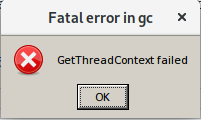
Hello @elimpnick, please retest with nvidia 410.xx (from https://github.com/ValveSoftware/Proton/issues/1304#issuecomment-441366797).
@kisak-valve, yep as you suggested, works with a downgrade to 410.78-1. (Still get the slow boot-up as reported, but otherwise everything is working, including sound and PS4 controller).
Thanks!
Just wanted to add that right now with kernel 4.19.4, nvidia 410.78 isn't much of an option anymore as the module doesn't even load anymore:
Nov 26 15:54:15  /usr/lib/gdm-x-session[1069]: (II) Module nvidia: vendor="NVIDIA Corporation"
Nov 26 15:54:15  /usr/lib/gdm-x-session[1069]: (II) NVIDIA dlloader X Driver  410.78  Sat Nov 10 22:15:52 CST 2018
Nov 26 15:54:15  /usr/lib/gdm-x-session[1069]: (II) NVIDIA Unified Driver for all Supported NVIDIA GPUs
Nov 26 15:54:15  kernel: nvidia: disagrees about version of symbol _dev_warn
Nov 26 15:54:15  kernel: nvidia: Unknown symbol _dev_warn (err -22)
Nov 26 15:54:15 ultra1 /usr/lib/gdm-x-session[1069]: (EE) NVIDIA:     consult the NVIDIA README for details.
Nov 26 15:54:15  /usr/lib/gdm-x-session[1069]: (EE) NVIDIA: Failed to initialize the NVIDIA kernel module. Please see the
Nov 26 15:54:15  /usr/lib/gdm-x-session[1069]: (EE) NVIDIA:     system's kernel log for additional error messages and
Worked so far until the kernel/nvidia upgrade... nvidia 415.18 works with kernel 4.19.4, but again the game won't launch... Oh well...
The nVidia GetThreadContext issue has been reported fixed with the 415.18.04 Vulkan dev driver.
Confirm it now works properly with stock nvidia 415.22-1 on Archlinux running kernel 4.19.4.
Doesn't even start for me, neither with the Proton 3.7.3 nor the Proton 3.16.4.
My system info is: https://gist.github.com/carlos-mg89/63e9d9dcf960fcc4de446a9874915eac
Hello @carlos-mg89, please move your system information into a gist, then replace the paste you dropped in the last comment.
Can you verify any vulkan application like vulkaninfo from vulkan-utils works? Also, please add PROTON_LOG=1 %command% to the game's launch options and drag and drop the generated $HOME/steam-$APPID.log into the comment box.
Done @kisak-valve and thanks for the tip :)
Running vulkaninfo throws a message that is not installed on my computer.
Actually, it's strange that in my system info there is no mention to my Nvidia graphics card. It's a Nvidia 450 GTS. And I do have the proprietary Nvidia drivers and can play games that otherwise won't be playable with the integrated Intel graphics card.
I cannot add the proton log option right now. I ran out of space to reinstall the game. Will try as soon as possible!
A nVidia GTS 450 is a Fermi generation video card and nVidia's proprietary driver does not support vulkan on that generation. Your options are to add PROTON_USE_WINED3D=1 %command% to the game's launch options to use the D3D11 -> OpenGL render path or install vulkan support for your Intel chipset with sudo apt install mesa-vulkan-drivers mesa-vulkan-drivers:i386.
Game starts fine and is playable, but fullscreen window is not expanding over the whole screen and launches on the wrong monitor. The window stays behind the panel and to get the game expand over the whole screen I have to launch it in window mode and use my window managers function to make it fullscreen. As this forces me to use my keyboard it makes it not enjoyable to launch the game to play it with a gamepad and espeically not with inhome streaming.
However, I found out that with GloriousEggrolls custom 4.20 Proton release the fullscreen works properly.
Proton 4.11-11: steam-387290.log
GE Proton 4.20: steam-387290.log
https://gist.github.com/NoXPhasma/e143e73c92e0f62dda1a84a586bc5d2b
Our And The Blond Forest (Definitive Edition)
Issue transferred from https://github.com/ValveSoftware/Proton/issues/3688.
@EMorris71 posted on 2020-03-26T01:17:47:
Compatibility Report
- Name of the game with compatibility issues: Ori And The Blind Forest Definitive Edition
- Steam AppID of the game:387290
System Information
- GPU: Intel Bay Trail
- Driver/LLVM version:
- Kernel version: Gnome 3.34.2
- Link to full system information report as Gist:
- Proton version: Not sure how to verify
I confirm:
- [ X] that I haven't found an existing compatibility report for this game.
- [X ] that I have checked whether there are updates for my system available.
Symptoms Game is not running under Proton on HP running Ubuntu 19.10
Reproduction
Just completed the game using Proton 5.0-9. First load took a while, but subsequent loads were normal. Did not notice any game breaking bugs or graphical glitches. "Behind the scenes" and "Promotional videos" are not working, probably due to missing codecs.
Should I include full hardware report with whitelist request?
I don't know if this should be whitelisted yet; it crashes for me on NixOS. Many other games run fine. A dialog pops up that the game crashed and I should send the logs to the developers.
output_log.txt
Initialize engine version: 5.3.2f1 (9236fb43490b)
GfxDevice: creating device client; threaded=1
d3d11: failed to create D3D11 device (0x887a0004)
GfxDevice: creating device client; threaded=1
Crash!!!
SymInit: Symbol-SearchPath: '.;Z:\home\lh\.local\share\Steam\steamapps\common\Ori DE;Z:\home\lh\.local\share\Steam\steamapps\common\Ori DE;C:\windows;C:\windows\system32;SRV*c:\websymbols*http://msdl.microsoft.com/download/symbols;', symOptions: 530, UserName: 'steamuser'
OS-Version: 10.0.17134 () 0x0-0x1
Z:\home\lh\.local\share\Steam\steamapps\common\Ori DE\oriDE.exe:oriDE.exe (00400000), size: 17920000 (result: 0), SymType: '-nosymbols-', PDB: 'Z:\home\lh\.local\share\Steam\steamapps\common\Ori DE\oriDE.exe', fileVersion: 5.3.2.14075
C:\windows\system32\ntdll.dll:ntdll.dll (7BC30000), size: 2908160 (result: 0), SymType: '-exported-', PDB: 'C:\windows\system32\ntdll.dll', fileVersion: 6.1.7601.24059
C:\windows\system32\kernel32.dll:kernel32.dll (7B420000), size: 2428928 (result: 0), SymType: '-exported-', PDB: 'C:\windows\system32\kernel32.dll', fileVersion: 6.1.7601.17514
C:\windows\system32\kernelbase.dll:kernelbase.dll (7B000000), size: 802816 (result: 0), SymType: '-nosymbols-', PDB: 'C:\windows\system32\kernelbase.dll'
C:\windows\system32\HID.DLL:HID.DLL (64D80000), size: 57344 (result: 0), SymType: '-nosymbols-', PDB: 'C:\windows\system32\HID.DLL', fileVersion: 10.0.0.0
C:\windows\system32\msvcrt.dll:msvcrt.dll (7EAA0000), size: 733184 (result: 0), SymType: '-exported-', PDB: 'C:\windows\system32\msvcrt.dll', fileVersion: 7.0.2600.2180
C:\windows\system32\GDI32.dll:GDI32.dll (7E940000), size: 1294336 (result: 0), SymType: '-exported-', PDB: 'C:\windows\system32\GDI32.dll', fileVersion: 10.0.0.0
C:\windows\system32\advapi32.dll:advapi32.dll (7E8D0000), size: 339968 (result: 0), SymType: '-exported-', PDB: 'C:\windows\system32\advapi32.dll', fileVersion: 5.1.2600.2180
C:\windows\system32\sechost.dll:sechost.dll (7E880000), size: 233472 (result: 0), SymType: '-exported-', PDB: 'C:\windows\system32\sechost.dll'
C:\windows\system32\USER32.dll:USER32.dll (7E670000), size: 2129920 (result: 0), SymType: '-exported-', PDB: 'C:\windows\system32\USER32.dll', fileVersion: 5.1.2600.2180
C:\windows\system32\version.dll:version.dll (65980000), size: 53248 (result: 0), SymType: '-nosymbols-', PDB: 'C:\windows\system32\version.dll', fileVersion: 5.1.2600.2180
C:\windows\system32\WS2_32.dll:WS2_32.dll (7E620000), size: 176128 (result: 0), SymType: '-exported-', PDB: 'C:\windows\system32\WS2_32.dll', fileVersion: 5.1.2600.5512
C:\windows\system32\ole32.dll:ole32.dll (65200000), size: 1359872 (result: 0), SymType: '-nosymbols-', PDB: 'C:\windows\system32\ole32.dll', fileVersion: 10.0.0.0
C:\windows\system32\rpcrt4.dll:rpcrt4.dll (6FDC0000), size: 569344 (result: 0), SymType: '-nosymbols-', PDB: 'C:\windows\system32\rpcrt4.dll', fileVersion: 5.1.2600.2180
C:\windows\system32\SHLWAPI.dll:SHLWAPI.dll (68C40000), size: 352256 (result: 0), SymType: '-nosymbols-', PDB: 'C:\windows\system32\SHLWAPI.dll', fileVersion: 6.0.2800.1692
C:\windows\system32\shcore.dll:shcore.dll (64B40000), size: 102400 (result: 0), SymType: '-nosymbols-', PDB: 'C:\windows\system32\shcore.dll'
C:\windows\system32\SHELL32.dll:SHELL32.dll (7DC30000), size: 10354688 (result: 0), SymType: '-exported-', PDB: 'C:\windows\system32\SHELL32.dll', fileVersion: 6.0.2900.6242
C:\windows\system32\OPENGL32.dll:OPENGL32.dll (7A840000), size: 1097728 (result: 0), SymType: '-exported-', PDB: 'C:\windows\system32\OPENGL32.dll', fileVersion: 5.1.2600.2082
C:\windows\system32\WINMM.dll:WINMM.dll (639C0000), size: 765952 (result: 0), SymType: '-nosymbols-', PDB: 'C:\windows\system32\WINMM.dll'
C:\windows\system32\msacm32.dll:msacm32.dll (66640000), size: 135168 (result: 0), SymType: '-nosymbols-', PDB: 'C:\windows\system32\msacm32.dll'
C:\windows\system32\OLEAUT32.dll:OLEAUT32.dll (6A300000), size: 1142784 (result: 0), SymType: '-nosymbols-', PDB: 'C:\windows\system32\OLEAUT32.dll', fileVersion: 6.0.6001.18000
C:\windows\system32\IMM32.dll:IMM32.dll (6C0C0000), size: 106496 (result: 0), SymType: '-nosymbols-', PDB: 'C:\windows\system32\IMM32.dll', fileVersion: 5.1.2600.2180
C:\windows\system32\DNSAPI.dll:DNSAPI.dll (7DBF0000), size: 94208 (result: 0), SymType: '-exported-', PDB: 'C:\windows\system32\DNSAPI.dll', fileVersion: 5.2.3790.4318
C:\windows\system32\netapi32.dll:netapi32.dll (7DB90000), size: 225280 (result: 0), SymType: '-exported-', PDB: 'C:\windows\system32\netapi32.dll'
C:\windows\system32\iphlpapi.dll:iphlpapi.dll (7DB60000), size: 135168 (result: 0), SymType: '-exported-', PDB: 'C:\windows\system32\iphlpapi.dll', fileVersion: 5.1.2600.2180
C:\windows\system32\WINHTTP.dll:WINHTTP.dll (64540000), size: 270336 (result: 0), SymType: '-nosymbols-', PDB: 'C:\windows\system32\WINHTTP.dll', fileVersion: 5.1.2600.2180
C:\windows\system32\jsproxy.dll:jsproxy.dll (71440000), size: 122880 (result: 0), SymType: '-nosymbols-', PDB: 'C:\windows\system32\jsproxy.dll'
Z:\home\lh\.local\share\Steam\steamapps\common\Ori DE\oriDE_Data\Mono\mono.dll:mono.dll (10000000), size: 2293760 (result: 0), SymType: '-nosymbols-', PDB: 'Z:\home\lh\.local\share\Steam\steamapps\common\Ori DE\oriDE_Data\Mono\mono.dll', fileVersion: 1.0.0.1
C:\windows\system32\PSAPI.DLL:PSAPI.DLL (6AEC0000), size: 40960 (result: 0), SymType: '-nosymbols-', PDB: 'C:\windows\system32\PSAPI.DLL', fileVersion: 5.1.2600.3264
C:\windows\system32\MSWSOCK.dll:MSWSOCK.dll (66A00000), size: 49152 (result: 0), SymType: '-nosymbols-', PDB: 'C:\windows\system32\MSWSOCK.dll', fileVersion: 4.0.0.0
C:\windows\system32\winex11.drv:winex11.drv (F5F70000), size: 655360 (result: 87), SymType: '-unknown-', PDB: '', fileVersion: 10.0.0.0
C:\windows\system32\setupapi.dll:setupapi.dll (6A900000), size: 532480 (result: 0), SymType: '-nosymbols-', PDB: 'C:\windows\system32\setupapi.dll'
C:\windows\system32\d3d11.dll:d3d11.dll (6A540000), size: 3153920 (result: 0), SymType: '-nosymbols-', PDB: 'C:\windows\system32\d3d11.dll', fileVersion: 10.0.17763.1
C:\windows\system32\dxgi.dll:dxgi.dll (F5E60000), size: 204800 (result: 87), SymType: '-unknown-', PDB: '', fileVersion: 6.0.6000.16386
C:\windows\system32\wined3d.dll:wined3d.dll (F5D00000), size: 1388544 (result: 87), SymType: '-unknown-', PDB: '', fileVersion: 10.0.0.0
C:\windows\system32\vulkan-1.dll:vulkan-1.dll (64F40000), size: 57344 (result: 0), SymType: '-nosymbols-', PDB: 'C:\windows\system32\vulkan-1.dll', fileVersion: 10.0.0.0
C:\windows\system32\winevulkan.dll:winevulkan.dll (F5C80000), size: 258048 (result: 87), SymType: '-unknown-', PDB: '', fileVersion: 10.0.0.0
C:\windows\system32\d3d9.dll:d3d9.dll (62440000), size: 2879488 (result: 0), SymType: '-nosymbols-', PDB: 'C:\windows\system32\d3d9.dll', fileVersion: 10.0.17763.1
C:\windows\system32\openvr_api_dxvk.dll:openvr_api_dxvk.dll (049A0000), size: 499712 (result: 0), SymType: '-nosymbols-', PDB: 'C:\windows\system32\openvr_api_dxvk.dll', fileVersion: 1.0.10.0
C:\windows\system32\api-ms-win-core-synch-l1-2-0.dll:api-ms-win-core-synch-l1-2-0.dll (6E540000), size: 32768 (result: 0), SymType: '-nosymbols-', PDB: 'C:\windows\system32\api-ms-win-core-synch-l1-2-0.dll'
C:\windows\system32\api-ms-win-core-fibers-l1-1-1.dll:api-ms-win-core-fibers-l1-1-1.dll (6BA80000), size: 28672 (result: 0), SymType: '-nosymbols-', PDB: 'C:\windows\system32\api-ms-win-core-fibers-l1-1-1.dll'
C:\windows\system32\api-ms-win-core-localization-l1-2-1.dll:api-ms-win-core-localization-l1-2-1.dll (6E8C0000), size: 32768 (result: 0), SymType: '-nosymbols-', PDB: 'C:\windows\system32\api-ms-win-core-localization-l1-2-1.dll'
C:\windows\system32\dbghelp.dll:dbghelp.dll (ED7A0000), size: 389120 (result: 87), SymType: '-unknown-', PDB: '', fileVersion: 6.1.7601.17514

========== OUTPUTING STACK TRACE ==================

ERROR: SymGetSymFromAddr64, GetLastError: 'Success.' (Address: 00513029)
0x00513029 (oride)
ERROR: SymGetSymFromAddr64, GetLastError: 'Success.' (Address: 0051387B)
0x0051387B (oride)
ERROR: SymGetSymFromAddr64, GetLastError: 'Success.' (Address: 00A08EBD)
0x00A08EBD (oride)
ERROR: SymGetSymFromAddr64, GetLastError: 'Success.' (Address: 00A080DD)
0x00A080DD (oride)
ERROR: SymGetSymFromAddr64, GetLastError: 'Success.' (Address: 005A1454)
0x005A1454 (oride)
ERROR: SymGetSymFromAddr64, GetLastError: 'Success.' (Address: 00A2CF77)
0x00A2CF77 (oride)
ERROR: SymGetSymFromAddr64, GetLastError: 'Success.' (Address: 00A2CB4F)
0x00A2CB4F (oride)
ERROR: SymGetSymFromAddr64, GetLastError: 'Success.' (Address: 005A14FD)
0x005A14FD (oride)
ERROR: SymGetSymFromAddr64, GetLastError: 'Success.' (Address: 005A15FF)
0x005A15FF (oride)
ERROR: SymGetSymFromAddr64, GetLastError: 'Success.' (Address: 00614513)
0x00614513 (oride)
ERROR: SymGetSymFromAddr64, GetLastError: 'Success.' (Address: 006A3D3A)
0x006A3D3A (oride)
ERROR: SymGetSymFromAddr64, GetLastError: 'Success.' (Address: 00A4FEE8)
0x00A4FEE8 (oride)
ERROR: SymGetSymFromAddr64, GetLastError: 'Success.' (Address: 00A7F28E)
0x00A7F28E (oride)
0x7B4539C2 (kernel32) call_process_entry
0x7B453DA5 (kernel32) start_process

========== END OF STACKTRACE ===========

**** Crash! ****
error.log
Unity Player [version: Unity 5.3.2f1_9236fb43490b]

oriDE.exe caused an Access Violation (0xc0000005)
in module oriDE.exe at 0023:00513029.

Error occurred at 2020-11-07_222056.
Z:\home\lh\.local\share\Steam\steamapps\common\Ori DE\oriDE.exe, run by steamuser.
68% memory in use.
0 MB physical memory [0 MB free].
0 MB paging file [2048 MB free].
0 MB user address space [0 MB free].
Read from location 00000000 caused an access violation.

Context:
EDI:    0x0136b964  ESI: 0x0136b910  EAX:   0x00000000
EBX:    0x00000000  ECX: 0x0031f78c  EDX:   0xffffffff
EIP:    0x00513029  EBP: 0x0031f794  SegCs: 0x00000023
EFlags: 0x00210246  ESP: 0x0031f5f4  SegSs: 0x0000002b

Bytes at CS:EIP:
8b 10 8b 52 1c 53 50 33 ff 88 5d ff ff d2 85 c0

Stack:
0x0031f5f4: 0031f78c 0136b964 00000002 00000000 ..1.d.6.........
0x0031f604: 00000000 00000000 7e6f657f 7e84f300 .........eo~...~
0x0031f614: 00000000 016cf1d4 0031f68c 00000000 ......l...1.....
0x0031f624: 00000000 00000000 7e6f49e0 00000000 .........Io~....
0x0031f634: 00000000 00000280 000001e0 00000000 ................
0x0031f644: 00000000 0031f670 00000000 00000000 ....p.1.........
0x0031f654: 00000001 0031f6c8 7e6f669f 00000000 ......1..fo~....
0x0031f664: 00000000 00000000 7e6f669f 00000000 .........fo~....
0x0031f674: 00000000 7e6f49e0 0031f68c 30303030 .....Io~..1.0000
0x0031f684: 56454426 3030305f 7e6f4cc0 0031f6fc &DEV_000.Lo~..1.
0x0031f694: 00000000 00000000 00000000 80000000 ................
0x0031f6a4: 80000000 7fffffff 7fffffff 00000040 ............@...
0x0031f6b4: 01ab3ad0 0000043a 0031f6e0 0031f760 .:..:.....1.`.1.
0x0031f6c4: 00000001 0031f738 7e6fa37d 00000040 ....8.1.}.o~@...
0x0031f6d4: 01367fa0 0031f6f0 7e6fa37d 00000000 ..6...1.}.o~....
0x0031f6e4: 00000000 7e6f4cc0 0031f6fc 0031f728 .....Lo~..1.(.1.
0x0031f6f4: 004fb2e8 00000040 00000000 00000000 ..O.@...........
0x0031f704: 00000001 00000001 00000001 ffffffff ................
0x0031f714: 00000001 00000000 00000001 435c7465 ............et\C
0x0031f724: 0031f744 0031f750 01530518 0136b910 D.1.P.1...S...6.
0x0031f734: 0136b964 0031f778 7e6fa495 010e4f28 d.6.x.1...o~(O..
0x0031f744: 00000048 0031f768 7e6fa495 0031f760 H...h.1...o~`.1.
0x0031f754: 00000001 00000041 00000000 00000000 ....A...........
0x0031f764: 00000000 00000001 00000001 01ab3a90 .............:..
0x0031f774: 0031f78c 0031fc70 624f5f00 f5e60000 ..1.p.1.._Ob....
0x0031f784: 00000000 624f5f00 00000000 00000000 ....._Ob........
0x0031f794: 0031f7b8 0051387b 00000001 0031f7b4 ..1.{8Q.......1.
0x0031f7a4: 0031f7ac 0031f7b0 00000000 00000000 ..1...1.........
0x0031f7b4: 00000000 0031fc70 00a08ebd 00000001 ....p.1.........
0x0031f7c4: 0031fc28 00000001 027caf80 00000001 (.1.......|.....
0x0031f7d4: 63697461 32337866 6c6c642e 00000000 aticfx32.dll....
0x0031f7e4: 00000000 00000000 00000000 00000000 ................
0x0031f7f4: 00000000 00000000 00000000 00000000 ................
0x0031f804: 00000000 00000000 00000000 00000000 ................
0x0031f814: 00000000 00000000 00000000 00000000 ................
0x0031f824: 00000000 00000000 00000000 00000000 ................
0x0031f834: 00000000 00000000 00000000 00000000 ................
0x0031f844: 00000000 00000000 00000000 00000000 ................
0x0031f854: 00000000 00000000 00000000 00000000 ................
0x0031f864: 00000000 00000000 00000000 00000000 ................
0x0031f874: 00000000 00000000 00000000 00000000 ................
0x0031f884: 00000000 00000000 00000000 00000000 ................
0x0031f894: 00000000 00000000 00000000 00000000 ................
0x0031f8a4: 00000000 00000000 00000000 00000000 ................
0x0031f8b4: 00000000 00000000 00000000 00000000 ................
0x0031f8c4: 00000000 00000000 00000000 00000000 ................
0x0031f8d4: 00000000 00000000 00000000 00000000 ................
0x0031f8e4: 00000000 00000000 00000000 00000000 ................
0x0031f8f4: 00000000 00000000 00000000 00000000 ................
0x0031f904: 00000000 00000000 00000000 00000000 ................
0x0031f914: 00000000 00000000 00000000 00000000 ................
0x0031f924: 00000000 00000000 00000000 00000000 ................
0x0031f934: 00000000 00000000 00000000 00000000 ................
0x0031f944: 00000000 00000000 00000000 00000000 ................
0x0031f954: 00000000 00000000 00000000 00000000 ................
0x0031f964: 00000000 00000000 00000000 00000000 ................
0x0031f974: 00000000 00000000 00000000 00000000 ................
0x0031f984: 00000000 00000000 00000000 00000000 ................
0x0031f994: 00000000 00000000 00000000 00000000 ................
0x0031f9a4: 00000000 00000000 00000000 00000000 ................
0x0031f9b4: 00000000 00000000 00000000 00000000 ................
0x0031f9c4: 00000000 00000000 00000000 00000000 ................
0x0031f9d4: 20444d41 56444152 4c4f5020 53495241 AMD RADV POLARIS
0x0031f9e4: 28203031 4d564c4c 302e3920 0029312e 10 (LLVM 9.0.1).
0x0031f9f4: 00000000 00000000 00000000 00000000 ................
0x0031fa04: 00000000 00000000 00000000 00000000 ................
0x0031fa14: 00000000 00000000 00000000 00000000 ................
0x0031fa24: 00000000 00000000 00000000 00000000 ................
0x0031fa34: 00000000 00000000 00000000 00000000 ................
0x0031fa44: 00000000 00000000 00000000 00000000 ................
0x0031fa54: 00000000 00000000 00000000 00000000 ................
0x0031fa64: 00000000 00000000 00000000 00000000 ................
0x0031fa74: 00000000 00000000 00000000 00000000 ................
0x0031fa84: 00000000 00000000 00000000 00000000 ................
0x0031fa94: 00000000 00000000 00000000 00000000 ................
0x0031faa4: 00000000 00000000 00000000 00000000 ................
0x0031fab4: 00000000 00000000 00000000 00000000 ................
0x0031fac4: 00000000 00000000 00000000 00000000 ................
0x0031fad4: 00000000 00000000 00000000 00000000 ................
0x0031fae4: 00000000 00000000 00000000 00000000 ................
0x0031faf4: 00000000 00000000 00000000 00000000 ................
0x0031fb04: 00000000 00000000 00000000 00000000 ................
0x0031fb14: 00000000 00000000 00000000 00000000 ................
0x0031fb24: 00000000 00000000 00000000 00000000 ................
0x0031fb34: 00000000 00000000 00000000 00000000 ................
0x0031fb44: 00000000 00000000 00000000 00000000 ................
0x0031fb54: 00000000 00000000 00000000 00000000 ................
0x0031fb64: 00000000 00000000 00000000 00000000 ................
0x0031fb74: 00000000 00000000 00000000 00000000 ................
0x0031fb84: 00000000 00000000 00000000 00000000 ................
0x0031fb94: 00000000 00000000 00000000 00000000 ................
0x0031fba4: 00000000 00000000 00000000 00000000 ................
0x0031fbb4: 00000000 00000000 00000000 00000000 ................
0x0031fbc4: 00000000 00000000 00000000 00000000 ................
0x0031fbd4: 5c2e5c5c 50534944 3159414c 00000000 \\.\DISPLAY1....
0x0031fbe4: 00000000 00000000 00000000 00000000 ................
0x0031fbf4: ffffffff 7fffffff 00001002 000067df .............g..
0x0031fc04: 00000000 00000000 00000000 00000007 ................
0x0031fc14: 00000000 00000000 00000000 7fffffff ................
0x0031fc24: ffffffff 010e4f28 0152b058 01ab3b00 ....(O..X.R..;..
0x0031fc34: 01a86800 01a86800 00000007 00000000 .h...h..........
0x0031fc44: 0000000f 00000072 00000000 0031fc70 ....r.......p.1.
0x0031fc54: 00a020f2 0152b058 00000000 0000000f . ..X.R.........
0x0031fc64: 000005a0 0119220d 00000000 0031fc80 ....."........1.
0x0031fc74: 00a080dd 00000001 10000000 0031fc8c ..............1.
0x0031fc84: 005a1454 10000000 0031fca4 00a2cf77 T.Z.......1.w...
0x0031fc94: 00000001 10000000 027b3da0 021f54c0 .........={..T..
0x0031fca4: 0031fccc 00a2cb4f 00000001 021f5401 ..1.O........T..
0x0031fcb4: 10000000 00000001 00000001 0001fcc4 ................
0x0031fcc4: 00000000 00001000 0031fce8 005a14fd ..........1...Z.
0x0031fcd4: 00000001 00000001 00000001 00000001 ................
0x0031fce4: 00000000 0031fcfc 005a15ff 00000001 ......1...Z.....
0x0031fcf4: 00000000 01a81640 0031fd50 00614513 [email protected].
0x0031fd04: 00000000 0110b0bc 0110b0dc 00602c4f ............O,`.
0x0031fd14: 00000000 0002004a 00000000 00000000 ....J...........
0x0031fd24: 010fa984 65726170 5748746e 0100444e ....parentHWND..
0x0031fd34: 00000041 0000000a 0000000f 0000000f A...............
0x0031fd44: 00cf0000 00000000 01aaef80 0031fe88 ..............1.
0x0031fd54: 006a3d3a 00000000 00000000 00000000 :=j.............
0x0031fd64: 7ffdf000 01a83c10 7bc8f5ec 0021d678 .....<.....{x.!.
0x0031fd74: 0031fd90 00000049 0000004f 01850060 ..1.I...O...`...
0x0031fd84: 01a83bc0 01858bf0 0120de04 7fffffff .;........ .....
0x0031fd94: 0000004e 0000004f 01858bf0 0120de04 N...O......... .
0x0031fda4: 00000010 00000010 7fffffff 00000000 ................
0x0031fdb4: 012fd590 01854828 00000010 0031fd00 ../.(H........1.
0x0031fdc4: 0031fdf4 00a9b067 01858bf0 0120de04 ..1.g......... .
0x0031fdd4: 00000010 01a83d00 7fffffff 00000000 .....=..........
0x0031fde4: 012fd590 0000004f 0000004f 0031fe00 ../.O...O.....1.
0x0031fdf4: 01a83df0 00a8c259 01858bf0 0120de04 .=..Y......... .
0x0031fe04: 00000040 0000004f 756e6547 616e614d @...O...GenuMana
0x0031fe14: 00646567 00000000 018504a0 00000007 ged.............
0x0031fe24: 0000000f 0031fe34 01960ec0 01a7b990 ....4.1.........
0x0031fe34: 01a7b9c8 01a7b9c8 0031fe6c 6f6e6f4d ........l.1.Mono
0x0031fe44: 6e6f6d2f 6c642e6f 00a8006c 0000000d /mono.dll.......
0x0031fe54: 0000000f 0031fe78 00000000 0031fe78 ....x.1.....x.1.
0x0031fe64: 00a7a007 00113d10 00000000 0000000f .....=..........
0x0031fe74: 00000000 00000000 01960ec0 00000000 ................
0x0031fe84: 01960f00 0031fea0 00a4fee8 00400000 ......1.......@.
0x0031fe94: 00000000 00113d11 0000000a 0031ff30 .....=......0.1.
0x0031fea4: 00a7f28e 00400000 00000000 00113d11 ......@......=..
0x0031feb4: 0000000a e097576a 00000000 00000000 ....jW..........
0x0031fec4: 7ffdf000 00000044 00000000 00118548 ....D.......H...
0x0031fed4: 001184c8 00000000 00000000 00000000 ................
0x0031fee4: 00000000 00000000 00000000 00000000 ................
0x0031fef4: 00000000 00000000 00000000 0000000c ................
0x0031ff04: 00000010 00000014 c0000005 00000000 ................
0x0031ff14: 00000000 0031feb8 0031f1e0 0031ff78 ......1...1.x.1.
0x0031ff24: 00a80f80 e18f14aa 00000000 0031ff48 ............H.1.
0x0031ff34: 7b4539c2 7ffdf000 7b453da5 7b453da5 .9E{.....=E{.=E{
0x0031ff44: 7b453da5 0031ffd8 7b453da5 7ffdf000 .=E{..1..=E{....
0x0031ff54: 00a7f2e1 ffffffff ffffffff 00000000 ................
0x0031ff64: 00000000 00a7f2e1 7ffdf000 00000000 ................
0x0031ff74: 00000000 ffffffff 7b46bf10 7b433a10 ..........F{.:C{
0x0031ff84: 00000000 0031ffd8 7ffdf000 00000000 ......1.........
0x0031ff94: 00000000 0031ff4c 7b453d3e 00000000 ....L.1.>=E{....
0x0031ffa4: 00000000 00000000 00000000 00000000 ................
0x0031ffb4: 00000000 00000000 00000000 00000000 ................
0x0031ffc4: 00000000 00000000 00000000 00000000 ................
0x0031ffd4: 0031ffe4 0031ffec 7b4539ce 7b4539ce ..1...1..9E{.9E{
0x0031ffe4: 00a7f2e1 7ffdf000 00000000 00000000 ................
0x0031fff4: 00000000 00000000 00000000          ............

Module 1
Z:\home\lh\.local\share\Steam\steamapps\common\Ori DE\oriDE.exe
Image Base: 0x00400000  Image Size: 0x01117000
File Size:  16990208    File Time:  2020-04-02_125238
Version:
 Company:
 Product:
 FileDesc:
 FileVer:    5.3.2.14075
 ProdVer:    5.3.2.14075

Module 2
C:\windows\system32\openvr_api_dxvk.dll
Image Base: 0x10000000  Image Size: 0x0007a000
File Size:  490784      File Time:  2020-11-07_222048
Version:
 Company:    Valve
 Product:    OpenVR
 FileDesc:   OpenVR Loader DLL
 FileVer:    1.0.10.0
 ProdVer:    1.0.10.0

Module 3
Z:\home\lh\.local\share\Steam\steamapps\common\Ori DE\oriDE_Data\Mono\mono.dll
Image Base: 0x10000000  Image Size: 0x00230000
File Size:  2104320     File Time:  2020-04-02_125316
Version:
 Company:    Unity Technologies
 Product:    libmono
 FileDesc:   Unity Technologies fork of mono runtime
 FileVer:    1.0.0.1
 ProdVer:    1.0.0.1

Module 4
C:\windows\system32\d3d9.dll
Image Base: 0x62440000  Image Size: 0x002bf000
File Size:  2841102     File Time:  2020-11-07_222048
Version:
 Company:    DXVK
 Product:    DXVK
 FileDesc:   Direct3D 9 Runtime
 FileVer:    10.0.17763.1
 ProdVer:    10.0.17763.1

Module 5
C:\windows\system32\WINMM.dll
Image Base: 0x639c0000  Image Size: 0x000bb000
File Size:  511800      File Time:  2020-11-07_221750
Version:
 Company:
 Product:
 FileDesc:
 FileVer:    0.0.0.0
 ProdVer:    0.0.0.0

Module 6
C:\windows\system32\WINHTTP.dll
Image Base: 0x64540000  Image Size: 0x00042000
File Size:  12704       File Time:  2020-11-07_221750
Version:
 Company:    Microsoft Corporation
 Product:    Wine
 FileDesc:   Wine HTTP Library
 FileVer:    5.1.2600.2180
 ProdVer:    1.0.0.0

Module 7
C:\windows\system32\shcore.dll
Image Base: 0x64b40000  Image Size: 0x00019000
File Size:  11272       File Time:  2020-11-07_221750
Version:
 Company:
 Product:
 FileDesc:
 FileVer:    0.0.0.0
 ProdVer:    0.0.0.0

Module 8
C:\windows\system32\HID.DLL
Image Base: 0x64d80000  Image Size: 0x0000e000
File Size:  5512        File Time:  2020-11-07_221750
Version:
 Company:    Microsoft Corporation
 Product:    Wine
 FileDesc:   Wine core dll
 FileVer:    10.0.0.0
 ProdVer:    1.0.0.0

Module 9
C:\windows\system32\vulkan-1.dll
Image Base: 0x64f40000  Image Size: 0x0000e000
File Size:  16288       File Time:  2020-11-07_221750
Version:
 Company:    Microsoft Corporation
 Product:    Wine Vulkan
 FileDesc:   Wine Vulkan Loader
 FileVer:    10.0.0.0
 ProdVer:    1.0.0.0

Module 10
C:\windows\system32\ole32.dll
Image Base: 0x65200000  Image Size: 0x0014c000
File Size:  171468      File Time:  2020-11-07_221750
Version:
 Company:    Microsoft Corporation
 Product:    Wine
 FileDesc:   Wine core dll
 FileVer:    10.0.0.0
 ProdVer:    1.0.0.0

Module 11
C:\windows\system32\version.dll
Image Base: 0x65980000  Image Size: 0x0000d000
File Size:  4020        File Time:  2020-11-07_221750
Version:
 Company:    Microsoft Corporation
 Product:    Wine
 FileDesc:   Wine version dll
 FileVer:    5.1.2600.2180
 ProdVer:    5.1.2600.2180

Module 12
C:\windows\system32\msacm32.dll
Image Base: 0x66640000  Image Size: 0x00021000
File Size:  28068       File Time:  2020-11-07_221750
Version:
 Company:
 Product:
 FileDesc:
 FileVer:    0.0.0.0
 ProdVer:    0.0.0.0

Module 13
C:\windows\system32\MSWSOCK.dll
Image Base: 0x66a00000  Image Size: 0x0000c000
File Size:  4492        File Time:  2020-11-07_221750
Version:
 Company:    Microsoft Corporation
 Product:    Wine
 FileDesc:   Wine core dll
 FileVer:    4.0.0.0
 ProdVer:    4.0.0.0

Module 14
C:\windows\system32\SHLWAPI.dll
Image Base: 0x68c40000  Image Size: 0x00056000
File Size:  63688       File Time:  2020-11-07_221750
Version:
 Company:    Microsoft Corporation
 Product:    Wine
 FileDesc:   Wine core dll
 FileVer:    6.0.2800.1692
 ProdVer:    6.0.2800.1692

Module 15
C:\windows\system32\OLEAUT32.dll
Image Base: 0x6a300000  Image Size: 0x00117000
File Size:  47328       File Time:  2020-11-07_221750
Version:
 Company:    Microsoft Corporation
 Product:    Wine
 FileDesc:   Wine OLE dll
 FileVer:    6.0.6001.18000
 ProdVer:    1.0.0.0

Module 16
C:\windows\system32\d3d11.dll
Image Base: 0x6a540000  Image Size: 0x00302000
File Size:  3109390     File Time:  2020-11-07_222048
Version:
 Company:    DXVK
 Product:    DXVK
 FileDesc:   Direct3D 11 Runtime
 FileVer:    10.0.17763.1
 ProdVer:    10.0.17763.1

Module 17
C:\windows\system32\setupapi.dll
Image Base: 0x6a900000  Image Size: 0x00082000
File Size:  92392       File Time:  2020-11-07_221750
Version:
 Company:
 Product:
 FileDesc:
 FileVer:    0.0.0.0
 ProdVer:    0.0.0.0

Module 18
C:\windows\system32\PSAPI.DLL
Image Base: 0x6aec0000  Image Size: 0x0000a000
File Size:  4548        File Time:  2020-11-07_221750
Version:
 Company:    Microsoft Corporation
 Product:    Wine
 FileDesc:   Wine Process Status Helper
 FileVer:    5.1.2600.3264
 ProdVer:    5.1.2600.3264

Module 19
C:\windows\system32\api-ms-win-core-fibers-l1-1-1.dll
Image Base: 0x6ba80000  Image Size: 0x00007000
File Size:  1544        File Time:  2020-11-07_221750
Version:
 Company:
 Product:
 FileDesc:
 FileVer:    0.0.0.0
 ProdVer:    0.0.0.0

Module 20
C:\windows\system32\IMM32.dll
Image Base: 0x6c0c0000  Image Size: 0x0001a000
File Size:  10148       File Time:  2020-11-07_221750
Version:
 Company:    Microsoft Corporation
 Product:    Wine
 FileDesc:   Wine imm32
 FileVer:    5.1.2600.2180
 ProdVer:    5.1.2600.2180

Module 21
C:\windows\system32\api-ms-win-core-synch-l1-2-0.dll
Image Base: 0x6e540000  Image Size: 0x00008000
File Size:  5128        File Time:  2020-11-07_221750
Version:
 Company:
 Product:
 FileDesc:
 FileVer:    0.0.0.0
 ProdVer:    0.0.0.0

Module 22
C:\windows\system32\api-ms-win-core-localization-l1-2-1.dll
Image Base: 0x6e8c0000  Image Size: 0x00008000
File Size:  5128        File Time:  2020-11-07_221750
Version:
 Company:
 Product:
 FileDesc:
 FileVer:    0.0.0.0
 ProdVer:    0.0.0.0

Module 23
C:\windows\system32\rpcrt4.dll
Image Base: 0x6fdc0000  Image Size: 0x0008b000
File Size:  39336       File Time:  2020-11-07_221750
Version:
 Company:    Microsoft Corporation
 Product:    Wine
 FileDesc:   Wine rpcrt4
 FileVer:    5.1.2600.2180
 ProdVer:    5.1.2600.2180

Module 24
C:\windows\system32\jsproxy.dll
Image Base: 0x71440000  Image Size: 0x0001e000
File Size:  9752        File Time:  2020-11-07_221750
Version:
 Company:
 Product:
 FileDesc:
 FileVer:    0.0.0.0
 ProdVer:    0.0.0.0

Module 25
C:\windows\system32\OPENGL32.dll
Image Base: 0x7a840000  Image Size: 0x0010c000
File Size:  23904       File Time:  2020-11-07_221750
Version:
 Company:    Microsoft Corporation
 Product:    Wine
 FileDesc:   Wine OpenGL Client
 FileVer:    5.1.2600.2082
 ProdVer:    5.1.2600.2082

Module 26
C:\windows\system32\kernelbase.dll
Image Base: 0x7b000000  Image Size: 0x000c4000
File Size:  85000       File Time:  2020-11-07_221750
Version:
 Company:
 Product:
 FileDesc:
 FileVer:    0.0.0.0
 ProdVer:    0.0.0.0

Module 27
C:\windows\system32\kernel32.dll
Image Base: 0x7b420000  Image Size: 0x00251000
File Size:  1893016     File Time:  2020-11-07_221750
Version:
 Company:    Microsoft Corporation
 Product:    Wine
 FileDesc:   Wine kernel DLL
 FileVer:    6.1.7601.17514
 ProdVer:    6.1.7601.17514

Module 28
C:\windows\system32\ntdll.dll
Image Base: 0x7bc30000  Image Size: 0x002c6000
File Size:  79276       File Time:  2020-11-07_221750
Version:
 Company:    Microsoft Corporation
 Product:    Wine
 FileDesc:   Wine ntdll
 FileVer:    6.1.7601.24059
 ProdVer:    6.1.7601.24059

Module 29
C:\windows\system32\iphlpapi.dll
Image Base: 0x7db60000  Image Size: 0x00021000
File Size:  13744       File Time:  2020-11-07_221750
Version:
 Company:    Microsoft Corporation
 Product:    Wine
 FileDesc:   Wine iphlpapi
 FileVer:    5.1.2600.2180
 ProdVer:    5.1.2600.2180

Module 30
C:\windows\system32\netapi32.dll
Image Base: 0x7db90000  Image Size: 0x00037000
File Size:  20488       File Time:  2020-11-07_221750
Version:
 Company:
 Product:
 FileDesc:
 FileVer:    0.0.0.0
 ProdVer:    0.0.0.0

Module 31
C:\windows\system32\DNSAPI.dll
Image Base: 0x7dbf0000  Image Size: 0x00017000
File Size:  11668       File Time:  2020-11-07_221750
Version:
 Company:    Microsoft Corporation
 Product:    Wine
 FileDesc:   Wine dnsapi
 FileVer:    5.2.3790.4318
 ProdVer:    1.0.0.0

Module 32
C:\windows\system32\SHELL32.dll
Image Base: 0x7dc30000  Image Size: 0x009e0000
File Size:  9286680     File Time:  2020-11-07_221750
Version:
 Company:    Microsoft Corporation
 Product:    Wine
 FileDesc:   Wine core dll
 FileVer:    6.0.2900.6242
 ProdVer:    6.0.2900.6242

Module 33
C:\windows\system32\WS2_32.dll
Image Base: 0x7e620000  Image Size: 0x0002b000
File Size:  13228       File Time:  2020-11-07_221750
Version:
 Company:    Microsoft Corporation
 Product:    Wine
 FileDesc:   Wine core dll
 FileVer:    5.1.2600.5512
 ProdVer:    5.1.2600.5512

Module 34
C:\windows\system32\USER32.dll
Image Base: 0x7e670000  Image Size: 0x00208000
File Size:  962560      File Time:  2020-11-07_221750
Version:
 Company:    Microsoft Corporation
 Product:    Wine
 FileDesc:   Wine core dll
 FileVer:    5.1.2600.2180
 ProdVer:    5.1.2600.2180

Module 35
C:\windows\system32\sechost.dll
Image Base: 0x7e880000  Image Size: 0x00039000
File Size:  4616        File Time:  2020-11-07_221750
Version:
 Company:
 Product:
 FileDesc:
 FileVer:    0.0.0.0
 ProdVer:    0.0.0.0

Module 36
C:\windows\system32\advapi32.dll
Image Base: 0x7e8d0000  Image Size: 0x00053000
File Size:  40376       File Time:  2020-11-07_221750
Version:
 Company:    Microsoft Corporation
 Product:    Wine
 FileDesc:   Wine advapi32 dll
 FileVer:    5.1.2600.2180
 ProdVer:    5.1.2600.2180

Module 37
C:\windows\system32\GDI32.dll
Image Base: 0x7e940000  Image Size: 0x0013c000
File Size:  46560       File Time:  2020-11-07_221750
Version:
 Company:    Microsoft Corporation
 Product:    Wine
 FileDesc:   Wine core dll
 FileVer:    10.0.0.0
 ProdVer:    1.0.0.0

Module 38
C:\windows\system32\msvcrt.dll
Image Base: 0x7eaa0000  Image Size: 0x000b3000
File Size:  71576       File Time:  2020-11-07_221750
Version:
 Company:    Microsoft Corporation
 Product:    Wine
 FileDesc:   Wine CRT library
 FileVer:    7.0.2600.2180
 ProdVer:    1.0.0.0

Module 39
C:\windows\system32\dbghelp.dll
Image Base: 0xed7a0000  Image Size: 0x0005f000
File Size:  14780       File Time:  2020-11-07_221750
Version:
 Company:    Microsoft Corporation
 Product:    Wine
 FileDesc:   Wine Image Helper
 FileVer:    6.1.7601.17514
 ProdVer:    6.1.7601.17514

Module 40
C:\windows\system32\winevulkan.dll
Image Base: 0xf5c80000  Image Size: 0x0003f000
File Size:  17308       File Time:  2020-11-07_221750
Version:
 Company:    Microsoft Corporation
 Product:    Wine Vulkan
 FileDesc:   Wine Vulkan ICD
 FileVer:    10.0.0.0
 ProdVer:    1.0.0.0

Module 41
C:\windows\system32\wined3d.dll
Image Base: 0xf5d00000  Image Size: 0x00153000
File Size:  28548       File Time:  2020-11-07_221750
Version:
 Company:    Microsoft Corporation
 Product:    Wine D3D
 FileDesc:   Wine D3D
 FileVer:    10.0.0.0
 ProdVer:    1.0.0.0

Module 42
C:\windows\system32\dxgi.dll
Image Base: 0xf5e60000  Image Size: 0x00032000
File Size:  3496        File Time:  2020-11-07_222048
Version:
 Company:    Microsoft Corporation
 Product:    Wine
 FileDesc:   Wine DXGI
 FileVer:    6.0.6000.16386
 ProdVer:    6.0.6000.16386

Module 43
C:\windows\system32\winex11.drv
Image Base: 0xf5f70000  Image Size: 0x000a0000
File Size:  6548        File Time:  2020-11-07_221750
Version:
 Company:    Microsoft Corporation
 Product:    Wine
 FileDesc:   Wine X11 driver
 FileVer:    10.0.0.0
 ProdVer:    1.0.0.0


== [end of error.log] ==
There is also a crash.dmp, which I could upload somewhere if needed.
Update: Sorry for the notifications; something was wrong with my Steam installation. Various other games, both Proton and native, were crashing on launch with errors like the one below and failures to create Direct3D devices. After removing $XDG_DATA_HOME/Steam and reinstalling Steam and games, they all work fine. Really wondering what might have caused this, as I have the same issue on another machine and I don't want to reinstall everything there as well. Seems like some sort of issue with some graphics configuration in Steam's data folder, but I don't even know where to look in that behemoth.
Stopped working for us with 5.13-2 and still works with 5.0-10
KaOS Linux, Steam version.
Game Won't Open at all when you press play
Issue transferred from https://github.com/ValveSoftware/Proton/issues/4505.
@BlackMageZeraf posted on 2020-12-28T00:06:31:
Compatibility Report
- Ori and the Blind Forrest Definitive Edition
- Steam AppID of the game:
System Information
- GPU:
- Driver/LLVM version:
- Kernel version:
- Link to full system information report (https://gist.github.com/BlackMageZeraf/4b75f55e23a7e94d17bccc0de2457ee6#file-system-report-txt)
- Proton version: 5.13-4
I confirm:
- [ o ] that I haven't found an existing compatibility report for this game.
- [ o ] that I have checked whether there are updates for my system available.
Symptoms
Game doesn't not open at all.
Reproduction
I do not know how on protonDB there aren't people who ran into issues like this.
@BlackMageZeraf
I do not know how on protonDB there aren't people who ran into issues like this.
It is also affecting me, but I found a workaround:
export W="/steam/steamapps/common/Proton - Experimental/dist"
export WINEVERPATH=$W
export PATH=$W/bin:$PATH
export WINESERVER=$W/bin/wineserver
export WINELOADER=$W/bin/wine
export WINEDLLPATH=$W/lib/wine/fakedlls
export LD_LIBRARY_PATH="$W/lib:$LD_LIBRARY_PATH"
export WINEPREFIX=/steam/steamapps/compatdata/387290/pfx

wine "/steam/steamapps/common/Ori DE/oriDE.exe"
You obviously have to adjust to the game and Proton paths in your computer. Also, if you tried launching the game from Steam before executing this script it won't work, because there are some Proton processes that keep running even if you try to close everything. You can run pkill -f steam or pkill -9 -f steam to force them close.
The bad thing about this workaround is you won't get any achievement.
@kisak-valve who would be responsible for fixing the hundreds of thousands warning messages while compiling the shaders? E.g.:
00bc:fixme:d3d_shader:print_glsl_info_log 0(24) : warning C7050: "vs_out[2].zw" might be used before being initialized
I guess fixing the shader code would be the best, but perhaps some performance could be obtained by omitting these messages.
Compatibility Report
Game doesn't work under Manjaro
System Information
- GPU: GeForce GTX TITAN X
- Driver/LLVM version: nvidia 455.45.01
- Kernel version: 5.10.2
- Link to full system information report
- Proton version: Experimental, 5.13, 5.0, 4.2, 3.7 (none work)
I confirm:
- [x] that I have checked whether there are updates for my system available.
Proton Log
Symptoms
Game won't launch. I click the green play button, the button changes to blue, a dialogue box shows "preparing to launch..." then the button changes back to green. I have tried rolling back to older kernels (5.9, 5.8, and 5.4) and older nvidia drivers (450xx) with no success. Game worked until yesterday when I installed a large system update. Unfortunately, I have not set up system snapshots so I can't roll the changes back and I don't know who the culprit is.
Hello @Doekeb, it looks like 32 bit Vulkan support in your video driver is broken with err:vulkan:wine_vkCreateInstance Failed to create instance, res=-1 in the Proton log and vkCreateInstance failed with ERROR_OUT_OF_HOST_MEMORY in the system information.
Thanks for the prompt reply @kisak-valve ! Do you have any ideas to fix that issue? I have the packages mentioned here already installed (including the ones required for 32-bit support). The vulkaninfo command outputs this which is quite long and I'm not sure how to parse.
As mentioned in the above wiki, I have
~ >>> ls /usr/share/vulkan/icd.d/
amd_icd32.json	     intel_icd.x86_64.json  radeon_icd.i686.json
intel_icd.i686.json  nvidia_icd.json	    radeon_icd.x86_64.json
Setting the environment variable VK_ICD_FILENAMES=/usr/share/vulkan/icd.d/nvidia_icd.json as in the wiki does not fix the issue.
Maybe try temporarily disabling amd_icd32.json with something like sudo mv /usr/share/vulkan/icd.d/amd_icd32.json /usr/share/vulkan/icd.d/amd_icd32.json.disabled. (from https://www.reddit.com/r/archlinux/comments/hnz13i/install_vulkan_support_for_intel_graphics/fxenj6y/ / https://github.com/Frogging-Family/nvidia-all/issues/7)
That did it! Thanks for the suggestions
Compatibility Report
- Name of the game with compatibility issues: Ori and the Blind Forest: Definitive Edition
- Steam AppID of the game: 387290
System Information
- GPU: RTX 2070
- Driver/LLVM version: nvidia 470.63
- Kernel version: 5.13
- Link to full system information report as Gist: https://gist.github.com/benjaminglass1/e54aa36f7fa6653fecd161d914c8b773
- Proton version: 6.3-5
I confirm:
- [x] that I have checked whether there are updates for my system available.
Symptoms
Game will not start.
Reproduction
Attempt to start a clean install of the game with the above settings.
Hello @benjaminglass1, looking at your system information, the 64 bit OpenGL and Vulkan render paths are going to the nVidia driver as expected, but the 32 bit OpenGL and Vulkan render paths are going to llvmpipe instead of your video card. Please verify that you have lib32-nvidia-utils installed and that it has exactly the same version as the rest of your video driver install.
@kisak-valve :man_facepalming: well that was embarrassingly simple. It works now; much thanks for the help!
I had a similar problem to what some have encountered, with the game crashing without starting. However, I'm not sure that it was specifically this game. Running the game with PROTON_LOG=1 had no logs produced and I ensured all my system packages were installed and up-to-date. Plus, the game runs through wine just fine. Regardless, I've actually resolved it, but I'm not sure if the issue I saw presents a larger issue.
System Information
- CPU: AMD Ryzen 9 5900X
- GPU: AMD Radeon RX 6900 XT
- Kernel: linux-5.16.16
- Mesa: 22.0.0-1
- Proton version: Experimental (7.0 31.03.2022)
Proton Log
======================
Proton: 1648742470 experimental-7.0-20220331
SteamGameId: 387290
Command: ['/mnt/games/steam-library-native/steamapps/common/Ori DE/oriDE.exe']
Options: {'forcelgadd'}
depot: 0.20220316.47
pressure-vessel: 0.20220315.0
scripts: v0.20220311.0-0-gae4cbed
soldier: 0.20220315.0 soldier 0.20220315.0
Kernel: Linux 5.16.16-arch1-1 #1 SMP PREEMPT Mon, 21 Mar 2022 22:59:40 +0000 x86_64
======================
Solution
It wasn't until I dug into logs for Steam itself that I saw an issue:
Traceback (most recent call last):
  File "/mnt/games/steam-library-native/steamapps/common/Proton - Experimental/proton", line 1463, in <module>
    g_session.init_session(sys.argv[1] != "runinprefix")
  File "/mnt/games/steam-library-native/steamapps/common/Proton - Experimental/proton", line 1265, in init_session
    g_compatdata.setup_prefix()
  File "/mnt/games/steam-library-native/steamapps/common/Proton - Experimental/proton", line 787, in setup_prefix
    self.migrate_user_paths()
  File "/mnt/games/steam-library-native/steamapps/common/Proton - Experimental/proton", line 762, in migrate_user_paths
    os.rename(old, old + " BACKUP")
OSError: [Errno 39] Directory not empty: '/mnt/games/steam-library-native/steamapps/compatdata/387290/pfx/drive_c/users/steamuser/Local Settings/Application Data' -> '/mnt/games/steam-library-native/steamapps/compatdata/387290/pfx/drive_c/users/steamuser/Local Settings/Application Data BACKUP'
I've done some rearranging of my steam library folders, so it's possible that I may have quirked this myself. However, renaming the Application Data BACKUP folder to app_data_bak (or removing) and restarting the game allowed it to work again. I haven't had any issues since. I'm not sure that others are having this issue with this game specifically, but it resolved the issue for me.
Game itself works great. However if you load to main menu, select theater, select the sound effects video, the videos do not play. A temporary test view appears, and then you are returned to the previous menu.
Related threads
- Ori and the Blind Forest: Definitive Edition graphics glitchesprotonclosed same game
- Cupheadprotonclosed same error
- 嗜血印 Bloody Spellprotonopen same error
- My Summer Carprotonopen same error
- Cuphead crashes at startprotonclosed same error
- My Summer Carprotonclosed same error
- Rocksmith 2014 (Remastered) Unlaunchableprotonopen same error
- DCS World Steam Editionprotonopen same error
- Black Desertprotonopen same error
- Latest commits to master causing Guild Wars 2 on Windows (AMD) to instantly crash on loaddxvkclosed same error
Proton versions
proton 5.0-9x1 2020-10proton 4.11-11x1 2019-12proton 4.20x1 2019-12proton 3.16x2 2019-02proton 3.7x2 2019-02proton 3.16-3x1 2018-10proton 3.7-3x1 2018-08
Launch options
PROTON_LOG=1x2 2022-04WINEPREFIX=/steam/steamapps/compatdata/387290/pfxx1 2020-12PROTON_USE_WINED3D=1x1 2019-03PROTON_USE_WINED3D11=1x1 2018-08
Launch lines
PROTON_USE_WINED3D=1 %command%x1 2019-03PROTON_USE_WINED3D11=1 %command%x1 2018-08
Upstream links
- ValveSoftware/Proton/issues/4505x1 2020-12
- ValveSoftware/Proton/issues/3688x1 2020-03
- ValveSoftware/Proton/issues/1304x1 2018-11
- ValveSoftware/Proton/issues/747x1 2018-08
DLLs
advapi32.dllx1 2020-11api-ms-win-core-fibers-l1-1-1.dllx1 2020-11api-ms-win-core-localization-l1-2-1.dllx1 2020-11api-ms-win-core-synch-l1-2-0.dllx1 2020-11aticfx32.dllx1 2020-11d3d11.dllx1 2020-11d3d9.dllx1 2020-11dbghelp.dllx1 2020-11dnsapi.dllx1 2020-11dxgi.dllx1 2020-11gdi32.dllx1 2020-11hid.dllx1 2020-11imm32.dllx1 2020-11iphlpapi.dllx1 2020-11jsproxy.dllx1 2020-11
Error codes
0x887a0004x1 2020-110xc0000005x1 2020-11
It works perfectly, detects my steam controller, no configuration required
the only thing that's strange, is that when it's starting it's slow for a bit(which will take about a minute, especially the first launch)
but when it reaches the menu, it's fluid and works perfectly