Do you use acpi-cpufreq with performance governor?
Did you change the power profile for integrated AMD GPU to LOW (idk why, but it can affect CPU speed)?
Are you sure you're not affected by SOC power limit? Is integrated GPU used somewhere else outside a game (it shares the same power limits with CPU)?
How about other games or other software?
Hello @Darkbloodking00, we're using one issue report per unofficially supported game title, so I've gone ahead and transferred this issue report to https://github.com/ValveSoftware/Proton/issues/607#issuecomment-1538332563.
Hello @Darkbloodking00, we're using one issue report per unofficially supported game title, so I've gone ahead and transferred this issue report to [#607 (comment)](https://github.com/ValveSoftware/Proton/issues/607#issuecomment-1538332563).
Ok, thank you for taking your time to transfer the issue ^^
Do you use
acpi-cpufreqwithperformancegovernor? Did you change the power profile for integrated AMD GPU to LOW (idk why, but it can affect CPU speed)? Are you sure you're not affected by SOC power limit? Is integrated GPU used somewhere else outside a game (it shares the same power limits with CPU)? How about other games or other software?
Hello, yes I'm using acpi-cpufreq with performance. I often use CoreCtrl to set it to HIGH, that's my default profile but even if it's not activated I get the same results in Witcher 3. My OS setup is very minimal so integrated GPU isn't used outside of the game. My laptop has the SmartShift feature which cannot be disabled without BIOS hacking but it never lowers the cpu freq to 400 MHz to allocate more power to GPU. Other softwares and games aren't effected even if are they GPU itensive. Thank you for replying.
proton experimentalx1 2023-05WINE_CPU_TOPOLOGY=4:0,1,2,3x1 2023-05WINE_CPU_TOPOLOGY=4:0,1,2,3 %command%x1 2023-05
Compatibility Report
System Information
I confirm:
ProtonLog: https://gist.github.com/Darkbloodking00/96858bfe0762fccfd06921df68abb31d
Symptoms
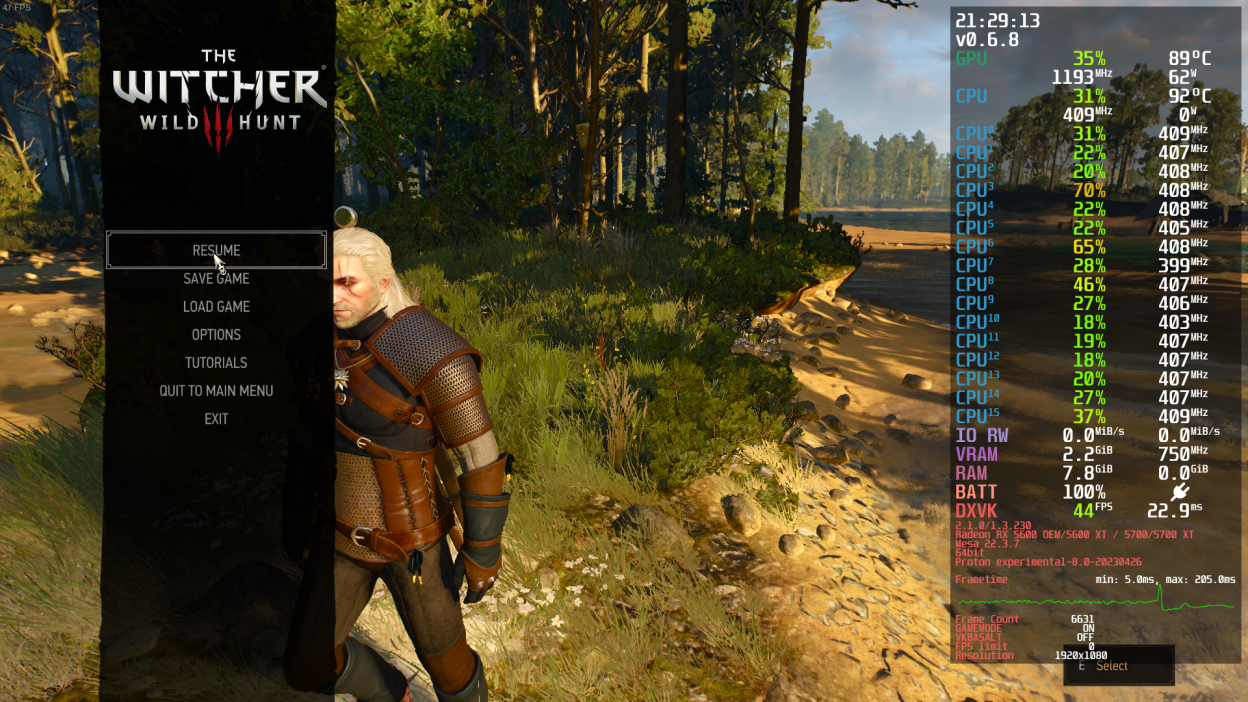
The Witcher 3 gradually lowers the CPU clock speeds until it hits 400-700 MHz which lowers my performance. I tried everything from changing the CPU governor to using different Proton versions. Even manually setting clock speeds and trying different BIOS options related to CPU power didn't fix my problem. I can confirm that it's not a heating problem since other games don't have such an unusual issue, my CPU can tolerate high temps like 93C, even if it's a heating issue clocks speeds shouldn't go below 400MHz.
Reproduction
1-Launch the game by any means either with DirectX11 or DirectX12 with our without launcher.
2-Set the graphics options to "LOW".
3-Continue your game or start a new one.
4-Either stay still or play the game normally a while.
5-Experience lower clocks speeds and lower performance.
Additional Information
Putting "WINE_CPU_TOPOLOGY=4:0,1,2,3 %command%" in launch options somehow fixes the problem but clock speed is still not in ideal range (it's locked to 2900 MHz) and performance is low.