Sine Mora EX
I too am finding the game to run perfectly. This is interesting since Sine Mora (original) shows a black screen.
System info: https://gist.github.com/nstgc/02457d7920931a3f8d69cc7b9fa41a2c
Interesting. The game has never started successfully for me.
Ubuntu 18.04.1, Ryzen 7 1800X, GTX 1080Ti O11G, Nvidia 396.54. 3x 4K monitors (which seems to cause issues with some games)
It crashes on the first screen where it tells you about autosave with the spinning wheel. I've tried different Proton options and both the 3.7.3 and 3.7.4 beta.
If possible, please provide a log file. You can find more details how to do it in a Proton FAQ, https://github.com/ValveSoftware/Proton/wiki/Proton-FAQ#how-to-enable-proton-logs
@jgacas Thanks for the info. Info added below;
https://gist.github.com/hamid-elaosta/b9d5504662a7c29935754f023de1da33
This time I got as far as the THQ logo before it crashed :smile:
System specs: https://gist.github.com/hamid-elaosta/1254fd07967de5b3f5050d35010bc0ca
EDIT: After further testing, I've found if I disable two of my three displays the game crashes every time if my remaining display is still 3840x2160, but, if I set my desktop resolution to 1920x1080 the game loads and plays perfectly but crashes to a black screen on exiting.
Confirmed.
Distro: Linux Mint 19 Tara
Processor: AMD Ryzen 7 1700
GPU: GTX 1070, Nvidia proprietary driver 396.54
RAM: 32GB
Kernel (custom) - 4.17.14 (optimized for Ryzen)
Resolution: 1920x1080
Proton 3.7-3
For me it runs fine with "High" settings, but show black screen in game with "Ultra" settings. And in both cases it hang on exit to desktop. So no, i can't confirm that it runs perfect.
Linux Mint 18.3, Nvidia GTX970 with 396.54, Proton 3.7.5 Beta.
I also used "Ultra" settings and did not encounter any problems. Only difference is that I used 3.7-3 version of Proton.
Retested with Proton 3.16-1: The only thing that wasn't working before was the alpha coverage, now the game crashes after displaying the thq nordic logo.
OS: "Manjaro Linux" (64 bit)
Kernel: 4.19.0-1-MANJARO (rc7)
CPU: AMD Ryzen 7 1700GPU: AMD Radeon R9 Nano (FIJI, DRM 3.27.0, LLVM 7.0.0)
GPU Driver: Mesa 18.2.2
Hello @undu, please add PROTON_LOG=1 %command% to the game's launch options and drag and drop the generated $HOME/steam-$APPID.log into the comment box.
Sure: steam-606730.log
3.16-2 Beta doesn't fix the crash
Distro: Linux Mint 19.1 Tessa (64 bit)
GPU: Vega 56
Driver/LLVM version: Mesa 19.1.0-devel/9.0.0
Kernel version: 5.1.0-050100-lowlatency
Proton version: 4.2-3
Launching the game, the screen goes black for a couple of seconds then game exits back to desktop. Tried also setting desktop resolution to 1080p.
steam-606730.1080p.log
steam-606730.proton-3.7-8.log
steam-606730_proton-4.2-3.log
system_info.txt
This looks like a line of interest in the log: fixme:process:GetNumaHighestNodeNumber (0x32f918): semi-stub
Hello @undu, are you still having an issue with this game? If you are, please double check that you have the vulkan-radeon and lib32-vulkan-radeon packages installed.
Tested it again with latest Proton on new PC and the game no longer hang on exit but still runs with black screen ingame on Ultra settings and runs normally on High settings.
sys.info.txt
I reinstalled the game again: the game keeps crashing after showing the THQ Nordic logo.
I've verified that both packages you mention are installed.
I can run Sekiro just fine and the DXVK HUD is displayed, while Sine Mora Doesn't show the DXVK HUD before crashing (but the steam overlay's fps do)
This happens with both vulkan drivers:
DXVK_HUD=1 VK_ICD_FILENAMES="/usr/share/vulkan/icd.d/radeon_icd.x86_64.json" %command% (radv)
DXVK_HUD=1 VK_ICD_FILENAMES="/usr/share/vulkan/icd.d/amd_icd64.json" %command% (amdvlk)
Are we sure it's not using DX9?
Thanks for retesting, looking at one of the logs again, it is using d3dx9_43.dll. Most if not all Ryzen/Threadripper users are probably hitting the GetNumaHighestNodeNumber issue. There's no good AMD gpu data points because the logs are indicating an issue with wine interacting with the cpu.
I think it is fair to say the game is working with the nvidia driver, a single 1920x1080 display with graphics set to High or lower, and quad-core cpu systems.
@hamid-elaosta, while testing did you happen to reduce the number of cpu cores exposed on the system or disable multithreading? If you can get the game into a workable state again and then switch your desktop back to 4k, does adding PROTON_FORCE_LARGE_ADDRESS_AWARE=1 %command% to the game's launch options help? (Hinted by err:d3d:wined3d_resource_allocate_sysmem Failed to allocate system memory. in your log.)
@Yar4e, a proton log of the game having trouble on your system with Ultra settings might have something of interest to ponder.
PROTON_FORCE_LARGE_ADDRESS_AWARE=1
This fixes the game here :)
The alpha blending used for vegetation renders incorrectly just like the original game, though. The rest is very smooth.
@kisak-valve, in addition to already described problem with black screen i get another one when retested game with log enabled - it may crash at first loading screen. I attached two log files: one with crash log and another one with blackscreen log (very big one!).
steam-606730-crash.log.tar.gz
steam-606730-blackscreen.log.tar.gz
Both logs have err:d3d:wined3d_resource_allocate_sysmem Failed to allocate system memory., so give the PROTON_FORCE_LARGE_ADDRESS_AWARE=1 %command% launch option a try.
Both logs have
err:d3d:wined3d_resource_allocate_sysmem Failed to allocate system memory., so give thePROTON_FORCE_LARGE_ADDRESS_AWARE=1 %command%launch option a try.
Yes, it works with this launch option! No more black screen with ultra settings and looks like the crash is fixed too by this (tried about 10 times to relaunch the game). Now it's your turn to make this game work "out of the box" somehow with this knowledge :)
System Information
- GPU: RX VEGA 56
- GPU Driver: 19.1.0+aco+git1568912505-b738bf06917-1bionic2 (Valves PPA)
- Kernel version: 5.3.1-050301-lowlatency
- Distro version: Linux Mint 19.2 Tina (64 bit) (Cinnamon)
- Proton version: 4.11-6
Retest Compatibility Report
Game now launches out of the box. The only issue is that without D9VK there is no foliage transparency as pictured below:
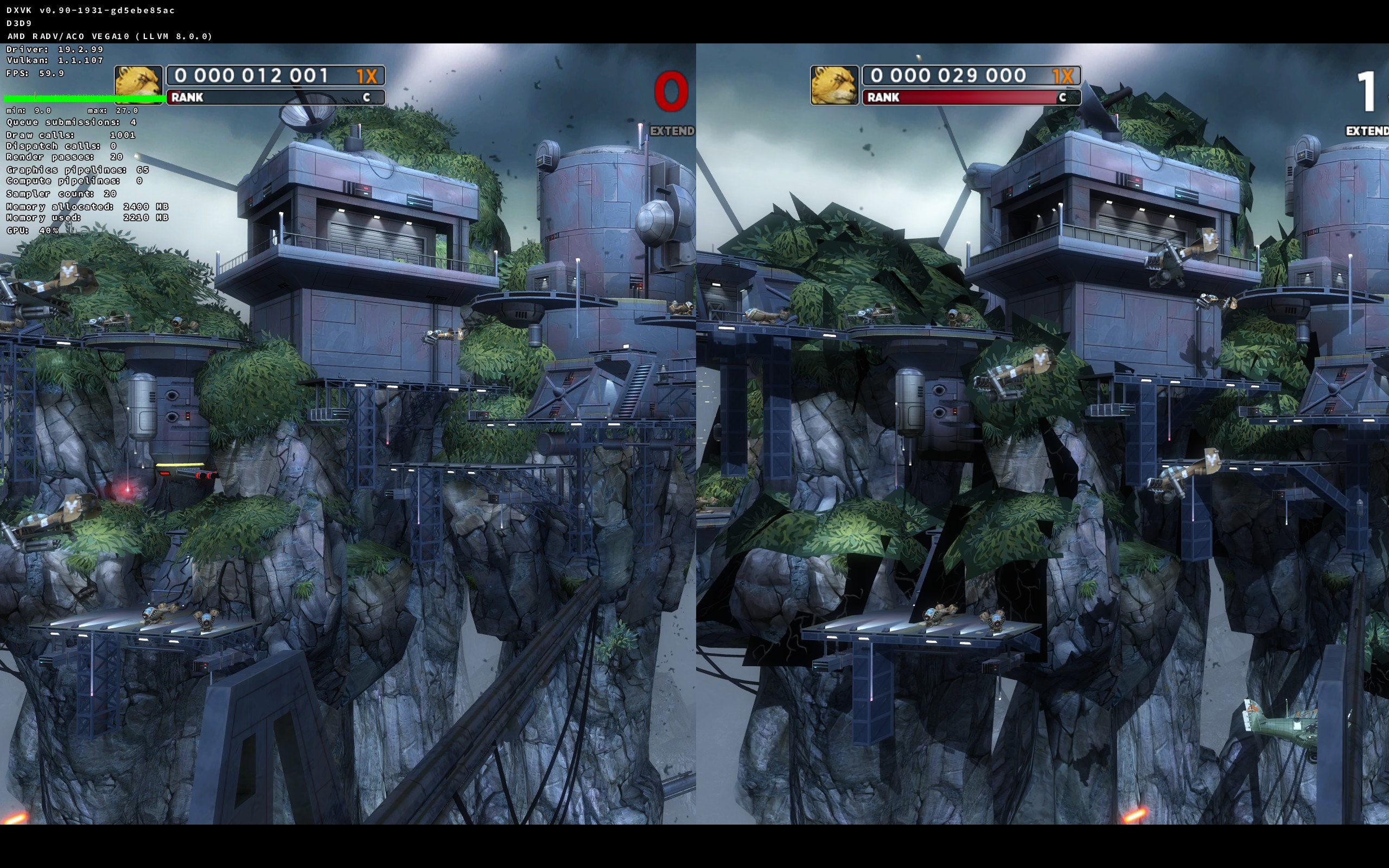
Left: D9VK Right: Out of the box
With launch option "PROTON_USE_D9VK=1 %command%" everything works perfectly :tada:
- Good Performance
- Switching between desktop/windowed works
- Nintendo Switch Controller Support Works
steam-606730-proton-4.11-6.log
steam-606730-proton-4.11-6-d9vk.log
system_info.txt
When D9VK becomes the default, I would say this is looking like Whitelist material.
Don't have the game on hand, but seeing plenty of reports saying this game only works on an lcd deck, it loads to an endless black screen on oled unless you launch it in desktop mode.
Tried it, before the os update it was not rendering at all on my oled deck, but after the update it is now rendering without issue, just had to change the resolution
Proton versions
proton 4.11-6x1 2019-09proton 3.7-8x1 2019-05proton 3.16-1x1 2018-10proton 3.7x1 2018-09proton 3.7-3x1 2018-08
Launch options
PROTON_USE_D9VK=1x1 2019-09PROTON_FORCE_LARGE_ADDRESS_AWARE=1x3 2019-05PROTON_FORCE_LARGE_ADDRESS_AWARE=1`x1 2019-05DXVK_HUD=1x1 2019-05PROTON_LOG=1x1 2018-10
Launch lines
PROTON_USE_D9VK=1 %command%x1 2019-09PROTON_FORCE_LARGE_ADDRESS_AWARE=1 %command%x3 2019-05DXVK_HUD=1 VK_ICD_FILENAMES="/usr/share/vulkan/icd.d/amd_icd64.json" %command%x1 2019-05DXVK_HUD=1 VK_ICD_FILENAMES="/usr/share/vulkan/icd.d/radeon_icd.x86_64.json" %command%x1 2019-05
DLLs
d3dx9_43.dllx1 2019-05
Game runs without any issues.
Specs:
Ubuntu 18.04
Intel Xeon X5460
Nvidia GTX 1060 3GB with 396.54 driver
Full spec: https://gist.github.com/jgacas/64704de0370633b265b2970b97ec7d35