Far Cry 3
@kisak-valve You are perhaps already aware but it therefore applies to all Uplay games (Assassin's Creed, Far Cry, For Honor, etc)
And I've seen similar issues for games requiring Origin as well.
Wine < 3.15 needs patches from Staging to have the possibility to connect correctly on UPlay.
@berillions Could you recommend a PPA that provides an updated Wine version which connects correctly to Uplay? If those patches need to be applied manually, could you give me a URL to point me to the right direction? I need some more clarification on this.
You can use the official wine repository for Ubuntu :
https://wiki.winehq.org/Ubuntu
Thanks. As much as I'd like to go add this PPA and update my Wine, that'd be way too easy. There's gotta be more to it than just that, right?
I can report the same issue. Tried installing uplay under wine-staging 3.14 (on Ubuntu 18.04) and I can log in normally. From there it installed Steam (Windows version) and I can launch the game this way. But as soon as the game runs past the video intro it crashes with in a few seconds. I hope this helps resolve the issues.
Well, we'll have to wait until they add to Proton a possibility to let Uplay connect like @berillions says
Adding my quarter-ounce of weight to this, I'd like to be able to play Fractured But Whole.
I'd like to play Fractured But Whole, which also requires UPlay. Pretty sure this is about UPlay keeping games from working, so don't mark my comment as off-topic. It's very much on-topic.
@kisak-valve
Is it worth merging in these?
https://github.com/ValveSoftware/Proton/issues/172
https://github.com/ValveSoftware/Proton/issues/1662
There is some progress on this issue, you can now select 'Proton 3.16 Beta' as 'Compatibility tool' in the Steam Play settings. This solves the issue of not being able to log in (I guess Proton versioning follows the Wine versioning so it's now on par with Wine 3.16, which makes it able to connect).
However... after logging in, it says 'Initializing...' and after a while it comes back telling me 'A Ubisoft services is currently unavailable'. I am able to then switch to offline mode, but it does not show the games from Steam under 'Games', even though I can verify online (on their site) the accounts are linked.
To work past "Initializing" screen you need to have 32-bit gnutls linked as described in #162.
OT: @Yoshi2889 your avatar makes me nervous :smile:
@dreamer I've tried the symlinking, doesn't solve it for me. I'm trying Assassin's Creed and it's the exact same situation as described here: https://github.com/ValveSoftware/Proton/issues/1757 (comments mention symlink doesn't solve it)
@1202software what symlink exactly have you created and where? Did you link to 32-bit version of gnutls30? What distribution are you using? I have Uplay working correctly for Valiant Hearts by installing corefonts and linking to gnutls (and no other tweaks); linking to 64-bit version or creating link with wrong name won't solve the problem.
@dreamer I'm on Arch, so I used:
sudo ln -s /usr/lib/libgnutls.so.30.14.11 /usr/lib/libgnutls.so.26
...as per this comment: https://github.com/ValveSoftware/Proton/issues/162#issuecomment-425779454
I'm not even sure it's a connection issue, because it does log me in (which requires a working internet connection).
@1202software You linked 64-bit library. Arch stores 32-bit libs in /usr/lib32. Install lib32-gnutls and fix your link - it should make Uplay work for you :)
[edit] also, avoid placing your link in /usr/ - it's better to create it in ~/.local/share/Steam/ubuntu12_32/steam-runtime/pinned_libs_32/.
@dreamer Yes, that's it! I did have the lib32-gnutls package installed, but it required the symlink. Also, as you suggested, I put the symlinks in the Steam-directory.
So anyone using Arch, with Proton 3.16 as compatibility tool, should get it working with:
sudo ln -s /usr/lib/libgnutls.so.30.14.11 ~/.local/share/Steam/ubuntu12_32/steam-runtime/pinned_libs_64/libgnutls.so.26
sudo ln -s /usr/lib32/libgnutls.so.30.14.11 ~/.local/share/Steam/ubuntu12_32/steam-runtime/pinned_libs_32/libgnutls.so.26
I will add it to the post about Assassin's Creed as well, because I now verified you can get it running fine with Steam/Proton. Thanks for your help!
For users of other distributions:
- Fedora and derivatives have 32-bit libs in
/usr/lib/, 64-but in/usr/lib64/ - Debian and derivatives have 32-libs in
/usr/lib/i386-linux-gnu/, 64-bit in/usr/x86_64-linux-gnu/ - Arch and derivatives have 32-libs in
/usr/lib32/, 64-bit in/usr/lib
Creating link just to lib in /usr/lib/ may or may not work, depending on what game needs and what distro puts in there ;)
Can confirm on debian stretch.
Using Proton 3.16-3 Beta and creating the links for gnutls worked.
The steam path is different tho and i linked libgnutls.so.30 which itself is a link to the real version.
This might make sense if there are minor library updates.
ln -s /usr/lib/x86_64-linux-gnu/libgnutls.so.30 ~/.steam/ubuntu12_32/steam-runtime/pinned_libs_64/libgnutls.so.26
ln -s /usr/lib/i386-linux-gnu/libgnutls.so.30 ~/.steam/ubuntu12_32/steam-runtime/pinned_libs_32/libgnutls.so.26
now with libgnutls tweak we can connect to Uplay but:
- Uplay WIndow is transparent or just black
- Uplay launch Steam installation instead of launch directly Far Cry 3, it doesn't recognize the Linux Steam client. The install can not continue because the Proton Steam folder is not empty
Someone has better results?
@legluondunet Uplay window being transparent will be fixed once you install corefonts. Let Uplay install Windows Steam client (just choose some new directory), but DO NOT let installer run Windows Steam (there's no reason to). Once installation will be done, Uplay will work and login normally.
@dreamer This is how far I've come now (with my own wine-3.19-based Proton build). But the game still won't start. It just opens a black window after the splash logo, then closes. The wine processes stay running, closing Uplay from the systray doesn't fix this.
So we have two new problems:
- The way Uplay titles start and stop is somewhat incompatible with how Proton expects titles to work. Not sure how to fix it but it could be a major inconvenience for many people.
- Something in wine/Proton is still incompatible with the game itself - at least for me.
I used a crack to overcome signing in to uplay, the game works great.
Oh yeah, here we are again... DRM aka digital restrictions management drives legal buyers into illegal actions... :-(
There we go again, posting this to let the subscribers (and hopefully Valve too) know where we are with this F-ing Uplay DRM:
After launching the game:
Step 1: input my credential
step 2: wait for a while
error message.
If I hit try again:
It says initializing... then takes forever
Same error message as before.
If I hit go offline:
Window goes away and then comes back
It says logging in, then window goes way, then comes back up, telling me I need to log in at least once. I hit OK and then I'm taken back to the initial email and password window.
And in order to make sure Uplay is actually connected and talking to its servers, I tried an incorrect password and it tells me it's wrong.
If I type in the correct password, I go back to step 1.
SteamPlay 3.16-4
In a nutshell, yes, Uplay now talks to its servers. But we're stuck in a loop bc it just won't launch the game.
After quite some time, and some Proton versions later, one would expect this to go away by now.
One would be so wrong..
@rdlf4 You could try reinstalling the game in Steam. I had a similar issue, where after an update the game would revert to the error you describe. Reinstalling solved it. Also, redoing the symlinking described above might help.
@1202software What Proton version are you using?
@rdlf4 Same as yours! My game broke because of a Steam update even though the Proton version remained the same.
@1202software Did you link to 32-bit version of gnutls30? What distribution are you using?
@rdlf4 Arch (pure Arch). See: https://github.com/ValveSoftware/Proton/issues/727#issuecomment-431571158
@SleepProgger 's comment did it for me.
But it still isn't over.
After symlinking, reinstalling the game, logging in to Uplay, it self-updated and then I have this:

The download button will try to install Steam, but I already have it (obviously).
There should be no download button to begin with, because I already have the game!
And Steam says the game is 'running' just because I have a Uplay instance.
Even after getting Uplay to work, it still manages to screw it. I'm out of ideas.
How did you guys get FarCry 3 to run?
==UPDATE==
Quitting Uplay triggered the game launcher/splash screen to show up.
But it still tries to install Steam (for Windows, I guess). Canceling it gives me an error msg.
Am I supposed to install Steam in order to play it?
==UPDATE2==
OK, I'm just going to go with whatever I'm given to see how far this goes..
So, once the game starts/is launched, it needs to detect Steam. It doesn't (for some reason), so it triggers a Steam installation. I go with it, and then we hit this roadblock:

What the heck? 'Destination must be empty'?! If it's empty, the install button greys out and there's no way to proceed. If it isn't, I'm stuck with that pop up message.
And that's where I'm stuck at.
@rdlf4 Look up the mentioned 'Steam' dir (somewhere in ~/.local/share/Steam/steamapps/compatdata/gameid/pfx/) and delete it. Then it should go.
@1202software The only problem with that is, as soon as I tell the installer to look into a hidden folder (.steam), it greys out the install button. How to proceed?
@rdlf4 Don't delete it from the installer, delete it from your filesystem via console/terminal or your system's file browser.
Can confirm on debian stretch.
Using Proton 3.16-3 Beta and creating the links for gnutls worked.
The steam path is different tho and i linkedlibgnutls.so.30which itself is a link to the real version.
This might make sense if there are minor library updates.ln -s /usr/lib/x86_64-linux-gnu/libgnutls.so.30 ~/.steam/ubuntu12_32/steam-runtime/pinned_libs_64/libgnutls.so.26 ln -s /usr/lib/i386-linux-gnu/libgnutls.so.30 ~/.steam/ubuntu12_32/steam-runtime/pinned_libs_32/libgnutls.so.26
Unfortunately, for some, whatever reason, Helldivers will no longer launch if libgnutls.so.26 is symlinked to pinned_libs (32 and 64). If the symlinked files are placed in those folders, the game will page fault, meaning it will say that it's running, then it syncs up, and then nothing happens.
The reason I'm pointing the finger at the symlinked files is because after those symlinks are removed, the game will launch again. For more info about it, I'm tracking it down and mentioning my steps right here.
Seems there is progress on the libgnutls front in steam-runtime just a few days ago:
https://github.com/ValveSoftware/steam-runtime/commit/ca34a8df9db1c3c0ce71aa96c64cd5606135f693
Looking forward to next release.
Seems there is progress on the libgnutls front in steam-runtime just a few days ago:
ValveSoftware/steam-runtime@ca34a8dLooking forward to next release.
Better late than never. I don't think libgnutls will make the headlines for the next regular update though.
So this might be available for Steam Beta before it even becomes a feature for the stable version.
Game seems to be broken again after the latest Steam update? Can anyone confirm?
Can confirm on debian stretch.
Using Proton 3.16-3 Beta and creating the links for gnutls worked.
The steam path is different tho and i linkedlibgnutls.so.30which itself is a link to the real version.
This might make sense if there are minor library updates.ln -s /usr/lib/x86_64-linux-gnu/libgnutls.so.30 ~/.steam/ubuntu12_32/steam-runtime/pinned_libs_64/libgnutls.so.26 ln -s /usr/lib/i386-linux-gnu/libgnutls.so.30 ~/.steam/ubuntu12_32/steam-runtime/pinned_libs_32/libgnutls.so.26
@1202software @SleepProgger This trick no longer works. I guess it's because SteamPlay has been updated, because it doesn't matter which Proton version I decide to go with, if those symlinks are placed into the pinned_libs folders (32 and 64), the game will not launch. I also tried symlinking only the 32-bit one and launch Helldivers in 32-bit safe mode, same thing: the game will not launch.
Any other ideas to get Helldivers going and also Far Cry 3? It lookslike regression is something we're gonna have to get used to, or work around it. :-/
EDIT: the reason I'm pointing that out is because once the symlinked files are removed, Helldivers will launch just fine and it goes without saying, but Far Cry 3 will not go past the login screen, regressing the progress back to the very same issue from this thread.
@rdlf4 In another thread the consensus is that it's the updated Uplay that's causing trouble. After downloading the last update for Uplay it complains it cannot connect to the internets. Uplay could connect before the update (otherwise it could not have downloaded the update) so it is not caused by Steam.
I would say 'it has nothing to do with Proton', but it does, because most likely, if they update Proton to 3.21 (the version number refers to the version of Wine used) it will work, since it works when you use Wine 3.21 (and does not in 3.16, only with the 'staging' build).
Of note: this means that probably all Ubisoft titles are 'broken' for the moment.
I've tested with my own proton branch rebased to 4.0 rc2. I removed the proton prefix (pfx in compatdata) and restarted Farcry 3. It no longer tried to install the Windows Steam client prerequisite which is good. It also installed Uplay and I logged in successfully. But it will then direct me into the Uplay shop to download the game. You'd have to completely exit Uplay so that no process within this wine prefix will run, then restart Farcry 3 from the Linux Steam library. This time (and successive runs) it will launch into the game successfully.
But it now hangs there on some sort of loading screen with audio or music which seems to play very slow (although pitched correctly as it seems). It eventually never finishes this video, HD activity is very low. I killed the processes. Not sure what's wrong...
@kakra Great effort! Wondering though, this is based on Wine 4.0-RC2, wouldn't it be better (work better) to build on stable 3.21?
3.21 isnt stable, it is a dev release. (All biweekly releases are dev)
Stable is the 3.0 branch. And soon 4.0.
@tingvarsson Still... seems 3.21 works, so the question remains.
But what's the deal with libgnutls on v3? An update ago, it was just a matter of symlinking it into pinned_libs folders and now, most of my steamplay games wont even launch because of it (I can tell because after symlinks are removed, my games launch just fine).
@1202software This is the release candidate, expect a stable version wine 4.0 in 3-4 weeks maybe... Not sure what the schedule of the winedevs is but it was announced to go stable around beginning of next year.
Actually, 3.21 isn't stable... 3.0 is, 3.21 is the dev version, a moving target, not stable. ;-)
Could you try if my branch works for you? So we could see if it may have been fixed meanwhile?
@kakra I got around to trying out 'wine-proton' and managed to get my game working again with Steam!
I should point out that the game I'm trying to run is Assassin's Creed Unity, whereas this thread is about Far Cry 3. I wound up here because they both require Uplay to run and exhibit the same errors/problems.
What did I do?
- Quit Steam (seems obvious, but you could forget about it running in the background)
- Follow the instructions for installing wine-proton: https://github.com/kakra/wine-proton, first the section 'Getting started...' for the prerequisites, then 'Cloning the Repository and Setup, 'Compiling from Source', this produces a tarball
- Backup Proton:
cp -r '~/.local/share/Steam/steamapps/common/Proton 3.16 Beta' '~/.local/share/Steam/steamapps/common/Proton 3.16 bk' - Unpack the tarball to the Proton directory:
tar -xvf dist.tar.xz -C '~/.local/share/Steam/steamapps/common/Proton 3.16 Beta' - Delete the
pfxfrom the game for good measure: for me that isrm -rf ~/.local/share/Steam/steamapps/compatdata/289650/pfxand the lock-file:rm -rf ~/.local/share/Steam/steamapps/compatdata/289650/pfx.lock - Start Steam
- Make sure the correct 'compatibility tool' is selected in Steam Settings (ie. 'Proton 3.16-6 Beta')
- Launch the game. This will recreate the
pfxand first update, then launch Uplay. This differs from the 'usual' install, where it would install Steam for Windows and then would launch the game. - Login to Uplay. It shows your games and it says 'Download' next to them, but DON'T.
- Quit Uplay - it will ask to completely exit, say 'yes'
- Relaunch the game. Now it will not show the Uplay stuff but directly launch the game.
This was my experience with ACU. I first tried it with Proton 3.16-4 but that would not launch the game. It got a bit further then usual, showing the game splash screen, but immediately quit after that. Out of curiosity, I tried Proton 3.7.8 as well, this got stuck with a nasty Windows dialog complaining about the 'Ubisoft Launcher' missing.
So it does require the latest Proton 3.16-6 Beta. After that, the only 'finicky' bit is the Uplay business (step 9) where it won't load the game the first time, but just quit and it will run fine every other time.
@kakra: one thing I tried figuring out, is if I could register a new Proton in the Steam Settings menu. So I can choose 'Proton 4.0 RC3' and leave the regular Protons as is (I would make a copy of the Proton 3.16-6 Beta and rename it before 'spicing it up'). I've looked through a bunch of .vdf files, but could not find anything relevant. Any thoughts?
@1202software Yes, I'm working on that feature to expose my version as a separate compat tool in Steam. There are a few bits missing: My version doesn't compile the steam API proxy DLL yet (and a few other deps like VR stuff which is really not my priority), and I'd like to create a custom launcher like the "proton" script. I'm currently still thinking about the best strategy.
BTW: I'd be interested in stability / performance reports, also we could add instructions for different games. If you want to help out, please head over to my repo.
@1202software try https://github.com/ValveSoftware/Proton#install-proton-locally
@kakra @arno01 I managed to get it listed separately in the Steam 'compatibility tool' menu:
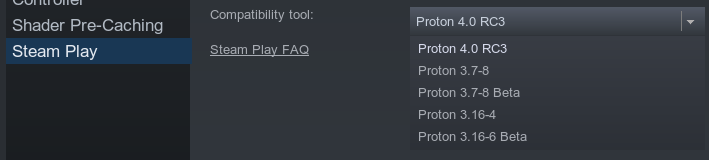
I've built Proton with these instructions: https://github.com/ValveSoftware/Proton - don't bother with the 'setting up a build environment' and build it without Steam Runtime. After doing make install it will create the mentioned compatibilitytools.d (in full: ~/.steam/steam/compatibilitytools.d) directory and put the locally built Proton in it.
I then tried to unpack proton-wine to this new folder, but the built and 'spiced' Proton did not work at all. After that, I moved the Proton (proton-localbuild) directory from compatibiltytools.d and placed the proton-wine from the common folder (~/.local/share/Steam/steamapps/common) in it.
I then copied the compatibilitytool.vdf file from the locally built Proton to the proton-wine folder, because it looked like that controlled the listing of the tool. I changed the name, started Steam, and now it gets listed separately, and best of all: it works great!
@1202software great! Did you manage to get Assassin's Creed Origins working?
@1202software This is great news... Could you head over to my repo and post an issue for this? I'd like to be interested in the tree structure and the contents of some vdf configuration files.
PS: I'm currently struggling with a bit flip error in one of my memory modules, so my reaction time would be slower. I didn't expect a memory module to go bad after 7 years. :-(
Moved this comment to https://github.com/ValveSoftware/Proton/issues/928#issuecomment-450565316 as it's about Assassin's Creed Origins.
Hello @arno01, please use #928 to discuss Assassin's Creed Origins.
@kakra Yes, sure. I wonder if it would be sufficient to create the compatibilitytools.d folder and put the compatibilitytool.vdf file in it, but now that I've already done the make install I would have to remove Steam entirely to be sure the make is not priming Steam in some way. Perhaps you can find out about that.
@kakra @1202software in my case (using official Valve Proton/Wine repo), it was enough to run make dist and copy my ./dist/* to .local/share/Steam/compatibilitytools.d/proton-my1/. (after make all)
I can see proton-my1 in the Steam compatibility tool list.
To accelerate compilation time use -jN where N is amount of your CPUs, e.g.: make -j$(getconf _NPROCESSORS_ONLN) all
The final layout I have:
I used
./configure.sh --no-steam-runtime --build-name proton-my1 --with-ffmpeg
user@proton:~/proton$ ls -lah dist/
total 419M
drwxrwxr-x  3 user user 4.0K Dec 30 12:06 .
drwxrwxr-x 38 user user 4.0K Dec 30 12:06 ..
-rw-rw-r--  1 user user 2.5K Dec 29 15:24 LICENSE
-rw-rw-r--  1 user user  688 Dec 29 21:58 compatibilitytool.vdf
drwxrwxr-x  6 user user 4.0K Dec 29 18:24 dist
-rw-rw-r--  1 user user  13K Dec 29 15:24 filelock.py
-rwxrwxr-x  1 user user  21K Dec 29 15:24 proton
-rw-rw-r--  1 user user  89K Dec 29 15:24 proton_3.7_tracked_files
-rw-rw-r--  1 user user  215 Dec 29 15:24 toolmanifest.vdf
-rwxrwxr-x  1 user user  578 Dec 29 15:24 user_settings.sample.py
-rw-rw-r--  1 user user   11 Dec 29 17:42 version
Edit: removed proton_dist.tar.gz since it isn't necessary to make.
- Uplay WIndow is transparent or just black
Uplay window being transparent will be fixed once you install corefonts.
Thanks for figuring this one, @legluondunet !
As the license forbids Valve from using the proprietary "corefonts" fonts you can just use already included liberation fonts Proton 3.16 already has them (by default).
(To those who compile Proton/Wine from source code): If you are building a custom wine with Valve's patches on the top of it, then you need to apply this commit https://github.com/ValveSoftware/wine/commit/63f934962cb97d69ed71604985716e7479f822b1 as well, otherwise fonts won't work. Don't forget to run make fonts or make all so it installs the fonts to your ./dist/dist/share/fonts/
Proton 3.16-7 Beta, Uplay is now working for me & Far Cry 3 lives again, guess what I'm doing this weekend? :) happy happy happy. Thanks Devs. :+1: Side note Uplay asks for my password every time I start it up in Proton, not a huge issue if you ask me.
Proton 3.16-7 Beta, Uplay is now working for me & Far Cry 3 lives again, guess what I'm doing this weekend? :) happy happy happy. Thanks Devs. Side note Uplay asks for my password every time I start it up in Proton, not a huge issue if you ask me.
So I also have it where Uplay now successfully opens while using 3.16-7, but launching Far Cry 3 will simply open a black window that won't progress to the game.
Hello @RiderExMachina, please copy your system information from Steam (Steam -> Help -> System Information) and put it in a gist, then include a link to the gist in this issue report. Also, please add PROTON_LOG=1 %command% to the game's launch options and drag and drop the generated $HOME/steam-$APPID.log into the comment box.
@kisak-valve Here is my information: https://gist.github.com/RiderExMachina/80981af4326748346048b9e1d12534e1
I ended up cutting a lot out of the log file, but here is the gist of it: https://gist.github.com/RiderExMachina/83add1a626cf6b637ed84f2582f0e527
Two things:
-
it got hung up running
trace:seh:call_stack_handlers handler at 0x7bc83880 returned 2for about 840,000 lines. Nothing else -
Later it got hung up running
trace:module:LdrGetDllHandle L"kernel32.dll" -> 0x7b420000 (load path L"Z:\\home\\rider\\.local\\share\\Steam\\steamapps\\common\\Far Cry 3\\bin;C:\\Program Files (x86)\\Steam;C:\\windows\\system32;C:\\windows\\system;C:\\windows;.;C:\\windows\\system32;C:\\windows;C:\\windows\\system32\\wbem")but only for about 500-1000 lines.
Hello,
I just tried to launch far cry 3 with latest Proton version, it doesn't launch.
My gisthub:
https://gist.github.com/legluondunet/8570a65372c3f7b9fea9c365c449cc59
I joined you two log files: the first launch of the game, when it installed dependencies and second one is a normal launch.
steam-220240_log1_first_launch.zip
steam-220240_log2.zip
Each time I launched Far Cry 3, nothing happened, I have to kill manually [upc.exe] :
$ ps aux |grep exe
legluondunet    6660  0.0  0.0 372760  9380 ?        Sl   févr.19   0:00 /usr/lib/gvfs/gvfsd-trash --spawner :1.22 /org/gtk/gvfs/exec_spaw/0
legluondunet    6855  0.0  0.0 360040  6644 ?        Sl   févr.19   0:00 /usr/lib/gvfs/gvfsd-burn --spawner :1.22 /org/gtk/gvfs/exec_spaw/1
legluondunet    6909  0.0  0.0 717896  8464 ?        Sl   févr.19   0:00 /usr/lib/gvfs/gvfsd-network --spawner :1.22 /org/gtk/gvfs/exec_spaw/3
legluondunet    6923  0.0  0.0 845244 13720 ?        Sl   févr.19   0:00 /usr/lib/gvfs/gvfsd-smb-browse --spawner :1.22 /org/gtk/gvfs/exec_spaw/5
legluondunet    6940  0.0  0.0 523224  7488 ?        Sl   févr.19   0:03 /usr/lib/gvfs/gvfsd-dnssd --spawner :1.22 /org/gtk/gvfs/exec_spaw/8
legluondunet   10218  0.0  0.1 2021932 29592 ?       Ssl  12:11   0:00 C:\windows\system32\services.exe
legluondunet   10221  0.0  0.2 1988712 36820 ?       Sl   12:11   0:00 C:\windows\system32\winedevice.exe
legluondunet   10230  0.0  0.1 1890608 28844 ?       Sl   12:11   0:00 C:\windows\system32\plugplay.exe
legluondunet   10235  0.0  0.2 2669716 36464 ?       Sl   12:11   0:00 C:\windows\syswow64\PnkBstrA.exe
legluondunet   10240  0.2  0.2 1980332 36232 ?       Sl   12:11   0:00 C:\windows\system32\winedevice.exe
legluondunet   10248  0.0  0.2 1942096 40580 ?       Ssl  12:11   0:00 C:\windows\system32\explorer.exe /desktop
legluondunet   10377  0.7  0.0      0     0 tty2     Zl+  12:12   0:01 [upc.exe] <defunct>
legluondunet   10549  0.0  0.0  15664  1060 pts/0    S+   12:15   0:00 grep --color=auto exe
legluondunet   29927  0.0  0.1 943128 22028 ?        Sl   févr.19   0:00 /usr/lib/gvfs/gvfsd-http --spawner :1.22 /org/gtk/gvfs/exec_spaw/27
legluondunet   31811  0.0  0.0 377964 13056 ?        Sl   10:48   0:00 /usr/lib/gvfs/gvfsd-recent --spawner :1.22 /org/gtk/gvfs/exec_spaw/50
At the first launch, Steam installed dependencies then Uplay launched for the first time, I can see the Uplay window and it updated to his latest version and never restart (only defunct mode).
Thank you for your help.
I found a temporary solution for the black screen as I'm getting it too.
go to "C:\Users[user name]\Documents\My Games\Far Cry 3" & edit GamerProfile.xml
find the entry UseD3D11="1" & change it to UseD3D11="0" the game works as normal after that, it means you'll be playing the DX9 version but at least it's playable again.
I got around the black screen by disabling uPlay's game overlay in the general uPlay settings. DirectX 11 is selected in game settings and working.
Using: Proton 3.16-7, Nvidia 4.15.27, GTX 970, i7-3770, 16GB DDR3 on Manjaro Linux
Each time I launched Far Cry 3, nothing happened, I have to kill manually [upc.exe] :
I had another computer with the same issue. Fixed it by deleting the ~/.local/share/Steam/steamapps/common/Proton 3.16 Beta folder, then re-installing that version of Proton in Steam uder Library -> Tools. I also deleted the compat data folder for Far Cry 3 for good measure: ~/.local/share/Steam/steamapps/compatdata/220240.
I got around the black screen by disabling uPlay's game overlay in the general uPlay settings. DirectX 11 is selected in game settings and working.
Can confirm: this works for me as well.
Just tried with latest Proton 3.16-8 version, I had this problem:
- nothing else than a black window when I launched the game: disabling uPlay's game overlay in the general uPlay settings resolved this problem
- Uplay did not exit cleanly and stayed as a zomby process, I had to kill manually several process .
But I can now play this game with Steamplay in Directx11 mode, it's a big step forward.
I joined you my log file.
steam-220240.zip
https://gist.github.com/legluondunet/8570a65372c3f7b9fea9c365c449cc59
Crashes randomly during the gameplay. The latest log i caught:
long paste
Unhandled exception: page fault on write access to 0x00000000 in 32-bit code (0x7a424c2b).
Register dump:
 CS:0023 SS:002b DS:002b ES:002b FS:0063 GS:006b
 EIP:7a424c2b ESP:0338f4d0 EBP:00000000 EFLAGS:00010246(  R- --  I  Z- -P- )
 EAX:00000000 EBX:00000000 ECX:25e73010 EDX:00000000
 ESI:00000000 EDI:00001000
Stack dump:
0x0338f4d0:  00001000 00000000 71500050 00100010
0x0338f4e0:  00000001 00000001 ffffffac 25e73090
0x0338f4f0:  00000000 00004000 264265d8 00100000
0x0338f500:  00000000 00000000 0000007e 000002bc
0x0338f510:  00040000 00004031 00000007 00000000
0x0338f520:  71540480 0000085b 00000800 00000000
Backtrace:
=>0 0x7a424c2b in i965_dri.so (+0x73bc2b) (0x00000000)
0x7a424c2b: movl	%edx,0x0(%eax)
Modules:
Module	Address			Debug info	Name (227 modules)
PE	  350000-  3a4000	Deferred        ubiorbitapi_r2_loader
PE	  3b0000-  3fc000	Deferred        uplay_r1_loader
PE	  400000-  433000	Deferred        farcry3
PE	  440000-  63f000	Deferred        d3dx9_43
PE	  640000-  689000	Deferred        binkw32
PE	  c30000-  ff3000	Deferred        overlay
PE	 1120000- 13c5000	Deferred        ubiorbitapi_r2
PE	 2aa0000- 2b19000	Deferred        openvr_api_dxvk
PE	 35b0000- 37b7000	Deferred        d3dcompiler_43
PE	 3e50000- 3ede000	Deferred        xaudio2_7
PE	 8260000- 8361000	Deferred        pbsv
PE	 8920000- 8932000	Deferred        pbags
PE	 8a50000- 8a62000	Deferred        pbag
PE	 8b30000- 8c2f000	Deferred        pbcls
PE	 8f20000- 901f000	Deferred        pbcl
PE	 e030000- e451000	Deferred        uplay_r1
PE	10000000-123be000	Deferred        fc3
PE	6f400000-6f58b000	Deferred        dxgi
ELF	70811000-70900000	Deferred        libasound.so.2
ELF	70a59000-70ae5000	Deferred        libvorbisenc.so.2
ELF	70ae5000-70bc4000	Deferred        libgcrypt.so.20
ELF	70bc4000-70c53000	Deferred        libsndfile.so.1
ELF	70c53000-70d00000	Deferred        libsystemd.so.0
ELF	7100b000-7107e000	Deferred        libflac.so.8
ELF	71671000-71700000	Deferred        libpulsecommon-12.2.so
ELF	71815000-71868000	Deferred        libdbus-1.so.3
ELF	720e3000-7212a000	Deferred        libnss_resolve.so.2
ELF	721aa000-73b98000	Deferred        libicudata.so.63
ELF	73b98000-78050000	Deferred        libllvm-7.so
PE	78050000-780b9000	Deferred        msvcp100
ELF	78a0b000-78a21000	Deferred        midimap<elf>
  \-PE	78a10000-78a21000	\               midimap
ELF	78a21000-78a44000	Deferred        libgpg-error.so.0
ELF	78a44000-78aa0000	Deferred        libpulse.so.0
PE	78aa0000-78b5f000	Deferred        msvcr100
ELF	78b61000-78b7a000	Deferred        msacm32<elf>
  \-PE	78b70000-78b7a000	\               msacm32
ELF	78b7a000-78ba8000	Deferred        libvorbis.so.0
ELF	78baa000-78bdc000	Deferred        winealsa<elf>
  \-PE	78bb0000-78bdc000	\               winealsa
ELF	78d35000-79103000	Deferred        libvulkan_intel.so
ELF	79103000-792d2000	Deferred        libicuuc.so.63
ELF	792d2000-79453000	Deferred        libxml2.so.2
ELF	79453000-79700000	Deferred        libvulkan_radeon.so
ELF	79c0e000-79c27000	Deferred        libresolv.so.2
ELF	79c27000-79c50000	Deferred        winepulse<elf>
  \-PE	79c30000-79c50000	\               winepulse
ELF	79c50000-79c73000	Deferred        mmdevapi<elf>
  \-PE	79c60000-79c73000	\               mmdevapi
ELF	79c8a000-79c9e000	Deferred        libnss_myhostname.so.2
ELF	79c9e000-79ce9000	Deferred        dsound<elf>
  \-PE	79ca0000-79ce9000	\               dsound
ELF	79ce9000-7a800000	Export          i965_dri.so
ELF	7a800000-7a93f000	Deferred        opengl32<elf>
  \-PE	7a820000-7a93f000	\               opengl32
ELF	7a948000-7a9be000	Deferred        ddraw<elf>
  \-PE	7a950000-7a9be000	\               ddraw
ELF	7b400000-7b7ea000	Deferred        kernel32<elf>
  \-PE	7b420000-7b7ea000	\               kernel32
ELF	7b7ee000-7b835000	Deferred        libnss_mymachines.so.2
ELF	7b835000-7b85a000	Deferred        gameux<elf>
  \-PE	7b840000-7b85a000	\               gameux
ELF	7b85a000-7b86f000	Deferred        avrt<elf>
  \-PE	7b860000-7b86f000	\               avrt
ELF	7b8bf000-7b8d7000	Deferred        steamoverlayvulkanlayer.so
ELF	7b8d7000-7b900000	Deferred        libdrm_intel.so.1
ELF	7ba05000-7ba18000	Deferred        libxcb-randr.so.0
ELF	7ba18000-7ba27000	Deferred        libdrm_radeon.so.1
ELF	7ba27000-7ba44000	Deferred        libxcb-glx.so.0
ELF	7ba44000-7babe000	Deferred        libglx_mesa.so.0
ELF	7babe000-7bc00000	Deferred        libp11-kit.so.0
ELF	7bc00000-7bd14000	Deferred        ntdll<elf>
  \-PE	7bc10000-7bd14000	\               ntdll
ELF	7bd16000-7bd21000	Deferred        libpciaccess.so.0
ELF	7bd2f000-7bd5b000	Deferred        liblzma.so.5
ELF	7bd6d000-7bdf8000	Deferred        libgmp.so.10
ELF	7bdf8000-7c000000	Deferred        libgnutls.so.30
ELF	7c000000-7c004000	Deferred        <wine-loader>
ELF	7c005000-7c010000	Deferred        libdrm_nouveau.so.2
ELF	7c010000-7c025000	Deferred        libdrm.so.2
ELF	7c025000-7c044000	Deferred        libglapi.so.0
ELF	7c064000-7c09f000	Deferred        libhogweed.so.4
ELF	7c09f000-7c0dd000	Deferred        libnettle.so.6
ELF	7c0dd000-7c0f2000	Deferred        libtasn1.so.6
ELF	7c0f2000-7c184000	Deferred        libcups.so.2
ELF	7c184000-7c1f1000	Deferred        setupapi<elf>
  \-PE	7c190000-7c1f1000	\               setupapi
ELF	7c1f1000-7c24c000	Deferred        libvulkan.so.1
ELF	7c24e000-7c251000	Deferred        libxshmfence.so.1
ELF	7c251000-7c25a000	Deferred        libxcb-sync.so.1
ELF	7c25a000-7c25f000	Deferred        libxcb-present.so.0
ELF	7c27f000-7c298000	Deferred        hid<elf>
  \-PE	7c280000-7c298000	\               hid
ELF	7c298000-7c2da000	Deferred        winevulkan<elf>
  \-PE	7c2a0000-7c2da000	\               winevulkan
ELF	7c2da000-7c2f2000	Deferred        vulkan-1<elf>
  \-PE	7c2e0000-7c2f2000	\               vulkan-1
ELF	7c2f2000-7c332000	Deferred        winspool<elf>
  \-PE	7c300000-7c332000	\               winspool
ELF	7c332000-7c359000	Deferred        libudev.so.1
ELF	7c359000-7c360000	Deferred        libxcb-dri3.so.0
ELF	7c360000-7c367000	Deferred        libxcb-dri2.so.0
ELF	7c367000-7c36c000	Deferred        libx11-xcb.so.1
ELF	7c36c000-7c3a5000	Deferred        wbemprox<elf>
  \-PE	7c370000-7c3a5000	\               wbemprox
ELF	7c3a5000-7c400000	Deferred        dbghelp<elf>
  \-PE	7c3b0000-7c400000	\               dbghelp
ELF	7c404000-7c408000	Deferred        libxdamage.so.1
ELF	7c408000-7c411000	Deferred        libffi.so.6
ELF	7c458000-7c460000	Deferred        libnss_dns.so.2
ELF	7c55d000-7c566000	Deferred        libogg.so.0
ELF	7c566000-7c5d6000	Deferred        libncursesw.so.6
ELF	7c5db000-7c5e3000	Deferred        libasyncns.so.0
ELF	7c5e6000-7c624000	Deferred        libvklayer_steam_fossilize.so
ELF	7c635000-7c643000	Deferred        libwayland-client.so.0
ELF	7c643000-7c661000	Deferred        libelf.so.1
ELF	7c661000-7c66d000	Deferred        libdrm_amdgpu.so.1
ELF	7c66d000-7c681000	Deferred        api-ms-win-core-file-l2-1-1<elf>
  \-PE	7c670000-7c681000	\               api-ms-win-core-file-l2-1-1
ELF	7c6b6000-7c6de000	Deferred        propsys<elf>
  \-PE	7c6c0000-7c6de000	\               propsys
ELF	7c6de000-7c79f000	Deferred        windowscodecs<elf>
  \-PE	7c6f0000-7c79f000	\               windowscodecs
ELF	7c79f000-7c7cd000	Deferred        libpng12.so.0
ELF	7c819000-7c82d000	Deferred        api-ms-win-core-localization-l1-2-1<elf>
  \-PE	7c820000-7c82d000	\               api-ms-win-core-localization-l1-2-1
ELF	7c82d000-7c841000	Deferred        api-ms-win-core-fibers-l1-1-1<elf>
  \-PE	7c830000-7c841000	\               api-ms-win-core-fibers-l1-1-1
ELF	7c841000-7c85f000	Deferred        jsproxy<elf>
  \-PE	7c850000-7c85f000	\               jsproxy
ELF	7c85f000-7c89c000	Deferred        winhttp<elf>
  \-PE	7c870000-7c89c000	\               winhttp
ELF	7c89c000-7c8a4000	Deferred        libxfixes.so.3
ELF	7c8a4000-7c8b0000	Deferred        libxcursor.so.1
ELF	7c8b0000-7c8be000	Deferred        libxrender.so.1
ELF	7c8be000-7c8d2000	Deferred        libxi.so.6
ELF	7c8d2000-7c8d6000	Deferred        libxcomposite.so.1
ELF	7c8d6000-7c8dd000	Deferred        libxxf86vm.so.1
ELF	7c8de000-7c8f2000	Deferred        api-ms-win-core-synch-l1-2-0<elf>
  \-PE	7c8e0000-7c8f2000	\               api-ms-win-core-synch-l1-2-0
ELF	7c8f2000-7c929000	Deferred        uxtheme<elf>
  \-PE	7c900000-7c929000	\               uxtheme
ELF	7c929000-7c9bc000	Deferred        winex11<elf>
  \-PE	7c930000-7c9bc000	\               winex11
ELF	7cbb0000-7cbec000	Deferred        libexpat.so.1
ELF	7cbec000-7cc38000	Deferred        libfontconfig.so.1
ELF	7cc38000-7ccb1000	Deferred        libpcre.so.1
ELF	7ccb1000-7cded000	Deferred        libglib-2.0.so.0
ELF	7cded000-7cf00000	Deferred        libharfbuzz.so.0
ELF	7cf00000-7cf40000	Deferred        libpng16.so.16
ELF	7cf40000-7d016000	Deferred        libfreetype.so.6
ELF	7d016000-7d03e000	Deferred        mpr<elf>
  \-PE	7d020000-7d03e000	\               mpr
ELF	7d03e000-7d058000	Deferred        libz.so.1
ELF	7d059000-7d05e000	Deferred        libxinerama.so.1
ELF	7d0a4000-7d11f000	Deferred        wininet<elf>
  \-PE	7d0b0000-7d11f000	\               wininet
ELF	7d11f000-7d139000	Deferred        wsock32<elf>
  \-PE	7d120000-7d139000	\               wsock32
ELF	7d139000-7d164000	Deferred        msacm32<elf>
  \-PE	7d140000-7d164000	\               msacm32
ELF	7d164000-7d21c000	Deferred        winmm<elf>
  \-PE	7d170000-7d21c000	\               winmm
ELF	7d21c000-7d246000	Deferred        iphlpapi<elf>
  \-PE	7d220000-7d246000	\               iphlpapi
ELF	7d246000-7dc00000	Deferred        shell32<elf>
  \-PE	7d260000-7dc00000	\               shell32
ELF	7dc00000-7dcba000	Deferred        msvcrt<elf>
  \-PE	7dc20000-7dcba000	\               msvcrt
ELF	7ddba000-7df09000	Deferred        wined3d<elf>
  \-PE	7ddd0000-7df09000	\               wined3d
ELF	7df09000-7df4b000	Deferred        d3d9<elf>
  \-PE	7df10000-7df4b000	\               d3d9
ELF	7df4b000-7df91000	Deferred        usp10<elf>
  \-PE	7df50000-7df91000	\               usp10
ELF	7df91000-7e0cb000	Deferred        comctl32<elf>
  \-PE	7dfa0000-7e0cb000	\               comctl32
ELF	7e0cb000-7e22c000	Deferred        libsdl2-2.0.so.0
ELF	7e22d000-7e23f000	Deferred        libbz2.so.1.0
ELF	7e23f000-7e253000	Deferred        psapi<elf>
  \-PE	7e240000-7e253000	\               psapi
ELF	7e253000-7e278000	Deferred        imm32<elf>
  \-PE	7e260000-7e278000	\               imm32
ELF	7e278000-7e2c6000	Deferred        dinput8<elf>
  \-PE	7e280000-7e2c6000	\               dinput8
ELF	7e2c6000-7e33c000	Deferred        shlwapi<elf>
  \-PE	7e2d0000-7e33c000	\               shlwapi
ELF	7e33c000-7e3cf000	Deferred        gdiplus<elf>
  \-PE	7e350000-7e3cf000	\               gdiplus
ELF	7e420000-7e551000	Deferred        oleaut32<elf>
  \-PE	7e440000-7e551000	\               oleaut32
ELF	7e551000-7e5d0000	Deferred        rpcrt4<elf>
  \-PE	7e560000-7e5d0000	\               rpcrt4
ELF	7e5d0000-7e729000	Deferred        ole32<elf>
  \-PE	7e5f0000-7e729000	\               ole32
ELF	7e729000-7e743000	Deferred        version<elf>
  \-PE	7e730000-7e743000	\               version
ELF	7e743000-7e870000	Deferred        gdi32<elf>
  \-PE	7e750000-7e870000	\               gdi32
ELF	7e870000-7ea72000	Deferred        user32<elf>
  \-PE	7e880000-7ea72000	\               user32
ELF	7ea72000-7eaeb000	Deferred        advapi32<elf>
  \-PE	7ea80000-7eaeb000	\               advapi32
ELF	7eaeb000-7eb25000	Deferred        ws2_32<elf>
  \-PE	7eaf0000-7eb25000	\               ws2_32
ELF	7ef9f000-7efb4000	Deferred        libnss_files.so.2
ELF	7efba000-7efd1000	Deferred        xinput1_3<elf>
  \-PE	7efc0000-7efd1000	\               xinput1_3
ELF	f758f000-f7596000	Deferred        libxdmcp.so.6
ELF	f7596000-f759b000	Deferred        libxau.so.6
ELF	f759b000-f75c7000	Deferred        libxcb.so.1
ELF	f75c7000-f75e4000	Deferred        libgcc_s.so.1
ELF	f75e4000-f7646000	Deferred        libgldispatch.so.0
ELF	f7646000-f765b000	Deferred        libxext.so.6
ELF	f765b000-f77a8000	Deferred        libx11.so.6
ELF	f77a8000-f77cb000	Deferred        libglx.so.0
ELF	f77cd000-f789a000	Deferred        libm.so.6
ELF	f7a1e000-f7a24000	Deferred        libdl.so.2
ELF	f7a24000-f7a2f000	Deferred        librt.so.1
ELF	f7a2f000-f7a93000	Deferred        libgl.so.1
ELF	f7a93000-f7c70000	Deferred        libc.so.6
ELF	f7c70000-f7c91000	Deferred        libpthread.so.0
ELF	f7c92000-f7c9c000	Deferred        libuuid.so.1
ELF	f7cdd000-f7e94000	Export          libwine.so.1
ELF	f7e94000-f7ed0000	Deferred        gameoverlayrenderer.so
ELF	f7ed2000-f7efc000	Deferred        ld-linux.so.2
ELF	f7eff000-f7f00000	Deferred        [vdso].so
Threads:
process  tid      prio (all id:s are in hex)
0000000c services.exe
	000000f9    0
	00000028    0
	00000024    0
	0000001f    0
	0000001a    0
	00000016    0
	00000011    0
	0000000e    0
	0000000d    0
0000000f winedevice.exe
	00000017    0
	00000015    0
	00000014    0
	00000010    0
00000018 plugplay.exe
	0000001c    0
	0000001b    0
	00000019    0
0000001d PnkBstrA.exe
	00000021    0
	00000020    0
	0000001e    0
00000022 winedevice.exe
	00000029    0
	00000027    0
	00000026    0
	00000025    0
	00000023    0
0000002a explorer.exe
	0000002e    0
	0000002d    0
	0000002c    0
	0000002b    0
00000044 UbisoftGameLauncher.exe
	000000ba    0
	00000046    0
	00000045    0
00000047 upc.exe
	000000a4    0
	0000010f    0
	0000010d    0
	000000b0    0
	000000af   -2
	000000ae    0
	00000076    0
	00000072    0
	00000071    0
	00000070    0
	0000006f    0
	0000006e    0
	0000006d    0
	0000006c   -2
	00000069    0
	00000068    0
	00000067    0
	00000066    0
	00000065   -2
	00000064    0
	00000063    0
	00000062    0
	00000061    0
	00000060    0
	0000005f   -2
	0000005e   -2
	0000005d    0
	0000005c    0
	0000005b    0
	0000005a    0
	00000059    0
	00000058    0
	00000057    0
	00000056    0
	00000055    0
	00000054    0
	00000053    0
	00000052    0
	00000051    0
	00000050    0
	0000004f    0
	00000048    0
00000077 UplayWebCore.exe
	000000ad    0
	000000a1    0
	000000a0   -2
	0000009f    0
	0000009e    0
	0000009d    0
	0000009c    0
	0000009b    0
	0000009a    0
	00000099    0
	00000098    0
	00000097    0
	00000096   -2
	00000095   -2
	00000094    0
	00000093    0
	00000078    0
000000b8 (D) Z:\home\xdshot\.local\share\Steam\steamapps\common\Far Cry 3\bin\farcry3.exe
	000000ff    1
	000000ec    0
	000000eb    0
	000000ea    0
	000000e9   -2
	000000e8   -2
	000000df   -1
	000000de    0
	000000dd   -1
	000000dc    0
	000000db    0
	000000da    0
	000000d9   15
	000000d8   15
	000000d7   15
	000000d6    0
	000000d5    1
	000000d4    1
	000000d3    0
	000000d2    0 <==
	000000d0    0
	000000cf    0
	000000ce    0
	000000cc    0
	000000cb    0
	000000ca    0
	000000c9   -2
	000000c8   -2
	000000c2    2
	000000c1    0
	000000c0    0
	000000bf    0
	000000be    0
	000000bd    0
	000000bc    0
	000000bb    0
	000000b9    0
000000f7 PnkBstrB.exe
	000000fb    0
	000000fa    0
	000000f8    0
System information:
    Wine build: wine-3.16
    Platform: i386 (WOW64)
    Version: Windows 7
    Host system: Linux
    Host version: 5.0.2-arch1-1-ARCH
I use proton 4.2-2, the game plays launches and plays fine but it crashes on checkpoints, when it tries to save or when you die and it tries to load the last checkpoint. Anyone here had to deal with that?
I use proton 4.2-2, the game plays launches and plays fine but it crashes on checkpoints, when it tries to save or when you die and it tries to load the last checkpoint. Anyone here had to deal with that?
What options are you launching the game with?
Additionally, try launching the game with
PROTON_LOG=1 %command%
and then attach the log generated to your post for additional technical details.
I use proton 4.2-2, the game plays launches and plays fine but it crashes on checkpoints, when it tries to save or when you die and it tries to load the last checkpoint. Anyone here had to deal with that?
What options are you launching the game with?
Additionally, try launching the game with
PROTON_LOG=1 %command%
and then attach the log generated to your post for additional technical details.
Hello,
I have the same problem as dkoukoul but for my part it crash also during the game. I use proton 4.2-3 and it crash when I launch the game with the command "DXVK_HUD=1 %command%" or without. I try to play with low or high setting and the problem is still there.
I try the command of rdlf4 in order to obtain the log generated, this last is here:
steam-220240.zip
Thank you for your help.
@legluondunet how can you get to uplay settings if after the first uplay execution it tries to go straight into the game? I get it saying it is logging in, then logged in, then starting the game, the black screen. I do not have an opportunity to set anything. I don't think this is something a non-technical user will be able to solve. Ubuntu 18.04, nvidia driver 418.56 (gtx 1070), Proton 4.2-4 here.
Uninstalling and reinstalling allowed me to prevent autologin and change the settings. I could have tried to find such settings in a configuration file but I was lazy and this worked. :P
System Information:
CPU: 16-Core (2-Die) AMD Ryzen Threadripper 1950X
(-MT MCP MCM-)speed: 3115 MHz
Kernel: 5.1.1-2-MANJARO x86_64
Mem: 4153.9/24044.0 MiB
Description:
When launching the game it immediately crashes after successfully launching through Uplay. I seem to have an Issue specific to my Amd Threadripper Cpu Segfaulting. Disabled the Uplay Overlay to rule this out, went through fresh installing Steam, the Operating system(Manjaro), and swapping out between a Vega64 and Nvidia 1080TI with Fresh Driver installations to make sure it wasn't Gpu specific.
Confirmed on Kernels 4.19,4.20,5.0, and 5.1.
Tested with Proton Version 4.2-5
Proton Debug Log Via Gist Below
https://gist.github.com/jph168/88c66dd46d6d566844013c767ace4d3d
Major issues:
- With Proton 4.2-5 the game not start (show only black screen with artifacts) until you disable in-game overlay.

- The game periodically crashes until you not add
"PROTON_FORCE_LARGE_ADDRESS_AWARE=1 %command%"to launch options.
Minor issues:
- Appearing on random locations rectangular dimming in game:

This issue also persist in Far Cry 4 https://github.com/ValveSoftware/Proton/issues/2143#issuecomment-494173333
How it looks in dynamic I demonstrate on Youtube video: https://youtu.be/obNiUtwS5jc
$ inxi -bM
System:    Host: localhost.localdomain Kernel: 5.1.0-1.fc31.x86_64 x86_64 bits: 64 Desktop: Gnome 3.33.2
           Distro: Fedora release 31 (Rawhide)
Machine:   Type: Desktop Mobo: ASUSTeK model: ROG STRIX X470-I GAMING v: Rev 1.xx serial: <root required>
           UEFI: American Megatrends v: 2304 date: 05/03/2019
CPU:       8-Core: AMD Ryzen 7 2700X type: MT MCP speed: 2129 MHz min/max: 2200/3700 MHz
Graphics:  Device-1: Advanced Micro Devices [AMD/ATI] Vega 20 [Radeon VII] driver: amdgpu v: kernel
           Display: wayland server: Fedora Project X.org 1.20.5 driver: amdgpu resolution: 3840x2160~60Hz
           OpenGL: renderer: AMD Radeon VII (VEGA20 DRM 3.30.0 5.1.0-1.fc31.x86_64 LLVM 8.0.0) v: 4.5 Mesa 19.1.0-rc4
Network:   Device-1: Intel I211 Gigabit Network driver: igb
           Device-2: Realtek RTL8822BE 802.11a/b/g/n/ac WiFi adapter driver: r8822be
Drives:    Local Storage: total: 11.57 TiB used: 8.39 TiB (72.5%)
Info:      Processes: 489 Uptime: 2h 38m Memory: 31.37 GiB used: 18.04 GiB (57.5%) Shell: bash inxi: 3.0.34
@NTMan Can you record a renderdoc trace please?
@NTMan Can you record a renderdoc trace please?
I would be love to record a trace, but renderdoccmd does not work in the steam environment
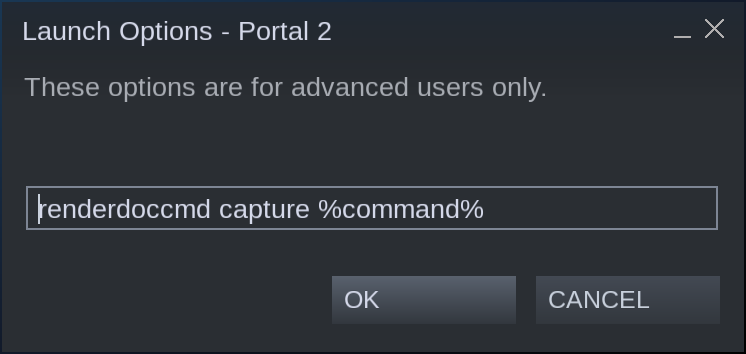
I added to launch options renderdoccmd capture %command% in several games. The games after it stop launch.
What about 'export ENABLE_VULKAN_RENDERDOC_CAPTURE=1' ?
@NTMan Can you record a renderdoc trace please?
Here trace https://mega.nz/#F!g0oFHC7D!1ixV7S7uPkKGT2Ctr9XqVA
Right side of screen are dimmed.
I assume RADV_DEBUG=nofastclears fixes the rendering issue?
I assume RADV_DEBUG=nofastclears fixes the rendering issue?
Unfortunately not
Does this revert help https://patchwork.freedesktop.org/patch/308717/?series=61646&rev=1 ?
Does this revert help https://patchwork.freedesktop.org/patch/308717/?series=61646&rev=1 ?
Unfortunately also not
Trace with patched mesa: https://mega.nz/#F!8hQVnCaQ!0OLpuXzyXzJjAzkZtC1hxw
Hmm, this is totally unexpected.
Hmm, this is totally unexpected.
I am added my save files, they should be placed in directory ~/.steam/steam/steamapps/compatdata/220240/pfx/drive_c/Program Files (x86)/Ubisoft/Ubisoft Game Launcher
I hope this can helps.
Appearing on random locations rectangular dimming in game
I suspect this is a rendering issue with DXVK as the rectangles are collision of unseen huts (behind hills, trees, other huts, etc). Something is happening with the translation process, but I don't know enough about graphics APIs to go further into detail or give possible solutions.
This rendering issue exists because the game expects different clear behaviour based on your GPU vendor, and the Vulkan drivers don't necessarily match the D3D11 drivers. DXVK has a workaround for that already, but for some reason that stopped working.
Should be fixed as of https://github.com/doitsujin/dxvk/commit/3b1e03f9887fc7b540c90e9e34e32b46612281bb when using Mesa 19.0.4 or newer. Note that this will break older Mesa versions, but we're effectively working around a per-vendor hack in the game that isn't particularly robust.
@doitsujin Awesome. Thanks for all your hard work!
@doitsujin Today proton was updated to v4.2-9. By change log DXVK v1.2.3 should be shipped with this version proton, but the issue still here.
@NTMan Proton 4.2-9 still ships DXVK 1.2.1 with an Unreal Engine 4 fix.
@doitsujin Would you happen to know what Unity version this Proton release brings? Or does it not bring any Unity version at all?
See, the reason I'm asking is because I still cannot manage to run PCBS on Proton.
However, if I sideload the game and run it on Crossover with Hardware acceleration enabled, I get past the brands screen, have access to the menu and everything works as it should.. I mean, almost everything. There is no text or characters on the game.
I wonder why that is.
Hey guys!
I decided to play Far Cry 3 today. This discussion was super helpful.
So, I ran into a problem.
I start Far Cry 3 via Steam, it says "Running", but nothing happens.
And I found a solution
sudo killall UplayCrashRepor
It looks like Proton doesn't know how to handle the crash reporter window or something like that.
I killed it and Uplay imediately popped up.
Hope my comment will help someone
For those of you who have been following this thread and are unaware, Proton 4.11 has been released. And this is big news because it features D9VK Support.
So if FarCry 3 struggles to run in DX11 on your machine, it might be a good idea to switch to DirectX 9 from the game menu. After that, exit the game, go to its properties and then set PROTON_USE_D9VK=1 as the launch parameter (along with DRI_PRIME=1 if you're running this game on a laptop) and see how it goes.
Does anyone know how to get the uplay launcher to show up? I unfortunately only found out you have to disable the overlay after already running the game. Now, when I launch the game it appears to skip the uplay launcher (it is running in the bg and draws it's overlay though).
Using Proton 5.0-5 (but the same is with 5.0-4), the game doesn't work.
What happens:
- Uplay works perfectly at first run
- Game is stuck at the loading screen
- Alt-Tab is impossible, I have to switch to a console
- I have to manually kill
farcry3_d3d11.exe - Then Uplay doesn't respond: clicking on the tray icon doesn't bring it up
- Steam remains in a "Running" state
- I have to kill
upc.exe
This is the log, launched the executable with PROTON_LARGE_ADDRESS_AWARE=1 flag.
The log:
steam-220240.log
This is the log using PROTON_USE_WINED3D=1 flag, the results are the same.
The log:
steam-220240.log
Game and Uplay refuses to start at all using PROTON_NO_D3D11 and/or PROTON_NO_D3D10
Tried it today. Uplay is launching fine. But as soon as I run the game, I get the FC3 splash screen and another black window, where the game is supposed to run in.
Happens on current official experimental build and 6.3-5
Currently running pop!OS with NVIDIA proprietary drivers
Tried it today. Uplay is launching fine. But as soon as I run the game, I get the FC3 splash screen and another black window, where the game is supposed to run in.
Happens on current official experimental build and 6.3-5Currently running pop!OS with NVIDIA proprietary drivers
Same here on Kubuntu 21.04.
Tested with Proton Experimental and 6.3-6.
nVidia GTX 1080 - 470.63.01
For those with a black window: FC3 may start in D3D9 mode, and that will hang for ages at least because wine complains about invalid shaders in the compiler. If I remember correctly, you'll have to set it to D3D11 mode manually in that case by editing a config file. Or D3D10? Don't remember...
For those with a black window: FC3 may start in D3D9 mode, and that will hang for ages at least because wine complains about invalid shaders in the compiler. If I remember correctly, you'll have to set it to D3D11 mode manually in that case by editing a config file. Or D3D10? Don't remember...
That's exactly whats happening, I presume you can change it to DirectX 11 in a config file since I can't in game?
Strangely Far Cry 3 Blood Dragon does not have this issue.
FC3 may fall back to D3D9 more easily if it failed to start before... But ever since I changed it in the config file, it runs. But I don't remember which file it was but I found it on some game settings wiki.
I guess you are referring to the pcgamingwiki [entry about Far Cry 3](entry about Far Cry 3). It mentions GamerProfile.xml, which on proton resides under <steam prefix>/steamapps/compatdata/220240/pfx/drive_c/users/steamuser/My Documents/My Games/Far Cry 3/GamerProfile.xml. There's the following line in there:
<RenderProfile MSAALevel="2" AlphaToCoverage="2" SSAOLevel="1" SDSM="0" ResolutionX="2560" ResolutionY="1080" Quality="optimal" QualityEditor="editor_ps3" Fullscreen="1" Borderless="0" UseD3D11="0" D3D11MultithreadedRendering="0" WidescreenLetterbox="0" UseWidescreenFOV="1" FOVScaleFactor="1.2" EnableSubResolution="0" SubResolutionX="960" SubResolutionY="540" VSync="0" RefreshRate="0" DisableMip0Loading="0" GPUMaxBufferedFrames="1" ShowFPS="0" Brightness="1" Contrast="1" GammaRamp="1" AllowAsynchShaderLoading="1">
So there's the UseD3D11 directive, which if at "0" should be changed to "1" to reactivate DirectX11.
Fixed it, you disable the Uplay overlay, and after that, the game launches.
I also added "PULSE_LATENCY_MSEC=90 PROTON_LARGE_ADDRESS_AWARE=1 %command%" to the game's custom launch options as recommended on ProtonDB.
This was with Proton 6.3-6
Not sure why, but after having to install Ubuntu on a new SSD, the game doesn't launch. Proton Experimental and Proton 6.3-7 refuses to load dll's.
Here's the three error's in the proton log when I attempt to launch the game:
- err:steam:initialize_vr_data Could not load libopenvr_api.so.
- err:module:import_dll Library mfc100.dll (which is needed by L"Z:\home\edgars\.steam\debian-installation\steamapps\common\Far Cry 3\bin\FC3UpdaterSteam.exe") not found
- err:module:LdrInitializeThunk Importing dlls for L"Z:\home\edgars\.steam\debian-installation\steamapps\common\Far Cry 3\bin\FC3UpdaterSteam.exe" failed, status c00001
Also dropped the entire log for anyone interested.
@Eddy-Pin I had the same error, then I went to the terminal, issued: WINEPREFIX=~/.local/share/Steam/steamapps/compatdata/220240/pfx winetricks → selected "Select standard wineprefix" → Install Windows-DLL and searched for mfc100.dll, it's there.
But it wasn't enough: when trying to run Far Cry 3 again I'm met with a Windows dialog (through wine of course) saying "Far Cry 3 didn't find necessary registry, reinstalling it [the game] might solve the issue.". Checked proton logs, nothing useful...
Weird, after installing this other games: TES: Oblivion, Warhammer 40K Dawn Of War, Resident Evil 5, Halo Wars Definitive Edition, I just reinstalled Far Cry 3, without changes and it worked; fired up Steam autoinstaller (for DirectX and Uplay) and everything.
I think the other games installed some missing modules in Wine prefix, but it's just a guess.
I think the other games installed some missing modules in Wine prefix, but it's just a guess.
This won't happen, each game has its own private wine prefix.
I had the same error, then I went to the terminal, issued:
WINEPREFIX=~/.local/share/Steam/steamapps/compatdata/220240/pfx winetricks→ selected "Select standard wineprefix" → Install Windows-DLL and searched for mfc100.dll, it's there.
Please don't do this, do not use your system wine for a Proton-wine prefix, it can damage the DLL installation of the prefix. Rather, use protontricks instead.
It's more likely that using winetricks on the prefix damaged something, and some time later (after you installed the other games), some Proton update was downloaded and applied to the prefix, essentially "repairing" it.
Please don't do this, do not use your system wine for a Proton-wine prefix, it can damage the DLL installation of the prefix. Rather, use protontricks instead.
Thanks for the heads up.
It's more likely that using winetricks on the prefix damaged something, and some time later (after you installed the other games), some Proton update was downloaded and applied to the prefix, essentially "repairing" it.
Now that you've mentioned it, I remember deleting the game's prefix contents. I think that's exactly what happened.
Proton Experimental 22-07-14 Update - New Issues in Far Cry 3
Issue transferred from https://github.com/ValveSoftware/Proton/issues/5993.
@K3zter posted on 2022-07-14T13:13:41:
Currently playing through Far Cry 3 on Steam Deck using Proton Experimental, was working okay however in the latest update there are strange colour issues and visual artefacts - when blood decals appear on the screen (e.g. when skinning an animal or being shot at), they are now luminous green, when going underwater there are flashes of various colours often filling the entire screen. Particle effects around glowing objects such as fire are also strangely discoloured.
@K3zter Can you explain how to reproduce? Can you upload a screenshot of the issue? Does proton 7 work fine? Is it Proton Experimental Bleeding Edge? thanks!
@K3zter Also, could you please copy your system information from Steam (Steam -> Help -> System Information) and put it in a gist, then include a link to the gist in this issue report?
Hey, thanks for picking this up! I'll try to address all your queries:
@hakzsam
- To reproduce, you just go out to any body of water and swim around near the surface, or kill an animal and skin them
- Proton 7 does not load for me with this game, it hangs on the first loading screen. The game used to work fine in Proton Experimental until it did an update earlier today.
- I was using "standard" Proton Experimental I guess, not bleeding edge - didn't know bleeding edge existed until now, however I enabled it and the issue seems to have vanished so it may have already been fixed!
Here is an imgur gallery with some screenshots (and one showing my settings)
@alasky17
- Here is a gist containing my Steam system info. As mentioned before it is a Steam Deck.
The game works out of the box with Proton Experimental, however you need to disable the Steam overlay otherwise the game will get stuck in an infinite loading loop on the first screen.
And annoying the Ubisoft Client does not close when the game is exited.
Proton-GE:
proton-ge.log
Proton-9.0:
proton9.log
Doesn't work with all versions of proton on steam and 9-27 GE
I can confirm that this game no more launch, whatever Proton version/Ge-Proton version I used.
I made my tests on a fresh install.
Log joined (Proton experimental).
I installed and completed the game a month ago. It was running without an issue on Proton 9.
Now after a fresh install it doesn't start. It used to run the installscript for a while and then start the Ubisoft launcher which prompted for a login.
None of this is happening now.
This game now requires mfc100.dll, which can be installed with protontricks:
protontricks 220240 mfc100
Might affect other games with Ubisoft Connect.
protontricks 220240 mfc100
Just tested, the game still didn't launch, nothing happened, log joined.
Edit: I deleted wineprefix (compatdata/220240) , now the game is working normally with Proton experimental.
I deleted the Wine Prefix for the game (~/.local/share/Steam/steamapps/compatdata/220240/) to let Proton create a fresh one on launch. Magically, for some reason, everything worked as expected and the Launcher and the game now work.
Used Proton Experimental.
@legluondunet Seems like an issue with Mesa. Are you possibly trying to run the game with 64-bit Vulkan? Both Far Cry 3 the game and Ubisoft Connect are 32-bit.
You could also try the new WoW64 mode (Proton 10+) and run everything in 64-bit:
PROTON_USE_WOW64=1 %command%
@legluondunet Seems like an issue with Mesa. Are you possibly trying to run the game with 64-bit Vulkan? Both Far Cry 3 the game and Ubisoft Connect are 32-bit.
You could also try the new WoW64 mode (Proton 10+) and run everything in 64-bit:
PROTON_USE_WOW64=1 %command%
There is no more issue from my side. The game did not launch 3 weeks ago with a fresh install.
But now everything is OK.
I don't think it's a MESA thing, more a Proton Experimental update.
During loading to main menu, game closes with:
1626878.999:0020:0180:err:msvcrt:_wassert (L"0",L"../src-wine/dlls/d3dx9_36/d3dx_helpers.c",322)
Assertion failed: 0, file ../src-wine/dlls/d3dx9_36/d3dx_helpers.c, line 322

1626879.001:0020:0180:trace:seh:raise (22)
1626879.004:0020:0180:fixme:msvcrt:__clean_type_info_names_internal (7A474208) stub
ERROR: Could Not Get Primary Adapter Handle
...
Affects all Proton10 versions, but not Proton9.
Before the assertion even with full proton log everything before this is seemingly normal and identical to previous proton versions output.
Not an issue with file descriptor limit as Proton9 is unaffected, and the game + everything wine included only use ~7000 fds (not even close to the limit).
None of the seemingly relevant environment options for proton seemed to change this behavior.
Hello @RoydZeller, please add PROTON_LOG=1 %command% to the game's launch options and attach the generated $HOME/steam-$APPID.log to this issue report as a file. (Proton logs compress well if needed.)
Apparently I managed to step on all the landmines.
First issue, steam runtime sandbox was preventing games from reading a directory:
- Proton prefix had a symlink from
drive_c/users/steamuser/Documentsto$HOME/Documents $HOME/Documentswas actually symlinked to a target outside of$HOME- Game crashes when attempting to access saves from
Documents/My Games
This actually broke multiple games and which were fixed when PRESSURE_VESSEL_FILESYSTEMS_RW was set to the target dir.
I know Wine by default links matching user dirs to $HOME ones, but most Proton versions do not do this by default. Likely happened due to running 3rd party programs to get the game into a running state and the links were not replaced by real dirs by proton.
Second:
- Couldn't simply use Wine to play this, because the game crashes if the CPU has too many cores, and only proton has the env to limit core count visible to the game.
WINE_CPU_TOPOLOGY=4 %command%
Third:
- Actually getting into fixing the assert, the wine version proton is currently based on is just bugged. Latest wine already seems to have this fixed, no clue why an assertion in d3dx9_36 is triggered when FC3 uses d9dx9_43.
- Getting this fixed DLL to proton, there seems to be no issue if the dll is simply replaced, couldn't get a WINEDLLOVERRIDES to work for this one.
( TMPD="lib/wine/i386-windows/d3dx9_43.dll"; cp "/usr/$TMPD" "$HOME/.steam/steam/compatibilitytools.d/[ProtonVer]/files/$TMPD" )
If using PROTON_USE_WOW64=1 different DLLs need to be replaced, cba
Game works, for now...
Proton versions
proton experimentalx10 2025-05proton 9.0x1 2025-04proton 6.3-7x1 2021-10proton 6.3-6x1 2021-08proton 5.0-5x1 2020-03proton 4.11x1 2019-07proton 4.2-9x1 2019-06proton 4.2-5x1 2019-06proton 4.2-4x1 2019-05proton 4.2-2x3 2019-05proton 4.2-3x1 2019-05proton 3.16-8x1 2019-03proton 3.16x5 2019-02proton 3.16-7x3 2019-02proton 3.16-4x1 2018-12
Launch options
PROTON_USE_WOW64=1`x1 2025-12WINEDLLOVERRIDESx1 2025-12WINE_CPU_TOPOLOGY=4x1 2025-12PROTON_LOG=1x4 2025-12PROTON_USE_WOW64=1x2 2025-05WINEPREFIX=~/.local/share/Steam/steamapps/compatdata/220240/pfxx2 2022-07PROTON_LARGE_ADDRESS_AWARE=1x2 2021-08PROTON_NO_D3D10x1 2020-03PROTON_NO_D3D11x1 2020-03PROTON_USE_WINED3D=1`x1 2020-03PROTON_USE_D9VK=1x1 2019-07RADV_DEBUG=nofastclearsx2 2019-06PROTON_FORCE_LARGE_ADDRESS_AWARE=1x1 2019-06DXVK_HUD=1x1 2019-05
Launch lines
WINE_CPU_TOPOLOGY=4 %command%x1 2025-12PROTON_USE_WOW64=1 %command%x2 2025-05PULSE_LATENCY_MSEC=90 PROTON_LARGE_ADDRESS_AWARE=1 %command%x1 2021-08PROTON_FORCE_LARGE_ADDRESS_AWARE=1 %command%x1 2019-06DXVK_HUD=1 %command%x1 2019-05
Upstream links
- ValveSoftware/Proton/issues/5993x1 2022-07
- ValveSoftware/Proton/issues/2143x1 2019-06
- ValveSoftware/Proton/issues/571x1 2018-12
- ValveSoftware/Proton/issues/928x1 2018-12
- ValveSoftware/Proton/issues/632x1 2018-12
- ValveSoftware/Proton/issues/162x1 2018-10
- ValveSoftware/Proton/issues/1757x1 2018-10
- ValveSoftware/Proton/issues/1662x1 2018-10
- ValveSoftware/Proton/issues/172x1 2018-10
DLLs
d3dx9_43.dllx1 2025-12mfc100.dllx4 2025-05kernel32.dllx1 2019-02
Launching Far Cry 3 via Steam Play makes a Uplay window to pop up and request that the user logs in at least once before we can use offline mode. Because games running via Steam Play do not connect to a network (so far), that Uplay window keeps the game from starting. Typing in username and password and then hitting Log in button won't change anything.
Steam System Info: https://gist.github.com/rdlf4/b77e018feb5104584927851c448f5a63