Final Fantasy XV
So I tried running FFXV directly from the Steam Client and, although it got me a bit further, it seems to imply FFXV is a no go.
I can't attach the log file because it's a 60MB file, and GitHub won't allow files bigger than 10MB, but the important part seems to be this:
69284.019:0008:0009:trace:module:load_dll looking for L"usp10.dll" in L"Z:\\home\\ugopozo\\.local\\share\\Steam\\steamapps\\common\\FINAL FANTASY XV;C:\\Program Files (x86)\\Steam;C:\\windows\\system32;C:\\windows\\system;C:\\windows;.;C:\\windows\\system32;C:\\windows;C:\\windows\\system32\\wbem"
69284.020:0008:0009:trace:module:load_dll Found L"C:\\windows\\system32\\usp10.dll" for L"usp10.dll" at 0x7fece3750000, count=-1
69284.031:0008:0009:trace:seh:NtRaiseException code=c0000005 flags=0 addr=0x7fece339a2c2 ip=7fece339a2c2 tid=0009
69284.031:0008:0009:trace:seh:NtRaiseException  info[0]=0000000000000000
69284.031:0008:0009:trace:seh:NtRaiseException  info[1]=ffffffffffffffff
69284.031:0008:0009:trace:seh:NtRaiseException  rax=0000000000000002 rbx=0052006100350030 rcx=00000000c0000033 rdx=0000000000000000
69284.031:0008:0009:trace:seh:NtRaiseException  rsi=0000000001906590 rdi=0000000000226f50 rbp=00610056004e0032 rsp=0000000000226ba8
69284.031:0008:0009:trace:seh:NtRaiseException   r8=000000007bcc40e0  r9=0000000000003fd1 r10=0000000000000000 r11=000000000010ace8
69284.031:0008:0009:trace:seh:NtRaiseException  r12=0065003500390057 r13=0053006e00520044 r14=005a00730039006d r15=0059006a00740057
69284.031:0008:0009:trace:seh:call_vectored_handlers calling handler at 0x6a404550 code=c0000005 flags=0
69284.031:0008:0009:trace:seh:call_vectored_handlers handler at 0x6a404550 returned 0
69284.031:0008:0009:trace:seh:call_vectored_handlers calling handler at 0x6f275d60 code=c0000005 flags=0
69284.031:0008:0009:trace:seh:call_vectored_handlers handler at 0x6f275d60 returned 0
69284.031:0008:0009:trace:seh:dwarf_virtual_unwind function 7fece339a2c2 base 0x7fece339a040 cie 0x7fece33e49e8 len 14 id 0 version 1 aug 'zR' code_align 1 data_align -8 retaddr %rip
69284.031:0008:0009:trace:seh:execute_cfa_instructions 7fece339a040: DW_CFA_def_cfa %rsp, 8
69284.031:0008:0009:trace:seh:execute_cfa_instructions 7fece339a040: DW_CFA_offset %rip, -8
69284.031:0008:0009:trace:seh:dwarf_virtual_unwind fde 0x7fece3410478 len 11c personality (nil) lsda (nil) code 7fece339a040-7fece339acc5
69284.031:0008:0009:trace:seh:execute_cfa_instructions 7fece339a040: DW_CFA_advance_loc 2
69284.031:0008:0009:trace:seh:execute_cfa_instructions 7fece339a042: DW_CFA_def_cfa_offset 16
69284.031:0008:0009:trace:seh:execute_cfa_instructions 7fece339a042: DW_CFA_offset %r15, -16
According to a quick Google search, a c0000005 exception is an ACCESS_VIOLATION kernel failure. Since Final Fantasy XV incorporates Denuvo DRM technology, and Steam Play explicitly warns about invasive DRM as a impediment to running some games, it probably means FFXV is one of the games that won't be able to run on Steam Play. :(
EDIT: There's a misleading error message claiming "The server is not reachable, check your Internet connection and click 'Retry'." prior to the actual issue, and I wasted quite a few hours looking for that, since clicking the "Next" closed the application and seemed to imply that was the issue. However, after you enable logging, you can see a window briefly flash after you click "Next", and analyzing the log gets you to the actual culprit, the c0000005 exception.
EDIT2: The whole log, zipped: steam-637650.zip.
So, I did a few more tests, and while it hasn't worked yet, I recant my statement that this is a no go.
I tried a few winetricks on the wineprefix (corefonts, usp10, dotnet46), and they didn't work. However, I got a picture of the window it flashes before the crash (yeah, I know, but I take pictures faster than I can screenshot on Gnome):

I also downloaded and installed Final Fantasy XII, which has the same Denuvo DRM, but it actually works. This window is supposed to display two text boxes, one with an input code and a blank one for the DRM website return code. It worked on Final Fantasy XII, but for some reason it crashes on FFXV. Which is sad, since you can easily find videos of Wine+DXVK running "alternative" versions of FFXV around, which implies that if this issue is fixed, the game will run fine.
Also, there's the issue of why the DRM can't automatically connect to the server and authenticate itself like it does on Windows. Fixing that probably would fix the issue altogether, since we'd never stumble on the codepath that fails here.
So TL;DR:
- Denuvo + other games: ✓
- FFXV without Denuvo: ✓
- Denuvo + FFXV: 🙁
EDIT: My system specs.
Hi, a couple of updates on trying to run Final Fantasy XV on Proton (yeah, I really want to play this game on Linux 🙂).
Turns out the connection issue was related to the fact I was running with the Steam runtime disabled (STEAM_RUNTIME=0). Proton seems to hardlink against libgnutls.so.26 (as it's named on the runtime, there's no .so file), and my system has version 3.5. This caused Proton to have no encryption support, hence no connection to auth servers. However, running on the runtime wouldn't work either, since apparently some algorithms used by the authentication framework don't work with GnuTLS version 2.6. I was able to bypass that issue simply symlinking my system library to libgnutls.so.26, and that was the end of the connection issues and gnutls warnings. That part is now working.
However, I still can't launch the game, and I'm having a hard time finding the culprit by perusing the logfile:
steam-637650.log. There's a 406d1388 exception in that file, but this exception seems related to setting thread names, and, from my admittedly poor understanding of Wine log files, it doesn't seem to trigger a fatal failure on the launch sequence. Closer to the shutdown are references to winmm.dll and wintrust.dll, but they also seem to be well supported by Wine, so I'm out of ideas for now.
I will keep trying to run this game, though, and I will report any new successes or failures.
@ugopozo There are several Denuvo versions.
Great debugging you're doing here. Thanks a lot.
Hello,
I am quite confident the issue with FFXV is Denuvo because I was able to get the game working without it. I have a backup copy of the game on my NAS with files from before the mod update and the debug executable (without Denuvo). I installed the current Steam version, then went offline and replaced the game folder with the older debug folder and, lo and behold, it worked. It's not perfect, there are some graphical issues such as shadows acting funky and entering the "Display" option in the settings menu locks up the game for a bit. Besides that, however, it is "playable".
@Admiral124 Were you using any wineprefixes or anything else special when you got this running? I'm trying something similar now but it's not starting at all.
@neilsimp1 Nope. Just tried it again with the current 3.16-7 beta and it runs much smoother than before. I'm not using any launch options either.
Is there anything to install with winetricks to run the non-Denuvo version of the game?
Here's a hack that allows you play it w/ the DRM:
always_succeed.txt
Confirming the above patch allows the game to run.
Void Linux 5.3.10_1
RX590
AMD Ryzen 5 1600 Six-Core Processor
Proton built from sha: fd5b6b2a0e80270052d430da36a242b57701a11f
I can run it up to the "High" graphical preset and things run relatively well (aside from what I assume is stutter caused by shader compilation). When I try the "Highest" setting, the game runs around or lower than 10FPS. I didn't yet nail down exactly what the offending setting is.
I will also note that, if I don't set power_dpm_force_performance_level to high as seen on this AMDGPU issue, the game would freeze and I'd have to restart my desktop. I'm pretty sure this isn't specific to FFXV, though.
I didn't yet nail down exactly what the offending setting is.
Geomapping. Not sure why but it absolutely murders performance to the point where I'm having a hard time even recording a renderdoc capture of it.
Does anyone experience this on Nvidia by the way?
Turns out the performance issue with geomapping is a game bug; it consumes undefined input variables in one of its tessellation shaders. On Windows they are treated as zeroes, but there's no easy way to emulate this behaviour in DXVK.
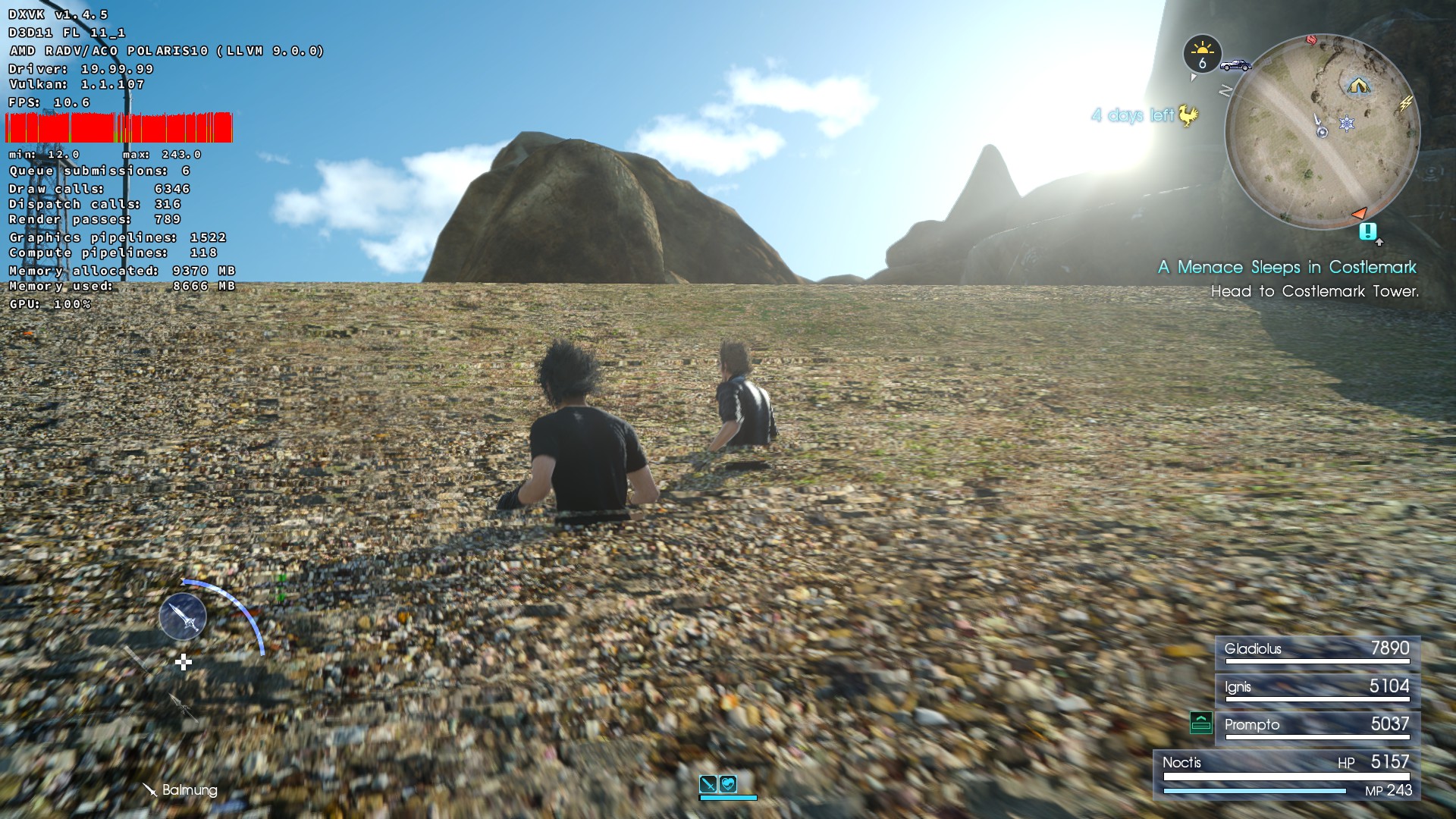
@doitsujin - I've rebuilt proton with DXVK 1.4.5 and the results are fantastic; I can play on Highest and my average FPS is in the 40s (or higher even).
I am seeing one issue, though: In some areas it seems like terrain LOD takes a minute to adjust, and while it does my FPS hovers below 20 or so (see the below image).
Another thing I've noticed while playing: when reviewing photos after camping, none of them render. In the photo reel all the images appear blank, and when I open one to view it is just a black screen. I don't know if this is specific to my system or not, the app log didn't seem to have anything helpful in it but I also had a hard time parsing it.
@hristoast ACO is buggy with geomapping right now; you might get better results with LLVM or AMDVLK. I haven't investigated that problem in detail yet (and it's bloody hard because my system constantly runs out of memory when trying to capture the damn thing).
Another thing I've noticed while playing: when reviewing photos after camping, none of them render.
They probably just don't get saved to disk properly.
Hi,
I tried to run this game with the custom proton (4.21-GE-1) with the Guy1524 patch.
I got many time this :

And for an unknown reason, I managed to launch the game, some hours later at my first tentative.
I had to disable FSYNC and ESYNC to launch it.

↑ Parameters : 4k, very high, vsync off
As said @hristoast all photos are black and shaders take a lot of time (around 8 sec) to be applied in game.

After that session, I tried to come back to an official Proton build (4.11-10)... and since then, I can't launch the game anymore with the custom proton (same message than above).
Spec :
Archlinux 5.4.1-arch1-1-fsync
Intel(R) Core(TM) i7-6700K CPU @ 4.00GHz
NVIDIA GeForce GTX 1080 Ti
RAM : 16 Go
Proton used : Proton-4.21-GE-1
logs :
steam-637650.log
Use Proton GE (custom proton glorious eggroll always works alot better than the default proton, it has that patch already ;)
I've noticed a few fixmes in the logs which show up roughly during an attempt to take a photo:
fixme:wincodecs:copypixels_to_24bppBGR Unimplemented conversion path!
Wine - dlls/windowscodecs/converter.c#L1169
Could this be related to the photo bug?
Also, I've encountered "Sorry, something went wrong..." message as described in https://github.com/ValveSoftware/Proton/issues/74#issuecomment-565704579 after switching from Proton-4.21-GE-1 to Proton-4.21-GE-2. My guess is this happens whenever the wine configuration changes.
The "sorry something went wrong" is DRM protection that triggers after launching the game too many times. Many games have this including MHW, SOTTR, Metro Exodus, BL3, and others. When this happens you have to wait about 24 hrs for it to turn off.
I've noticed a few
fixmes in the logs which show up roughly during an attempt to take a photo:fixme:wincodecs:copypixels_to_24bppBGR Unimplemented conversion path!Wine - dlls/windowscodecs/converter.c#L1169
Could this be related to the photo bug?
Could you attach a log when this happens, with WINEDEBUG=+wincodecs set, in user_settings.py for example.
Update regarding the photo bug:
I've traced the copypixels_to_24bppBGR parameters and as it turns out it is asked to copy format_32bppRGBA images. Just to confirm my hunch I added format_32bppRGBA to the format_32bppBGR* block and the result is working photo mode and Prompto now takes pictures too.
Manual photo:


Prompto's photo:

Weird hue is due to incorrect pixel byte order, as expected. Shouldn't be too hard to hook up the proper RGBA to BGR conversion.
Edit:
Patch with correct BGR format:
diff --git a/dlls/windowscodecs/converter.c b/dlls/windowscodecs/converter.c
index dcc2f05..c6ace9c 100644
--- a/dlls/windowscodecs/converter.c
+++ b/dlls/windowscodecs/converter.c
@@ -1035,6 +1035,7 @@ static HRESULT copypixels_to_24bppBGR(struct FormatConverter *This, const WICRec
             return hr;
         }
         return S_OK;
+    case format_32bppRGBA:
     case format_32bppBGR:
     case format_32bppBGRA:
     case format_32bppPBGRA:
@@ -1073,6 +1074,8 @@ static HRESULT copypixels_to_24bppBGR(struct FormatConverter *This, const WICRec
                     srcrow += srcstride;
                     dstrow += cbStride;
                 }
+                if (source_format == format_32bppRGBA)
+                    reverse_bgr8(3, pbBuffer, prc->Width, prc->Height, cbStride);
             }

             HeapFree(GetProcessHeap(), 0, srcdata);
There could be a better way to do this but it works.
I'd rather have it unrolled, going twice through seems unnecessary. Here's untested diff, thanks for tracking this issue down.
Game instantly crashes after the main menu for me on Proton-GE 5.9. I assume it's not a DRM issue, since it would crash on launch if that were the case.
I have the exact same problem @RodrigoLeiteF . I've tried multiple versions of Proton, from 5.8-GE-1 to 5.9-GE-4,5.9-GE-5, 5.11-GE-3 and 5.14-TKG. The game will just crash when loading the world.
Hi,
Thanks for your hard work and to many more SteamOS users!
So FFXV won't run. But it display something I've never encountered.
Have you?
Seems like NVIDIA is bound to bother us one way or another...
Now the output is a bit sparse. Attached is the Wine log.
steam-637650.logSince your distribution does not include winedbg, I'm afraid this is the extent of my investigations for now.

I think I have a similar problem, I recently bought a new computer, did the usual destroy windows and install linux (cus' linux rocks), eventually thought to boot steam via terminal and launch the game at the same time and I got the following output (with home directory removed for ~ because I feel uncomfortable putting that on the net) [
steam_FFXV.log
](url), btw my new computer has a ryzen 7 8 core CPU with a Radeon RX 480 if that is of any help, also (because I deleted ALL old data) the crash occurs before it even reaches the title screen, it's either at language selection or just after displaying that "A Final Fantasy for returners and first timers" text that the crash occurs
I just found this small log while I was hunting for potential reasons why FFXV won't get to the title screen for me:
2020-09-08T23:24:35.259[I]: Core.cpp:29 	#0 Creating GfeSDK Version 1.0.132.d2f5f552
2020-09-08T23:24:35.265[I]: TaskRunner.cpp:42 	#1 Start TaskRunner thread
2020-09-08T23:24:35.276[I]: FactoryImpl.cpp:17 	#0 Creating default MessageBus wrapper
2020-09-08T23:24:35.282[E]: MessagebusWrapper.cpp:34 	#0 Error creating message bus interface
2020-09-08T23:24:35.287[E]: Core.cpp:122 	#0 Unexpected exception during NVGSDK_Create
2020-09-08T23:24:35.293[E]: CoreCInterface.cpp:90 	#0 Error: failed initializing SDK -1020
2020-09-08T23:24:35.297[I]: Core.cpp:34 	#0 Destroyed GfeSDK
I'm using a Radeon RX 480, vulkan works just fine (checked via vulkaninfo), any ideas?
Was under this path
~/steamapps/compatdata/637650/pfx/drive_c/users/steamuser/Local Settings/Application Data/NVIDIA Corporation/GfeSDK/ffxv_s_208.log
Same issue as above, game just crashes trying to load, tried GE 5.9-1 and previous, just crashes. The game worked some months back, not sure what happened.
I don't know if it did this when it did work, but I enabled "show framerate" in the options, it reports that I have 24Gb of Ram yet I only have 16. It reports not using any VRAM at all, and it reports that it I am using over 14Gb ram just sitting at the title screen
I don't know if it did this when it did work, but I enabled "show framerate" in the options, it reports that I have 24Gb of Ram yet I only have 16. It reports not using any VRAM at all, and it reports that it I am using over 14Gb ram just sitting at the title screen
In system memory it includes swap, which may account for the difference. Vram reporting is broken but it shouldn't prevent the game from working.
I finally got it working just using proton GE 5.9-8. The 5.11 branch still doesn't work, neither does the main proton bundled with steam.
Since that I only had 1 crash after loading, but running the game again worked just fine.
Game instantly crashes after the main menu for me on Proton-GE 5.9. I assume it's not a DRM issue, since it would crash on launch if that were the case.
The game works perfectly now, using Proton-5.9-GE-8-ST. Not sure if that's what fixed it, since I (unfortunately) had to wipe my machine in the meantime, but it's something.
I'm still not getting it to load with 5.9-GE-8. Starts the menu but any attempt to load the game crashes. I am on an AMD GPU btw, 5700xt
Seems to work pretty well with the new Proton 5.13. Is anyone else getting variable framerates? (RTX 2070 @ 1920 x 1080)
Tried Proton 5.13, and just about every custom version of proton I can find and it still crashes Running Steam from terminal I notice this error when it crashes:
mesa: for the --simplifycfg-sink-common option: may only occur zero or one times! mesa: for the --global-isel-abort option: may only occur zero or one times! mesa: for the --amdgpu-atomic-optimizations option: may only occur zero or one times! wine: Unhandled page fault on read access to 0000000000000008 at address 00007FE64A3309F3 (thread 012c), starting debugger... ERROR: ld.so: object '/home/justin/.local/share/Steam/ubuntu12_32/gameoverlayrenderer.so' from LD_PRELOAD cannot be preloaded (wrong ELF class: ELFCLASS32): ignored.
@adrianlshaw Which kernel are you using? I'm experiencing similar issues to others now where the game does not load after the menu. Wondering what other factors there may be.
I figured out my problem, well mostly. It has something to do with the
vulkan ICD loader. In order to get doom eternal working early on I had to
switch ICD loaders. I can't remember the details but now I can get the game
running if I use Lutris to launch the Steam runner and selecting an ICD
loader since it allows multiple choices.
If necessary I can try to get more details but it runs perfectly this way.
On Wed, Oct 28, 2020, 8:16 AM JacoG-RH [email protected] wrote:
@adrianlshaw https://github.com/adrianlshaw Which kernel are you using?
I'm experiencing similar issues to others now where the game does not load
after the menu. Wondering what other factors there may be.—
You are receiving this because you commented.
Reply to this email directly, view it on GitHub
https://github.com/ValveSoftware/Proton/issues/74#issuecomment-717894475,
or unsubscribe
https://github.com/notifications/unsubscribe-auth/ANIOO6T6P2SLJEGGPGAUCDTSNADS3ANCNFSM4FQ5XXKA
.
@JacoG-RH 5.4.0-52-generic, which is part of Ubuntu 20.04. Since the game uses a huge amount of disk space it's installed on a HDD. Will see if performance improves much on the SSD. It averages around 30fps but haven't found any crashes or weird bugs yet. Some motion blur effects do cause the framerate to be volatile at times.
Not sure how well the reporting works with fps on but the game reports
using alot of RAM, over 16gb. Runs at a solid 60fps for me @1440p on a
5700xt with everything maxed out and the Nvidia stuff turned off. I'm on
kernel 5.8
On Wed, Oct 28, 2020, 10:19 AM Adrian L. Shaw [email protected]
wrote:
@JacoG-RH https://github.com/JacoG-RH 5.4.0-52-generic, which is part
of Ubuntu 20.04. Since the game uses a huge amount of disk space it's
installed on a HDD. Will see if performance improves much on the SSD. It
averages around 30fps but haven't found any crashes or weird bugs yet. Some
motion blur effects do cause the framerate to be volatile at times.—
You are receiving this because you commented.
Reply to this email directly, view it on GitHub
https://github.com/ValveSoftware/Proton/issues/74#issuecomment-717964845,
or unsubscribe
https://github.com/notifications/unsubscribe-auth/ANIOO6RP2URNDIXYR3RZMVDSNASAFANCNFSM4FQ5XXKA
.
The game seems to now launch fine with stock Proton 5.13-4, and I can load an existing save file with no apparent problems.
If I start a new game, however, the game crashes right after the "Before The Fall" message.
I didn't think to enable logging before, and now the game won't launch with an "unexpected error" window. Once I can launch the game again, I'll capture some logs.
I found a performance issue with FFXV. When you alt tab out from the game and go back in, any controller input will cause the game to hang for a bit, about 300ms according to DXVK frametime counter. This makes it unplayable. This bug even happens at main menu. Keyboard input does not cause the game to stutter though
Specs: i7-6700, RX 570 and 8GB RAM: https://gist.github.com/minecraft2048/c4f4d73a0e496168e80b1f12bf284d9d
Link to demo video: https://youtu.be/nbp_6wrTJVc
I think that when we alt tab out and back in, some sort of keyboard input got stuck or something, as when in game, the button prompt consistently changes into keyboard button prompt instead of PS4 button prompt. This interacts with a known issue in FFXV where it loads the input icons everytime when different input is detected: https://steamcommunity.com/app/637650/discussions/0/1697167168518535998/ . Unfortunately Special K is not compatible with Proton
On the topic of keyboard inputs getting stuck: I have long had the issue that sometimes the command window (where you select which ally's special ability to use) would get stuck on screen. My workaround has been to tap both the left and right CTRL keys.
I think that when the game loses focus while a key like CTRL or ALT is pressed, and released outside of the game, the game doesn't detect those having been released when you bring it back into focus. Tapping the stuck key after getting back into the game should work around this issue.
Final Fantasy XV/Final Fantasy 15 will not boot due to linking 32bit libs
Issue transferred from https://github.com/ValveSoftware/steam-for-linux/issues/7634.
@awsdert posted on 2021-01-31T19:40:37:
Your system information
- Steam client version (build number or date): Jan 30 2021 at 01:03:12
- Package version: 1611978348
- Distribution (e.g. Ubuntu): Manjaro x64 Cinnamon
- Opted into Steam client beta?: [Yes/No] Yes
- Have you checked for system updates?: [Yes/No] Yes
Please describe your issue in as much detail as possible:
Expected to see the main menu, didn't even see the intro banner stuff
Steps for reproducing this issue:
- Just launch the game
Terminal output
Finally got the game to boot and play, had to completely delete my install including savegames and settings, reinstalled and switch to "Proton Experimental" (on linux kernel 5.11 btw) and the 1st day it reported it couldn't verify my install and to wait 24 hours, so left it until couple days later (my attempt was late at night so couple days was easier) and wallah, it plays. Thing to note however is that when attempting to cheat it plays slowly, half the time it becomes SPF instead of FPS so I'll be hacking only the more permanent values like AP, LVL & Gil (I chose level over XP because once I have the relative position I can set that to 999 the next time I feel like cheating, but won't bother until chapter 15, will however try to get X&Y positions so I can yank noctus out of either the leviathan fight or the ardyn fight for my "God Mode") then shut down PINCE (yes that's a decent option over GameConquerer now)
Edit: Scratch that PINCE part, keeps getting detected and killed, GameConqueror also doesn't slow the game down so I will report this issue to the dev (https://github.com/korcankaraokcu/PINCE for anyone interested btw)
Game doesn't load for me at all with Proton versions > 5.13-6. The game plays well on 5.13-6 however I can't use features like FSR/DLSS which I would like to implement into gameplay. Here is a pastebin copy of my PROTON_LOG=1 output: https://pastebin.com/FUeMpXeg
This was done with Proton-GE but my output is the same with Proton 6.3 and Proton Experimental.
Hello @Furaihai, wine: Call from 000000007BC338A8 to unimplemented function POWRPROF.dll.PowerSettingRegisterNotification, aborting looks like the line of interest from your log.
Can you check if a Proton log from 6.3-6 has a similar line?
New log file below, still crashes:
The game runs out of the box with Proton 7.0 on my end. However the performance is abysmal much like on Windows.
Haven't played it in a while but FFXV has ran perfectly fine for years on
proton. There was a few random issues, probably caused by updates that
temporarily broke it. I don't understand the "it runs abysmal " thing, you
must have some hardware issues if it runs bad on proton and windows.
On Sat, Mar 12, 2022, 4:42 PM Raklodder @.***> wrote:
The game runs out of the box with Proton 7.0 on my end. However the
performance is abysmal much like on Windows.—
Reply to this email directly, view it on GitHub
https://github.com/ValveSoftware/Proton/issues/74#issuecomment-1065969435,
or unsubscribe
https://github.com/notifications/unsubscribe-auth/ANIOO6U2J7HJNZOZETLXMF3U7UFUFANCNFSM4FQ5XXKA
.
Triage notifications on the go with GitHub Mobile for iOS
https://apps.apple.com/app/apple-store/id1477376905?ct=notification-email&mt=8&pt=524675
or Android
https://play.google.com/store/apps/details?id=com.github.android&referrer=utm_campaign%3Dnotification-email%26utm_medium%3Demail%26utm_source%3Dgithub.You are receiving this because you commented.Message ID:
@.***>
With proton 7.0.3, the game ran fine but seemed to have memory leak issues (or could be something else?). I noticed the game would eventually used up all 6GB of V-RAM (GTX 1660) which cause frame-rate to drop to single digit. On Windows 10 with the same graphics settings (High Preset), this didn't occur. NVIDIA Turf Effects seemed to exacerbate the issue and caused the frame drop to happen sooner. I usually restart the game every hour or so to avoid this. The in-game FPS counter, which include the memory counter, is a good way to check if the game need to be restart.
I am encountering some freezes. I was able to overcome one freeze when entering the boat to Atlissia (setting FPS limit to 30), but I didn't manage to get around "Umbra" freeze. I tried Proton Experimental (not sure where the version is, but it's updated) and GE 7.22, both are behaving the same (freezing when entering or loading a save after calling Umbra and choosing revisit old quests in the dialog, after load screen and ~0.5s of ingame rendering it freezes, I see last frame and infinite ringing of a phone).
Edit: Okay, the freeze wasn't permanent. When I let it run "frozen" for around two minutes, it went back to life :open_mouth:. At least I found out how to get logs.
I think it got frozen after this section:
48984.491:0120:0214:err:sync:RtlpWaitForCriticalSection section 000000021A386100 "../src-wine/dlls/xinput1_3/main.c: controllers[0].crit" wait timed out in thread 0214, blocked by 01b0, retrying (60 sec)
48989.533:0110:0118:fixme:oleacc:find_class_data unhandled window class: L"[#32769](/issue/ValveSoftware/Proton/32769)"
49135.763:0110:0118:fixme:oleacc:find_class_data unhandled window class: L"[#32769](/issue/ValveSoftware/Proton/32769)"
49135.935:0110:0118:fixme:oleacc:find_class_data unhandled window class: L"[#32769](/issue/ValveSoftware/Proton/32769)"
The game plays fine for me (60 FPS at 4K with the high-resolution assets pack), but I have been experiencing a gradual VRAM leak. The game does not crash when VRAM is exhausted, but performance drops to 45 FPS (every third frame takes twice as long as the previous two) and GPU power consumption decreases by about 75W. Continued play results in further FPS decreases with unpredictable frame times. There is no fix but to restart the game (every ~2 hours in my case, but sometimes within 30 minutes).
I can reproduce a VRAM leak by entering the graphics settings and repeatedly changing the resolution scaling from 100% to 50% and back when TurfEffects and/or ShadowLibs are on. Toggling the resolution scaling when those two settings are off does not result in growing VRAM usage. Turning those two settings off after VRAM has leaked does not reclaim the leaked memory. TurfEffects is partially broken (grass is different when enabled, but it doesn't flatten after walking on it), and I can't tell if ShadowLibs is working or not.
Distribution: Arch Linux
Kernel: 6.2.13.arch1-1
CPU: AMD Ryzen 9 5950X
System memory: 64 GB
GPU: AMD Radeon RX 6800 XT
Mesa: 23.0.3-1
RADV (vulkan-radeon): 23.0.3-1
Proton: GE-Proton7-49
any update? The game crashes @ launch with proton experimental (proton 9)
For anyone watching this thread and still looking for their copy to run, I was fortunate enough to find mine would run just fine (ignoring the fact my potato of a laptop can only handle the worst graphical settings XD) when I decided to re-install it to give it another chance.
I'm on Manjaro XFCE x64, used the latest build of the proton-ge-custom-bin package which is 1:GE_Proton9_20-1 at the time of posting. Maybe you'll be just as lucky.
Final Fantasy XV Crashes When Loading Save File or Starting New Game
Issue transferred from https://github.com/ValveSoftware/Proton/issues/9950.
@davgar99 posted on 2026-07-06T17:28:44:
Compatibility Report
- Name of the game with compatibility issues: Final Fantasy XV
- Steam AppID of the game: 637650
System Information
- GPU: NVIDIA GeForce RTX 4090
- Video driver version: Nvidia 610.43.02
- Kernel version: Arch Linux 7.1.2-arch3-1
- Link to full system information report as Gist: https://gist.github.com/davgar99/a81b73b01134eec8fc1a1b7794d4786f
- Proton version: 9 (unable to test many versions due to Denuvo's 5 PC limit)
I confirm:
- [x] that I haven't found an existing compatibility report for this game.
- [x] that I have checked whether there are updates for my system available.
Symptoms
The game doesn't get passed the tutorial level or the first cut-scene when skipping the tutorial. Sometimes the sound plays in the background, but the game itself freezes and becomes unresponsive. Other times it gets stuck loading indefinitely.
Reproduction
- Launch game normally
- Start new game or do the tutorial
- The tutorial works for a few minutes then crashes
- New Game button loads then crashes on black screen with sound playing
- Loading save file also crashes
UPDATE: Proton 7 fixed this crash and the game runs now.
I can confirm on my machine that between proton experimental and proton-ge 11-1 , I get a lockup right at the very end of a load screen. I was unable to start a new game as well. I'll get around to checking other versions, but I'm afraid I'll hit my denuvo limit today if I switch anymore.
Every single time I get to that lockup point, the following error is logged in journalctl:
kernel: NVRM: Xid (PCI:0000:01:00): 109, pid=14362, name=[SK] Primary In, channel 0x00000025, errorString CTX SWITCH TIMEOUT, Info 0xac02b
Same as noted by davgar99 above me, Proton 7 let me progress.
Configuration:
OS: CachyOS
Kernel: Linux 7.1.3-2-cachyos
RAM: 32GB
GPU: RTX 5070, driver = 610.43.03
CPU: AMD R7 7700x
I'm having the same issue where when moving from the in-game cutscene in the training room to the playable portion, the screen locks on black with music still playing. GPU memory usage spikes to maximum then drops to nothing and the game must be manually exited.
System Information:
OS: CachyOS 7.1.3.2
CPU: AMD Ryzen 9 5900X
GPU: NVIDIA RTX 3070 Ti 8GB (Nvidia driver version: 610.43.03; CUDA version 13.3)
RAM: 64GB DDR4
Proton Versions Tested: Regression persists on Proton 9.0-4, GE-Proton, and proton-cachyos.
Symptoms:
When transitioning directly from an in-game cutscene into a playable area, the game goes to black and does not continue loading.
Behavior: GPU usage spikes to maximum, the CPU process crashes/restarts, and the display container freezes entirely (either dropping to a persistent black screen or showing a loading bar for ~1 second before locking up).

Background audio/music continues to stream.
Troubleshooting Already Attempted (Did not prevent the crash):
Lowering textures to lowest possible values (to rule out basic 8GB VRAM overcommit timeouts).

Disabling all NVIDIA GameWorks features and  the Steam Overlay.

Forcing borderless windowed mode and asset preload in GraphicsConfig.ini.

Increasing kernel allocation depth via vm.max_map_count=1048576.

Isolating the process topology to a single CCD (taskset -c 0-5).

Forcing VKD3D_CONFIG=no_upload_hvv,async_compile and vkd3d_disable_node=1.
Note: pretty much all my troubleshooting was done via gemini, so grains of salt on utility of each attempted solution
Proton versions
proton 9.0-4x1 2026-07proton experimentalx5 2026-07ge-proton7-49x1 2023-05proton 7.0x3 2022-06proton 6.3x1 2021-09proton 5.13-4x1 2020-12proton 5.13x2 2020-10proton 5.9-ge-8x1 2020-10proton 4.21-ge-1x2 2020-01proton 4.21-ge-2x1 2020-01
Launch options
VKD3D_CONFIG=no_upload_hvv,async_compilex1 2026-07PROTON_LOG=1x1 2021-09WINEDEBUG=+wincodecsx1 2020-01
Upstream links
- ValveSoftware/Proton/issues/9950x1 2026-07
- ValveSoftware/steam-for-linux/issues/7634x1 2021-01
- show_bug.cgi?id=25243x1 2018-08
DLLs
powrprof.dllx1 2021-09winmm.dllx1 2018-08wintrust.dllx1 2018-08usp10.dllx1 2018-08
Hi,
Thanks for your hard work and to many more SteamOS users!
So FFXV won't run. But it display something I've never encountered.
Have you?
Seems like NVIDIA is bound to bother us one way or another...
Now the output is a bit sparse. Attached is the Wine log.
steam-637650.log
Since your distribution does not include winedbg, I'm afraid this is the extent of my investigations for now.