Spintires
same behavior in 3.16-4
Spintires showing black screen on launch. Plays sound but doesn't crash.
Issue transferred from https://github.com/ValveSoftware/Proton/issues/2190.
@TheYeetest posted on 2019-01-04T05:41:56:
System Information
Processor: AMD Ryzen 3 1200 Quad-Core
Graphics Card: Radeon RX 560 (Driver v.4.5.13540)
RAM: 8 GB DDR4
Operating System: Ubuntu Linux 18.04.1 LTS (64 bit)
Spintires: Some particles are only rendered as black rectangles.
Issue transferred from https://github.com/ValveSoftware/Proton/issues/2589.
@toqgit posted on 2019-04-23T14:00:45:
In game Spintires[263280] some particles are only rendered as black rectangles.
(whirling up leaves, burst mushrooms, mud pieces)
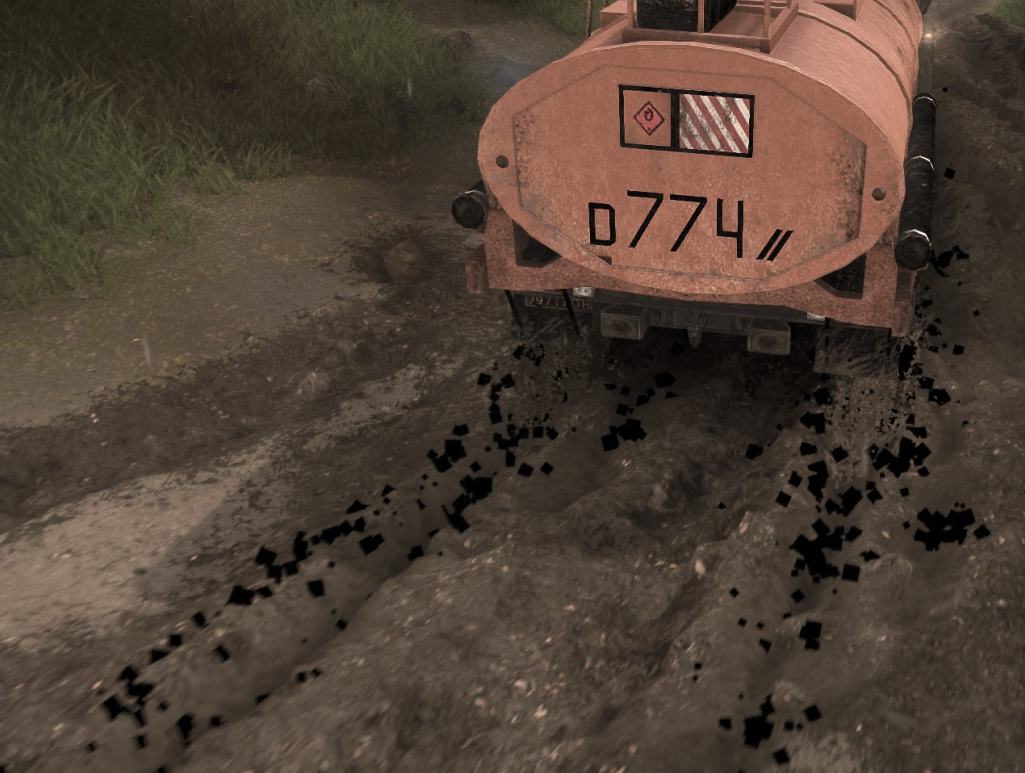
The game works quite well, but you can't use D9VK (@Joshua-Ashton ) to play it. Works great with Force Feedback support on Logitech Wheels.
FWIW, black particles seems to be gone with latest Proton/game updates, but weather effects, like rain, are not rendered.
On my system, D9VK does work but only if the game is run in a window. D9VK also renders the rain.
On my system, D9VK does work but only if the game is run in a window. D9VK also renders the rain.
Thanks for this info!
The game works quite well, but you can't use D9VK (@Joshua-Ashton ) to play it.
Please make an issue on my tracker and follow the bug report guide.
The game works quite well, but you can't use D9VK (@Joshua-Ashton ) to play it.
Please make an issue on my tracker and follow the bug report guide.
Can you share the bug report guide? I found this, is correct?
https://github.com/Joshua-Ashton/d9vk/wiki/Making-a-Trace
Its just there when you hit make issue
I will try to open an issue when I get home. Cheers
The base game works very well, but I'm having severe performance issues with the latest DLCs. Sherp Ural Challange and Chernobyl. Framerate drops to between 5-20 fps on these maps, with every setting set to low.
Proton 5.0-9 and 5.13-1 have the same problem, using OpenGL (with WineD3D) or Vulkan (with DXVK/D9VK) makes no difference.
Dropping back to Proton 4.11 seems to work best, I'm getting framerates between 45-60 fps, so presumably this is regression in Wine?
I'm curious if anyone else is having the same problem?
Looks like this was a temporary regression in Wine, it has been fixed in 5.20, and possibly earlier releases.
Proton versions
proton 4.11x1 2020-10proton 5.0-9x1 2020-10
Upstream links
- ValveSoftware/Proton/issues/2589x1 2019-04
- ValveSoftware/Proton/issues/2190x1 2019-01
Game window appears but stays black, by that point I see in the log that the game is trying to close but is stuck there.
looking through the log I think problems start with this line:
107435.900:0029:002a:warn:debugstr:OutputDebugStringA "Info,System| NvAPI_Stereo_CreateHandleFromIUnknown error: "
(which is then followed by a bunch of raise_exception lines)
system info: https://gist.github.com/Cuddlypuff/a518019d119623d9a1b7552e284c1f6d
log: https://gist.github.com/Cuddlypuff/163999a767a1d23fb85e3215768d4161