Grand Theft Auto III
Hello @Xeers, please copy your system information from steam (Steam -> Help -> System Information) and put it in a gist, then include a link to the gist in this issue report. Additionally, please add PROTON_LOG=1 %command% to the game's launch options and drag and drop the generated $HOME/steam-$APPID.log into the comment box.
These commands do not work:
PROTON_USE_WINED3D11=1 %command%
"Created gta_dxvk.conf file":
dxgi.customDeviceId = E366
dxgi.customVendorId = 1002
"Went to the game properties and set launch options":
DXVK_CONFIG_FILE=/path/to/gta_dxvk.conf %command%
Información del equipo:
Fabricante: Unknown
Modelo: Unknown
Factor de forma: Sobremesa
Entrada táctil no detectada
Información sobre el procesador:
Fabricante de la CPU: AuthenticAMD
Marca de la CPU: AMD FX(tm)-8320 Eight-Core Processor
Familia de la CPU: 0x15
Modelo de la CPU: 0x2
Stepping de la CPU: 0x0
Tipo de CPU: 0x0
Velocidad: 3500 MHz
Procesadores lógicos: 8
Procesadores físicos: 8
HyperThreading: No compatible
FCMOV: Compatible
SSE2: Compatible
SSE3: Compatible
SSSE3: Compatible
SSE4a: Compatible
SSE41: Compatible
SSE42: Compatible
AES: Compatible
AVX: Compatible
CMPXCHG16B: Compatible
LAHF/SAHF: Compatible
PrefetchW: No compatible
Versión del sistema operativo:
"Arch Linux" (64 bits)
Nombre de kernel: Linux
Versión de kernel: 4.18.5-zen1-1-zen
Editor de X Server: The X.Org Foundation
Versión de X Server: 12001000
Gestor X Window: Mutter(DeepinGala)
Versión del runtime de Steam: steam-runtime-beta-release_2018-06-14
Tarjeta de vídeo:
Controlador: NVIDIA Corporation GeForce GTX 950/PCIe/SSE2
Versión del controlador: 4.6.0 NVIDIA 396.54
Versión de OpenGL: 4.6
Densidad de color del escritorio: 24 bits por píxel
Frecuencia de actualización del monitor: 59 Hz
Identificador del fabricante: 0x10de
Identificador del dispositivo: 0x1402
Revisión no detectada
Número de monitores: 1
Número de tarjetas de vídeo lógicas: 1
Resolución de pantalla principal: 2560 x 1080
Resolución de escritorio: 2560 x 1080
Tamaño de la pantalla principal: 26.50" x 11.18" (28.74" diag)
67.3cm x 28.4cm (73.0cm diag)
Bus principal: PCI Express 16x
Memoria VRAM principal: 2048 MB
Modos MSAA compatibles: 2x 4x 8x 16x
Tarjeta de sonido:
Dispositivo de sonido: Realtek ALC887-VD
Memoria:
RAM: 16023 MB
Varios:
Idioma de la IU: Español
IDIOMA: es_ES.UTF-8
Espacio total en disco disponible: 327620 MB
Bloque libre más grande en el disco: 87643 MB
HMD de RV: Ninguno detectado
Informes de fallos recientes:
PROTON_LOG=1 %command%
Pastebin:
https://paste.drhack.net/?7ecde5eaadaf9188#53g2zpSoh+S3cWKW14oNTofTDQTjhzmQz312W8Syi3M=
Today with the new version of Steam Beta and using Proton 3.7-4-Beta (also Proton 3.7-3) the game worked.
Click on "Start" and before it locks press Alt + Enter
I've tested this game on SteamOS and on MX Linux and as far as gameplay is concerned works perfectly (ignoring the sign that appears behind the screen of the game: just press [Enter] one or twice when the screen gets black).
The only issue that I noticed is that the gamesaves are not there.. After my first test on MX Linux I played like 5 hours and saved various times but when I started the game in SteamOS the saves wasn't there.
I saw the same thing in BioShock (7670), when I started the game in this machine I didn't have the saved games.
Is it maybe a problem of Proton with the Steam cloud? Or is that Valve decided not to store in the cloud the saves of games runned through Proton?
Do the opening credits play for you guys?
When launching the game, it looks like nothing is happening (just sits at the steam window), but after a couple minutes it drops me at the menu screen.
This happens both using native steam with proton, and steam installed through wine.
Tested on Arch and Debian.
In my notebook with MX Linux 17.1 Horizon it goes straight to menu after showing for a second a video glitch that is probably the credits image.
In my PC with SteamOS 2.0 Brewmaster it shows the credits image without problems.
Personally, I don't see the problem on that haha.
Btw, after testing it more time over SteamOS, it does not work perfectly like I said before. It has the same "mouse wall / lag" issue that various other games are presenting over Proton (GTA-VC, DOOM, Q3A, etc). This mouse issue is no where to be seen on MX Linux.
My system info
- GPU: AMD Radeon R7 Kaveri 1GB
- Driver/LLVM version: Mesa 17.2.4/5.0.0
- Kernel version: 4.14.0-0.steamos.81-amd64
- Full system information report: here
- Proton version: 3.7-6 Beta
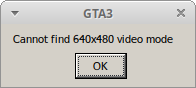
On Proton 4.11, GTA3 gives this error: "Cannot find 640x480 video mode"
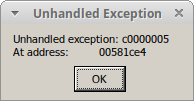
On any other Proton version it gives an unhandled exception
I'm fairly certain the game launched just fine before but some patch to ubuntu has regressed it
Hello @Managor, please copy your system information from Steam (Steam -> Help -> System Information) and put it in a gist, then include a link to the gist in this issue report. Also, please add PROTON_LOG=1 %command% to the game's launch options and drag and drop the generated $HOME/steam-$APPID.log into the comment box.
https://gist.github.com/Managor/79c70389a572c8a45e8231997ff6028e
Proton 4.11-1 log
steam-12100.log
Proton 4.2-9 log
steam-12100.log
I get the same error on 4.11-1, but game works perfectly on 4.2-9.
If you've previously played the game setting resolution higher, then it starts working on 4.11-1.
All in all, 4.11-1 doesn't like 640x480.
System Information
steam-12100.log (4.11-1)
Thanks for reporting. I've found the bug in 4.11-1. This should be fixed in the next 4.11 release.
I believe the missing resolution problem has been fixed in 4.11-2. Please retest!
All working fine captain! Thanks for the quick fix.
steam-12100.log
Yep. 4.11-2 is giving me the same unhandled exception as every other proton version. I wish I knew what's different on my system.
Compatibility Report
- Name of the game with compatibility issues: Grand Theft Auto III
- Steam AppID of the game: https://steamdb.info/app/12100/
System Information
- GPU: GTX 760
- Driver/LLVM version: NVIDIA 440.59
- Kernel version: 5.5.5
- https://github.com/shoober420/linux-scripts/blob/main/home/shoober420/sysinfonvidia
- Proton version: 5.0-3
LOG:
steam-12100.log
Symptoms
After hitting the enter key a couple times at launch to get past the black screen (probably due to the cinematics), the game runs perfectly.
This game was completely playable (in my opinion) on Proton 5.0
After updating to 5.13, the game loads but I am only able to see the top left corner of the screen.
I am getting this error message in the game logs.
ERROR:frame_sink_video_capturer_impl.cc(206)] Invalid resolutions constraints: 0x0 must not be greater than 0x0; and also within media::limits.
Hello @doublez13, please add PROTON_LOG=1 %command% to the game's launch options and attach the generated $HOME/steam-$APPID.log to this issue report as a file. (Proton logs compress well if needed.)
steam-12100.log
Here ya go. Thanks for the help
Can you check if PROTON_USE_WINED3D=1 %command% has an effect? I suspect that warn: winevulkan detected, disabling exclusive fullscreen support is relevant to what you're seeing.
Unfortunately no difference.
steam-12100.log
Blackscreened menu (and still no video playback) with 5.13, details are here as it's the same for both titles: https://github.com/ValveSoftware/Proton/issues/291#issuecomment-711092689
@alasky17 @thaewrapt Interestingly, after updating to Proton 5.13-2, GTA 3 is working again, but GTA VC is not
@doublez13 check if you have any additional command options for GTA 3 alone, like WINED3D one. It's still not working for me on 5.13-2 via DXVK for both games (same issue as https://github.com/ValveSoftware/Proton/issues/832#issuecomment-711092839).
No additional command options specified for either game. It looks like the reason gta3 is working is because I have a gta3.set file saved. Deleting that file and then launching gta3 causes the weird screen on launch again, and restoring the file causes the game to work normally. I believe the only two settings I've change are the resolution, and widescreen on.
However, I just tried launching GTA VC with Proton 5.0, setting the resolution and widescreen, then launching with 5.13, but that still gave the weird screen.
I have previous saves for both games, so this is also not a case here.
Working for both titles (still no videos, though) after an update to 5.13-3.
Confirmed both GTA 3 and GTA VC are working again with 5.13-3!! So much nostalgia
Hey, I know this specific edition is retired from the store but I'm running into a puzzling bug. The game completely freezes whenever I try rigging a car with a bomb and I have to manually terminate the pid. I'm using the latest ProtonGE with umu-launcher. I can post a log if this is the right place to report such an issue.
Update: I tried again with a standard x86 build of Wine 5.5, and the bomb-rigging issue doesn't happen, so this is likely a regression. Rigging a car with a bomb is required in some missions, so the bug makes the game unplayable.
Although I can play the game without issues in Wine 5.5, the mod loader and mods don't work in this version, the most important of which (to me) is the Ginput mod, which allows better controller support. I can't get my DS3 controller working at all otherwise.
Update 2: x86 wine 8.0.1 works a bit better for controller support, but I still can't load mods. I would test with GE Proton 8 and UMU launcher but I can't because this is a non-Steam retail version of the game and older versions of Proton require it to be launched through Steam
I think I solved the mystery. I had game files from re3, a reverse engineered port, put into my main game folder, some of them overwriting the old ones, such as particle.txd. I tried a different install of the game, with mods, and the bomb-rigging freeze didn't happen. I used the latest GE-Proton, so I don't think it's a regression anymore.
Grand Theft Auto III (12100)
Issue transferred from https://github.com/ValveSoftware/Proton/issues/10093.
@anthoncast posted on 2026-08-25T04:43:11:
System Information
- GPU: NVIDIA GeForce GTX 1650
- Video driver version: 595.91.07
- Kernel version: Linux 7.2.0-202.nobara.fc44.x86_64
- Link to full system information report as Gist: https://gist.github.com/anthoncast/638a0c389a7bc7650cec654c47e4d963
- Proton version: Default, Experimental, Hotfix
I confirm:
- [Check] that I haven't found an existing compatibility report for this game.
- [Check] that I have checked whether there are updates for my system available.
Symptoms
The Logos/Intro movies don't play as they should. Compared to Proton 9.0-4, where the movies would play with no other issue, the movies don't display image in latest Proton versions such as Hotfix and Experimental, both just play audio but no image. Below, here's an example of what you look at when the game opens.
Reproduction
Launch the game with Hotfix or Experimental.
Proton versions
proton 9.0-4x1 2026-08proton 5.0x2 2020-11proton 5.13-2x1 2020-11proton 4.11-1x1 2019-08proton 4.2-9x1 2019-08proton 4.11x1 2019-08proton 3.7-3x1 2018-08proton 3.7-4x1 2018-08
Launch options
PROTON_USE_WINED3D=1x1 2020-10PROTON_LOG=1x4 2020-10DXVK_CONFIG_FILE=/path/to/gta_dxvk.confx1 2018-08PROTON_USE_WINED3D11=1x1 2018-08
Launch lines
PROTON_USE_WINED3D=1 %command%x1 2020-10DXVK_CONFIG_FILE=/path/to/gta_dxvk.conf %command%x1 2018-08PROTON_USE_WINED3D11=1 %command%x1 2018-08
Upstream links
- ValveSoftware/Proton/issues/10093x1 2026-08
- ValveSoftware/Proton/issues/291x1 2020-10
Nvidia Geforce GTX 950
CPU AMD FX
Pastebin:
https://paste.drhack.net/?2ef1d1b8b7bebac5#IA5of2aa1P5hQOf8lUhUOFHqWGvDtMkxKy0zXw9T5gs=