BIT.TRIP RUNNER
Specs? Logs?
@parkerlreed
Yeah... I forgot to do that... sorry...
Here are the specs:
CPU: Intel(R) Core(TM) i5-4670
GPU: NVIDIA Corporation GeForce GTX 1060
DRIVER: NVIDIA 396.45
OS: Fedora release 28 (4.17.14-202.fc28.x86_64)
Now I just need to figure out how to get the logs.
Navigate to <steam>/steamapps/common/Proton 3.7
Rename user_settings.sample.py to user_settings.py and try to run the game again.
Now go to your home directory and you will find steam-<appid>.log file in there.
@jonasBoss Thanks! I got the log. I am going to update the first post with the info.
Question: How is this game being launched using Steam Play? Steam thinks it's Linux-native for me.
When trying to launch, I end up with this: 
(I have raised a Valve Steam Support case for this labelled HT-2KKR-GF34-4P45)
@MartynHare That's strange... I just install it and it launches the Windows program. Maybe you need to remove the game and try reinstalling it.
This looks to be included as part of #991, which has the same error for the whole series.
I’m same as @MartynHare
I added the game with Humble Indie Bundle 6 Bonus.
If I understand depots and packages correctly, you won’t get the “linux version” if you just buy the “BIT.TRIP RUNNER” package.
But “Bit.Trip.Runner Franchise Pack”, “The Trip'n Balls Pack” and “BIT.TRIP Collection” shouldn’t work with proton following this logic.
BIT.TRIP RUNNER (63710)
Issue transferred from https://github.com/ValveSoftware/Proton/issues/2152.
@afettouhi posted on 2018-12-28T08:38:56:
Compatibility Report
- Name of the game with compatibility issues: BIT.TRIP RUNNER
- Steam AppID of the game: 63710
System Information
- GPU: GTX 1080
- Driver/LLVM version: nvidia 415.25
- Kernel version: 4.19.12
- Link to full system information report as Gist: https://gist.github.com/afettouhi/aedb2e527d0acad7c7980dda0e9974e3#file-gistfile1-txt
- Proton version: 3.16-6
I confirm:
- [ x] that I haven't found an existing compatibility report for this game.
- [ x] that I have checked whether there are updates for my system available.
Symptoms
Running the game gives this error widow stating "shader: failed to compile vertex shader". Game can be run using the beta branch though but there is no sound in the game.
Reproduction
Install the game and run it with proton.
I tested with proton 4.11-3 with D9VK enabled. It still seems to cause the same issue.
- GPU: RX 580X
- Driver/LLVM version: X.Org AMD POLARIS10 (DRM 3.32.0, 5.2.8-200.fc30.x86_64, LLVM 8.0.0)
- Kernel version: 5.2.8-200.fc30.x86_64
Worth noting this error also occurs on Steam Deck.
Am I missing something? Set the compatiblity to Proton 7.0-4. Runs fine. This is on the Deck

Am I missing something? Doesn't work for me with either Proton 7.0-4 or Proton Experimental on Steam Deck.
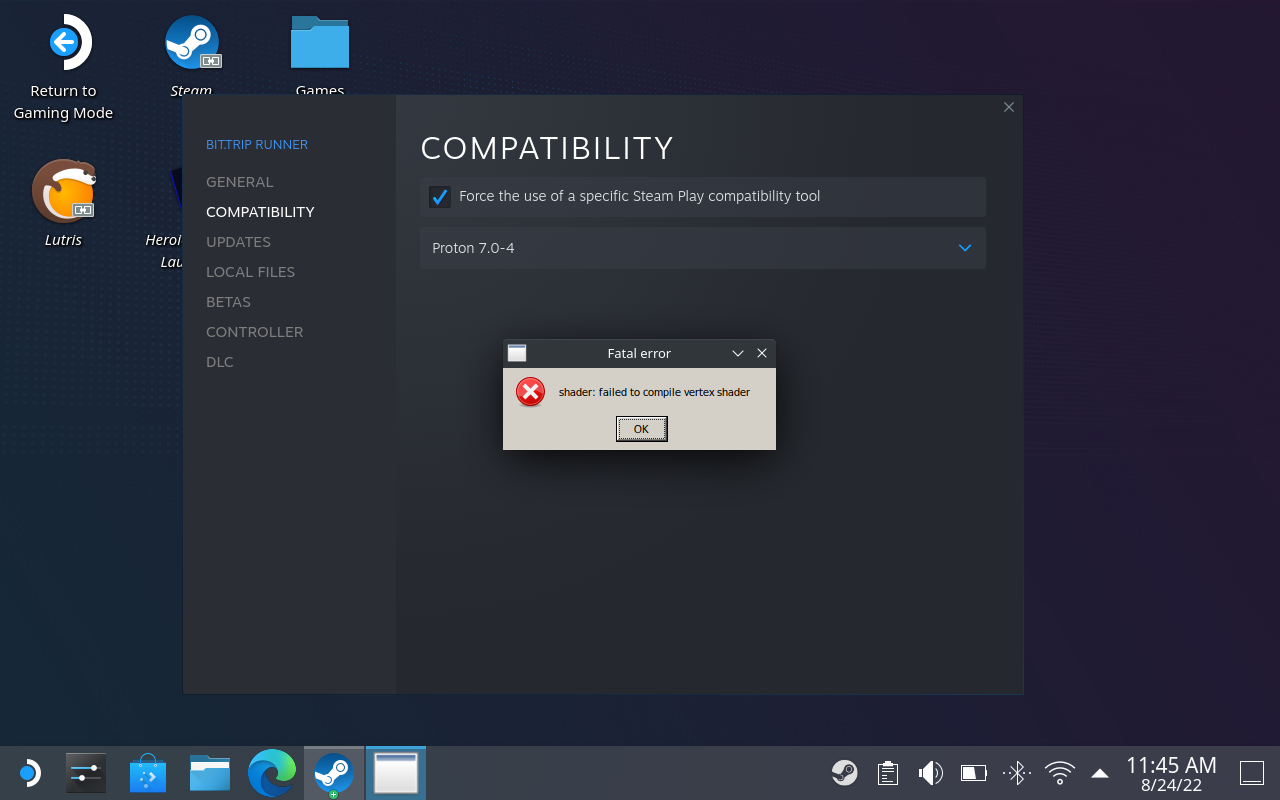
How strange. I'll clear my prefix and see if I can reproduce.
Works one day... Not the next O.o
I went to check and it was uninstalled with nothing in compatdata. I'm not sure how in the world I had that working.
Okay so ProtonDB has the "fix" for this.
- Run the game first time with any recent GE 7 (27 worked for me)
- It will take about a minute or so to launch
- Game starts
- You can then go back to 7.0-4 and it will start faster and continue working.
I mean, GE is not a proper solution for Proton compatibility.
I can confirm, that the latest stable Proton still fails with the error from @FayneAldan's comment abvoe
I can also confirm that the latest release from GE (7-37) works perfectly.
It will take about a minute or so to launch
On my desktop it was basically instantaneous, but it is pretty beefy, so there's that. Specs below:
       _,met$$$$$gg.          me@host
    ,g$$$$$$$$$$$$$$$P.       -----------
  ,g$$P"     """Y$$.".        OS: Debian GNU/Linux bookworm/sid x86_64
 ,$$P'              `$$$.     Kernel: 6.0.2-citadel
',$$P       ,ggs.     `$$b:   Uptime: [doesn't matter]
`d$$'     ,$P"'   .    $$$    Packages: [doesn't matter]
 $$P      d$'     ,    $$P    Shell: bash 5.2.0
 $$:      $$.   -    ,d$$'    Resolution: 2560x1440
 $$;      Y$b._   _,d$P'      DE: Plasma 5.25.5
 Y$$.    `.`"Y$$$$P"'         WM: KWin
 `$$b      "-.__              Theme: [Plasma], Breeze [GTK2/3]
  `Y$$                        Icons: [Plasma], breeze-dark [GTK2/3]
   `Y$$.                      Terminal: konsole
     `$$b.                    Terminal Font: [doesn't matter]
       `Y$$b.                 CPU: AMD Ryzen 9 5900X (24) @ 4.951GHz
          `"Y$b._             GPU: AMD ATI Radeon RX 6700/6700 XT/6750 XT / 6800M
              `"""            Memory: 4044MiB / 32015MiB
Additional information:
I've tried it on my StemDeck (512 GB model, in case this matters) too, and with the GE 7-37 compat layer it works there as well.
The difference seems to be, that one of the installers – I think it's the DirectX SDK – shows up and completes successfully. I have not seen that installer window before using a GE version of Proton.
Workaround (Proton 10, Arch Linux)
BIT.TRIP RUNNER (AppID 63710) starts and runs correctly for me on Proton 10 after forcing the native D3DX9 effect compiler. Steam Input also works for controller support.
The shader: failed to compile vertex shader error is Proton/Wine loading the builtin d3dx9_43.dll. Wine’s ID3DXEffectCompiler path is still incomplete for what RUNNER needs:
Loaded L"C:\windows\system32\d3dx9_43.dll" ... builtin
fixme:d3dx:ID3DXEffectCompilerImpl_GetFunctionByName ... name "vs_main" stub!
fixme:d3dx:ID3DXEffectCompilerImpl_CompileShader ... target "vs_3_0" ... stub!
protontricks 63710 d3dx9_43 d3dcompiler_43 was not enough in my prefix. The files in system32 still identified as Wine-built DLLs, so Proton kept loading the builtin implementation.
What worked:
- Use Proton 10.
- Install OpenAL (otherwise the game exits with
OpenAL32.dllnot found):protontricks 63710 openal - Extract the genuine Microsoft x86
d3dx9_43.dllandd3dcompiler_43.dllfrom the DirectX June 2010 redistributable (Jun2010_d3dx9_43_x86.cabandJun2010_D3DCompiler_43_x86.cab). - Put those two native DLLs next to
RUNNER.exe. - Launch with:
WINEDLLOVERRIDES="d3dx9_43,d3dcompiler_43=n" %command%
RUNNER needs the native D3DX9 effect compiler. Wine’s builtin d3dx9_43 reaches ID3DXEffectCompiler::CompileShader, but that path is still a stub.
Proton versions
ge-proton7-37x1 2022-10proton 7.0-4x2 2022-08proton experimentalx1 2022-08proton 4.11-3x1 2019-09proton 3.7x1 2018-08
Launch options
Launch lines
Upstream links
- ValveSoftware/Proton/issues/2152x1 2018-12
DLLs
d3dcompiler_43.dllx1 2026-08d3dx9_43.dllx1 2026-08openal32.dllx1 2026-08
Trying to launch this game results in
shader: failed to compile vertex shader. So far, I haven't seen any solution to this problem.Edit: Here is the additional information I forgot to provide.
Specs:
Log: https://pastebin.com/J3KeaWxs