SteamVR Home Constantly Tears
- Steam client version (build number or date): Apr 16 2019
- Distribution (e.g. Ubuntu): Pop_OS 19.04 w/Gnome 3.32 (tested xfce as well)
- Graphics driver version (run nvidia-settings): Nvidia 418.56 (Switched from Debian Testing to see if it was the same)
- Opted into Steam client beta?: Yes
- Opted into SteamVR beta?: Yes
- Have you checked for system updates?: Yes
I have the same issue, though it keeps this tearing issue throughout anything I've tried to load.
I actually do get tearing in some games, Gorn for example. Maybe Beat Saber just doesn't show it because it's so light on resources that it isn't apparent (SteamVR's settings shows the frametimes at less than half of the window). Most VR games still haven't run that well in Linux for me so I really only use it for Beat Saber and then Windows for all other VR games.
Make sure you have G/Freesync disabled in Nvidia settings. I get tearing if I have that on while using steamvr.
Tried disabling gsync, unfortunately didn't help for me. Still get tons of frame drops and tearing simply spinning the headset around in the VR Home environment. Windows is smooth as silk with an RTX 2080.
I also test basically every driver release, currently on the latest Vulkan beta 418.52.10 and still duplicating it.
Same issue with my Index now. Currently using the latest vulkan driver 418.52.14, also tested the 430 drivers.
https://gist.github.com/Vash63/201f9cbd87ff134875bee45eaf3af093
The above system report gist does show something interesting:
 Wed Jul 03 2019 01:49:37.527919 - No Vulkan command buffer open in CGpuTiming::MarkEvent!
 Wed Jul 03 2019 01:49:37.527934 - Invalid command buffer in VRCompositorSharedTextures::FinishOpenCommandBuffer!
 Wed Jul 03 2019 01:49:37.544349 - No GPU timing Vulkan device in CVRCompositorSharedTextures::BeginGPUTimingCommandBuffer!
I made some progress here - disabling gsync in nvidia settings didn't help, but booting the computer without that monitor plugged in and using my TV temporarily did work around it. It seems there's an issue with the Nvidia driver and even having a gsync display plugged in.
gist of successful run:
https://gist.githubusercontent.com/Vash63/72ca5f21cfa6f36f7d3c4e26836a85ef/raw/5a735c176009f87b31e591b36e051890b6d952fe/SteamVR-2019-07-07-PM_02_45_52.txt
The boot at 14:41 had no tearing (the previous one didn't boot properly)
Same problem on an Index with Ubuntu 18.04 and 19.04 with nvidia both 430.26 and 430.34. It's distracting and with the frame skips (micro freezes) it's unplayable. The SteamVR graph is trying to say something but the undocumented frame timing details doesn't help. PC load letter? More like "WaitForPresent Spin" or
"New Poses Ready".
Runs perfectly fine under windows which depresses me.
https://gist.github.com/SlickMcRunFast/daac5f2c2a22299fcf449d3a45fb825a
Ah, I forgot to update this thread but I found a workaround while working with nvidia support, they've filed an internal bug so hopefully it gets fixed on their end.
Disabling gsync in nvidia-settings did nothing, but force disabling it from their X11 driver did, using the nvidia-settings MetaModes command line:
nvidia-settings -a CurrentMetaMode="DPY-3: 2560x1440_144 @2560x1440 +0+0 {ViewPortIn=2560x1440, ViewPortOut=2560x1440+0+0, AllowGSYNC=off}"
Just run nvidia-settings -q CurrentMetaMode to get your current formatting and then copy everything after the ::, then add the 'AllowGSYNC=off' into the curley braces for all connected displays.
As this is a workaround and not a fix I'll be leaving this bug open until it's fully fixed.
Ah, I forgot to update this thread but I found a workaround while working with nvidia support, they've filed an internal bug so hopefully it gets fixed on their end.
Disabling gsync in nvidia-settings did nothing, but force disabling it from their X11 driver did, using the nvidia-settings MetaModes command line:
nvidia-settings -a CurrentMetaMode="DPY-3: 2560x1440_144 @2560x1440 +0+0 {ViewPortIn=2560x1440, ViewPortOut=2560x1440+0+0, AllowGSYNC=off}"Just run
nvidia-settings -q CurrentMetaModeto get your current formatting and then copy everything after the ::, then add the 'AllowGSYNC=off' into the curley braces for all connected displays.As this is a workaround and not a fix I'll be leaving this bug open until it's fully fixed.
Nice thanks for the info, ill try tonight.
Same problem on an Index with Ubuntu 18.04 and 19.04 with nvidia both 430.26 and 430.34. It's distracting and with the frame skips (micro freezes) it's unplayable. The SteamVR graph is trying to say something but the undocumented frame timing details doesn't help. PC load letter? More like "WaitForPresent Spin" or
"New Poses Ready".Runs perfectly fine under windows which depresses me.
https://gist.github.com/SlickMcRunFast/daac5f2c2a22299fcf449d3a45fb825a
Interesting, I'm not having the problem under the Index.
AllowGSYNC=off made it run worse.
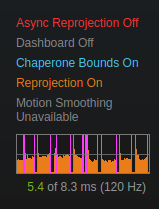
Even swapped to a non-gsync monitor at a lower resolution and refresh rate. The card already has bad coil whine to the beat of the graph, so I might just return it and go AMD.
Vash63, Thanks for posting your solution, it let me know my issue is something closer to the GPU.
Edit, another related issue appears. #216, AMD but still frame/display lag.
Ah, I forgot to update this thread but I found a workaround while working with nvidia support, they've filed an internal bug so hopefully it gets fixed on their end.
Disabling gsync in nvidia-settings did nothing, but force disabling it from their X11 driver did, using the nvidia-settings MetaModes command line:
nvidia-settings -a CurrentMetaMode="DPY-3: 2560x1440_144 @2560x1440 +0+0 {ViewPortIn=2560x1440, ViewPortOut=2560x1440+0+0, AllowGSYNC=off}"Just run
nvidia-settings -q CurrentMetaModeto get your current formatting and then copy everything after the ::, then add the 'AllowGSYNC=off' into the curley braces for all connected displays.As this is a workaround and not a fix I'll be leaving this bug open until it's fully fixed.
I keep getting:
ERROR: Error parsing query 'CurrentMetaMode=DPY-5: 1920x1080_144 @1920x1080 +0+0 {ViewPortIn=1920x1080, ViewPortOut=1920x1080+0+0, AllowGSYNC=off}' (Trailing garbage).
Already just tried setting nvidia-settings -a AllowGSYNC=0 but that tells me AllowGSYNC is deprecated and I should use AllowVRR instead (which I did, still gsync remains on).
Ironically I update from Ubuntu's Repositories 418 where VR worked but only the VR Home, no tearing as it was before the GSync drivers.
You have the double quotes around the full string right? After the = ?
You have the double quotes around the full string right? After the = ?
Yes, I used the command:
nvidia-settings -q CurrentMetaMode="DPY-5: 1920x1080_144 @1920x1080 +0+0 {ViewPortIn=1920x1080, ViewPortOut=1920x1080+0+0, AllowGSYNC=off}"
Swap the -q for a -a. -q is query, -a is apply.
Swap the -q for a -a. -q is query, -a is apply.
Yeah realised it yesterday night, screen flashes black for a moment but GSYNC remains on (tearing persists as well), might have something to do with how Ubuntu does things (each user has their own display settings which are somehow saved by the Gnome-Display aldo normally nvidia-settings do apply for the session at least), might try to find a solution Wednesday, a bit busy at the moment.
Additional information; it is a freesync screen, if anyone knows if that could have something to do with it. Half assed solution is to use HDMI with 120HZ (gsync only works with display port), no more tearing but it takes up the precious HDMI slot of my second monitor 60hz.
Turns out for Freesync monitors you need the command AllowGSYNCCompatible=off instead of AllowGSYNC=off, tearing is indeed gone after this.
Turns out for Freesync monitors you need the command AllowGSYNCCompatible=off instead of AllowGSYNC=off, tearing is indeed gone after this.
Ah, that makes sense that the flag would be different. Curious also since you have the same symptoms as I do, once you fix the tearing do you have what feels like a couple frames of latency on everything? Even basic head movement feels swimmy to me in Linux.
Ah, that makes sense that the flag would be different. Curious also since you have the same symptoms as I do, once you fix the tearing do you have what feels like a couple frames of latency on everything? Even basic head movement feels swimmy to me in Linux.
At first yes, but I disabled supersampling and I think Valve must have pushed an update as my abnormal frame timings have disappeared today as well.
Edit: just compared it to Windows, Linux does indeed have more of a nauseating feel to it, perhaps it is the lack of Motion Smoothing?
I could reproduce this on NVIDIA 435.21, kernel 5.2.11, SteamVR 1.7.12 with the Vive Pro, old Vive worked, tried both over DisplayPort.
It only occurs when a G-Sync monitor is connected and G-Sync is turned on. Turning off in the nvidia-settings GUI did not suffice, it needed the command pointed out by @Tenchrio
Arch btw.
Ah, that makes sense that the flag would be different. Curious also since you have the same symptoms as I do, once you fix the tearing do you have what feels like a couple frames of latency on everything? Even basic head movement feels swimmy to me in Linux.
At first yes, but I disabled supersampling and I think Valve must have pushed an update as my abnormal frame timings have disappeared today as well.
Edit: just compared it to Windows, Linux does indeed have more of a nauseating feel to it, perhaps it is the lack of Motion Smoothing?
Motion smoothing should only matter if the application is below target framerate. This feels to me like a constant latency, like the frames are being queued for 20ms or something. Just turning my head feels like I'm swimming or something and makes me feel almost immediately sick.
From the Nvidia Linux 435.27.07 release notes:
- Fixed a bug that caused applications running directly on a display (such as VR HMDs) to tear when a G-SYNC or G-SYNC Compatible monitor is plugged in the system
Nothing extracted yet.
Your system information
Problem
SteamVR Home is constantly tearing near the top half of the display. This happens even if I'm looking straight up or at other angles that I would not expect to be dropping frames. This isn't a problem with the runtime or compositor themselves though, as once I start a game (Beat Saber usually), there's no tearing in either the game or the empty environment in between.